Can't use the my new hard drive

Poro

New member
Local time
8:46 PM
Messages
21
Hey,

I bought a new hard drive a while ago and decided to install it now, but I have some problems while doing so. I installed the drive and it shows up fine in BIOS and in Device Manager, but if I go to computer, the drive won't show up there. I can't format it or use it because it just doesn't show up there. What's wrong?

The drive I'm installing is Western Digital WD1002FAEX-00Y9A0
 

My Computer My Computer

At a glance

Windows 7 Home Premium x64Intel i7 920 @ 3.80 GHz3x Kingston HyperX DDR3 @ 1600 MHzATi Radeon 5970 2GB + nVidia 8800 GTX
Computer Manufacturer/Model Number
Custom Built
OS
Windows 7 Home Premium x64
CPU
Intel i7 920 @ 3.80 GHz
Motherboard
ASUS P6T (x58 chipset)
Memory
3x Kingston HyperX DDR3 @ 1600 MHz
Graphics Card(s)
ATi Radeon 5970 2GB + nVidia 8800 GTX
Sound Card
Creative X-Fi Fatal1ty
Monitor(s) Displays
HP LP2475W
Screen Resolution
1920x1200
Hard Drives
Samsung SpinPoint F1 500GB
PSU
Chieftec 750w
Case
Compucase 6C11
Cooling
Noctua NH-U12P
Keyboard
Logitech MX5000
Mouse
Roccat Kone
Internet Speed
12MB/1MB
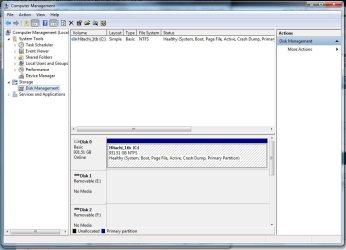
Do you see it in disk management? Type Disk Management in the start menu search bar and click on Create and format hard drive partitions. You need to format the drive and assign it a drive letter.
 

My Computer My Computer

At a glance

Windows 7 Professional SP1 64-bitIntel Core i5-2450M @2.5 GHz6 GB DDR3 1333MHzIntel HD 3000
Computer type
Laptop
Computer Manufacturer/Model Number
Toshiba P775-S7100
OS
Windows 7 Professional SP1 64-bit
CPU
Intel Core i5-2450M @2.5 GHz
Memory
6 GB DDR3 1333MHz
Graphics Card(s)
Intel HD 3000
Monitor(s) Displays
Built-in 17.3" LED; 22" Insignia NS-L22Q-10A
Screen Resolution
1600x900; 1360x768
Hard Drives
750 GB Hitachi
1TB Seagate FreeAgent External
Internet Speed
Verizon DSL Speed(Down/Up): 3360 Kbps / 800 Kbps
Antivirus
MSE and MBAM Pro
Browser
IE10
Start :ar: Computer Management :ar: Disk Management
 

Attachments

  • Disk_Management.JPG
    Disk_Management.JPG
    76.1 KB · Views: 75

My Computer My Computer

At a glance

Win7 Enterprise, Win7 x86 (Ult 7600), Win7 x6...AMD fx8350 4ghz, AMD-32 2400mhz, AMD-64 3200m...2gb, 4gb on the Ult 7600, 4gb on Technet RTM,...Draw my own Graphics, several nVidia cards
Computer type
PC/Desktop
Computer Manufacturer/Model Number
Built them myself, Science Experiments !
OS
Win7 Enterprise, Win7 x86 (Ult 7600), Win7 x64 Ult 7600, TechNet RTM on AMD x64 (2.8Ghz)
CPU
AMD fx8350 4ghz, AMD-32 2400mhz, AMD-64 3200mhz, AMDx64 2.8G
Motherboard
SIS 755, ECS-K8M890M-M (Ult 7600), GigaByte & others
Memory
2gb, 4gb on the Ult 7600, 4gb on Technet RTM, 32gb on FX8350
Graphics Card(s)
Draw my own Graphics, several nVidia cards
Sound Card
on motherboard
Monitor(s) Displays
19" flat scr, 28" I-Inc widescr,22" Emprex Widescr, 23" Acer
Screen Resolution
1280 x 1024, 1440 x 900, 1920 x 1080
Hard Drives
6 pata Ide HD's & 2 Sata HD's
added 80gb external on Ult 7600 computer,
numerous extra 1tb, 2TB, 3Tb SATA HD's
A collection of ext HD Docks w/ HDs
PSU
430w, 550w, 600w, 700, 800, etc
Case
All Generic Full Towers
Cooling
Open Air & a few fans, some w/ colored LEDs
Keyboard
Compaq & Dell recycled from GoodWill
Mouse
Made in China Optical Wired Mouse
Internet Speed
Fast Cable InterNet
Antivirus
AVG Free on 24 different Desktops, NO Problems!
Browser
IE 8 is preferred, but use FireFox sometimes
Other Info
Linksys Routers, switches, & Hubs
Too Many USB Flash Drives to count, Biggest is 64GB !
Eight computers in my home network.
Sixteen computers at my business network.
Linked via TeamViewer !
Lots of old used spare computer parts everywhere!
Hey,

I bought a new hard drive a while ago and decided to install it now, but I have some problems while doing so. I installed the drive and it shows up fine in BIOS and in Device Manager, but if I go to computer, the drive won't show up there. I can't format it or use it because it just doesn't show up there. What's wrong?

The drive I'm installing is Western Digital WD1002FAEX-00Y9A0
Good morning Poro, welcome to Windows 7 Support Forums.
I suspect your issue arises from the fact the new hard drive has not been assigned a letter within Windows 7!
If you would be so kind as to review the icon: "My Computer"
Put your mouse over it, right click and you will see a drop down menu and look for Manage, left click and review Disk Management: (See Attached Image) You will see the new hard drive without a letter designation, right click the un-assigned drive and you will see the drop down menu with the dialog to assign the drive a letter.
 

Attachments

  • disk_mgr.png
    disk_mgr.png
    28 KB · Views: 103

My Computer My Computer

At a glance

Windows 7 7600 1 X64AMD PHENOM II X 550 PROCESSOR 3.1 ghzCorsair 4 gig ddr 3ati radeon 3300
Computer Manufacturer/Model Number
Custom Build
OS
Windows 7 7600 1 X64
CPU
AMD PHENOM II X 550 PROCESSOR 3.1 ghz
Motherboard
ASUS M4A78-TE
Memory
Corsair 4 gig ddr 3
Graphics Card(s)
ati radeon 3300
Sound Card
ati hd
Monitor(s) Displays
syncmaster 2033sw
Screen Resolution
1600X900 60 hz refresh
Hard Drives
twin_seagates SATA's 1 TB & 500 Gig, hitachi_slimline 160 gig
PSU
antec_550 watt
Case
cooler master GLite
Cooling
stock_heat sink
Internet Speed
20mbs up/ 1.5mbs down
Other Info
favorite child "stewie"
favorite dog "brian"
Wonderful! I partitioned, formatted and assigned the drive a letter from the Disk Manager and it's working perfectly now. Thanks!
 

My Computer My Computer

At a glance

Windows 7 Home Premium x64Intel i7 920 @ 3.80 GHz3x Kingston HyperX DDR3 @ 1600 MHzATi Radeon 5970 2GB + nVidia 8800 GTX
Computer Manufacturer/Model Number
Custom Built
OS
Windows 7 Home Premium x64
CPU
Intel i7 920 @ 3.80 GHz
Motherboard
ASUS P6T (x58 chipset)
Memory
3x Kingston HyperX DDR3 @ 1600 MHz
Graphics Card(s)
ATi Radeon 5970 2GB + nVidia 8800 GTX
Sound Card
Creative X-Fi Fatal1ty
Monitor(s) Displays
HP LP2475W
Screen Resolution
1920x1200
Hard Drives
Samsung SpinPoint F1 500GB
PSU
Chieftec 750w
Case
Compucase 6C11
Cooling
Noctua NH-U12P
Keyboard
Logitech MX5000
Mouse
Roccat Kone
Internet Speed
12MB/1MB
Wonderful! I partitioned, formatted and assigned the drive a letter from the Disk Manager and it's working perfectly now. Thanks!


Godd job Poro :thumbsup:
 

My Computer My Computer

At a glance

Win7 Enterprise, Win7 x86 (Ult 7600), Win7 x6...AMD fx8350 4ghz, AMD-32 2400mhz, AMD-64 3200m...2gb, 4gb on the Ult 7600, 4gb on Technet RTM,...Draw my own Graphics, several nVidia cards
Computer type
PC/Desktop
Computer Manufacturer/Model Number
Built them myself, Science Experiments !
OS
Win7 Enterprise, Win7 x86 (Ult 7600), Win7 x64 Ult 7600, TechNet RTM on AMD x64 (2.8Ghz)
CPU
AMD fx8350 4ghz, AMD-32 2400mhz, AMD-64 3200mhz, AMDx64 2.8G
Motherboard
SIS 755, ECS-K8M890M-M (Ult 7600), GigaByte & others
Memory
2gb, 4gb on the Ult 7600, 4gb on Technet RTM, 32gb on FX8350
Graphics Card(s)
Draw my own Graphics, several nVidia cards
Sound Card
on motherboard
Monitor(s) Displays
19" flat scr, 28" I-Inc widescr,22" Emprex Widescr, 23" Acer
Screen Resolution
1280 x 1024, 1440 x 900, 1920 x 1080
Hard Drives
6 pata Ide HD's & 2 Sata HD's
added 80gb external on Ult 7600 computer,
numerous extra 1tb, 2TB, 3Tb SATA HD's
A collection of ext HD Docks w/ HDs
PSU
430w, 550w, 600w, 700, 800, etc
Case
All Generic Full Towers
Cooling
Open Air & a few fans, some w/ colored LEDs
Keyboard
Compaq & Dell recycled from GoodWill
Mouse
Made in China Optical Wired Mouse
Internet Speed
Fast Cable InterNet
Antivirus
AVG Free on 24 different Desktops, NO Problems!
Browser
IE 8 is preferred, but use FireFox sometimes
Other Info
Linksys Routers, switches, & Hubs
Too Many USB Flash Drives to count, Biggest is 64GB !
Eight computers in my home network.
Sixteen computers at my business network.
Linked via TeamViewer !
Lots of old used spare computer parts everywhere!
Wonderful! I partitioned, formatted and assigned the drive a letter from the Disk Manager and it's working perfectly now. Thanks!
Glad to hear it:geek:
 

My Computer My Computer

At a glance

Windows 7 7600 1 X64AMD PHENOM II X 550 PROCESSOR 3.1 ghzCorsair 4 gig ddr 3ati radeon 3300
Computer Manufacturer/Model Number
Custom Build
OS
Windows 7 7600 1 X64
CPU
AMD PHENOM II X 550 PROCESSOR 3.1 ghz
Motherboard
ASUS M4A78-TE
Memory
Corsair 4 gig ddr 3
Graphics Card(s)
ati radeon 3300
Sound Card
ati hd
Monitor(s) Displays
syncmaster 2033sw
Screen Resolution
1600X900 60 hz refresh
Hard Drives
twin_seagates SATA's 1 TB & 500 Gig, hitachi_slimline 160 gig
PSU
antec_550 watt
Case
cooler master GLite
Cooling
stock_heat sink
Internet Speed
20mbs up/ 1.5mbs down
Other Info
favorite child "stewie"
favorite dog "brian"
Back
Top