CCleaner ccsetup504.exe: "...side-by-side configuration is incorrect"

Itundic

New member
Member
Local time
8:42 PM
Messages
61
CCleaner ccsetup504.exe: "...side-by-side configuration is incorrect"

Hi,

I can't seem to install any version of CCleaner and maybe other progs., too.

I'm presented with the following two errors:

1. "The application has failed to start because its side-by-side configuration is incorrect. Please see the application event log or use the command-line sxstrace.exe tool for more detail."
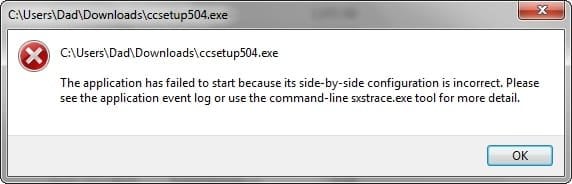
2015-04-05_201539.jpg

2. "Windows cannot access the specified device, path or file. You may not have the appropriate permissions to access them."
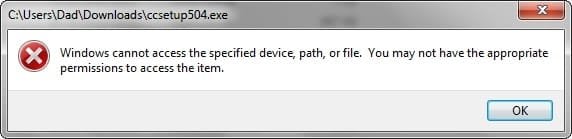
2015-04-05_200729.jpg

I've downloaded the latest version - 5.04.5151 - to the downloads folder, as well as a copy of the previous version - 5.03.5128 - but neither will install. I uninstalled the previous version, in prep for the new one, but can't re-install it, not even via the original 5.03.5128 file I had saved months ago.

I Googled for some help and found Microsoft's KB on "Windows cannot access the specified path...":
"http://support.microsoft.com/en-us/kb/2669244
I've been through 1 - 6, to no avail
Only 5 was relevant: I "unblocked" the file, owing to Properties stating "This file came from another computer and might be blocked to help protect this computer". It didn't make any difference, nor to 5.03.5128.

I Googled "...side by side configuration is incorrect..." and this is where I've come to a dead end.

I'd be really grateful for some help.

I don't want to uninstall any other progs and discover I can't re-install them, either.
 

My Computer

Computer type
Laptop
Computer Manufacturer/Model Number
Acer Aspire 5741
OS
Windows 7 Home Premium 64bit
CPU
Core i3
Memory
8GB DDR3
Graphics Card(s)
Intel HD
Sounds like you've tried to install it and then it has completed installing. Have you check all CCleaner files are removed from your system also check in Add and Remove programs...
 

My Computer

Computer type
PC/Desktop
Computer Manufacturer/Model Number
Me :D
OS
Windows 7
CPU
AMD X6 1090T 4.02Ghz
Motherboard
ASUS Crosshair IV Formula
Memory
16.00GB
Graphics Card(s)
Nvidia Geforce 470
Sound Card
ASUS Xonar DX
Monitor(s) Displays
Dell 24" Monitor
Hard Drives
2TB WD
1TB WD
2TB WD
60 SSD
60 SSD
PSU
700W Crosshair
Case
Antec Three hundred
Cooling
Water Cooling
I originally uninstalled the previous version via "Add/Remove" and nothing shows up there now, so I assume it's completely uninstalled.

I don't think the latest version can have installed, as I can't get past double-clicking the ".exe" file. It routinely gives me one of the two errors.
 

My Computer

Computer type
Laptop
Computer Manufacturer/Model Number
Acer Aspire 5741
OS
Windows 7 Home Premium 64bit
CPU
Core i3
Memory
8GB DDR3
Graphics Card(s)
Intel HD

My Computer

Computer type
PC/Desktop
Computer Manufacturer/Model Number
Dude Build
OS
Windows 10 Pro X64
CPU
Intel(R) Core(TM) i5-3570K CPU OC@ 4.5GHZ Turbo
Motherboard
MSI Z77A-G45 Gaming
Memory
8.00 GB DDR3 1600Mhz
Graphics Card(s)
MSI Gaming X GTX 1070
Sound Card
Realtek High Definition
Monitor(s) Displays
Dell S23O9W, HP L1710
Screen Resolution
DELL-1920 x 1080 HP-1280 x1024
Hard Drives
Crucial m4 256 SSD, WD 7200RPM 500GB WD 1TB
PSU
Seasonic X650 GOLD
Case
Zalman Z12
Cooling
Antec Kuhler 920
Keyboard
Logitech
Mouse
MSI DS100 Interceptor
Internet Speed
50 down and 5 up
Antivirus
MSE
Browser
Chrome, IE 11
Other Info
Logitech X-620 Speakers
I've installed/repaired the 4 C++ files listed in the first answer and re-booted, but I still get "Windows cannot access the specified device..."
 

My Computer

Computer type
Laptop
Computer Manufacturer/Model Number
Acer Aspire 5741
OS
Windows 7 Home Premium 64bit
CPU
Core i3
Memory
8GB DDR3
Graphics Card(s)
Intel HD
I usually use the portable version on a USB Thumb/Flash drive, don't have to install anything, just unzip into a Folder such as CCleaner.
CCleaner - Portable
 

My Computer

Computer type
PC/Desktop
Computer Manufacturer/Model Number
Customs, Dell, Gateway, HP, Toshiba, Acer, ASUS
OS
Windows 7 Ultimate 64-bit, Windows 8.1 64-bit, Mac OS X 10.10, Linux Mint 17, Windows 10 Pro TP
Keyboard
Microsoft
Mouse
Microsoft
Just a personal observation but it sounds like you already tried to use a cleanup tool and hosed Winsxs files and perhaps even the Registry. What happens when you try to run SFC /scannow?

Also; What did the Event Log say?
 

My Computer

Computer type
PC/Desktop
Computer Manufacturer/Model Number
Built 2/11/2011
OS
Windows 7 Pro-x64
CPU
i7-2600 3.4GHz - 3.8GHz Turbo
Motherboard
Intel DH67BL-B3
Memory
8Gb - 2x4GB, Muskin 991770 PC3-1333
Graphics Card(s)
Integrated Intel HD 2000
Sound Card
Integrated Intel 10.1 HD, RealTek ALC892
Monitor(s) Displays
Asus LCD VH222H, Haier HL24XSL2a
Screen Resolution
1920x1080, 1920x1080
Hard Drives
Crucial SSD C300-128Gb,
Western Digital WD5002AALX - 500Gb,
Western Digital WD7501AALS - 750Gb
PSU
Seasonic 650W 80+ Gold Modular
Case
Rosewill Defender
Cooling
Stock CPU, Four 120mm case fans, PCH fan added
Keyboard
Logitech EX100 Y-RBH94 Wireless
Mouse
Logitech EX100 M-RCE95 Wireless
Internet Speed
3.0/1.5 Mbs
Antivirus
Microsoft Security Essentials
Browser
Microsoft Internet Explorer 11
Other Info
Antec Veris Premier-Multimedia IR Station,
Cyber Accoustics-3602 Speakers,
AFT XM-5U Card Reader,
Hauppauge TV-HVR-2250,
Sony LX300 USB Turntable
I've just checked what restore points I have, to see what I've uninstalled recently, and I used Revo Uninstaller to uninstall Adobe AIR and VLC. I usually uninstall a program before updating it. Maybe this deleted some of the Winsxs files - I don't know what these are, by the way.

Which SFC/scannow option should I choose, as I haven't ever used this before?
 

My Computer

Computer type
Laptop
Computer Manufacturer/Model Number
Acer Aspire 5741
OS
Windows 7 Home Premium 64bit
CPU
Core i3
Memory
8GB DDR3
Graphics Card(s)
Intel HD
You can use any of the options but Option Two is the easiest. Be sure to right click the Command Prompt and Run as Administrator.

Forgot to add: It's usually not necessary to uninstall programs for an updated release unless the update instructions specifically requests it. I've never uninstalled CCleaner for a new release. This also keeps all the settings.
 

My Computer

Computer type
PC/Desktop
Computer Manufacturer/Model Number
Built 2/11/2011
OS
Windows 7 Pro-x64
CPU
i7-2600 3.4GHz - 3.8GHz Turbo
Motherboard
Intel DH67BL-B3
Memory
8Gb - 2x4GB, Muskin 991770 PC3-1333
Graphics Card(s)
Integrated Intel HD 2000
Sound Card
Integrated Intel 10.1 HD, RealTek ALC892
Monitor(s) Displays
Asus LCD VH222H, Haier HL24XSL2a
Screen Resolution
1920x1080, 1920x1080
Hard Drives
Crucial SSD C300-128Gb,
Western Digital WD5002AALX - 500Gb,
Western Digital WD7501AALS - 750Gb
PSU
Seasonic 650W 80+ Gold Modular
Case
Rosewill Defender
Cooling
Stock CPU, Four 120mm case fans, PCH fan added
Keyboard
Logitech EX100 Y-RBH94 Wireless
Mouse
Logitech EX100 M-RCE95 Wireless
Internet Speed
3.0/1.5 Mbs
Antivirus
Microsoft Security Essentials
Browser
Microsoft Internet Explorer 11
Other Info
Antec Veris Premier-Multimedia IR Station,
Cyber Accoustics-3602 Speakers,
AFT XM-5U Card Reader,
Hauppauge TV-HVR-2250,
Sony LX300 USB Turntable
Everything seems OK.

2015-04-06_210134.jpg

Edit: View attachment sfcdetails.txt

I always thought I was being clever doing fresh installs; didn't ever want to fall victim to a threat from old files remaining on the system. Thanks for the advice.
 
Last edited:

My Computer

Computer type
Laptop
Computer Manufacturer/Model Number
Acer Aspire 5741
OS
Windows 7 Home Premium 64bit
CPU
Core i3
Memory
8GB DDR3
Graphics Card(s)
Intel HD
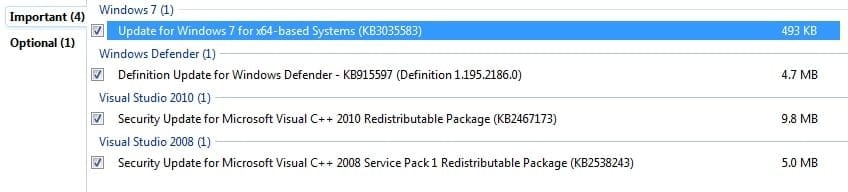
I've just installed new C++ Windows Updates, but the "Cannot access the specified device, path..." persists.

1. I ran the portable "CCleaner64.exe" to clean up the drive - with the default settings.

2. Installed new updates:
2015-04-07_145412.jpg

3. Re-booted.

4. Defragged, with Auslogics Disk Derfrag "Optimise..." setting.

5. Re-downloaded ccsetup504.exe from Piriform

6. Double-clicked the file and got the same "Cannot access the specified device..."

Is there anything else I can try?
 

My Computer

Computer type
Laptop
Computer Manufacturer/Model Number
Acer Aspire 5741
OS
Windows 7 Home Premium 64bit
CPU
Core i3
Memory
8GB DDR3
Graphics Card(s)
Intel HD
I'd be really grateful for some further help.

Thanks.
 

My Computer

Computer type
Laptop
Computer Manufacturer/Model Number
Acer Aspire 5741
OS
Windows 7 Home Premium 64bit
CPU
Core i3
Memory
8GB DDR3
Graphics Card(s)
Intel HD
Performing actions not specifically requested throughout a debug process makes it hard for people to follow and help. It's difficult to determine the state of system at this point.

"Cannot access the specified device..."
Review this KB article some things to try: "Windows cannot access the specified device, path, or file" error when you try to install, update or start a program or file

This issue can occur if any of the following scenarios exist on your PC.

  • You do not have permissions to the file or the file location.
  • The file is on a location that is not currently accessible like a network location or an external drive that is not currently connected to the PC.
  • The file has been moved or deleted.
  • The file or shortcut is corrupt.
  • The file may be blocked by Windows.
  • Your antivirus software may be blocking the file.
 

My Computer

Computer type
PC/Desktop
Computer Manufacturer/Model Number
Built 2/11/2011
OS
Windows 7 Pro-x64
CPU
i7-2600 3.4GHz - 3.8GHz Turbo
Motherboard
Intel DH67BL-B3
Memory
8Gb - 2x4GB, Muskin 991770 PC3-1333
Graphics Card(s)
Integrated Intel HD 2000
Sound Card
Integrated Intel 10.1 HD, RealTek ALC892
Monitor(s) Displays
Asus LCD VH222H, Haier HL24XSL2a
Screen Resolution
1920x1080, 1920x1080
Hard Drives
Crucial SSD C300-128Gb,
Western Digital WD5002AALX - 500Gb,
Western Digital WD7501AALS - 750Gb
PSU
Seasonic 650W 80+ Gold Modular
Case
Rosewill Defender
Cooling
Stock CPU, Four 120mm case fans, PCH fan added
Keyboard
Logitech EX100 Y-RBH94 Wireless
Mouse
Logitech EX100 M-RCE95 Wireless
Internet Speed
3.0/1.5 Mbs
Antivirus
Microsoft Security Essentials
Browser
Microsoft Internet Explorer 11
Other Info
Antec Veris Premier-Multimedia IR Station,
Cyber Accoustics-3602 Speakers,
AFT XM-5U Card Reader,
Hauppauge TV-HVR-2250,
Sony LX300 USB Turntable
This could be causing your problem.

Auslogics Disk Derfrag

It could be putting things where can't find them.

I recommend using Windows 7 built in defragger.
 

My Computer

Computer type
PC/Desktop
Computer Manufacturer/Model Number
Home made Desktop
OS
Windows 10 Pro. 64/ version 1709 Windows 7 Pro/64
CPU
Intel i7-6800K @ 4.3
Motherboard
ASUS X-99 Deluxe II
Memory
Corsair Platinum 16 gig @2400
Graphics Card(s)
EVGA GTX 1070 OC
Monitor(s) Displays
Asus 27" LED LCD/VE278Q
Screen Resolution
1920-1080 or 1280-720 HDMI
Hard Drives
INTEL SSD 730-240 Gb Sata 3.0/
PSU
EVGA Platium 1200W
Case
Phanteks Luxe Tempered Glass 8 fans/ one radiator
Cooling
XSPC/ Water Cooled CPU
Keyboard
Das 4 Professional
Mouse
Logitech M705/MX Anywhere 2-S
Internet Speed
100 mbits
Antivirus
Microsoft Security Essentials/ Malwarebytes Premium 3.0/ SAS
Browser
I.E. 11 default/Firefox/ ISP Time Warner Cable/Spectrum
Other Info
LG BluRay Burner/
Sound system-KLipsch-THX/
Icy Dock ssd Hot Swap bays.
Did you get a notice when you tried to delete something that stated the file may be used by other programs?

A Side-by-Side error usually indicates a program, driver or module linked from another program has been changed or deleted. Many applications share modules (runtime libraries, Windows components, etc.) and when one application changes, the link to the application is stored in the Winsxs folder. The links don't get removed--Only a new Winsxs entry is added. This is so other applications that use the same module are not affected by the change of another. This was a royal PITA with Windows XP and often caused programs to fail when a single module was changed and other applications weren't programed for the mods or functions.

Tampering with the Winsxs folder or Registry entries usually results in failures with many applications and the even the OS if it can't find expected entries or links. I don't know of a way to rebuild the Winsxs folder except by reinstalling Windows and applications.
 

My Computer

Computer type
PC/Desktop
Computer Manufacturer/Model Number
Built 2/11/2011
OS
Windows 7 Pro-x64
CPU
i7-2600 3.4GHz - 3.8GHz Turbo
Motherboard
Intel DH67BL-B3
Memory
8Gb - 2x4GB, Muskin 991770 PC3-1333
Graphics Card(s)
Integrated Intel HD 2000
Sound Card
Integrated Intel 10.1 HD, RealTek ALC892
Monitor(s) Displays
Asus LCD VH222H, Haier HL24XSL2a
Screen Resolution
1920x1080, 1920x1080
Hard Drives
Crucial SSD C300-128Gb,
Western Digital WD5002AALX - 500Gb,
Western Digital WD7501AALS - 750Gb
PSU
Seasonic 650W 80+ Gold Modular
Case
Rosewill Defender
Cooling
Stock CPU, Four 120mm case fans, PCH fan added
Keyboard
Logitech EX100 Y-RBH94 Wireless
Mouse
Logitech EX100 M-RCE95 Wireless
Internet Speed
3.0/1.5 Mbs
Antivirus
Microsoft Security Essentials
Browser
Microsoft Internet Explorer 11
Other Info
Antec Veris Premier-Multimedia IR Station,
Cyber Accoustics-3602 Speakers,
AFT XM-5U Card Reader,
Hauppauge TV-HVR-2250,
Sony LX300 USB Turntable

My Computer

Computer type
PC/Desktop
Computer Manufacturer/Model Number
Built 2/11/2011
OS
Windows 7 Pro-x64
CPU
i7-2600 3.4GHz - 3.8GHz Turbo
Motherboard
Intel DH67BL-B3
Memory
8Gb - 2x4GB, Muskin 991770 PC3-1333
Graphics Card(s)
Integrated Intel HD 2000
Sound Card
Integrated Intel 10.1 HD, RealTek ALC892
Monitor(s) Displays
Asus LCD VH222H, Haier HL24XSL2a
Screen Resolution
1920x1080, 1920x1080
Hard Drives
Crucial SSD C300-128Gb,
Western Digital WD5002AALX - 500Gb,
Western Digital WD7501AALS - 750Gb
PSU
Seasonic 650W 80+ Gold Modular
Case
Rosewill Defender
Cooling
Stock CPU, Four 120mm case fans, PCH fan added
Keyboard
Logitech EX100 Y-RBH94 Wireless
Mouse
Logitech EX100 M-RCE95 Wireless
Internet Speed
3.0/1.5 Mbs
Antivirus
Microsoft Security Essentials
Browser
Microsoft Internet Explorer 11
Other Info
Antec Veris Premier-Multimedia IR Station,
Cyber Accoustics-3602 Speakers,
AFT XM-5U Card Reader,
Hauppauge TV-HVR-2250,
Sony LX300 USB Turntable
Thanks.

I tried all the options in the KB article, but nothing worked. Only "unblocking" the file, as detailed in "5.", applied, but it didn't make any difference. "This file came from another computer and might be blocked to help protect this computer".

I didn't get any notice of a file not being deleted because it was in use with another program.

I don't think cleaning up with the default settings of CCleaner64.exe and defragging can have deleted or made inaccessible any important files - it never has before in the decade I've used it. I could be wrong.

I'm very grateful for the help so far and the explanation of the Winsxs folder - I had wondered where the fresh files could come from for a repair, if sfc /scannow had found something. I wish it had found something.

what would you suggest I do next?

Should I try some of the suggestions others have offered in the "Similar threads..." I don't want to mess-up things further.
 

My Computer

Computer type
Laptop
Computer Manufacturer/Model Number
Acer Aspire 5741
OS
Windows 7 Home Premium 64bit
CPU
Core i3
Memory
8GB DDR3
Graphics Card(s)
Intel HD
1. "The application has failed to start because its side-by-side configuration is incorrect. Please see the application event log or use the command-line sxstrace.exe tool for more detail."
I think I asked before but was there anything in the event log?

A notice usually appears on the display when you uninstall programs that have modules used by other applications. This is not the same as an error indicating that a file is in use when tying to delete it. You can accept the first but not the "in use" message. I gathered that you uninstalled C++ libraries, reinstalled then updated them. Or is that wrong?

Forgot to mention:
Did you do anything with/to the .NET libraries?
 
Last edited:

My Computer

Computer type
PC/Desktop
Computer Manufacturer/Model Number
Built 2/11/2011
OS
Windows 7 Pro-x64
CPU
i7-2600 3.4GHz - 3.8GHz Turbo
Motherboard
Intel DH67BL-B3
Memory
8Gb - 2x4GB, Muskin 991770 PC3-1333
Graphics Card(s)
Integrated Intel HD 2000
Sound Card
Integrated Intel 10.1 HD, RealTek ALC892
Monitor(s) Displays
Asus LCD VH222H, Haier HL24XSL2a
Screen Resolution
1920x1080, 1920x1080
Hard Drives
Crucial SSD C300-128Gb,
Western Digital WD5002AALX - 500Gb,
Western Digital WD7501AALS - 750Gb
PSU
Seasonic 650W 80+ Gold Modular
Case
Rosewill Defender
Cooling
Stock CPU, Four 120mm case fans, PCH fan added
Keyboard
Logitech EX100 Y-RBH94 Wireless
Mouse
Logitech EX100 M-RCE95 Wireless
Internet Speed
3.0/1.5 Mbs
Antivirus
Microsoft Security Essentials
Browser
Microsoft Internet Explorer 11
Other Info
Antec Veris Premier-Multimedia IR Station,
Cyber Accoustics-3602 Speakers,
AFT XM-5U Card Reader,
Hauppauge TV-HVR-2250,
Sony LX300 USB Turntable
I haven't uninstalled any of the C++ libraries or not to my knowledge hopefully. "Dude" directed me to the MS Community page, detailing the "...side-by-side..." problem and C++ solution. I installed/repaired the following:

- Microsoft Visual C++ 2008 SP1 Redistributable Package (x86)
- Microsoft Visual C++ 2008 SP1 Redistributable Package for (x64)
- Microsoft Visual C++ 2010 Redistributable Package (x86)
- Microsoft Visual C++ 2010 Redistributable Package (x64)

Yesterday I got 2 C++ security updates:

- Security Update for Microsoft Visual C++ 2010 Redistributable Package (KB2467173)
- Security Update for Microsoft Visual C++ 2008 Service Pack 1 Redistributable Package (KB2538243)

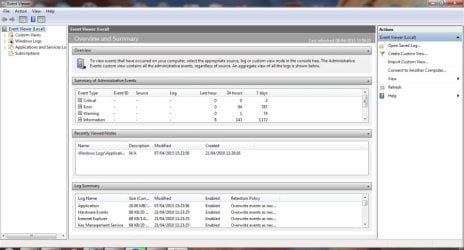
I've opened the Event Log - the first time I've done this. Can you tell me where I need to look?
2015-04-09_000035_900.jpg
 

My Computer

Computer type
Laptop
Computer Manufacturer/Model Number
Acer Aspire 5741
OS
Windows 7 Home Premium 64bit
CPU
Core i3
Memory
8GB DDR3
Graphics Card(s)
Intel HD
In that Summary of Administrative Events, expand (+) the Critical and Error lines then scroll through the entries.
 

My Computer

Computer type
PC/Desktop
Computer Manufacturer/Model Number
Built 2/11/2011
OS
Windows 7 Pro-x64
CPU
i7-2600 3.4GHz - 3.8GHz Turbo
Motherboard
Intel DH67BL-B3
Memory
8Gb - 2x4GB, Muskin 991770 PC3-1333
Graphics Card(s)
Integrated Intel HD 2000
Sound Card
Integrated Intel 10.1 HD, RealTek ALC892
Monitor(s) Displays
Asus LCD VH222H, Haier HL24XSL2a
Screen Resolution
1920x1080, 1920x1080
Hard Drives
Crucial SSD C300-128Gb,
Western Digital WD5002AALX - 500Gb,
Western Digital WD7501AALS - 750Gb
PSU
Seasonic 650W 80+ Gold Modular
Case
Rosewill Defender
Cooling
Stock CPU, Four 120mm case fans, PCH fan added
Keyboard
Logitech EX100 Y-RBH94 Wireless
Mouse
Logitech EX100 M-RCE95 Wireless
Internet Speed
3.0/1.5 Mbs
Antivirus
Microsoft Security Essentials
Browser
Microsoft Internet Explorer 11
Other Info
Antec Veris Premier-Multimedia IR Station,
Cyber Accoustics-3602 Speakers,
AFT XM-5U Card Reader,
Hauppauge TV-HVR-2250,
Sony LX300 USB Turntable
Back
Top