Re: C++
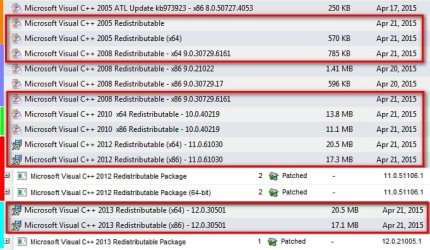
Personally I'd remove all 2008 versions and run Cccleaner then reboot and let UVK take care of the install like you did before. It will install only the latest versions and service packs that are required.
Re: ARJ vs Dad.
You could try matching your display name and user name as in Post #92. So you've got ARJ on your login screen and to save confusion it would be better to match names.
Re: Your test account that you created. You can delete it via Control Panel > User Accounts and choose not to save any files when asked.
Re: EagleGet. Well done for solving the problem yourself!

Like I said - I know little about Chrome. If you want to keep using the extension then I'd suggest getting advice on a fresh install of Chrome but you'd need to at least export bookmarks first. Then with a fresh install maybe try reinstalling the latest version of EagleGet and see if the problem returns.
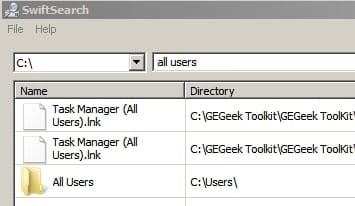
Re: All Users.
On my machine All Users is the same as Users.
Have a look at UVK's Quick User Manager - in the left pane highlight the account you use to login and change the display nane to match.
Personally I'd remove all 2008 versions and run Cccleaner then reboot and let UVK take care of the install like you did before. It will install only the latest versions and service packs that are required.
Re: ARJ vs Dad.
You could try matching your display name and user name as in Post #92. So you've got ARJ on your login screen and to save confusion it would be better to match names.
Re: Your test account that you created. You can delete it via Control Panel > User Accounts and choose not to save any files when asked.
Re: EagleGet. Well done for solving the problem yourself!
Like I said - I know little about Chrome. If you want to keep using the extension then I'd suggest getting advice on a fresh install of Chrome but you'd need to at least export bookmarks first. Then with a fresh install maybe try reinstalling the latest version of EagleGet and see if the problem returns.
Re: All Users.
On my machine All Users is the same as Users.
Have a look at UVK's Quick User Manager - in the left pane highlight the account you use to login and change the display nane to match.
My Computer
- Computer type
- Laptop
- Computer Manufacturer/Model Number
- ASUS
- OS
- Microsoft Windows 7 Home Premium 64-bit 7601 Multiprocessor Free Service Pack 1
- CPU
- AMD C-60 APU with Radeon(tm) HD Graphics
- Motherboard
- ASUSTeK COMPUTER INC. X501U
- Memory
- 4.00 GB
- Graphics Card(s)
- AMD Radeon HD 6290 Graphics
- Sound Card
- (1) AMD High Definition Audio Device (2) Realtek High Defi
- Screen Resolution
- 1366 x 768 x 32 bits (4294967296 colors) @ 60 Hz
- Hard Drives
- Hitachi HTS545050A7E380 SATA Disk Device
- Antivirus
- Comodo CIS & FW, SecureAplus App Whitelisting, Threatfire
- Browser
- Cyberfox 64bit, Opera 64bit, Airfox
- Other Info
- Spy-The-Spy, HitmanPro.Alert, Norton Connect Safe, MJRegWatcher, BitDefender TrafficLight, Voodoo Shield, Zemana AntiMalware