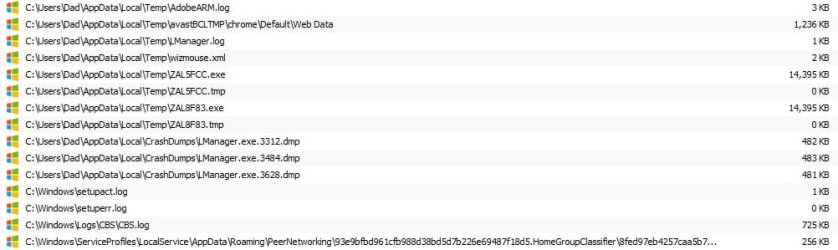
CCleaner ccsetup504.exe: "...side-by-side configuration is incorrect"

The common solution "appears to be" - uninstall Ccleaner using a decent removal tool like:

GeekUninstaller | GeekUninstaller

Then fix any C++ issues before rebooting and fresh installing Ccleaner.

I'm no expert on C++ or Visual Studio though so I can't say which version caused the problem. Here's what I've got and Ccleaner installation works.
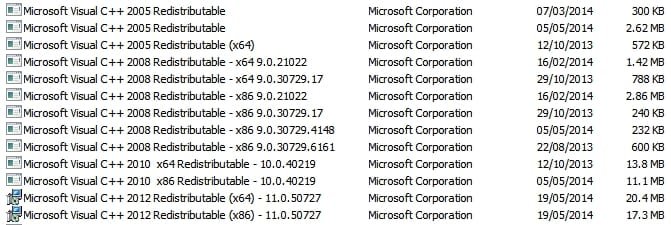
screenshot.jpg

As a test try running Geek Uninstaller and select Ccleaner for removal. Uninstall and select the option to scan for and delete leftovers. Reboot once finished.

Then try downloading Cccleaner Slim Build (bottom of the page here)

CCleaner - Builds

So just to recap:

1. Try removing Ccleaner and rebooting then fresh installing Cccleaner
2. If it doesn't install wait for help with MS Visual C++ versions fix

Suggested fix as far as I can tell is to remove the problem version of MS Visual C++ then reboot and reinstall it. However I can't say which version is the culprit.
 

My Computer My Computer

Computer type
Laptop
Computer Manufacturer/Model Number
ASUS
OS
Microsoft Windows 7 Home Premium 64-bit 7601 Multiprocessor Free Service Pack 1
CPU
AMD C-60 APU with Radeon(tm) HD Graphics
Motherboard
ASUSTeK COMPUTER INC. X501U
Memory
4.00 GB
Graphics Card(s)
AMD Radeon HD 6290 Graphics
Sound Card
(1) AMD High Definition Audio Device (2) Realtek High Defi
Screen Resolution
1366 x 768 x 32 bits (4294967296 colors) @ 60 Hz
Hard Drives
Hitachi HTS545050A7E380 SATA Disk Device
Antivirus
Comodo CIS & FW, SecureAplus App Whitelisting, Threatfire
Browser
Cyberfox 64bit, Opera 64bit, Airfox
Other Info
Spy-The-Spy, HitmanPro.Alert, Norton Connect Safe, MJRegWatcher, BitDefender TrafficLight, Voodoo Shield, Zemana AntiMalware

The slim version has worked, but the full version still produces the same 2 errors.

I tried GeekUninstaller, but because I'd already uninstalled CCleaner (with Add and Remove), Geek doesn't list it, so I can't search for any leftover files. Maybe there's a separate way of locating these files.

Perhaps I should have mentioned the problems I've had with CCleaner for quite a while and I can only apologise for not doing so earlier. I attributed them to whatever causes a laptop to generally get slower and slower.

For a long time, it hasn't been listed in Revo (long before I messed it up with PicPick malware), so I've had to resort to Add and Remove.

On occasion, it has taken an hour to identify ~500MB of files for erasure and the same to remove them.

Chrome cache files are the ones to take an age to erase.

C++

From post #19, these are the packages I installed:

- Microsoft Visual C++ 2008 SP1 Redistributable Package (x86)
- Microsoft Visual C++ 2008 SP1 Redistributable Package for (x64)
- Microsoft Visual C++ 2010 Redistributable Package (x86)
- Microsoft Visual C++ 2010 Redistributable Package (x64)

2 C++ security updates:
- Security Update for Microsoft Visual C++ 2010 Redistributable Package (KB2467173)
- Security Update for Microsoft Visual C++ 2008 Service Pack 1 Redistributable Package (KB2538243)

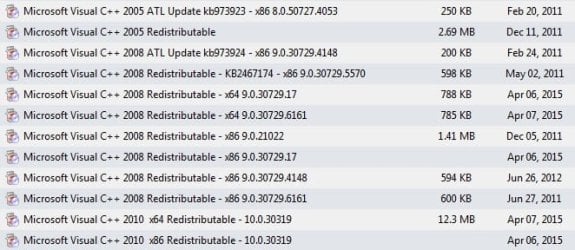
Add and Remove only lists recent x64 ones:
2015-04-12_230132_Add and Remove C++ Files.jpg

Geek lists far more, but I don't know if it's a complete list, as you have some extra ones:
2015-04-12_231021_GeeksUnin C++ files.jpg

I don't know why Add and Remove doesn't list all of them.

Maybe the problem is still C++. Should I install every C++ I can find. Are they essentially harmless?
 

My Computer My Computer

Computer type
Laptop
Computer Manufacturer/Model Number
Acer Aspire 5741
OS
Windows 7 Home Premium 64bit
CPU
Core i3
Memory
8GB DDR3
Graphics Card(s)
Intel HD
You only need an MS Visual C++ version if a program requires it and that's the problem - identifying which version you need. I believe that it doesn't hurt to install extra versions as long as they're applicable to your version of windows.

Geek Unistaller shows Ccleaner listed as installed for me. I'm now guessing a bit and it's up to you if you want to try this but you could try running CPM to see if it detects Ccleaner (old version) as partially installed.

https://www.comodo.com/home/support-maintenance/programs-manager.php

If you type Ccleaner into the search box see if more than one version shows up and if one of them does indeed show up as partially installed. If so - remove it.

Here's a post showing the symbol (a red circle with a line through it) for a partial install for another program that I removed from my machine:

http://www.sevenforums.com/software/366869-whats-best-uninstaller-post3044439.html#post3044439

   Tip
Since the Slim Build works -set it so that it doesn't auto-update and check manually every few months for a new verion. If available just download and install the new Slim Build over the top of the old one. The Slim Build is only available to download a few days after the regular version is updated so you have to wait for it.


Also for slow perfomance issues when using Ccleaner check this post:

http://www.sevenforums.com/software...version-released-post2947947.html#post2947947

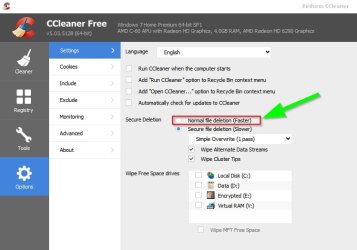
Suggest setting secure overwrite to one pass only and trimming the winapp2.ini file and it tends to run cleanup in 30 seconds maximum on my machine depending on how long since the last cleanup but for me it's usually after each browsing session.
 
Last edited:

My Computer My Computer

Computer type
Laptop
Computer Manufacturer/Model Number
ASUS
OS
Microsoft Windows 7 Home Premium 64-bit 7601 Multiprocessor Free Service Pack 1
CPU
AMD C-60 APU with Radeon(tm) HD Graphics
Motherboard
ASUSTeK COMPUTER INC. X501U
Memory
4.00 GB
Graphics Card(s)
AMD Radeon HD 6290 Graphics
Sound Card
(1) AMD High Definition Audio Device (2) Realtek High Defi
Screen Resolution
1366 x 768 x 32 bits (4294967296 colors) @ 60 Hz
Hard Drives
Hitachi HTS545050A7E380 SATA Disk Device
Antivirus
Comodo CIS & FW, SecureAplus App Whitelisting, Threatfire
Browser
Cyberfox 64bit, Opera 64bit, Airfox
Other Info
Spy-The-Spy, HitmanPro.Alert, Norton Connect Safe, MJRegWatcher, BitDefender TrafficLight, Voodoo Shield, Zemana AntiMalware
Just noticed that one of my installed programs lists the following Visual C++ Runtime versions are needed for my machine - Windows 7 64bit.

System Repair.jpg

I'll try running the fix and see if there is anything different to my earlier screenshot of installed versions.
 

My Computer My Computer

Computer type
Laptop
Computer Manufacturer/Model Number
ASUS
OS
Microsoft Windows 7 Home Premium 64-bit 7601 Multiprocessor Free Service Pack 1
CPU
AMD C-60 APU with Radeon(tm) HD Graphics
Motherboard
ASUSTeK COMPUTER INC. X501U
Memory
4.00 GB
Graphics Card(s)
AMD Radeon HD 6290 Graphics
Sound Card
(1) AMD High Definition Audio Device (2) Realtek High Defi
Screen Resolution
1366 x 768 x 32 bits (4294967296 colors) @ 60 Hz
Hard Drives
Hitachi HTS545050A7E380 SATA Disk Device
Antivirus
Comodo CIS & FW, SecureAplus App Whitelisting, Threatfire
Browser
Cyberfox 64bit, Opera 64bit, Airfox
Other Info
Spy-The-Spy, HitmanPro.Alert, Norton Connect Safe, MJRegWatcher, BitDefender TrafficLight, Voodoo Shield, Zemana AntiMalware
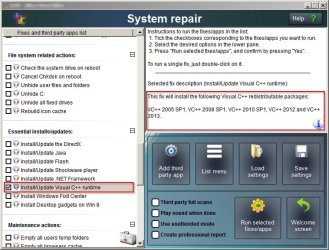
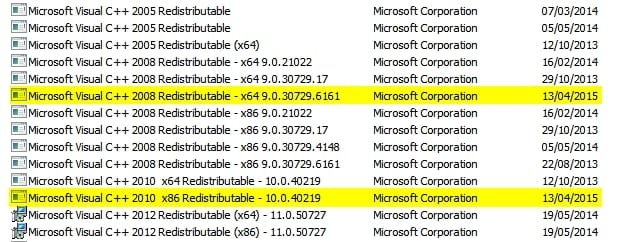
Well after running the install unattended (full auto mode) I get the two extra versions highlighted but no changes were made to the versions that were already installed.

screenshot 2.jpg
 

My Computer My Computer

Computer type
Laptop
Computer Manufacturer/Model Number
ASUS
OS
Microsoft Windows 7 Home Premium 64-bit 7601 Multiprocessor Free Service Pack 1
CPU
AMD C-60 APU with Radeon(tm) HD Graphics
Motherboard
ASUSTeK COMPUTER INC. X501U
Memory
4.00 GB
Graphics Card(s)
AMD Radeon HD 6290 Graphics
Sound Card
(1) AMD High Definition Audio Device (2) Realtek High Defi
Screen Resolution
1366 x 768 x 32 bits (4294967296 colors) @ 60 Hz
Hard Drives
Hitachi HTS545050A7E380 SATA Disk Device
Antivirus
Comodo CIS & FW, SecureAplus App Whitelisting, Threatfire
Browser
Cyberfox 64bit, Opera 64bit, Airfox
Other Info
Spy-The-Spy, HitmanPro.Alert, Norton Connect Safe, MJRegWatcher, BitDefender TrafficLight, Voodoo Shield, Zemana AntiMalware
GeekUninstaller does show CCleaner, now that I've installed the slim build. Sorry for not being clear, but I used Geek prior to trying the slim build, as I wanted to see if it could find any of the leftover files from the Add and Remove uninstallation of the previous version. Didn't want to complicate things with a new installation and a partial uninstallation. It didn't find any old files and still doesn't, now that I finally have CCleaner installed. The search doesn't turn-up anything.

Is it common for CCleaner to slow over time?

Winapp2.ini and Trim.bat look like they're a little above my pay grade. Would they really reduce a 1 hour erasure to 60 secs?

What would you advise regarding the C++? Uninstall each one and re-install?
 

My Computer My Computer

Computer type
Laptop
Computer Manufacturer/Model Number
Acer Aspire 5741
OS
Windows 7 Home Premium 64bit
CPU
Core i3
Memory
8GB DDR3
Graphics Card(s)
Intel HD
Well like I said I'm no expert on MS Visual C++. I reckon that if you removed all of them you'll at a minimum get programs crashing that depend upon those versions and at worse crash your entire system and so for that reason don't feel confident in giving you advice. If anything - download all required verions but don't install them. Disconnect frrm the internet and remove the oldest one first and reboot then replace it. Then move on to the next one. I really would suggest waiting for advice from other members on this!

Yes, Ccleaner Slim Build should show up as installed - no problem. I just wondered if Comodo Programs Manager might detect the old version of Ccleaner as still installed? Possibly it won't as the Slim Build might have overwritten the files!

Now Slim Cleaner runs the 32bit app by default. On a 64bit machine it's better to run the 64bit version.

If you modify the desktop shortcut to look like this it will only launch the 64bit version:

CCleaner64 Properties.jpg

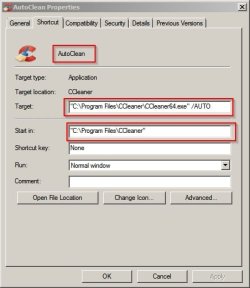
To run automatically when clicked just copy the shortcut and rename it to AutoClean then enter the following:

AutoClean Properties.jpg

As for the trim winapp2.ini - it does make a huge difference depending on how often you clean up. The longer you leave it between cleans - the longer it will take but in any case it will be significantly faster with the trim.

The easiest method is to download CCEnhancer and from the GUI choose "Trim winapp2.ini" and it will do it all for you. The problem is that although it removes the cleaners that you don't need from Cccleaner it also adds some additional eantries marked with an asterisk. It's best to leave those asterisked entries alone or ask for advice before selecting them.

If you don't want to trim - no problem!
 
Last edited:

My Computer My Computer

Computer type
Laptop
Computer Manufacturer/Model Number
ASUS
OS
Microsoft Windows 7 Home Premium 64-bit 7601 Multiprocessor Free Service Pack 1
CPU
AMD C-60 APU with Radeon(tm) HD Graphics
Motherboard
ASUSTeK COMPUTER INC. X501U
Memory
4.00 GB
Graphics Card(s)
AMD Radeon HD 6290 Graphics
Sound Card
(1) AMD High Definition Audio Device (2) Realtek High Defi
Screen Resolution
1366 x 768 x 32 bits (4294967296 colors) @ 60 Hz
Hard Drives
Hitachi HTS545050A7E380 SATA Disk Device
Antivirus
Comodo CIS & FW, SecureAplus App Whitelisting, Threatfire
Browser
Cyberfox 64bit, Opera 64bit, Airfox
Other Info
Spy-The-Spy, HitmanPro.Alert, Norton Connect Safe, MJRegWatcher, BitDefender TrafficLight, Voodoo Shield, Zemana AntiMalware
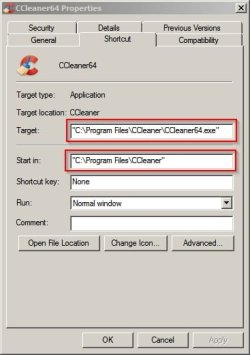
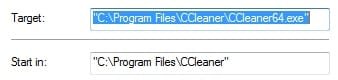
Maybe this is another sign of something strange, but the "Properties" of the slim cleaner on my desktop indicates I'm already running the 64-bit version. The top-left of the program GUI also states "v5.04.5151 (64-bit)".

I appear not to need to modify anything:
2015-04-13_214820 CCleaner Desktop Shortcut Properties.jpg

I've installed CCEnhancer and used the built-in 'Trim winapp2.ini' function, but haven't noticed any speed increase. Am I correct in thinking that this function simply removes the definitions/entries, in both the CCEnhancer definitions and the ones built-in to CCleaner, not specific to the programs I have installed?

I'll try to test it properly. Maybe visit a set no. of sites and check the speed of the erasure of the files with CCleaner alone, with CCenhancer and with CCEnhancer trimmed.
 

My Computer My Computer

Computer type
Laptop
Computer Manufacturer/Model Number
Acer Aspire 5741
OS
Windows 7 Home Premium 64bit
CPU
Core i3
Memory
8GB DDR3
Graphics Card(s)
Intel HD
Re: Modifying shortcut. You're correct - from what your screenshot shows it is indeed launching the 64bit version. My mistake!

Re: Trimmed winapp2.ini. Just check here:

"C:\Program Files\CCleaner\winapp2.ini"

The file should be around 50 -100 kb in size rather than the default size which is around 791 KB. Yes, trimming removes enties that you don't need so improves launch time and in theory cleaning speed.

I'm left wondering if you are using any kind of process taming software? Also regarding Chrome - do you let it auto update and install new versions? If so it's possible that you have a few old versions that need deleting manually.

Check using the instuctions here:

https://www.raymond.cc/blog/remove-outdated-google-chrome-files/

Don't download the software mentioned. It's no longer supported.

As for the Chrome cache - it's possible to limit it's size but as I'm not a Chrome user so maybe someone else can provide a suggestion?

Another thing that you could do is to rename your winapp2.ini file to winapp2.old then download a freah copy and place it here:

"C:\Program Files\CCleaner\winapp2.ini"

The procedure is to visit this web page: http://winapp2.com/Winapp2.ini then choose either File> Save Page As > All Files (*.*)

or File > Save As > Configuration Settings(*.ini)

or Save Web Page > Save As > then choose whatever shows up either All Files (*.*) or Configuration Settings(*.ini)

It depends upon your browser. Then just make sure that the saved file is named winapp2.ini and copy it into:

"C:\Program Files\CCleaner\"

Then you've got the default copy to work with. You can then try running CCEnhancer (Analyse Only) then exit the program. Run CCEnhancer to trim winapp2.ini and exit the program. Run Ccleaner (actually go ahead and clean) and see if it's any better.
 

My Computer My Computer

Computer type
Laptop
Computer Manufacturer/Model Number
ASUS
OS
Microsoft Windows 7 Home Premium 64-bit 7601 Multiprocessor Free Service Pack 1
CPU
AMD C-60 APU with Radeon(tm) HD Graphics
Motherboard
ASUSTeK COMPUTER INC. X501U
Memory
4.00 GB
Graphics Card(s)
AMD Radeon HD 6290 Graphics
Sound Card
(1) AMD High Definition Audio Device (2) Realtek High Defi
Screen Resolution
1366 x 768 x 32 bits (4294967296 colors) @ 60 Hz
Hard Drives
Hitachi HTS545050A7E380 SATA Disk Device
Antivirus
Comodo CIS & FW, SecureAplus App Whitelisting, Threatfire
Browser
Cyberfox 64bit, Opera 64bit, Airfox
Other Info
Spy-The-Spy, HitmanPro.Alert, Norton Connect Safe, MJRegWatcher, BitDefender TrafficLight, Voodoo Shield, Zemana AntiMalware
CCleaner is all over the place.

I gathered enough files for a decent erasure and closed every open browser, program and folder.

Time to load...Time to analyse...Files for erasure...

CCLeaner + CCEnhancer

30 secs ........... 9.558 secs ....... 374 MB

I rebooted:
30 secs ........... 17.876 secs ....... 378 MB

I rebooted again:
30 secs ........... 20.939 secs ....... 378 MB


CCLeaner + CCEnhancer-trimmed winapp2.ini

I rebooted:
1 sec .............. 41 secs ............ 380 MB

I rebooted:
1 sec .............. 17.427 secs ...... 381 MB

I rebooted:
1 sec .............. 18.175 secs ...... 381 MB


Deleted winapp2.ini and returned to CCleaner Slim

I rebooted:
1 sec .............. 32 secs ............ 382 MB

I rebooted:
1 sec .............. 1.27 secs ......... 382 MB

I finally erased the files
382 MB took 19 mins, which is quite quick for how this laptop now behaves.

I conducted this experiment when I was convinced Windows had fully loaded, so no power was being sapped by programs still to load.

Conclusions:
Slow loading when the winapp2.ini file is added, via CCEnhancer.
Fast loading when the winapp2.ini file is trimmed and when the winapp2.ini file is deleted and I return to the basic CCleaner
Analysing is all over the place.
Maybe the fast loading is simply the result of changes made to the new version or the fact it's the 'slim' version.
Erasure still takes an age and I'm sure the reasons aren't related to CCleaner.

Re: Chrome

I can't find it where raymond.cc states it should be:
C:\Users\\AppData\Local\Google\Chrome\Application

but I did find it here: C:\Programs (x86)\Google\Chrome\Application

The folder only has the current and last version. I assume Google auto deletes older versions.

If I have a query regarding the way my installation of Chrome works, should I start a new thread in the appropriate section or continue here?
 

My Computer My Computer

Computer type
Laptop
Computer Manufacturer/Model Number
Acer Aspire 5741
OS
Windows 7 Home Premium 64bit
CPU
Core i3
Memory
8GB DDR3
Graphics Card(s)
Intel HD
CCleaner Slow?

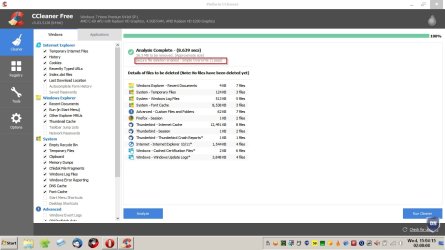
Okay thanks for testing. As far as I can work out Ccleaner is always faster with a trimmed winapp2.ini file. I've never heard or seen otherwise!

How about using your machine for a few hours then posying a screenshot of the analysis? (files waiting to be removed)

Analysis.jpg

Also chreck that you've got normal file deletion enabled:

CCleaner Settings.jpg
 

My Computer My Computer

Computer type
Laptop
Computer Manufacturer/Model Number
ASUS
OS
Microsoft Windows 7 Home Premium 64-bit 7601 Multiprocessor Free Service Pack 1
CPU
AMD C-60 APU with Radeon(tm) HD Graphics
Motherboard
ASUSTeK COMPUTER INC. X501U
Memory
4.00 GB
Graphics Card(s)
AMD Radeon HD 6290 Graphics
Sound Card
(1) AMD High Definition Audio Device (2) Realtek High Defi
Screen Resolution
1366 x 768 x 32 bits (4294967296 colors) @ 60 Hz
Hard Drives
Hitachi HTS545050A7E380 SATA Disk Device
Antivirus
Comodo CIS & FW, SecureAplus App Whitelisting, Threatfire
Browser
Cyberfox 64bit, Opera 64bit, Airfox
Other Info
Spy-The-Spy, HitmanPro.Alert, Norton Connect Safe, MJRegWatcher, BitDefender TrafficLight, Voodoo Shield, Zemana AntiMalware
Sorry forgot to answer your Google Chrome question. I avoid using it but do sometimes use a couple of Chromium browsers so I'm no expert on Chrome. As far as I know Chrome does not delete the old versions automatically but maybe they fixed that!
 

My Computer My Computer

Computer type
Laptop
Computer Manufacturer/Model Number
ASUS
OS
Microsoft Windows 7 Home Premium 64-bit 7601 Multiprocessor Free Service Pack 1
CPU
AMD C-60 APU with Radeon(tm) HD Graphics
Motherboard
ASUSTeK COMPUTER INC. X501U
Memory
4.00 GB
Graphics Card(s)
AMD Radeon HD 6290 Graphics
Sound Card
(1) AMD High Definition Audio Device (2) Realtek High Defi
Screen Resolution
1366 x 768 x 32 bits (4294967296 colors) @ 60 Hz
Hard Drives
Hitachi HTS545050A7E380 SATA Disk Device
Antivirus
Comodo CIS & FW, SecureAplus App Whitelisting, Threatfire
Browser
Cyberfox 64bit, Opera 64bit, Airfox
Other Info
Spy-The-Spy, HitmanPro.Alert, Norton Connect Safe, MJRegWatcher, BitDefender TrafficLight, Voodoo Shield, Zemana AntiMalware
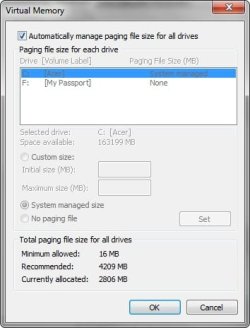
Just one more thought. How have you got your page file set up on your Windows partition?

Start > Run

then type

sysdm.cpl

Press Enter

Advanced Tab > Performance > Settings > Advanced > Virtual Memory > Change

Post a screenshot. Thanks.
 

My Computer My Computer

Computer type
Laptop
Computer Manufacturer/Model Number
ASUS
OS
Microsoft Windows 7 Home Premium 64-bit 7601 Multiprocessor Free Service Pack 1
CPU
AMD C-60 APU with Radeon(tm) HD Graphics
Motherboard
ASUSTeK COMPUTER INC. X501U
Memory
4.00 GB
Graphics Card(s)
AMD Radeon HD 6290 Graphics
Sound Card
(1) AMD High Definition Audio Device (2) Realtek High Defi
Screen Resolution
1366 x 768 x 32 bits (4294967296 colors) @ 60 Hz
Hard Drives
Hitachi HTS545050A7E380 SATA Disk Device
Antivirus
Comodo CIS & FW, SecureAplus App Whitelisting, Threatfire
Browser
Cyberfox 64bit, Opera 64bit, Airfox
Other Info
Spy-The-Spy, HitmanPro.Alert, Norton Connect Safe, MJRegWatcher, BitDefender TrafficLight, Voodoo Shield, Zemana AntiMalware
Sorry but I'm tired at the moment.

Re: Chrome old versions.

File path in the article states On Windows Vista/7: C:\Users\\AppData\Local\Google\Chrome\Application

but you need to replace Users with the logged in user's name so for myself that would be:

C:\Chris\\AppData\Local\Google\Chrome\Application

It might be worth another look!
 

My Computer My Computer

Computer type
Laptop
Computer Manufacturer/Model Number
ASUS
OS
Microsoft Windows 7 Home Premium 64-bit 7601 Multiprocessor Free Service Pack 1
CPU
AMD C-60 APU with Radeon(tm) HD Graphics
Motherboard
ASUSTeK COMPUTER INC. X501U
Memory
4.00 GB
Graphics Card(s)
AMD Radeon HD 6290 Graphics
Sound Card
(1) AMD High Definition Audio Device (2) Realtek High Defi
Screen Resolution
1366 x 768 x 32 bits (4294967296 colors) @ 60 Hz
Hard Drives
Hitachi HTS545050A7E380 SATA Disk Device
Antivirus
Comodo CIS & FW, SecureAplus App Whitelisting, Threatfire
Browser
Cyberfox 64bit, Opera 64bit, Airfox
Other Info
Spy-The-Spy, HitmanPro.Alert, Norton Connect Safe, MJRegWatcher, BitDefender TrafficLight, Voodoo Shield, Zemana AntiMalware
Well being tired doesn't help! I left out part of the file path. That post above should read

so try

C:\Users\Dad\AppData\Local\Google\Chrome\Application
 

My Computer My Computer

Computer type
Laptop
Computer Manufacturer/Model Number
ASUS
OS
Microsoft Windows 7 Home Premium 64-bit 7601 Multiprocessor Free Service Pack 1
CPU
AMD C-60 APU with Radeon(tm) HD Graphics
Motherboard
ASUSTeK COMPUTER INC. X501U
Memory
4.00 GB
Graphics Card(s)
AMD Radeon HD 6290 Graphics
Sound Card
(1) AMD High Definition Audio Device (2) Realtek High Defi
Screen Resolution
1366 x 768 x 32 bits (4294967296 colors) @ 60 Hz
Hard Drives
Hitachi HTS545050A7E380 SATA Disk Device
Antivirus
Comodo CIS & FW, SecureAplus App Whitelisting, Threatfire
Browser
Cyberfox 64bit, Opera 64bit, Airfox
Other Info
Spy-The-Spy, HitmanPro.Alert, Norton Connect Safe, MJRegWatcher, BitDefender TrafficLight, Voodoo Shield, Zemana AntiMalware
Sorry for my late reply and thanks for your quick one.

Page File:
2015-04-15_024229_Page file.jpg

I'm tired too, so I'll use the laptop for a few hours later today.

Re: Chrome
Raymond.cc states the Chrome.exe etc should be in this Chrome folder: C:\Users\Dad\AppData\Local\Google\Chrome\,
but all I have is a single folder, "User Data", in the Chrome folder C:\Users\Dad\AppData\Local\Google\Chrome\User Data
 

My Computer My Computer

Computer type
Laptop
Computer Manufacturer/Model Number
Acer Aspire 5741
OS
Windows 7 Home Premium 64bit
CPU
Core i3
Memory
8GB DDR3
Graphics Card(s)
Intel HD
Re: Page File.

Really it would help if you increased the size. As a test it might be worth setting it to a Custom Size of 16Mb Mimimum and 4409 Mb Maximum. A reboot would be required. The 4409 Mb is recommended size plus 200 MB which shou;d be plenty. You might get different advice from other users but this is just for test purposes. You can easily revert to "Sytem Managed" size at any time.

Re: Chrome. I wouldn't worry about it too much but what you're looking for is folders with version numbers. I remember having the old Chrome problem when I used to have it installed. Reading the article again it seems that folder view must be set to "show hidden files" in order to see the old versions.

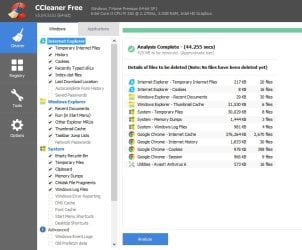
Re: Ccleaner screenshot - analysis. Really it would be helpful to see if a huge amount of files are being created.

Will check back tomorrow but if anyone else has any ideas please post!
 

My Computer My Computer

Computer type
Laptop
Computer Manufacturer/Model Number
ASUS
OS
Microsoft Windows 7 Home Premium 64-bit 7601 Multiprocessor Free Service Pack 1
CPU
AMD C-60 APU with Radeon(tm) HD Graphics
Motherboard
ASUSTeK COMPUTER INC. X501U
Memory
4.00 GB
Graphics Card(s)
AMD Radeon HD 6290 Graphics
Sound Card
(1) AMD High Definition Audio Device (2) Realtek High Defi
Screen Resolution
1366 x 768 x 32 bits (4294967296 colors) @ 60 Hz
Hard Drives
Hitachi HTS545050A7E380 SATA Disk Device
Antivirus
Comodo CIS & FW, SecureAplus App Whitelisting, Threatfire
Browser
Cyberfox 64bit, Opera 64bit, Airfox
Other Info
Spy-The-Spy, HitmanPro.Alert, Norton Connect Safe, MJRegWatcher, BitDefender TrafficLight, Voodoo Shield, Zemana AntiMalware
I've increased the Page File to what you suggested.

Re: CCleaner. Bit of overkill. I've changed to just basic deletion.

2015-04-15_235903.jpg

A selection of the files that are detected:

2015-04-15_234836.jpg
....
2015-04-15_235026.jpg
....
2015-04-15_235114.jpg
....
2015-04-15_235147.jpg
....
2015-04-15_235226.jpg
....
2015-04-15_235307.jpg
....
2015-04-15_235355.jpg
....
2015-04-15_235542.jpg
....
2015-04-15_235638.jpg
....
2015-04-15_235729.jpg
....
2015-04-15_235752.jpg
....
2015-04-15_235803.jpg
....
2015-04-15_235822.jpg
 

Attachments

  • 2015-04-15_235512.jpg
    2015-04-15_235512.jpg
    21.8 KB · Views: 0

My Computer My Computer

Computer type
Laptop
Computer Manufacturer/Model Number
Acer Aspire 5741
OS
Windows 7 Home Premium 64bit
CPU
Core i3
Memory
8GB DDR3
Graphics Card(s)
Intel HD
Everything looks in order apart from the size of Google Chrome cache which does indeed appear to be on the large side. You probably need to start a new thread and get help from someone who knows what they're doing with Chrome. I know that for the browsers that I use I limit cache size but don't know how in Chrome!

Examples (other browsers)

Preferences.jpg

Preferences 2.jpg

That's just to show that it's possible to control cache size in other browsers so I guess it must be possible in Chrome.

I have a few ideas if you want to try them. The first one is backup your Chrome bookmarks and extensions and fully remove Chrome then reboot and reinstall it. You would need to get help with this from other members.

The second one is to install SRWare Iron browser - almost identical in look and feel to Chrome and run it for a while to see if you get the same cache problem with it. There's a portable version available that can be run without installation.

Re: MS Visual C++ and possibly other software related issues. It's possible to check for problems and missing patches using additional software. See the posts here:

http://www.sevenforums.com/performa...l-my-rams-memory-post2952513.html#post2952513

I can send you a message with the download link if you want to try running a scan with it. If you decide to go ahead there's no need to keep the software installed once any problems have been identified and fixed but there is a specific way of uninstalling it.

Another idea is to get a look at what's actually running on your system but again it would involve downloading additional software and creating a scan log which would need to be uploaded here.
 

My Computer My Computer

Computer type
Laptop
Computer Manufacturer/Model Number
ASUS
OS
Microsoft Windows 7 Home Premium 64-bit 7601 Multiprocessor Free Service Pack 1
CPU
AMD C-60 APU with Radeon(tm) HD Graphics
Motherboard
ASUSTeK COMPUTER INC. X501U
Memory
4.00 GB
Graphics Card(s)
AMD Radeon HD 6290 Graphics
Sound Card
(1) AMD High Definition Audio Device (2) Realtek High Defi
Screen Resolution
1366 x 768 x 32 bits (4294967296 colors) @ 60 Hz
Hard Drives
Hitachi HTS545050A7E380 SATA Disk Device
Antivirus
Comodo CIS & FW, SecureAplus App Whitelisting, Threatfire
Browser
Cyberfox 64bit, Opera 64bit, Airfox
Other Info
Spy-The-Spy, HitmanPro.Alert, Norton Connect Safe, MJRegWatcher, BitDefender TrafficLight, Voodoo Shield, Zemana AntiMalware

Yes, I'm willing to try as much as possible. Can you PM the link for Secunia PSI and the other program(s)?

As far as the Chrome cache is concerned: I visit lots of sites that are heavy with graphics and video (nothing dodgy), so the cache is usually 100MBs. Is it really unusually large?
 

My Computer My Computer

Computer type
Laptop
Computer Manufacturer/Model Number
Acer Aspire 5741
OS
Windows 7 Home Premium 64bit
CPU
Core i3
Memory
8GB DDR3
Graphics Card(s)
Intel HD
Back
Top