CCleaner ccsetup504.exe: "...side-by-side configuration is incorrect"

Would you try this:

Start > Run

then type

netplwiz

Press Enter.

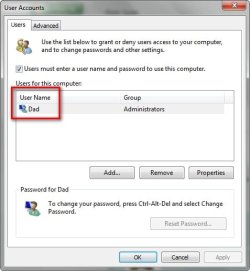
Let us know how many accounts show up and highlight your account then "properties" the "group membership" - what does it show?
 

My Computer My Computer

Computer type
Laptop
Computer Manufacturer/Model Number
ASUS
OS
Microsoft Windows 7 Home Premium 64-bit 7601 Multiprocessor Free Service Pack 1
CPU
AMD C-60 APU with Radeon(tm) HD Graphics
Motherboard
ASUSTeK COMPUTER INC. X501U
Memory
4.00 GB
Graphics Card(s)
AMD Radeon HD 6290 Graphics
Sound Card
(1) AMD High Definition Audio Device (2) Realtek High Defi
Screen Resolution
1366 x 768 x 32 bits (4294967296 colors) @ 60 Hz
Hard Drives
Hitachi HTS545050A7E380 SATA Disk Device
Antivirus
Comodo CIS & FW, SecureAplus App Whitelisting, Threatfire
Browser
Cyberfox 64bit, Opera 64bit, Airfox
Other Info
Spy-The-Spy, HitmanPro.Alert, Norton Connect Safe, MJRegWatcher, BitDefender TrafficLight, Voodoo Shield, Zemana AntiMalware
2015-04-18_143149.jpg

2015-04-18_143246.jpg

Very strange. I've always had admin priviliges, as the only person using this laptop.
 

My Computer My Computer

Computer type
Laptop
Computer Manufacturer/Model Number
Acer Aspire 5741
OS
Windows 7 Home Premium 64bit
CPU
Core i3
Memory
8GB DDR3
Graphics Card(s)
Intel HD
So try assignning admin rights to your account the click Apply and reboot.
 

My Computer My Computer

Computer type
Laptop
Computer Manufacturer/Model Number
ASUS
OS
Microsoft Windows 7 Home Premium 64-bit 7601 Multiprocessor Free Service Pack 1
CPU
AMD C-60 APU with Radeon(tm) HD Graphics
Motherboard
ASUSTeK COMPUTER INC. X501U
Memory
4.00 GB
Graphics Card(s)
AMD Radeon HD 6290 Graphics
Sound Card
(1) AMD High Definition Audio Device (2) Realtek High Defi
Screen Resolution
1366 x 768 x 32 bits (4294967296 colors) @ 60 Hz
Hard Drives
Hitachi HTS545050A7E380 SATA Disk Device
Antivirus
Comodo CIS & FW, SecureAplus App Whitelisting, Threatfire
Browser
Cyberfox 64bit, Opera 64bit, Airfox
Other Info
Spy-The-Spy, HitmanPro.Alert, Norton Connect Safe, MJRegWatcher, BitDefender TrafficLight, Voodoo Shield, Zemana AntiMalware

My Computer My Computer

Computer type
Laptop
Computer Manufacturer/Model Number
ASUS
OS
Microsoft Windows 7 Home Premium 64-bit 7601 Multiprocessor Free Service Pack 1
CPU
AMD C-60 APU with Radeon(tm) HD Graphics
Motherboard
ASUSTeK COMPUTER INC. X501U
Memory
4.00 GB
Graphics Card(s)
AMD Radeon HD 6290 Graphics
Sound Card
(1) AMD High Definition Audio Device (2) Realtek High Defi
Screen Resolution
1366 x 768 x 32 bits (4294967296 colors) @ 60 Hz
Hard Drives
Hitachi HTS545050A7E380 SATA Disk Device
Antivirus
Comodo CIS & FW, SecureAplus App Whitelisting, Threatfire
Browser
Cyberfox 64bit, Opera 64bit, Airfox
Other Info
Spy-The-Spy, HitmanPro.Alert, Norton Connect Safe, MJRegWatcher, BitDefender TrafficLight, Voodoo Shield, Zemana AntiMalware
Re: admin rights.

Assigned admin rights to "Dad" and rebooted, but the error was the same, even with a fresh CCleaner (Standard) ccsetup504.exe download.

Re: restore default loaction of User folders.

I've deleted the "Guest" account and left/deleted the Homegroup.

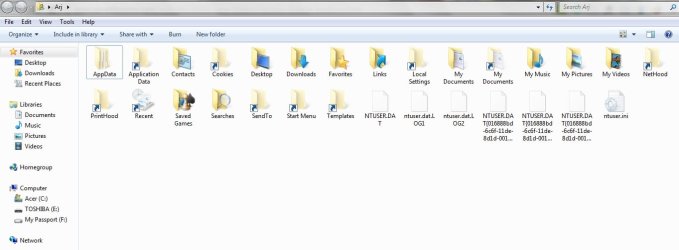
Using "Option One" I typed shell:UsersFilesFolder into the Run dialog, to open the C:\Users\(user-name) folder. I assume the folder that I should expect to open is C:\Users\Arj

This is what I see and maybe it's correct:

2015-04-18_184437.jpg

I right-clicked the "Downloads" folder, selected "Properties" and received this:

2015-04-18_185829.jpg

Restore Default > Apply > OK

No change to the location, though I don't think anything was amiss anyway.

I re-booted and checked again, without any change.

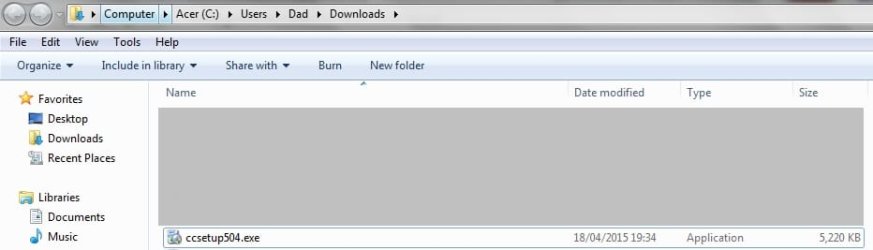
Downloaded a fresh copy of CCleaner (Standard) to the "Downloads" folder:

2015-04-18_193653.jpg

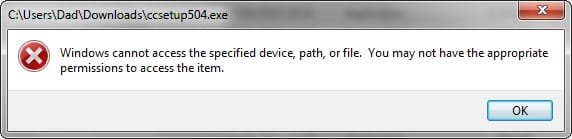
Attempted to install it:

2015-04-18_193448.jpg
 

My Computer My Computer

Computer type
Laptop
Computer Manufacturer/Model Number
Acer Aspire 5741
OS
Windows 7 Home Premium 64bit
CPU
Core i3
Memory
8GB DDR3
Graphics Card(s)
Intel HD
Logged in user

You're logged in as "Dad" correct? So if you go to Start > Run then type:

%USERPROFILE%\

a window should open with Dad in the address bar and showing your user folders including downloads.

If it opens to ARJ something is wrong.

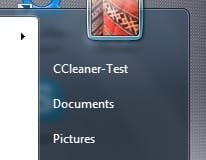
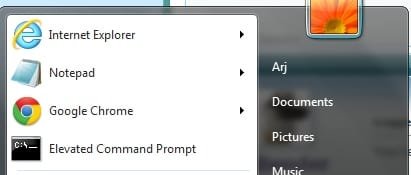
When you open your Start Menu what is the name that is currently displayed?

Start menu.jpg
 

My Computer My Computer

Computer type
Laptop
Computer Manufacturer/Model Number
ASUS
OS
Microsoft Windows 7 Home Premium 64-bit 7601 Multiprocessor Free Service Pack 1
CPU
AMD C-60 APU with Radeon(tm) HD Graphics
Motherboard
ASUSTeK COMPUTER INC. X501U
Memory
4.00 GB
Graphics Card(s)
AMD Radeon HD 6290 Graphics
Sound Card
(1) AMD High Definition Audio Device (2) Realtek High Defi
Screen Resolution
1366 x 768 x 32 bits (4294967296 colors) @ 60 Hz
Hard Drives
Hitachi HTS545050A7E380 SATA Disk Device
Antivirus
Comodo CIS & FW, SecureAplus App Whitelisting, Threatfire
Browser
Cyberfox 64bit, Opera 64bit, Airfox
Other Info
Spy-The-Spy, HitmanPro.Alert, Norton Connect Safe, MJRegWatcher, BitDefender TrafficLight, Voodoo Shield, Zemana AntiMalware
I think we are getting close to solving your problems but it might need someone else to have a look. It seems to me that your user profile doesn't match with your user folders.
 

My Computer My Computer

Computer type
Laptop
Computer Manufacturer/Model Number
ASUS
OS
Microsoft Windows 7 Home Premium 64-bit 7601 Multiprocessor Free Service Pack 1
CPU
AMD C-60 APU with Radeon(tm) HD Graphics
Motherboard
ASUSTeK COMPUTER INC. X501U
Memory
4.00 GB
Graphics Card(s)
AMD Radeon HD 6290 Graphics
Sound Card
(1) AMD High Definition Audio Device (2) Realtek High Defi
Screen Resolution
1366 x 768 x 32 bits (4294967296 colors) @ 60 Hz
Hard Drives
Hitachi HTS545050A7E380 SATA Disk Device
Antivirus
Comodo CIS & FW, SecureAplus App Whitelisting, Threatfire
Browser
Cyberfox 64bit, Opera 64bit, Airfox
Other Info
Spy-The-Spy, HitmanPro.Alert, Norton Connect Safe, MJRegWatcher, BitDefender TrafficLight, Voodoo Shield, Zemana AntiMalware
"Dad" is the name registered when the laptop was set-up.

"Arj" is the name of my User account - the name on the log-in screen when I boot-up, whether from sleep or fully off.

Start > Run > %USERPROFILE%\ gives:

2015-04-18_214527.jpg

2015-04-18_214809.jpg

When I assigned Admin privileges to my account, this is what confused me. It looked like I was granting the rights to the laptop and not a User:

2015-04-18_215137.jpg
 

My Computer My Computer

Computer type
Laptop
Computer Manufacturer/Model Number
Acer Aspire 5741
OS
Windows 7 Home Premium 64bit
CPU
Core i3
Memory
8GB DDR3
Graphics Card(s)
Intel HD
User vs Machine name

Okay do your user account is ARJ but your downloads folder is C:\Users\Dad\Downloads

Let's try the following:

Start >Run

then type

regedit

press Enter.

Navigate to

HKEY_CURRENT_USER\Software\Microsoft\Windows\CurrentVersion\Explorer\User Shell Folders

In the right pane find the string named {374DE290-123F-4565-9164-39C4925E467B} and click on it.

Change the value data to: C:\Users\ARJ\Downloads

Click OK.

Log off or reboot.

Also I've asked someone else to take a look at this thread as User Profile management isn't exactly my strong point. You might want to wait and see if there is any input.
 
Last edited:

My Computer My Computer

Computer type
Laptop
Computer Manufacturer/Model Number
ASUS
OS
Microsoft Windows 7 Home Premium 64-bit 7601 Multiprocessor Free Service Pack 1
CPU
AMD C-60 APU with Radeon(tm) HD Graphics
Motherboard
ASUSTeK COMPUTER INC. X501U
Memory
4.00 GB
Graphics Card(s)
AMD Radeon HD 6290 Graphics
Sound Card
(1) AMD High Definition Audio Device (2) Realtek High Defi
Screen Resolution
1366 x 768 x 32 bits (4294967296 colors) @ 60 Hz
Hard Drives
Hitachi HTS545050A7E380 SATA Disk Device
Antivirus
Comodo CIS & FW, SecureAplus App Whitelisting, Threatfire
Browser
Cyberfox 64bit, Opera 64bit, Airfox
Other Info
Spy-The-Spy, HitmanPro.Alert, Norton Connect Safe, MJRegWatcher, BitDefender TrafficLight, Voodoo Shield, Zemana AntiMalware
Sorry, I don't understand.
 

My Computer My Computer

Computer type
Laptop
Computer Manufacturer/Model Number
Acer Aspire 5741
OS
Windows 7 Home Premium 64bit
CPU
Core i3
Memory
8GB DDR3
Graphics Card(s)
Intel HD
Well you are logged in using the account name "ARJ" but your default downloads folder is for someone using an account name "Dad" - so I thought it might be worth attempting to switch your default dowloads folder location that currently shows as C:\Users\Dad\Downloads and make it C:\Users\ARJ\Downloads which is what it should be.

I've been given some advice and been told that it might be better to just create a new profile and copy any files that you need into the new profile. To get started see the tutorial here:

http://www.sevenforums.com/tutorials/181024-user-account-create.html

Choose a unique account name (one that doesn't exist already)

Do not delete any old accounts - just test the new onw when you've set it up.
 

My Computer My Computer

Computer type
Laptop
Computer Manufacturer/Model Number
ASUS
OS
Microsoft Windows 7 Home Premium 64-bit 7601 Multiprocessor Free Service Pack 1
CPU
AMD C-60 APU with Radeon(tm) HD Graphics
Motherboard
ASUSTeK COMPUTER INC. X501U
Memory
4.00 GB
Graphics Card(s)
AMD Radeon HD 6290 Graphics
Sound Card
(1) AMD High Definition Audio Device (2) Realtek High Defi
Screen Resolution
1366 x 768 x 32 bits (4294967296 colors) @ 60 Hz
Hard Drives
Hitachi HTS545050A7E380 SATA Disk Device
Antivirus
Comodo CIS & FW, SecureAplus App Whitelisting, Threatfire
Browser
Cyberfox 64bit, Opera 64bit, Airfox
Other Info
Spy-The-Spy, HitmanPro.Alert, Norton Connect Safe, MJRegWatcher, BitDefender TrafficLight, Voodoo Shield, Zemana AntiMalware
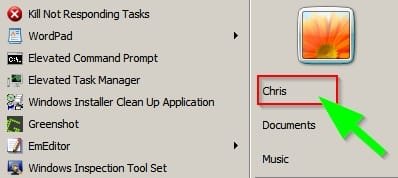
Hold on for a bit before going ahead. I think I'm seeing a problem that doesn't exist! Sorry about that. On my machine if I change my Display Name to ARJ like this:

Display Name.jpg

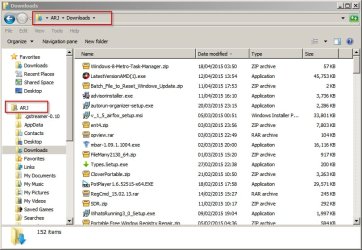
Then my downloads folder looks like yours with ARJ displayed in the address bar.

Downloads Folder.jpg

However clicking the address bar reveals the actual location which is as it should be.

Downloads 2.jpg

So basically that means ignore the last few posts as there's no problem with your downloads folder!

On the other hand that still leaves us with your side by side configuration issue. How about copying the Ccleaner setup file to your desktop and trying to run it from there? I suspect that you will get the same issue though. :cry:

I'm not sure that I can figure this one out but it would still be worth creating a new account then testing it to see if you can install Ccleaner using that account.
 
Last edited:

My Computer My Computer

Computer type
Laptop
Computer Manufacturer/Model Number
ASUS
OS
Microsoft Windows 7 Home Premium 64-bit 7601 Multiprocessor Free Service Pack 1
CPU
AMD C-60 APU with Radeon(tm) HD Graphics
Motherboard
ASUSTeK COMPUTER INC. X501U
Memory
4.00 GB
Graphics Card(s)
AMD Radeon HD 6290 Graphics
Sound Card
(1) AMD High Definition Audio Device (2) Realtek High Defi
Screen Resolution
1366 x 768 x 32 bits (4294967296 colors) @ 60 Hz
Hard Drives
Hitachi HTS545050A7E380 SATA Disk Device
Antivirus
Comodo CIS & FW, SecureAplus App Whitelisting, Threatfire
Browser
Cyberfox 64bit, Opera 64bit, Airfox
Other Info
Spy-The-Spy, HitmanPro.Alert, Norton Connect Safe, MJRegWatcher, BitDefender TrafficLight, Voodoo Shield, Zemana AntiMalware
Okay I've re-read this entire thread again and I think you're actually missing Visual C++ 2008 Redistributable Service Pack that hasn't been suggested as far as I can see.

So basically you need these two downloads:

Download Microsoft Visual C++ 2008 SP1 Redistributable Package (x86) from Official Microsoft Download Center

Download Microsoft Visual C++ 2008 Redistributable Package (x86) from Official Microsoft Download Center

I know both links above look the same but they actually point to different downloads.
 
Last edited:

My Computer My Computer

Computer type
Laptop
Computer Manufacturer/Model Number
ASUS
OS
Microsoft Windows 7 Home Premium 64-bit 7601 Multiprocessor Free Service Pack 1
CPU
AMD C-60 APU with Radeon(tm) HD Graphics
Motherboard
ASUSTeK COMPUTER INC. X501U
Memory
4.00 GB
Graphics Card(s)
AMD Radeon HD 6290 Graphics
Sound Card
(1) AMD High Definition Audio Device (2) Realtek High Defi
Screen Resolution
1366 x 768 x 32 bits (4294967296 colors) @ 60 Hz
Hard Drives
Hitachi HTS545050A7E380 SATA Disk Device
Antivirus
Comodo CIS & FW, SecureAplus App Whitelisting, Threatfire
Browser
Cyberfox 64bit, Opera 64bit, Airfox
Other Info
Spy-The-Spy, HitmanPro.Alert, Norton Connect Safe, MJRegWatcher, BitDefender TrafficLight, Voodoo Shield, Zemana AntiMalware
Go for both just to be on the safe side. The first one is:

Version:SP1
File Name: vcredist_x86.exe
Date Published: 9/16/2008
File Size: 4.0 MB

The second one is:

Version: x86
File Name:
vcredist_x86.exe
Date Published: 11/29/2007
File Size: 1.7 MB
 

My Computer My Computer

Computer type
Laptop
Computer Manufacturer/Model Number
ASUS
OS
Microsoft Windows 7 Home Premium 64-bit 7601 Multiprocessor Free Service Pack 1
CPU
AMD C-60 APU with Radeon(tm) HD Graphics
Motherboard
ASUSTeK COMPUTER INC. X501U
Memory
4.00 GB
Graphics Card(s)
AMD Radeon HD 6290 Graphics
Sound Card
(1) AMD High Definition Audio Device (2) Realtek High Defi
Screen Resolution
1366 x 768 x 32 bits (4294967296 colors) @ 60 Hz
Hard Drives
Hitachi HTS545050A7E380 SATA Disk Device
Antivirus
Comodo CIS & FW, SecureAplus App Whitelisting, Threatfire
Browser
Cyberfox 64bit, Opera 64bit, Airfox
Other Info
Spy-The-Spy, HitmanPro.Alert, Norton Connect Safe, MJRegWatcher, BitDefender TrafficLight, Voodoo Shield, Zemana AntiMalware
Sorry for the delay and apologies for stating I didn't understand your post (#90). I only received the first 10 words of your reply, no matter how many times I refreshed, so I was a little confused by it. I don't know what happened.

No joy with anything, I'm afraid.

Re: New User Account

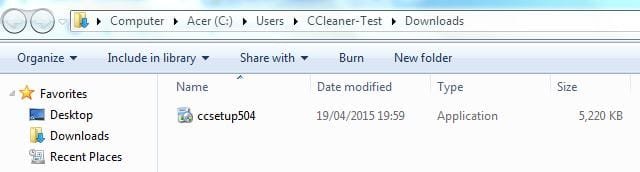
I created "CCleaner-Test" (with admin. privileges), rebooted and logged-in to it.

2015-04-19_192946.jpg

CCleaner-Test UserAcc_04.jpg

CCleaner-Test UserAcc_02.JPG

CCleaner (standard) still won't install from the Downloads folder or Desktop.

Re: CCleaner installation from the desktop of my original acc.

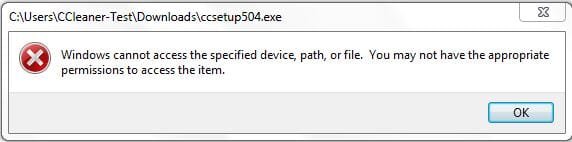
I rebooted to "Arj" and moved the "ccsetup504.exe" to the Desktop, but the result is the same:

"Windows cannot access the specified device, path or file..."

2015-04-20_225547.jpg

Re: C++

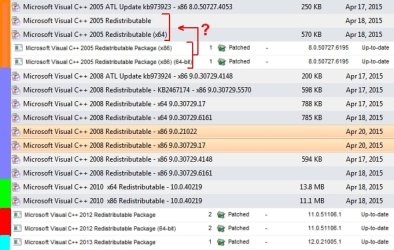
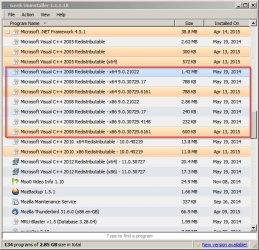
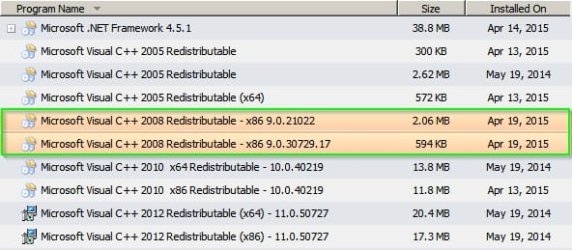
I was only given the option to repair or uninstall the runtimes, because I apparently already had them. Using GeekUninstaller and PSI, I think I've identified all I have:

2015-04-20_215524 All C++ Arrow.jpg

Re: is Chrome the problem?

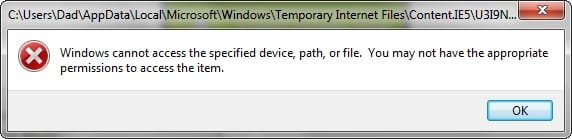
I've tried IE11 and the result is the same, whether running the download or saving it first. When I choose to 'run' the file, I can't access the Temporary Internet Folder:

2015-04-20_222901.jpg

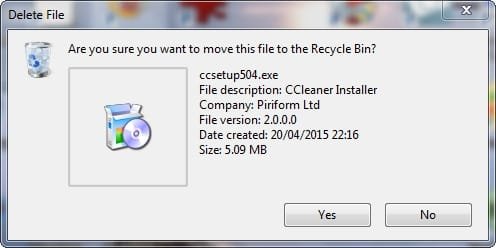
Could the CCleaner file be the problem? Does this look correct, when I send the file to the Recycle Bin?

2015-04-20_221853.jpg

................

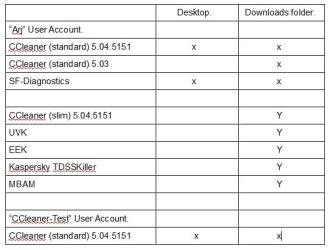
A few thoughts:

Do I have all the C++ runtimes?
The problem is the same in Chrome and IE11.
It won't install from the Downlods folder, Desktop or TIF (IE11).
SF-Diagnostics won't install either.

CCleaner slim does install.
So do UVK, EEK, Kaspersky TDSSKIller and MBAM.
Not the Downloads folder that is the problem.

Did the problem arise following the creation of the Guest account or Homegroup, though they have both been deleted?
Did it occur when I updated Adobe AIR or VLC?
 

Attachments

  • CCleaner-Test UserAcc_03.JPG
    CCleaner-Test UserAcc_03.JPG
    19.4 KB · Views: 23

My Computer My Computer

Computer type
Laptop
Computer Manufacturer/Model Number
Acer Aspire 5741
OS
Windows 7 Home Premium 64bit
CPU
Core i3
Memory
8GB DDR3
Graphics Card(s)
Intel HD
Does this look correct?

2015-04-20_235918.jpg
 

My Computer My Computer

Computer type
Laptop
Computer Manufacturer/Model Number
Acer Aspire 5741
OS
Windows 7 Home Premium 64bit
CPU
Core i3
Memory
8GB DDR3
Graphics Card(s)
Intel HD
Re: Your last post - Does this look correct? Actuall it doesn't. The Ccleaner test folder (if it contains the Ccleaner installer) should be in your downloads folder or on your desktop.

C:\Users\ARJ\Desktop

C:\Users\Dad\Desktop

As for the downloads folder - really need to see the registry entry as described earlier.

Re: C++

On my own machine I experimented and went with the advice given elsewhere on "Side by side configuration is incorrect" even though I don't have the problem. I downloaded the two files mentioned earlier in Post #93 but didn't install them. The advice is to remove all versions and reinstall then so I removed all versions that are shown in this screenshot:

Geek Uninstaller 1.jpg

Then I ran Ccleaner - rebooted and ran Ccleaner once more. Then reinstalled the current C++ 2008 version and Service Pack and everything still works.

So here's what I see now.

Geek Uninstaller 2.jpg

So what I'm saying is that you've got way too many C++ 2008 versions showing up in your screenshot. Try removing all 2008 versions - rebooting and reinstalling using the download links given.
 
Last edited:

My Computer My Computer

Computer type
Laptop
Computer Manufacturer/Model Number
ASUS
OS
Microsoft Windows 7 Home Premium 64-bit 7601 Multiprocessor Free Service Pack 1
CPU
AMD C-60 APU with Radeon(tm) HD Graphics
Motherboard
ASUSTeK COMPUTER INC. X501U
Memory
4.00 GB
Graphics Card(s)
AMD Radeon HD 6290 Graphics
Sound Card
(1) AMD High Definition Audio Device (2) Realtek High Defi
Screen Resolution
1366 x 768 x 32 bits (4294967296 colors) @ 60 Hz
Hard Drives
Hitachi HTS545050A7E380 SATA Disk Device
Antivirus
Comodo CIS & FW, SecureAplus App Whitelisting, Threatfire
Browser
Cyberfox 64bit, Opera 64bit, Airfox
Other Info
Spy-The-Spy, HitmanPro.Alert, Norton Connect Safe, MJRegWatcher, BitDefender TrafficLight, Voodoo Shield, Zemana AntiMalware
You might have a point about Chrome. If you download a file you should be able to choose where to save it or set the preferred download location for files and installers should not be running from the temporary internet files folder.
 

My Computer My Computer

Computer type
Laptop
Computer Manufacturer/Model Number
ASUS
OS
Microsoft Windows 7 Home Premium 64-bit 7601 Multiprocessor Free Service Pack 1
CPU
AMD C-60 APU with Radeon(tm) HD Graphics
Motherboard
ASUSTeK COMPUTER INC. X501U
Memory
4.00 GB
Graphics Card(s)
AMD Radeon HD 6290 Graphics
Sound Card
(1) AMD High Definition Audio Device (2) Realtek High Defi
Screen Resolution
1366 x 768 x 32 bits (4294967296 colors) @ 60 Hz
Hard Drives
Hitachi HTS545050A7E380 SATA Disk Device
Antivirus
Comodo CIS & FW, SecureAplus App Whitelisting, Threatfire
Browser
Cyberfox 64bit, Opera 64bit, Airfox
Other Info
Spy-The-Spy, HitmanPro.Alert, Norton Connect Safe, MJRegWatcher, BitDefender TrafficLight, Voodoo Shield, Zemana AntiMalware
Homegroup - I think it relates to sharing files with other users. On my machine it's disabled like this:

How to Disable

Didn't think that you could delete it!
 

My Computer My Computer

Computer type
Laptop
Computer Manufacturer/Model Number
ASUS
OS
Microsoft Windows 7 Home Premium 64-bit 7601 Multiprocessor Free Service Pack 1
CPU
AMD C-60 APU with Radeon(tm) HD Graphics
Motherboard
ASUSTeK COMPUTER INC. X501U
Memory
4.00 GB
Graphics Card(s)
AMD Radeon HD 6290 Graphics
Sound Card
(1) AMD High Definition Audio Device (2) Realtek High Defi
Screen Resolution
1366 x 768 x 32 bits (4294967296 colors) @ 60 Hz
Hard Drives
Hitachi HTS545050A7E380 SATA Disk Device
Antivirus
Comodo CIS & FW, SecureAplus App Whitelisting, Threatfire
Browser
Cyberfox 64bit, Opera 64bit, Airfox
Other Info
Spy-The-Spy, HitmanPro.Alert, Norton Connect Safe, MJRegWatcher, BitDefender TrafficLight, Voodoo Shield, Zemana AntiMalware
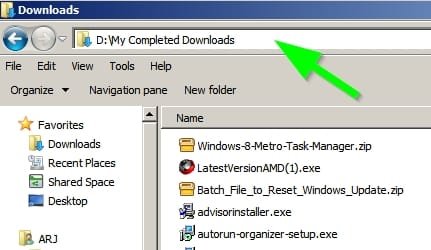
Re: Homegroup.

I simply left the Homegroup, as far as "3." Don't know if I want to remove it, though!

Re: alternative solution.

I was just about to update my post, but you beat me to a reply, as I've solved the problem another way, though not one I like.

I uninstalled the EagleGet Chrome extension I have and, miraculously, the standard version of CCleaner installed from a fresh download. I'm baffled as to why, as the packet-sniffer extension doesn't alter any file that it grabs.

ccsetup504.exe (standard):
Chrome (no download sniffer) = downloads to Downloads folder and installs
Chrome (EagleGet) with the extension over-ridden (Ctrl+Alt) = downloads to Downloads folder, but won't install.

ccsetup504.exe (slim)
No problem at all.

I've had the extension for quite a while and, whether I've used it to direct a download somewhere other then the default Downloads folder, or over-ridden it and sent the download to where they usually go, it hasn't ever mattered. The file is the the file, no matter what folder it goes to or what I use to download it or even what programs I don't use by over-riding them.

As the download sniffer doesn't alter the file and doesn't affect the 'slim' version, what could the reason be?

Could a fraction of a second delay in a download beginning, because the browser has to process my over-ride command, affect the file being downloaded?

As I'd prefer to keep EagleGet, I'll try the C++ method. Who knows, I may have a problem installing other programs - programs I haven't yet discovered won't install.

Re: C++

Several of the versions I have and you had have higher version nos. than the two you've suggested I download and I have x86 and x64 versions. Does it matter?

By the way, "CCleaner-Test" is the name of the second User account I created. I wanted to know why, when I'm back in my usual account - "Arj" - the C:\Users folder shows "All Users", "CCleaner-Test" user and "Dad", but not "Arj". I thought something might be amiss.
 

My Computer My Computer

Computer type
Laptop
Computer Manufacturer/Model Number
Acer Aspire 5741
OS
Windows 7 Home Premium 64bit
CPU
Core i3
Memory
8GB DDR3
Graphics Card(s)
Intel HD
Back
Top