Check Disk - Reset

How to Reset Check Disk to Not Run at Startup


   Information
This will show you how to reset Check Disk or chkdsk back to it's default state of not running at the next startup. This can be handy if you had scheduled disk check to run on the next startup and changed your mind, or Check Disk will not stop running at startup.

See also: The Chkdsk.exe program does not start correctly on a Windows 7-based computer

   Warning
You must be logged in as an administrator to be able to do the steps in this tutorial.


OPTION ONE

Reset chkdsk using an Elevated Command Prompt


1. Open an elevated command prompt.

2. To Check to See if a Disk Check is Scheduled for a Drive
A) In the elevated command prompt, type the command below and press Enter. (see screenshots below)
NOTE: Substitute C: in the command below with the drive letter of the drive you wanted to check instead.
chkntfs c:

If scheduled to run chkdsk at next startup, you will see this:
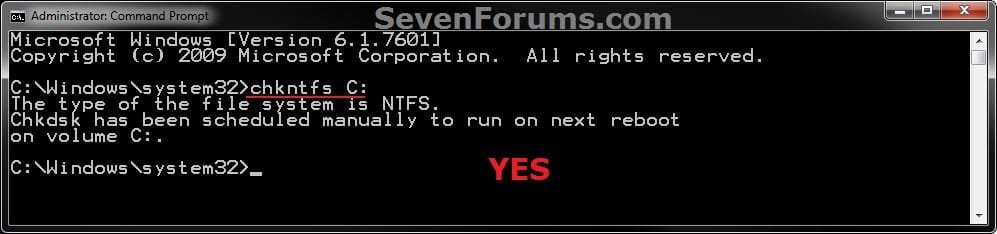
Check.jpg

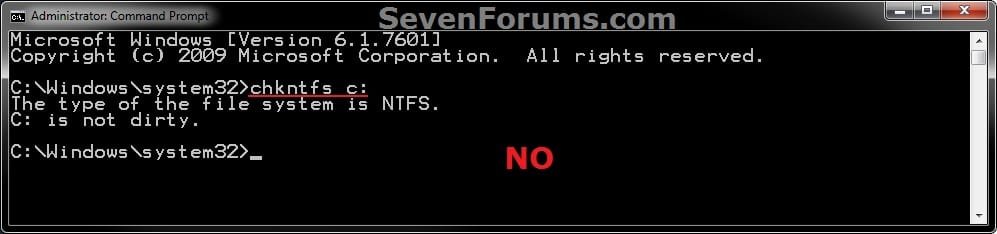
If not scheduled, you will see this:
No.jpg
3. To Cancel a Scheduled Disk Check for a Drive
A) In the elevated command prompt, type the command below and press Enter. (see screenshot below)
NOTE: Substitute C: in the command below with the drive letter of the drive you wanted to cancel the scheduled disk check to run at the next startup for instead.
chkntfs /x c:

Unschedule.jpg
4. When finished, close the elevated command prompt.


OPTION TWO

Reset chkdsk using a REG File Download


1. Click on the download button below to download the file below.
Reset_Chkdsk.reg

Download


2. Save the REG file to your desktop.

3. Right click on the downloaded REG file and click on Merge.

4. When prompted, click on Run, Yes, Yes, and OK to approve the merge.

5. You can now delete the downloaded REG file if you would like to.


OPTION THREE

Reset chkdsk using Registry Editor


1. Open the Start Menu, then type regedit in the search box and press enter.

2. If prompted by UAC, then click on Yes or enter the administrator's password.

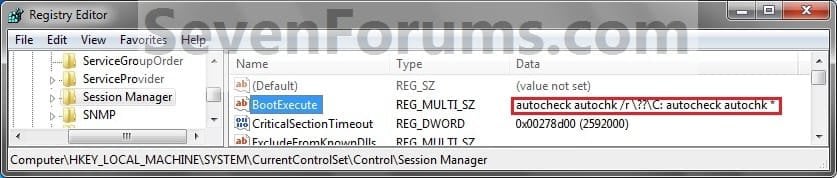
3. In regedit, navigate to the location below. (see screenshots below)
HKEY_LOCAL_MACHINE\SYSTEM\CurrentControlSet\Control\Session Manager

Step1A.jpg

Step1C.jpg

4. In the right pane, right click on BootExecute and click on Modify. (see screenshots above)

5. Copy and paste either command below, and click on OK. (See screenshot below)
(Default do not run)
autocheck autochk *

OR

(Disable chkdsk for C: drive)
autocheck autochk /k:C *
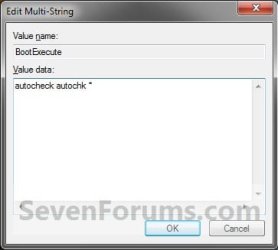
Step2.jpg
6. The registry will now look like this. (see screenshot below)
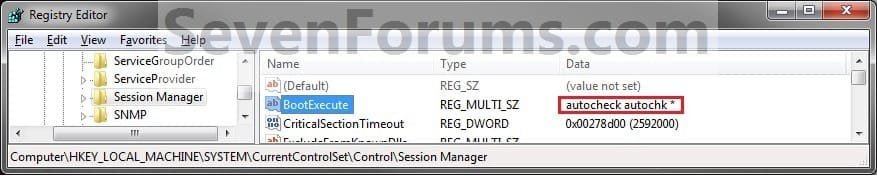
Step1B.jpg
7. Close regedit.
That's it,
Shawn


Attachments

Last edited:
I have HKEY LOCAL MACHINE, but the rest I don't have.
 

My Computer

Computer type
Laptop
Computer Manufacturer/Model Number
compaq
OS
windows Ultimate
I have HKEY LOCAL MACHINE, but the rest I don't have.

Hi Rose, that isn't possible. Look again. I can see This registry path even on a Windows XP computer.

BTW, this tutorial works with XP as well. ;)
 

My Computer

Computer Manufacturer/Model Number
Samsung NP530U4B-S02IN
OS
Windows® 8 Pro (64-bit)
CPU
Intel® Core™ i5 Processor 2467M (1.60GHz, 3MB L3 Cache)
Motherboard
Samsung Electronics
Memory
6GB DDR3 System Memory at 1,333MHz (on BD 4GB + 2GB x 1)
Graphics Card(s)
AMD Radeon™ HD7550M 1GB DDR3 (Ext. Graphic)
Sound Card
Realtek High Definition Audio
Monitor(s) Displays
35.56cm (14.0) SuperBright 300nit HD LED Display
Screen Resolution
1366x768
Hard Drives
1TB S-ATA II Hard Drive (5400RPM) with ExpressCache 16GB SSD
Internet Speed
sucks
Antivirus
Microsoft Security Essentials
Browser
Google Chrome (Sync enabled)
Hello Rose,

You can use OPTION ONE to use the download to have this (OPTION TWO) done automatically for you. :)
 

My Computer

Computer type
PC/Desktop
Computer Manufacturer/Model Number
Self built custom
OS
64-bit Windows 11 Pro for Workstations
CPU
Intel i7-8700K OC'd to 5 GHz
Motherboard
ASUS ROG Maximus XI Formula Z390
Memory
64 GB (4x16GB) G.SKILL TridentZ RGB DDR4 3600 MHz
Graphics Card(s)
ASUS ROG-STRIX-GTX1080TI-O11G-GAMING
Sound Card
Integrated
Monitor(s) Displays
2 x Samsung Odyssey G7 27"
Screen Resolution
2560x1440
Hard Drives
1TB Samsung 990 PRO M.2,
4TB Samsung 990 PRO PRO M.2,
TerraMaster F8 SSD Plus NAS
PSU
Seasonic Prime Titanium 850W
Case
Thermaltake Core P3
Cooling
Corsair Hydro H115i
Keyboard
Logitech wireless K800
Mouse
Logitech MX Master 4
Internet Speed
2 Gb/s Download and 100 Mb/s Upload
Antivirus
Malwarebyte Anti-Malware Premium
Browser
Google Chrome
Other Info
Logitech Z625 speaker system,
Logitech BRIO 4K Pro webcam,
HP Color LaserJet Pro MFP M477fdn,
APC SMART-UPS RT 1000 XL - SURT1000XLI,
Galaxy S23 Plus phone
Thanks a lot for another great tutorial.
 

My Computer

OS
Windows 7 Ultimate 32bit
CPU
AMD Phenom II x4 965 3.4GHz
Motherboard
Gigabyte GA-890FXA-UD5 rev2.0
Memory
G.SKILL F3-16000CL8D-4GBPIS (2GBx2)
Graphics Card(s)
Inno3d GTX480 1.5GB GDDR5
Monitor(s) Displays
LG FLATRON W2486L
Screen Resolution
1920x1080@60Hz
Hard Drives
Western Digital Caviar Black WD1002FAEX 1TB 64MB 7200RPM Sata III x3
PSU
Enermax MODU82+ 625W
Case
Thermaltake Element G Middle Tower
Thanks Brink, I have downloaded the reg file and use it, I don't know if next time I restart my computer will there be any auto checking on my E: drive or not, because it stuck at "Windows Is Starting" for about 5-10 minutes and only start disk check itself! But when I'm log on to Windows and I click on "My Computer", the E: drive is not accessable!
 

My Computer

Computer Manufacturer/Model Number
Custom Build
OS
Windows 7 Professional 64 bit SP 1
CPU
Intel(R) Core(TM) i5-2500 CPU 3.30GHz
Motherboard
Asus P8H61-MLE
Memory
4.00 GB DDR3 SDRAM
Graphics Card(s)
NVIDIA GeForce 9500 GT
Sound Card
High Definition Audio Codec:
Monitor(s) Displays
SyncMaster (1280x1024@60Hz)
Screen Resolution
1280x1024
Hard Drives
1465GB Western Digital WDC WD15EARS-00Z5B1 ATA Device (SATA)
977GB Western Digital WDC WD10EADS-00L5B1 ATA Device (SATA)
1863GB Western Digital WDC WD20EARX-00PASB0 ATA Device (SATA)
156GB Seagate ST3160813AS ATA Device (SATA)
PSU
Cooler Master eXtreme Power Plus 650W
Case
Cooler Master Elite 431 Plus
Keyboard
Razer Tarantula
Mouse
Razer Mamba
Other Info
Creative SBS A200 speaker
Hello Mual,

There may be an issue with your E: drive. Depending on what brand the HDD is, you might run correct program below to scan the HDD with to see if it may be failing or dead.

Seagate (SeaTools) SeaTools | Seagate
NOTE: Click on "Downloads" there.

OR

Western Digital (Data Lifeguard Dagnostic): WD Support / Downloads / SATA & SAS / WD Green / GP
 
Last edited:

My Computer

Computer type
PC/Desktop
Computer Manufacturer/Model Number
Self built custom
OS
64-bit Windows 11 Pro for Workstations
CPU
Intel i7-8700K OC'd to 5 GHz
Motherboard
ASUS ROG Maximus XI Formula Z390
Memory
64 GB (4x16GB) G.SKILL TridentZ RGB DDR4 3600 MHz
Graphics Card(s)
ASUS ROG-STRIX-GTX1080TI-O11G-GAMING
Sound Card
Integrated
Monitor(s) Displays
2 x Samsung Odyssey G7 27"
Screen Resolution
2560x1440
Hard Drives
1TB Samsung 990 PRO M.2,
4TB Samsung 990 PRO PRO M.2,
TerraMaster F8 SSD Plus NAS
PSU
Seasonic Prime Titanium 850W
Case
Thermaltake Core P3
Cooling
Corsair Hydro H115i
Keyboard
Logitech wireless K800
Mouse
Logitech MX Master 4
Internet Speed
2 Gb/s Download and 100 Mb/s Upload
Antivirus
Malwarebyte Anti-Malware Premium
Browser
Google Chrome
Other Info
Logitech Z625 speaker system,
Logitech BRIO 4K Pro webcam,
HP Color LaserJet Pro MFP M477fdn,
APC SMART-UPS RT 1000 XL - SURT1000XLI,
Galaxy S23 Plus phone
Hello Brink, if it is dead, or either is failling, there is no way to save the hard disk already?
I'll download and dignose soon :)
 
Last edited by a moderator:

My Computer

Computer Manufacturer/Model Number
Custom Build
OS
Windows 7 Professional 64 bit SP 1
CPU
Intel(R) Core(TM) i5-2500 CPU 3.30GHz
Motherboard
Asus P8H61-MLE
Memory
4.00 GB DDR3 SDRAM
Graphics Card(s)
NVIDIA GeForce 9500 GT
Sound Card
High Definition Audio Codec:
Monitor(s) Displays
SyncMaster (1280x1024@60Hz)
Screen Resolution
1280x1024
Hard Drives
1465GB Western Digital WDC WD15EARS-00Z5B1 ATA Device (SATA)
977GB Western Digital WDC WD10EADS-00L5B1 ATA Device (SATA)
1863GB Western Digital WDC WD20EARX-00PASB0 ATA Device (SATA)
156GB Seagate ST3160813AS ATA Device (SATA)
PSU
Cooler Master eXtreme Power Plus 650W
Case
Cooler Master Elite 431 Plus
Keyboard
Razer Tarantula
Mouse
Razer Mamba
Other Info
Creative SBS A200 speaker
If it's dead, then no. However, let's see what the results say. Fingers crossed.
 

My Computer

Computer type
PC/Desktop
Computer Manufacturer/Model Number
Self built custom
OS
64-bit Windows 11 Pro for Workstations
CPU
Intel i7-8700K OC'd to 5 GHz
Motherboard
ASUS ROG Maximus XI Formula Z390
Memory
64 GB (4x16GB) G.SKILL TridentZ RGB DDR4 3600 MHz
Graphics Card(s)
ASUS ROG-STRIX-GTX1080TI-O11G-GAMING
Sound Card
Integrated
Monitor(s) Displays
2 x Samsung Odyssey G7 27"
Screen Resolution
2560x1440
Hard Drives
1TB Samsung 990 PRO M.2,
4TB Samsung 990 PRO PRO M.2,
TerraMaster F8 SSD Plus NAS
PSU
Seasonic Prime Titanium 850W
Case
Thermaltake Core P3
Cooling
Corsair Hydro H115i
Keyboard
Logitech wireless K800
Mouse
Logitech MX Master 4
Internet Speed
2 Gb/s Download and 100 Mb/s Upload
Antivirus
Malwarebyte Anti-Malware Premium
Browser
Google Chrome
Other Info
Logitech Z625 speaker system,
Logitech BRIO 4K Pro webcam,
HP Color LaserJet Pro MFP M477fdn,
APC SMART-UPS RT 1000 XL - SURT1000XLI,
Galaxy S23 Plus phone
If it's dead, then no. However, let's see what the results say. Fingers crossed.

Sorry, is late right now, I'm gonna take a rest, tomorrow I'll give a feedback, thanks for providing the link :D

I check on all the Seagate drive already, and it pass SMART test, but which fix or scan should I apply to fix the bad sector? From the basic tests tab, there are a few option there. I used the SMART test, other I not sure. Can you guide me?
And what does it mean the SeaTools will fail the drive if not success repairing the bad sector? Means the tools might damage the hard disk?
 
Last edited:

My Computer

Computer Manufacturer/Model Number
Custom Build
OS
Windows 7 Professional 64 bit SP 1
CPU
Intel(R) Core(TM) i5-2500 CPU 3.30GHz
Motherboard
Asus P8H61-MLE
Memory
4.00 GB DDR3 SDRAM
Graphics Card(s)
NVIDIA GeForce 9500 GT
Sound Card
High Definition Audio Codec:
Monitor(s) Displays
SyncMaster (1280x1024@60Hz)
Screen Resolution
1280x1024
Hard Drives
1465GB Western Digital WDC WD15EARS-00Z5B1 ATA Device (SATA)
977GB Western Digital WDC WD10EADS-00L5B1 ATA Device (SATA)
1863GB Western Digital WDC WD20EARX-00PASB0 ATA Device (SATA)
156GB Seagate ST3160813AS ATA Device (SATA)
PSU
Cooler Master eXtreme Power Plus 650W
Case
Cooler Master Elite 431 Plus
Keyboard
Razer Tarantula
Mouse
Razer Mamba
Other Info
Creative SBS A200 speaker
If it's dead, then no. However, let's see what the results say. Fingers crossed.

Sorry, is late right now, I'm gonna take a rest, tomorrow I'll give a feedback, thanks for providing the link :D

I check on all the Seagate drive already, and it pass SMART test, but which fix or scan should I apply to fix the bad sector? From the basic tests tab, there are a few option there. I used the SMART test, other I not sure. Can you guide me?
And what does it mean the SeaTools will fail the drive if not success repairing the bad sector? Means the tools might damage the hard disk?

You're welcome.

Only the E: drive, but it depends on what brand the HDD is that you need to scan for what "for Windows" version of the program to use. From your specs, either Seagate or Western Digital.
 
Last edited:

My Computer

Computer type
PC/Desktop
Computer Manufacturer/Model Number
Self built custom
OS
64-bit Windows 11 Pro for Workstations
CPU
Intel i7-8700K OC'd to 5 GHz
Motherboard
ASUS ROG Maximus XI Formula Z390
Memory
64 GB (4x16GB) G.SKILL TridentZ RGB DDR4 3600 MHz
Graphics Card(s)
ASUS ROG-STRIX-GTX1080TI-O11G-GAMING
Sound Card
Integrated
Monitor(s) Displays
2 x Samsung Odyssey G7 27"
Screen Resolution
2560x1440
Hard Drives
1TB Samsung 990 PRO M.2,
4TB Samsung 990 PRO PRO M.2,
TerraMaster F8 SSD Plus NAS
PSU
Seasonic Prime Titanium 850W
Case
Thermaltake Core P3
Cooling
Corsair Hydro H115i
Keyboard
Logitech wireless K800
Mouse
Logitech MX Master 4
Internet Speed
2 Gb/s Download and 100 Mb/s Upload
Antivirus
Malwarebyte Anti-Malware Premium
Browser
Google Chrome
Other Info
Logitech Z625 speaker system,
Logitech BRIO 4K Pro webcam,
HP Color LaserJet Pro MFP M477fdn,
APC SMART-UPS RT 1000 XL - SURT1000XLI,
Galaxy S23 Plus phone
You're welcome.

Only the E: drive, but it depends on what brand the HDD is that you need to scan for what "for Windows" version of the program to use. From your specs, either Seagate or Western Digital.

I have test and the result is :

Code:
Test Option: EXTENDED TEST 
Model Number: WDC WD15EARS-00Z5B1 
Unit Serial Number: WD-WMAVU2142358 
Firmware Number: 80.00A80 
Capacity: 1500.30 GB 
SMART Status: PASS 
Test Result: FAIL 
Test Error Code: 08-Too many bad sectors detected. 
Test Time: 01:23:07, October 04, 2012

So do you think that drive is dead or failing badly? And the previous post might have some info I provided, please check, thanks :)
 

My Computer

Computer Manufacturer/Model Number
Custom Build
OS
Windows 7 Professional 64 bit SP 1
CPU
Intel(R) Core(TM) i5-2500 CPU 3.30GHz
Motherboard
Asus P8H61-MLE
Memory
4.00 GB DDR3 SDRAM
Graphics Card(s)
NVIDIA GeForce 9500 GT
Sound Card
High Definition Audio Codec:
Monitor(s) Displays
SyncMaster (1280x1024@60Hz)
Screen Resolution
1280x1024
Hard Drives
1465GB Western Digital WDC WD15EARS-00Z5B1 ATA Device (SATA)
977GB Western Digital WDC WD10EADS-00L5B1 ATA Device (SATA)
1863GB Western Digital WDC WD20EARX-00PASB0 ATA Device (SATA)
156GB Seagate ST3160813AS ATA Device (SATA)
PSU
Cooler Master eXtreme Power Plus 650W
Case
Cooler Master Elite 431 Plus
Keyboard
Razer Tarantula
Mouse
Razer Mamba
Other Info
Creative SBS A200 speaker
The HDD failed the test and has to many bad sectors on it. With that and not be able to access it, I'm afraid the HDD is dead. R.I.P. :(
 

My Computer

Computer type
PC/Desktop
Computer Manufacturer/Model Number
Self built custom
OS
64-bit Windows 11 Pro for Workstations
CPU
Intel i7-8700K OC'd to 5 GHz
Motherboard
ASUS ROG Maximus XI Formula Z390
Memory
64 GB (4x16GB) G.SKILL TridentZ RGB DDR4 3600 MHz
Graphics Card(s)
ASUS ROG-STRIX-GTX1080TI-O11G-GAMING
Sound Card
Integrated
Monitor(s) Displays
2 x Samsung Odyssey G7 27"
Screen Resolution
2560x1440
Hard Drives
1TB Samsung 990 PRO M.2,
4TB Samsung 990 PRO PRO M.2,
TerraMaster F8 SSD Plus NAS
PSU
Seasonic Prime Titanium 850W
Case
Thermaltake Core P3
Cooling
Corsair Hydro H115i
Keyboard
Logitech wireless K800
Mouse
Logitech MX Master 4
Internet Speed
2 Gb/s Download and 100 Mb/s Upload
Antivirus
Malwarebyte Anti-Malware Premium
Browser
Google Chrome
Other Info
Logitech Z625 speaker system,
Logitech BRIO 4K Pro webcam,
HP Color LaserJet Pro MFP M477fdn,
APC SMART-UPS RT 1000 XL - SURT1000XLI,
Galaxy S23 Plus phone
The HDD failed the test and has to many bad sectors on it. With that and not be able to access it, I'm afraid the HDD is dead. R.I.P. :(

I still able to access it sometime, but randomly it will be slow down and cannot be use. So there is no way to backup the files? :(
 

My Computer

Computer Manufacturer/Model Number
Custom Build
OS
Windows 7 Professional 64 bit SP 1
CPU
Intel(R) Core(TM) i5-2500 CPU 3.30GHz
Motherboard
Asus P8H61-MLE
Memory
4.00 GB DDR3 SDRAM
Graphics Card(s)
NVIDIA GeForce 9500 GT
Sound Card
High Definition Audio Codec:
Monitor(s) Displays
SyncMaster (1280x1024@60Hz)
Screen Resolution
1280x1024
Hard Drives
1465GB Western Digital WDC WD15EARS-00Z5B1 ATA Device (SATA)
977GB Western Digital WDC WD10EADS-00L5B1 ATA Device (SATA)
1863GB Western Digital WDC WD20EARX-00PASB0 ATA Device (SATA)
156GB Seagate ST3160813AS ATA Device (SATA)
PSU
Cooler Master eXtreme Power Plus 650W
Case
Cooler Master Elite 431 Plus
Keyboard
Razer Tarantula
Mouse
Razer Mamba
Other Info
Creative SBS A200 speaker
Not unless you are able to copy the files off of it to another location when able to access it. :(

I suppose that you could try and use a free program like Recuva on it to try and recovery anything from the HDD, but I wouldn't get your hopes up.
 

My Computer

Computer type
PC/Desktop
Computer Manufacturer/Model Number
Self built custom
OS
64-bit Windows 11 Pro for Workstations
CPU
Intel i7-8700K OC'd to 5 GHz
Motherboard
ASUS ROG Maximus XI Formula Z390
Memory
64 GB (4x16GB) G.SKILL TridentZ RGB DDR4 3600 MHz
Graphics Card(s)
ASUS ROG-STRIX-GTX1080TI-O11G-GAMING
Sound Card
Integrated
Monitor(s) Displays
2 x Samsung Odyssey G7 27"
Screen Resolution
2560x1440
Hard Drives
1TB Samsung 990 PRO M.2,
4TB Samsung 990 PRO PRO M.2,
TerraMaster F8 SSD Plus NAS
PSU
Seasonic Prime Titanium 850W
Case
Thermaltake Core P3
Cooling
Corsair Hydro H115i
Keyboard
Logitech wireless K800
Mouse
Logitech MX Master 4
Internet Speed
2 Gb/s Download and 100 Mb/s Upload
Antivirus
Malwarebyte Anti-Malware Premium
Browser
Google Chrome
Other Info
Logitech Z625 speaker system,
Logitech BRIO 4K Pro webcam,
HP Color LaserJet Pro MFP M477fdn,
APC SMART-UPS RT 1000 XL - SURT1000XLI,
Galaxy S23 Plus phone
Not unless you are able to copy the files off of it to another location when able to access it. :(

I suppose that you could try and use a free program like Recuva on it to try and recovery anything from the HDD, but I wouldn't get your hopes up.

I think I'm still able to copy the files... but might took a very long time since the speed is slow on the E: drive now. I'll try to copy if can, gonna get this hard disk to the guy who install on my computer.

So if I'm still can copy, which mean I'm still have chance to save my hard disk?
 

My Computer

Computer Manufacturer/Model Number
Custom Build
OS
Windows 7 Professional 64 bit SP 1
CPU
Intel(R) Core(TM) i5-2500 CPU 3.30GHz
Motherboard
Asus P8H61-MLE
Memory
4.00 GB DDR3 SDRAM
Graphics Card(s)
NVIDIA GeForce 9500 GT
Sound Card
High Definition Audio Codec:
Monitor(s) Displays
SyncMaster (1280x1024@60Hz)
Screen Resolution
1280x1024
Hard Drives
1465GB Western Digital WDC WD15EARS-00Z5B1 ATA Device (SATA)
977GB Western Digital WDC WD10EADS-00L5B1 ATA Device (SATA)
1863GB Western Digital WDC WD20EARX-00PASB0 ATA Device (SATA)
156GB Seagate ST3160813AS ATA Device (SATA)
PSU
Cooler Master eXtreme Power Plus 650W
Case
Cooler Master Elite 431 Plus
Keyboard
Razer Tarantula
Mouse
Razer Mamba
Other Info
Creative SBS A200 speaker
You may have a chance to save the data on the HDD before it fails, but the HDD is on it's way to being completely dead and inoperable.
 

My Computer

Computer type
PC/Desktop
Computer Manufacturer/Model Number
Self built custom
OS
64-bit Windows 11 Pro for Workstations
CPU
Intel i7-8700K OC'd to 5 GHz
Motherboard
ASUS ROG Maximus XI Formula Z390
Memory
64 GB (4x16GB) G.SKILL TridentZ RGB DDR4 3600 MHz
Graphics Card(s)
ASUS ROG-STRIX-GTX1080TI-O11G-GAMING
Sound Card
Integrated
Monitor(s) Displays
2 x Samsung Odyssey G7 27"
Screen Resolution
2560x1440
Hard Drives
1TB Samsung 990 PRO M.2,
4TB Samsung 990 PRO PRO M.2,
TerraMaster F8 SSD Plus NAS
PSU
Seasonic Prime Titanium 850W
Case
Thermaltake Core P3
Cooling
Corsair Hydro H115i
Keyboard
Logitech wireless K800
Mouse
Logitech MX Master 4
Internet Speed
2 Gb/s Download and 100 Mb/s Upload
Antivirus
Malwarebyte Anti-Malware Premium
Browser
Google Chrome
Other Info
Logitech Z625 speaker system,
Logitech BRIO 4K Pro webcam,
HP Color LaserJet Pro MFP M477fdn,
APC SMART-UPS RT 1000 XL - SURT1000XLI,
Galaxy S23 Plus phone
If you hear any clicking sounds at all coming from the drive that will mean the armature that holds the read/write heads is worn and slapping up against the spindle. Grabbing anything you can now will likely prove the last chance unless later taking the drive to a professional data recovery service to grab data off the drive's platters directly for a price!

Besides Recuva best used on drives in working order there are a large number of partition recovery programs usually trials to try out to grab what you can from it before it quits entirely. The main problem faced with that type of recovery program however is files are too often renamed by number! if you are able to recover a large number of them.

Meanwhile I have to wonder if there a way to create a desktop shortcut with the chkntfs /x command applied in some way rather then opening a command prompt for a fast cancel? Most of the time shortcuts go direct to a file on the drive. But i had to wonder about a shortcut with a scripted command somewhat on the idea of a tiny batch file in a sense.
 

My Computers

System One System Two

  • Computer type
    PC/Desktop
    Computer Manufacturer/Model Number
    Custom builds = 2
    OS
    W7 Ultimate x64/W10 Pro x64/W11 Pro Triple Boot - Main PC W7 Remote PC Micro ATX W7 Pro x64/W11 Pro
    CPU
    AMD Phenom II X4 975 Deneb 3.6ghz - 965 2nd remote pc
    Motherboard
    Gigabyte GA-790XTA-UD4-Gigabyte GA-880GM-D2H remote pc
    Memory
    Kingston Hyper X DDR3 1600 1.5v 16gb - Hyper X Fury 8gb 2nd
    Graphics Card(s)
    MSI HD Radeon 5750 1gb - MSI HD Radeon 6450 on mini tower
    Sound Card
    Creative Labs X-Fi Xtreme Audio P - Realtek onooard 2nd case
    Monitor(s) Displays
    ASUS VW199T-P 19" HP 2082a Main-HP 2082a 20" remote pc
    Screen Resolution
    Asus 1440x900 - HP 1600x900
    Hard Drives
    WD Black 1TB HD per OS W7, W10, and pending W11 presently on 500gb OS Drive - Pending Triple 1TB HDs for Spanned Storage/backup volume
    Single 2TB external USB enclosure, single 1TB System 7 Host/Boot drive, Pending 8TB external HD for system image b
    PSU
    Corsair 750TX - primary / Corsair CX600 - second
    Case
    Antec 900-2 - SSD compatible / NZXT Vulcan mini tower
    Cooling
    Zalman CNPS9900A
    Keyboard
    AZIO L70 Backlit Letters Gaming - ONN Cordless/USB
    Mouse
    MSI DS200 Programmable, Logitech Cordless
    Internet Speed
    30mbps upgrade - primary hard wired - mini tower usb WiFi
    Antivirus
    GFI VIPRE Internet Security 2014 on W7 2016 beta on W10,
    Browser
    Cyberfox, WaterFox 64bit FF variants, FireFox x64, Pale Moon
    Other Info
    Accomdata fan cooled usb 2.0 PIDE/Sata II, III external enclosure.
    Sambient usb/eSata PATA/Sata II, III external enclosure.
  • Computer type
    PC/Desktop
    System Manufacturer/Model Number
    CUSTOM ASSEMBLY
    OS
    W7 Pro x64/W11 Pro
    CPU
    AMD Deneb 3.6ghz - 965
    Motherboard
    Gigabyte GA-880GM-D2H remote pc
    Memory
    Kingston Hyper X Fury 8gb
    Graphics Card(s)
    MSI HD Radeon 6450 DVI Output
    Sound Card
    Realtek onooard Creative or Other separate PENDING
    Monitor(s) Displays
    VIZIO 32" LCD TV Separate LCD Pending
    Screen Resolution
    1600x1080
    Hard Drives
    WD 500GB OS Host/Boot WD Green 1TB Storage/Backup
    PSU
    Corsair 600W - THERMALTAKE 600W spare case
    Case
    NZXT Vulcan mini tower
    Cooling
    Twin 120mm Top Fans - 240mm Side Cover
    Keyboard
    ONN Cordless/USB Logitech Cordless
    Mouse
    ONN USB/Cordless - Logitech Cordless
    Internet Speed
    DSL 5G
    Browser
    MS Edge, FireFox, WaterFox x64, FireFox Nightly
    Other Info
    OS Testing-Remote Access to Main TeamViewer
You may have a chance to save the data on the HDD before it fails, but the HDD is on it's way to being completely dead and inoperable.

I understand what you saying now, I'm will go get a new HDD, also a same model too because I have warranty still available on this damaged HDD. Gonna copy all files to there before that HDD fails to work.


If you hear any clicking sounds at all coming from the drive that will mean the armature that holds the read/write heads is worn and slapping up against the spindle. Grabbing anything you can now will likely prove the last chance unless later taking the drive to a professional data recovery service to grab data off the drive's platters directly for a price!

Besides Recuva best used on drives in working order there are a large number of partition recovery programs usually trials to try out to grab what you can from it before it quits entirely. The main problem faced with that type of recovery program however is files are too often renamed by number! if you are able to recover a large number of them.

Meanwhile I have to wonder if there a way to create a desktop shortcut with the chkntfs /x command applied in some way rather then opening a command prompt for a fast cancel? Most of the time shortcuts go direct to a file on the drive. But i had to wonder about a shortcut with a scripted command somewhat on the idea of a tiny batch file in a sense.

There is no sound at all, I took off the cover of my CPU, no sound was coming from the HDD, just unable to access it. Now I manage to access it as I mentioned before, and copying some data that I need.

Will taking the drive to a professional data recovery service to grab data off the drive's platters be expensive?

Recuva seems very complicated to me, ha ha :o
I don't know about the shorcut things you mentioned :confused:
 

My Computer

Computer Manufacturer/Model Number
Custom Build
OS
Windows 7 Professional 64 bit SP 1
CPU
Intel(R) Core(TM) i5-2500 CPU 3.30GHz
Motherboard
Asus P8H61-MLE
Memory
4.00 GB DDR3 SDRAM
Graphics Card(s)
NVIDIA GeForce 9500 GT
Sound Card
High Definition Audio Codec:
Monitor(s) Displays
SyncMaster (1280x1024@60Hz)
Screen Resolution
1280x1024
Hard Drives
1465GB Western Digital WDC WD15EARS-00Z5B1 ATA Device (SATA)
977GB Western Digital WDC WD10EADS-00L5B1 ATA Device (SATA)
1863GB Western Digital WDC WD20EARX-00PASB0 ATA Device (SATA)
156GB Seagate ST3160813AS ATA Device (SATA)
PSU
Cooler Master eXtreme Power Plus 650W
Case
Cooler Master Elite 431 Plus
Keyboard
Razer Tarantula
Mouse
Razer Mamba
Other Info
Creative SBS A200 speaker
Data recovery services will charge! For most it will depend on how important the data is compared to what a service will charge. For things you can download again most would say "no way!" For family photos and other unreplaceable things then you have to decide to pay out to see what they can recover for you.

The alternative methods here may cost a blank disk or two when making a comparison to what a service will charge and why most will be a "do it themselfer" and try to recovery things on their own.

As for Recuva that can be a rather limited file recovery program while Windows is up and running while others work when booting live from disk for recoverying entire partitions. Another option not mentioned so far goes a bit further in using another OS entirely which you rescue files from a drive while booting live from a disk or even a usb flash drive. Recover files from Windows hard disk using Puppy Linux | help.artaro.eu

Ubuntu live cd, Knoppix Live on dvd(at one time small and on cd), Linux Mint live, Linux Mint Debiar live, etc. are able to read, write, copy to and copy from MS volumes. For the effort of download and burn to disk or seeing an iso image written to a flash drive made bootable to boot live from you can grab files manually to save to another drive.

The professional services on the other hand are usually sought once a drive has failed completely and can no longer be written to or not even allowing you to see anything let alone copy files from. The serivce will open a drive up under controlled circumstances to read from the platters directly for the fee they charge. You simply provide the blank media or spare drive they recover files to.
 

My Computers

System One System Two

  • Computer type
    PC/Desktop
    Computer Manufacturer/Model Number
    Custom builds = 2
    OS
    W7 Ultimate x64/W10 Pro x64/W11 Pro Triple Boot - Main PC W7 Remote PC Micro ATX W7 Pro x64/W11 Pro
    CPU
    AMD Phenom II X4 975 Deneb 3.6ghz - 965 2nd remote pc
    Motherboard
    Gigabyte GA-790XTA-UD4-Gigabyte GA-880GM-D2H remote pc
    Memory
    Kingston Hyper X DDR3 1600 1.5v 16gb - Hyper X Fury 8gb 2nd
    Graphics Card(s)
    MSI HD Radeon 5750 1gb - MSI HD Radeon 6450 on mini tower
    Sound Card
    Creative Labs X-Fi Xtreme Audio P - Realtek onooard 2nd case
    Monitor(s) Displays
    ASUS VW199T-P 19" HP 2082a Main-HP 2082a 20" remote pc
    Screen Resolution
    Asus 1440x900 - HP 1600x900
    Hard Drives
    WD Black 1TB HD per OS W7, W10, and pending W11 presently on 500gb OS Drive - Pending Triple 1TB HDs for Spanned Storage/backup volume
    Single 2TB external USB enclosure, single 1TB System 7 Host/Boot drive, Pending 8TB external HD for system image b
    PSU
    Corsair 750TX - primary / Corsair CX600 - second
    Case
    Antec 900-2 - SSD compatible / NZXT Vulcan mini tower
    Cooling
    Zalman CNPS9900A
    Keyboard
    AZIO L70 Backlit Letters Gaming - ONN Cordless/USB
    Mouse
    MSI DS200 Programmable, Logitech Cordless
    Internet Speed
    30mbps upgrade - primary hard wired - mini tower usb WiFi
    Antivirus
    GFI VIPRE Internet Security 2014 on W7 2016 beta on W10,
    Browser
    Cyberfox, WaterFox 64bit FF variants, FireFox x64, Pale Moon
    Other Info
    Accomdata fan cooled usb 2.0 PIDE/Sata II, III external enclosure.
    Sambient usb/eSata PATA/Sata II, III external enclosure.
  • Computer type
    PC/Desktop
    System Manufacturer/Model Number
    CUSTOM ASSEMBLY
    OS
    W7 Pro x64/W11 Pro
    CPU
    AMD Deneb 3.6ghz - 965
    Motherboard
    Gigabyte GA-880GM-D2H remote pc
    Memory
    Kingston Hyper X Fury 8gb
    Graphics Card(s)
    MSI HD Radeon 6450 DVI Output
    Sound Card
    Realtek onooard Creative or Other separate PENDING
    Monitor(s) Displays
    VIZIO 32" LCD TV Separate LCD Pending
    Screen Resolution
    1600x1080
    Hard Drives
    WD 500GB OS Host/Boot WD Green 1TB Storage/Backup
    PSU
    Corsair 600W - THERMALTAKE 600W spare case
    Case
    NZXT Vulcan mini tower
    Cooling
    Twin 120mm Top Fans - 240mm Side Cover
    Keyboard
    ONN Cordless/USB Logitech Cordless
    Mouse
    ONN USB/Cordless - Logitech Cordless
    Internet Speed
    DSL 5G
    Browser
    MS Edge, FireFox, WaterFox x64, FireFox Nightly
    Other Info
    OS Testing-Remote Access to Main TeamViewer
Back
Top