Check Disk - Reset

How to Reset Check Disk to Not Run at Startup


   Information
This will show you how to reset Check Disk or chkdsk back to it's default state of not running at the next startup. This can be handy if you had scheduled disk check to run on the next startup and changed your mind, or Check Disk will not stop running at startup.

See also: The Chkdsk.exe program does not start correctly on a Windows 7-based computer

   Warning
You must be logged in as an administrator to be able to do the steps in this tutorial.


OPTION ONE

Reset chkdsk using an Elevated Command Prompt


1. Open an elevated command prompt.

2. To Check to See if a Disk Check is Scheduled for a Drive
A) In the elevated command prompt, type the command below and press Enter. (see screenshots below)
NOTE: Substitute C: in the command below with the drive letter of the drive you wanted to check instead.
chkntfs c:

If scheduled to run chkdsk at next startup, you will see this:
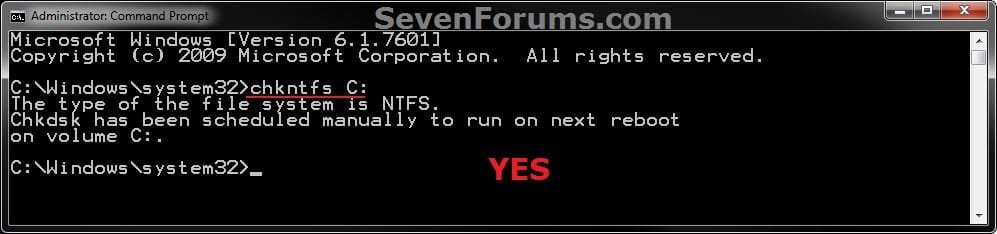
Check.jpg

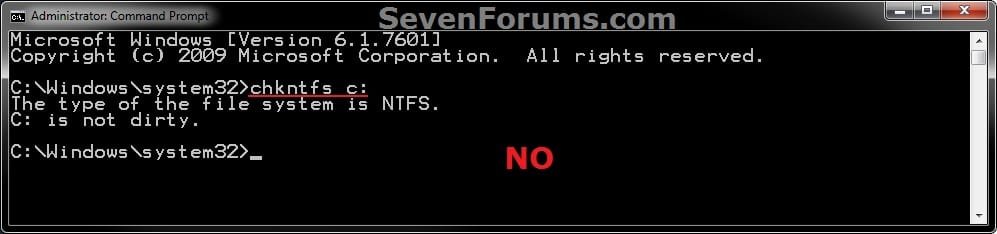
If not scheduled, you will see this:
No.jpg
3. To Cancel a Scheduled Disk Check for a Drive
A) In the elevated command prompt, type the command below and press Enter. (see screenshot below)
NOTE: Substitute C: in the command below with the drive letter of the drive you wanted to cancel the scheduled disk check to run at the next startup for instead.
chkntfs /x c:

Unschedule.jpg
4. When finished, close the elevated command prompt.


OPTION TWO

Reset chkdsk using a REG File Download


1. Click on the download button below to download the file below.
Reset_Chkdsk.reg

Download


2. Save the REG file to your desktop.

3. Right click on the downloaded REG file and click on Merge.

4. When prompted, click on Run, Yes, Yes, and OK to approve the merge.

5. You can now delete the downloaded REG file if you would like to.


OPTION THREE

Reset chkdsk using Registry Editor


1. Open the Start Menu, then type regedit in the search box and press enter.

2. If prompted by UAC, then click on Yes or enter the administrator's password.

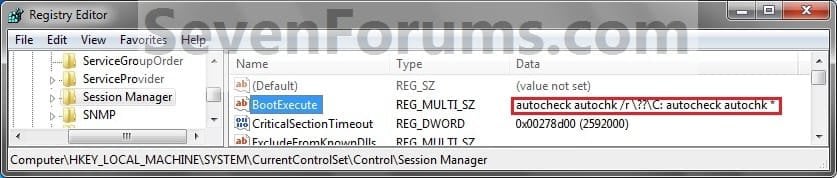
3. In regedit, navigate to the location below. (see screenshots below)
HKEY_LOCAL_MACHINE\SYSTEM\CurrentControlSet\Control\Session Manager

Step1A.jpg

Step1C.jpg

4. In the right pane, right click on BootExecute and click on Modify. (see screenshots above)

5. Copy and paste either command below, and click on OK. (See screenshot below)
(Default do not run)
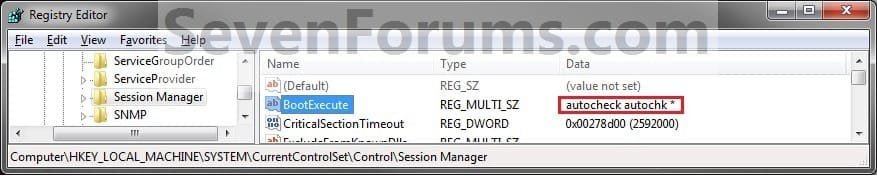
autocheck autochk *

OR

(Disable chkdsk for C: drive)
autocheck autochk /k:C *
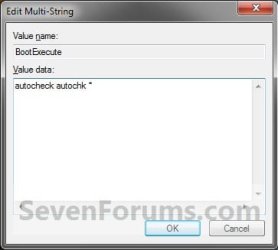
Step2.jpg
6. The registry will now look like this. (see screenshot below)
Step1B.jpg
7. Close regedit.
That's it,
Shawn


Attachments

Last edited:
I can't believe that information in a post like this is not provided on how to BOTH turn on and turn off chkdsk running. Why provide information for ONLY one thing, when it is so easy to provide information on both things (and the information on what registry settings need to be changed are already included here), so it should be very easy to provide information on both turning on and turning off the chkdsk running at startup and let people make their own choice on what they prefer.

I don't mean to be offensive, I'm autistic and autistic people tend to say the truth as they see it.
 
Last edited:

My Computer

OS
Windows 7 Ultimate x64
Hello Staragox, :-)

Since it's a separate function, I like to keep it in a separate tutorial.

:ar: Disk Check
 

My Computer

Computer type
PC/Desktop
Computer Manufacturer/Model Number
Self built custom
OS
64-bit Windows 11 Pro for Workstations
CPU
Intel i7-8700K OC'd to 5 GHz
Motherboard
ASUS ROG Maximus XI Formula Z390
Memory
64 GB (4x16GB) G.SKILL TridentZ RGB DDR4 3600 MHz
Graphics Card(s)
ASUS ROG-STRIX-GTX1080TI-O11G-GAMING
Sound Card
Integrated
Monitor(s) Displays
2 x Samsung Odyssey G7 27"
Screen Resolution
2560x1440
Hard Drives
1TB Samsung 990 PRO M.2,
4TB Samsung 990 PRO PRO M.2,
TerraMaster F8 SSD Plus NAS
PSU
Seasonic Prime Titanium 850W
Case
Thermaltake Core P3
Cooling
Corsair Hydro H115i
Keyboard
Logitech wireless K800
Mouse
Logitech MX Master 4
Internet Speed
2 Gb/s Download and 100 Mb/s Upload
Antivirus
Malwarebyte Anti-Malware Premium
Browser
Google Chrome
Other Info
Logitech Z625 speaker system,
Logitech BRIO 4K Pro webcam,
HP Color LaserJet Pro MFP M477fdn,
APC SMART-UPS RT 1000 XL - SURT1000XLI,
Galaxy S23 Plus phone
Sorry fr the bump but can I add other drives in this? I have multi HDDs and it wants to do a disk check on all three.

So can I have:

autocheck autochk /k:C *
autocheck autochk /k:d *
autocheck autochk /k:E *

It's also worth noting in an elevated command prompt I ran:

chkntfs /x c: d: e: and when I went into the RegEdit the /k was already added to C.
 

My Computer

Computer type
PC/Desktop
Computer Manufacturer/Model Number
Custom Build
OS
Windows 7 Ultimate x64 / Windows 10 Home x64
CPU
Intel i7 6700K
Motherboard
ASRock Z170 Extreme7+ LGA 1151 Intel Z170 HDMI SATA 6Gb/s US
Memory
16GB
Graphics Card(s)
GeForce GTX 980 TI
Monitor(s) Displays
HP 25VX | AOC 27 Inch
Screen Resolution
1920x1080
Hard Drives
Windows 7: 250GB
Windows 10: 1TB
Storage: 3TB
PSU
CoolerMaster 700W
Case
ThermalTake Chaser MK-1
Cooling
Fan
Keyboard
Razer Blackwidow Chroma
Mouse
Razer Mamba
Antivirus
Kaspersky Total Security
Browser
Chrome
You could use the command below to not run check disk at boot for any drive.

autocheck autochk *
 

My Computer

Computer type
PC/Desktop
Computer Manufacturer/Model Number
Self built custom
OS
64-bit Windows 11 Pro for Workstations
CPU
Intel i7-8700K OC'd to 5 GHz
Motherboard
ASUS ROG Maximus XI Formula Z390
Memory
64 GB (4x16GB) G.SKILL TridentZ RGB DDR4 3600 MHz
Graphics Card(s)
ASUS ROG-STRIX-GTX1080TI-O11G-GAMING
Sound Card
Integrated
Monitor(s) Displays
2 x Samsung Odyssey G7 27"
Screen Resolution
2560x1440
Hard Drives
1TB Samsung 990 PRO M.2,
4TB Samsung 990 PRO PRO M.2,
TerraMaster F8 SSD Plus NAS
PSU
Seasonic Prime Titanium 850W
Case
Thermaltake Core P3
Cooling
Corsair Hydro H115i
Keyboard
Logitech wireless K800
Mouse
Logitech MX Master 4
Internet Speed
2 Gb/s Download and 100 Mb/s Upload
Antivirus
Malwarebyte Anti-Malware Premium
Browser
Google Chrome
Other Info
Logitech Z625 speaker system,
Logitech BRIO 4K Pro webcam,
HP Color LaserJet Pro MFP M477fdn,
APC SMART-UPS RT 1000 XL - SURT1000XLI,
Galaxy S23 Plus phone
You could use the command below to not run check disk at boot for any drive.

autocheck autochk *

Well I did the following:

autocheck autochk /k:C *
autocheck autochk /k:d *
autocheck autochk /k:E *

Now it doesn't ask to do a check on any disks but it still wants to run a check on the following:

Checking file system on \\?\volume{3b332ccb-1ca2-11e9-a00b-806e6f6e6963}

This is the only thing trying to get a disk check now. So if I do:

autocheck autochk *

it will prevent any and all disk checks including the volume above?
 

My Computer

Computer type
PC/Desktop
Computer Manufacturer/Model Number
Custom Build
OS
Windows 7 Ultimate x64 / Windows 10 Home x64
CPU
Intel i7 6700K
Motherboard
ASRock Z170 Extreme7+ LGA 1151 Intel Z170 HDMI SATA 6Gb/s US
Memory
16GB
Graphics Card(s)
GeForce GTX 980 TI
Monitor(s) Displays
HP 25VX | AOC 27 Inch
Screen Resolution
1920x1080
Hard Drives
Windows 7: 250GB
Windows 10: 1TB
Storage: 3TB
PSU
CoolerMaster 700W
Case
ThermalTake Chaser MK-1
Cooling
Fan
Keyboard
Razer Blackwidow Chroma
Mouse
Razer Mamba
Antivirus
Kaspersky Total Security
Browser
Chrome
It should unless something is tripping Smart to perform a check.
 

My Computer

Computer type
PC/Desktop
Computer Manufacturer/Model Number
Self built custom
OS
64-bit Windows 11 Pro for Workstations
CPU
Intel i7-8700K OC'd to 5 GHz
Motherboard
ASUS ROG Maximus XI Formula Z390
Memory
64 GB (4x16GB) G.SKILL TridentZ RGB DDR4 3600 MHz
Graphics Card(s)
ASUS ROG-STRIX-GTX1080TI-O11G-GAMING
Sound Card
Integrated
Monitor(s) Displays
2 x Samsung Odyssey G7 27"
Screen Resolution
2560x1440
Hard Drives
1TB Samsung 990 PRO M.2,
4TB Samsung 990 PRO PRO M.2,
TerraMaster F8 SSD Plus NAS
PSU
Seasonic Prime Titanium 850W
Case
Thermaltake Core P3
Cooling
Corsair Hydro H115i
Keyboard
Logitech wireless K800
Mouse
Logitech MX Master 4
Internet Speed
2 Gb/s Download and 100 Mb/s Upload
Antivirus
Malwarebyte Anti-Malware Premium
Browser
Google Chrome
Other Info
Logitech Z625 speaker system,
Logitech BRIO 4K Pro webcam,
HP Color LaserJet Pro MFP M477fdn,
APC SMART-UPS RT 1000 XL - SURT1000XLI,
Galaxy S23 Plus phone
It should unless something is tripping Smart to perform a check.

By doing the autocheck autochk * it disabled disk checking on all lettered drives. But it still wants to check on

\\?\volume{3b332ccb-1ca2-11e9-a00b-806e6f6e6963}

I read somewhere it's because these aren't assigned a drive letter. This installation is fresh out the box so it shouldn't be doing that.
 

My Computer

Computer type
PC/Desktop
Computer Manufacturer/Model Number
Custom Build
OS
Windows 7 Ultimate x64 / Windows 10 Home x64
CPU
Intel i7 6700K
Motherboard
ASRock Z170 Extreme7+ LGA 1151 Intel Z170 HDMI SATA 6Gb/s US
Memory
16GB
Graphics Card(s)
GeForce GTX 980 TI
Monitor(s) Displays
HP 25VX | AOC 27 Inch
Screen Resolution
1920x1080
Hard Drives
Windows 7: 250GB
Windows 10: 1TB
Storage: 3TB
PSU
CoolerMaster 700W
Case
ThermalTake Chaser MK-1
Cooling
Fan
Keyboard
Razer Blackwidow Chroma
Mouse
Razer Mamba
Antivirus
Kaspersky Total Security
Browser
Chrome
By doing the autocheck autochk * it disabled disk checking on all lettered drives. But it still wants to check on

\\?\volume{3b332ccb-1ca2-11e9-a00b-806e6f6e6963}

I read somewhere it's because these aren't assigned a drive letter. This installation is fresh out the box so it shouldn't be doing that.

If you let it run the check, does it stop wanting to at the next boot?
 

My Computer

Computer type
PC/Desktop
Computer Manufacturer/Model Number
Self built custom
OS
64-bit Windows 11 Pro for Workstations
CPU
Intel i7-8700K OC'd to 5 GHz
Motherboard
ASUS ROG Maximus XI Formula Z390
Memory
64 GB (4x16GB) G.SKILL TridentZ RGB DDR4 3600 MHz
Graphics Card(s)
ASUS ROG-STRIX-GTX1080TI-O11G-GAMING
Sound Card
Integrated
Monitor(s) Displays
2 x Samsung Odyssey G7 27"
Screen Resolution
2560x1440
Hard Drives
1TB Samsung 990 PRO M.2,
4TB Samsung 990 PRO PRO M.2,
TerraMaster F8 SSD Plus NAS
PSU
Seasonic Prime Titanium 850W
Case
Thermaltake Core P3
Cooling
Corsair Hydro H115i
Keyboard
Logitech wireless K800
Mouse
Logitech MX Master 4
Internet Speed
2 Gb/s Download and 100 Mb/s Upload
Antivirus
Malwarebyte Anti-Malware Premium
Browser
Google Chrome
Other Info
Logitech Z625 speaker system,
Logitech BRIO 4K Pro webcam,
HP Color LaserJet Pro MFP M477fdn,
APC SMART-UPS RT 1000 XL - SURT1000XLI,
Galaxy S23 Plus phone
Back
Top