Solved CHKDSK Running at every boot

Suv

New member
Local time
4:00 PM
Messages
5
Title says it.

Really stupid and annoying problem, yet not a lot of answers:(.

I haven't installed any programs recently that could have messed my hdd up. Just scanned with my anti virus, and found two tracking cookies. I did happen to install the windows 8.1 preview on a separate partition (dual booted with windows 7), and I believe it started running this AFTER the installation. First time it ran, I didn't think anything of it, then it ran every time i booted. This ONLY happens on windows 7 boot, and that seems funnny.


I did see the "chkdsk /x c" fix, but I think its more of a workaround because it blocks your drive from being scanned. What happens when/if my drive does have problems?

Thanks,
Suv


Edit: Now that I think of it, CHKDSK finds no issues with the drive. It states that it checks for errors, then disk consistency specifically.
 
Last edited:

My Computer

Computer type
Laptop
Computer Manufacturer/Model Number
Acer
OS
Windows 7 Home Premium 64 bit
CPU
i3
Motherboard
Unknown
Memory
6GB, brand unknown
Graphics Card(s)
Onboard
Hard Drives
Unknown
Antivirus
AVG Free
Browser
Chrome running in Sandboxie

My Computer

Computer Manufacturer/Model Number
Custom Built
OS
Windows 7 Ultimate 32-Bit & Windows 7 Ultimate 64-Bit
CPU
Intel Core i7 CPU 950 @ 3.07GHz
Motherboard
ASUS P6T DELUXE V2
Memory
OCZ 6GB (3 x 2GB) 240-Pin DDR3 SDRAM DDR3 1600 OCZ3X1600R2
Graphics Card(s)
ATI Radeon HD 5700 Series
Sound Card
OnBoard
Hard Drives
WD6400AACS-00M3B0 (640GB SATA )
PSU
CORSAIR 850w
Case
NZXT LEXA
Cooling
Intel Stock Heatsink Fan
Keyboard
Microsoft Wireless Laser Keyboard 7000
Mouse
Microsoft Wireless Laser Mouse 7000
Hmmmmmm...

Tried doing option 1, no success. Screen shot of what it said is attached

Am trying option 2 right now, we will see if it works
 

Attachments

  • error1.png
    error1.png
    959 bytes · Views: 12

My Computer

Computer type
Laptop
Computer Manufacturer/Model Number
Acer
OS
Windows 7 Home Premium 64 bit
CPU
i3
Motherboard
Unknown
Memory
6GB, brand unknown
Graphics Card(s)
Onboard
Hard Drives
Unknown
Antivirus
AVG Free
Browser
Chrome running in Sandboxie
No Grace

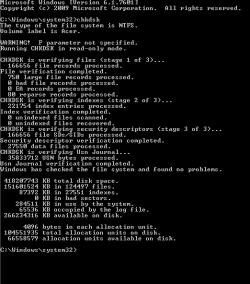
Option 2 is a failure, running chkdsk inside of windows and then see if it detects any problems.

stage one has 750 large files, 0 bad reports, 0 ea records and 80 reparse records.

Stage two found 0 of both unindexed files scanned and unindexed files recovered


at the end of all that, it says "Windows has checked the file system and found no problems" counteracting the earlier command prompt.

Have a look at the screenshot


Edit:I went to manualy edit the registry, and it was edited already. Must have been because of that registry I merged in option 2.

No luck, and i starting to think about biting the bullet and just wiping and starting over

Thanks,
Suv
 

Attachments

  • disk check 1.png
    disk check 1.png
    6.4 KB · Views: 12

My Computer

Computer type
Laptop
Computer Manufacturer/Model Number
Acer
OS
Windows 7 Home Premium 64 bit
CPU
i3
Motherboard
Unknown
Memory
6GB, brand unknown
Graphics Card(s)
Onboard
Hard Drives
Unknown
Antivirus
AVG Free
Browser
Chrome running in Sandboxie
Did you format the PC ?
 

My Computer

Computer Manufacturer/Model Number
Custom Built
OS
Windows 7 Ultimate 32-Bit & Windows 7 Ultimate 64-Bit
CPU
Intel Core i7 CPU 950 @ 3.07GHz
Motherboard
ASUS P6T DELUXE V2
Memory
OCZ 6GB (3 x 2GB) 240-Pin DDR3 SDRAM DDR3 1600 OCZ3X1600R2
Graphics Card(s)
ATI Radeon HD 5700 Series
Sound Card
OnBoard
Hard Drives
WD6400AACS-00M3B0 (640GB SATA )
PSU
CORSAIR 850w
Case
NZXT LEXA
Cooling
Intel Stock Heatsink Fan
Keyboard
Microsoft Wireless Laser Keyboard 7000
Mouse
Microsoft Wireless Laser Mouse 7000
I did not format my own C drive, although I did shrink that drive and then dual boot the windows 8.1 consumer preview.

That was done by disk management (shirk drive, then ntfs format).

My drive is a Toshiba MK5059GSXP. I was looking on the toshiba hard drive software utilities(Software Utilities)
and could find nothing related to my drive. I also could not find out if it was a re branded fujitsu drive. I read that Seagates Seetools works on all brands, so i am trying that.

Thanks,
Suv
 

My Computer

Computer type
Laptop
Computer Manufacturer/Model Number
Acer
OS
Windows 7 Home Premium 64 bit
CPU
i3
Motherboard
Unknown
Memory
6GB, brand unknown
Graphics Card(s)
Onboard
Hard Drives
Unknown
Antivirus
AVG Free
Browser
Chrome running in Sandboxie
Ya!!!

I don't no what happened, but first i booted the system recovery by miskate then shut my computer down then i booted the dos master seagate seetools, all it said was and it said freedos. No way to enter anything, so i force-shutdown, and booted windows 7. There was no chkdsk. I don't know what I did, but it worked:p.

Thanks for the help,
Suv:)
 

My Computer

Computer type
Laptop
Computer Manufacturer/Model Number
Acer
OS
Windows 7 Home Premium 64 bit
CPU
i3
Motherboard
Unknown
Memory
6GB, brand unknown
Graphics Card(s)
Onboard
Hard Drives
Unknown
Antivirus
AVG Free
Browser
Chrome running in Sandboxie
Glad you fixed your issue ?
 

My Computer

Computer Manufacturer/Model Number
Custom Built
OS
Windows 7 Ultimate 32-Bit & Windows 7 Ultimate 64-Bit
CPU
Intel Core i7 CPU 950 @ 3.07GHz
Motherboard
ASUS P6T DELUXE V2
Memory
OCZ 6GB (3 x 2GB) 240-Pin DDR3 SDRAM DDR3 1600 OCZ3X1600R2
Graphics Card(s)
ATI Radeon HD 5700 Series
Sound Card
OnBoard
Hard Drives
WD6400AACS-00M3B0 (640GB SATA )
PSU
CORSAIR 850w
Case
NZXT LEXA
Cooling
Intel Stock Heatsink Fan
Keyboard
Microsoft Wireless Laser Keyboard 7000
Mouse
Microsoft Wireless Laser Mouse 7000
Back
Top