Solved Clean Install Win7 x86. Windows Updates not working :-(

DawnR

New member
Local time
5:30 AM
Messages
12
Thank you for reading through these for me. I hope you can help me get this working. I appreciate it so much!
 

Attachments

  • scannow.jpg
    scannow.jpg
    24.9 KB · Views: 18
  • update.jpg
    update.jpg
    25 KB · Views: 18

My Computer My Computer

Computer type
PC/Desktop
Computer Manufacturer/Model Number
Custom Built
OS
Windows 7 Home Premium 64bit
CPU
AMD Phenom X3 8650
Motherboard
Gigabyte Technology
Memory
DDR2 4GB
Graphics Card(s)
ATI HD6450
Hard Drives
Seagate 1TB
Antivirus
AVast
Browser
Firefox
WELL..........BAM!!!
I am soooooo confused???
I walked away after I posted this for your help.
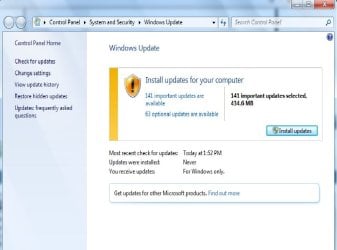
Sat down at the laptop and was welcomed by this on the screen.
HOW??? I have spent hours with this. Any ideas?
 

Attachments

  • updates.jpg
    updates.jpg
    43 KB · Views: 1

My Computer My Computer

Computer type
PC/Desktop
Computer Manufacturer/Model Number
Custom Built
OS
Windows 7 Home Premium 64bit
CPU
AMD Phenom X3 8650
Motherboard
Gigabyte Technology
Memory
DDR2 4GB
Graphics Card(s)
ATI HD6450
Hard Drives
Seagate 1TB
Antivirus
AVast
Browser
Firefox
After a Clean install you will surly have over a 100 updates.

That is what your last picture is indicating.

You need to install Windows 7 updates next.
I personally install about 10 at a time and reboot. Then do another 10 and so on.

Note:
Windows Servers are probably very busy messing with Windows 10 downloads so it may take even longer than normal.
 

My Computer My Computer

Computer type
PC/Desktop
Computer Manufacturer/Model Number
Home made Desktop
OS
Windows 10 Pro. 64/ version 1709 Windows 7 Pro/64
CPU
Intel i7-6800K @ 4.3
Motherboard
ASUS X-99 Deluxe II
Memory
Corsair Platinum 16 gig @2400
Graphics Card(s)
EVGA GTX 1070 OC
Monitor(s) Displays
Asus 27" LED LCD/VE278Q
Screen Resolution
1920-1080 or 1280-720 HDMI
Hard Drives
INTEL SSD 730-240 Gb Sata 3.0/
PSU
EVGA Platium 1200W
Case
Phanteks Luxe Tempered Glass 8 fans/ one radiator
Cooling
XSPC/ Water Cooled CPU
Keyboard
Das 4 Professional
Mouse
Logitech M705/MX Anywhere 2-S
Internet Speed
100 mbits
Antivirus
Microsoft Security Essentials/ Malwarebytes Premium 3.0/ SAS
Browser
I.E. 11 default/Firefox/ ISP Time Warner Cable/Spectrum
Other Info
LG BluRay Burner/
Sound system-KLipsch-THX/
Icy Dock ssd Hot Swap bays.
I marked as unsolved for a minute here....
Trusted Installer keeps stopping. It is set to Automatic in services. Ughhhh!
How can I fix that?
I feel back to base 1.
I have been at this mess for several days.

ETA: I have clean installed 3 times over the past 2 weeks.
It was suggested to me (not here) that my media may have been corrupt.
My disc is a retail that I purchased, I honestly doubt that my install disc is the issue.
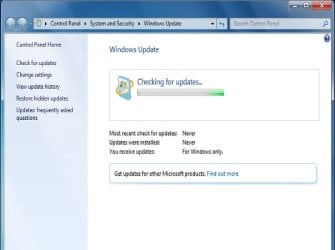
I would leave Windows checking for updates overnight to find nothing in the morning.
 

My Computer My Computer

Computer type
PC/Desktop
Computer Manufacturer/Model Number
Custom Built
OS
Windows 7 Home Premium 64bit
CPU
AMD Phenom X3 8650
Motherboard
Gigabyte Technology
Memory
DDR2 4GB
Graphics Card(s)
ATI HD6450
Hard Drives
Seagate 1TB
Antivirus
AVast
Browser
Firefox
We must not be on the same page.

Your picture show that Windows 7 want you to install updates.

Did you try to download and install any of the Important Updates?
 

My Computer My Computer

Computer type
PC/Desktop
Computer Manufacturer/Model Number
Home made Desktop
OS
Windows 10 Pro. 64/ version 1709 Windows 7 Pro/64
CPU
Intel i7-6800K @ 4.3
Motherboard
ASUS X-99 Deluxe II
Memory
Corsair Platinum 16 gig @2400
Graphics Card(s)
EVGA GTX 1070 OC
Monitor(s) Displays
Asus 27" LED LCD/VE278Q
Screen Resolution
1920-1080 or 1280-720 HDMI
Hard Drives
INTEL SSD 730-240 Gb Sata 3.0/
PSU
EVGA Platium 1200W
Case
Phanteks Luxe Tempered Glass 8 fans/ one radiator
Cooling
XSPC/ Water Cooled CPU
Keyboard
Das 4 Professional
Mouse
Logitech M705/MX Anywhere 2-S
Internet Speed
100 mbits
Antivirus
Microsoft Security Essentials/ Malwarebytes Premium 3.0/ SAS
Browser
I.E. 11 default/Firefox/ ISP Time Warner Cable/Spectrum
Other Info
LG BluRay Burner/
Sound system-KLipsch-THX/
Icy Dock ssd Hot Swap bays.
Hi,
Make sure windows is activated,
Start/ Control Panel/ System
On the bottom.
 

My Computer My Computer

Computer type
PC/Desktop
Computer Manufacturer/Model Number
Custom assembled by me :}
OS
Win-7-Pro64bit 7-H-Prem-64bit
CPU
i7-5930K 2nd i9-9940x both water blocked VRM's too
Motherboard
ASUS SABERTOOTH X99 2nd ASUS x299 Apex
Memory
Trident-z 3200C14 2nd Trident-z 3600C16
Graphics Card(s)
EVGA 1080ti ftw3 2nd Titan Xp both water blocked
Sound Card
Built-in Realtek
Monitor(s) Displays
1-AOC G2460PG 24"G-Sync 144Hz/ 2nd 1-ASUS VG248QE 24" 144Hz
Screen Resolution
1920 x 1080 144Hz
Hard Drives
2-Samsung M.2 Evo & Evo Plus
2-Samsung 850 EVO 500GB SSD's/ 3-2.5 W.D. Black 1tb-&3-1tb/3-3.5 WD Black 1tb hdd's
PSU
EVGA SuperNOVA 1000-P2 2nd 1200-P2
Case
2-Corsair Obsidian Series 450D Black ATX Mid Tower
Cooling
Custom water loops
Keyboard
Logitech G710+/ 2nd Logitech G910
Mouse
2-RedDragon M901 Perdition 16400 dpi Gaming mouse = wired
Internet Speed
Comcast Ping 19ms 89.31mbps download speed 6.12mbps upload
Antivirus
Malwarebytes Pro/ Superantispyware Pro
Browser
FireFox & Pale moon
Other Info
2nd ASUS X299 Apex/Intel i9-9940x with Custom water loop/7H-Prem-x64/Corsair 450D case/Ram Trident-z 3600C16 4x8gb / Samsung970Evo plus 500gb SSD/Dual ssd EZ swap evo/PSU EVGA SuperNova 1200w-P2 80+Platinum/GPU Titan Xp /8-ML-140 on push-pull on 2-280GTX rads
We must not be on the same page.

Your picture show that Windows 7 want you to install updates.

Did you try to download and install any of the Important Updates?

It sucessfully installed 38 updates. After reboot...Windows Update is not functioning again.


ThrashZone...Yes Windows is successfully activated.
 

My Computer My Computer

Computer type
PC/Desktop
Computer Manufacturer/Model Number
Custom Built
OS
Windows 7 Home Premium 64bit
CPU
AMD Phenom X3 8650
Motherboard
Gigabyte Technology
Memory
DDR2 4GB
Graphics Card(s)
ATI HD6450
Hard Drives
Seagate 1TB
Antivirus
AVast
Browser
Firefox
I am going to hang my hat for tonight.

Would one of you be so kind as to give me the correct order in case I decide to reinstall?
What I mean is....Troubleshooter first...or SURTool first? Or Fixit tools first?

Thank you.
 

My Computer My Computer

Computer type
PC/Desktop
Computer Manufacturer/Model Number
Custom Built
OS
Windows 7 Home Premium 64bit
CPU
AMD Phenom X3 8650
Motherboard
Gigabyte Technology
Memory
DDR2 4GB
Graphics Card(s)
ATI HD6450
Hard Drives
Seagate 1TB
Antivirus
AVast
Browser
Firefox

My Computer My Computer

Computer type
PC/Desktop
Computer Manufacturer/Model Number
Home made Desktop
OS
Windows 10 Pro. 64/ version 1709 Windows 7 Pro/64
CPU
Intel i7-6800K @ 4.3
Motherboard
ASUS X-99 Deluxe II
Memory
Corsair Platinum 16 gig @2400
Graphics Card(s)
EVGA GTX 1070 OC
Monitor(s) Displays
Asus 27" LED LCD/VE278Q
Screen Resolution
1920-1080 or 1280-720 HDMI
Hard Drives
INTEL SSD 730-240 Gb Sata 3.0/
PSU
EVGA Platium 1200W
Case
Phanteks Luxe Tempered Glass 8 fans/ one radiator
Cooling
XSPC/ Water Cooled CPU
Keyboard
Das 4 Professional
Mouse
Logitech M705/MX Anywhere 2-S
Internet Speed
100 mbits
Antivirus
Microsoft Security Essentials/ Malwarebytes Premium 3.0/ SAS
Browser
I.E. 11 default/Firefox/ ISP Time Warner Cable/Spectrum
Other Info
LG BluRay Burner/
Sound system-KLipsch-THX/
Icy Dock ssd Hot Swap bays.
If you are still having update problems I recommend do this tutorial exactly as it instructs again.
Then we will need Neol to continue with proper guidance.

http://www.sevenforums.com/windows-...4840-windows-update-posting-instructions.html

It would also be helpful to complete this tutorial by Brink and post here.

http://www.sevenforums.com/windows-...ne-activation-issue-posting-instructions.html

Thank you...This is what I did earlier today. ~~But I had tried some FixIt tools from MS.
Sooo... SURTool is very first.
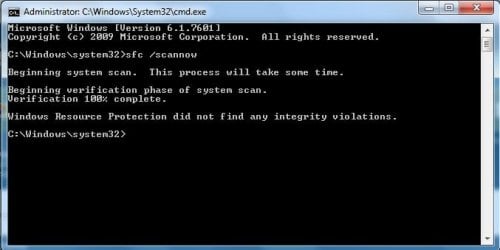
Sfc /scannow is second.
Error Codes third.
Windows Log fourth.
~~Just so I am clear...I should not do any of FixIt tools offered on the MS sites?

I had no issues with Activating Windows...I will follow that guide tomorrow.
Is the purpose of that to hopefully find an issue that is hiding in there?
I am not familiar with it.

And Thank you again for you help. I will be back tomorrow afternoon.
 

My Computer My Computer

Computer type
PC/Desktop
Computer Manufacturer/Model Number
Custom Built
OS
Windows 7 Home Premium 64bit
CPU
AMD Phenom X3 8650
Motherboard
Gigabyte Technology
Memory
DDR2 4GB
Graphics Card(s)
ATI HD6450
Hard Drives
Seagate 1TB
Antivirus
AVast
Browser
Firefox
Please do not use ANY other tools while we are working on your problem - it will merely confuse the issue.

Please post a new set of CBS and CheckSUR logs
 

My Computer My Computer

Computer type
Laptop
Computer Manufacturer/Model Number
Asus K52F or Lenovo B51-80
OS
Win 7 x64 Home Premium (and x86 VirtualBox VM)/Win10
CPU
i3 370M/i7 6500U
Motherboard
Asus/Lenovo
Memory
8GB - finally :)/8GB
Graphics Card(s)
it's an i3, dude!/dual Intel&nVidia
Sound Card
onboard
Monitor(s) Displays
15.6" built-in
Screen Resolution
1366x768/1920x1080
Hard Drives
750GB Seagate internal
Sundry external drives attached to other computers on the local network
1TB SSD on the Lenovo
PSU
n/a
Internet Speed
as much as I can get - usually on a dongle/phone, so <1MB/s
Antivirus
MSE/Defender
Browser
IE11/12/Edge/Chrome/FF(if I must)
DawnR I suggest you follow Noel's instruction exactly. He is our expert.
 

My Computer My Computer

Computer type
PC/Desktop
Computer Manufacturer/Model Number
Home made Desktop
OS
Windows 10 Pro. 64/ version 1709 Windows 7 Pro/64
CPU
Intel i7-6800K @ 4.3
Motherboard
ASUS X-99 Deluxe II
Memory
Corsair Platinum 16 gig @2400
Graphics Card(s)
EVGA GTX 1070 OC
Monitor(s) Displays
Asus 27" LED LCD/VE278Q
Screen Resolution
1920-1080 or 1280-720 HDMI
Hard Drives
INTEL SSD 730-240 Gb Sata 3.0/
PSU
EVGA Platium 1200W
Case
Phanteks Luxe Tempered Glass 8 fans/ one radiator
Cooling
XSPC/ Water Cooled CPU
Keyboard
Das 4 Professional
Mouse
Logitech M705/MX Anywhere 2-S
Internet Speed
100 mbits
Antivirus
Microsoft Security Essentials/ Malwarebytes Premium 3.0/ SAS
Browser
I.E. 11 default/Firefox/ ISP Time Warner Cable/Spectrum
Other Info
LG BluRay Burner/
Sound system-KLipsch-THX/
Icy Dock ssd Hot Swap bays.
Hello. Just popping back to follow up and mark this solved.
I did another clean install. I tried once more. I left it go overnight. It was a long deal. It would appear to lock on do not power off your pc installing updates.
I had to shut down and when I restarted things appeared to pick up and proceed.

I don't get it??? Windows said that there are 197 updates successful. Maybe it's an odd coincidence. Once I changed settings to install recommended updates with important updates. It made it work???
 

My Computer My Computer

Computer type
PC/Desktop
Computer Manufacturer/Model Number
Custom Built
OS
Windows 7 Home Premium 64bit
CPU
AMD Phenom X3 8650
Motherboard
Gigabyte Technology
Memory
DDR2 4GB
Graphics Card(s)
ATI HD6450
Hard Drives
Seagate 1TB
Antivirus
AVast
Browser
Firefox
You are correct. NEVER turn off the computer in the middle of installing Updates.
Why would one even think of doing such a thing? It tells on the computer screen, do not turn off your computer.

Did you get all the needed updates installed?
You might have to check for new Windows 7 Updates 2 or 3 more times that day.
 

My Computer My Computer

Computer type
PC/Desktop
Computer Manufacturer/Model Number
Home made Desktop
OS
Windows 10 Pro. 64/ version 1709 Windows 7 Pro/64
CPU
Intel i7-6800K @ 4.3
Motherboard
ASUS X-99 Deluxe II
Memory
Corsair Platinum 16 gig @2400
Graphics Card(s)
EVGA GTX 1070 OC
Monitor(s) Displays
Asus 27" LED LCD/VE278Q
Screen Resolution
1920-1080 or 1280-720 HDMI
Hard Drives
INTEL SSD 730-240 Gb Sata 3.0/
PSU
EVGA Platium 1200W
Case
Phanteks Luxe Tempered Glass 8 fans/ one radiator
Cooling
XSPC/ Water Cooled CPU
Keyboard
Das 4 Professional
Mouse
Logitech M705/MX Anywhere 2-S
Internet Speed
100 mbits
Antivirus
Microsoft Security Essentials/ Malwarebytes Premium 3.0/ SAS
Browser
I.E. 11 default/Firefox/ ISP Time Warner Cable/Spectrum
Other Info
LG BluRay Burner/
Sound system-KLipsch-THX/
Icy Dock ssd Hot Swap bays.
You are correct. NEVER turn off the computer in the middle of installing Updates.
Why would one even think of doing such a thing? It tells on the computer screen, do not turn off your computer.

Did you get all the needed updates installed?
You might have to check for new Windows 7 Updates 2 or 3 more times that day.

I cringed while shutting it down for sure.
It was frozen for over 6 hours. The hard drive led was solid for 3 of those hours.
For whatever reason. It locked.
I just counted... There's 231 updates successfully installed...
So who knows???
 

My Computer My Computer

Computer type
PC/Desktop
Computer Manufacturer/Model Number
Custom Built
OS
Windows 7 Home Premium 64bit
CPU
AMD Phenom X3 8650
Motherboard
Gigabyte Technology
Memory
DDR2 4GB
Graphics Card(s)
ATI HD6450
Hard Drives
Seagate 1TB
Antivirus
AVast
Browser
Firefox
Back
Top