Clean Wipe & Install Errors..

ileikhip

New member
Local time
1:26 AM
Messages
1
Hey there, basically my problem is that I want to wipe my computer clean, and have a fresh install of Windows 7.
I have the discs that came with my computer.
But here is the problem, when I boot my PC up with my CD Drive running first with the first installation CD, the computer says: "CD-ROM Boot Priority" and counts down for a couple seconds then says "CD-ROM Boot Priority .. Boot Ready" But then doesnt do anything, and after about 30 seconds it goes back to the screen that says "Launch Startup Repair" and "Start Windows Normally"
What should I do? I've tried all that I know of, and I'm thinking I should just take this in to the local computer store here..
Any help will be appreciated ! :)

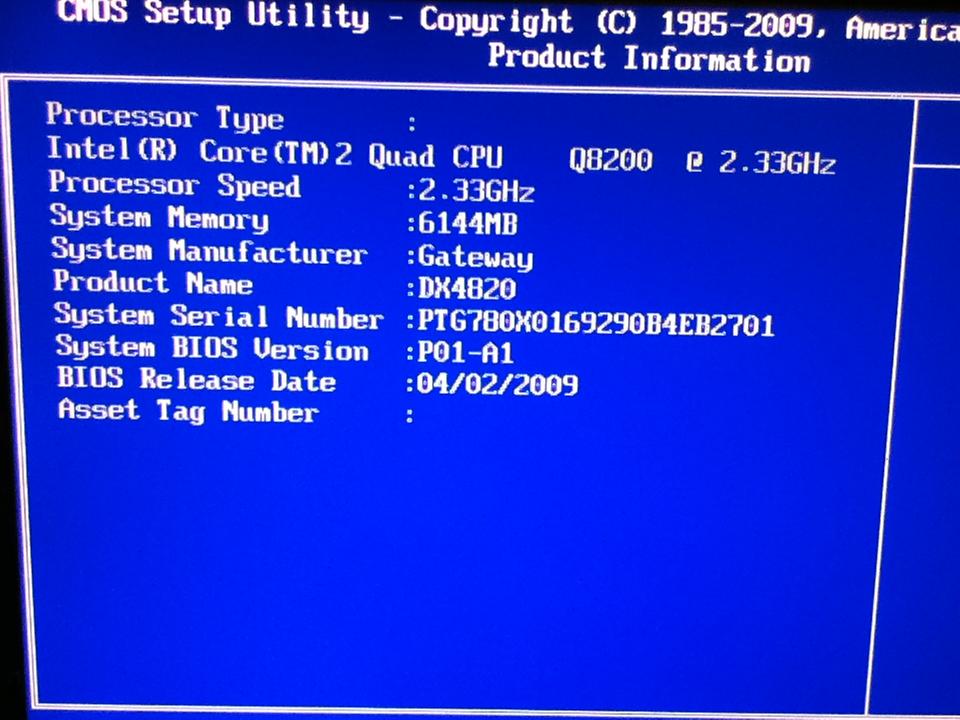
Specs:

99Z0m.jpg
 
Last edited by a moderator:

My Computer

OS
Windows 7 64 bit
Please fill out your system specs.

What is the title of the disk you are trying to boot from? Exactly what does it say on this disk?

Those disks may be able to do a clean install or maybe not.

Are you sure you want to do a clean install rather than restore your computer to factory specifications?

Even if your disks won't do a clean install, you should be able to download an ISO and burn a disk that will do a clean install---if that is truly what you want.
 

My Computer

Computer type
PC/Desktop
Computer Manufacturer/Model Number
Ignatz Special; 4 speed manual gearbox; factory air conditioning; one of one
OS
Windows 7 Home Premium SP1, 64-bit
CPU
Intel Skylake i5-6600K, not overclocked
Motherboard
AsRock Z170M Extreme 4, micro ATX
Memory
8 GB HyperX DDR4-2666 (2 x 4 GB)
Graphics Card(s)
none; graphics are integrated on CPU
Sound Card
onboard: Realtek ALC1150; external: USB Behringer UF0-202
Monitor(s) Displays
Dell S2340M 23 inch IPS
Screen Resolution
1600 x 900
Hard Drives
System: Crucial MX100 series SSD, 128 GB;
Data: Samsung Spinpoint 103SJ, 1 TB;
Backup: WD Caviar Green WD30EZRX-00D8PB0, 3 TB
PSU
Rosewill SilentNight 500 watt fanless, semi-modular
Case
Antec Solo II
Cooling
Noctua NH-U12S; Noctua F12 intake, Noctua S12A exhaust
Keyboard
Microsoft 200 6JH-00001 USB
Mouse
Dell or Microsoft optical wired; USB
Antivirus
Microsoft Security Essentials and Malwarebytes Premium
Browser
Pale Moon
Other Info
All fans PWM; speeds at idle: CPU circa 500 rpm; intake circa 600 rpm; exhaust circa 600 rpm; CPU temps 27 idle and 47 C load in a warm room (27 C/81 F) when running Intel Extreme Tuning Utility stress test.
ileikhip,
As requested, please fill in some system spec info. We don't know whether you've got a cat, a dog, an Hp, a Dell or what. We don't know if it's laptop or desktop. We don't know the model.
We need some help from you.
 

My Computer

Computer Manufacturer/Model Number
Toshiba Satellite S875D-S7239 laptop
OS
MS Windows 7 Ultimate SP1 64-bit
CPU
AMD A10-4600M
Motherboard
AMD Pumori (Socket FT1)
Memory
6.00 GB Dual-Channel DDR3 @ 798MHz (11-11-12-28)
Graphics Card(s)
AMD Radeon HD 7660G
Sound Card
High Definition Audio Device
Monitor(s) Displays
Generic PnP Monitor (1600x900@60Hz)
Screen Resolution
1600x900@60Hz
Hard Drives
SSD 119GB Corsair CSSD-V128GB2 ATA Device
Keyboard
Standard PS/2 Keyboard
Mouse
HP Wireless Optical Mobile Mouse Model FHA-3410
Internet Speed
What the local pub, local coffee shop offers.
Other Info
Optical Drive:MATSHITA BD-CMB UJ160B ATA Device


Also have an Asus ha1002xp netbook with Win 7 Ultimate installed.
Back
Top