I have created a detailed post on my blog on how I am currently viewing the text of what the actors say while watching a DVD in Windows 7 Media Center:
I am currently watching
Lord of the Rings - The Return of the King with English Subtitles on:
Here is what I did to be able to see what the actors are saying while watching this DVD movie in W7 Media Center:
First, and as I thought, Microsoft in fact supports those with disabilities:
http://www.microsoft.com/enable/
There is a section in the CP below that turns on text captions.
Control Panel>All Control Panel Items>Ease of Access Center>Get recommendations to make your computer easier to use
Run this routine and select ‘deaf’ and any others that apply:

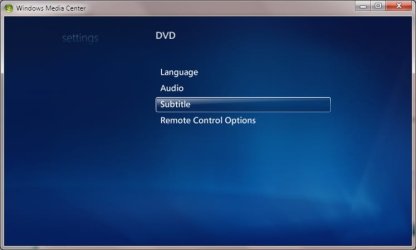
I then went to Windows Media Center and navigated to the the DVD Subtitles Section:
Tasks>Settings>DVD> and set Language to ‘English’ and set Subtitles to ‘On When Muted’
Make sure to save.

Then, I popped in the DVD and began playing it.
For this movie I had to enter the DVD Menu by right clicking on the movie playing:

and switch the Audio to English Subtitles:

Then, all I had to do was
mute the sound and I began to see the text of the actors dialogue:

A right click over the movie while playing shows a ‘ribbon’:

That should be it!


 )
)


