Color Bit Depth - Display Settings

How to Change the Color Bit Depth in Windows 7


   Information
This will show you how to change your Colors settings to the Color bit you want in the Windows 7 Display Settings.
   Note
Windows 7 colors and themes work best when you have your monitor set to True Color 32 bit color depth. You can set your monitor to 24-bit color, but you won't see all the visual effects. If you set your monitor to 16-bit color, images that should be smooth might not appear correctly. The available colors to choose from will depend on your monitor and graphic card drivers.
   Warning
Aero Requirements to be Enabled in Windows 7:
  • 1 GHz 32-bit or 64-bit processor
  • 1 GB of system memory
  • Support for DirectX 9 graphics with 128 MB memory (in order to enable Aero theme)
  • You must be have True Color (32 bit) set instead of High Color (16 bit).
  • The desktop composition and Animate controls and elements inside windows options enabled in Visual Effects.
  • Refresh or update your WEI score.


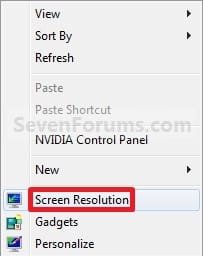
Here's How: 1. Right click on a empty space on the desktop and click on Screen Resolution. (See screenshot below)
145d1230591116-color-bit-depth-display-settings-right_click.jpg

2. Select the monitor Display you want to change the color bit depth for. (See screenshot below step 3)
NOTE: You will only be able to select a different display if you have more than one monitor connected.

3. Click on the Advanced settings link. (See screenshot below)
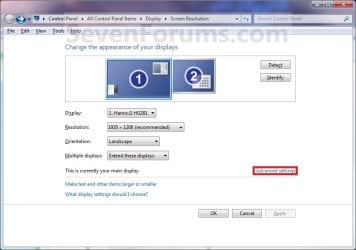
Display_Settings.jpg
4. To Select from a List of All Display Modes A) Click on the Adapter tab, and on the List All Modes button. (See screenshot below) Adapter1.jpg
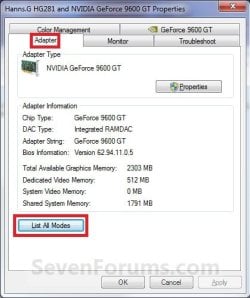
B) Select the display mode with the screen resolution, color depth, and screen refresh rate that you want to use, and click on OK. (See screenshot below)
NOTE: It is recommended to use a native screen resolution with a True Color (32-bit) color depth. Adapter2.jpg
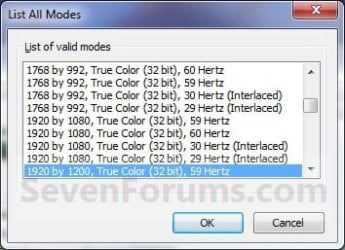
C) Click on OK. (See screenshot below step 4A)
5. To Change Only the Color Depth Setting A) Click on the Monitor tab. (See screenshot below step 5C)

B) Select from the available Colors from the drop down menu the color bit you want. (See screenshot below step 5C)
WARNING: It is recommended to use True Color (32 bit) for the best picture for your monitor.

C) Click on OK. Colors.jpg
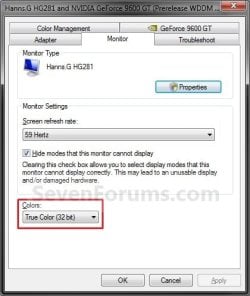
D) Go to step 6.
6. Click on Yes to confirm the color bit change. (See screenshot below) Confirm.jpg
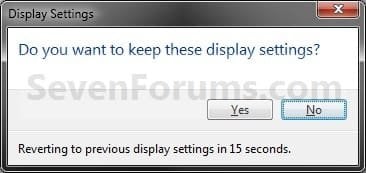
7. Click on OK. (See screenshot below step 3)
That's it,
Shawn


Attachments

  • Right_Click.jpg
    Right_Click.jpg
    7.5 KB · Views: 354,970
Last edited:
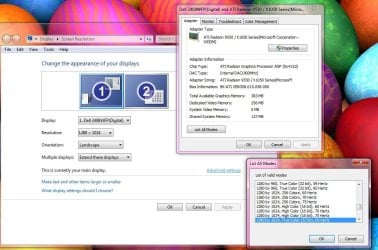
I would just like to add that for my particular set-up I have one extra step I must follow - others may need to do this also:
Go into advance settings and than click on the list all modes button - this may be the only way to achieve the desired resolution . ;)
 

Attachments

  • aaaaaaaa.JPG
    aaaaaaaa.JPG
    113.5 KB · Views: 4,705

My Computer

Computer Manufacturer/Model Number
dell optiplex - 2003
OS
windows7 7600 x86
CPU
itel pentium 4
Memory
3.00 GB
Graphics Card(s)
diamond radion x1050
Sound Card
SoundMax
Monitor(s) Displays
dell 2408wfp dell e172fp
Screen Resolution
1920 x 1200 1280 x 1024
Hard Drives
2 - 80 GB internals WD
1 - 01 TB ext
2 - 750 GB ext
1- 500 GB ext
all running on system no problems
Keyboard
old logitech cordless
Mouse
logitech wireless
Internet Speed
16 / 4
Other Info
networked into my sbs2003 server running sp1 still
it's a wonder I could even get windows 7 to connect to it
Hello T41,

Good point. I have added that as an option as well. :)

Thank you,
Shawn
 

My Computer

Computer type
PC/Desktop
Computer Manufacturer/Model Number
Self built custom
OS
64-bit Windows 11 Pro for Workstations
CPU
Intel i7-8700K OC'd to 5 GHz
Motherboard
ASUS ROG Maximus XI Formula Z390
Memory
64 GB (4x16GB) G.SKILL TridentZ RGB DDR4 3600 MHz
Graphics Card(s)
ASUS ROG-STRIX-GTX1080TI-O11G-GAMING
Sound Card
Integrated
Monitor(s) Displays
2 x Samsung Odyssey G7 27"
Screen Resolution
2560x1440
Hard Drives
1TB Samsung 990 PRO M.2,
4TB Samsung 990 PRO PRO M.2,
TerraMaster F8 SSD Plus NAS
PSU
Seasonic Prime Titanium 850W
Case
Thermaltake Core P3
Cooling
Corsair Hydro H115i
Keyboard
Logitech wireless K800
Mouse
Logitech MX Master 4
Internet Speed
2 Gb/s Download and 100 Mb/s Upload
Antivirus
Malwarebyte Anti-Malware Premium
Browser
Google Chrome
Other Info
Logitech Z625 speaker system,
Logitech BRIO 4K Pro webcam,
HP Color LaserJet Pro MFP M477fdn,
APC SMART-UPS RT 1000 XL - SURT1000XLI,
Galaxy S23 Plus phone
The change from 32 bit to 16 bit color restored some icons that had become generic. However, as soon as I changed it back to 32 bit the generic icons were back.

How do I fix this?

thanks,

James
 

My Computer

OS
Windows 7 Home
Hello James, and welcome to Seven Forums.

You might see if rebuilding the icon cache may be able to help.

Hope this helps,
Shawn
 

My Computer

Computer type
PC/Desktop
Computer Manufacturer/Model Number
Self built custom
OS
64-bit Windows 11 Pro for Workstations
CPU
Intel i7-8700K OC'd to 5 GHz
Motherboard
ASUS ROG Maximus XI Formula Z390
Memory
64 GB (4x16GB) G.SKILL TridentZ RGB DDR4 3600 MHz
Graphics Card(s)
ASUS ROG-STRIX-GTX1080TI-O11G-GAMING
Sound Card
Integrated
Monitor(s) Displays
2 x Samsung Odyssey G7 27"
Screen Resolution
2560x1440
Hard Drives
1TB Samsung 990 PRO M.2,
4TB Samsung 990 PRO PRO M.2,
TerraMaster F8 SSD Plus NAS
PSU
Seasonic Prime Titanium 850W
Case
Thermaltake Core P3
Cooling
Corsair Hydro H115i
Keyboard
Logitech wireless K800
Mouse
Logitech MX Master 4
Internet Speed
2 Gb/s Download and 100 Mb/s Upload
Antivirus
Malwarebyte Anti-Malware Premium
Browser
Google Chrome
Other Info
Logitech Z625 speaker system,
Logitech BRIO 4K Pro webcam,
HP Color LaserJet Pro MFP M477fdn,
APC SMART-UPS RT 1000 XL - SURT1000XLI,
Galaxy S23 Plus phone
I think the change of color depth above does refresh the cache.

I found the following SOLUTION: :D:D After changing from 32 bit to 16 bit color, you must REBOOT the computer; this BEFORE changing color depth back to 32 bit. When done this way the icons are corrected and do not revert when you change it! If you change it without rebooting first, it does not work.


Best Thoughts,

James


Keywords for search engine: some Windows 7 icons become generic icons / original icons replaced by generic icons / how to repair missing icons or changed icons.
 

My Computer

OS
Windows 7 Home
That's great news James. :)

Changing the color depth may work sometimes, but the link above to rebuild the icon cache is more thorough. If it happens again, you might give it a try.
 

My Computer

Computer type
PC/Desktop
Computer Manufacturer/Model Number
Self built custom
OS
64-bit Windows 11 Pro for Workstations
CPU
Intel i7-8700K OC'd to 5 GHz
Motherboard
ASUS ROG Maximus XI Formula Z390
Memory
64 GB (4x16GB) G.SKILL TridentZ RGB DDR4 3600 MHz
Graphics Card(s)
ASUS ROG-STRIX-GTX1080TI-O11G-GAMING
Sound Card
Integrated
Monitor(s) Displays
2 x Samsung Odyssey G7 27"
Screen Resolution
2560x1440
Hard Drives
1TB Samsung 990 PRO M.2,
4TB Samsung 990 PRO PRO M.2,
TerraMaster F8 SSD Plus NAS
PSU
Seasonic Prime Titanium 850W
Case
Thermaltake Core P3
Cooling
Corsair Hydro H115i
Keyboard
Logitech wireless K800
Mouse
Logitech MX Master 4
Internet Speed
2 Gb/s Download and 100 Mb/s Upload
Antivirus
Malwarebyte Anti-Malware Premium
Browser
Google Chrome
Other Info
Logitech Z625 speaker system,
Logitech BRIO 4K Pro webcam,
HP Color LaserJet Pro MFP M477fdn,
APC SMART-UPS RT 1000 XL - SURT1000XLI,
Galaxy S23 Plus phone
Hi i need you help :/

I did your TUT and i dont have "High [32 bit]" i cant seem to find a website where i can download it:cry:. cause i cant exactly do anything with this computer until i get 32 bit...any suggestions?.

Thx
Mike.
 
Last edited by a moderator:

My Computer

Computer Manufacturer/Model Number
Dell Computer Corporation
OS
Windows Home
CPU
Intelm Pentium lll EB
Motherboard
OptiPlex GX150
Memory
SDRAM
Graphics Card(s)
Intel(R) 82815 Graphics Controller (Microsoft Corporation)
Screen Resolution
1152 by 864 pixels
Cooling
Fan
Keyboard
compaq
Mouse
Logitech
Internet Speed
54.0 Mbps Excellent
Other Info
Computer Specification:Intel(R) lll CPU 1133MHz.
Bios.
Brand:Dell Computer Corporation
Version:A10
Date:07/29/2002
.
Chipset:Intel-i815/E/EP-Rev.B
Southbridge:Intel-82801BA (ICHZ)-Rev.11
LPCIO:NS-PC87364
.
(Memory)General
Type:SDRAM
Size:256 MBytes
(MemoryTimings
DRAM Frequency:132.9 MHz
FSB:DRAM:1:1
CAS# Latency (CL):3.0 clocks
RAS# to CAS# Delay (tRCD):3 clocks
RAS# Precharge (
Hello SublimESmokeR, and welcome to Seven Forums.

If you would, please fill out your system specs to help us determine better if your system may be the minimum requirements for it. Specifically, we need to know what the brand and model is for your monitor and graphics card/chip, or brand and model of your computer it it's a store bought OEM computer.

Check the items in the Warning box at the top of the tutorial to see if any those may be the issue.

In addition, do you have the latest driver version installed for your graphics card/chip, and monitor (if one is available for the monitor)?
 

My Computer

Computer type
PC/Desktop
Computer Manufacturer/Model Number
Self built custom
OS
64-bit Windows 11 Pro for Workstations
CPU
Intel i7-8700K OC'd to 5 GHz
Motherboard
ASUS ROG Maximus XI Formula Z390
Memory
64 GB (4x16GB) G.SKILL TridentZ RGB DDR4 3600 MHz
Graphics Card(s)
ASUS ROG-STRIX-GTX1080TI-O11G-GAMING
Sound Card
Integrated
Monitor(s) Displays
2 x Samsung Odyssey G7 27"
Screen Resolution
2560x1440
Hard Drives
1TB Samsung 990 PRO M.2,
4TB Samsung 990 PRO PRO M.2,
TerraMaster F8 SSD Plus NAS
PSU
Seasonic Prime Titanium 850W
Case
Thermaltake Core P3
Cooling
Corsair Hydro H115i
Keyboard
Logitech wireless K800
Mouse
Logitech MX Master 4
Internet Speed
2 Gb/s Download and 100 Mb/s Upload
Antivirus
Malwarebyte Anti-Malware Premium
Browser
Google Chrome
Other Info
Logitech Z625 speaker system,
Logitech BRIO 4K Pro webcam,
HP Color LaserJet Pro MFP M477fdn,
APC SMART-UPS RT 1000 XL - SURT1000XLI,
Galaxy S23 Plus phone
Im sorry brink, im only 14 years old, and i only know its an old Dell desktop. i dont know much about this computer at all. but when i get a bit of time i WILL go through the stepps, because i allready spent an entire day searching for it...i dont have 32 bit quality on my computer period, max quality i have is 24 bit...but i will goto your links and try things out. I have Filled All I Know, So Plz Check it out. hope it will help
Thx
Get back to me soon
 
Last edited:

My Computer

Computer Manufacturer/Model Number
Dell Computer Corporation
OS
Windows Home
CPU
Intelm Pentium lll EB
Motherboard
OptiPlex GX150
Memory
SDRAM
Graphics Card(s)
Intel(R) 82815 Graphics Controller (Microsoft Corporation)
Screen Resolution
1152 by 864 pixels
Cooling
Fan
Keyboard
compaq
Mouse
Logitech
Internet Speed
54.0 Mbps Excellent
Other Info
Computer Specification:Intel(R) lll CPU 1133MHz.
Bios.
Brand:Dell Computer Corporation
Version:A10
Date:07/29/2002
.
Chipset:Intel-i815/E/EP-Rev.B
Southbridge:Intel-82801BA (ICHZ)-Rev.11
LPCIO:NS-PC87364
.
(Memory)General
Type:SDRAM
Size:256 MBytes
(MemoryTimings
DRAM Frequency:132.9 MHz
FSB:DRAM:1:1
CAS# Latency (CL):3.0 clocks
RAS# to CAS# Delay (tRCD):3 clocks
RAS# Precharge (

My Computer

Computer type
PC/Desktop
Computer Manufacturer/Model Number
Self built custom
OS
64-bit Windows 11 Pro for Workstations
CPU
Intel i7-8700K OC'd to 5 GHz
Motherboard
ASUS ROG Maximus XI Formula Z390
Memory
64 GB (4x16GB) G.SKILL TridentZ RGB DDR4 3600 MHz
Graphics Card(s)
ASUS ROG-STRIX-GTX1080TI-O11G-GAMING
Sound Card
Integrated
Monitor(s) Displays
2 x Samsung Odyssey G7 27"
Screen Resolution
2560x1440
Hard Drives
1TB Samsung 990 PRO M.2,
4TB Samsung 990 PRO PRO M.2,
TerraMaster F8 SSD Plus NAS
PSU
Seasonic Prime Titanium 850W
Case
Thermaltake Core P3
Cooling
Corsair Hydro H115i
Keyboard
Logitech wireless K800
Mouse
Logitech MX Master 4
Internet Speed
2 Gb/s Download and 100 Mb/s Upload
Antivirus
Malwarebyte Anti-Malware Premium
Browser
Google Chrome
Other Info
Logitech Z625 speaker system,
Logitech BRIO 4K Pro webcam,
HP Color LaserJet Pro MFP M477fdn,
APC SMART-UPS RT 1000 XL - SURT1000XLI,
Galaxy S23 Plus phone
Hi there!

I'm having a bit of a problem, perhaps you'll be able to help me out:

I have 2 Samsung monitors, a SyncMaster 740N and a 2243LNX connected to each output of a 9500GT (I'm using DVI-VGA adapters on both), I'm running the first on 1280x1024 and the second on 1680x1050 resolutions, but I have a problem: I want to run one on 16bit color depth and the other on 32bit. But this seems impossible (changing the color depth of one also changes the other, even though in the configurations menu they claim to be in the dephts I setted them independently).

So.. any thoughts?

PS: I'm running Windows Server 2008 R2 Enterprise with SP1.
 

My Computer

OS
MS Windows Server 2008 R2
CPU
AMD Phenom X3 8650
Motherboard
MSI MS-7374
Memory
Kingston 2.0GB Dual-Channel DDR2 @ 400MHz 6-6-6-18
Graphics Card(s)
512MB GeForce 9500 GT (XFX Pine Group)
Sound Card
Realtek High Definition Audio
Monitor(s) Displays
SyncMaster 2243lnx @ 1680x1050
Hard Drives
"500"GB FUJITSU MAXTOR STM3500320AS ATA Device (IDE)
"500"GB Western Digital WDC WD5000AAKS-00H2B0 ATA Device (IDE)
"300"GB Western Digital WDC ATA Device (IDE)
PSU
Cooler Master 650W
Case
COOLER MASTER 609
Hello ZippoLag,

I haven't tried it myself, but you might check in your NVIDIA Control Center settings to see if you may be able to set a different color depth per monitor.

Hope this helps, :)
Shawn
 

My Computer

Computer type
PC/Desktop
Computer Manufacturer/Model Number
Self built custom
OS
64-bit Windows 11 Pro for Workstations
CPU
Intel i7-8700K OC'd to 5 GHz
Motherboard
ASUS ROG Maximus XI Formula Z390
Memory
64 GB (4x16GB) G.SKILL TridentZ RGB DDR4 3600 MHz
Graphics Card(s)
ASUS ROG-STRIX-GTX1080TI-O11G-GAMING
Sound Card
Integrated
Monitor(s) Displays
2 x Samsung Odyssey G7 27"
Screen Resolution
2560x1440
Hard Drives
1TB Samsung 990 PRO M.2,
4TB Samsung 990 PRO PRO M.2,
TerraMaster F8 SSD Plus NAS
PSU
Seasonic Prime Titanium 850W
Case
Thermaltake Core P3
Cooling
Corsair Hydro H115i
Keyboard
Logitech wireless K800
Mouse
Logitech MX Master 4
Internet Speed
2 Gb/s Download and 100 Mb/s Upload
Antivirus
Malwarebyte Anti-Malware Premium
Browser
Google Chrome
Other Info
Logitech Z625 speaker system,
Logitech BRIO 4K Pro webcam,
HP Color LaserJet Pro MFP M477fdn,
APC SMART-UPS RT 1000 XL - SURT1000XLI,
Galaxy S23 Plus phone
Hello ZippoLag,

I haven't tried it myself, but you might check in your NVIDIA Control Center settings to see if you may be able to set a different color depth per monitor.

Hope this helps, :)
Shawn

Thanks for the quick reply!

Anyays, no, I had already tried that too, it's the same as if I were to use Windows's menus..
 

My Computer

OS
MS Windows Server 2008 R2
CPU
AMD Phenom X3 8650
Motherboard
MSI MS-7374
Memory
Kingston 2.0GB Dual-Channel DDR2 @ 400MHz 6-6-6-18
Graphics Card(s)
512MB GeForce 9500 GT (XFX Pine Group)
Sound Card
Realtek High Definition Audio
Monitor(s) Displays
SyncMaster 2243lnx @ 1680x1050
Hard Drives
"500"GB FUJITSU MAXTOR STM3500320AS ATA Device (IDE)
"500"GB Western Digital WDC WD5000AAKS-00H2B0 ATA Device (IDE)
"300"GB Western Digital WDC ATA Device (IDE)
PSU
Cooler Master 650W
Case
COOLER MASTER 609
can i choose any of these list of color in my dell inspiron 5050 ... thanks
 

My Computer

OS
32
Hello Mohaman,

Yes, but using one with 32 bit would give you better color depth quality.

Hope this helps, :)
Shawn
 

My Computer

Computer type
PC/Desktop
Computer Manufacturer/Model Number
Self built custom
OS
64-bit Windows 11 Pro for Workstations
CPU
Intel i7-8700K OC'd to 5 GHz
Motherboard
ASUS ROG Maximus XI Formula Z390
Memory
64 GB (4x16GB) G.SKILL TridentZ RGB DDR4 3600 MHz
Graphics Card(s)
ASUS ROG-STRIX-GTX1080TI-O11G-GAMING
Sound Card
Integrated
Monitor(s) Displays
2 x Samsung Odyssey G7 27"
Screen Resolution
2560x1440
Hard Drives
1TB Samsung 990 PRO M.2,
4TB Samsung 990 PRO PRO M.2,
TerraMaster F8 SSD Plus NAS
PSU
Seasonic Prime Titanium 850W
Case
Thermaltake Core P3
Cooling
Corsair Hydro H115i
Keyboard
Logitech wireless K800
Mouse
Logitech MX Master 4
Internet Speed
2 Gb/s Download and 100 Mb/s Upload
Antivirus
Malwarebyte Anti-Malware Premium
Browser
Google Chrome
Other Info
Logitech Z625 speaker system,
Logitech BRIO 4K Pro webcam,
HP Color LaserJet Pro MFP M477fdn,
APC SMART-UPS RT 1000 XL - SURT1000XLI,
Galaxy S23 Plus phone
Back
Top