Context Menu - Add Copy To Folder and Move To Folder

How to Add "Copy To Folder" and "Move To Folder" to Context Menu in Windows 7 and Windows 8

   Information
This tutorial will show you how to add or remove Copy To Folder and Move to Folder to the context menu for all users in Windows 7 and Windows 8.

You must me logged in as an administrator to be able to do the steps in this tutorial.

   Note
Copy To Folder allows you to right click selected file(s) and folder(s) and copy them to another location immediately.

Move to Folder allows you to right click on selected file(s) and folder(s) and move them to another location, then remove them from their current location immediately.

In Windows 7, the default location for Copy To Folder and Move To Folder is in the Edit menu bar menu in Windows Explorer.
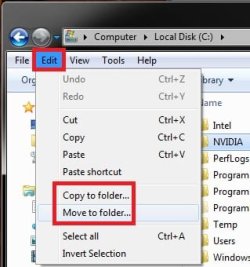
Default.jpg
In Windows 8 and 8.1, the default location for Copy To Folder and Move To Folder is in the Home tab in the ribbon of File Explorer. You would click/tap on Choose location to see the "Copy Items" or "Move Items" dialog.
W8.jpg
   Tip
To Copy file(s) regardless of the source and target destination, hold down the CTRL key while you drag and drop the file(s).

To Move file(s) regardless of the source and target destination, hold down the SHIFT key while you drag and drop the file(s).


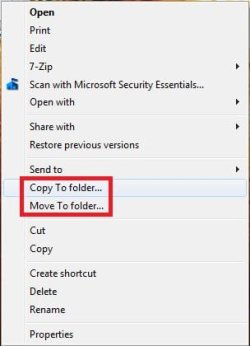
EXAMPLE: "Copy To Folder" and "Move To Folder" added to the Context Menu
NOTE: Right click on selected file(s) and folder(s) to see your new additions.
Default_Context_Menu.jpgAdded.jpg
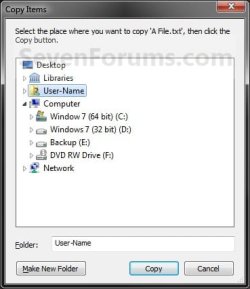
EXAMPLE: Copy To Folder and Move To Folder windows
NOTE: You can see what happens when you click on each of these context menu items to.
578d1226688176-context-menu-add-copy-folder-move-folder-copy_to_folder.jpg
579d1226688176-context-menu-add-copy-folder-move-folder-move_to_folder.jpg


OPTION ONE

Add or Remove "Copy To Folder" from the Context Menu


1. To Add "Copy To Folder" to Context Menu
A) Click/tap on the Download button below to download the file below, and go to step 3 below.
Add_Copy_To_Folder.reg

Download


B) Go to step 3.
2. To Remove "Copy To Folder" from Context Menu
A) Click/tap on the Download button below to download the file below, and go to step 3 below.
Remove_Copy_To_Folder.reg

Download


3. Save the .reg file to the desktop.

4. Double click/tap on the downloaded .reg file to merge it.

5. When prompted, click/tap on Run, Yes (UAC), Yes, and OK to approve merging the .reg file.

6. You can now delete the downloaded .reg file if you like.


OPTION TWO

Add or Remove "Move To Folder" from the Context Menu


1. To Add "Move To Folder" to Context Menu
A) Click/tap on the Download button below to download the file below, and go to step 3 below.
Add_Move_To_Folder.reg

Download


B) Go to step 3.
2. To Remove "Move To Folder" from Context Menu
A) Click/tap on the Download button below to download the file below, and go to step 3 below.
Remove_Move_To_Folder.reg

Download


3. Save the .reg file to the desktop.

4. Double click/tap on the downloaded .reg file to merge it.

5. When prompted, click/tap on Run, Yes (UAC), Yes, and OK to approve merging the .reg file.

6. You can now delete the downloaded .reg file if you like.

That's it,
Shawn


Attachments

Last edited:
Cgelic,

It's there. C:\Users\(user-name)\AppData\Roaming\Microsoft\Windows\SendTo is a hidden system file. You will just need to unhide system files before you will see it.
 

My Computer My Computer

Computer type
PC/Desktop
Computer Manufacturer/Model Number
Self built custom
OS
64-bit Windows 11 Pro for Workstations
CPU
Intel i7-8700K OC'd to 5 GHz
Motherboard
ASUS ROG Maximus XI Formula Z390
Memory
64 GB (4x16GB) G.SKILL TridentZ RGB DDR4 3600 MHz
Graphics Card(s)
ASUS ROG-STRIX-GTX1080TI-O11G-GAMING
Sound Card
Integrated
Monitor(s) Displays
2 x Samsung Odyssey G7 27"
Screen Resolution
2560x1440
Hard Drives
1TB Samsung 990 PRO M.2,
4TB Samsung 990 PRO PRO M.2,
TerraMaster F8 SSD Plus NAS
PSU
Seasonic Prime Titanium 850W
Case
Thermaltake Core P3
Cooling
Corsair Hydro H115i
Keyboard
Logitech wireless K800
Mouse
Logitech MX Master 4
Internet Speed
2 Gb/s Download and 100 Mb/s Upload
Antivirus
Malwarebyte Anti-Malware Premium
Browser
Google Chrome
Other Info
Logitech Z625 speaker system,
Logitech BRIO 4K Pro webcam,
HP Color LaserJet Pro MFP M477fdn,
APC SMART-UPS RT 1000 XL - SURT1000XLI,
Galaxy S23 Plus phone
You're welcome Horeen. :)
 

My Computer My Computer

Computer type
PC/Desktop
Computer Manufacturer/Model Number
Self built custom
OS
64-bit Windows 11 Pro for Workstations
CPU
Intel i7-8700K OC'd to 5 GHz
Motherboard
ASUS ROG Maximus XI Formula Z390
Memory
64 GB (4x16GB) G.SKILL TridentZ RGB DDR4 3600 MHz
Graphics Card(s)
ASUS ROG-STRIX-GTX1080TI-O11G-GAMING
Sound Card
Integrated
Monitor(s) Displays
2 x Samsung Odyssey G7 27"
Screen Resolution
2560x1440
Hard Drives
1TB Samsung 990 PRO M.2,
4TB Samsung 990 PRO PRO M.2,
TerraMaster F8 SSD Plus NAS
PSU
Seasonic Prime Titanium 850W
Case
Thermaltake Core P3
Cooling
Corsair Hydro H115i
Keyboard
Logitech wireless K800
Mouse
Logitech MX Master 4
Internet Speed
2 Gb/s Download and 100 Mb/s Upload
Antivirus
Malwarebyte Anti-Malware Premium
Browser
Google Chrome
Other Info
Logitech Z625 speaker system,
Logitech BRIO 4K Pro webcam,
HP Color LaserJet Pro MFP M477fdn,
APC SMART-UPS RT 1000 XL - SURT1000XLI,
Galaxy S23 Plus phone
Hey,
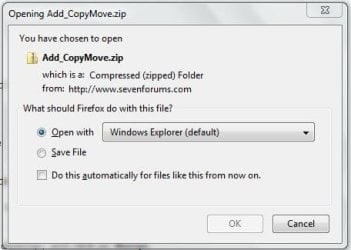
first of all, i'm loving all of these tweeks of yours (most of them i'm not too worried about but some, like this one, are exactly what I like to see). But I do have a suggestion for you. You always say to click the download button and save the .zip and so on and so forth. With all that you have to do, would it just be easier to click "open with" instead of "save"? The default for .zip files is Windows Explorer.

All you have to do is click "open with" and then "ok" and the .zip folder will open up. Then double-click the .reg file and you're good to go (after approving the change in the pop-up window that appears). It's easier, quicker, and doesn't put anything on your desktop that you'll have to go back and delete later (especially since people generally forget to empty their recycle bin not realizing that while trying to clean up their system that those files still take up space). Although I guess some people like to save these things for future reference, which then I can understand wanting to save it.

I realize you probably won't change these directions since you have so many posts and some people might want to keep the files, but just thought i'd mention it for future reference.
 

My Computer My Computer

Computer Manufacturer/Model Number
10" MSI Wind U100 (Netbook), Dell Dimension 3000 (Desktop)
OS
Windows XP Home SP3 / Windows 7 Ultimate 32-bit (Netbook), Windows XP Professional SP3 (Desktop)
CPU
INTEL Atom N270 1.60GHz
Memory
Kingston 2GB DDR2
Monitor(s) Displays
10"
Screen Resolution
1024 x 600
Hard Drives
120GB, 1T external (hooked up to my desktop, but mapped to my netbook)
Hello Matrix, and welcome to Seven Forums.

I'm not sure what you mean. When you click on the Download button, you usually only have the Find, Save, and Cancel options available. :confused:
 

My Computer My Computer

Computer type
PC/Desktop
Computer Manufacturer/Model Number
Self built custom
OS
64-bit Windows 11 Pro for Workstations
CPU
Intel i7-8700K OC'd to 5 GHz
Motherboard
ASUS ROG Maximus XI Formula Z390
Memory
64 GB (4x16GB) G.SKILL TridentZ RGB DDR4 3600 MHz
Graphics Card(s)
ASUS ROG-STRIX-GTX1080TI-O11G-GAMING
Sound Card
Integrated
Monitor(s) Displays
2 x Samsung Odyssey G7 27"
Screen Resolution
2560x1440
Hard Drives
1TB Samsung 990 PRO M.2,
4TB Samsung 990 PRO PRO M.2,
TerraMaster F8 SSD Plus NAS
PSU
Seasonic Prime Titanium 850W
Case
Thermaltake Core P3
Cooling
Corsair Hydro H115i
Keyboard
Logitech wireless K800
Mouse
Logitech MX Master 4
Internet Speed
2 Gb/s Download and 100 Mb/s Upload
Antivirus
Malwarebyte Anti-Malware Premium
Browser
Google Chrome
Other Info
Logitech Z625 speaker system,
Logitech BRIO 4K Pro webcam,
HP Color LaserJet Pro MFP M477fdn,
APC SMART-UPS RT 1000 XL - SURT1000XLI,
Galaxy S23 Plus phone
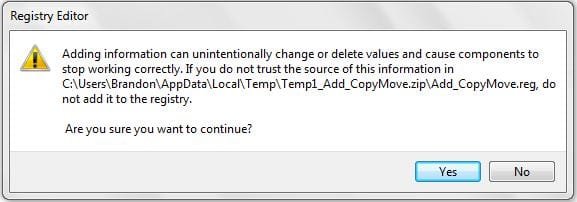
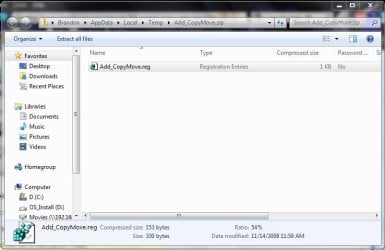
Hm...I guess that would explain it, then, lol. I've attached thumbnails of what I see when I click "Download" I'm using Windows 7 Ultimate (not sure of the build number). I've put everything in order of how it pops up. I just click Download, Open With Windows Explorer, click on the .reg file, then click Yes and OK. I should add that i've always had this "Open With..." option...even in XP. Maybe i'm just special, lol.
 

Attachments

  • Capture2.JPG
    Capture2.JPG
    24.9 KB · Views: 1,452
  • Capture1.JPG
    Capture1.JPG
    47.7 KB · Views: 1,397
  • Capture.JPG
    Capture.JPG
    24.8 KB · Views: 1,449
  • Capture3.JPG
    Capture3.JPG
    20.3 KB · Views: 1,419

My Computer My Computer

Computer Manufacturer/Model Number
10" MSI Wind U100 (Netbook), Dell Dimension 3000 (Desktop)
OS
Windows XP Home SP3 / Windows 7 Ultimate 32-bit (Netbook), Windows XP Professional SP3 (Desktop)
CPU
INTEL Atom N270 1.60GHz
Memory
Kingston 2GB DDR2
Monitor(s) Displays
10"
Screen Resolution
1024 x 600
Hard Drives
120GB, 1T external (hooked up to my desktop, but mapped to my netbook)

My Computer My Computer

Computer type
PC/Desktop
Computer Manufacturer/Model Number
Self built custom
OS
64-bit Windows 11 Pro for Workstations
CPU
Intel i7-8700K OC'd to 5 GHz
Motherboard
ASUS ROG Maximus XI Formula Z390
Memory
64 GB (4x16GB) G.SKILL TridentZ RGB DDR4 3600 MHz
Graphics Card(s)
ASUS ROG-STRIX-GTX1080TI-O11G-GAMING
Sound Card
Integrated
Monitor(s) Displays
2 x Samsung Odyssey G7 27"
Screen Resolution
2560x1440
Hard Drives
1TB Samsung 990 PRO M.2,
4TB Samsung 990 PRO PRO M.2,
TerraMaster F8 SSD Plus NAS
PSU
Seasonic Prime Titanium 850W
Case
Thermaltake Core P3
Cooling
Corsair Hydro H115i
Keyboard
Logitech wireless K800
Mouse
Logitech MX Master 4
Internet Speed
2 Gb/s Download and 100 Mb/s Upload
Antivirus
Malwarebyte Anti-Malware Premium
Browser
Google Chrome
Other Info
Logitech Z625 speaker system,
Logitech BRIO 4K Pro webcam,
HP Color LaserJet Pro MFP M477fdn,
APC SMART-UPS RT 1000 XL - SURT1000XLI,
Galaxy S23 Plus phone
Many thanks Brink,
I finally upgraded from Windows 7 RC - and was wondering why the "move to and copy to" commands were playing hide and seek ;)
Always good to check out this forum and especially your little tutorials.

Thanks again
 

My Computer My Computer

OS
windows 7
Motherboard
asus m2n32 deluxe
You're most welcome Krissboo. :)
 

My Computer My Computer

Computer type
PC/Desktop
Computer Manufacturer/Model Number
Self built custom
OS
64-bit Windows 11 Pro for Workstations
CPU
Intel i7-8700K OC'd to 5 GHz
Motherboard
ASUS ROG Maximus XI Formula Z390
Memory
64 GB (4x16GB) G.SKILL TridentZ RGB DDR4 3600 MHz
Graphics Card(s)
ASUS ROG-STRIX-GTX1080TI-O11G-GAMING
Sound Card
Integrated
Monitor(s) Displays
2 x Samsung Odyssey G7 27"
Screen Resolution
2560x1440
Hard Drives
1TB Samsung 990 PRO M.2,
4TB Samsung 990 PRO PRO M.2,
TerraMaster F8 SSD Plus NAS
PSU
Seasonic Prime Titanium 850W
Case
Thermaltake Core P3
Cooling
Corsair Hydro H115i
Keyboard
Logitech wireless K800
Mouse
Logitech MX Master 4
Internet Speed
2 Gb/s Download and 100 Mb/s Upload
Antivirus
Malwarebyte Anti-Malware Premium
Browser
Google Chrome
Other Info
Logitech Z625 speaker system,
Logitech BRIO 4K Pro webcam,
HP Color LaserJet Pro MFP M477fdn,
APC SMART-UPS RT 1000 XL - SURT1000XLI,
Galaxy S23 Plus phone
Hi

As it seems that you knows everything ;) maybe you can help with this.

What I would really like is some kind of Copy / Move To menu within the Context Menu. Something like this (pardon my mock-up):

2m34f94.jpg


The standard Copy / Move To only remembers the last location a folder was copied / sent to. My example would perhaps have 2 or 3 pre-defined folders or remembers the last 2 or 3 folders.

Would something like this be possible, or do you know of any application that can do this?

Many thanks for your knowledge and excellent forums :D
 

My Computer My Computer

Computer Manufacturer/Model Number
Custom Build
OS
Win 7 x64
CPU
Q6600
Motherboard
Asus P5N32-SLi
Memory
2GB
Graphics Card(s)
nVidia 8800GT x 2
Sound Card
Creative X-Fi Extreme Gamer
Monitor(s) Displays
Asus 21"
Hard Drives
3 x Samsung
Case
Cooler Master
I don't know whether your setup would be possible. But what you could do is use "send to" a number of predefined folders. All you have to do is to include shortcuts of the desired folders into the "Send to" folder.

Place shortcuts of the desired folders on the desktop, then type shell:sendto into the Start/search, hit Enter and drag your shortcuts into the sento folder. Close the send to folder. Now, whenever you go to "Send to" in the context menu, your folders will be one of the pop-up options.

Send To Context Menu - Vista Forums

Note: Send to equals a copy, not a move.
 
Last edited by a moderator:

My Computer My Computer

Computer Manufacturer/Model Number
HP, Dell, Gateway, Toshiba - 4 laptops and 2 desktops
OS
Vista, Windows7, Mint Mate, Zorin, Windows 8
CPU
from 1.6GHz Duo to i7
Monitor(s) Displays
2x HP w2207
Hard Drives
5x HDD, 7x SSD, 12x Externals
Keyboard
with trackball - no mices
Mouse
Trackball mice
Internet Speed
DSL 6000
Note: Send to equals a copy, not a move.

Thanks! I never thought of Send To. Ideally I would like a move instead of copy, as it would save another operation to delete the original / copied file.
 

My Computer My Computer

Computer Manufacturer/Model Number
Custom Build
OS
Win 7 x64
CPU
Q6600
Motherboard
Asus P5N32-SLi
Memory
2GB
Graphics Card(s)
nVidia 8800GT x 2
Sound Card
Creative X-Fi Extreme Gamer
Monitor(s) Displays
Asus 21"
Hard Drives
3 x Samsung
Case
Cooler Master
MOVE TO: COPY TO:

REGEDIT

GO TO HKEY_ CLASSES_ROOT\ALLFILESYSTEMOBJECTS\SHELLEX\CONTEXTMENUHANDLERS

Once there create new\key call it MOVE TO, after this new key is created move to right pane, and modify the default key to
{C2FBB631-2971-11D1-A18C-00C04FD75D13}

COPY TO same set up, except the default key should read
{C2FBB630-2971-11D1-A18C-00C04FD75D13}

This will give you much more function in your right click context menu.
 

My Computer My Computer

OS
WIN 7
This tutorial already adds both a Copy to Folder and Move to Folder context menu option.
 

My Computer My Computer

Computer type
PC/Desktop
Computer Manufacturer/Model Number
Self built custom
OS
64-bit Windows 11 Pro for Workstations
CPU
Intel i7-8700K OC'd to 5 GHz
Motherboard
ASUS ROG Maximus XI Formula Z390
Memory
64 GB (4x16GB) G.SKILL TridentZ RGB DDR4 3600 MHz
Graphics Card(s)
ASUS ROG-STRIX-GTX1080TI-O11G-GAMING
Sound Card
Integrated
Monitor(s) Displays
2 x Samsung Odyssey G7 27"
Screen Resolution
2560x1440
Hard Drives
1TB Samsung 990 PRO M.2,
4TB Samsung 990 PRO PRO M.2,
TerraMaster F8 SSD Plus NAS
PSU
Seasonic Prime Titanium 850W
Case
Thermaltake Core P3
Cooling
Corsair Hydro H115i
Keyboard
Logitech wireless K800
Mouse
Logitech MX Master 4
Internet Speed
2 Gb/s Download and 100 Mb/s Upload
Antivirus
Malwarebyte Anti-Malware Premium
Browser
Google Chrome
Other Info
Logitech Z625 speaker system,
Logitech BRIO 4K Pro webcam,
HP Color LaserJet Pro MFP M477fdn,
APC SMART-UPS RT 1000 XL - SURT1000XLI,
Galaxy S23 Plus phone
WOO lol thanks now this will help because i move alot of stuff :P
 

My Computer My Computer

OS
Windows 7 Ultimate 32 bit
For some reason when I right click and select "Merge" (which is at the top of the menu, in bold), all it does is open up a notepad. When I right clicked the .reg file it says .reg files open up with notepad. Is there something configured wrong on my PC or something I need to do differently?
 

My Computer My Computer

Computer Manufacturer/Model Number
N/A
OS
Windows 7 Professional x64 SP1
CPU
AMD Phenom II X4 940 Black Edition @ 3.0GHz OC to 3.5 GHz
Motherboard
MSi 785 GT-E63
Memory
8GB OCZ 1066MHz DDR2
Graphics Card(s)
Nvidia GeForce 9800 GTX+
Sound Card
Onboard 7.1 High Definition Audio
Monitor(s) Displays
17" Envision
Screen Resolution
1280 x 1024
Hard Drives
250GB Seagate Sata
PSU
550w
Case
Thermaltake
Cooling
4 120mm case fans
Keyboard
Logitech EX 110 Wireless
Mouse
Logitech EX 110 Wireless
Internet Speed
1-3MB/sec Download
Hello Hot97EclipseGSX, and welcome to Seven Forums.

You're default associations for .reg file extensions is incorrect. In Default Programs, double check to make sure that the .reg file extension is set to have it's "Current Default" program open with Registry Editor (C:\Windows\regedit.exe).

Afterwards, see if you are able to merge the REG file.

Hope this helps,
Shawn
 

My Computer My Computer

Computer type
PC/Desktop
Computer Manufacturer/Model Number
Self built custom
OS
64-bit Windows 11 Pro for Workstations
CPU
Intel i7-8700K OC'd to 5 GHz
Motherboard
ASUS ROG Maximus XI Formula Z390
Memory
64 GB (4x16GB) G.SKILL TridentZ RGB DDR4 3600 MHz
Graphics Card(s)
ASUS ROG-STRIX-GTX1080TI-O11G-GAMING
Sound Card
Integrated
Monitor(s) Displays
2 x Samsung Odyssey G7 27"
Screen Resolution
2560x1440
Hard Drives
1TB Samsung 990 PRO M.2,
4TB Samsung 990 PRO PRO M.2,
TerraMaster F8 SSD Plus NAS
PSU
Seasonic Prime Titanium 850W
Case
Thermaltake Core P3
Cooling
Corsair Hydro H115i
Keyboard
Logitech wireless K800
Mouse
Logitech MX Master 4
Internet Speed
2 Gb/s Download and 100 Mb/s Upload
Antivirus
Malwarebyte Anti-Malware Premium
Browser
Google Chrome
Other Info
Logitech Z625 speaker system,
Logitech BRIO 4K Pro webcam,
HP Color LaserJet Pro MFP M477fdn,
APC SMART-UPS RT 1000 XL - SURT1000XLI,
Galaxy S23 Plus phone
You were correct. I figured it opened with the wrong file. I honestly have no idea how .reg files became associated with Notepad. I didn't get the option for "merge", but I did get the option of "open", which worked just fine.

Thanks for the welcome to the forums. I hope to learn a lot here! :)
 

My Computer My Computer

Computer Manufacturer/Model Number
N/A
OS
Windows 7 Professional x64 SP1
CPU
AMD Phenom II X4 940 Black Edition @ 3.0GHz OC to 3.5 GHz
Motherboard
MSi 785 GT-E63
Memory
8GB OCZ 1066MHz DDR2
Graphics Card(s)
Nvidia GeForce 9800 GTX+
Sound Card
Onboard 7.1 High Definition Audio
Monitor(s) Displays
17" Envision
Screen Resolution
1280 x 1024
Hard Drives
250GB Seagate Sata
PSU
550w
Case
Thermaltake
Cooling
4 120mm case fans
Keyboard
Logitech EX 110 Wireless
Mouse
Logitech EX 110 Wireless
Internet Speed
1-3MB/sec Download
You're most welcome. :)

It may have happened by mistake if you right clicked on a .reg file and clicked on "Open with", then selected Notepad.
 

My Computer My Computer

Computer type
PC/Desktop
Computer Manufacturer/Model Number
Self built custom
OS
64-bit Windows 11 Pro for Workstations
CPU
Intel i7-8700K OC'd to 5 GHz
Motherboard
ASUS ROG Maximus XI Formula Z390
Memory
64 GB (4x16GB) G.SKILL TridentZ RGB DDR4 3600 MHz
Graphics Card(s)
ASUS ROG-STRIX-GTX1080TI-O11G-GAMING
Sound Card
Integrated
Monitor(s) Displays
2 x Samsung Odyssey G7 27"
Screen Resolution
2560x1440
Hard Drives
1TB Samsung 990 PRO M.2,
4TB Samsung 990 PRO PRO M.2,
TerraMaster F8 SSD Plus NAS
PSU
Seasonic Prime Titanium 850W
Case
Thermaltake Core P3
Cooling
Corsair Hydro H115i
Keyboard
Logitech wireless K800
Mouse
Logitech MX Master 4
Internet Speed
2 Gb/s Download and 100 Mb/s Upload
Antivirus
Malwarebyte Anti-Malware Premium
Browser
Google Chrome
Other Info
Logitech Z625 speaker system,
Logitech BRIO 4K Pro webcam,
HP Color LaserJet Pro MFP M477fdn,
APC SMART-UPS RT 1000 XL - SURT1000XLI,
Galaxy S23 Plus phone
Back
Top