
cooling options for my oddly-designed Gateway PC?

Diosoth

New member
Guru
Local time
2:06 AM
Messages
451
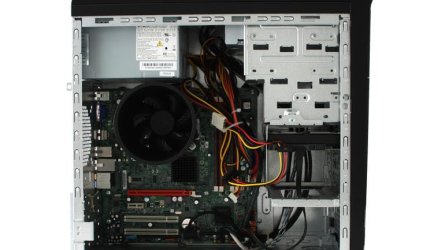
My main W7 PC is a Gateway DX4822-01. As far as cooling goes it has a massive intake fan over the CPU, a case fan I installed in the back and the power supply fan. The HDD bay sits at the front in an odd tray and there is no cooling or ventilation around it. I run my HDD at 47 C, which might be acceptable but I'd prefer to drop that a bit- seeing as my XP Dell runs its HDD at 42 C maximum.

Alright, so I have 2 internal floppy drive sized bays that are empty, which might house something BUT...

E5300 6GB DDR2 1TB HDD | Gateway DX4822-01 Windows 7 Desktop Pc

... as you can see the front is a solid chunk of black plastic. Now this front panel does come off, and the bottom area below the DVD drive doors also pops off as a separate piece. I can access the floppy area or even drill some vent holes towards the bottom of the PC if that would help. It's a 5 year old PC, I'm not too worried about any warranty voiding by cutting up the case a bit, or I could just leave the lower panel piece off. Or I could use one of my DVD bays for some sort of cooler too as I only have one drive(well okay, I have two, but that piece of junk that came factory installed just sits there unused after I got an Asus).

I suppose a PCI slot fan may also help to some minor degree but that's at the opposite end of the case, I need some cooling near the HDD bays.
 

My Computer My Computer

Computer type
PC/Desktop
Computer Manufacturer/Model Number
Gateway DX4822-01
OS
Windows 7 Home Premium x64
CPU
Intel Pentium Dual Core 2.6 GHz
Motherboard
stock factory for this model
Memory
6 GB
Graphics Card(s)
stock factory for this model
Sound Card
stock factory for this model
Monitor(s) Displays
Dell P2010Ht
Screen Resolution
1600 x 900
Hard Drives
1 TB Western Digital
PSU
300 watt
Cooling
80mm case fan, CPU fan, 60mm front intake
Keyboard
Logitech
Mouse
HP 3-button optical wheel mouse
Internet Speed
fiber optic
Antivirus
MSE, SuperAntiSpyware, Malwarebytes Free
I've attached a pic so others can chime in if they wish.
If this were MY computer, I'd be taking off the front panel and looking closely for openings that allow air into the case, and enlarging them as much as possible without destroying too much of it, for appearance's sake. Then I'd take a close look at any chassis perforations right near the hard drive cage area. If there are a lot of holes there, great. If not, then perhaps it's time to break out the Dremel and cut a slot or hole. Then I'd block off the lower portion where you might normally expect to put a fan so that incoming air would be drawn in directly over the hard drives.
 

Attachments

  • gateway.jpg
    gateway.jpg
    42.2 KB · Views: 5

My Computer My Computer

Computer type
PC/Desktop
Computer Manufacturer/Model Number
Self-Built
OS
Win10 Pro 64-bit
CPU
AMD Ryzen 7 3800X
Motherboard
Gigabyte X570 UD
Memory
32 GB Kingston DDR4-2666
Graphics Card(s)
MSI nVidia GT 710 (2GB)
Sound Card
Creative Audigy FX 5.1
Monitor(s) Displays
ViewSonic VG2439Smh 24"
Screen Resolution
1920x1080
Hard Drives
3xWD1TB; 1xSeagate 1TB... all spinning rust
PSU
EVGA 100-W1-0500-KR (500w)
Case
SilverStone PS10 (modified)
Cooling
CPU:AMD Wraith Prism. Case:3x Noctua 120mm
Keyboard
Compaq Professional PS/2
Mouse
Microsoft Basic Optical Mouse 2.0
Internet Speed
Fiber 1Gbit/sec down/up
Antivirus
Avast Free
Browser
FF, Chrome
Other Info
2x LG GH24NSC0 DVD burners, Mackie CR3 monitor speakers
The metal case has plenty of holes and vents in the front, so I can easily drill some intake holes. I keep the one HDD in the lower half of the bay so I can go above that. There is also enough space at the bottom I could theoretically mount a small molex-powered case fan to the front, but it'd be below the HDD bay.

I am also likely to replace my current case fan as it's 5 years old too. I'm using an 80mm fan bt it has an extra set of holes outside those, I think it takes a 92mm fan as well.

I'm also annoyed at the sheer number of fans that have LEDs in them.
 

My Computer My Computer

Computer type
PC/Desktop
Computer Manufacturer/Model Number
Gateway DX4822-01
OS
Windows 7 Home Premium x64
CPU
Intel Pentium Dual Core 2.6 GHz
Motherboard
stock factory for this model
Memory
6 GB
Graphics Card(s)
stock factory for this model
Sound Card
stock factory for this model
Monitor(s) Displays
Dell P2010Ht
Screen Resolution
1600 x 900
Hard Drives
1 TB Western Digital
PSU
300 watt
Cooling
80mm case fan, CPU fan, 60mm front intake
Keyboard
Logitech
Mouse
HP 3-button optical wheel mouse
Internet Speed
fiber optic
Antivirus
MSE, SuperAntiSpyware, Malwarebytes Free
Okay, good. I'm concerned a little about where you'll get intake air from in regards to your front decorative cover panel. Is there a slot or some perforations on the bottom? eMachines had those hidden as a slot for your hand, for instance.

For a rear fan, if you want good airflow but don't want to go deaf, I strongly suggest a Noctua NF-A9 FLX. Yeah, they're pricey but your ears will thank you. Some say they're ugly because they're brown and tan but if it's hidden inside, who cares? And with a six year warranty, that fan will outlive the computer.
 

My Computer My Computer

Computer type
PC/Desktop
Computer Manufacturer/Model Number
Self-Built
OS
Win10 Pro 64-bit
CPU
AMD Ryzen 7 3800X
Motherboard
Gigabyte X570 UD
Memory
32 GB Kingston DDR4-2666
Graphics Card(s)
MSI nVidia GT 710 (2GB)
Sound Card
Creative Audigy FX 5.1
Monitor(s) Displays
ViewSonic VG2439Smh 24"
Screen Resolution
1920x1080
Hard Drives
3xWD1TB; 1xSeagate 1TB... all spinning rust
PSU
EVGA 100-W1-0500-KR (500w)
Case
SilverStone PS10 (modified)
Cooling
CPU:AMD Wraith Prism. Case:3x Noctua 120mm
Keyboard
Compaq Professional PS/2
Mouse
Microsoft Basic Optical Mouse 2.0
Internet Speed
Fiber 1Gbit/sec down/up
Antivirus
Avast Free
Browser
FF, Chrome
Other Info
2x LG GH24NSC0 DVD burners, Mackie CR3 monitor speakers

My Computer My Computer

Computer type
PC/Desktop
Computer Manufacturer/Model Number
Home made Desktop
OS
Windows 10 Pro. 64/ version 1709 Windows 7 Pro/64
CPU
Intel i7-6800K @ 4.3
Motherboard
ASUS X-99 Deluxe II
Memory
Corsair Platinum 16 gig @2400
Graphics Card(s)
EVGA GTX 1070 OC
Monitor(s) Displays
Asus 27" LED LCD/VE278Q
Screen Resolution
1920-1080 or 1280-720 HDMI
Hard Drives
INTEL SSD 730-240 Gb Sata 3.0/
PSU
EVGA Platium 1200W
Case
Phanteks Luxe Tempered Glass 8 fans/ one radiator
Cooling
XSPC/ Water Cooled CPU
Keyboard
Das 4 Professional
Mouse
Logitech M705/MX Anywhere 2-S
Internet Speed
100 mbits
Antivirus
Microsoft Security Essentials/ Malwarebytes Premium 3.0/ SAS
Browser
I.E. 11 default/Firefox/ ISP Time Warner Cable/Spectrum
Other Info
LG BluRay Burner/
Sound system-KLipsch-THX/
Icy Dock ssd Hot Swap bays.
I ended up going with an Antec Tricool 92mm from Amazon. It was dirt cheap, has good reviews and I'm stuck using a Molex plug to power it. I couldn't see any plugs on the mobo for a fan- if there are any they're hidden somewhere I couldn't find from just a look in the case. I was also limited to either 80mm or 92mm based on screw hole placement and I wanted to get it here quick so I got it via Amazon before my free month of Prime expired.

I don't know what's in the case now, I got it when I got the PC, it's run well for 5 years but it might be slowing. It has blue LEDs which are annoying when I'm letting the PC run overnight. The computer just leaks blue light from every vent hole. I actually got a Cooler Master fan 2 years ago, and the thing shattered like cheap glass when I tried to put the screws into it because the plastic it was made from was such junk.

As for the front panel, I can pop off the lower half to reveal some unsightly holes. I can't just totally leave the front piece off because the top is a mess of card slots and such, but that flat piece I can remove. Or I can drill holes in. I may very well be able to mount a smaller intake fan down there- it won't be too pretty inside but it'll work. I have to measure space under the HDD tray. Most likely I can do what I did with my Dell and just bolt the fan to the case in a suitable spot.

Yes, my XP Dell... a slim case design with no real useful mounting spots for an extra fan, plus it's designed to lay flat. I had to get a PCI slot cooler and rig it so I could bolt it into the back of the case. That dropped average HDD temp from around 50c to 42c though. Maybe I should also get a PCI slot cooler for this PC. But I also need to be wary of overloading the UPS, but running just one HDD and one DVD drive I doubt 2 or 3 fans will do that.


-----------


EDIT- I can comfortably fit a 60mm fan under the HDD tray. I can easily fit a 40mm fan using the existing vent hole sin the metal case, or 60mm if I drill some holes. Although neither accounts for those holes lining up with the fan's own screw slots.

An alternate method would be to rig up a PCI slot cooler to fit down there, which would be easy- but I need an intake fan, and PCI coolers are generality exhaust fans by default.
 
Last edited:

My Computer My Computer

Computer type
PC/Desktop
Computer Manufacturer/Model Number
Gateway DX4822-01
OS
Windows 7 Home Premium x64
CPU
Intel Pentium Dual Core 2.6 GHz
Motherboard
stock factory for this model
Memory
6 GB
Graphics Card(s)
stock factory for this model
Sound Card
stock factory for this model
Monitor(s) Displays
Dell P2010Ht
Screen Resolution
1600 x 900
Hard Drives
1 TB Western Digital
PSU
300 watt
Cooling
80mm case fan, CPU fan, 60mm front intake
Keyboard
Logitech
Mouse
HP 3-button optical wheel mouse
Internet Speed
fiber optic
Antivirus
MSE, SuperAntiSpyware, Malwarebytes Free

My Computer My Computer

Computer type
PC/Desktop
Computer Manufacturer/Model Number
Gateway DX4822-01
OS
Windows 7 Home Premium x64
CPU
Intel Pentium Dual Core 2.6 GHz
Motherboard
stock factory for this model
Memory
6 GB
Graphics Card(s)
stock factory for this model
Sound Card
stock factory for this model
Monitor(s) Displays
Dell P2010Ht
Screen Resolution
1600 x 900
Hard Drives
1 TB Western Digital
PSU
300 watt
Cooling
80mm case fan, CPU fan, 60mm front intake
Keyboard
Logitech
Mouse
HP 3-button optical wheel mouse
Internet Speed
fiber optic
Antivirus
MSE, SuperAntiSpyware, Malwarebytes Free
Just a general question- why are PC fans still made so poorly and why do I feel like I'm going to break these things trying to get the screws in? Granted, I have broken one- a Cooler Master brand shattered when trying to get the screws in. It seems either they could stand to use a better grade of plastic, or better methods for putting the holes in. It also seems most ever fan I've handled feels flimsy regardless of the brand. Maybe the really expensive fans are better quality but these feel no better than fans from 10 years ago.
 

My Computer My Computer

Computer type
PC/Desktop
Computer Manufacturer/Model Number
Gateway DX4822-01
OS
Windows 7 Home Premium x64
CPU
Intel Pentium Dual Core 2.6 GHz
Motherboard
stock factory for this model
Memory
6 GB
Graphics Card(s)
stock factory for this model
Sound Card
stock factory for this model
Monitor(s) Displays
Dell P2010Ht
Screen Resolution
1600 x 900
Hard Drives
1 TB Western Digital
PSU
300 watt
Cooling
80mm case fan, CPU fan, 60mm front intake
Keyboard
Logitech
Mouse
HP 3-button optical wheel mouse
Internet Speed
fiber optic
Antivirus
MSE, SuperAntiSpyware, Malwarebytes Free
Fans come in all kinds of quality grades and prices.

There are hundreds if not thousands of fans you can buy. You just have to pick the ones you want and look at reviews. Or you can pick ones that members have used and recommended.

If I could buy a $5.00 fan to work as good as a $25.00 fan that is exactly what I would do.
 

My Computer My Computer

Computer type
PC/Desktop
Computer Manufacturer/Model Number
Home made Desktop
OS
Windows 10 Pro. 64/ version 1709 Windows 7 Pro/64
CPU
Intel i7-6800K @ 4.3
Motherboard
ASUS X-99 Deluxe II
Memory
Corsair Platinum 16 gig @2400
Graphics Card(s)
EVGA GTX 1070 OC
Monitor(s) Displays
Asus 27" LED LCD/VE278Q
Screen Resolution
1920-1080 or 1280-720 HDMI
Hard Drives
INTEL SSD 730-240 Gb Sata 3.0/
PSU
EVGA Platium 1200W
Case
Phanteks Luxe Tempered Glass 8 fans/ one radiator
Cooling
XSPC/ Water Cooled CPU
Keyboard
Das 4 Professional
Mouse
Logitech M705/MX Anywhere 2-S
Internet Speed
100 mbits
Antivirus
Microsoft Security Essentials/ Malwarebytes Premium 3.0/ SAS
Browser
I.E. 11 default/Firefox/ ISP Time Warner Cable/Spectrum
Other Info
LG BluRay Burner/
Sound system-KLipsch-THX/
Icy Dock ssd Hot Swap bays.
There's just no substitute for quality and computer fans like the PSU should be the quiet understated one's always doing there job and never getting the recognition they deserve.
 

My Computer My Computer

Computer type
PC/Desktop
Computer Manufacturer/Model Number
A blend of brains, brawn and dumb luck.
OS
Windows 7 Ultimate 64
CPU
i7 3770k OC'd 4.6 @ 1.17v, also FX 8120 & i5 miniITX
Motherboard
MSI P67A-GD80 b3
Memory
32 gb G.Skill Sniper DDR3 10-12-12-31 @ 2133
Graphics Card(s)
XFX Radeon 7870 2GB DDR5
Sound Card
Sound Blaster Z Series Card
Monitor(s) Displays
(2) LG LED 23" 1920 x 1080 2ms Monitors via mini d-port
Screen Resolution
1680 X 1050 p
Hard Drives
Samsung 256 gb 830 SSD sata III
(1) 1 tb WD Black
(2) 1 tb Hitachi deskmates/sata II
(2) 1 tb WD green/sata II
(2) 3 tb Seagate Barracuda
(1) 120 gb OCZ Vertex SS
(1) Drobo 5N w/5 Seagate 3tb
PSU
EVGA modular 1000G2 80% gold rating & APC 1200 RS
Case
CoolerMaster Storm Styker
Cooling
7 case fans 140mm & 120mm, NZXT Kraken X60
Keyboard
(2) Logitech Illuminated Keyboards (1) usb (1) wireless
Mouse
Logitech G700 & T-BC21 - nano nx for the laptop
Internet Speed
Basic 120mbps down
Antivirus
Trend Micro Titanium Max Security & Malwarebytes Premium
Browser
Chrome and IE 10
Other Info
5 Noctua case fans + 3 Noctua in p/p on NZXT cooler
Integrated hot swap drive bays for 2.5" Drives
(2) Lite-on dvd/cd/Blu Ray optical 22X
Integrated fan controller and led on/off
HP Officejet Pro 8630 all-n-one
Hot-swappable 3.5" hard drive bay
Netgear Nighthawk router
Asus USB 3 & sata 6 PCIe card
Vantec IDE to sata adptr./Ultra sata adptr
Lenovo L420 i5 lappy with m sata
Drobo 5N advanced NAS
While I wouldn't expect the same air flow out of a $10 fan that a $30 fan would be capable of, I'd at least expect them to not break when putting the screws in, especially a name brand fan.

So then, got the second fan today. I had to do less work ot the metal case than I thought- just snip 3 spots in the front grille, file them down and I swapped the default screws with larger ones that had bigger heads to hold them in place. The front plastic cover needed a lot of holes drilled, and I may have to drill a few more as airflow in the front still seems a bit light. Also swapped the back fan with the new 92mm, left the speed switch on maximum.

So far though after a half hour or so back on the HDD is running at 35 C. It'll probably get warmer after Youtube videos and gaming but it already seems to be helping out a good deal to have put the new fans in.

------------------
update- several hours later and the HDD is still going at 36 C, a vast improvement to the 47 C I had the other day. Guess the old fan was just too worn, but the second fan isn't hurting any.
 
Last edited:

My Computer My Computer

Computer type
PC/Desktop
Computer Manufacturer/Model Number
Gateway DX4822-01
OS
Windows 7 Home Premium x64
CPU
Intel Pentium Dual Core 2.6 GHz
Motherboard
stock factory for this model
Memory
6 GB
Graphics Card(s)
stock factory for this model
Sound Card
stock factory for this model
Monitor(s) Displays
Dell P2010Ht
Screen Resolution
1600 x 900
Hard Drives
1 TB Western Digital
PSU
300 watt
Cooling
80mm case fan, CPU fan, 60mm front intake
Keyboard
Logitech
Mouse
HP 3-button optical wheel mouse
Internet Speed
fiber optic
Antivirus
MSE, SuperAntiSpyware, Malwarebytes Free
Back
Top