Solved Copy of Windows not genuine, Build 7601

More a case of incompetence than malice I expect, but you may be right.
 

My Computer My Computer

At a glance

Win 7 x64 Home Premium (and x86 VirtualBox VM...i3 370M/i7 6500U8GB - finally :)/8GBit's an i3, dude!/dual Intel&nVidia
Computer type
Laptop
Computer Manufacturer/Model Number
Asus K52F or Lenovo B51-80
OS
Win 7 x64 Home Premium (and x86 VirtualBox VM)/Win10
CPU
i3 370M/i7 6500U
Motherboard
Asus/Lenovo
Memory
8GB - finally :)/8GB
Graphics Card(s)
it's an i3, dude!/dual Intel&nVidia
Sound Card
onboard
Monitor(s) Displays
15.6" built-in
Screen Resolution
1366x768/1920x1080
Hard Drives
750GB Seagate internal
Sundry external drives attached to other computers on the local network
1TB SSD on the Lenovo
PSU
n/a
Internet Speed
as much as I can get - usually on a dongle/phone, so <1MB/s
Antivirus
MSE/Defender
Browser
IE11/12/Edge/Chrome/FF(if I must)
As soon as the factory recovery starts up, work through the steps to http://www.sevenforums.com/tutorials/219576-clean-up-factory-bloatware.html

This will relieve some of the damage caused by the factory bloatware as best as can be expected for an install which is corrupt to begin with. For example just turning off the 12–25 programs unnecessarily starting with windows will boost performance noticeably. You don't even need to be in a hurry to uninstall them then once they are removed from Freeloading at start up.

It will also introduce other optimizations as well as the tools and methods which work best with Windows 7. :cool:
 
Last edited:
More a case of incompetence than malice I expect, but you may be right.

You are probably correct but I wouldn't take the chance.
 

My Computer My Computer

At a glance

Windows 10 Pro. 64/ version 1709 Windows 7 Pr...Intel i7-6800K @ 4.3Corsair Platinum 16 gig @2400EVGA GTX 1070 OC
Computer type
PC/Desktop
Computer Manufacturer/Model Number
Home made Desktop
OS
Windows 10 Pro. 64/ version 1709 Windows 7 Pro/64
CPU
Intel i7-6800K @ 4.3
Motherboard
ASUS X-99 Deluxe II
Memory
Corsair Platinum 16 gig @2400
Graphics Card(s)
EVGA GTX 1070 OC
Monitor(s) Displays
Asus 27" LED LCD/VE278Q
Screen Resolution
1920-1080 or 1280-720 HDMI
Hard Drives
INTEL SSD 730-240 Gb Sata 3.0/
PSU
EVGA Platium 1200W
Case
Phanteks Luxe Tempered Glass 8 fans/ one radiator
Cooling
XSPC/ Water Cooled CPU
Keyboard
Das 4 Professional
Mouse
Logitech M705/MX Anywhere 2-S
Internet Speed
100 mbits
Antivirus
Microsoft Security Essentials/ Malwarebytes Premium 3.0/ SAS
Browser
I.E. 11 default/Firefox/ ISP Time Warner Cable/Spectrum
Other Info
LG BluRay Burner/
Sound system-KLipsch-THX/
Icy Dock ssd Hot Swap bays.
Noel,
I think it is more incompetence than anything too -- I think they are sincerely, trying to do their best but clearly they lack the proper skills.

Greg,
I will follow the protocols listed in the steps once the system reboots from the recovery -- it seems to be working to get back to factory settings (most likely with corrupted partitions, files, etc.). I think I got lucky I used the vaio assist button to try it first through vaio care and it did not work, so I then used F2 to get to advanced boot, hit F9 to select the configuration and F10 to save it and tried to recover but failed after 55%. So, I repeated the second recovery process and it said no operating system found. I shut it down and tried the vaio assist again and viola ( pure luck combined with stubborness). Any additional advice will greatly be appreciated. Let me know what logs, reports, etc. make sense because there is no doubt in my mind this will most likely be a corrupted install and I may very well be reinstalling immediately. However, if I can access the internet to get to this forum in normal mode I feel that a clean install can be accomplished with less problems plus Team Viewer could work in normal mode as well as safe mode. Probably will take at least another hour as it took a long time to recover after the MCC people had it.
 

My Computer My Computer

At a glance

Windows 7, 64 bit Home Premium.Intel 2.5Ghz6Gb Ram
Computer type
Laptop
Computer Manufacturer/Model Number
Sony Vaio
OS
Windows 7, 64 bit Home Premium.
CPU
Intel 2.5Ghz
Memory
6Gb Ram
Hard Drives
750 Gb
Antivirus
Webroot
Browser
Internet Explorer
Fortunately there's no real way for the corruption to get into your recovery partition, so if recovery will run and complete you should have the best that recovery can provide: an inferior install heavily throttled by bloatware.

That's where those steps http://www.sevenforums.com/tutorials/219576-clean-up-factory-bloatware.html can help you clean up the bloatware so that your install will be cleaned and optimized to the best extent possible. You'll also have the tools and methods which assure you can keep it that way.

Be sure to scan your data before reimporting it using Malwarebytes and ESET Online scanner. If in doubt don't reimport the data because it's the only way that factory recovery can become reinfected right off the bat. I would also uninstall whatever bloatware antivirus is provided and install Microsoft security essentials.

Be sure to make your recovery media this time so you have an alternative method for running recovery, especially if you need to replace or wipe the hard drive.

And if you don't want to settle for second-best you'll have the best install possible if you do the clean reinstall tutorial.
 
Greg,
That is good to hear but why did it blue screen again after I did the factory reset the first time? That is what made me believe either the partition or Windows must have been corrupted -- I do not understand why it keeps blue screening. So, is it safe to create the recovery disks once it has been restored to factory? Does it matter whether I do them before or after the steps you provided to remove bloatware?
 

My Computer My Computer

At a glance

Windows 7, 64 bit Home Premium.Intel 2.5Ghz6Gb Ram
Computer type
Laptop
Computer Manufacturer/Model Number
Sony Vaio
OS
Windows 7, 64 bit Home Premium.
CPU
Intel 2.5Ghz
Memory
6Gb Ram
Hard Drives
750 Gb
Antivirus
Webroot
Browser
Internet Explorer
Uninstall the provided antivirus, install Microsoft security essentials,

in MSconfig Startup and Services tabs uncheck everything except AV, after hiding all Microsoft services.

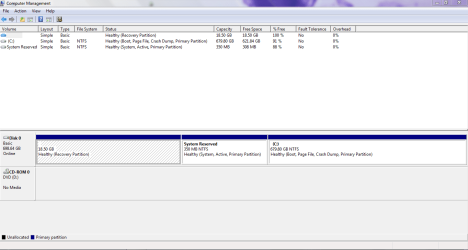
Post back a screenshot of disk management. http://www.sevenforums.com/tutorial...nt-post-screen-capture-image.html#post2261610

Run a full scan of the hard drive makers diagnostics followed by disk check.
Hard Drive Diagnostic Procedure
http://www.sevenforums.com/tutorials/433-disk-check.html

Post up a BSOD file if it crashes again
 
Greg,
I have gone through everything in the bloatware procedure except creating an image because I wanted to make sure all is good first. I will be attaching the disk mgmt. capture with this response. So far everything looks pretty good but there is one glitch that happened that I wanted to mention. Last night while downloading the updates, that I have only finished about an hour ago, I encountered a message that I hope is nothing but I want to be certain. Here is what happened, I forgot I had taken my battery out of the computer during all of the other issues (just trying to minimize the CPU resources by not having the computer constantly charging the battery) so I was attempting to move the computer closer to the wi fi signal to speed up the download, unplugged it and of course shutdown. No problem usually just put battery back in and restart. However, when I restarted the computer I got the message "operating system not found" which had only occurred during the whole fiasco with MCC. I pressed ctl-alt-del and chose the start normally option but the only time I have seen that message was during the time when I received the "This copy of Windows is not genuine" message. Do you think this is nothing or should I be concerned? I am currently running the Win DFT on one of my external drives and I am scheduled to do a disk check at next start up but as the capture will show it says everything is fine. I hope this was just an anomaly and nothing to worry about but with all that has happened I take nothing for granted. If everything is deemed to be fine I will then do an image save of my system now since there is really nothing else on my computer so as you all have said this is only the second best install option and I am still considering a complete clean reinstall with the COA license. Also, I will be burning the recovery disks once I am given the clear on this one concern I just mentioned. Finally, in reading the bloatware there was mention that the installed AV are problematic so you recommend several freeware options, but I have been using Webroot for many years and I have a multi-user license as it runs on some of my other computers so is this a problem AV in your opinion to reinstall it on this PC (that I am finally using again to post this reply I did install MSE and used it to do my scan with of course nothing found)?
 

Attachments

  • TZXLYD's Disk Mgmt capture.PNG
    TZXLYD's Disk Mgmt capture.PNG
    20.8 KB · Views: 7

My Computer My Computer

At a glance

Windows 7, 64 bit Home Premium.Intel 2.5Ghz6Gb Ram
Computer type
Laptop
Computer Manufacturer/Model Number
Sony Vaio
OS
Windows 7, 64 bit Home Premium.
CPU
Intel 2.5Ghz
Memory
6Gb Ram
Hard Drives
750 Gb
Antivirus
Webroot
Browser
Internet Explorer
Looks good. Wait to see if problem repeats.

Also resolve repeat errors in Admin log, Check for queued issues and solutions to problems as described in Bloatware tutorial Steps 7-9 or Troubleshooting tutorial. This will clue you to problems and may resolve some.

Run the hard drive makers diagnostics followed by a full Disk check on the hard drive to know its condition for sure.

Keep in mind that the disc has not been wiped which is how many boot problems are resolved. And you can wipe the disk and then do the reinstall or run factory recovery media.

Read more in the reinstall tutorial about the benefit of having a separate data partition to keep the system image smaller.
 
Last edited:
Greg,
Will do and I will keep monitoring the systems as the procedures describe. I will keep you apprised of the status within the next few days. If I do not get the chance before let me wish all here a very joyous and safe holiday this weekend.
 

My Computer My Computer

At a glance

Windows 7, 64 bit Home Premium.Intel 2.5Ghz6Gb Ram
Computer type
Laptop
Computer Manufacturer/Model Number
Sony Vaio
OS
Windows 7, 64 bit Home Premium.
CPU
Intel 2.5Ghz
Memory
6Gb Ram
Hard Drives
750 Gb
Antivirus
Webroot
Browser
Internet Explorer
Greg,
It appears that a reply I sent to you is not posted. I was saying that my computer BSOD' twice -- first, on 7/4/15 while I was listening to music before transferring it to my tablet -- with external drive attached and just about 30 minutes ago when I turned it back on. After the first BSOD the computer ran a disk check and nothing was reported wrong but the check took at least 3 hours. I did not know whether to post the BSOD file here but since all of the history is detailed in this thread I will post the file here and await instruction on whether it should be posted in the BSOD section of this forum. Additionally, like I said I had sent a similar message earlier and was in the process of sending the BSOD file when my computer just locked up for at least 10 minutes. It would not open the task manager to end the task and esc had no affect -- I had received a message that token expired so refresh the screen. When I hit the refresh button it started to refresh and just froze. There would have been two messages but it appears that the first message was not transmitted for some apparent reason. You can tell by the timestamp on the BSOD file -- trust me it did not take me 37 minutes to attach file and type this message.
 

Attachments

My Computer My Computer

At a glance

Windows 7, 64 bit Home Premium.Intel 2.5Ghz6Gb Ram
Computer type
Laptop
Computer Manufacturer/Model Number
Sony Vaio
OS
Windows 7, 64 bit Home Premium.
CPU
Intel 2.5Ghz
Memory
6Gb Ram
Hard Drives
750 Gb
Antivirus
Webroot
Browser
Internet Explorer
Greg,
Details sent from different pc.
 

Attachments

My Computer My Computer

At a glance

Windows 7, 64 bit Home Premium.Intel 2.5Ghz6Gb Ram
Computer type
Laptop
Computer Manufacturer/Model Number
Sony Vaio
OS
Windows 7, 64 bit Home Premium.
CPU
Intel 2.5Ghz
Memory
6Gb Ram
Hard Drives
750 Gb
Antivirus
Webroot
Browser
Internet Explorer
I have been trying to respond for 30 minutes -- had to switch to another computer because BSOD keeps happening.

In response to your questions, the disk check showed nothing and the maker's HD came back with passed -- it would not run on the system HD only the external drive that was the same drive I was using as mentioned in the previous post. I was typing a post when it crashed and I had run another BSOD file that I wanted to send because it crashed while running a full MSE scan that was nearly completed. After that BSOD of about an 45 minutes ago, it switched screens to a "disk read error, press ctl-alt-del" message with the below information:
Status: OXC00000e9
Info: An unexpected I/O error has occurred. Windows encountered a problem communicating with a device connected to your computer. This was most likely caused by unplugging a removable storage device, faulty hardware or CD-Rom drive that is failing.

The computer rebooted and went into startup repair, where it stated it was repairing disk errors. Again it restarted and I was in the process of sending you another BSOD file while typing a reply to your post when it crashed again.

I switched to safe mode started to proceed to the forum and it crashed again with a message "Instruction at oxfbd1584d referenced memory at 0X00000008 could not be read. Press OK to terminate.

It crashed again, I switched to safe mode and was typing a report to send when the internet window for the forum closed and said it could not be opened. I had to shut down the computer, then I was unable to log on as it said server unavailable. I shut it down and just turned it back on to send you the last BSOD file.
 

My Computer My Computer

At a glance

Windows 7, 64 bit Home Premium.Intel 2.5Ghz6Gb Ram
Computer type
Laptop
Computer Manufacturer/Model Number
Sony Vaio
OS
Windows 7, 64 bit Home Premium.
CPU
Intel 2.5Ghz
Memory
6Gb Ram
Hard Drives
750 Gb
Antivirus
Webroot
Browser
Internet Explorer
Run the diagnostics for the Win7 hard drive.

Are you safely removing the external before unplugging? Does the problem happened with the external plugged in?

Have you wiped and full reformatted the external?
 
The external drive has not been attached since it first crashed on yesterday -- I suspected the external but it is a new external drive that I have scanned repeatedly with no problems. From what I can tell the problem seems to be with the main drive -- the external is a Seagate expansion portable 2TB usb 3.0. I will run the windows 7 HD diagnostic. The previous was the Win HGST as my main drive is a Hitachi but the app says it will not run on the main drive.
 

My Computer My Computer

At a glance

Windows 7, 64 bit Home Premium.Intel 2.5Ghz6Gb Ram
Computer type
Laptop
Computer Manufacturer/Model Number
Sony Vaio
OS
Windows 7, 64 bit Home Premium.
CPU
Intel 2.5Ghz
Memory
6Gb Ram
Hard Drives
750 Gb
Antivirus
Webroot
Browser
Internet Explorer
To clarify you do not mean the WINDFT app, correct? Because that is what I ran on the Seagate.
 

My Computer My Computer

At a glance

Windows 7, 64 bit Home Premium.Intel 2.5Ghz6Gb Ram
Computer type
Laptop
Computer Manufacturer/Model Number
Sony Vaio
OS
Windows 7, 64 bit Home Premium.
CPU
Intel 2.5Ghz
Memory
6Gb Ram
Hard Drives
750 Gb
Antivirus
Webroot
Browser
Internet Explorer
Greg,
My hitachi drive is not listed it is the 5K750 specifically the HTS547575A9E384...it is not even in the technical library. I found a fitness test for the drive but it is for 32 bit systems. My gut tells me this drive is failing...
 

My Computer My Computer

At a glance

Windows 7, 64 bit Home Premium.Intel 2.5Ghz6Gb Ram
Computer type
Laptop
Computer Manufacturer/Model Number
Sony Vaio
OS
Windows 7, 64 bit Home Premium.
CPU
Intel 2.5Ghz
Memory
6Gb Ram
Hard Drives
750 Gb
Antivirus
Webroot
Browser
Internet Explorer
Greg,
My hitachi drive is not listed it is the 5K750 specifically the HTS547575A9E384...it is not even in the technical library. I found a fitness test for the drive but it is for 32 bit systems. My gut tells me this drive is failing...

It's listed,

View attachment TS5K750_ds.pdf

http://www.hgst.com/tech/techlib.nsf/techdocs/DC52DB708920882B882577AE00721B0D/$file/TS5K750_ds.pdf

I don't see where it says 32bit only for that test,

http://www.hgst.com/hdd/support/downloads/WinDFT Install and User Guide.pdf
 

My Computer My Computer

At a glance

Win 10 Pro x64Intel I5-2500K @3.3GHz16GB G.Skill Ripjaws X (4x4GB)EVGA GeForce 750 Ti SC 2GB
Computer type
PC/Desktop
Computer Manufacturer/Model Number
Self Built
OS
Win 10 Pro x64
CPU
Intel I5-2500K @3.3GHz
Motherboard
Asrock P67 Extreme4
Memory
16GB G.Skill Ripjaws X (4x4GB)
Graphics Card(s)
EVGA GeForce 750 Ti SC 2GB
Sound Card
ASUS Xonar DG 5.1 Channels 24-bit 96KHz PCI Interface Sound
Monitor(s) Displays
auria eq2367
Screen Resolution
1920 x 1080
Hard Drives
250GB Samsung 850 EVO SSD
1TB WD Blue
1TB Hitachi
PSU
SeaSonic X 650W 80 Plus Gold
Case
Corsair Obsidian 750D
Cooling
Corsair H60, Three 140mm case fans
Keyboard
Logitech Wireless Keyboard K520
Mouse
Logitech Wireless Mouse M310
Internet Speed
Wave Broadband ~ 100 dn 5 up
Antivirus
Windows Defender, Malwarebytes Premium
Browser
Edge, IE11, Chrome
Other Info
Laptop specs: HP g7-1365dx /
CPU: AMD A6-3420M APU with Radeon(tm) HD Graphics /
RAM: Crucial 8Gb (2x4Gb) /
SSD: Crucial M4-CT128M4SSD2 ATA Device/ FW 000F /
GFX: AMD Radeon HD 6520G /
OS: Windows 10 Pro x64
Derekimo,
I have the same pdf that describes the drive but when I download the WINDFT and run it my internal Hitachi drive does not appear so I went to google and searched for the drive fitness test for the 5K750 and found this link where I download the file and it is a 32 bit file -- I cannot find a 64 bit version of the file -- see link below.

Hard Drive Diagnostics Tools and Utilities (Storage) - TACKtech Corp.
 

My Computer My Computer

At a glance

Windows 7, 64 bit Home Premium.Intel 2.5Ghz6Gb Ram
Computer type
Laptop
Computer Manufacturer/Model Number
Sony Vaio
OS
Windows 7, 64 bit Home Premium.
CPU
Intel 2.5Ghz
Memory
6Gb Ram
Hard Drives
750 Gb
Antivirus
Webroot
Browser
Internet Explorer
Back
Top