
Solved Copy of Windows not genuine, Build 7601

I understand that, I just want to see if it is reinstalling that driver or if we need to try something else to get the Microsoft driver to install.

Can you do it again and then run the log collector or post a screenshot like your first one above.

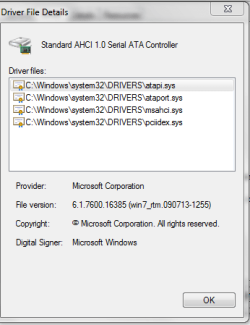
I am hoping to see msahci there (Mine show iaStor but that's where I want to see) when you look at driver details.
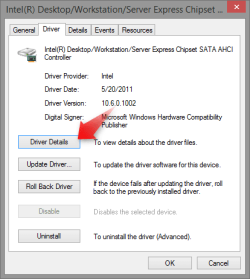
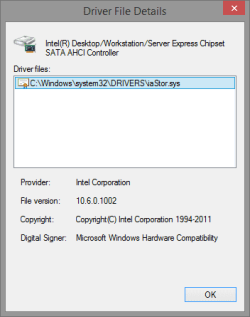
2015-07-07_19h21_46.png 2015-07-07_19h22_52.png
 

My Computer My Computer

At a glance

Win 10 Pro x64Intel I5-2500K @3.3GHz16GB G.Skill Ripjaws X (4x4GB)EVGA GeForce 750 Ti SC 2GB
Computer type
PC/Desktop
Computer Manufacturer/Model Number
Self Built
OS
Win 10 Pro x64
CPU
Intel I5-2500K @3.3GHz
Motherboard
Asrock P67 Extreme4
Memory
16GB G.Skill Ripjaws X (4x4GB)
Graphics Card(s)
EVGA GeForce 750 Ti SC 2GB
Sound Card
ASUS Xonar DG 5.1 Channels 24-bit 96KHz PCI Interface Sound
Monitor(s) Displays
auria eq2367
Screen Resolution
1920 x 1080
Hard Drives
250GB Samsung 850 EVO SSD
1TB WD Blue
1TB Hitachi
PSU
SeaSonic X 650W 80 Plus Gold
Case
Corsair Obsidian 750D
Cooling
Corsair H60, Three 140mm case fans
Keyboard
Logitech Wireless Keyboard K520
Mouse
Logitech Wireless Mouse M310
Internet Speed
Wave Broadband ~ 100 dn 5 up
Antivirus
Windows Defender, Malwarebytes Premium
Browser
Edge, IE11, Chrome
Other Info
Laptop specs: HP g7-1365dx /
CPU: AMD A6-3420M APU with Radeon(tm) HD Graphics /
RAM: Crucial 8Gb (2x4Gb) /
SSD: Crucial M4-CT128M4SSD2 ATA Device/ FW 000F /
GFX: AMD Radeon HD 6520G /
OS: Windows 10 Pro x64
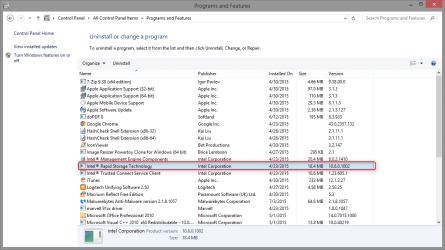
OK. The computer of course will force a restart once I do it so I will send the capture once it restarts.
 

My Computer My Computer

At a glance

Windows 7, 64 bit Home Premium.Intel 2.5Ghz6Gb Ram
Computer type
Laptop
Computer Manufacturer/Model Number
Sony Vaio
OS
Windows 7, 64 bit Home Premium.
CPU
Intel 2.5Ghz
Memory
6Gb Ram
Hard Drives
750 Gb
Antivirus
Webroot
Browser
Internet Explorer
I understand. Can you confirm you don't have this in programs and features as well.
 

Attachments

  • 2015-07-07_19h42_05.png
    2015-07-07_19h42_05.png
    33.9 KB · Views: 1

My Computer My Computer

At a glance

Win 10 Pro x64Intel I5-2500K @3.3GHz16GB G.Skill Ripjaws X (4x4GB)EVGA GeForce 750 Ti SC 2GB
Computer type
PC/Desktop
Computer Manufacturer/Model Number
Self Built
OS
Win 10 Pro x64
CPU
Intel I5-2500K @3.3GHz
Motherboard
Asrock P67 Extreme4
Memory
16GB G.Skill Ripjaws X (4x4GB)
Graphics Card(s)
EVGA GeForce 750 Ti SC 2GB
Sound Card
ASUS Xonar DG 5.1 Channels 24-bit 96KHz PCI Interface Sound
Monitor(s) Displays
auria eq2367
Screen Resolution
1920 x 1080
Hard Drives
250GB Samsung 850 EVO SSD
1TB WD Blue
1TB Hitachi
PSU
SeaSonic X 650W 80 Plus Gold
Case
Corsair Obsidian 750D
Cooling
Corsair H60, Three 140mm case fans
Keyboard
Logitech Wireless Keyboard K520
Mouse
Logitech Wireless Mouse M310
Internet Speed
Wave Broadband ~ 100 dn 5 up
Antivirus
Windows Defender, Malwarebytes Premium
Browser
Edge, IE11, Chrome
Other Info
Laptop specs: HP g7-1365dx /
CPU: AMD A6-3420M APU with Radeon(tm) HD Graphics /
RAM: Crucial 8Gb (2x4Gb) /
SSD: Crucial M4-CT128M4SSD2 ATA Device/ FW 000F /
GFX: AMD Radeon HD 6520G /
OS: Windows 10 Pro x64
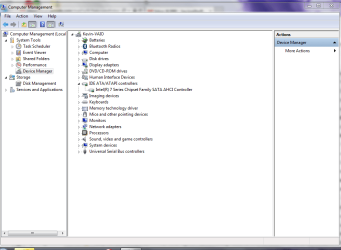
Derekimo,
Immediately after the computer restarts it updates the driver back to the Intel and I have to restart again for the update to take affect.
 

Attachments

My Computer My Computer

At a glance

Windows 7, 64 bit Home Premium.Intel 2.5Ghz6Gb Ram
Computer type
Laptop
Computer Manufacturer/Model Number
Sony Vaio
OS
Windows 7, 64 bit Home Premium.
CPU
Intel 2.5Ghz
Memory
6Gb Ram
Hard Drives
750 Gb
Antivirus
Webroot
Browser
Internet Explorer
Derekimo,
Yes it is there in programs and features.
 

Attachments

  • Capture of programs and features.PNG
    Capture of programs and features.PNG
    30.9 KB · Views: 0

My Computer My Computer

At a glance

Windows 7, 64 bit Home Premium.Intel 2.5Ghz6Gb Ram
Computer type
Laptop
Computer Manufacturer/Model Number
Sony Vaio
OS
Windows 7, 64 bit Home Premium.
CPU
Intel 2.5Ghz
Memory
6Gb Ram
Hard Drives
750 Gb
Antivirus
Webroot
Browser
Internet Explorer
OK, that was step one. :)

Uninstall that, then move on to uninstalling the driver, then reboot. (Even if you are asked to reboot after uninstalling from programs, choose later.)
 

My Computer My Computer

At a glance

Win 10 Pro x64Intel I5-2500K @3.3GHz16GB G.Skill Ripjaws X (4x4GB)EVGA GeForce 750 Ti SC 2GB
Computer type
PC/Desktop
Computer Manufacturer/Model Number
Self Built
OS
Win 10 Pro x64
CPU
Intel I5-2500K @3.3GHz
Motherboard
Asrock P67 Extreme4
Memory
16GB G.Skill Ripjaws X (4x4GB)
Graphics Card(s)
EVGA GeForce 750 Ti SC 2GB
Sound Card
ASUS Xonar DG 5.1 Channels 24-bit 96KHz PCI Interface Sound
Monitor(s) Displays
auria eq2367
Screen Resolution
1920 x 1080
Hard Drives
250GB Samsung 850 EVO SSD
1TB WD Blue
1TB Hitachi
PSU
SeaSonic X 650W 80 Plus Gold
Case
Corsair Obsidian 750D
Cooling
Corsair H60, Three 140mm case fans
Keyboard
Logitech Wireless Keyboard K520
Mouse
Logitech Wireless Mouse M310
Internet Speed
Wave Broadband ~ 100 dn 5 up
Antivirus
Windows Defender, Malwarebytes Premium
Browser
Edge, IE11, Chrome
Other Info
Laptop specs: HP g7-1365dx /
CPU: AMD A6-3420M APU with Radeon(tm) HD Graphics /
RAM: Crucial 8Gb (2x4Gb) /
SSD: Crucial M4-CT128M4SSD2 ATA Device/ FW 000F /
GFX: AMD Radeon HD 6520G /
OS: Windows 10 Pro x64
Huh??? Not sure I understand...go back to DM, then uninstall again and uninstall from programs and features. So far I have not restarted after the DM uninstall. So do you want me to go back to DM, uninstall and not restart choose later? Or just uninstall from Programs now and choose later?
 

My Computer My Computer

At a glance

Windows 7, 64 bit Home Premium.Intel 2.5Ghz6Gb Ram
Computer type
Laptop
Computer Manufacturer/Model Number
Sony Vaio
OS
Windows 7, 64 bit Home Premium.
CPU
Intel 2.5Ghz
Memory
6Gb Ram
Hard Drives
750 Gb
Antivirus
Webroot
Browser
Internet Explorer
First: Uninstall from programs and features. (Sometimes programs ask to restart when uninstalling, in this case you don't want to, so choose later if it asks)

Second: Uninstall from Device Manager.

Then restart.

Was that better? Less confusing?
 

My Computer My Computer

At a glance

Win 10 Pro x64Intel I5-2500K @3.3GHz16GB G.Skill Ripjaws X (4x4GB)EVGA GeForce 750 Ti SC 2GB
Computer type
PC/Desktop
Computer Manufacturer/Model Number
Self Built
OS
Win 10 Pro x64
CPU
Intel I5-2500K @3.3GHz
Motherboard
Asrock P67 Extreme4
Memory
16GB G.Skill Ripjaws X (4x4GB)
Graphics Card(s)
EVGA GeForce 750 Ti SC 2GB
Sound Card
ASUS Xonar DG 5.1 Channels 24-bit 96KHz PCI Interface Sound
Monitor(s) Displays
auria eq2367
Screen Resolution
1920 x 1080
Hard Drives
250GB Samsung 850 EVO SSD
1TB WD Blue
1TB Hitachi
PSU
SeaSonic X 650W 80 Plus Gold
Case
Corsair Obsidian 750D
Cooling
Corsair H60, Three 140mm case fans
Keyboard
Logitech Wireless Keyboard K520
Mouse
Logitech Wireless Mouse M310
Internet Speed
Wave Broadband ~ 100 dn 5 up
Antivirus
Windows Defender, Malwarebytes Premium
Browser
Edge, IE11, Chrome
Other Info
Laptop specs: HP g7-1365dx /
CPU: AMD A6-3420M APU with Radeon(tm) HD Graphics /
RAM: Crucial 8Gb (2x4Gb) /
SSD: Crucial M4-CT128M4SSD2 ATA Device/ FW 000F /
GFX: AMD Radeon HD 6520G /
OS: Windows 10 Pro x64
Yes it was. Now because I had not restarted I am going to show you what is now in IDE before I do anything else and await your instructions because the Intel is not showing up there yet because I did not restart after the driver was updated.
 

Attachments

  • Capture of current DM before restarting after uninstalling from Pgms & features.PNG
    Capture of current DM before restarting after uninstalling from Pgms & features.PNG
    34.6 KB · Views: 0

My Computer My Computer

At a glance

Windows 7, 64 bit Home Premium.Intel 2.5Ghz6Gb Ram
Computer type
Laptop
Computer Manufacturer/Model Number
Sony Vaio
OS
Windows 7, 64 bit Home Premium.
CPU
Intel 2.5Ghz
Memory
6Gb Ram
Hard Drives
750 Gb
Antivirus
Webroot
Browser
Internet Explorer
Thanks. Go ahead and restart. It should stay with what is showing now.
 

My Computer My Computer

At a glance

Win 10 Pro x64Intel I5-2500K @3.3GHz16GB G.Skill Ripjaws X (4x4GB)EVGA GeForce 750 Ti SC 2GB
Computer type
PC/Desktop
Computer Manufacturer/Model Number
Self Built
OS
Win 10 Pro x64
CPU
Intel I5-2500K @3.3GHz
Motherboard
Asrock P67 Extreme4
Memory
16GB G.Skill Ripjaws X (4x4GB)
Graphics Card(s)
EVGA GeForce 750 Ti SC 2GB
Sound Card
ASUS Xonar DG 5.1 Channels 24-bit 96KHz PCI Interface Sound
Monitor(s) Displays
auria eq2367
Screen Resolution
1920 x 1080
Hard Drives
250GB Samsung 850 EVO SSD
1TB WD Blue
1TB Hitachi
PSU
SeaSonic X 650W 80 Plus Gold
Case
Corsair Obsidian 750D
Cooling
Corsair H60, Three 140mm case fans
Keyboard
Logitech Wireless Keyboard K520
Mouse
Logitech Wireless Mouse M310
Internet Speed
Wave Broadband ~ 100 dn 5 up
Antivirus
Windows Defender, Malwarebytes Premium
Browser
Edge, IE11, Chrome
Other Info
Laptop specs: HP g7-1365dx /
CPU: AMD A6-3420M APU with Radeon(tm) HD Graphics /
RAM: Crucial 8Gb (2x4Gb) /
SSD: Crucial M4-CT128M4SSD2 ATA Device/ FW 000F /
GFX: AMD Radeon HD 6520G /
OS: Windows 10 Pro x64
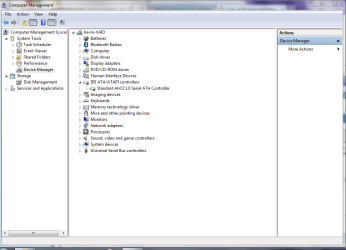
OK. Done and it was updated again and I chose to restart later so you could see the current DM configuration.
 

Attachments

  • Capture of current DM before restarting after uninstalling from Pgms & features.PNG
    Capture of current DM before restarting after uninstalling from Pgms & features.PNG
    34.6 KB · Views: 1

My Computer My Computer

At a glance

Windows 7, 64 bit Home Premium.Intel 2.5Ghz6Gb Ram
Computer type
Laptop
Computer Manufacturer/Model Number
Sony Vaio
OS
Windows 7, 64 bit Home Premium.
CPU
Intel 2.5Ghz
Memory
6Gb Ram
Hard Drives
750 Gb
Antivirus
Webroot
Browser
Internet Explorer
Derekimo,
That was the wrong capture -- had too many -- here is the correct picture image.
 

Attachments

  • Capture of current IDE after restart and update of drivers requiring another restart.PNG
    Capture of current IDE after restart and update of drivers requiring another restart.PNG
    31.8 KB · Views: 2

My Computer My Computer

At a glance

Windows 7, 64 bit Home Premium.Intel 2.5Ghz6Gb Ram
Computer type
Laptop
Computer Manufacturer/Model Number
Sony Vaio
OS
Windows 7, 64 bit Home Premium.
CPU
Intel 2.5Ghz
Memory
6Gb Ram
Hard Drives
750 Gb
Antivirus
Webroot
Browser
Internet Explorer
Just to clarify, you have uninstalled from programs and features and from device manager. Then restarted and the above is the result?

If you check the driver details for the standard AHCI controller like the screenshots I posted do you see msahci?
 

My Computer My Computer

At a glance

Win 10 Pro x64Intel I5-2500K @3.3GHz16GB G.Skill Ripjaws X (4x4GB)EVGA GeForce 750 Ti SC 2GB
Computer type
PC/Desktop
Computer Manufacturer/Model Number
Self Built
OS
Win 10 Pro x64
CPU
Intel I5-2500K @3.3GHz
Motherboard
Asrock P67 Extreme4
Memory
16GB G.Skill Ripjaws X (4x4GB)
Graphics Card(s)
EVGA GeForce 750 Ti SC 2GB
Sound Card
ASUS Xonar DG 5.1 Channels 24-bit 96KHz PCI Interface Sound
Monitor(s) Displays
auria eq2367
Screen Resolution
1920 x 1080
Hard Drives
250GB Samsung 850 EVO SSD
1TB WD Blue
1TB Hitachi
PSU
SeaSonic X 650W 80 Plus Gold
Case
Corsair Obsidian 750D
Cooling
Corsair H60, Three 140mm case fans
Keyboard
Logitech Wireless Keyboard K520
Mouse
Logitech Wireless Mouse M310
Internet Speed
Wave Broadband ~ 100 dn 5 up
Antivirus
Windows Defender, Malwarebytes Premium
Browser
Edge, IE11, Chrome
Other Info
Laptop specs: HP g7-1365dx /
CPU: AMD A6-3420M APU with Radeon(tm) HD Graphics /
RAM: Crucial 8Gb (2x4Gb) /
SSD: Crucial M4-CT128M4SSD2 ATA Device/ FW 000F /
GFX: AMD Radeon HD 6520G /
OS: Windows 10 Pro x64
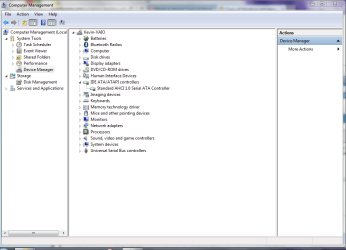
Derekimo,
Yes but I have multiples in each of my details -- 2 in each of the Channel 0 & 4 and a total of 4 in the serial. Of course I still need to restart the computer for the configuration to be updated.
 

My Computer My Computer

At a glance

Windows 7, 64 bit Home Premium.Intel 2.5Ghz6Gb Ram
Computer type
Laptop
Computer Manufacturer/Model Number
Sony Vaio
OS
Windows 7, 64 bit Home Premium.
CPU
Intel 2.5Ghz
Memory
6Gb Ram
Hard Drives
750 Gb
Antivirus
Webroot
Browser
Internet Explorer
I asked if that was the result after a restart, please restart so we can be sure it stays.
 

My Computer My Computer

At a glance

Win 10 Pro x64Intel I5-2500K @3.3GHz16GB G.Skill Ripjaws X (4x4GB)EVGA GeForce 750 Ti SC 2GB
Computer type
PC/Desktop
Computer Manufacturer/Model Number
Self Built
OS
Win 10 Pro x64
CPU
Intel I5-2500K @3.3GHz
Motherboard
Asrock P67 Extreme4
Memory
16GB G.Skill Ripjaws X (4x4GB)
Graphics Card(s)
EVGA GeForce 750 Ti SC 2GB
Sound Card
ASUS Xonar DG 5.1 Channels 24-bit 96KHz PCI Interface Sound
Monitor(s) Displays
auria eq2367
Screen Resolution
1920 x 1080
Hard Drives
250GB Samsung 850 EVO SSD
1TB WD Blue
1TB Hitachi
PSU
SeaSonic X 650W 80 Plus Gold
Case
Corsair Obsidian 750D
Cooling
Corsair H60, Three 140mm case fans
Keyboard
Logitech Wireless Keyboard K520
Mouse
Logitech Wireless Mouse M310
Internet Speed
Wave Broadband ~ 100 dn 5 up
Antivirus
Windows Defender, Malwarebytes Premium
Browser
Edge, IE11, Chrome
Other Info
Laptop specs: HP g7-1365dx /
CPU: AMD A6-3420M APU with Radeon(tm) HD Graphics /
RAM: Crucial 8Gb (2x4Gb) /
SSD: Crucial M4-CT128M4SSD2 ATA Device/ FW 000F /
GFX: AMD Radeon HD 6520G /
OS: Windows 10 Pro x64
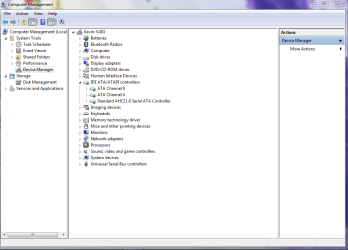
Derekimo,
Yes it stayed. I am attaching the capture of details of driver -- only 2 of them since I am not attaching channel 4 since it is the same as channel 0. The bad news is that my screen was freezing due to weak wi fi signal but the good news is that the usual result would have been a BSOD so I was sitting here crossing my fingers that it would not BSOD this time. The Intel is gone and I am extremely optimistic for the first time in several weeks based upon the screen freeze that did not result in a BSOD.
 

Attachments

  • Capture of channel 0 details same as channel 4.PNG
    Capture of channel 0 details same as channel 4.PNG
    9.9 KB · Views: 23
  • Capture of serial ATA controller details.PNG
    Capture of serial ATA controller details.PNG
    10.4 KB · Views: 23

My Computer My Computer

At a glance

Windows 7, 64 bit Home Premium.Intel 2.5Ghz6Gb Ram
Computer type
Laptop
Computer Manufacturer/Model Number
Sony Vaio
OS
Windows 7, 64 bit Home Premium.
CPU
Intel 2.5Ghz
Memory
6Gb Ram
Hard Drives
750 Gb
Antivirus
Webroot
Browser
Internet Explorer
OK, we got the storage controller covered. For that we now wait and see if your BSOD's stop.

Screen freezing and weak wifi should not be related to each other, separate components, separate drivers.

Or do you mean something else by screen freezing?
 

My Computer My Computer

At a glance

Win 10 Pro x64Intel I5-2500K @3.3GHz16GB G.Skill Ripjaws X (4x4GB)EVGA GeForce 750 Ti SC 2GB
Computer type
PC/Desktop
Computer Manufacturer/Model Number
Self Built
OS
Win 10 Pro x64
CPU
Intel I5-2500K @3.3GHz
Motherboard
Asrock P67 Extreme4
Memory
16GB G.Skill Ripjaws X (4x4GB)
Graphics Card(s)
EVGA GeForce 750 Ti SC 2GB
Sound Card
ASUS Xonar DG 5.1 Channels 24-bit 96KHz PCI Interface Sound
Monitor(s) Displays
auria eq2367
Screen Resolution
1920 x 1080
Hard Drives
250GB Samsung 850 EVO SSD
1TB WD Blue
1TB Hitachi
PSU
SeaSonic X 650W 80 Plus Gold
Case
Corsair Obsidian 750D
Cooling
Corsair H60, Three 140mm case fans
Keyboard
Logitech Wireless Keyboard K520
Mouse
Logitech Wireless Mouse M310
Internet Speed
Wave Broadband ~ 100 dn 5 up
Antivirus
Windows Defender, Malwarebytes Premium
Browser
Edge, IE11, Chrome
Other Info
Laptop specs: HP g7-1365dx /
CPU: AMD A6-3420M APU with Radeon(tm) HD Graphics /
RAM: Crucial 8Gb (2x4Gb) /
SSD: Crucial M4-CT128M4SSD2 ATA Device/ FW 000F /
GFX: AMD Radeon HD 6520G /
OS: Windows 10 Pro x64
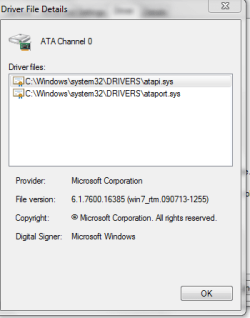
Derekimo,
Yes not really screen freezing but very slow loading of pages/screens is probably more accurate but usually when that happens it would result in BSOD. It did that when I was trying to reply to you about the restart and usually when that happened lately it would result in a BSOD so as I was sitting here waiting for the forum page to refresh to respond to the most current question I was hoping it would not BSOD. That is what was happening many times before it would crash and BSOD.
 

My Computer My Computer

At a glance

Windows 7, 64 bit Home Premium.Intel 2.5Ghz6Gb Ram
Computer type
Laptop
Computer Manufacturer/Model Number
Sony Vaio
OS
Windows 7, 64 bit Home Premium.
CPU
Intel 2.5Ghz
Memory
6Gb Ram
Hard Drives
750 Gb
Antivirus
Webroot
Browser
Internet Explorer
OK, that's a little better. So by pages you mean browser only?

Or do programs that don't access the internet load slow too?
 

My Computer My Computer

At a glance

Win 10 Pro x64Intel I5-2500K @3.3GHz16GB G.Skill Ripjaws X (4x4GB)EVGA GeForce 750 Ti SC 2GB
Computer type
PC/Desktop
Computer Manufacturer/Model Number
Self Built
OS
Win 10 Pro x64
CPU
Intel I5-2500K @3.3GHz
Motherboard
Asrock P67 Extreme4
Memory
16GB G.Skill Ripjaws X (4x4GB)
Graphics Card(s)
EVGA GeForce 750 Ti SC 2GB
Sound Card
ASUS Xonar DG 5.1 Channels 24-bit 96KHz PCI Interface Sound
Monitor(s) Displays
auria eq2367
Screen Resolution
1920 x 1080
Hard Drives
250GB Samsung 850 EVO SSD
1TB WD Blue
1TB Hitachi
PSU
SeaSonic X 650W 80 Plus Gold
Case
Corsair Obsidian 750D
Cooling
Corsair H60, Three 140mm case fans
Keyboard
Logitech Wireless Keyboard K520
Mouse
Logitech Wireless Mouse M310
Internet Speed
Wave Broadband ~ 100 dn 5 up
Antivirus
Windows Defender, Malwarebytes Premium
Browser
Edge, IE11, Chrome
Other Info
Laptop specs: HP g7-1365dx /
CPU: AMD A6-3420M APU with Radeon(tm) HD Graphics /
RAM: Crucial 8Gb (2x4Gb) /
SSD: Crucial M4-CT128M4SSD2 ATA Device/ FW 000F /
GFX: AMD Radeon HD 6520G /
OS: Windows 10 Pro x64
Derekimo,
It has been both but lately mostly internet because once this problem started I have not been able to run many programs. Right now there are not as many apps on this computer as I would normally be running since I

have had to restore to factory settings 2-3 times over the past 2-3 months. I had many more apps on this computer before all of this BSOD started so the current configuration is minimal in comparison to what was

running on it before the BSOD. I have not reinstalled Office 2013, Lotus Smart Suite, Photoshop, Adobe Bridge, Roxio, DVD Flick, Studio, etc. I generally have many more apps installed, so my current configuration is

bare bones to say the least. However, until the problem is identified I saw no need to install apps that may have to be removed again and again as that process can be tedious. Additionally, because the wi fi router is so

far away from this laptop I purchased a 802.11 adapter that I am suspecting may have been an enabler to the problem if not the source of this problem with my drivers -- if the drivers are the actual cause of the

BSOD. The adapter was working for awhile then the lights stopped blinking and the adapter was no longer working -- it is one of those adapters with the antenna that I suspect corrupted my drivers -- only a theory as

it has not been installed for 3-4 months but the intermittent BSOD started long before I started using it. The BSODs were far more infrequent prior to its use so it was likely not the actual source but the problem

became worse after its use.
 
Last edited by a moderator:

My Computer My Computer

At a glance

Windows 7, 64 bit Home Premium.Intel 2.5Ghz6Gb Ram
Computer type
Laptop
Computer Manufacturer/Model Number
Sony Vaio
OS
Windows 7, 64 bit Home Premium.
CPU
Intel 2.5Ghz
Memory
6Gb Ram
Hard Drives
750 Gb
Antivirus
Webroot
Browser
Internet Explorer
Back
Top