Courrupted SSD, reinstalling windows advice

thepower99

New member
Member
Local time
1:54 PM
Messages
41
Location
Aus
Hey guys,

My machine has somehow managed to corrupt it self, it shutdown fine one day and wouldn't boot the next. It gave this error error1_34.jpg
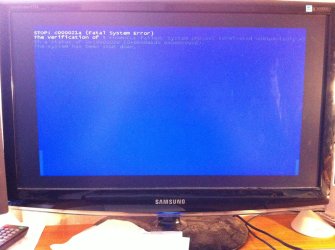
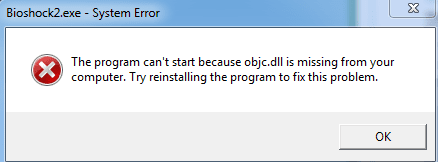
I managed to sort of fix it by running windows startup repair a few times and also rebuilding the MBR using a cd booted partition manager. I also ran sfc through command prompt and chkdsk. However windows now has so many errors it almost unusable when I try to run the majority of programs I get .dll errors like this one
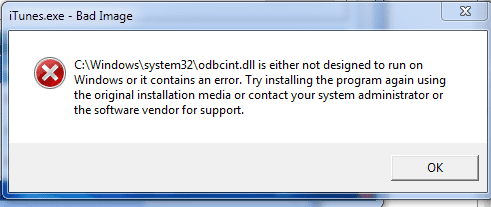
error2.PNG

and this one

error3.PNG

Sometimes reinstalling the program fixes the problem completely and in other times it half fixes the issue. As in reinstalling jdownloader worked fine, but foxit reader still does not work after being reinstalled. Firefox mostly works but has weird issues sometimes.
Anyway I have decided to reinstall windows and start from scratch again. However I want to do this the correct way, (computer management no longer works gives this error )
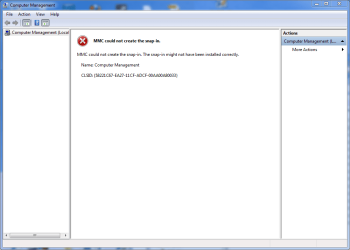
error4.PNG

So to my current question:
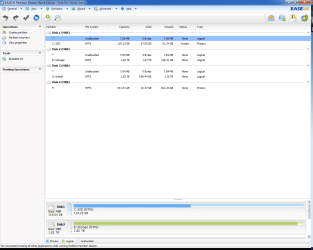
I have four hard drives in my pc
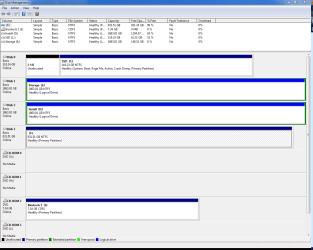
drives3.PNG

another picture

drives1.PNG

My boot drive the SSD (has windows and common programs)
2 2tb storage drives (one for installing programs, one for storing media)
1 1tb spare drive (does nothing really)
(all are Sata drives)

The ssd is installed as ahci, and the motherboard is set to ahci, however windows (and I) think that the other drives are running in IDE.
Is this an issue ?
To clarify the ssd is achi and the others are ide,
I install most programs on a 2tb IDE interface drive while windows is on the 120gb ahci ssd.

How should I set up and install my pc to run in the most stable way?


Any help would be greatly appreciated.
 

My Computer

Computer type
PC/Desktop
Computer Manufacturer/Model Number
Custom
OS
Windows 7 Professional 64bit
CPU
Intel i7 920 OC 3.8ghz
Motherboard
Asus P6T
Memory
20gb Kingston DDR3
Graphics Card(s)
Gtx 460 1gb x2 SLI
Sound Card
Realtek HD audio inbuilt 7.1 surround
Monitor(s) Displays
SyncMaster 2333
Screen Resolution
1920*1080
Hard Drives
Seagate es2 barracuda 1TB,
Kingston 128gb SSD,
3 WD 2TB green drives ,
PSU
1200 watt
Cooling
Trition 81
if you've set the BIOS to run AHCI+IDE you should be OK..
 

My Computer

Computer type
PC/Desktop
Computer Manufacturer/Model Number
benchtec, built to personal specs
OS
Windows10 Pro - 64Bit vs.10547
CPU
i7-965 Extreme Edition (8 Cores) at 3.3GHz (no OC)
Motherboard
BloodRageX58 (Socket1366)
Memory
12G Corsair Dominator DDR3 - tripled
Graphics Card(s)
2xAMD SapphireNITRO R9 380(4G) crossfire
Sound Card
Sonar(SB)X-Fi onboard
Monitor(s) Displays
SyncMaster P2050 20"
Screen Resolution
1600x900 (widescreen)
Hard Drives
480G\OCZSolid3SSD, 64G\OCZVertex3SSD,60G\OCZVertex2SSD, 1TB\spinpointF1SATAHDD
PSU
1200w Power Station Gold
Case
ANTEC 900/2 all blue lights, etc..
Cooling
Noctua SE1366 NH-U12P - a tight fit, but a monster cooler!!
Keyboard
Logitech G19 (wired)
Mouse
Logitech G9 Laser (wired)
Internet Speed
150mb unlimited
Browser
IE11(RP)
Other Info
Xbox One, Nokia735 Windows10 mobile, LG HD/DVD/Blu-Ray r/w, CyberlinkPowerDVD15, LogitechZ5500-SS(5.1), LogitechG35Phones-SS(7.1),MSOffice 2007,CorelDrawX7,Painter2016, Wacom Intuos Pro-SE
if you've set the BIOS to run AHCI+IDE you should be OK..

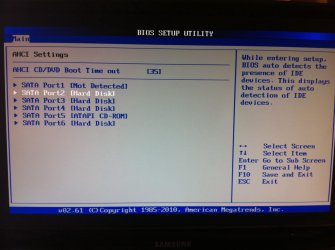
I do not know if it is set to that

motherboard is a Asus p6t if that helps, images below
drive1.jpg

drive2.jpg


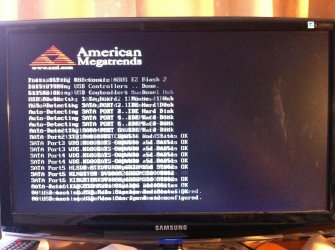
sorry about the blur was a hard one to try and take
drive3.jpg
 

My Computer

Computer type
PC/Desktop
Computer Manufacturer/Model Number
Custom
OS
Windows 7 Professional 64bit
CPU
Intel i7 920 OC 3.8ghz
Motherboard
Asus P6T
Memory
20gb Kingston DDR3
Graphics Card(s)
Gtx 460 1gb x2 SLI
Sound Card
Realtek HD audio inbuilt 7.1 surround
Monitor(s) Displays
SyncMaster 2333
Screen Resolution
1920*1080
Hard Drives
Seagate es2 barracuda 1TB,
Kingston 128gb SSD,
3 WD 2TB green drives ,
PSU
1200 watt
Cooling
Trition 81
As BugMeister said you should be OK as long as the SSD is in ahci mode. I would recommend disconnecting the power cables to all hard drives except the SSD before doing a clean install. There are many who recommend running all sata drives in ahci, but it will not matter if the others are in IDE mode. I would follow this tutorial on readying a HD/SSD for reinstall with the exception of running the clean all command. I only run the command as 'clean', not 'clean all'. After windows is installed, cturn off the machine and connect the other hard drives. As soon as all windows updates and drivers are installed, I would make an image of the hard drive and save it so you can restore the image and not have to reinstall again.
 

My Computers

System One System Two

  • Computer type
    PC/Desktop
    Computer Manufacturer/Model Number
    ALWAYS UNDER CONSTRUCTION
    OS
    Windows 11 Pro
    CPU
    Ryzen 9 5900X
    Motherboard
    Asus X570 Crosshair Viii Hero
    Memory
    32GB G Skill DDR4-3600
    Graphics Card(s)
    EVGA RTX 3080 FTW 3 Ultra
    Sound Card
    On Board/Sennheiser PC37X Headset
    Monitor(s) Displays
    3 X Asus 27"
    Screen Resolution
    2560x1440
    Hard Drives
    2 X 1 TB NVME drives
    PSU
    EVGA 850
    Case
    Phanteks Eclipse P400A
    Cooling
    EVGA 280 AIO
    Keyboard
    Logitech G510s/ Logitech G13
    Mouse
    Logitech G502
    Internet Speed
    24/1
    Antivirus
    ESET/MBAM Pro/SAS Pro
    Browser
    Chrome/ Firefox/ Edge
  • Computer type
    Laptop
    System Manufacturer/Model Number
    Dell 16 Plus
    OS
    Windows 11 Pro
    CPU
    Intel Ultra 9 288V
    Memory
    32 GB LPDDR5X 8533
    Monitor(s) Displays
    16" Mini-LED HDR600 Touch 90 Hz
    Screen Resolution
    2560X1600
    Hard Drives
    1 TB NVME
From the last photo of the bios load screen it is hard to tell, but from the other screeens shown it appears everything is set to ahci which is how mine is. Do you have more than 1 sata controller in bios? If not, all drives connecteed appear to be ahci.
 

My Computers

System One System Two

  • Computer type
    PC/Desktop
    Computer Manufacturer/Model Number
    ALWAYS UNDER CONSTRUCTION
    OS
    Windows 11 Pro
    CPU
    Ryzen 9 5900X
    Motherboard
    Asus X570 Crosshair Viii Hero
    Memory
    32GB G Skill DDR4-3600
    Graphics Card(s)
    EVGA RTX 3080 FTW 3 Ultra
    Sound Card
    On Board/Sennheiser PC37X Headset
    Monitor(s) Displays
    3 X Asus 27"
    Screen Resolution
    2560x1440
    Hard Drives
    2 X 1 TB NVME drives
    PSU
    EVGA 850
    Case
    Phanteks Eclipse P400A
    Cooling
    EVGA 280 AIO
    Keyboard
    Logitech G510s/ Logitech G13
    Mouse
    Logitech G502
    Internet Speed
    24/1
    Antivirus
    ESET/MBAM Pro/SAS Pro
    Browser
    Chrome/ Firefox/ Edge
  • Computer type
    Laptop
    System Manufacturer/Model Number
    Dell 16 Plus
    OS
    Windows 11 Pro
    CPU
    Intel Ultra 9 288V
    Memory
    32 GB LPDDR5X 8533
    Monitor(s) Displays
    16" Mini-LED HDR600 Touch 90 Hz
    Screen Resolution
    2560X1600
    Hard Drives
    1 TB NVME
As BugMeister said you should be OK as long as the SSD is in ahci mode. I would recommend disconnecting the power cables to all hard drives except the SSD before doing a clean install. There are many who recommend running all sata drives in ahci, but it will not matter if the others are in IDE mode. I would follow this tutorial on readying a HD/SSD for reinstall with the exception of running the clean all command. I only run the command as 'clean', not 'clean all'. After windows is installed, cturn off the machine and connect the other hard drives. As soon as all windows updates and drivers are installed, I would make an image of the hard drive and save it so you can restore the image and not have to reinstall again.

Ok, is there a way to change all the other drives to ahci?
 

My Computer

Computer type
PC/Desktop
Computer Manufacturer/Model Number
Custom
OS
Windows 7 Professional 64bit
CPU
Intel i7 920 OC 3.8ghz
Motherboard
Asus P6T
Memory
20gb Kingston DDR3
Graphics Card(s)
Gtx 460 1gb x2 SLI
Sound Card
Realtek HD audio inbuilt 7.1 surround
Monitor(s) Displays
SyncMaster 2333
Screen Resolution
1920*1080
Hard Drives
Seagate es2 barracuda 1TB,
Kingston 128gb SSD,
3 WD 2TB green drives ,
PSU
1200 watt
Cooling
Trition 81
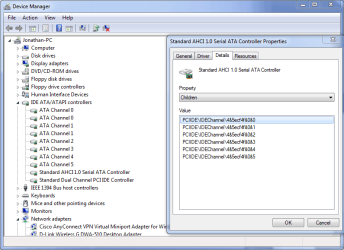
If you only have 1 sata controller in bios, it appears they are all in ahci mode. If you can boot into windows, go to device manager, expand IDE/ATA/ATAPI controllers. The last entries there will be what the controllers are. If you see one that says ahci in the name, right click it and select properties, select the details tab, open the box and scroll down to "children". All of the devices listed there are controlled by that ahci controller.
 

My Computers

System One System Two

  • Computer type
    PC/Desktop
    Computer Manufacturer/Model Number
    ALWAYS UNDER CONSTRUCTION
    OS
    Windows 11 Pro
    CPU
    Ryzen 9 5900X
    Motherboard
    Asus X570 Crosshair Viii Hero
    Memory
    32GB G Skill DDR4-3600
    Graphics Card(s)
    EVGA RTX 3080 FTW 3 Ultra
    Sound Card
    On Board/Sennheiser PC37X Headset
    Monitor(s) Displays
    3 X Asus 27"
    Screen Resolution
    2560x1440
    Hard Drives
    2 X 1 TB NVME drives
    PSU
    EVGA 850
    Case
    Phanteks Eclipse P400A
    Cooling
    EVGA 280 AIO
    Keyboard
    Logitech G510s/ Logitech G13
    Mouse
    Logitech G502
    Internet Speed
    24/1
    Antivirus
    ESET/MBAM Pro/SAS Pro
    Browser
    Chrome/ Firefox/ Edge
  • Computer type
    Laptop
    System Manufacturer/Model Number
    Dell 16 Plus
    OS
    Windows 11 Pro
    CPU
    Intel Ultra 9 288V
    Memory
    32 GB LPDDR5X 8533
    Monitor(s) Displays
    16" Mini-LED HDR600 Touch 90 Hz
    Screen Resolution
    2560X1600
    Hard Drives
    1 TB NVME
If you only have 1 sata controller in bios, it appears they are all in ahci mode. If you can boot into windows, go to device manager, expand IDE/ATA/ATAPI controllers. The last entries there will be what the controllers are. If you see one that says ahci in the name, right click it and select properties, select the details tab, open the box and scroll down to "children". All of the devices listed there are controlled by that ahci controller.

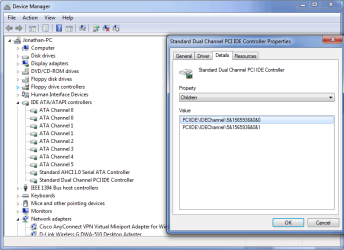
I have done what you said, there appears to be two controllers but i don't really know what that means to be honest.

achi one
drives6.PNG

ide one
drive7.PNG

A bit of back story, the ssd was originally ide but i changed it a few months ago to ahci using the Microsoft fix it tool, and changing the bios, worked fine and the pc ran much faster. however after waking the pc from sleep it would often lose all the rest of the drives beside the ssd.
I am trying to avoid this, i believe it happened because the drives were ide but i dont really know.

thanks for your help
 

My Computer

Computer type
PC/Desktop
Computer Manufacturer/Model Number
Custom
OS
Windows 7 Professional 64bit
CPU
Intel i7 920 OC 3.8ghz
Motherboard
Asus P6T
Memory
20gb Kingston DDR3
Graphics Card(s)
Gtx 460 1gb x2 SLI
Sound Card
Realtek HD audio inbuilt 7.1 surround
Monitor(s) Displays
SyncMaster 2333
Screen Resolution
1920*1080
Hard Drives
Seagate es2 barracuda 1TB,
Kingston 128gb SSD,
3 WD 2TB green drives ,
PSU
1200 watt
Cooling
Trition 81
I can tell that, it didn't work well for you. I thought it should have listed the devices. In bios you showed a screenshot of storage controller set to ahci. Do you have more than 1 sata controller?
 

My Computers

System One System Two

  • Computer type
    PC/Desktop
    Computer Manufacturer/Model Number
    ALWAYS UNDER CONSTRUCTION
    OS
    Windows 11 Pro
    CPU
    Ryzen 9 5900X
    Motherboard
    Asus X570 Crosshair Viii Hero
    Memory
    32GB G Skill DDR4-3600
    Graphics Card(s)
    EVGA RTX 3080 FTW 3 Ultra
    Sound Card
    On Board/Sennheiser PC37X Headset
    Monitor(s) Displays
    3 X Asus 27"
    Screen Resolution
    2560x1440
    Hard Drives
    2 X 1 TB NVME drives
    PSU
    EVGA 850
    Case
    Phanteks Eclipse P400A
    Cooling
    EVGA 280 AIO
    Keyboard
    Logitech G510s/ Logitech G13
    Mouse
    Logitech G502
    Internet Speed
    24/1
    Antivirus
    ESET/MBAM Pro/SAS Pro
    Browser
    Chrome/ Firefox/ Edge
  • Computer type
    Laptop
    System Manufacturer/Model Number
    Dell 16 Plus
    OS
    Windows 11 Pro
    CPU
    Intel Ultra 9 288V
    Memory
    32 GB LPDDR5X 8533
    Monitor(s) Displays
    16" Mini-LED HDR600 Touch 90 Hz
    Screen Resolution
    2560X1600
    Hard Drives
    1 TB NVME
I can tell that, it didn't work well for you. I thought it should have listed the devices. In bios you showed a screenshot of storage controller set to ahci. Do you have more than 1 sata controller?

I think so, not to sure
spec page
ASUSTeK Computer Inc. - Motherboards- ASUS P6T

I think it has two
One with 6 X SATA 3GB/s ICH10R Southbridge ports which (using Intel Matrix Storage) supports SATA RAID 0,1,5,10.

and one with JMicron JMB322 2 X SATA 3 GB/s

from this page [Solved] How 2 configure ASUS P6T w/lone SSD + SATA RAID? - New-System-Build - Homebuilt-Systems
 

My Computer

Computer type
PC/Desktop
Computer Manufacturer/Model Number
Custom
OS
Windows 7 Professional 64bit
CPU
Intel i7 920 OC 3.8ghz
Motherboard
Asus P6T
Memory
20gb Kingston DDR3
Graphics Card(s)
Gtx 460 1gb x2 SLI
Sound Card
Realtek HD audio inbuilt 7.1 surround
Monitor(s) Displays
SyncMaster 2333
Screen Resolution
1920*1080
Hard Drives
Seagate es2 barracuda 1TB,
Kingston 128gb SSD,
3 WD 2TB green drives ,
PSU
1200 watt
Cooling
Trition 81
I am looking at your mother board on Asus site now. It has options of other expansion sata ports. Do you have more than 1. Are all of your internal sata ports red in color?
 

My Computers

System One System Two

  • Computer type
    PC/Desktop
    Computer Manufacturer/Model Number
    ALWAYS UNDER CONSTRUCTION
    OS
    Windows 11 Pro
    CPU
    Ryzen 9 5900X
    Motherboard
    Asus X570 Crosshair Viii Hero
    Memory
    32GB G Skill DDR4-3600
    Graphics Card(s)
    EVGA RTX 3080 FTW 3 Ultra
    Sound Card
    On Board/Sennheiser PC37X Headset
    Monitor(s) Displays
    3 X Asus 27"
    Screen Resolution
    2560x1440
    Hard Drives
    2 X 1 TB NVME drives
    PSU
    EVGA 850
    Case
    Phanteks Eclipse P400A
    Cooling
    EVGA 280 AIO
    Keyboard
    Logitech G510s/ Logitech G13
    Mouse
    Logitech G502
    Internet Speed
    24/1
    Antivirus
    ESET/MBAM Pro/SAS Pro
    Browser
    Chrome/ Firefox/ Edge
  • Computer type
    Laptop
    System Manufacturer/Model Number
    Dell 16 Plus
    OS
    Windows 11 Pro
    CPU
    Intel Ultra 9 288V
    Memory
    32 GB LPDDR5X 8533
    Monitor(s) Displays
    16" Mini-LED HDR600 Touch 90 Hz
    Screen Resolution
    2560X1600
    Hard Drives
    1 TB NVME
The Tom's hardware article is only for raid. He wants to run raid and a SSD not in the raid array. I don't believe you should have any issues if all ports are in ahci.
 

My Computers

System One System Two

  • Computer type
    PC/Desktop
    Computer Manufacturer/Model Number
    ALWAYS UNDER CONSTRUCTION
    OS
    Windows 11 Pro
    CPU
    Ryzen 9 5900X
    Motherboard
    Asus X570 Crosshair Viii Hero
    Memory
    32GB G Skill DDR4-3600
    Graphics Card(s)
    EVGA RTX 3080 FTW 3 Ultra
    Sound Card
    On Board/Sennheiser PC37X Headset
    Monitor(s) Displays
    3 X Asus 27"
    Screen Resolution
    2560x1440
    Hard Drives
    2 X 1 TB NVME drives
    PSU
    EVGA 850
    Case
    Phanteks Eclipse P400A
    Cooling
    EVGA 280 AIO
    Keyboard
    Logitech G510s/ Logitech G13
    Mouse
    Logitech G502
    Internet Speed
    24/1
    Antivirus
    ESET/MBAM Pro/SAS Pro
    Browser
    Chrome/ Firefox/ Edge
  • Computer type
    Laptop
    System Manufacturer/Model Number
    Dell 16 Plus
    OS
    Windows 11 Pro
    CPU
    Intel Ultra 9 288V
    Memory
    32 GB LPDDR5X 8533
    Monitor(s) Displays
    16" Mini-LED HDR600 Touch 90 Hz
    Screen Resolution
    2560X1600
    Hard Drives
    1 TB NVME
I would suggest that you set the Intel ports as ahci and use them for all of your drives.
 

My Computers

System One System Two

  • Computer type
    PC/Desktop
    Computer Manufacturer/Model Number
    ALWAYS UNDER CONSTRUCTION
    OS
    Windows 11 Pro
    CPU
    Ryzen 9 5900X
    Motherboard
    Asus X570 Crosshair Viii Hero
    Memory
    32GB G Skill DDR4-3600
    Graphics Card(s)
    EVGA RTX 3080 FTW 3 Ultra
    Sound Card
    On Board/Sennheiser PC37X Headset
    Monitor(s) Displays
    3 X Asus 27"
    Screen Resolution
    2560x1440
    Hard Drives
    2 X 1 TB NVME drives
    PSU
    EVGA 850
    Case
    Phanteks Eclipse P400A
    Cooling
    EVGA 280 AIO
    Keyboard
    Logitech G510s/ Logitech G13
    Mouse
    Logitech G502
    Internet Speed
    24/1
    Antivirus
    ESET/MBAM Pro/SAS Pro
    Browser
    Chrome/ Firefox/ Edge
  • Computer type
    Laptop
    System Manufacturer/Model Number
    Dell 16 Plus
    OS
    Windows 11 Pro
    CPU
    Intel Ultra 9 288V
    Memory
    32 GB LPDDR5X 8533
    Monitor(s) Displays
    16" Mini-LED HDR600 Touch 90 Hz
    Screen Resolution
    2560X1600
    Hard Drives
    1 TB NVME
I am looking at your mother board on Asus site now. It has options of other expansion sata ports. Do you have more than 1. Are all of your internal sata ports red in color?

Not to sure what you mean by " more than 1" as for the sata ports yes there are ones that are a different colour, they are orange i think (cannot check right now on the train)

Thanks agian
 

My Computer

Computer type
PC/Desktop
Computer Manufacturer/Model Number
Custom
OS
Windows 7 Professional 64bit
CPU
Intel i7 920 OC 3.8ghz
Motherboard
Asus P6T
Memory
20gb Kingston DDR3
Graphics Card(s)
Gtx 460 1gb x2 SLI
Sound Card
Realtek HD audio inbuilt 7.1 surround
Monitor(s) Displays
SyncMaster 2333
Screen Resolution
1920*1080
Hard Drives
Seagate es2 barracuda 1TB,
Kingston 128gb SSD,
3 WD 2TB green drives ,
PSU
1200 watt
Cooling
Trition 81
I would suggest that you set the Intel ports as ahci and use them for all of your drives.

Ok do i do that after i install windows, or have to format all drives, or change ports? How do i make them all ahci?
 

My Computer

Computer type
PC/Desktop
Computer Manufacturer/Model Number
Custom
OS
Windows 7 Professional 64bit
CPU
Intel i7 920 OC 3.8ghz
Motherboard
Asus P6T
Memory
20gb Kingston DDR3
Graphics Card(s)
Gtx 460 1gb x2 SLI
Sound Card
Realtek HD audio inbuilt 7.1 surround
Monitor(s) Displays
SyncMaster 2333
Screen Resolution
1920*1080
Hard Drives
Seagate es2 barracuda 1TB,
Kingston 128gb SSD,
3 WD 2TB green drives ,
PSU
1200 watt
Cooling
Trition 81
I would suggest that you set the Intel ports as ahci and use them for all of your drives.

Ok do i do that after i install windows, or have to format all drives, or change ports? How do i make them all ahci?


Cheers
 

My Computer

Computer type
PC/Desktop
Computer Manufacturer/Model Number
Custom
OS
Windows 7 Professional 64bit
CPU
Intel i7 920 OC 3.8ghz
Motherboard
Asus P6T
Memory
20gb Kingston DDR3
Graphics Card(s)
Gtx 460 1gb x2 SLI
Sound Card
Realtek HD audio inbuilt 7.1 surround
Monitor(s) Displays
SyncMaster 2333
Screen Resolution
1920*1080
Hard Drives
Seagate es2 barracuda 1TB,
Kingston 128gb SSD,
3 WD 2TB green drives ,
PSU
1200 watt
Cooling
Trition 81
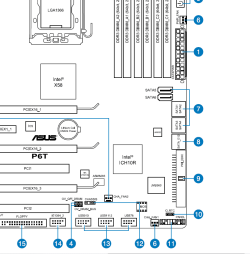
Your motherboard has 6 sata ports controlled by Intel controller, red. There appear to be 2 sata ports controlled by J Micron which are orange. I am only asking to make sure which ports are set to ahci. The bios picture you showed didn't say which sata controller it is. But in your manual it shows setting the ports to ahci and the picture looks the same as what you showed in the screenshot. This is from your manual. Set the ports to ahci before you install. The link I gave you earlier about using diskpart was only for the SSD. The other disks should work either way.
bios.PNG

bios1.PNG
 

My Computers

System One System Two

  • Computer type
    PC/Desktop
    Computer Manufacturer/Model Number
    ALWAYS UNDER CONSTRUCTION
    OS
    Windows 11 Pro
    CPU
    Ryzen 9 5900X
    Motherboard
    Asus X570 Crosshair Viii Hero
    Memory
    32GB G Skill DDR4-3600
    Graphics Card(s)
    EVGA RTX 3080 FTW 3 Ultra
    Sound Card
    On Board/Sennheiser PC37X Headset
    Monitor(s) Displays
    3 X Asus 27"
    Screen Resolution
    2560x1440
    Hard Drives
    2 X 1 TB NVME drives
    PSU
    EVGA 850
    Case
    Phanteks Eclipse P400A
    Cooling
    EVGA 280 AIO
    Keyboard
    Logitech G510s/ Logitech G13
    Mouse
    Logitech G502
    Internet Speed
    24/1
    Antivirus
    ESET/MBAM Pro/SAS Pro
    Browser
    Chrome/ Firefox/ Edge
  • Computer type
    Laptop
    System Manufacturer/Model Number
    Dell 16 Plus
    OS
    Windows 11 Pro
    CPU
    Intel Ultra 9 288V
    Memory
    32 GB LPDDR5X 8533
    Monitor(s) Displays
    16" Mini-LED HDR600 Touch 90 Hz
    Screen Resolution
    2560X1600
    Hard Drives
    1 TB NVME
The snip posted above. #8 is the JMicron ports, #7 are the intel ports. You set them to ahci in bios before you install windows.


EDIT: Am I confusing you?
 

My Computers

System One System Two

  • Computer type
    PC/Desktop
    Computer Manufacturer/Model Number
    ALWAYS UNDER CONSTRUCTION
    OS
    Windows 11 Pro
    CPU
    Ryzen 9 5900X
    Motherboard
    Asus X570 Crosshair Viii Hero
    Memory
    32GB G Skill DDR4-3600
    Graphics Card(s)
    EVGA RTX 3080 FTW 3 Ultra
    Sound Card
    On Board/Sennheiser PC37X Headset
    Monitor(s) Displays
    3 X Asus 27"
    Screen Resolution
    2560x1440
    Hard Drives
    2 X 1 TB NVME drives
    PSU
    EVGA 850
    Case
    Phanteks Eclipse P400A
    Cooling
    EVGA 280 AIO
    Keyboard
    Logitech G510s/ Logitech G13
    Mouse
    Logitech G502
    Internet Speed
    24/1
    Antivirus
    ESET/MBAM Pro/SAS Pro
    Browser
    Chrome/ Firefox/ Edge
  • Computer type
    Laptop
    System Manufacturer/Model Number
    Dell 16 Plus
    OS
    Windows 11 Pro
    CPU
    Intel Ultra 9 288V
    Memory
    32 GB LPDDR5X 8533
    Monitor(s) Displays
    16" Mini-LED HDR600 Touch 90 Hz
    Screen Resolution
    2560X1600
    Hard Drives
    1 TB NVME
Your motherboard has 6 sata ports controlled by Intel controller, red. There appear to be 2 sata ports controlled by J Micron which are orange. I am only asking to make sure which ports are set to ahci. The bios picture you showed didn't say which sata controller it is. But in your manual it shows setting the ports to ahci and the picture looks the same as what you showed in the screenshot. This is from your manual. Set the ports to ahci before you install. The link I gave you earlier about using diskpart was only for the SSD. The other disks should work either way.
View attachment 176305

View attachment 176306

Ok, well i believe it is set as that currently, however as of right now it is using these drives as ide i think, reinstalling windows might hep but i am not sure
 

My Computer

Computer type
PC/Desktop
Computer Manufacturer/Model Number
Custom
OS
Windows 7 Professional 64bit
CPU
Intel i7 920 OC 3.8ghz
Motherboard
Asus P6T
Memory
20gb Kingston DDR3
Graphics Card(s)
Gtx 460 1gb x2 SLI
Sound Card
Realtek HD audio inbuilt 7.1 surround
Monitor(s) Displays
SyncMaster 2333
Screen Resolution
1920*1080
Hard Drives
Seagate es2 barracuda 1TB,
Kingston 128gb SSD,
3 WD 2TB green drives ,
PSU
1200 watt
Cooling
Trition 81
It should be in ahci if the bios is set that way. If you don't have AS SSD, download it. Don't run the test. just open it up, select your SSD at the top and post a screenshot. It will tell the alignment, the firmware installed on the SSD, and the controller. Then you will know. If I am confusing you, please let me know and I will try to explain everything. I may not be up much longer. It's getting late here and I know it is quite late there. I will be on early in the morning, but there is usually someone else around to help. But, post your screenshot of AS SSD.
 

My Computers

System One System Two

  • Computer type
    PC/Desktop
    Computer Manufacturer/Model Number
    ALWAYS UNDER CONSTRUCTION
    OS
    Windows 11 Pro
    CPU
    Ryzen 9 5900X
    Motherboard
    Asus X570 Crosshair Viii Hero
    Memory
    32GB G Skill DDR4-3600
    Graphics Card(s)
    EVGA RTX 3080 FTW 3 Ultra
    Sound Card
    On Board/Sennheiser PC37X Headset
    Monitor(s) Displays
    3 X Asus 27"
    Screen Resolution
    2560x1440
    Hard Drives
    2 X 1 TB NVME drives
    PSU
    EVGA 850
    Case
    Phanteks Eclipse P400A
    Cooling
    EVGA 280 AIO
    Keyboard
    Logitech G510s/ Logitech G13
    Mouse
    Logitech G502
    Internet Speed
    24/1
    Antivirus
    ESET/MBAM Pro/SAS Pro
    Browser
    Chrome/ Firefox/ Edge
  • Computer type
    Laptop
    System Manufacturer/Model Number
    Dell 16 Plus
    OS
    Windows 11 Pro
    CPU
    Intel Ultra 9 288V
    Memory
    32 GB LPDDR5X 8533
    Monitor(s) Displays
    16" Mini-LED HDR600 Touch 90 Hz
    Screen Resolution
    2560X1600
    Hard Drives
    1 TB NVME
Back
Top