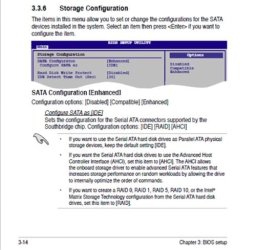
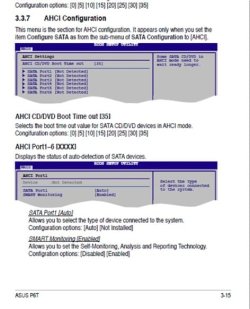
It should be in ahci if the bios is set that way. If you don't have AS SSD, download it. Don't run the test. just open it up, select your SSD at the top and post a screenshot. It will tell the alignment, the firmware installed on the SSD, and the controller. Then you will know. If I am confusing you, please let me know and I will try to explain everything. I may not be up much longer. It's getting late here and I know it is quite late there. I will be on early in the morning, but there is usually someone else around to help. But, post your screenshot of AS SSD.
Unfortunately i cannot run as-ssd (even though i re-downloaded it as above) get a another .dll error (WindowsCodecs.dll is either not designed to run on windows or contains an error)
I am 99% sure my ssd is running in ahci and rest are not, because when the computer boots (in the bios post) it says the ssd is ahci and the rest are ide. Is there any way to change that?
All options in the bios are set to ahci that i could find, same as the previous screen shots.
I am slightly confused but will try install anyway i have a little free time now
this is my plan
Disconnect all drives but the ssd
run that diskpart thing you mentioned earlier with clean only
format drive
install windows
install updates
reconnect other drives
link user account folders back up (e.g. my music and my videos)
My Computer
- Computer type
- PC/Desktop
- Computer Manufacturer/Model Number
- Custom
- OS
- Windows 7 Professional 64bit
- CPU
- Intel i7 920 OC 3.8ghz
- Motherboard
- Asus P6T
- Memory
- 20gb Kingston DDR3
- Graphics Card(s)
- Gtx 460 1gb x2 SLI
- Sound Card
- Realtek HD audio inbuilt 7.1 surround
- Monitor(s) Displays
- SyncMaster 2333
- Screen Resolution
- 1920*1080
- Hard Drives
- Seagate es2 barracuda 1TB,
Kingston 128gb SSD,
3 WD 2TB green drives ,
- PSU
- 1200 watt
- Cooling
- Trition 81