
Hi: First time poster, here. Like others, I'm having a difficult time understanding why my cpu usage reaches 100% so frequently in Windows 7 64-bit. I'm running several systems with this problem; the one I'm looking at at the moment is a Dell Latitude D830 (Intel dual core) laptop with 4gb RAM. I've looked through several posts in these and other forums but haven't really seen a solution. (If I've missed a solution somewhere, my apologies and please direct me to the correct page.)
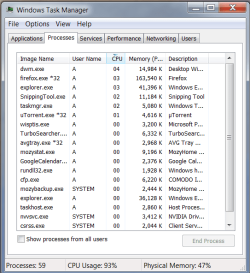
Also: while in Windows XP the sum of the cpus usages of the processes was equal to the the stated cpu usage itself, Windows 7 shows a difference between these two figures. For example, in the screen capture I'm sending you, the total usage of all processes equals 15% while cpu usage equals 93%. How can I find which processes are draining the cpu without having to shut processes down one by one?
Thanks.
Also: while in Windows XP the sum of the cpus usages of the processes was equal to the the stated cpu usage itself, Windows 7 shows a difference between these two figures. For example, in the screen capture I'm sending you, the total usage of all processes equals 15% while cpu usage equals 93%. How can I find which processes are draining the cpu without having to shut processes down one by one?
Thanks.
Attachments

My Computer
- OS
- Windows 7 64-bit

