CPU temp way high

illway1

New member
Local time
2:46 PM
Messages
78
My cpu is a amd phenom ii 955 or 965 black edition

with an antec 300 case.

My case has 4 fans in it, I have recently cleaned my computer yet the cpu temperatures are still at about 60 degrees C.

Is this because of my heatsink and thermal paste being stock or is it cuz my fans are at the low state?

So pretty much my question is, should i (1) get new thermal paste and a new heatsink, (2) change all my fans from the low to medium or high state or (3) none of the above and do something else.
 

My Computer

OS
Windows 7 Home Premium 64 bit
CPU
AMD Phenom II X4 black edition 3.2 ghz
Motherboard
MSI 870a-g54
Memory
4GB Gskill DDR3 1600
Graphics Card(s)
sapphire HD radeon 4670
Sound Card
on board
Hard Drives
wd 320gb 16mb cache
PSU
corsair 650w
Case
antec 300
Cooling
Cooler Master Hyper 212 Plus
Internet Speed
20mb/s
Get high performance thermal paster, Artic Silver at least, and if possible get a better hieatsink for your AMD, my X4 never goes above 40°c @ full load with a Cooler Master Hyper 212.
 

My Computer

Computer type
PC/Desktop
OS
Microsoft Windows 10 Professional / Windows 7 Professional
CPU
Intel i5-3570
Motherboard
Lenovo Mahobay
Memory
16GB DDR3
Graphics Card(s)
AMD Radeon HD 7850 2GB
Sound Card
(1) Realtek HD Audio (2) AMD HD Audio
Monitor(s) Displays
LG LS192WS
Screen Resolution
1440 x 900 @ 32bit color
Hard Drives
(1) SUV300S37A/120G (2) ST3500413AS SATA Disk Device AHCI mode enabled.
PSU
Corsair HX620
Case
Thermaltake V4 Black Edition
Cooling
Cooler Master Hyper 212 + Artic Silver 5 on CPU/GPU
Keyboard
Dell SK-8115
Mouse
Razer Copperhead with MAPED mat (awesome!)
Internet Speed
100 Mbps up/down
Browser
Chrome
Some things need to be met before anything else:
> how long you use the processor;
> temperatures were always at that level, I mean, since you bought it;
> which the average temperature of the environment in which the computer is.
My AMD Phenom II 1090T, for example, uses
stock thermal paste and and heasink. Even at room temperature around 30º C, the CPU temperature is no more than 40 ° C in medium to high load. I ask you to post a picture of readings by CPUZ ...
 

My Computer

Computer Manufacturer/Model Number
WALLONN7 / LIN BLACK SERIES II
OS
Windows 7 Ultimate x64 SP1
CPU
AMD PHENOM II X6 1090T 3.2GHz
Motherboard
GIGABYTE GA-890FXA-UD7
Memory
8GB G.SKILL RIPJAWS - F3-10666CL7D
Graphics Card(s)
SAPPHIRE ATI RADEON HD 5870 VAPOR X OC
Sound Card
REALTEK DOLBY HOME THEATER
Monitor(s) Displays
LED LG W2486L
Screen Resolution
1080p
Hard Drives
SEAGATE 1TB -ST31000528AS - AHCI MODE - AS SATA
PSU
ZALMAN ZM1000-HP 1000W
Case
THERMALTAKE XASER VI VG4000SWA
Cooling
140MM x3 / 120MM x1 AIR COOLING - THERMALTAKE
Keyboard
MICROSOFT DIGITAL MEDIA KEYBOARD 3000 - USB
Mouse
MICROSOFT BASIC OPTICAL MOUSE 2.0 - USB
Internet Speed
600KBPS
Other Info
MICROSOFT XBOX 360 CONTROLLER
so far I have had this processor for a little less than a year. Got it in June. I believe temperatures were around 30-40 when I first check about 3 months after I build my computer. Average room temperature is about 34 ish a bit higher than normal room temperature. As for photos I will get that up first thing tomorrow
 

My Computer

OS
Windows 7 Home Premium 64 bit
CPU
AMD Phenom II X4 black edition 3.2 ghz
Motherboard
MSI 870a-g54
Memory
4GB Gskill DDR3 1600
Graphics Card(s)
sapphire HD radeon 4670
Sound Card
on board
Hard Drives
wd 320gb 16mb cache
PSU
corsair 650w
Case
antec 300
Cooling
Cooler Master Hyper 212 Plus
Internet Speed
20mb/s
34 C is a very hot room--about 93 Fahrenheit. Most people's rooms are probably 22-24 C, or somewhere in the 70s Fahrenheit.

You can't expect to have a cool CPU with high ambient temperatures like that unless you have a very powerful fan with good case ventilation. Even then, I wouldn't expect a lot of improvement. It's very tough fighting high ambient temps.

I wouldn't consider a new heatsink until I knew that my case had good case fans to begin with. If you have poor case ventilation in a very hot room, you are fighting a losing battle.

Are these idle temperatures or load temperatures?
 

My Computer

Computer type
PC/Desktop
Computer Manufacturer/Model Number
Ignatz Special; 4 speed manual gearbox; factory air conditioning; one of one
OS
Windows 7 Home Premium SP1, 64-bit
CPU
Intel Skylake i5-6600K, not overclocked
Motherboard
AsRock Z170M Extreme 4, micro ATX
Memory
8 GB HyperX DDR4-2666 (2 x 4 GB)
Graphics Card(s)
none; graphics are integrated on CPU
Sound Card
onboard: Realtek ALC1150; external: USB Behringer UF0-202
Monitor(s) Displays
Dell S2340M 23 inch IPS
Screen Resolution
1600 x 900
Hard Drives
System: Crucial MX100 series SSD, 128 GB;
Data: Samsung Spinpoint 103SJ, 1 TB;
Backup: WD Caviar Green WD30EZRX-00D8PB0, 3 TB
PSU
Rosewill SilentNight 500 watt fanless, semi-modular
Case
Antec Solo II
Cooling
Noctua NH-U12S; Noctua F12 intake, Noctua S12A exhaust
Keyboard
Microsoft 200 6JH-00001 USB
Mouse
Dell or Microsoft optical wired; USB
Antivirus
Microsoft Security Essentials and Malwarebytes Premium
Browser
Pale Moon
Other Info
All fans PWM; speeds at idle: CPU circa 500 rpm; intake circa 600 rpm; exhaust circa 600 rpm; CPU temps 27 idle and 47 C load in a warm room (27 C/81 F) when running Intel Extreme Tuning Utility stress test.
Have the fans always been in the same configuration since you built the rig? If not, I'd put things back the way they were. Are you sure all the fans are still working? Also, like suggested AS5 and a new cooler would definitely help. Good luck.
 

My Computer

Computer Manufacturer/Model Number
"WartHog Wonder"
OS
Windows 7 Ultimate x64 SP1
CPU
AMD Phenom II X4, 945, Quad Core, 3.0 GHz
Motherboard
Gigabyte MA785GM-US2H
Memory
8GB G.Skill PI Black PC2 6400 * 4-4-4-12 @1.9v
Graphics Card(s)
NVIDIA 512MB 9600GT
Sound Card
Realtek ALC889A Chipset (onboard)
Monitor(s) Displays
2 x 22" Hans-G LCD
Screen Resolution
1680x1050
Hard Drives
650GB 7200RPM WD Caviar Black
PSU
OCZ 700w GameXstream
Case
Cooler Master CM 690 Midtower
Cooling
Xigmatek Gaia SD1283 CPU Cooler, Assorted 120mm case fans
Keyboard
Dell SK-8115
Mouse
Microsoft Comfort Optical Mouse 3000
Other Info
Liteon iHAS 424-98B 24x DVD/CD Writer
I actually turned the fans to the low setting from medium a like two days ago. I probably will put them on the high state when I can.
 

My Computer

OS
Windows 7 Home Premium 64 bit
CPU
AMD Phenom II X4 black edition 3.2 ghz
Motherboard
MSI 870a-g54
Memory
4GB Gskill DDR3 1600
Graphics Card(s)
sapphire HD radeon 4670
Sound Card
on board
Hard Drives
wd 320gb 16mb cache
PSU
corsair 650w
Case
antec 300
Cooling
Cooler Master Hyper 212 Plus
Internet Speed
20mb/s
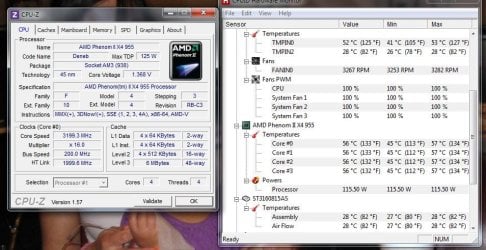
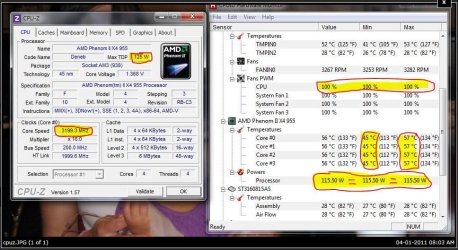
so i turned my fans to the high state (they were on low) and temperatures at start up were fine but after a couple minutes the temperature went back up...

the pic is of cpuz and hwmoniter....
 

Attachments

  • cpuz.JPG
    cpuz.JPG
    96.7 KB · Views: 519

My Computer

OS
Windows 7 Home Premium 64 bit
CPU
AMD Phenom II X4 black edition 3.2 ghz
Motherboard
MSI 870a-g54
Memory
4GB Gskill DDR3 1600
Graphics Card(s)
sapphire HD radeon 4670
Sound Card
on board
Hard Drives
wd 320gb 16mb cache
PSU
corsair 650w
Case
antec 300
Cooling
Cooler Master Hyper 212 Plus
Internet Speed
20mb/s
Those are high temps. I would look into the new paste and cooler.

How are your fans configured? Optimally (in my opinion :)) they will be drawing air in through the bottom and front and expelling air out of the back and top. Is that what they're doing? Also, I was still wondering if all 4 fans are working? One other thing, I was wondering if you're oc'g the cpu?
 

My Computer

Computer Manufacturer/Model Number
"WartHog Wonder"
OS
Windows 7 Ultimate x64 SP1
CPU
AMD Phenom II X4, 945, Quad Core, 3.0 GHz
Motherboard
Gigabyte MA785GM-US2H
Memory
8GB G.Skill PI Black PC2 6400 * 4-4-4-12 @1.9v
Graphics Card(s)
NVIDIA 512MB 9600GT
Sound Card
Realtek ALC889A Chipset (onboard)
Monitor(s) Displays
2 x 22" Hans-G LCD
Screen Resolution
1680x1050
Hard Drives
650GB 7200RPM WD Caviar Black
PSU
OCZ 700w GameXstream
Case
Cooler Master CM 690 Midtower
Cooling
Xigmatek Gaia SD1283 CPU Cooler, Assorted 120mm case fans
Keyboard
Dell SK-8115
Mouse
Microsoft Comfort Optical Mouse 3000
Other Info
Liteon iHAS 424-98B 24x DVD/CD Writer
I noticed my 965 even at stock speeds ran stupidly hot with the supplied HSF and TIM. There was something about those top end Deneb Cores that was just bad, like the old Bartons I guess. Thubans by comparison (the 6 core Phenom IIs) run just silly cold. I can get it down to 24C idle.
 

My Computer

OS
7x64 SP1
CPU
Intel 2600K
Motherboard
Intel DZ77GA-70K
Memory
8GB Samsung
Graphics Card(s)
MSI 670
Sound Card
HT Omega Striker 7.1
Monitor(s) Displays
Dell U2412M
Screen Resolution
1920x1200
Hard Drives
2x 3TB WD Green
1x 4TB Hitachi
1x Intel 330 Series 180GB SSD
PSU
Corsair HX850
so i turned my fans to the high state (they were on low) and temperatures at start up were fine but after a couple minutes the temperature went back up...

the pic is of cpuz and hwmoniter....


Those are high temps. I would look into the new paste and cooler.

How are your fans configured? Optimally (in my opinion :)) they will be drawing air in through the bottom and front and expelling air out of the back and top. Is that what they're doing? Also, I was still wondering if all 4 fans are working? One other thing, I was wondering if you're oc'g the cpu?

Well, taking into account the ambient temperature and the processor is at full load, the temperature is relatively "normal" for me. I have the impression that you turned off the Cool N 'Quiet in bios, or the configuration of power management in Windows is set to "High performance " ... Consider setting the speed of the coolers case for standard speed, rehabilitate CN'Q if applicable.
 

My Computer

Computer Manufacturer/Model Number
WALLONN7 / LIN BLACK SERIES II
OS
Windows 7 Ultimate x64 SP1
CPU
AMD PHENOM II X6 1090T 3.2GHz
Motherboard
GIGABYTE GA-890FXA-UD7
Memory
8GB G.SKILL RIPJAWS - F3-10666CL7D
Graphics Card(s)
SAPPHIRE ATI RADEON HD 5870 VAPOR X OC
Sound Card
REALTEK DOLBY HOME THEATER
Monitor(s) Displays
LED LG W2486L
Screen Resolution
1080p
Hard Drives
SEAGATE 1TB -ST31000528AS - AHCI MODE - AS SATA
PSU
ZALMAN ZM1000-HP 1000W
Case
THERMALTAKE XASER VI VG4000SWA
Cooling
140MM x3 / 120MM x1 AIR COOLING - THERMALTAKE
Keyboard
MICROSOFT DIGITAL MEDIA KEYBOARD 3000 - USB
Mouse
MICROSOFT BASIC OPTICAL MOUSE 2.0 - USB
Internet Speed
600KBPS
Other Info
MICROSOFT XBOX 360 CONTROLLER
Well, taking into account the ambient temperature and the processor is at full load, the temperature is relatively "normal" for me. I have the impression that you turned off the Cool N 'Quiet in bios, or the configuration of power management in Windows is set to "High performance " ... Consider setting the speed of the coolers case for standard speed, rehabilitate CN'Q if applicable.

Sounds like a good plan there.
 

My Computer

Computer Manufacturer/Model Number
"WartHog Wonder"
OS
Windows 7 Ultimate x64 SP1
CPU
AMD Phenom II X4, 945, Quad Core, 3.0 GHz
Motherboard
Gigabyte MA785GM-US2H
Memory
8GB G.Skill PI Black PC2 6400 * 4-4-4-12 @1.9v
Graphics Card(s)
NVIDIA 512MB 9600GT
Sound Card
Realtek ALC889A Chipset (onboard)
Monitor(s) Displays
2 x 22" Hans-G LCD
Screen Resolution
1680x1050
Hard Drives
650GB 7200RPM WD Caviar Black
PSU
OCZ 700w GameXstream
Case
Cooler Master CM 690 Midtower
Cooling
Xigmatek Gaia SD1283 CPU Cooler, Assorted 120mm case fans
Keyboard
Dell SK-8115
Mouse
Microsoft Comfort Optical Mouse 3000
Other Info
Liteon iHAS 424-98B 24x DVD/CD Writer
wowz.. those are some HIGH numbers all around.. at full load, my CPU temp has never gotten above 40c. at idle, its about 25c-27c, ad minimal load, its about 30c.. my mobo and hdd temps are about the same as the CPU. the only temp of mine that gets higher is the GPU, which goes up to 45c from time to time, but that's more normal.

either your fans are horrible, your airflow inside the case it horrible, or something is clogged (vents?).. smoking, pets, general dirt/dust can clog the vents that bring in the intake air. if your room really is 30c-35c, its WAY too hot in there.. (or, as others have mentioned, you are using a plain old crappy heatsink that has the OEM paste on it).
 

My Computer

Computer Manufacturer/Model Number
Self Built
OS
Windows 7 Home Premium x64
CPU
AMD Phenom II X4 955 Black Edition
Motherboard
ASUS M4A79XTD EVO
Memory
Kingston 4GB DDR3 1333
Graphics Card(s)
PNY GeForce 210 1GB DDR2 PCIe 2.0
Sound Card
Integrated Audio
Monitor(s) Displays
LG W2286L HDMI LED monitor
Screen Resolution
1680 x 1050
Hard Drives
500GB WD 7200rpm SATA (OS)
500GB WD 7200rpm SATA
250GB Seagate 7200rpm SATA
PSU
Rosewill RG700-S12 700W
Case
Rosewill Blackbone ATX Mid Tower
Cooling
COOLER MASTER Hyper N520, 3 case fans (front, back, side)
Keyboard
Basic
Mouse
Basic
Internet Speed
Cable
Other Info
Laptop - Toshiba Satellite P755, Intel i3 2.1GHz, 640GB HDD, 6GB RAM, Intel HD Video, 1366x768 Resolution, Windows 7 Home Premium x64
Interesting discussion. What you consider acceptable temps may be correct but they seem on the low side.
I have a common Intel Core 2 Quad Q8300 @ 2.5GHz
At low load proc 1-3 hover around 30-35C #4 tend to sit 35-40C.
When they are flat out (100%) for ~30min doing a vdeo encoding they are around the 50C.
Hot by your standards?
But this is what Intel says
Temperature of the Core 2 Quad Q 8300: Intel Communities
Intel talk about 70C as ok/normal.

illway1,
what does your CPU spec sheet say?

Interesting how cool your HDD is running.
 

My Computer

Computer type
PC/Desktop
Computer Manufacturer/Model Number
Own build
OS
Windows 7x64 Home Premium SP1
CPU
Intel i7 2600k
Motherboard
ASUS P8Z68 Deluxe
Memory
G.Skill Ripjaws (DDR3-1600) 2x4GB
Graphics Card(s)
Nvidia GeForce GTS 450; Intel HD Graphics 3000(GT2+)
Monitor(s) Displays
Dell Ultrasharp IPS panel U2311H, Samsung SyncMaster P2350
Screen Resolution
1920x1080
Hard Drives
Samsung 850 Pro SSD 256GB, Samsung SSD 840 120GB, Seagates 1TB Barracuda ST31000528AS x2
PSU
Seasonic M12II 520W
Case
Lian Li Lancool PC-K60
Cooling
Case: 1x120mm, 3x140mm CPU: Hyper 212+
Keyboard
Logitech MK520 (wireless)
Mouse
Logitech MK520
Internet Speed
6-7 Mbps
Antivirus
Norton Security Premium, Malwarebytes on 2 (MSE on 3rd PC)
Browser
FireFox
Other Info
Audio: Logitech Z523 2.1
I am not OCing, I have 2 fans in front sucking in, I have one on top to expel, and one in the back to expel, I have one on the side that is not a fan but a vent. When i get home I will check whether or not my Quiet N cool is on.

How do i get to my CPU spec sheet?

Just saying... This is not at a fully load. These temperatures are for the idle state.

So do you guys suggest keep my fans on Low, Medium or High?
 

My Computer

OS
Windows 7 Home Premium 64 bit
CPU
AMD Phenom II X4 black edition 3.2 ghz
Motherboard
MSI 870a-g54
Memory
4GB Gskill DDR3 1600
Graphics Card(s)
sapphire HD radeon 4670
Sound Card
on board
Hard Drives
wd 320gb 16mb cache
PSU
corsair 650w
Case
antec 300
Cooling
Cooler Master Hyper 212 Plus
Internet Speed
20mb/s
at those temps, i would keep them on high if it were my machine..

are there a lot of cables blocking air flow inside the case? if not, then i would definitely think about a new heatsink/cooler and get some arctic silver thermal paste...
 

My Computer

Computer Manufacturer/Model Number
Self Built
OS
Windows 7 Home Premium x64
CPU
AMD Phenom II X4 955 Black Edition
Motherboard
ASUS M4A79XTD EVO
Memory
Kingston 4GB DDR3 1333
Graphics Card(s)
PNY GeForce 210 1GB DDR2 PCIe 2.0
Sound Card
Integrated Audio
Monitor(s) Displays
LG W2286L HDMI LED monitor
Screen Resolution
1680 x 1050
Hard Drives
500GB WD 7200rpm SATA (OS)
500GB WD 7200rpm SATA
250GB Seagate 7200rpm SATA
PSU
Rosewill RG700-S12 700W
Case
Rosewill Blackbone ATX Mid Tower
Cooling
COOLER MASTER Hyper N520, 3 case fans (front, back, side)
Keyboard
Basic
Mouse
Basic
Internet Speed
Cable
Other Info
Laptop - Toshiba Satellite P755, Intel i3 2.1GHz, 640GB HDD, 6GB RAM, Intel HD Video, 1366x768 Resolution, Windows 7 Home Premium x64
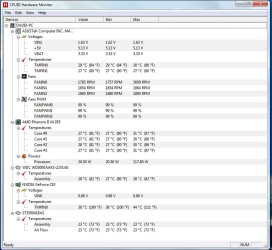
this is a snapshot of my temps...

Picture1.jpg
 

My Computer

Computer Manufacturer/Model Number
Self Built
OS
Windows 7 Home Premium x64
CPU
AMD Phenom II X4 955 Black Edition
Motherboard
ASUS M4A79XTD EVO
Memory
Kingston 4GB DDR3 1333
Graphics Card(s)
PNY GeForce 210 1GB DDR2 PCIe 2.0
Sound Card
Integrated Audio
Monitor(s) Displays
LG W2286L HDMI LED monitor
Screen Resolution
1680 x 1050
Hard Drives
500GB WD 7200rpm SATA (OS)
500GB WD 7200rpm SATA
250GB Seagate 7200rpm SATA
PSU
Rosewill RG700-S12 700W
Case
Rosewill Blackbone ATX Mid Tower
Cooling
COOLER MASTER Hyper N520, 3 case fans (front, back, side)
Keyboard
Basic
Mouse
Basic
Internet Speed
Cable
Other Info
Laptop - Toshiba Satellite P755, Intel i3 2.1GHz, 640GB HDD, 6GB RAM, Intel HD Video, 1366x768 Resolution, Windows 7 Home Premium x64
Here are some specs on your CPU
AMD Processors for Desktops: AMD Phenom
The maximum temperature rating is 62C. Surprisingly low to me. So I think you do have a cooling problem given your CPU.

Next time I'm choosing a CPU I'll look more closely at the temperature specs. Not that my Intel chip runs at 60C it apparently is fine at this temp.
 

My Computer

Computer type
PC/Desktop
Computer Manufacturer/Model Number
Own build
OS
Windows 7x64 Home Premium SP1
CPU
Intel i7 2600k
Motherboard
ASUS P8Z68 Deluxe
Memory
G.Skill Ripjaws (DDR3-1600) 2x4GB
Graphics Card(s)
Nvidia GeForce GTS 450; Intel HD Graphics 3000(GT2+)
Monitor(s) Displays
Dell Ultrasharp IPS panel U2311H, Samsung SyncMaster P2350
Screen Resolution
1920x1080
Hard Drives
Samsung 850 Pro SSD 256GB, Samsung SSD 840 120GB, Seagates 1TB Barracuda ST31000528AS x2
PSU
Seasonic M12II 520W
Case
Lian Li Lancool PC-K60
Cooling
Case: 1x120mm, 3x140mm CPU: Hyper 212+
Keyboard
Logitech MK520 (wireless)
Mouse
Logitech MK520
Internet Speed
6-7 Mbps
Antivirus
Norton Security Premium, Malwarebytes on 2 (MSE on 3rd PC)
Browser
FireFox
Other Info
Audio: Logitech Z523 2.1

My Computer

Computer type
PC/Desktop
Computer Manufacturer/Model Number
Custom Build
OS
Windows 7 Home Premium 64 bit
CPU
Intel Core i7-4790
Motherboard
GA-Z87X-D3H
Memory
G.SKILL 8GB (2 x 4GB) DDR3 F3-10666CL9D-8GBNT
Graphics Card(s)
AMD Radeon R7 250
Sound Card
Realtek ALC892
Monitor(s) Displays
Samsung UN32EH5000, Dell 1703FPT
Screen Resolution
1920 x 1080, 1280 x 1024
Hard Drives
WD5003AZEX
WD10EZEX
Samsung HD103SJ
Samsung 128 GB 840 PRO
PSU
SeaSonic M12II SS-500GM
Case
Fractal Design Define R4
Cooling
Zalman CNPS9900ALED
Keyboard
Logitech K800
Mouse
Logitech M705
Internet Speed
16 Mbps
Antivirus
Avast
Browser
Firefox
Other Info
Bose Companion 2 Multimedia Speakers
I am not OCing, I have 2 fans in front sucking in, I have one on top to expel, and one in the back to expel, I have one on the side that is not a fan but a vent. When i get home I will check whether or not my Quiet N cool is on.

How do i get to my CPU spec sheet?

Just saying... This is not at a fully load. These temperatures are for the idle state.

So do you guys suggest keep my fans on Low, Medium or High?

After taking another look at the image of readings by CPUZ you posted, it became even clearer that CN'Q is disabled. Note that the readings of consumption remains always in 115W; the fan speed is always 100%; the core speed is 3199mhz, ie 1mhz below the maximum for your processor clock - 3200MHz - see below. Considering this, plus the temperature of the room you told us, I am not surprised at anything that the temperature at full load, that's right, FULL LOAD oscillates between 45 º C and 57 º C. Therefore, I urge your attention remains focused on the CN'Q. Keep the default speed - high - for the other fans. Let us know the results.


Attachments

  • Capturar.JPG
    Capturar.JPG
    111.7 KB · Views: 84

My Computer

Computer Manufacturer/Model Number
WALLONN7 / LIN BLACK SERIES II
OS
Windows 7 Ultimate x64 SP1
CPU
AMD PHENOM II X6 1090T 3.2GHz
Motherboard
GIGABYTE GA-890FXA-UD7
Memory
8GB G.SKILL RIPJAWS - F3-10666CL7D
Graphics Card(s)
SAPPHIRE ATI RADEON HD 5870 VAPOR X OC
Sound Card
REALTEK DOLBY HOME THEATER
Monitor(s) Displays
LED LG W2486L
Screen Resolution
1080p
Hard Drives
SEAGATE 1TB -ST31000528AS - AHCI MODE - AS SATA
PSU
ZALMAN ZM1000-HP 1000W
Case
THERMALTAKE XASER VI VG4000SWA
Cooling
140MM x3 / 120MM x1 AIR COOLING - THERMALTAKE
Keyboard
MICROSOFT DIGITAL MEDIA KEYBOARD 3000 - USB
Mouse
MICROSOFT BASIC OPTICAL MOUSE 2.0 - USB
Internet Speed
600KBPS
Other Info
MICROSOFT XBOX 360 CONTROLLER
Back
Top