CPU usage 100% after fresh Install

danasegarane

New member
Local time
10:43 PM
Messages
19
Hello,
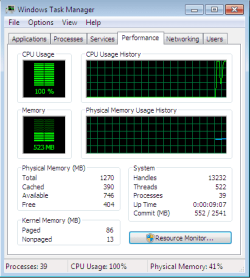
Just now finished installing a fresh copy of Windows7 and the CPU usage shows 100%. What chould be the issue ?


Thanks,
Dana
 

Attachments

  • CPU100%.png
    CPU100%.png
    10.5 KB · Views: 9

My Computer My Computer

At a glance

Microsoft Windows 7 (6.1) Ultimate Edition ,P...1.80GHz, cores-1 (max 1)1280 MBytesStandard VGA Controller
Computer Manufacturer/Model Number
Intel(R) Pentium(R) 4
OS
Microsoft Windows 7 (6.1) Ultimate Edition ,Previously Windows XP
CPU
1.80GHz, cores-1 (max 1)
Motherboard
Intel i845GL rev. A1,D845GLAD
Memory
1280 MBytes
Graphics Card(s)
Standard VGA Controller
Monitor(s) Displays
Genric PNP Monitor
Screen Resolution
1024*768
Hard Drives
40GB
Keyboard
Logictech
Mouse
Logictech,Serial
Go to Processes tab and click on CPU. That will sort processes by CPU Usage. You'll see what's using your CPU.
 

My Computer My Computer

At a glance

Windows 10 Pro x64Intel Core i5 4440 @Stock4 x 4GB HyperX Fury DDR3Gigabyte GTX 1050Ti O4G
Computer type
PC/Desktop
Computer Manufacturer/Model Number
Custom Build
OS
Windows 10 Pro x64
CPU
Intel Core i5 4440 @Stock
Motherboard
Gigabyte Z97 D3H
Memory
4 x 4GB HyperX Fury DDR3
Graphics Card(s)
Gigabyte GTX 1050Ti O4G
Sound Card
Integrated
Monitor(s) Displays
Dell P2417H
Screen Resolution
1920 x 1080
Hard Drives
Samsung EVO 850 120GB / Toshiba DT01ACA050 1TB 7200prm 32MB
PSU
Riotoro Onyx 750W
Case
NZXT H500 Black-Red
Cooling
Stock CPU + NZXT 120mm + 2x120mm red fans
Keyboard
Modecom Volcano Lanparty
Mouse
Asus ROG Gladius / DeepCool E-Pad Plus
Internet Speed
DOCSIS 50/3 Mbit
Browser
Google Chrome
Other Info
Asus K55VJ(i5 3210M, GT635M / 2GB, 8GB DDR3, 500GB HDD)
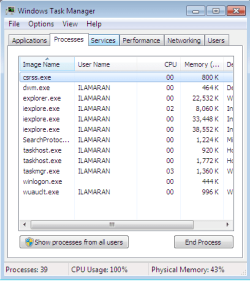
This is what I see in process tab
 

Attachments

  • Proceesstab.png
    Proceesstab.png
    12.1 KB · Views: 21

My Computer My Computer

At a glance

Microsoft Windows 7 (6.1) Ultimate Edition ,P...1.80GHz, cores-1 (max 1)1280 MBytesStandard VGA Controller
Computer Manufacturer/Model Number
Intel(R) Pentium(R) 4
OS
Microsoft Windows 7 (6.1) Ultimate Edition ,Previously Windows XP
CPU
1.80GHz, cores-1 (max 1)
Motherboard
Intel i845GL rev. A1,D845GLAD
Memory
1280 MBytes
Graphics Card(s)
Standard VGA Controller
Monitor(s) Displays
Genric PNP Monitor
Screen Resolution
1024*768
Hard Drives
40GB
Keyboard
Logictech
Mouse
Logictech,Serial
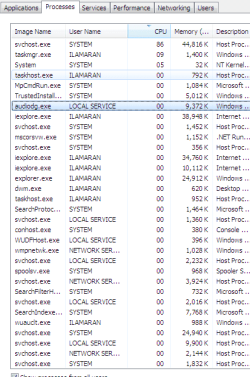
Click on Show processes from all users. And click on CPU column and then post screenshot.

Capture.PNG
 

My Computer My Computer

At a glance

Windows 10 Pro x64Intel Core i5 4440 @Stock4 x 4GB HyperX Fury DDR3Gigabyte GTX 1050Ti O4G
Computer type
PC/Desktop
Computer Manufacturer/Model Number
Custom Build
OS
Windows 10 Pro x64
CPU
Intel Core i5 4440 @Stock
Motherboard
Gigabyte Z97 D3H
Memory
4 x 4GB HyperX Fury DDR3
Graphics Card(s)
Gigabyte GTX 1050Ti O4G
Sound Card
Integrated
Monitor(s) Displays
Dell P2417H
Screen Resolution
1920 x 1080
Hard Drives
Samsung EVO 850 120GB / Toshiba DT01ACA050 1TB 7200prm 32MB
PSU
Riotoro Onyx 750W
Case
NZXT H500 Black-Red
Cooling
Stock CPU + NZXT 120mm + 2x120mm red fans
Keyboard
Modecom Volcano Lanparty
Mouse
Asus ROG Gladius / DeepCool E-Pad Plus
Internet Speed
DOCSIS 50/3 Mbit
Browser
Google Chrome
Other Info
Asus K55VJ(i5 3210M, GT635M / 2GB, 8GB DDR3, 500GB HDD)
Here is the screen shot..
 

Attachments

  • cpu1.png
    cpu1.png
    15.4 KB · Views: 72

My Computer My Computer

At a glance

Microsoft Windows 7 (6.1) Ultimate Edition ,P...1.80GHz, cores-1 (max 1)1280 MBytesStandard VGA Controller
Computer Manufacturer/Model Number
Intel(R) Pentium(R) 4
OS
Microsoft Windows 7 (6.1) Ultimate Edition ,Previously Windows XP
CPU
1.80GHz, cores-1 (max 1)
Motherboard
Intel i845GL rev. A1,D845GLAD
Memory
1280 MBytes
Graphics Card(s)
Standard VGA Controller
Monitor(s) Displays
Genric PNP Monitor
Screen Resolution
1024*768
Hard Drives
40GB
Keyboard
Logictech
Mouse
Logictech,Serial

My Computer My Computer

At a glance

Windows 10 Pro x64Intel Core i5 4440 @Stock4 x 4GB HyperX Fury DDR3Gigabyte GTX 1050Ti O4G
Computer type
PC/Desktop
Computer Manufacturer/Model Number
Custom Build
OS
Windows 10 Pro x64
CPU
Intel Core i5 4440 @Stock
Motherboard
Gigabyte Z97 D3H
Memory
4 x 4GB HyperX Fury DDR3
Graphics Card(s)
Gigabyte GTX 1050Ti O4G
Sound Card
Integrated
Monitor(s) Displays
Dell P2417H
Screen Resolution
1920 x 1080
Hard Drives
Samsung EVO 850 120GB / Toshiba DT01ACA050 1TB 7200prm 32MB
PSU
Riotoro Onyx 750W
Case
NZXT H500 Black-Red
Cooling
Stock CPU + NZXT 120mm + 2x120mm red fans
Keyboard
Modecom Volcano Lanparty
Mouse
Asus ROG Gladius / DeepCool E-Pad Plus
Internet Speed
DOCSIS 50/3 Mbit
Browser
Google Chrome
Other Info
Asus K55VJ(i5 3210M, GT635M / 2GB, 8GB DDR3, 500GB HDD)
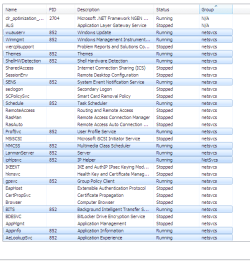
This from services tab.


Checking the other link
 

Attachments

  • Process1.png
    Process1.png
    20.6 KB · Views: 38

My Computer My Computer

At a glance

Microsoft Windows 7 (6.1) Ultimate Edition ,P...1.80GHz, cores-1 (max 1)1280 MBytesStandard VGA Controller
Computer Manufacturer/Model Number
Intel(R) Pentium(R) 4
OS
Microsoft Windows 7 (6.1) Ultimate Edition ,Previously Windows XP
CPU
1.80GHz, cores-1 (max 1)
Motherboard
Intel i845GL rev. A1,D845GLAD
Memory
1280 MBytes
Graphics Card(s)
Standard VGA Controller
Monitor(s) Displays
Genric PNP Monitor
Screen Resolution
1024*768
Hard Drives
40GB
Keyboard
Logictech
Mouse
Logictech,Serial
I am confused like which process to stop. Few of them are windows defender like
 

My Computer My Computer

At a glance

Microsoft Windows 7 (6.1) Ultimate Edition ,P...1.80GHz, cores-1 (max 1)1280 MBytesStandard VGA Controller
Computer Manufacturer/Model Number
Intel(R) Pentium(R) 4
OS
Microsoft Windows 7 (6.1) Ultimate Edition ,Previously Windows XP
CPU
1.80GHz, cores-1 (max 1)
Motherboard
Intel i845GL rev. A1,D845GLAD
Memory
1280 MBytes
Graphics Card(s)
Standard VGA Controller
Monitor(s) Displays
Genric PNP Monitor
Screen Resolution
1024*768
Hard Drives
40GB
Keyboard
Logictech
Mouse
Logictech,Serial
Just to clarify.
From a 'fresh' install?
Or a re-image? This is when you have used a backup.
 

My Computer My Computer

At a glance

Stools
OS
Stools
I was using Windows XP and downloaded Win7 from Msdn ,formatted the system and installed win7
 

My Computer My Computer

At a glance

Microsoft Windows 7 (6.1) Ultimate Edition ,P...1.80GHz, cores-1 (max 1)1280 MBytesStandard VGA Controller
Computer Manufacturer/Model Number
Intel(R) Pentium(R) 4
OS
Microsoft Windows 7 (6.1) Ultimate Edition ,Previously Windows XP
CPU
1.80GHz, cores-1 (max 1)
Motherboard
Intel i845GL rev. A1,D845GLAD
Memory
1280 MBytes
Graphics Card(s)
Standard VGA Controller
Monitor(s) Displays
Genric PNP Monitor
Screen Resolution
1024*768
Hard Drives
40GB
Keyboard
Logictech
Mouse
Logictech,Serial

My Computer My Computer

At a glance

Windows 10 Pro x64Intel Core i5 4440 @Stock4 x 4GB HyperX Fury DDR3Gigabyte GTX 1050Ti O4G
Computer type
PC/Desktop
Computer Manufacturer/Model Number
Custom Build
OS
Windows 10 Pro x64
CPU
Intel Core i5 4440 @Stock
Motherboard
Gigabyte Z97 D3H
Memory
4 x 4GB HyperX Fury DDR3
Graphics Card(s)
Gigabyte GTX 1050Ti O4G
Sound Card
Integrated
Monitor(s) Displays
Dell P2417H
Screen Resolution
1920 x 1080
Hard Drives
Samsung EVO 850 120GB / Toshiba DT01ACA050 1TB 7200prm 32MB
PSU
Riotoro Onyx 750W
Case
NZXT H500 Black-Red
Cooling
Stock CPU + NZXT 120mm + 2x120mm red fans
Keyboard
Modecom Volcano Lanparty
Mouse
Asus ROG Gladius / DeepCool E-Pad Plus
Internet Speed
DOCSIS 50/3 Mbit
Browser
Google Chrome
Other Info
Asus K55VJ(i5 3210M, GT635M / 2GB, 8GB DDR3, 500GB HDD)
From the above I can say that I followed only clean install only . Thanks
 

My Computer My Computer

At a glance

Microsoft Windows 7 (6.1) Ultimate Edition ,P...1.80GHz, cores-1 (max 1)1280 MBytesStandard VGA Controller
Computer Manufacturer/Model Number
Intel(R) Pentium(R) 4
OS
Microsoft Windows 7 (6.1) Ultimate Edition ,Previously Windows XP
CPU
1.80GHz, cores-1 (max 1)
Motherboard
Intel i845GL rev. A1,D845GLAD
Memory
1280 MBytes
Graphics Card(s)
Standard VGA Controller
Monitor(s) Displays
Genric PNP Monitor
Screen Resolution
1024*768
Hard Drives
40GB
Keyboard
Logictech
Mouse
Logictech,Serial
I was using Windows XP and downloaded Win7 from Msdn ,formatted the system and installed win7

Did your machine originally come with XP? What are your system specs? If your computer meets the minimum specs to run Windows 7 you could experience high CPU usage as well as slow performance in other areas.

Your choice of antivirus, other CPU or RAM intensive programs, etc could also have an effect as Windows 7 tries to "learn" and eventually manage your resources. To see how your resources are being allocated you could open the Resource Monitor from Task Manager or run a free program called Process Monitor by clicking the Run Process Monitor Now link at the bottom of their page.
 

My Computer My Computer

At a glance

Win 7 Pro 64-bitIntel i5 2.4 Ghz8GB DDR3Intel HD 3000
Computer type
Laptop
Computer Manufacturer/Model Number
Sony Vaio VPCEB47GM Laptop
OS
Win 7 Pro 64-bit
CPU
Intel i5 2.4 Ghz
Memory
8GB DDR3
Graphics Card(s)
Intel HD 3000
Sound Card
IDT High Definition
Monitor(s) Displays
15.6 WGXA Anti-Glare LED
Screen Resolution
1280x800
Hard Drives
640Gb 7200rpm
Antivirus
MSE
Browser
Opera (primary) with IE9 backup

My Computer My Computer

At a glance

Windows 10 Pro x64Intel Core i5 4440 @Stock4 x 4GB HyperX Fury DDR3Gigabyte GTX 1050Ti O4G
Computer type
PC/Desktop
Computer Manufacturer/Model Number
Custom Build
OS
Windows 10 Pro x64
CPU
Intel Core i5 4440 @Stock
Motherboard
Gigabyte Z97 D3H
Memory
4 x 4GB HyperX Fury DDR3
Graphics Card(s)
Gigabyte GTX 1050Ti O4G
Sound Card
Integrated
Monitor(s) Displays
Dell P2417H
Screen Resolution
1920 x 1080
Hard Drives
Samsung EVO 850 120GB / Toshiba DT01ACA050 1TB 7200prm 32MB
PSU
Riotoro Onyx 750W
Case
NZXT H500 Black-Red
Cooling
Stock CPU + NZXT 120mm + 2x120mm red fans
Keyboard
Modecom Volcano Lanparty
Mouse
Asus ROG Gladius / DeepCool E-Pad Plus
Internet Speed
DOCSIS 50/3 Mbit
Browser
Google Chrome
Other Info
Asus K55VJ(i5 3210M, GT635M / 2GB, 8GB DDR3, 500GB HDD)
Install Process explorer to drill down into those svchost services to find out which one is hogging your CPU, then google to find the solution which will likely NOT be turning it off.

At the same time work through the logs and System resources given here to find additional clues: troubleshooting steps

This will familarize you with basic troubleshooting and the specialty of tracing processes which is invaluable.

If you decide to give up, consider following these steps to get a baseline Perfect Reinstall

Please supply your System Specs in bottom left corner of post as they may apply.
 
I have updated my system spec
 

My Computer My Computer

At a glance

Microsoft Windows 7 (6.1) Ultimate Edition ,P...1.80GHz, cores-1 (max 1)1280 MBytesStandard VGA Controller
Computer Manufacturer/Model Number
Intel(R) Pentium(R) 4
OS
Microsoft Windows 7 (6.1) Ultimate Edition ,Previously Windows XP
CPU
1.80GHz, cores-1 (max 1)
Motherboard
Intel i845GL rev. A1,D845GLAD
Memory
1280 MBytes
Graphics Card(s)
Standard VGA Controller
Monitor(s) Displays
Genric PNP Monitor
Screen Resolution
1024*768
Hard Drives
40GB
Keyboard
Logictech
Mouse
Logictech,Serial
From your system specs it looks like you're on the low end for RAM and hard drive. If you have 1280MB RAM I'm guessing your machine came with 256MB installed and you added another gig (1024MB) somewehres along the line for a total of 1280MB. Most people suggest 2GB (2048MB) for Windows 7. If your hard drive is only 40GB it's possible that your low RAM is forcing some programs to use virtual memory (a portion of your hard drive that is set aside to compensate for low RAM.) RAM is "electrical" and the hard drive is "mechanical". Mechanical is slower than electrical and more resources have to be used (like higher CPU.)
 

My Computer My Computer

At a glance

Win 7 Pro 64-bitIntel i5 2.4 Ghz8GB DDR3Intel HD 3000
Computer type
Laptop
Computer Manufacturer/Model Number
Sony Vaio VPCEB47GM Laptop
OS
Win 7 Pro 64-bit
CPU
Intel i5 2.4 Ghz
Memory
8GB DDR3
Graphics Card(s)
Intel HD 3000
Sound Card
IDT High Definition
Monitor(s) Displays
15.6 WGXA Anti-Glare LED
Screen Resolution
1280x800
Hard Drives
640Gb 7200rpm
Antivirus
MSE
Browser
Opera (primary) with IE9 backup
put simply..you cannot use windows 7 with less than 2gb of ram.
 

My Computer My Computer

At a glance

Stools
OS
Stools
^ I agree. Unless you are using Windows 7 Starter for basic computing.

These days, 4GB of RAM is generally recommended for new Windows 7 PCs. Although around 2-3GB of RAM and a discrete GFX card usually gets the job done.
 

My Computer My Computer

At a glance

Windows 7 HP / Ultimate x64Core i5 / X4 955 BE4GB DDR3 1333Mhz / 8GB DDR3 1600MhzHD5470 / HD5670
Computer Manufacturer/Model Number
Dell / Custom
OS
Windows 7 HP / Ultimate x64
CPU
Core i5 / X4 955 BE
Motherboard
OEM / Gigabyte 880GM-USB3
Memory
4GB DDR3 1333Mhz / 8GB DDR3 1600Mhz
Graphics Card(s)
HD5470 / HD5670
Sound Card
Onboard
Monitor(s) Displays
FullHD 15" / Dell 22" WS
Screen Resolution
1920x1080 / 1680x1050
Hard Drives
320GB / 1.5TB
PSU
CM
Case
CM
Cooling
CM, Antec
Keyboard
Logitech
Mouse
Logitech
I can't see the first page as it crashes my phone app lol, but after reading the second page I'm going to say bad driver/incompatible with 7.

If you have 1256mb ram it means you've one 1gb and one 256mb, so its a rather old machine, and as older models with lower specs won't support 7 developers won't make drivers that do work

Sent from my BlackBerry 9900 using Tapatalk
 

My Computer My Computer

At a glance

Windows 7 Ultimate x64, & Mac OS X 10.9.2Intel Core i5 2500kCorsair Vengence 8gb 1866mhzNvidia GTX 770 OC
Computer type
PC/Desktop
Computer Manufacturer/Model Number
Built by badgers!!!
OS
Windows 7 Ultimate x64, & Mac OS X 10.9.2
CPU
Intel Core i5 2500k
Motherboard
Asus P8z68 LE
Memory
Corsair Vengence 8gb 1866mhz
Graphics Card(s)
Nvidia GTX 770 OC
Monitor(s) Displays
2x ASUS LED 22" IPS
Screen Resolution
3840x1080
Hard Drives
240GB Crucial M500 SSD
120gb Corsair Force 3 SSD
1TB Western Digital
PSU
Corsair HX650w Modular
Case
Corsair Air 540
Cooling
Corsair H60 Push/Pull
Keyboard
Corsair K70/ Logitech G27 wheel
Mouse
Saitek R.A.T 9
Internet Speed
Too slow!
Other Info
AMD fusion E350N Home server-Windows Home Server 2011 (also made by badgers!)
2011 Macbook 2.4ghz Core2Duo, 4gb ddr3, 120gb Ocz Vertex SSD
Back
Top