Solved cpu usage 100%

alive063

New member
Local time
12:58 PM
Messages
9
Hi,
Often when watching a film or using an audio app like live or cubase my laptop locks up and the cpu meter shows a solid 100%! I can slowly get into task manager but no processes show high cpu usage. all I can do is a cold boot but even then sometimes it restarts at 100%.
Any help would be much appreciated.

It is a dell latitude e6400 win 7ultimate 32 bit less than a year old.
 

My Computer

Computer Manufacturer/Model Number
dell latitude e6400 xfr
OS
windows 7 ultimate 32 bit
CPU
intel core 2 duo p8700 @2.53ghz 2.54ghz
Memory
8 GB
Hard Drives
120 GB solid state
Run a full anti virus scan
Download and run malwarebytes full scan
If they are both negative, post a pic of your task manager that shows the process showing usage
 

My Computer

Computer type
PC/Desktop
Computer Manufacturer/Model Number
Dell XPS 420
OS
Windows 10, Home Clean Install
CPU
Intel Core2 processsor Q8200(2.33Ghz 1333FSB) Quad Core Tech
Motherboard
Dell
Memory
6 gb
Graphics Card(s)
ATI Radeon 256MB HD3650
Sound Card
Intergrated 7.1 Channel Audio
Monitor(s) Displays
Dell SP2009W 20"
Hard Drives
640 GB Serial ATA Hard drive
Cooling
Fan
Keyboard
Dell USB Keyboard
Mouse
Dell Premium Optical USB
Internet Speed
DSL 2.85
Hi Rich, sorry for late reply-credit ran out!
I ran malwarebytes, avg, spybot- all clean but still the cpu usage goes up to 100% and stays there with no programs running , in task manager processes there is nothing using more than 5 or 10% and the total of the cpu column is about 15 or 20% but at the bottom of the window it says cpu 100% (I couldn't get a snapshot to post)
It never does this when I am running linux from its own partition, only in windows.
 

My Computer

Computer Manufacturer/Model Number
dell latitude e6400 xfr
OS
windows 7 ultimate 32 bit
CPU
intel core 2 duo p8700 @2.53ghz 2.54ghz
Memory
8 GB
Hard Drives
120 GB solid state
Go to the free software sections of this forums and DL this LookInMyPC - It will show you all running processes ,, which may show you whats it consuming the processor resources ,,, while there scroll down to the P area ( It is alphabetically) Organized .. Look at some of those process tools
 

My Computer

Computer Manufacturer/Model Number
MSI
OS
Ultimate 7
CPU
1055T @ 3.7
Motherboard
MSI
Memory
16g Corsair
Graphics Card(s)
HD5770
Sound Card
Onboard
Monitor(s) Displays
FLat 23
Hard Drives
SSD 64g Kingston
500 Gig Western
PSU
850 Thermaltake
In task manager click on show all users.
 

My Computer

Computer type
PC/Desktop
Computer Manufacturer/Model Number
Dell XPS 420
OS
Windows 10, Home Clean Install
CPU
Intel Core2 processsor Q8200(2.33Ghz 1333FSB) Quad Core Tech
Motherboard
Dell
Memory
6 gb
Graphics Card(s)
ATI Radeon 256MB HD3650
Sound Card
Intergrated 7.1 Channel Audio
Monitor(s) Displays
Dell SP2009W 20"
Hard Drives
640 GB Serial ATA Hard drive
Cooling
Fan
Keyboard
Dell USB Keyboard
Mouse
Dell Premium Optical USB
Internet Speed
DSL 2.85
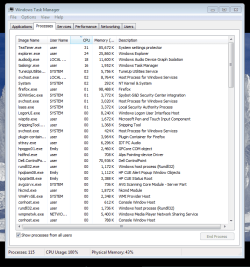
Now I have processes from all users showing and audiodg.exe is using 40%
Can I disable 'Microsoft HD Sound Driver for HDMI' or fix it?
I'm not sure if I have ATI GPU or even what one is!
 

My Computer

Computer Manufacturer/Model Number
dell latitude e6400 xfr
OS
windows 7 ultimate 32 bit
CPU
intel core 2 duo p8700 @2.53ghz 2.54ghz
Memory
8 GB
Hard Drives
120 GB solid state
How about a screen shot showing all the processess'
 

My Computer

Computer type
PC/Desktop
Computer Manufacturer/Model Number
Dell XPS 420
OS
Windows 10, Home Clean Install
CPU
Intel Core2 processsor Q8200(2.33Ghz 1333FSB) Quad Core Tech
Motherboard
Dell
Memory
6 gb
Graphics Card(s)
ATI Radeon 256MB HD3650
Sound Card
Intergrated 7.1 Channel Audio
Monitor(s) Displays
Dell SP2009W 20"
Hard Drives
640 GB Serial ATA Hard drive
Cooling
Fan
Keyboard
Dell USB Keyboard
Mouse
Dell Premium Optical USB
Internet Speed
DSL 2.85
Hi, Here is a screenshot attachedCapture.PNG
hope it helps.
 

My Computer

Computer Manufacturer/Model Number
dell latitude e6400 xfr
OS
windows 7 ultimate 32 bit
CPU
intel core 2 duo p8700 @2.53ghz 2.54ghz
Memory
8 GB
Hard Drives
120 GB solid state
The big user is tea timer, what is that?
 

My Computer

Computer type
PC/Desktop
Computer Manufacturer/Model Number
Dell XPS 420
OS
Windows 10, Home Clean Install
CPU
Intel Core2 processsor Q8200(2.33Ghz 1333FSB) Quad Core Tech
Motherboard
Dell
Memory
6 gb
Graphics Card(s)
ATI Radeon 256MB HD3650
Sound Card
Intergrated 7.1 Channel Audio
Monitor(s) Displays
Dell SP2009W 20"
Hard Drives
640 GB Serial ATA Hard drive
Cooling
Fan
Keyboard
Dell USB Keyboard
Mouse
Dell Premium Optical USB
Internet Speed
DSL 2.85

My Computer

Computer Manufacturer/Model Number
MSI
OS
Ultimate 7
CPU
1055T @ 3.7
Motherboard
MSI
Memory
16g Corsair
Graphics Card(s)
HD5770
Sound Card
Onboard
Monitor(s) Displays
FLat 23
Hard Drives
SSD 64g Kingston
500 Gig Western
PSU
850 Thermaltake
Ty diehard for doing what I should have done. rep for your efforts.
Per this article, it seems that it maybe part of your security. Remove Spybot and replace with Malwarebytes.
You can just disable it at first to see if problem persists.
 

My Computer

Computer type
PC/Desktop
Computer Manufacturer/Model Number
Dell XPS 420
OS
Windows 10, Home Clean Install
CPU
Intel Core2 processsor Q8200(2.33Ghz 1333FSB) Quad Core Tech
Motherboard
Dell
Memory
6 gb
Graphics Card(s)
ATI Radeon 256MB HD3650
Sound Card
Intergrated 7.1 Channel Audio
Monitor(s) Displays
Dell SP2009W 20"
Hard Drives
640 GB Serial ATA Hard drive
Cooling
Fan
Keyboard
Dell USB Keyboard
Mouse
Dell Premium Optical USB
Internet Speed
DSL 2.85
No problem you actually help me as much .. Thats what makes a forum worthwhile
 

My Computer

Computer Manufacturer/Model Number
MSI
OS
Ultimate 7
CPU
1055T @ 3.7
Motherboard
MSI
Memory
16g Corsair
Graphics Card(s)
HD5770
Sound Card
Onboard
Monitor(s) Displays
FLat 23
Hard Drives
SSD 64g Kingston
500 Gig Western
PSU
850 Thermaltake
It is something that spybot has running, installed to identify the problem which has been happening from new,I don't think its the culprit but I'll lose it anyway.
 

My Computer

Computer Manufacturer/Model Number
dell latitude e6400 xfr
OS
windows 7 ultimate 32 bit
CPU
intel core 2 duo p8700 @2.53ghz 2.54ghz
Memory
8 GB
Hard Drives
120 GB solid state
That didn't work, just restarted from a total lockup halfway into a movie, had to pull the power,
 

My Computer

Computer Manufacturer/Model Number
dell latitude e6400 xfr
OS
windows 7 ultimate 32 bit
CPU
intel core 2 duo p8700 @2.53ghz 2.54ghz
Memory
8 GB
Hard Drives
120 GB solid state

My Computer

Computer type
PC/Desktop
Computer Manufacturer/Model Number
Dell XPS 420
OS
Windows 10, Home Clean Install
CPU
Intel Core2 processsor Q8200(2.33Ghz 1333FSB) Quad Core Tech
Motherboard
Dell
Memory
6 gb
Graphics Card(s)
ATI Radeon 256MB HD3650
Sound Card
Intergrated 7.1 Channel Audio
Monitor(s) Displays
Dell SP2009W 20"
Hard Drives
640 GB Serial ATA Hard drive
Cooling
Fan
Keyboard
Dell USB Keyboard
Mouse
Dell Premium Optical USB
Internet Speed
DSL 2.85
Hi, with all services disabled including all microsoft services I still get total lockup when I run normal use programs-1 movie+1 audio loop in live.
Thanks again, all help is much appreciated.
 

My Computer

Computer Manufacturer/Model Number
dell latitude e6400 xfr
OS
windows 7 ultimate 32 bit
CPU
intel core 2 duo p8700 @2.53ghz 2.54ghz
Memory
8 GB
Hard Drives
120 GB solid state
Set up another user account and see if problem persists from there.
 

My Computer

Computer type
PC/Desktop
Computer Manufacturer/Model Number
Dell XPS 420
OS
Windows 10, Home Clean Install
CPU
Intel Core2 processsor Q8200(2.33Ghz 1333FSB) Quad Core Tech
Motherboard
Dell
Memory
6 gb
Graphics Card(s)
ATI Radeon 256MB HD3650
Sound Card
Intergrated 7.1 Channel Audio
Monitor(s) Displays
Dell SP2009W 20"
Hard Drives
640 GB Serial ATA Hard drive
Cooling
Fan
Keyboard
Dell USB Keyboard
Mouse
Dell Premium Optical USB
Internet Speed
DSL 2.85
That worked Richard! in guest account I could run 2 movies and 2 audio programs together with cpu at a workable 70-80%. do you know what is going on and what I might do to fix it?
 

My Computer

Computer Manufacturer/Model Number
dell latitude e6400 xfr
OS
windows 7 ultimate 32 bit
CPU
intel core 2 duo p8700 @2.53ghz 2.54ghz
Memory
8 GB
Hard Drives
120 GB solid state
That worked Richard! in guest account I could run 2 movies and 2 audio programs together with cpu at a workable 70-80%. do you know what is going on and what I might do to fix it?

Easy the account is corrupt or has other problems, maybe like malware that does not show up with the scans. Just use the new account.
Well not the guest account, create a new user account.
This is how it could be done, but if malware is involved you may transfer that too. Would not hurt to try, though
http://windows.microsoft.com/en-US/Windows7/Fix-a-corrupted-user-profile
You can open a new user account and reinstall programs etc, if the above method does not work.
Windows Easy Transfer is another method of trasfer, but that would also be a problem if you have malware.
 

My Computer

Computer type
PC/Desktop
Computer Manufacturer/Model Number
Dell XPS 420
OS
Windows 10, Home Clean Install
CPU
Intel Core2 processsor Q8200(2.33Ghz 1333FSB) Quad Core Tech
Motherboard
Dell
Memory
6 gb
Graphics Card(s)
ATI Radeon 256MB HD3650
Sound Card
Intergrated 7.1 Channel Audio
Monitor(s) Displays
Dell SP2009W 20"
Hard Drives
640 GB Serial ATA Hard drive
Cooling
Fan
Keyboard
Dell USB Keyboard
Mouse
Dell Premium Optical USB
Internet Speed
DSL 2.85
Now I have processes from all users showing and audiodg.exe is using 40%
Can I disable 'Microsoft HD Sound Driver for HDMI' or fix it?
I'm not sure if I have ATI GPU or even what one is!

This pertains to your Video card connection for a HDMI TV

That worked Richard! in guest account I could run 2 movies and 2 audio programs together with cpu at a workable 70-80%. do you know what is going on and what I might do to fix it?

Don't use Tuneup utilities. I saw that in your processes. That software has known issues to cause instability in computers...
 

My Computer

OS
Stools
Back
Top