CPU usage capped at 100%, I have tried everything

huntforfun

New member
Local time
8:06 AM
Messages
28
Well this is a new, custom built computer; main use for it is gaming and Photoshop/Graphic Design work. I had a buddy of mine make it, it has 8GB RAM, and uses the graphics card NVIDIA GeForce GTX 570.

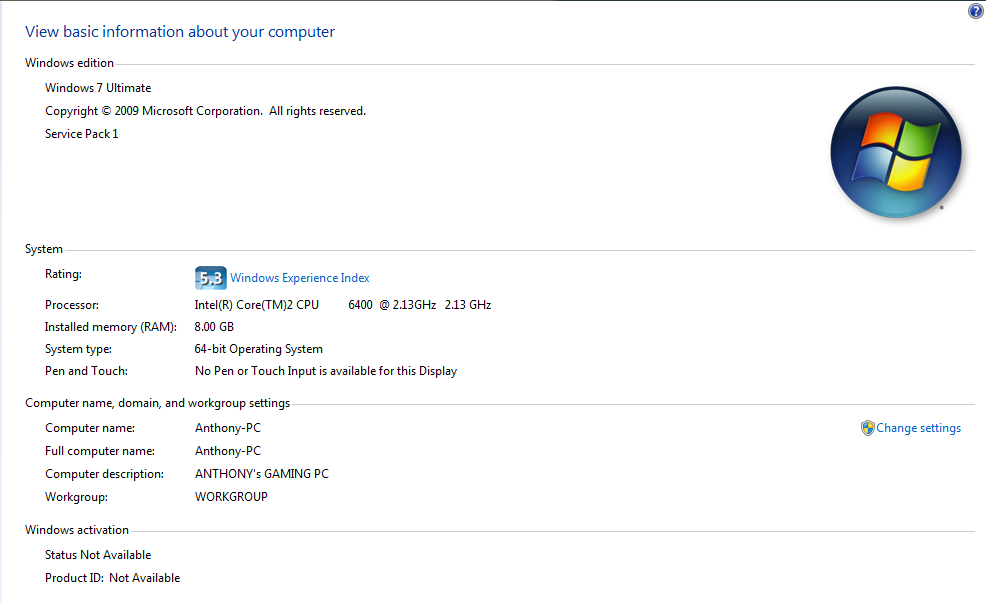
here is my specs:
qioI9Ko.png


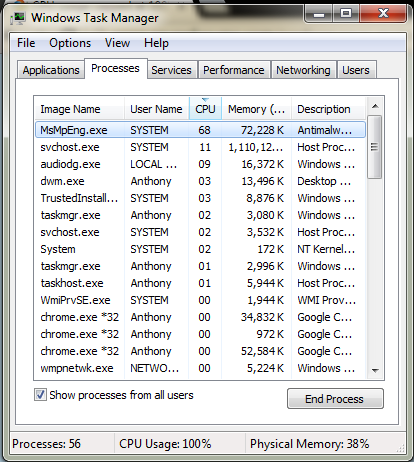
Anyways, no matter what I do, whether be on the desktop, typing his message right now, or playing games... the computer freezes every 3 seconds for like a millisecond, this includes the arrow, screen, menus, etc (everything). It didn't do this yesterday at all, I installed a driver for my mouse and keyboard (razer synapse) but I thought that was what gave me the problems so I system restored to before I installed those drivers. Its a little less laggy but its still at 100% cpu usage for NO reason, virtually NO programs are open. What do I do?

CPU USAGE SCREENSHOT:
npQHtMa.png


any hasteful replies would be much appreciated, would love to get this bad boy up and running again before my new monitor comes in tomorrow :P
 

My Computer My Computer

Computer type
PC/Desktop
Computer Manufacturer/Model Number
custom build
OS
windows 7 64 bit
Memory
8 gb RAM
Graphics Card(s)
NVIDIA GeForce GTX 570
Browser
google chrome
First thing that I would try would be the obvious
Run a full anti virus scan
Download and make a scan with malwarebytes
Scan with the free eset online.

Click on show process from all users. Click on the top of cpu usage (title cpu)
Give us a screen shot, (ie show us everything that is using cpu)

Already I see a possible problem, all that Google Chrome. That could be a virus.
 

My Computer My Computer

Computer type
PC/Desktop
Computer Manufacturer/Model Number
Dell XPS 420
OS
Windows 10, Home Clean Install
CPU
Intel Core2 processsor Q8200(2.33Ghz 1333FSB) Quad Core Tech
Motherboard
Dell
Memory
6 gb
Graphics Card(s)
ATI Radeon 256MB HD3650
Sound Card
Intergrated 7.1 Channel Audio
Monitor(s) Displays
Dell SP2009W 20"
Hard Drives
640 GB Serial ATA Hard drive
Cooling
Fan
Keyboard
Dell USB Keyboard
Mouse
Dell Premium Optical USB
Internet Speed
DSL 2.85
Sounds more like a driver issue to me. Are you still running the razer? Google issues with that device - some had problems when advanced features were turned on.
 

My Computer My Computer

Computer type
PC/Desktop
Computer Manufacturer/Model Number
Custom
OS
7 x64 Ultimate
CPU
AMD Ryzen 5
Motherboard
Gigabyte GA-AB350-Gaming
Memory
16GB DDR4
Graphics Card(s)
Radeon R7 360
Monitor(s) Displays
2 x Dell U2518D
Screen Resolution
2560x1440 2560x1440
Hard Drives
WD 500GB x2
Samsung SSD 128MB (OS)
XPG SX8200 Pro M.2 2280 1TB
PSU
Antec 500
Cooling
Hyper 212 EVO
Keyboard
Logitech cordless K800
Mouse
Logitech M510
Antivirus
Avira
First thing that I would try would be the obvious
Run a full anti virus scan
Download and make a scan with malwarebytes
Scan with the free eset online.

Click on show process from all users. Click on the top of cpu usage (title cpu)
Give us a screen shot, (ie show us everything that is using cpu)

Already I see a possible problem, all that Google Chrome. That could be a virus.

hO1nzJV.png


downloading malware antibytes now, will scan

EDIT: There is now a new process takign 90 cpu called system idle
 

My Computer My Computer

Computer type
PC/Desktop
Computer Manufacturer/Model Number
custom build
OS
windows 7 64 bit
Memory
8 gb RAM
Graphics Card(s)
NVIDIA GeForce GTX 570
Browser
google chrome
Sounds more like a driver issue to me. Are you still running the razer? Google issues with that device - some had problems when advanced features were turned on.

yes im still running the razer, but i deleted razer synapse(like a universal controller for razer devices), however I still am using the devices individually.
 

My Computer My Computer

Computer type
PC/Desktop
Computer Manufacturer/Model Number
custom build
OS
windows 7 64 bit
Memory
8 gb RAM
Graphics Card(s)
NVIDIA GeForce GTX 570
Browser
google chrome
Make a system restore point so you can go back if necessary
Uninstall your anti virus.
Download and install avast, at least for a test
What is Msmpeng.exe and How to Remove It

If you cannot unstall it, just turn it off and try Avast.
 

My Computer My Computer

Computer type
PC/Desktop
Computer Manufacturer/Model Number
Dell XPS 420
OS
Windows 10, Home Clean Install
CPU
Intel Core2 processsor Q8200(2.33Ghz 1333FSB) Quad Core Tech
Motherboard
Dell
Memory
6 gb
Graphics Card(s)
ATI Radeon 256MB HD3650
Sound Card
Intergrated 7.1 Channel Audio
Monitor(s) Displays
Dell SP2009W 20"
Hard Drives
640 GB Serial ATA Hard drive
Cooling
Fan
Keyboard
Dell USB Keyboard
Mouse
Dell Premium Optical USB
Internet Speed
DSL 2.85
Make a system restore point so you can go back if necessary
Uninstall your anti virus.
Download and install avast, at least for a test
What is Msmpeng.exe and How to Remove It

If you cannot unstall it, just turn it off and try Avast.

ok, so should i scan with malware or not? or should i use both malware and avast. also did you see the edit in my post that there is a new process taking cpu now?
 

My Computer My Computer

Computer type
PC/Desktop
Computer Manufacturer/Model Number
custom build
OS
windows 7 64 bit
Memory
8 gb RAM
Graphics Card(s)
NVIDIA GeForce GTX 570
Browser
google chrome
System Idle is Ok, It shows what is available. Get rid of Defender, you will be ok.
 

My Computer My Computer

Computer type
PC/Desktop
Computer Manufacturer/Model Number
Dell XPS 420
OS
Windows 10, Home Clean Install
CPU
Intel Core2 processsor Q8200(2.33Ghz 1333FSB) Quad Core Tech
Motherboard
Dell
Memory
6 gb
Graphics Card(s)
ATI Radeon 256MB HD3650
Sound Card
Intergrated 7.1 Channel Audio
Monitor(s) Displays
Dell SP2009W 20"
Hard Drives
640 GB Serial ATA Hard drive
Cooling
Fan
Keyboard
Dell USB Keyboard
Mouse
Dell Premium Optical USB
Internet Speed
DSL 2.85
System Idle is Ok, It shows what is available. Get rid of Defender, you will be ok.

I searched it up to turn it off, when I clicked on it to proceed to turn it off, it says its already off?
 

My Computer My Computer

Computer type
PC/Desktop
Computer Manufacturer/Model Number
custom build
OS
windows 7 64 bit
Memory
8 gb RAM
Graphics Card(s)
NVIDIA GeForce GTX 570
Browser
google chrome
As far as I am concerned, for now, the problem is the high usage of the msmpend.exe. It should be defender or Microsoft Security Essentials. If you are not using either, run those scans, you may have a virus.
do not worry about system Idle.
 

My Computer My Computer

Computer type
PC/Desktop
Computer Manufacturer/Model Number
Dell XPS 420
OS
Windows 10, Home Clean Install
CPU
Intel Core2 processsor Q8200(2.33Ghz 1333FSB) Quad Core Tech
Motherboard
Dell
Memory
6 gb
Graphics Card(s)
ATI Radeon 256MB HD3650
Sound Card
Intergrated 7.1 Channel Audio
Monitor(s) Displays
Dell SP2009W 20"
Hard Drives
640 GB Serial ATA Hard drive
Cooling
Fan
Keyboard
Dell USB Keyboard
Mouse
Dell Premium Optical USB
Internet Speed
DSL 2.85
As far as I am concerned, for now, the problem is the high usage of the msmpend.exe. It should be defender or Microsoft Security Essentials. If you are not using either, run those scans, you may have a virus.

how do i disable microsoft security essentials, thinking that may be it because the defenders already off? Thanks for the quick replies by the way
 

My Computer My Computer

Computer type
PC/Desktop
Computer Manufacturer/Model Number
custom build
OS
windows 7 64 bit
Memory
8 gb RAM
Graphics Card(s)
NVIDIA GeForce GTX 570
Browser
google chrome
You uninstall from control panel
then go to programs
Then uninstall from there. Make sure you make a system restore first.
Then install avast
 

My Computer My Computer

Computer type
PC/Desktop
Computer Manufacturer/Model Number
Dell XPS 420
OS
Windows 10, Home Clean Install
CPU
Intel Core2 processsor Q8200(2.33Ghz 1333FSB) Quad Core Tech
Motherboard
Dell
Memory
6 gb
Graphics Card(s)
ATI Radeon 256MB HD3650
Sound Card
Intergrated 7.1 Channel Audio
Monitor(s) Displays
Dell SP2009W 20"
Hard Drives
640 GB Serial ATA Hard drive
Cooling
Fan
Keyboard
Dell USB Keyboard
Mouse
Dell Premium Optical USB
Internet Speed
DSL 2.85
For the future, if Defender is off, use an Anti Virus that works well for you, hopefully Avast and download the free Malwarebytes. You will have even better protection, but that is after we get these things fixed.
 

My Computer My Computer

Computer type
PC/Desktop
Computer Manufacturer/Model Number
Dell XPS 420
OS
Windows 10, Home Clean Install
CPU
Intel Core2 processsor Q8200(2.33Ghz 1333FSB) Quad Core Tech
Motherboard
Dell
Memory
6 gb
Graphics Card(s)
ATI Radeon 256MB HD3650
Sound Card
Intergrated 7.1 Channel Audio
Monitor(s) Displays
Dell SP2009W 20"
Hard Drives
640 GB Serial ATA Hard drive
Cooling
Fan
Keyboard
Dell USB Keyboard
Mouse
Dell Premium Optical USB
Internet Speed
DSL 2.85
will do, creating restore point, then will uninstall the esstentals, if that doesnt work I will then scan with malware bytes and downlaod avast
 

My Computer My Computer

Computer type
PC/Desktop
Computer Manufacturer/Model Number
custom build
OS
windows 7 64 bit
Memory
8 gb RAM
Graphics Card(s)
NVIDIA GeForce GTX 570
Browser
google chrome
Going back to Post #1,
A buddy built the system for you, and your screen print shows Windows Activation Status and Product ID Not Available ...
Do you have a valid license, and can you activate it ?
If not, can your buddy activate a license ?
 

My Computer My Computer

Computer type
PC/Desktop
Computer Manufacturer/Model Number
home built
OS
Multi-Boot W7_Pro_x64 W8.1_Pro_x64 W10_Pro_x64 +Linux_VMs +Chromium_VM
CPU
AMD Athlon II x4 620
Motherboard
Gigabyte GA-MA785G-UD3H
Memory
6GB GSkill DDR2 800
Graphics Card(s)
AMD 4670 GPU + AMD 4200 IGP
Sound Card
on board Realtek ALC889A
Monitor(s) Displays
RCA 40" LCD TV, Insignia 32" LCD TV, HP 15" LCD monitor
Screen Resolution
1680 x 1050
Hard Drives
OCZ Vertex 3 120GB,
Samsung F3 1TB (3),
Several others - WD, Seagate, Hitachi, ...
PSU
Corsair 500 W
Case
Rosewill mid tower
Cooling
CM 90mm rifle
Keyboard
Gyration wireless, Logitech wireless, Dell USB wired
Mouse
Gyration wireless, Logitech wireless, V7 USB wired
Internet Speed
Spectrum - 100Mbps D / 10Mbps U
Antivirus
Avast, MBAM3, EMET, WinPatrol
Browser
Pale Moon, Firefox, IE
Other Info
2 multi-boot PC's
Mainly HTPC/Office/Gen purpose (no gaming).
Trendnet USB KVM.
LG DVD burner/Blue Ray Player.
Tray system for removable SATA backup drives.

Not currently OCd, under-volted.
I use Hybrid sleep, rarely re-boot or shutdown.

Hauppauge HD-PVR, Avermedia PCIe TV Tuner, Hauppauge PCI TV Tuner.
Glad that you noticed that. All help will have to stop until that matter is taken care of.
 

My Computer My Computer

Computer type
PC/Desktop
Computer Manufacturer/Model Number
Dell XPS 420
OS
Windows 10, Home Clean Install
CPU
Intel Core2 processsor Q8200(2.33Ghz 1333FSB) Quad Core Tech
Motherboard
Dell
Memory
6 gb
Graphics Card(s)
ATI Radeon 256MB HD3650
Sound Card
Intergrated 7.1 Channel Audio
Monitor(s) Displays
Dell SP2009W 20"
Hard Drives
640 GB Serial ATA Hard drive
Cooling
Fan
Keyboard
Dell USB Keyboard
Mouse
Dell Premium Optical USB
Internet Speed
DSL 2.85
Let us know when you are activated, then help will continue.
 

My Computer My Computer

Computer type
PC/Desktop
Computer Manufacturer/Model Number
Dell XPS 420
OS
Windows 10, Home Clean Install
CPU
Intel Core2 processsor Q8200(2.33Ghz 1333FSB) Quad Core Tech
Motherboard
Dell
Memory
6 gb
Graphics Card(s)
ATI Radeon 256MB HD3650
Sound Card
Intergrated 7.1 Channel Audio
Monitor(s) Displays
Dell SP2009W 20"
Hard Drives
640 GB Serial ATA Hard drive
Cooling
Fan
Keyboard
Dell USB Keyboard
Mouse
Dell Premium Optical USB
Internet Speed
DSL 2.85
I am activated, my computer is just so God damned slow right now it took like 5 mins to load up, I'm going to take a picture for u guys from my iPhone cuz now it's freezing pretty bad, can I post to these forums from my iPhone camera ?
 

My Computer My Computer

Computer type
PC/Desktop
Computer Manufacturer/Model Number
custom build
OS
windows 7 64 bit
Memory
8 gb RAM
Graphics Card(s)
NVIDIA GeForce GTX 570
Browser
google chrome
You should be able to. As soon as we have proof that you are activated, we will continue to help
I will be going to bed soon. If you post and you do not get an answer, you will tomorrow.
 

My Computer My Computer

Computer type
PC/Desktop
Computer Manufacturer/Model Number
Dell XPS 420
OS
Windows 10, Home Clean Install
CPU
Intel Core2 processsor Q8200(2.33Ghz 1333FSB) Quad Core Tech
Motherboard
Dell
Memory
6 gb
Graphics Card(s)
ATI Radeon 256MB HD3650
Sound Card
Intergrated 7.1 Channel Audio
Monitor(s) Displays
Dell SP2009W 20"
Hard Drives
640 GB Serial ATA Hard drive
Cooling
Fan
Keyboard
Dell USB Keyboard
Mouse
Dell Premium Optical USB
Internet Speed
DSL 2.85
proof is attatched
 

Attachments

  • genuine.png
    genuine.png
    63.5 KB · Views: 12

My Computer My Computer

Computer type
PC/Desktop
Computer Manufacturer/Model Number
custom build
OS
windows 7 64 bit
Memory
8 gb RAM
Graphics Card(s)
NVIDIA GeForce GTX 570
Browser
google chrome
Back
Top