JavaScript is disabled. For a better experience, please enable JavaScript in your browser before proceeding.
You are using an out of date browser. It may not display this or other websites correctly.
You should upgrade or use an
alternative browser .
Customize Start Menu with Images
So I read that via ResourceHacker - Style Builder and another I can't recall right now you can place images in the start menu.
I need to know how to do this as I cannot figure it out.
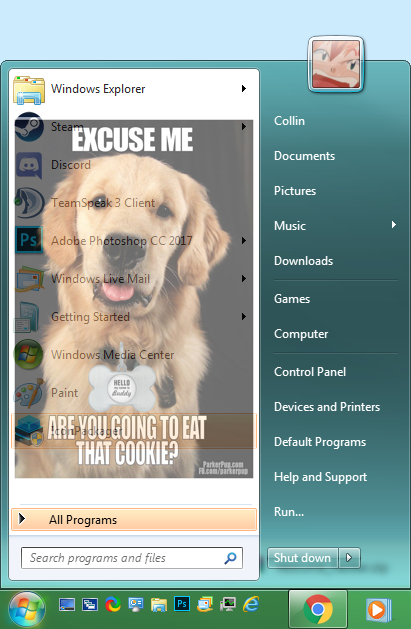
This is what I want to do:
I crudely did this in Photoshop
Windows 7 Ultimate x64 / Windows 10 Home x64 Intel i7 6700K 16GB GeForce GTX 980 TI PC/Desktop Custom Build Windows 7 Ultimate x64 / Windows 10 Home x64 Intel i7 6700K ASRock Z170 Extreme7+ LGA 1151 Intel Z170 HDMI SATA 6Gb/s US 16GB GeForce GTX 980 TI HP 25VX | AOC 27 Inch 1920x1080 Windows 7: 250GB CoolerMaster 700W ThermalTake Chaser MK-1 Fan Razer Blackwidow Chroma Razer Mamba Kaspersky Total Security Chrome
"Phelps Helps"
Pro User
VIP
Linux Mint 18.2 xfce 64-bit (VMWare host) / W... Haswell 4 GB PC/Desktop Dell Linux Mint 18.2 xfce 64-bit (VMWare host) / Windows 8.1 Pro 32-bit (VMWare guest) Haswell 4 GB Acer 23" 1920 x 1080 Two hard drives, 1TB each: One for Linux, one for my data. IBM Model M Sophos (Linux), Trend Micro (Windows) Firefox, Opera I use Samba to share my data drive with the other computers at my house and with my guest session in VMWare Workstation Player.
New member
Member
VIP
Thread Starter
Download and install Classic Shell:
www.classicshell.net . It will allow you to put a picture into the start menu.
Here's how to do that in Classic Shell:
http://www.classicshell.net/forum/viewtopic.php?f=17&t=9
I don't want Classic Shell though. I have Vista Style Builder how do I do it with that or something else? I actually have made a copy of the aero theme and changed the name. It will be basically the same thing but with a picture inside the start menu.
Windows 7 Ultimate x64 / Windows 10 Home x64 Intel i7 6700K 16GB GeForce GTX 980 TI PC/Desktop Custom Build Windows 7 Ultimate x64 / Windows 10 Home x64 Intel i7 6700K ASRock Z170 Extreme7+ LGA 1151 Intel Z170 HDMI SATA 6Gb/s US 16GB GeForce GTX 980 TI HP 25VX | AOC 27 Inch 1920x1080 Windows 7: 250GB CoolerMaster 700W ThermalTake Chaser MK-1 Fan Razer Blackwidow Chroma Razer Mamba Kaspersky Total Security Chrome