"Date Modified" changes on original file when copying

sevenup

New member
Local time
10:24 AM
Messages
7
I spent some time searching the forums but did not find any post that answered my question so I am starting a new thread.

Windows Explorer is changing my original file's date when I do a drag-and-drop copy operation. I would like to know how I can tell Win7 to not change the original file date.
 

My Computer My Computer

OS
win7
What problem is this causing?
 

My Computer My Computer

Computer type
PC/Desktop
Computer Manufacturer/Model Number
Alienware Aurora ALX R4
OS
Windows 10 Pro (x64)
CPU
Intel Core i7-3930K (3.2GHz - 4.5GHz)
Motherboard
Alienware Aurora-R4 x79
Memory
4x Samsung 4GB PC3-12800 DDR3 (16GB 1600MHz)
Graphics Card(s)
Nvidia Geforce GTX 690
Sound Card
SteelSeries Siberia Elite
Monitor(s) Displays
Dell UltraSharp U3011
Screen Resolution
2560x1600
Hard Drives
Samsung 850 Pro 256 GB, Seagate 1TB Desktop Hybrid HDD, 2x Western Digital 4TB Green HDD
PSU
875W Some Dell PSU <.<
Case
Alienware Aurora ALX
Cooling
Custom Liquid Cooling (EK CPU & GPU blocks) dual EK 480RAD
Keyboard
Logitech G710+ Mechanical
Mouse
Logitech G700s
Internet Speed
Verizon Fios (50 mbps average)
Other Info
Server: Intel NUC D54250WYK: i5-4250U, 16GB, 256 GB mSATA, Windows Server 2012 R2
The problem is that I do not want the file date to change on the original. I would like to be able to retain the ability to sort by date on my original files. The file date changing on the copy is not a problem for me.
 

My Computer My Computer

OS
win7
1) You can use the MS Robocopy utility. Robocopy is an advanced utility which is in-built in Windows 7 and can preserve folder attributes such as timestamps while copying files. However, since it is a command line tool, it may not be easy to work with, so you can download the MS Robocopy GUI.

http://download.microsoft.com/downl...8546-25c359cc0842/UtilitySpotlight2006_11.exe

Also see this.

How to copy or move files and folders whilst maintaining their original time date stamp. | TechHead.co.uk

2) You can also try using XCOPY.

In a command window, run xcopy with the following switches: /s/e/c/a/k/h

See this page.

MS-DOS xcopy command help
 

My Computer My Computer

Computer Manufacturer/Model Number
Too many to describe...
OS
Windows 7 x64 pro/ Windows 7 x86 Pro/ XP SP3 x86
Thanks - I actually did see this info in another post. Unfortunately using a command prompt is not a good option for me. I was hoping there was some setting in windows explorer that would fix this for me.
 

My Computer My Computer

OS
win7
Thanks again. I will see if I can find anything there.
 

My Computer My Computer

OS
win7
That is one of the dumbest "features" I've seen. The original file should never be modified by simply copying it. Wow.

Have you tried doing a right click Copy instead of dragging it? I'm not sure if that would make a difference or not, but it's worth a try.
 

My Computer My Computer

OS
XP / Win7 x64 Pro
CPU
Intel Quad-Core Q9450 @ 3.2GHz
Motherboard
Asus P5-E
Memory
2x2GB GSkill DDR2
Graphics Card(s)
NVIDIA GeForce 8600 GTS (EVGA)
Monitor(s) Displays
Dell 2408WFP
Screen Resolution
1920x1200
I normally highlight the files I want to copy and then do a right-click-drag and it pops up the window asking me what I want to do with the files. I will give the right-click-copy and right-click-paste a try! Thanks for the advice!!
 

My Computer My Computer

OS
win7
I cannot replicate the problem in question. Doing right-click drag and copy the modified date remains the same, moving it remains the same, left-click drag and copy to another drive stays the same... Maybe you have something, like an anti-virus or explorer extension that is doing something with the file during these copy operations.
 

My Computer My Computer

Computer type
PC/Desktop
Computer Manufacturer/Model Number
Alienware Aurora ALX R4
OS
Windows 10 Pro (x64)
CPU
Intel Core i7-3930K (3.2GHz - 4.5GHz)
Motherboard
Alienware Aurora-R4 x79
Memory
4x Samsung 4GB PC3-12800 DDR3 (16GB 1600MHz)
Graphics Card(s)
Nvidia Geforce GTX 690
Sound Card
SteelSeries Siberia Elite
Monitor(s) Displays
Dell UltraSharp U3011
Screen Resolution
2560x1600
Hard Drives
Samsung 850 Pro 256 GB, Seagate 1TB Desktop Hybrid HDD, 2x Western Digital 4TB Green HDD
PSU
875W Some Dell PSU <.<
Case
Alienware Aurora ALX
Cooling
Custom Liquid Cooling (EK CPU & GPU blocks) dual EK 480RAD
Keyboard
Logitech G710+ Mechanical
Mouse
Logitech G700s
Internet Speed
Verizon Fios (50 mbps average)
Other Info
Server: Intel NUC D54250WYK: i5-4250U, 16GB, 256 GB mSATA, Windows Server 2012 R2
Wow that is interesting. Now that you mention that I did try to install something that I originally used for XP called "NinotechPathCopy". That was before I found out you could hold "SHIFT" and right-click in Win7 to "copy as path". At the time I tried installing the NinotechPathCopy it did not work so I assumed all was good but maybe it did actually install something. I will have to check on that as it could be what is causing my problem.
 

My Computer My Computer

OS
win7
I cannot replicate the problem in question. Doing right-click drag and copy the modified date remains the same, moving it remains the same, left-click drag and copy to another drive stays the same... Maybe you have something, like an anti-virus or explorer extension that is doing something with the file during these copy operations.

Very good point. It certainly could be an A/V "on-demand" scanning of the files when they are accessed (in this case being moved/copied) which then modifies the files.
 

My Computer My Computer

OS
XP / Win7 x64 Pro
CPU
Intel Quad-Core Q9450 @ 3.2GHz
Motherboard
Asus P5-E
Memory
2x2GB GSkill DDR2
Graphics Card(s)
NVIDIA GeForce 8600 GTS (EVGA)
Monitor(s) Displays
Dell 2408WFP
Screen Resolution
1920x1200
I looked under "Programs and Features" and could not find anything to uninstall. I will have to look at the inf file to see what registry entries were made and maybe I can remove them.
 

My Computer My Computer

OS
win7
right-click and drag works!

Thank you Logic Earth! I'm still using XP; I found this forum by Googling the problem. Right-clicking and dragging a file (or a whole folder full of files) and selecting "copy" from the pop-up window, does indeed preserve the file modified dates in the copied files. Simple!

Why Microsoft does not make this info clearly and easily available, is mystifying to me. But no longer surprising. :rolleyes:
 

My Computer My Computer

OS
Windows XP
i saw the notice "The last post in this thread was 183 days ago. If your post is not directly related to this discussion please consider making a new thread."

but i have same problem. and read through the topic, and same problem.

i copy (ctrl c) the picture from usb drive which has date 01/01/2011 for example. after paste (ctrl v) to local drive, date modified changed to todays date which is 15/02/2011.

is this kind of new behaviour of windows 7? if it is so-called "by design", i only can say, WOW!
 

My Computer My Computer

Computer Manufacturer/Model Number
CUSTOM BUILD
OS
WINDOWS SERVER 2008 R2 STANDARD
CPU
INTEL CORE i7 860
Motherboard
ASUS P7P55D
Memory
4GB
Graphics Card(s)
ATI RADEON HD 4650
Sound Card
VIA HIGH DEFINITION AUDIO
Monitor(s) Displays
SONY SDM-S71
Hard Drives
SEAGATE 500GB
PSU
450W
Case
CUSTOM
Cooling
COOLER MASTER HYPER 212+
but i have same problem. and read through the topic, and same problem.

i copy (ctrl c) the picture from usb drive which has date 01/01/2011 for example. after paste (ctrl v) to local drive, date modified changed to todays date which is 15/02/2011.

is this kind of new behaviour of windows 7? if it is so-called "by design", i only can say, WOW!

As I said before in this thread: http://www.sevenforums.com/general-...es-original-file-when-copying.html#post766784

I just copied from a USB drive. No change is modified date.
 

My Computer My Computer

Computer type
PC/Desktop
Computer Manufacturer/Model Number
Alienware Aurora ALX R4
OS
Windows 10 Pro (x64)
CPU
Intel Core i7-3930K (3.2GHz - 4.5GHz)
Motherboard
Alienware Aurora-R4 x79
Memory
4x Samsung 4GB PC3-12800 DDR3 (16GB 1600MHz)
Graphics Card(s)
Nvidia Geforce GTX 690
Sound Card
SteelSeries Siberia Elite
Monitor(s) Displays
Dell UltraSharp U3011
Screen Resolution
2560x1600
Hard Drives
Samsung 850 Pro 256 GB, Seagate 1TB Desktop Hybrid HDD, 2x Western Digital 4TB Green HDD
PSU
875W Some Dell PSU <.<
Case
Alienware Aurora ALX
Cooling
Custom Liquid Cooling (EK CPU & GPU blocks) dual EK 480RAD
Keyboard
Logitech G710+ Mechanical
Mouse
Logitech G700s
Internet Speed
Verizon Fios (50 mbps average)
Other Info
Server: Intel NUC D54250WYK: i5-4250U, 16GB, 256 GB mSATA, Windows Server 2012 R2
Sky drive modifies my files

I am using skydrive. I have noticed that upon uploading my files the "date modified" for each file is changed to the time that the file was uploaded.

This seems to violate the presumption that you are archiving an actual exact copy of the original file. I must retain an exact copy of the original.

Does anyone know how to get skydrive to not modify the original file?

I am using W7 64 bit.
 

My Computer My Computer

OS
windows 7 64
I cannot replicate the problem in question. Doing right-click drag and copy the modified date remains the same, moving it remains the same, left-click drag and copy to another drive stays the same... Maybe you have something, like an anti-virus or explorer extension that is doing something with the file during these copy operations.
+1

I have never seen or noticed original file properties to change in any version of Windows when it's copied. I've now "played" about 15 minutes with this, trying to replicate this. No luck.

Right mouse button drag and drop, selecting Copy here or Create shortcut here > original file or folder properties including time stamp are not changed.

CTRL + C copy, CTRL + V paste > original file or folder properties including time stamp are not changed.

Context menu Copy - Paste > original file or folder properties including time stamp are not changed.

Am I missing something here?

I am using skydrive. I have noticed that upon uploading my files the "date modified" for each file is changed to the time that the file was uploaded.

This seems to violate the presumption that you are archiving an actual exact copy of the original file. I must retain an exact copy of the original.

Does anyone know how to get skydrive to not modify the original file?

I am using W7 64 bit.
Also this issue seems to be impossible to replicate, at least for me.

Right mouse button drag from desktop or folder and drop to SkyDrive > original file or folder properties including time stamp are not changed.

Left mouse button drag from desktop or folder and drop to SkyDrive > original file or folder properties including time stamp are not changed.

Uploading normally > original file or folder properties including time stamp are not changed.

Kari
 

My Computer My Computer

Computer type
Laptop
Computer Manufacturer/Model Number
HP ENVY 17-1150eg
OS
Windows 10 Pro x64 EN-GB
CPU
1.6 GHz Intel Core i7-720QM Processor
Memory
6 GB
Graphics Card(s)
ATI Mobility Radeon HD 5850 Graphics
Sound Card
Beats sound system with integrated subwoofer
Monitor(s) Displays
17" laptop display, 22" LED and 32" Full HD TV through HDMI
Screen Resolution
1600*900 (1), 1920*1080 (2&3)
Hard Drives
Internal: 2 x 500 GB SATA Hard Disk Drive 7200 rpm
External: 2TB for backups, 3TB USB3 network drive for media
Cooling
As Envy runs a bit warm, I have it on a Cooler Master pad
Keyboard
Logitech diNovo Media Desktop Laser (bluetooth)
Mouse
Logitech Performance Mouse MX
Internet Speed
50/10 Mbps VDSL
Antivirus
Windows Defender 4.3.9431.0
Browser
Maxthon 3.5.2., IE11
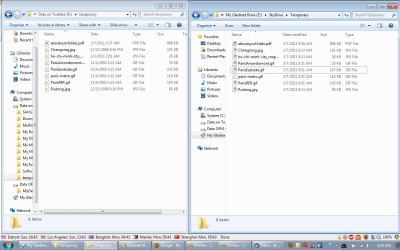
I recreated the problem and have attached a screen-print showing the problem. To create the problem, I opened up two explorer windows and then created an empty directory in my skydrive called temporary. I then dragged the 8 files using windows explorer to the skydrive temporary folder at 4:37 a.m. (Saigon time)

That was the time the "aboutsyncfolder.pdf" was created on my D drive.

The same file on my skydrive shows it was created at 9:38 a.m .... but this is not true ... it had to be 4:38 am (exactly 5 hours different) ... The other files all show being created in skydrive at either 9:13 or 8:51. I don't know why this is. They were all dragged and dropped at the same time. I've repeated this many times and it gives the same results. I've disconnected and reconnected my Gladinet skydrive.

I'm in Saigon doing this ... could it be some sort of problem in timezones?
 

Attachments

  • My Desktop.png
    My Desktop.png
    48.3 KB · Views: 155

My Computer My Computer

OS
windows 7 64
This is a problem that occurs when files are copied from ONE DRIVE to ANOTHER.

Even I would like a SIMPLER SOLUTION where the COPIED or MOVED Files & Folders RETAIN their DATE/ TIME STAMPS:
- Creation Date
- Last Modified Date
- Last Accessed Date (Not critical but nice to have)

Its simple but the only way for me to do this is a set of complex steps using RichCopy/ RoboCopy.
 

My Computer My Computer

Computer Manufacturer/Model Number
Mac Book Pro | Thinkpads T61 X61T W510
OS
WinXP/ Win7x64/ Mac OSX Snow Leopard - Multi Boot
Back
Top