Desktop & rocketdock & rainmeter

Static

New member
Power User
Local time
8:32 PM
Messages
173
Hey I've got both Rocketdock and Rainmeter running on my Desktop. They look great and I enjoy both of them a lot. But I am looking to change a setting or a fix for them.

They are currently on my desktop, only they aren't. Meaning when I minimize my other programs etc and look at my desktop, I see both programs running wonderfully. But when I use alt tab or the windows minimizer button on the bottom right corner of the superbar, it ONLY shows my background wallpaper and not rocketdock or Rainmeter.

So, how do I set or adjust either program to actually be 100% incorporated on the same level as my desktop so that when I alt-tab etc, I see both or either program?


Picture of my desktop for visual and informational purposes.

Win7 SS 8-14-09.jpg
 

My Computer My Computer

OS
Windows 7 RC - 7100 64bit
CPU
AMD Athlon(tm) 64 x2 4800+ 2.50Ghz Dual Core
Motherboard
Hewlett Packard
Memory
4 gig Kingston DDR2
Graphics Card(s)
XFX Nvidia GeForce GTS 250
Sound Card
na
Monitor(s) Displays
22" Samsung LCD Syncmaster
Screen Resolution
1680x1050
Hard Drives
300gig Western Digital
PSU
BFG Tech 550watt
Case
Crap stock Dell
Cooling
Side panel open on case, and a box fan blowing in.
Keyboard
G15
Mouse
G9
Internet Speed
Bike Messenger
Hey I've got both Rocketdock and Rainmeter running on my Desktop. They look great and I enjoy both of them a lot. But I am looking to change a setting or a fix for them.

They are currently on my desktop, only they aren't. Meaning when I minimize my other programs etc and look at my desktop, I see both programs running wonderfully. But when I use alt tab or the windows minimizer button on the bottom right corner of the superbar, it ONLY shows my background wallpaper and not rocketdock or Rainmeter.

So, how do I set or adjust either program to actually be 100% incorporated on the same level as my desktop so that when I alt-tab etc, I see both or either program?


Picture of my desktop for visual and informational purposes.

View attachment 23119

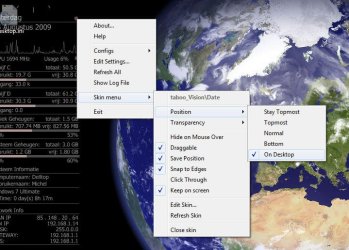
Right click at the correct position on a item of rain meter (depends on the skin), and do what you see in the screenshot. (on Desktop)

You will have to do this for every individual item of rain meter.

desk.jpg


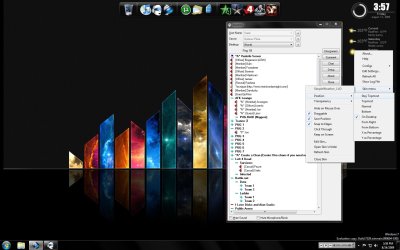
For rocket dock go to Dock Settings -> Position,

and do set layering to "always on top"

dock.PNG


good luck


.
 

My Computer My Computer

OS
Win7 Build 7600 x86
CPU
Pentium II 300MHz
Motherboard
Asus
Memory
32mb EDO RAM
Graphics Card(s)
Diamond Viper
Sound Card
Soundblaster 16
Monitor(s) Displays
14" AOC CRT 16K color
Screen Resolution
800x600
Hard Drives
300mb Quantum fireball
PSU
110 Watts
Cooling
Passive
Keyboard
Trust Ergonomic
Mouse
Generic
Internet Speed
256K u 128K d
Right click at the correct position on a item of rain meter (depends on the skin), and do what you see in the screenshot. (on Desktop)

You will have to do this for every individual item of rain meter.

View attachment 23120

good luck


.

I had seen this and hoped it was what I wanted. But it is not working atm for me.

Two things happen when i have that option selected.

1) Right as I select that option, the item of rainmeter I just selected completely dissapears until I alttab a few times or minimize things and then it randomly re-appears. and disapears again.

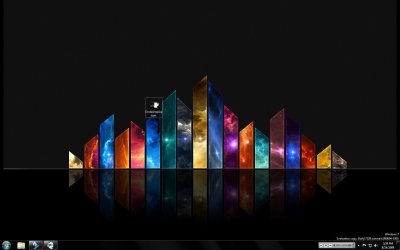
2) It doesn't work either. When i alt tab to desktop or use the bottom right corner, it still ONLY shows my background.


here is option enabled and a picture of me alt tabbing to desktop and it only showing the 1 item/icon for the jpeg I just made for this thread.

Ondesktopoption.jpgalttabbed.jpg
 

My Computer My Computer

OS
Windows 7 RC - 7100 64bit
CPU
AMD Athlon(tm) 64 x2 4800+ 2.50Ghz Dual Core
Motherboard
Hewlett Packard
Memory
4 gig Kingston DDR2
Graphics Card(s)
XFX Nvidia GeForce GTS 250
Sound Card
na
Monitor(s) Displays
22" Samsung LCD Syncmaster
Screen Resolution
1680x1050
Hard Drives
300gig Western Digital
PSU
BFG Tech 550watt
Case
Crap stock Dell
Cooling
Side panel open on case, and a box fan blowing in.
Keyboard
G15
Mouse
G9
Internet Speed
Bike Messenger
Added rocket dock option to my post.

Check it out.


about rainmeter:

I just did them all. don't know why it won't work for you.

alt tab and right lower corner button work for me.

Maybe different versions?

What's your version?
 

My Computer My Computer

OS
Win7 Build 7600 x86
CPU
Pentium II 300MHz
Motherboard
Asus
Memory
32mb EDO RAM
Graphics Card(s)
Diamond Viper
Sound Card
Soundblaster 16
Monitor(s) Displays
14" AOC CRT 16K color
Screen Resolution
800x600
Hard Drives
300mb Quantum fireball
PSU
110 Watts
Cooling
Passive
Keyboard
Trust Ergonomic
Mouse
Generic
Internet Speed
256K u 128K d
Added rocket dock option to my post.

Check it out.


about rainmeter:

I just did them all. don't know why it won't work for you.

alt tab and right lower corner button work for me.

Maybe different versions?

What's your version?


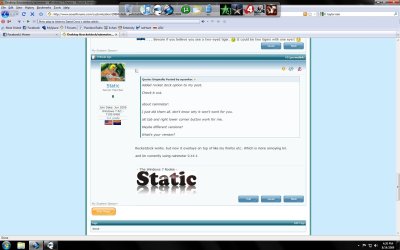
Rocketdock works. but now it overlays on top of like my firefox etc. Which is more annoying lol.

Rocketontop.jpg

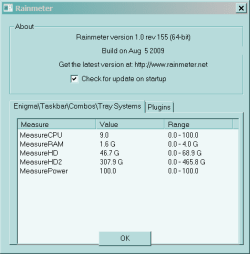
and Im currently using rainmeter 0.14.1
 

My Computer My Computer

OS
Windows 7 RC - 7100 64bit
CPU
AMD Athlon(tm) 64 x2 4800+ 2.50Ghz Dual Core
Motherboard
Hewlett Packard
Memory
4 gig Kingston DDR2
Graphics Card(s)
XFX Nvidia GeForce GTS 250
Sound Card
na
Monitor(s) Displays
22" Samsung LCD Syncmaster
Screen Resolution
1680x1050
Hard Drives
300gig Western Digital
PSU
BFG Tech 550watt
Case
Crap stock Dell
Cooling
Side panel open on case, and a box fan blowing in.
Keyboard
G15
Mouse
G9
Internet Speed
Bike Messenger
Rocketdock works. but now it overlays on top of like my firefox etc. Which is more annoying lol.

and Im currently using rainmeter 0.14.1

I have rocket dock on auto hide, so it's out of my way when not needing it, and because it's on "on top" I can make it appear while I'm in an application.

no need to go to my desktop first.

maybe useful tip.

I'll see what version rainmeter I have.
 

My Computer My Computer

OS
Win7 Build 7600 x86
CPU
Pentium II 300MHz
Motherboard
Asus
Memory
32mb EDO RAM
Graphics Card(s)
Diamond Viper
Sound Card
Soundblaster 16
Monitor(s) Displays
14" AOC CRT 16K color
Screen Resolution
800x600
Hard Drives
300mb Quantum fireball
PSU
110 Watts
Cooling
Passive
Keyboard
Trust Ergonomic
Mouse
Generic
Internet Speed
256K u 128K d
I have version 0.14

I just have an idea.

right click on one of the rainmeters, chose "edit settings"

The Ini file will open.

paste the text from ini file in your post.

I'll compare it to mine.
 

My Computer My Computer

OS
Win7 Build 7600 x86
CPU
Pentium II 300MHz
Motherboard
Asus
Memory
32mb EDO RAM
Graphics Card(s)
Diamond Viper
Sound Card
Soundblaster 16
Monitor(s) Displays
14" AOC CRT 16K color
Screen Resolution
800x600
Hard Drives
300mb Quantum fireball
PSU
110 Watts
Cooling
Passive
Keyboard
Trust Ergonomic
Mouse
Generic
Internet Speed
256K u 128K d
A VERY new version of Rainmeter is available. Much nice.

Thanks Antman.

Will my present skin function under the new version?
 

My Computer My Computer

OS
Win7 Build 7600 x86
CPU
Pentium II 300MHz
Motherboard
Asus
Memory
32mb EDO RAM
Graphics Card(s)
Diamond Viper
Sound Card
Soundblaster 16
Monitor(s) Displays
14" AOC CRT 16K color
Screen Resolution
800x600
Hard Drives
300mb Quantum fireball
PSU
110 Watts
Cooling
Passive
Keyboard
Trust Ergonomic
Mouse
Generic
Internet Speed
256K u 128K d
Thanks Antman.

Will my present skin function under the new version?
Loaded question. I have some skins that pre-date 0.14 that do work, and some that do not.

All of my current knowledge deals with text output. I don't do much "pretty" stuff.

See the forums.
 
Loaded question. I have some skins that pre-date 0.14 that do work, and some that do not.

All of my current knowledge deals with text output. I don't do much "pretty" stuff.

See the forums.

Me too.

No glossy stuff, all done with ini file.

Thanks. I'll give it a go in a virtual box.
 

My Computer My Computer

OS
Win7 Build 7600 x86
CPU
Pentium II 300MHz
Motherboard
Asus
Memory
32mb EDO RAM
Graphics Card(s)
Diamond Viper
Sound Card
Soundblaster 16
Monitor(s) Displays
14" AOC CRT 16K color
Screen Resolution
800x600
Hard Drives
300mb Quantum fireball
PSU
110 Watts
Cooling
Passive
Keyboard
Trust Ergonomic
Mouse
Generic
Internet Speed
256K u 128K d
Thanks for the help so far all. Downloading 1.0 seeing if it helps at all. It's not like a dire need that this gets changed. I just thought it would be nice. I truely don't alt-tab to desktop very often.
 

My Computer My Computer

OS
Windows 7 RC - 7100 64bit
CPU
AMD Athlon(tm) 64 x2 4800+ 2.50Ghz Dual Core
Motherboard
Hewlett Packard
Memory
4 gig Kingston DDR2
Graphics Card(s)
XFX Nvidia GeForce GTS 250
Sound Card
na
Monitor(s) Displays
22" Samsung LCD Syncmaster
Screen Resolution
1680x1050
Hard Drives
300gig Western Digital
PSU
BFG Tech 550watt
Case
Crap stock Dell
Cooling
Side panel open on case, and a box fan blowing in.
Keyboard
G15
Mouse
G9
Internet Speed
Bike Messenger
Update: Installed new 1.0 all my skins work but still same problem. I'll figure it out later. It might be something i've done with my desktop. so. We'll see. Thanks for the help.
 

My Computer My Computer

OS
Windows 7 RC - 7100 64bit
CPU
AMD Athlon(tm) 64 x2 4800+ 2.50Ghz Dual Core
Motherboard
Hewlett Packard
Memory
4 gig Kingston DDR2
Graphics Card(s)
XFX Nvidia GeForce GTS 250
Sound Card
na
Monitor(s) Displays
22" Samsung LCD Syncmaster
Screen Resolution
1680x1050
Hard Drives
300gig Western Digital
PSU
BFG Tech 550watt
Case
Crap stock Dell
Cooling
Side panel open on case, and a box fan blowing in.
Keyboard
G15
Mouse
G9
Internet Speed
Bike Messenger
Your desktop wallpaper is nice, can you post a link as where we can get it ??
 

My Computer My Computer

OS
Windows 7 Ultimate X64 RTM
CPU
Q6600 @ 3.4Ghz
Motherboard
Abit IP35-E
Memory
8GB DDR2-800
Graphics Card(s)
GTX285 1GB
Sound Card
Creative X-Fi Extreme Music
Monitor(s) Displays
Samsung T220
Hard Drives
Samsung F1 Spinpoint 1TB
PSU
Silverstone Zues 750ZF
Case
Lian Li PC-P80
Cooling
Thermalright Ultra 120-Extreme

My Computer My Computer

OS
Windows 7 RC - 7100 64bit
CPU
AMD Athlon(tm) 64 x2 4800+ 2.50Ghz Dual Core
Motherboard
Hewlett Packard
Memory
4 gig Kingston DDR2
Graphics Card(s)
XFX Nvidia GeForce GTS 250
Sound Card
na
Monitor(s) Displays
22" Samsung LCD Syncmaster
Screen Resolution
1680x1050
Hard Drives
300gig Western Digital
PSU
BFG Tech 550watt
Case
Crap stock Dell
Cooling
Side panel open on case, and a box fan blowing in.
Keyboard
G15
Mouse
G9
Internet Speed
Bike Messenger
i've never been able to get 3rd party apps to pin to desktop in vista or 7. i didn't think it was possible. at least that's what i was told by the developer of CD Art Display.

fwiw, WIN+M will minimize all windows, yet rainmeter/rainlendar/samurize/cd art display/docks will all stay put...
 

My Computer My Computer

OS
7600 x86
CPU
Core 2 Duo e7200, 2.53 ghz
Motherboard
Micro-Star MS-7529
Memory
2x DDR2 PC5300 1gb, 667 mhz
Graphics Card(s)
GeForce 9500gt, 512mb
Monitor(s) Displays
22" LG Flatron w2234s
Screen Resolution
1680x1050
Hard Drives
Excelstor SATA-II 250gb 7200rpm, 8mb cache
PSU
CoolerMaster M520
Internet Speed
30/20 mbits
fwiw, WIN+M will minimize all windows, yet rainmeter/rainlendar/samurize/cd art display/docks will all stay put...


Awesome. Thanks. That makes things a lot easier.
 

My Computer My Computer

OS
Windows 7 RC - 7100 64bit
CPU
AMD Athlon(tm) 64 x2 4800+ 2.50Ghz Dual Core
Motherboard
Hewlett Packard
Memory
4 gig Kingston DDR2
Graphics Card(s)
XFX Nvidia GeForce GTS 250
Sound Card
na
Monitor(s) Displays
22" Samsung LCD Syncmaster
Screen Resolution
1680x1050
Hard Drives
300gig Western Digital
PSU
BFG Tech 550watt
Case
Crap stock Dell
Cooling
Side panel open on case, and a box fan blowing in.
Keyboard
G15
Mouse
G9
Internet Speed
Bike Messenger
thanxx
 

My Computer My Computer

Computer Manufacturer/Model Number
HP
OS
Windows 7 ultimate 64 bit
CPU
Intel Quad Core Q8200
Motherboard
?
Memory
4 GB
Graphics Card(s)
Nvidia GT220 1GB
Monitor(s) Displays
Samsung 32Inch
I use rocket dock and I know if I hit the "show desktop" button it will hide it and you have to hit it again to show it.
 

My Computer My Computer

Computer type
PC/Desktop
Computer Manufacturer/Model Number
Home Built
OS
Win7 Ultimate x64
CPU
Intel I5 4690k
Motherboard
MSI Z97 Gaming 5
Memory
16gb Corsair DDR3 @1600mhz
Graphics Card(s)
GTX 970
Sound Card
Realtek HD 5.1
Monitor(s) Displays
Acer 23" LCD
Screen Resolution
1920x1080
Hard Drives
Samsung Evo III SSD
WD 1TB Black
PSU
EVGA Supernove 650w
Case
Diabolik
Cooling
Cooler Master
Keyboard
Logitech
Mouse
Logitech
Internet Speed
Fiber
Other Info
Logitech X-540 5.1 Surround Sound/
Logitech Rumblepad2/
Thrustmaster RGT FFB Wheel
Back
Top