
Disk - Clean and Clean All with Diskpart Command

How to "Clean" or "Clean All" a Disk with the Diskpart Command


   Information
This will show you how to use the clean or clean all command on a selected disk to delete all of it's MBR or GPT partitions, volumes, and any hidden sector information on MBR disks is overwritten.

The data on the HDD is not written over using the clean command like it does with the clean all command below. With the clean command, the data on the HDD is only marked as being deleted instead and is only written over when new data is written/saved to the same location on the HDD next.

OR

You could use the clean all command (secure erase) to do the above and also have each and every disk sector on the HDD written over and zeroed out completely to securely delete all data on the disk to help prevent the data from being able to be recovered. "Clean All" takes about an hour per 320 GB to finish running.

   Note

  • You cannot use the clean or clean all diskpart commands on a boot disk (ex: disk Windows is installed on) unless you do it from a command prompt at boot.
  • Be sure to backup anything that you do not want to lose on the disk that you use clean or clean all on first. It will be to late afterwards. All data will be permanently lost on the disk.
   Warning
You do not want to use clean all on a SSD disk often. Having every sector written over to 0 on a SSD can reduce it's life span faster.


Here's How:

1. In Windows 7, open an elevated command prompt, or a command prompt at boot.

OR

2. In Windows 8 and 8.1, open an elevated command prompt, or a command prompt at boot.

   Note
Be sure that you have the correct Disk #. You would not want to wipe clean the wrong disk.

A) Press the Windows + R keys to open the Run dialog, type compmgmt.msc, and press Enter.

B) If prompted by UAC, click/tap on Yes.

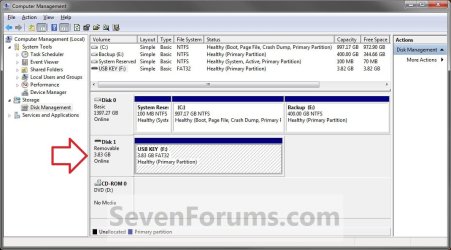
C) Click/tap on Disk Management in the left pane, and make note of the disk # in the middle pane of the disk that you want to clean or clean all. (see screenshot below)
NOTE: For example, I would use Disk 1 if I wanted to use clean or clean all on my USB key drive.
Computer_Management-1.jpg


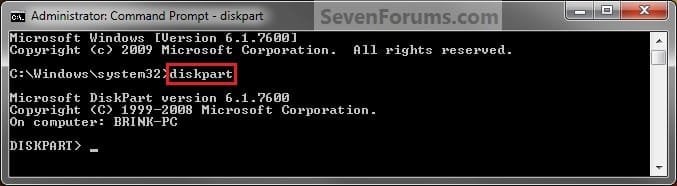
3. In the elevated command prompt, type diskpart and press Enter. (see screenshot below)
Step1.jpg
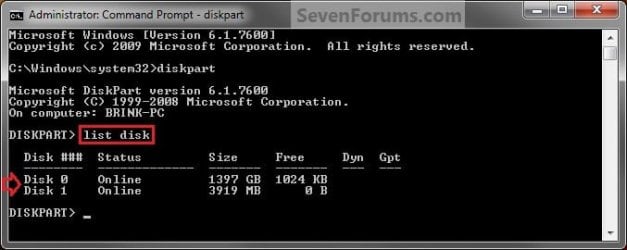
4. In the elevated command prompt, type list disk and press Enter. (see screenshot below)
NOTE: This will give you a list of disk numbers to select from.
Step2.jpg
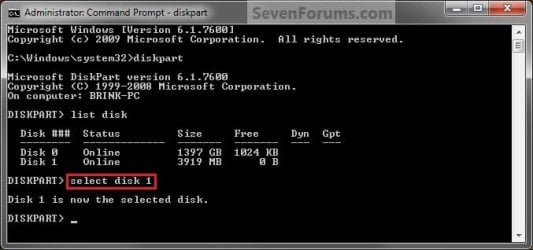
5. In the elevated command prompt, type select disk # and press Enter. (see screenshot below)
NOTE: You would substitute # for the disk number listed that you want to use clean or clean all on. For example, I want to use one of them on Disk 1 (from step 1) for my USB key drive, so I would type select disk 1 and press Enter.
Step3.jpg
6. If the status of the selected disk # (ex: Disk 3) shows as Offline, type online disk, and press Enter to make it online. (see screenshot below)
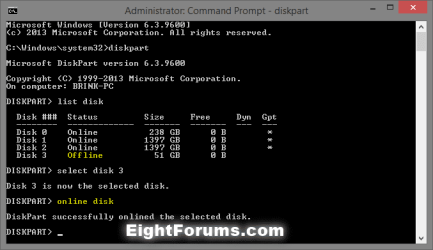
diskpart_online_disk.png
7. Do either step 8 or 9 below for which command you would like to use.


8. To Use the Clean Diskpart Command
NOTE: (Recommended) See the green INFO box at the top of the tutorial for more information about this command. This command will wipe the HDD quickly.
A) In the elevated command prompt, type clean, press Enter, and go to step 10 below. (see screenshot below)
NOTE: This will not take long to finish. Think of it as being like a quick format.
Step4_Clean.jpg
9. To Use the Clean All Diskpart Command
NOTE: See the green INFO box at the top of the tutorial for more information about this command. This command will wipe the HDD, and perform a secure erase. "Clean All" takes about an hour per 320 GB to finish running. It's best to only use this command if you wanted to help make sure that the data on the HDD cannot be recovered say when giving or selling the HDD to another person.
A) In the elevated command prompt, type clean all, and press Enter, and go to step 10 below. You will see the command prompt below as is until the "clean all" command is finished. (see screenshot below)

NOTE: This will take quite some time (several hours or more) to finish depending on how large the disk is since it is writing over each and every sector on it to zero. Think of it as being like a full or low level format.
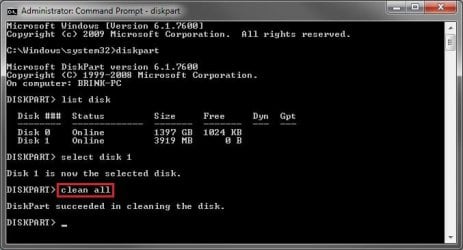
Step4_Clean_All.jpg
10. When finished, in the elevated command prompt, type exit and press Enter. Close the elevated command prompt.

11. The disk will be left as unallocated space. (see screenshot below)
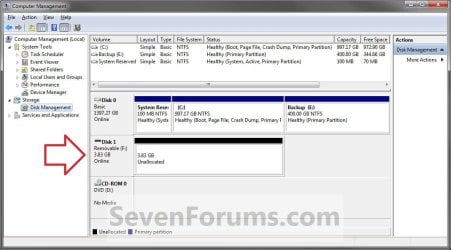
Computer_Management-2.jpg
12. You will now need to create a new partition or volume on the disk to be able to use it again.


That's it,
Shawn


Last edited:
RAW indicates that it's not finished yet since it should say "Unallocated Space" instead.

Since you are doing this from a program, then it could take longer since it may do more write passes. Plus, it will take longer via a USB connection since it is slower than a internal SATA or external eSATA connection.

Is the drive's activity light still on or blinking?

If you look at the "Current Sector" area in the progress dialog box, is the sector count increasing on the left side to indicate that it is actually still running?
It's blinking like when it was with the interrupted clean all. And yeah the "Current Sector" is increasing.

I guess interrupting the previous clean didn't damage anything right? Because I think the command window actually had a blinking "_", I just interpreted it wrong. The HDD was already empty and all.

Just don't understand where those 118MB after formating the unallocated space came from.
 

My Computer

OS
Windows 7 Professional 64bit
CPU
Intel i7 920
Motherboard
EVGA X58 SLI
Memory
3x2GB GSKill
Graphics Card(s)
EVGA GTX 295
Sound Card
Auzentech X-Fi Forte
Monitor(s) Displays
Samsung T220
Screen Resolution
1680x1050
Hard Drives
2x640GB internal WD Caviar
1 TB WD My Book external
PSU
Corsair HX1000
Case
Antec 1200
Interrupting it would usually just lead to having to format, clean, or clean all the drive again before being able to use it.

I would recommend to let this one finish to make it unallocated space so that you will be able to do step 10 afterwards, and not have to start over again. :)
 

My Computer

Computer type
PC/Desktop
Computer Manufacturer/Model Number
Self built custom
OS
64-bit Windows 11 Pro for Workstations
CPU
Intel i7-8700K OC'd to 5 GHz
Motherboard
ASUS ROG Maximus XI Formula Z390
Memory
64 GB (4x16GB) G.SKILL TridentZ RGB DDR4 3600 MHz
Graphics Card(s)
ASUS ROG-STRIX-GTX1080TI-O11G-GAMING
Sound Card
Integrated
Monitor(s) Displays
2 x Samsung Odyssey G7 27"
Screen Resolution
2560x1440
Hard Drives
1TB Samsung 990 PRO M.2,
4TB Samsung 990 PRO PRO M.2,
TerraMaster F8 SSD Plus NAS
PSU
Seasonic Prime Titanium 850W
Case
Thermaltake Core P3
Cooling
Corsair Hydro H115i
Keyboard
Logitech wireless K800
Mouse
Logitech MX Master 4
Internet Speed
2 Gb/s Download and 100 Mb/s Upload
Antivirus
Malwarebyte Anti-Malware Premium
Browser
Google Chrome
Other Info
Logitech Z625 speaker system,
Logitech BRIO 4K Pro webcam,
HP Color LaserJet Pro MFP M477fdn,
APC SMART-UPS RT 1000 XL - SURT1000XLI,
Galaxy S23 Plus phone
It takes 14 hours to complete the clean all command on my USB external of 1TB. I just want to register that.

I will also full format the disk and later here tell how long it takes.
 

My Computer

OS
Seven Home Premium x64
CPU
Intel Core i3 330M
Internet Speed
2Mbps
It takes a long time but that looks too long. Are you using USB 1 by any chance?
 

My Computer

Computer type
PC/Desktop
Computer Manufacturer/Model Number
Own build
OS
Windows 7x64 Home Premium SP1
CPU
Intel i7 2600k
Motherboard
ASUS P8Z68 Deluxe
Memory
G.Skill Ripjaws (DDR3-1600) 2x4GB
Graphics Card(s)
Nvidia GeForce GTS 450; Intel HD Graphics 3000(GT2+)
Monitor(s) Displays
Dell Ultrasharp IPS panel U2311H, Samsung SyncMaster P2350
Screen Resolution
1920x1080
Hard Drives
Samsung 850 Pro SSD 256GB, Samsung SSD 840 120GB, Seagates 1TB Barracuda ST31000528AS x2
PSU
Seasonic M12II 520W
Case
Lian Li Lancool PC-K60
Cooling
Case: 1x120mm, 3x140mm CPU: Hyper 212+
Keyboard
Logitech MK520 (wireless)
Mouse
Logitech MK520
Internet Speed
6-7 Mbps
Antivirus
Norton Security Premium, Malwarebytes on 2 (MSE on 3rd PC)
Browser
FireFox
Other Info
Audio: Logitech Z523 2.1
That was the clean all as I said. Full format should be somewhat faster.
USB 2.0 - thanks for noting.

PS. Please check some earlier posts of someone waiting 11 hours. It's perfectly normal for USB externals. I wanted to register that for anyone like me afraid something is wrong...

PPS. Still before the full format, the clean all again strangely only lasted for 11 hours. Nothing was done between both (clean all) passes. Then the full format also took 11 hours.
A couple things about my earlier wrong assumption. Either Format and Diskpart, actually almost anything is under very strict bandwidth limits - all of us know it, about 20MB per second on USB 2.o; and not as much known the fact that the full format also writes zeros since Vista.
Any comment on the 3 hours difference between both clean all passes is much appreciated.
 
Last edited:

My Computer

OS
Seven Home Premium x64
CPU
Intel Core i3 330M
Internet Speed
2Mbps
Hey guys, the diskpart "clean all" command used to zero everything out within 3hours of my normal WD Black 1TB. But after the last clean install which is half a year ago, the "clean all" command took more than 10hours.

I've used:
Chkdsk /f/r/v for the whole drive, sfc /scannow and even WD HD Diagnostic tools.

Chkdsk found some bad sectors and fixed it, SFC found nothing, & during a month ago, I used WD HD Diag and found some errors in my hard disk. Apparently, it showed me an error and I looked it up on the net & I found the only way to fix it was to RMA it. But I lost my receipt & not sure about it whether I can RMA it without the receipt though. ):

Is it possible to fix the drive without RMA-ing it? Is it possible that the failing hard disk would be the issue for the slow "clean all" diskpart command?

Thanks for your time.
 

My Computer

Computer Manufacturer/Model Number
Custom Built
OS
Windows 7 x64 OEM Build 7600
CPU
Intel Core i5-750 Lynnfield
Motherboard
MSI P55-GD65
Memory
Team Elite DDR3 1333 CL9 (4GB Kit) 2GB x 2 TED34096M1333(H)C
Graphics Card(s)
HIS ATI Radeon HD 5850
Sound Card
Onboard Sound Card
Monitor(s) Displays
Samsung P2250 21.5" inch
Screen Resolution
1920x1080
Hard Drives
Western Digital Caviar Black 1TB
PSU
Corsair HX650W 650W
Case
Antec Nine-Hundred Two
Cooling
Coolermaster Hyper 212 Plus RR-B10-212P-GP
Keyboard
Razer Lycosa
Mouse
Razer Deathadder 3500DPI
That was the clean all as I said. Full format should be somewhat faster.
USB 2.0 - thanks for noting.

PS. Please check some earlier posts of someone waiting 11 hours. It's perfectly normal for USB externals. I wanted to register that for anyone like me afraid something is wrong...

PPS. Still before the full format, the clean all again strangely only lasted for 11 hours. Nothing was done between both (clean all) passes. Then the full format also took 11 hours.
A couple things about my earlier wrong assumption. Either Format and Diskpart, actually almost anything is under very strict bandwidth limits - all of us know it, about 20MB per second on USB 2.o; and not as much known the fact that the full format also writes zeros since Vista.
Any comment on the 3 hours difference between both clean all passes is much appreciated.

Hello 0770,

The time it takes to complete a "Clean all" command could vary depending on many different factors that each of those could also vary each time you run the command. For example, varying bandwidth, cpu usage, memory usage, drive errors (ex: bad sectors), how the drive is connected (SATA, USB 2.0, USB 1.0, eSATA) etc......


It's almost impossible to predict an exact time unitl completion due to this, but at least you have an average time now.

Hope this helps some.
 

My Computer

Computer type
PC/Desktop
Computer Manufacturer/Model Number
Self built custom
OS
64-bit Windows 11 Pro for Workstations
CPU
Intel i7-8700K OC'd to 5 GHz
Motherboard
ASUS ROG Maximus XI Formula Z390
Memory
64 GB (4x16GB) G.SKILL TridentZ RGB DDR4 3600 MHz
Graphics Card(s)
ASUS ROG-STRIX-GTX1080TI-O11G-GAMING
Sound Card
Integrated
Monitor(s) Displays
2 x Samsung Odyssey G7 27"
Screen Resolution
2560x1440
Hard Drives
1TB Samsung 990 PRO M.2,
4TB Samsung 990 PRO PRO M.2,
TerraMaster F8 SSD Plus NAS
PSU
Seasonic Prime Titanium 850W
Case
Thermaltake Core P3
Cooling
Corsair Hydro H115i
Keyboard
Logitech wireless K800
Mouse
Logitech MX Master 4
Internet Speed
2 Gb/s Download and 100 Mb/s Upload
Antivirus
Malwarebyte Anti-Malware Premium
Browser
Google Chrome
Other Info
Logitech Z625 speaker system,
Logitech BRIO 4K Pro webcam,
HP Color LaserJet Pro MFP M477fdn,
APC SMART-UPS RT 1000 XL - SURT1000XLI,
Galaxy S23 Plus phone
Hey guys, the diskpart "clean all" command used to zero everything out within 3hours of my normal WD Black 1TB. But after the last clean install which is half a year ago, the "clean all" command took more than 10hours.

I've used:
Chkdsk /f/r/v for the whole drive, sfc /scannow and even WD HD Diagnostic tools.

Chkdsk found some bad sectors and fixed it, SFC found nothing, & during a month ago, I used WD HD Diag and found some errors in my hard disk. Apparently, it showed me an error and I looked it up on the net & I found the only way to fix it was to RMA it. But I lost my receipt & not sure about it whether I can RMA it without the receipt though. ):

Is it possible to fix the drive without RMA-ing it? Is it possible that the failing hard disk would be the issue for the slow "clean all" diskpart command?

Thanks for your time.

Hello Xplicit,

Yes, a failing HDD would slow it down quite a bit. In fact running a "Clean all" command on a failing HDD could cause the HDD to completely fail faster due to the high activity on the HDD the command uses.

As for your receipt, if you purchased the HDD from a online retailer, then you might be able to go back to that online retailer, log in, view your order history, and hopefully find and print out a copy of the order's invoice as a receipt.

Hope this helps,
Shawn
 

My Computer

Computer type
PC/Desktop
Computer Manufacturer/Model Number
Self built custom
OS
64-bit Windows 11 Pro for Workstations
CPU
Intel i7-8700K OC'd to 5 GHz
Motherboard
ASUS ROG Maximus XI Formula Z390
Memory
64 GB (4x16GB) G.SKILL TridentZ RGB DDR4 3600 MHz
Graphics Card(s)
ASUS ROG-STRIX-GTX1080TI-O11G-GAMING
Sound Card
Integrated
Monitor(s) Displays
2 x Samsung Odyssey G7 27"
Screen Resolution
2560x1440
Hard Drives
1TB Samsung 990 PRO M.2,
4TB Samsung 990 PRO PRO M.2,
TerraMaster F8 SSD Plus NAS
PSU
Seasonic Prime Titanium 850W
Case
Thermaltake Core P3
Cooling
Corsair Hydro H115i
Keyboard
Logitech wireless K800
Mouse
Logitech MX Master 4
Internet Speed
2 Gb/s Download and 100 Mb/s Upload
Antivirus
Malwarebyte Anti-Malware Premium
Browser
Google Chrome
Other Info
Logitech Z625 speaker system,
Logitech BRIO 4K Pro webcam,
HP Color LaserJet Pro MFP M477fdn,
APC SMART-UPS RT 1000 XL - SURT1000XLI,
Galaxy S23 Plus phone
Thanks for your fast reply, Shawn.
Is there any possible ways to fix the drive instead of the last resort to RMA it?
 

My Computer

Computer Manufacturer/Model Number
Custom Built
OS
Windows 7 x64 OEM Build 7600
CPU
Intel Core i5-750 Lynnfield
Motherboard
MSI P55-GD65
Memory
Team Elite DDR3 1333 CL9 (4GB Kit) 2GB x 2 TED34096M1333(H)C
Graphics Card(s)
HIS ATI Radeon HD 5850
Sound Card
Onboard Sound Card
Monitor(s) Displays
Samsung P2250 21.5" inch
Screen Resolution
1920x1080
Hard Drives
Western Digital Caviar Black 1TB
PSU
Corsair HX650W 650W
Case
Antec Nine-Hundred Two
Cooling
Coolermaster Hyper 212 Plus RR-B10-212P-GP
Keyboard
Razer Lycosa
Mouse
Razer Deathadder 3500DPI
Xplicit,

Not for hardware failure. The only way to truly fix it is to replace it.

If you keep on using it, it's just going to be a gamble on when it's going to fail and take out the data on it as well.

I would strongly recommend to RMA it while it's still under warranty. Otherwise, you risk having to pay for a new one out of your own pocket when it dies. :(
 

My Computer

Computer type
PC/Desktop
Computer Manufacturer/Model Number
Self built custom
OS
64-bit Windows 11 Pro for Workstations
CPU
Intel i7-8700K OC'd to 5 GHz
Motherboard
ASUS ROG Maximus XI Formula Z390
Memory
64 GB (4x16GB) G.SKILL TridentZ RGB DDR4 3600 MHz
Graphics Card(s)
ASUS ROG-STRIX-GTX1080TI-O11G-GAMING
Sound Card
Integrated
Monitor(s) Displays
2 x Samsung Odyssey G7 27"
Screen Resolution
2560x1440
Hard Drives
1TB Samsung 990 PRO M.2,
4TB Samsung 990 PRO PRO M.2,
TerraMaster F8 SSD Plus NAS
PSU
Seasonic Prime Titanium 850W
Case
Thermaltake Core P3
Cooling
Corsair Hydro H115i
Keyboard
Logitech wireless K800
Mouse
Logitech MX Master 4
Internet Speed
2 Gb/s Download and 100 Mb/s Upload
Antivirus
Malwarebyte Anti-Malware Premium
Browser
Google Chrome
Other Info
Logitech Z625 speaker system,
Logitech BRIO 4K Pro webcam,
HP Color LaserJet Pro MFP M477fdn,
APC SMART-UPS RT 1000 XL - SURT1000XLI,
Galaxy S23 Plus phone
Xplicit,

Not for hardware failure. The only way to truly fix it is to replace it.

If you keep on using it, it's just going to be a gamble on when it's going to fail and take out the data on it as well.

I would strongly recommend to RMA it while it's still under warranty. Otherwise, you risk having to pay for a new one out of your own pocket when it dies. :(

Oh, alright. Thanks for the help though! Truly appreciated it. (:
 

My Computer

Computer Manufacturer/Model Number
Custom Built
OS
Windows 7 x64 OEM Build 7600
CPU
Intel Core i5-750 Lynnfield
Motherboard
MSI P55-GD65
Memory
Team Elite DDR3 1333 CL9 (4GB Kit) 2GB x 2 TED34096M1333(H)C
Graphics Card(s)
HIS ATI Radeon HD 5850
Sound Card
Onboard Sound Card
Monitor(s) Displays
Samsung P2250 21.5" inch
Screen Resolution
1920x1080
Hard Drives
Western Digital Caviar Black 1TB
PSU
Corsair HX650W 650W
Case
Antec Nine-Hundred Two
Cooling
Coolermaster Hyper 212 Plus RR-B10-212P-GP
Keyboard
Razer Lycosa
Mouse
Razer Deathadder 3500DPI
You're most welcome. :)
 

My Computer

Computer type
PC/Desktop
Computer Manufacturer/Model Number
Self built custom
OS
64-bit Windows 11 Pro for Workstations
CPU
Intel i7-8700K OC'd to 5 GHz
Motherboard
ASUS ROG Maximus XI Formula Z390
Memory
64 GB (4x16GB) G.SKILL TridentZ RGB DDR4 3600 MHz
Graphics Card(s)
ASUS ROG-STRIX-GTX1080TI-O11G-GAMING
Sound Card
Integrated
Monitor(s) Displays
2 x Samsung Odyssey G7 27"
Screen Resolution
2560x1440
Hard Drives
1TB Samsung 990 PRO M.2,
4TB Samsung 990 PRO PRO M.2,
TerraMaster F8 SSD Plus NAS
PSU
Seasonic Prime Titanium 850W
Case
Thermaltake Core P3
Cooling
Corsair Hydro H115i
Keyboard
Logitech wireless K800
Mouse
Logitech MX Master 4
Internet Speed
2 Gb/s Download and 100 Mb/s Upload
Antivirus
Malwarebyte Anti-Malware Premium
Browser
Google Chrome
Other Info
Logitech Z625 speaker system,
Logitech BRIO 4K Pro webcam,
HP Color LaserJet Pro MFP M477fdn,
APC SMART-UPS RT 1000 XL - SURT1000XLI,
Galaxy S23 Plus phone
Is this also applicable to a dual boot?
 

My Computer

Computer Manufacturer/Model Number
Panasonic Toughbook CF F9
OS
Windows 7 Panasonic CF F9 (used to have CF F8)
Hello Lister,

I'm not sure what you mean. The "clean" or "clean all" command will delete all partitions on the hard drive that you run it on. :)
 

My Computer

Computer type
PC/Desktop
Computer Manufacturer/Model Number
Self built custom
OS
64-bit Windows 11 Pro for Workstations
CPU
Intel i7-8700K OC'd to 5 GHz
Motherboard
ASUS ROG Maximus XI Formula Z390
Memory
64 GB (4x16GB) G.SKILL TridentZ RGB DDR4 3600 MHz
Graphics Card(s)
ASUS ROG-STRIX-GTX1080TI-O11G-GAMING
Sound Card
Integrated
Monitor(s) Displays
2 x Samsung Odyssey G7 27"
Screen Resolution
2560x1440
Hard Drives
1TB Samsung 990 PRO M.2,
4TB Samsung 990 PRO PRO M.2,
TerraMaster F8 SSD Plus NAS
PSU
Seasonic Prime Titanium 850W
Case
Thermaltake Core P3
Cooling
Corsair Hydro H115i
Keyboard
Logitech wireless K800
Mouse
Logitech MX Master 4
Internet Speed
2 Gb/s Download and 100 Mb/s Upload
Antivirus
Malwarebyte Anti-Malware Premium
Browser
Google Chrome
Other Info
Logitech Z625 speaker system,
Logitech BRIO 4K Pro webcam,
HP Color LaserJet Pro MFP M477fdn,
APC SMART-UPS RT 1000 XL - SURT1000XLI,
Galaxy S23 Plus phone
Hello Magnificent 7,

I was a little too fast with executing the 'clean all' command in DISKPART.
The data being erased is not a problem but the time that it takes :eek:...

Therefore, is it possible to gently stop this process? Is it safe to do so?

Thanks!
 

My Computer

OS
Windows 7 Ultimate x86
Hello Koala, and welcome to Seven Forums.

Unfortunately, no. Once started, you need to let it finish. If not, then you may be unable to use the HDD until you run the command on it again. :(
 

My Computer

Computer type
PC/Desktop
Computer Manufacturer/Model Number
Self built custom
OS
64-bit Windows 11 Pro for Workstations
CPU
Intel i7-8700K OC'd to 5 GHz
Motherboard
ASUS ROG Maximus XI Formula Z390
Memory
64 GB (4x16GB) G.SKILL TridentZ RGB DDR4 3600 MHz
Graphics Card(s)
ASUS ROG-STRIX-GTX1080TI-O11G-GAMING
Sound Card
Integrated
Monitor(s) Displays
2 x Samsung Odyssey G7 27"
Screen Resolution
2560x1440
Hard Drives
1TB Samsung 990 PRO M.2,
4TB Samsung 990 PRO PRO M.2,
TerraMaster F8 SSD Plus NAS
PSU
Seasonic Prime Titanium 850W
Case
Thermaltake Core P3
Cooling
Corsair Hydro H115i
Keyboard
Logitech wireless K800
Mouse
Logitech MX Master 4
Internet Speed
2 Gb/s Download and 100 Mb/s Upload
Antivirus
Malwarebyte Anti-Malware Premium
Browser
Google Chrome
Other Info
Logitech Z625 speaker system,
Logitech BRIO 4K Pro webcam,
HP Color LaserJet Pro MFP M477fdn,
APC SMART-UPS RT 1000 XL - SURT1000XLI,
Galaxy S23 Plus phone
Unfortunately, no. Once started, you need to let it finish. If not, then you may be unable to use the HDD until you run the command on it again. :(
Brink,
I thought the clean all was just progressively writing zeroes to the disk.
Can you explain the consequences of just doing cntrl C out of the clean all?
 

My Computer

Computer type
PC/Desktop
Computer Manufacturer/Model Number
Own build
OS
Windows 7x64 Home Premium SP1
CPU
Intel i7 2600k
Motherboard
ASUS P8Z68 Deluxe
Memory
G.Skill Ripjaws (DDR3-1600) 2x4GB
Graphics Card(s)
Nvidia GeForce GTS 450; Intel HD Graphics 3000(GT2+)
Monitor(s) Displays
Dell Ultrasharp IPS panel U2311H, Samsung SyncMaster P2350
Screen Resolution
1920x1080
Hard Drives
Samsung 850 Pro SSD 256GB, Samsung SSD 840 120GB, Seagates 1TB Barracuda ST31000528AS x2
PSU
Seasonic M12II 520W
Case
Lian Li Lancool PC-K60
Cooling
Case: 1x120mm, 3x140mm CPU: Hyper 212+
Keyboard
Logitech MK520 (wireless)
Mouse
Logitech MK520
Internet Speed
6-7 Mbps
Antivirus
Norton Security Premium, Malwarebytes on 2 (MSE on 3rd PC)
Browser
FireFox
Other Info
Audio: Logitech Z523 2.1
Hello MJF,

It's not going to hurt the HDD, but if it isn't allowed to finish, then you most likely will not be able to use the HDD until either running the commmand again or format the HDD to create a partition/volume on the HDD.

Think of it as about the same as interrupting the formatting of a HDD.
 

My Computer

Computer type
PC/Desktop
Computer Manufacturer/Model Number
Self built custom
OS
64-bit Windows 11 Pro for Workstations
CPU
Intel i7-8700K OC'd to 5 GHz
Motherboard
ASUS ROG Maximus XI Formula Z390
Memory
64 GB (4x16GB) G.SKILL TridentZ RGB DDR4 3600 MHz
Graphics Card(s)
ASUS ROG-STRIX-GTX1080TI-O11G-GAMING
Sound Card
Integrated
Monitor(s) Displays
2 x Samsung Odyssey G7 27"
Screen Resolution
2560x1440
Hard Drives
1TB Samsung 990 PRO M.2,
4TB Samsung 990 PRO PRO M.2,
TerraMaster F8 SSD Plus NAS
PSU
Seasonic Prime Titanium 850W
Case
Thermaltake Core P3
Cooling
Corsair Hydro H115i
Keyboard
Logitech wireless K800
Mouse
Logitech MX Master 4
Internet Speed
2 Gb/s Download and 100 Mb/s Upload
Antivirus
Malwarebyte Anti-Malware Premium
Browser
Google Chrome
Other Info
Logitech Z625 speaker system,
Logitech BRIO 4K Pro webcam,
HP Color LaserJet Pro MFP M477fdn,
APC SMART-UPS RT 1000 XL - SURT1000XLI,
Galaxy S23 Plus phone
...then you most likely will not be able to use the HDD until either running the commmand again or format the HDD to create a partition/volume on the HDD.
Thanks
I thought that might be all. It's just useful for people to partly run a clean all to completely wipe the MBR at times. But as you say you need to initialize and format the disk after.
 

My Computer

Computer type
PC/Desktop
Computer Manufacturer/Model Number
Own build
OS
Windows 7x64 Home Premium SP1
CPU
Intel i7 2600k
Motherboard
ASUS P8Z68 Deluxe
Memory
G.Skill Ripjaws (DDR3-1600) 2x4GB
Graphics Card(s)
Nvidia GeForce GTS 450; Intel HD Graphics 3000(GT2+)
Monitor(s) Displays
Dell Ultrasharp IPS panel U2311H, Samsung SyncMaster P2350
Screen Resolution
1920x1080
Hard Drives
Samsung 850 Pro SSD 256GB, Samsung SSD 840 120GB, Seagates 1TB Barracuda ST31000528AS x2
PSU
Seasonic M12II 520W
Case
Lian Li Lancool PC-K60
Cooling
Case: 1x120mm, 3x140mm CPU: Hyper 212+
Keyboard
Logitech MK520 (wireless)
Mouse
Logitech MK520
Internet Speed
6-7 Mbps
Antivirus
Norton Security Premium, Malwarebytes on 2 (MSE on 3rd PC)
Browser
FireFox
Other Info
Audio: Logitech Z523 2.1
Thank you Brink!

I eventually did a ctrl+c, with no hurt.
After that I formatted the HDD and everything went fine.
 

My Computer

OS
Windows 7 Ultimate x86
Back
Top