Solved Disk structure is corrupt and unreadable

Ah, good question

The two directories dot (.) and dotdot (..) are current directory and parent directory
Arrow down to .. and Enter
Continue moving up until you reach Downloads, then arrow down to the Recovery folder I suggested you make and press Enter

Photorec will find what it can. You will have to decide what get moved. Some will be recoverable, but a lot of old files will have been completely overwritten and will not be recoverable.

edit: jumanji is back and I will sit on the sidelines. Too many people giving instructions does not help, it often confuses things and makes the recovery more difficult. jumanji has been helping you, so please continue following his instructions. He is one of the best at data recovery (probably other things as well, but definitely data recovery)
 

My Computer My Computer

Computer type
Laptop
Computer Manufacturer/Model Number
HP Pavilion dv6-6c10us
OS
x64 (6.3.9600) Win8.1 Pro & soon dual boot x64 (6.1.7601) Win7_SP1 HomePrem
CPU
AMD A6-3420M APU with Radeon(tm) HD Graphics
Motherboard
Hewlett-Packard 1805
Memory
6.00 GB
Graphics Card(s)
AMD Radeon(TM) HD 6520G
Sound Card
(1) AMD High Definition Audio Device (2) IDT High Definiti
Monitor(s) Displays
HP W2072a 20" LCD (1600 x 900) @ 60 Hz
Screen Resolution
1366 x 768 x 32 bits (4294967296 colors) @ 60 Hz
Hard Drives
ST640LM0 00 HM641JI SATA Disk Device
Keyboard
Logitech k520 wireless KB
Mouse
Logitech m320 wireless mouse (bundled with KB)
Internet Speed
15/5 | 54 MB Wireless 'n'
Antivirus
Realtime: Defender or Avast | On-demand: Malwarebytes, ESET
Browser
IE 11 on Win8, IE 10 on win 7
Other Info
Media: [Gimp, Audacity, VLC] || Comm: [WEmail 2012, Skype] || Productivity: [OpenOffice,| Textpad] || Utils: [Sysinternals, cCleaner, Speccy, Defraggler]
Hope Slartybart's post didn't gobble up my post which crossed and you don't miss it. So go to previous page and look at it in case you missed it.

Slarty's posts are complimentary and when Slarty reads through that previous post, I am sure he can help you further on any queries since I am retiring now.

You are in another expert and more than that helpful hands. That is a big relief for me.:) I can go to sleep peacefully and yes after my before bed coffee.
 

My Computer My Computer

OS
Windows 7 Home Premium 32 bit
I can go to sleep peacefully and yes after my before bed coffee.


Thanks. Photorec "reading sector" now for .ifo files and the destination chosen. Hopefully the outcome is good because it's six months of important info. Estimate 11 hours. Coffee same for me 'cept I wake up 2 hours later in the wee hours and have trouble sleeping again..
 

My Computer My Computer

OS
Windows 7 Pro 64bit
@jumanji: Sleep well, my friend. I'll help where I can.

@shokan: Let Photorec run until it is complete (11 hrs estimate)
That will put it at about 01:40 AM our time on Friday.

If you're awake and Photorec is done, post a screen shot. There's no need for intermediary shots unless something needs to be addressed. Just let it do it's job and hopefully you'll have your data, or most of it.

I won't be awake at that time, at least I don't think I will.

Bill
.
 

My Computer My Computer

Computer type
Laptop
Computer Manufacturer/Model Number
HP Pavilion dv6-6c10us
OS
x64 (6.3.9600) Win8.1 Pro & soon dual boot x64 (6.1.7601) Win7_SP1 HomePrem
CPU
AMD A6-3420M APU with Radeon(tm) HD Graphics
Motherboard
Hewlett-Packard 1805
Memory
6.00 GB
Graphics Card(s)
AMD Radeon(TM) HD 6520G
Sound Card
(1) AMD High Definition Audio Device (2) IDT High Definiti
Monitor(s) Displays
HP W2072a 20" LCD (1600 x 900) @ 60 Hz
Screen Resolution
1366 x 768 x 32 bits (4294967296 colors) @ 60 Hz
Hard Drives
ST640LM0 00 HM641JI SATA Disk Device
Keyboard
Logitech k520 wireless KB
Mouse
Logitech m320 wireless mouse (bundled with KB)
Internet Speed
15/5 | 54 MB Wireless 'n'
Antivirus
Realtime: Defender or Avast | On-demand: Malwarebytes, ESET
Browser
IE 11 on Win8, IE 10 on win 7
Other Info
Media: [Gimp, Audacity, VLC] || Comm: [WEmail 2012, Skype] || Productivity: [OpenOffice,| Textpad] || Utils: [Sysinternals, cCleaner, Speccy, Defraggler]
The .ifo files being recovered do not show the thumbnail previews of the .vob files they originally referenced. Just blank. Which makes sense since the .vob files are not yet recovered. Apparently I will need to try and recover all the .vob files first.

edit: no .vob choice in Photo Rec. Out of luck.
 

My Computer My Computer

OS
Windows 7 Pro 64bit
Is Photorec done?
Are you only selecting one file type at a time? That will take quite a while because Photorec has to scan the faulty drive each time. If you select multiple file type (or all) then Photorec can collect the files in the same scan.

How much space is available for this recovery on C:\? I know you mentioned the sheer size of a years work, so I want to be certain you don't bang up against a space limitation.

Remember that you are only recovering files and any reference to each other is not part of the process.

Once the files are recovered, it might be possible to reconstruct the relationship.

I want to review the thread to see what has already been tried (I know some things were not successful), but I don't want to move away from Photorec since it is capable of getting some files. That's the difficult part of data recovery - it's not guaranteed and you have to find the tool or tools that can retrieve data from a faulty drive.
Photorec might recognize .vob file by another type (mp4).

If you have an existing .vob file, see if the Photorec fidentify utility can identify it.
launch a Command Prompt
navigate to where you have Tesdisk (Downloads\Testdisk...) folder and enter
fidentify_win <test file location>\Some.vob

It might come back unknown, or it might identify the file as another type.

There's another option if it comes back unknown. You can build a signature file for .vob and add it to Photorec. I've never done it, but it shouldn't be too hard. Determine what makes a .vob file identified, use the identifier and file offset for Photorec. But.... that too might not work and as I said, it is untested by me.

After fidentify tells you about .vob, skip the recovery of .vob files for now and focus on other file types that you can recover with Photorec.

Bill
.
 

My Computer My Computer

Computer type
Laptop
Computer Manufacturer/Model Number
HP Pavilion dv6-6c10us
OS
x64 (6.3.9600) Win8.1 Pro & soon dual boot x64 (6.1.7601) Win7_SP1 HomePrem
CPU
AMD A6-3420M APU with Radeon(tm) HD Graphics
Motherboard
Hewlett-Packard 1805
Memory
6.00 GB
Graphics Card(s)
AMD Radeon(TM) HD 6520G
Sound Card
(1) AMD High Definition Audio Device (2) IDT High Definiti
Monitor(s) Displays
HP W2072a 20" LCD (1600 x 900) @ 60 Hz
Screen Resolution
1366 x 768 x 32 bits (4294967296 colors) @ 60 Hz
Hard Drives
ST640LM0 00 HM641JI SATA Disk Device
Keyboard
Logitech k520 wireless KB
Mouse
Logitech m320 wireless mouse (bundled with KB)
Internet Speed
15/5 | 54 MB Wireless 'n'
Antivirus
Realtime: Defender or Avast | On-demand: Malwarebytes, ESET
Browser
IE 11 on Win8, IE 10 on win 7
Other Info
Media: [Gimp, Audacity, VLC] || Comm: [WEmail 2012, Skype] || Productivity: [OpenOffice,| Textpad] || Utils: [Sysinternals, cCleaner, Speccy, Defraggler]
Just checked your Disk Mgmt: you only have 24 GB on your C: drive
The external drive is 1 TB - how much space was used on that drive?

You raised a good point when you asked about the files Photorec would recover.

You and jumanji might have already gone over this and there might be another disk used as the destination.
That's the only way I see this working.

Do you have another 1 TB (or larger) drive? The free space should be equal to or greater than the capacity of the faulty drive. This way, you know that everything recovered will fit on the destination.

Bill
.
 

My Computer My Computer

Computer type
Laptop
Computer Manufacturer/Model Number
HP Pavilion dv6-6c10us
OS
x64 (6.3.9600) Win8.1 Pro & soon dual boot x64 (6.1.7601) Win7_SP1 HomePrem
CPU
AMD A6-3420M APU with Radeon(tm) HD Graphics
Motherboard
Hewlett-Packard 1805
Memory
6.00 GB
Graphics Card(s)
AMD Radeon(TM) HD 6520G
Sound Card
(1) AMD High Definition Audio Device (2) IDT High Definiti
Monitor(s) Displays
HP W2072a 20" LCD (1600 x 900) @ 60 Hz
Screen Resolution
1366 x 768 x 32 bits (4294967296 colors) @ 60 Hz
Hard Drives
ST640LM0 00 HM641JI SATA Disk Device
Keyboard
Logitech k520 wireless KB
Mouse
Logitech m320 wireless mouse (bundled with KB)
Internet Speed
15/5 | 54 MB Wireless 'n'
Antivirus
Realtime: Defender or Avast | On-demand: Malwarebytes, ESET
Browser
IE 11 on Win8, IE 10 on win 7
Other Info
Media: [Gimp, Audacity, VLC] || Comm: [WEmail 2012, Skype] || Productivity: [OpenOffice,| Textpad] || Utils: [Sysinternals, cCleaner, Speccy, Defraggler]
Do you have another 1 TB (or larger) drive? The free space should be equal to or greater than the capacity of the faulty drive. This way, you know that everything recovered will fit on the destination.

Bill
.

I'm avoiding clearing out a USB portable drive until I test another program. It's going to take a long time, hard to say, no estimate shown. About 12 hrs. probably.
 

My Computer My Computer

OS
Windows 7 Pro 64bit
Does this mean you are testing another program or you want to know about another program?

The way I read your post, it sounds as though you are testing another program.
I read in the thread that you tried Active File Recovery for Windows (LSoft), but because it was the demo version, you could not recover your data (or the size of the recovery was limited). This is true for most of the demo or trial software.

If you are testing another program, please let members on this side of your monitor know which one you're trying. It helps all of us, that's how I learned about Testdisk (thanks jumanji). It was very similar to a commercial product I used before so the learning curve wasn't that bad.

Perhaps the program you're trying now will solve the "Where do I put this stuff dilemma".

Good luck.

Bill
.
 

My Computer My Computer

Computer type
Laptop
Computer Manufacturer/Model Number
HP Pavilion dv6-6c10us
OS
x64 (6.3.9600) Win8.1 Pro & soon dual boot x64 (6.1.7601) Win7_SP1 HomePrem
CPU
AMD A6-3420M APU with Radeon(tm) HD Graphics
Motherboard
Hewlett-Packard 1805
Memory
6.00 GB
Graphics Card(s)
AMD Radeon(TM) HD 6520G
Sound Card
(1) AMD High Definition Audio Device (2) IDT High Definiti
Monitor(s) Displays
HP W2072a 20" LCD (1600 x 900) @ 60 Hz
Screen Resolution
1366 x 768 x 32 bits (4294967296 colors) @ 60 Hz
Hard Drives
ST640LM0 00 HM641JI SATA Disk Device
Keyboard
Logitech k520 wireless KB
Mouse
Logitech m320 wireless mouse (bundled with KB)
Internet Speed
15/5 | 54 MB Wireless 'n'
Antivirus
Realtime: Defender or Avast | On-demand: Malwarebytes, ESET
Browser
IE 11 on Win8, IE 10 on win 7
Other Info
Media: [Gimp, Audacity, VLC] || Comm: [WEmail 2012, Skype] || Productivity: [OpenOffice,| Textpad] || Utils: [Sysinternals, cCleaner, Speccy, Defraggler]
IsoBuster

Says shareware but no details about limitations provided so I'll just see what happens.

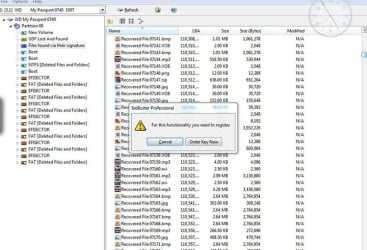
Even if it doesn't actually let me retrieve whatever it comes up with, I want to see what those files are. Could be they'll be named in a way so I can't tell, though. It will be done in eight or so hours (16 total if the progress graphic is correct; no time remaining estimate in this program). There's also the issue of clearing space on another drive. I'll deal with that when I have to.

I'll be using PhotoRec again later for BMPs to see how that goes.
 

My Computer My Computer

OS
Windows 7 Pro 64bit
Ok thanks. Keep us posted.

I haven't been much help, but you seem to have a good handle on the issue.

I'll take a look at IsoBuster - it might be another tool in the tool belt.

Then I'm hitting the sack.

Back in 8 - 16 hours.

edit: IsoBuster website
License models
IsoBuster said:
If you install IsoBuster and want to make use of the free functionality only, click the "Free Functionality" button when prompted.

If you run into functionality that needs to be paid for, you will be prompted. There are no hidden features so you need not to wonder what a paid for version would show extra. You can safely install IsoBuster on your system, there are no xx-days limitations to the free use, you may install at work or wherever you like.

For a registration: Pay online and get a key sent to you automatically on payment verification.

All functionality prior to version 1.0 is free and remains free. All functionality related to the ISO9660, Joliet, Rock Ridge, El Torito and CD-i file-systems, everything related to Video CDs and all image-file making functionality is free. So, finding data, extracting (copying) data etc. is free.

Part of the functionality related to the UDF and HFS(+) file-systems is not free and needs to be paid for. This is the extraction of files that come from the UDF [drag & drop software] or HFS(+) [Macintosh] file-systems. So, all functionality is present, including scanning and finding of lost files, but if you actually want to extract (copy) a file from the UDF or HFS file-system you need a valid registration.

Sounds as though this will fill the bill with regards to .ifo and .vob - @ 40 USD, it might be worth your hard earned cash if it does work as advertised. I would contact the vendor first though if you find that the free version doesn't pass the mustard.

Good luck and good night.

Bill
 

My Computer My Computer

Computer type
Laptop
Computer Manufacturer/Model Number
HP Pavilion dv6-6c10us
OS
x64 (6.3.9600) Win8.1 Pro & soon dual boot x64 (6.1.7601) Win7_SP1 HomePrem
CPU
AMD A6-3420M APU with Radeon(tm) HD Graphics
Motherboard
Hewlett-Packard 1805
Memory
6.00 GB
Graphics Card(s)
AMD Radeon(TM) HD 6520G
Sound Card
(1) AMD High Definition Audio Device (2) IDT High Definiti
Monitor(s) Displays
HP W2072a 20" LCD (1600 x 900) @ 60 Hz
Screen Resolution
1366 x 768 x 32 bits (4294967296 colors) @ 60 Hz
Hard Drives
ST640LM0 00 HM641JI SATA Disk Device
Keyboard
Logitech k520 wireless KB
Mouse
Logitech m320 wireless mouse (bundled with KB)
Internet Speed
15/5 | 54 MB Wireless 'n'
Antivirus
Realtime: Defender or Avast | On-demand: Malwarebytes, ESET
Browser
IE 11 on Win8, IE 10 on win 7
Other Info
Media: [Gimp, Audacity, VLC] || Comm: [WEmail 2012, Skype] || Productivity: [OpenOffice,| Textpad] || Utils: [Sysinternals, cCleaner, Speccy, Defraggler]
Yes, the .vob extraction thing (that started I think with v3.3) is what made me try it. The product came up when I Googled something like "recover .vob files".

I've just noticed a running file ticker (scanned number of files and total to be scanned) down at the bottom that also is flashing file extensions in quick succession as it comes across them (.vob, mp4, avi etc.), so that's encouraging. That nothing is showing up in the file tree yet, however, is not. It has a pretty comprehensive Help which, as usual, I haven't looked over much.

I doubt if all the videos from Digital Tutors (usually mp4) that may be recovered will help me much because there would be no way to re-organize them, ie. video file with file name given by the recovery software with no indication what series or package it belongs to. You can see the problem. It means I have to get another subscription and re-download all of them. Oh well. We're talking hundreds. I say re-download, actually they don't permit that. I do capture them, though, for my own use. Yikes, so much work... gone.

The only hope there is that the retrieved files come grouped in the same order as they were originally saved to disk in folders, if you follow me. That way I might be able to re-organize them. Not expecting that they will be retrieved in the original order, though. They'll probably be all mixed up. Getting another subscription would be much easier.
 
Last edited:

My Computer My Computer

OS
Windows 7 Pro 64bit
Thanks Slarty for the excellent support you have provided. Honestly I couldn't have done anything better than what you did - why better, it is nothing, I could have done nothing :).. I wasn't even aware of fidentify.

Vob files do seem to be difficult to recover and a quick roll through google confirms it and a solution seems to be evading thus far. But somewhere someone had said that PhotoRec recovers the vob files as an mpg file. OP also can do a google search on " Can PhotoRec recover .vob files" and check whether he gets any clue. Sometimes an interested party can do a better search compared to a "not-so-concerned" outsider.:)

And yes, I was also thinking of ISObuster, but not straightaway on the HDD but on whatever PhotoRec recovered for that vob file to check whether it can demystify it. I appreciate OP trying it straightaway on the HDD. I have ISObuster Pro - but never used it but at one point of time I was trying to create an exact copy of a copy protected media complete with the protection for that is what the law permits, a backup copy of your own media without breaking any of its copy protection, but gave up after that experiment failed :) - but on occasions where people wanted to recover from damaged CDs and DVDs I had recommended it - that is what for it started with. I am also not sure whether the free version of ISObuster can deal with HDDs. OP may check the ISObuster website.

It is a well accepted fact that in Data Recovery there is no one-size-fits-all. The author of Test Disk recommends Zero Assumption Recovery, GetDataBack for NTFS or Restorer 2000 as alternatives.

I have nothing more to add to this thread except wait and watch for OP's report on whatever he is doing and vacating this spot for Slarty to lead further.I may break in only if something flashes in mind with a prophetic vision. :)
 

My Computer My Computer

OS
Windows 7 Home Premium 32 bit
You've provided very useful information to me, Jumanji. Especially that Photorec thing. And, free. My favorite price. High hopes for .bmp retrieval later. Thanks very much!
 

My Computer My Computer

OS
Windows 7 Pro 64bit
So, finished but need to buy it to go further. I think I will. Going back to photorec to try some more stuff there first.
 

Attachments

  • Capture.JPG
    Capture.JPG
    82.2 KB · Views: 8

My Computer My Computer

OS
Windows 7 Pro 64bit
Ok, I have a .vob file that I can look at to see if a custom file definition can be created.

Or you might test to see if Photorec definition for .mp4 finds the .vob files.

The data stream relationship between .ifo and .vob files will need to be restored or recreated, but that's another issue after recovery.

Bill
.
 

My Computer My Computer

Computer type
Laptop
Computer Manufacturer/Model Number
HP Pavilion dv6-6c10us
OS
x64 (6.3.9600) Win8.1 Pro & soon dual boot x64 (6.1.7601) Win7_SP1 HomePrem
CPU
AMD A6-3420M APU with Radeon(tm) HD Graphics
Motherboard
Hewlett-Packard 1805
Memory
6.00 GB
Graphics Card(s)
AMD Radeon(TM) HD 6520G
Sound Card
(1) AMD High Definition Audio Device (2) IDT High Definiti
Monitor(s) Displays
HP W2072a 20" LCD (1600 x 900) @ 60 Hz
Screen Resolution
1366 x 768 x 32 bits (4294967296 colors) @ 60 Hz
Hard Drives
ST640LM0 00 HM641JI SATA Disk Device
Keyboard
Logitech k520 wireless KB
Mouse
Logitech m320 wireless mouse (bundled with KB)
Internet Speed
15/5 | 54 MB Wireless 'n'
Antivirus
Realtime: Defender or Avast | On-demand: Malwarebytes, ESET
Browser
IE 11 on Win8, IE 10 on win 7
Other Info
Media: [Gimp, Audacity, VLC] || Comm: [WEmail 2012, Skype] || Productivity: [OpenOffice,| Textpad] || Utils: [Sysinternals, cCleaner, Speccy, Defraggler]
Ok, I have a .vob file that I can look at to see if a custom file definition can be created.

Or you might test to see if Photorec definition for .mp4 finds the .vob files.

The data stream relationship between .ifo and .vob files will need to be restored or recreated, but that's another issue after recovery.

Bill
.
If you could, that'd be great. But, I'm going to get Isobuster anyway because it has the option of extracting results individually. I believe PhotoRec results would be to extract all to a directory as the only option and currently I just don't have the space.
 

My Computer My Computer

OS
Windows 7 Pro 64bit
Understood, I'll try the custom file definition just so that I understand the process.

I think IsoBuster can repair the relationship between the files - but you should verify that with the vendor. The description I read might apply to files that are healthy or come off an optical disc. I'm not certain.
 

My Computer My Computer

Computer type
Laptop
Computer Manufacturer/Model Number
HP Pavilion dv6-6c10us
OS
x64 (6.3.9600) Win8.1 Pro & soon dual boot x64 (6.1.7601) Win7_SP1 HomePrem
CPU
AMD A6-3420M APU with Radeon(tm) HD Graphics
Motherboard
Hewlett-Packard 1805
Memory
6.00 GB
Graphics Card(s)
AMD Radeon(TM) HD 6520G
Sound Card
(1) AMD High Definition Audio Device (2) IDT High Definiti
Monitor(s) Displays
HP W2072a 20" LCD (1600 x 900) @ 60 Hz
Screen Resolution
1366 x 768 x 32 bits (4294967296 colors) @ 60 Hz
Hard Drives
ST640LM0 00 HM641JI SATA Disk Device
Keyboard
Logitech k520 wireless KB
Mouse
Logitech m320 wireless mouse (bundled with KB)
Internet Speed
15/5 | 54 MB Wireless 'n'
Antivirus
Realtime: Defender or Avast | On-demand: Malwarebytes, ESET
Browser
IE 11 on Win8, IE 10 on win 7
Other Info
Media: [Gimp, Audacity, VLC] || Comm: [WEmail 2012, Skype] || Productivity: [OpenOffice,| Textpad] || Utils: [Sysinternals, cCleaner, Speccy, Defraggler]
I ran fidentify_win.exe against the .vob file I have and it came back as mpg.

Good thing too, I was going cross eyed reading the ISO file header information.

Try Photorec and specify .mpg as the file type to search / recover.

You'll still have the "where do I put the files" issue, and the data stream relationship issue - but I think the money would be better spent on a external drive than a single purpose program. That's your call, of course.
 

My Computer My Computer

Computer type
Laptop
Computer Manufacturer/Model Number
HP Pavilion dv6-6c10us
OS
x64 (6.3.9600) Win8.1 Pro & soon dual boot x64 (6.1.7601) Win7_SP1 HomePrem
CPU
AMD A6-3420M APU with Radeon(tm) HD Graphics
Motherboard
Hewlett-Packard 1805
Memory
6.00 GB
Graphics Card(s)
AMD Radeon(TM) HD 6520G
Sound Card
(1) AMD High Definition Audio Device (2) IDT High Definiti
Monitor(s) Displays
HP W2072a 20" LCD (1600 x 900) @ 60 Hz
Screen Resolution
1366 x 768 x 32 bits (4294967296 colors) @ 60 Hz
Hard Drives
ST640LM0 00 HM641JI SATA Disk Device
Keyboard
Logitech k520 wireless KB
Mouse
Logitech m320 wireless mouse (bundled with KB)
Internet Speed
15/5 | 54 MB Wireless 'n'
Antivirus
Realtime: Defender or Avast | On-demand: Malwarebytes, ESET
Browser
IE 11 on Win8, IE 10 on win 7
Other Info
Media: [Gimp, Audacity, VLC] || Comm: [WEmail 2012, Skype] || Productivity: [OpenOffice,| Textpad] || Utils: [Sysinternals, cCleaner, Speccy, Defraggler]
Yep, finding space. It's do-able but time consuming. Very, in my case.

Running Stellar Phoenix now and will take probably the same 10-12 hrs.. And, almost certainly it won't extract in the demo mode. With its RAW Recovery mode, it's adding folders one by one in the tree each time it comes across a new extension, which is good for me. On the site it says .vob is included, so...

Same as others, around $50.
 

Attachments

  • Capture.JPG
    Capture.JPG
    40 KB · Views: 8

My Computer My Computer

OS
Windows 7 Pro 64bit
Back
Top