Display problem

borisyordanov11

New member
Local time
8:00 AM
Messages
14
I didn't see a forum specifically about displays so i'll just ask here. It's pretty simple really - i have a dell 1901fp and i want to use it's usb ports. I connected it to my laptop (a Dell 5110) with a usb cable but nothing happened. I expect any necessary drivers to install automatically but they didn't. I tried adding new devices,windows update, troubleshooting my display - no results.
Any ideas?
 

My Computer

Computer type
PC/Desktop
Computer Manufacturer/Model Number
Dell
OS
Windows 7 Ultimate x64
CPU
i5-2430M 2.4 GHz
Memory
8 GB
Graphics Card(s)
GeForce GT525m
Browser
Chrome,Firefox
The USB ports are supposed to be for the attachment of peripherals see overview tab.

And from here: UltraSharp 1901FP see Techs Specs tab. The actual connections are either DVI-D or VGA.
Try to connect using one of those types of connections.
 

My Computer

Computer type
PC/Desktop
Computer Manufacturer/Model Number
Gateway DX4831-01e (Mid-Tower Desktop)
OS
Originally Win 7 Hm Prem x64 Ver 6.1.7600 Build 7601-SP1 | Upgraded to Windows 10 December 14, 2019
CPU
Intel i3 530 2.93GHz, 2933MHz 2 Cores 4 Logical Processors
Motherboard
Gateway H57M01 133 megahertz
Memory
6GB of 1,333MHz DDR3 SDRAM
Graphics Card(s)
32MB Intel Graphics Media Accelerator HD IGChip
Sound Card
Realtek High Definition Audio
Monitor(s) Displays
Gateway HX2000 20inch TFT active matrix TN
Screen Resolution
1600 x 900 x 59 hertz
Hard Drives
WDC WD10EADS-00M2B0 [HDD] (1000.20 GB) -- drive 0,
HL-DT-ST DVDRAM GH41N [CD-ROM dr]
Four card readers, and Four USB 2.0
PSU
300watts.
Case
Mid-Tower Desktop
Cooling
Stock from Gateway
Keyboard
Natural Ergonomic Keyboard 4000, see Other Info
Mouse
Orig. Gateway wore out now using Insignia USB wired optical
Internet Speed
Vz FIOS 10ms png 57.64Mbps down 65.53Mbps up Speedtest.org
Antivirus
Zamana Anti-logger with Anti-malware, MSE, Windows Firewall,
Browser
IE11.0.9600.19399-Upd ver11.0.135, Firefox 68.0.1 x64
Other Info
System Specs by Belarc.

BIOS: American Megatrends Inc. P01-A0 11/17/2009

Replaced the MS 'Natural' Standard PS/2 Enhanced 101-102 Keyboard with a new Natural Ergonomic Keyboard 4000 on August 1st 2014.

Canon Pixma MG3222 Printer.

Updated to IE11 on 12102015 | Fios Quantum Router g1100

Additional AV: SpywareBlaster, manual Mbam, SAS
I'm not sure i understood - i'm using a VGA cable to get an image on the monitor. I want to use the UBS's for flash drives keyboards etc, but i can't get access to them.
 

My Computer

Computer type
PC/Desktop
Computer Manufacturer/Model Number
Dell
OS
Windows 7 Ultimate x64
CPU
i5-2430M 2.4 GHz
Memory
8 GB
Graphics Card(s)
GeForce GT525m
Browser
Chrome,Firefox
My apologies for the delayed response, I had prior commitments,

I'm not sure i understood
Evidently neither did I.

It's pretty simple really - i have a dell 1901fp and i want to use it's usb ports. I connected it to my laptop (a Dell 5110) with a usb cable but nothing happened.
This lead me to believe you were using the USB to drive your 1901 display and I missed the fact that you were trying to add peripherals, until you pointed it out.

You may find solace in this tutorial: http://www.sevenforums.com/tutorials/147369-usb-selective-suspend-turn-off.html

Go to Here's How Step #3.
What you are trying to do is wake up the USB ports, it seems incongruous that in order to have your displays USB ports recognized you have to turn off Selective Suspend, but read it, if the OS sees that it's on, it won't see the ports.

You may also have to check the OSD (On Screen Display) to see if the are any settings there that need to be awakened.

I hope you have the original manual that came with the 1901 because the closest I could come up with is: DELL ULTRASHARP 1901FP GUIDE Pdf Download. and it doesn't tell about the OSD.

There may also be a setting in your BIOS, but, again, since your system is getting on in years, Dell doesn't keep comprehensive links to its older equipment and it would take some digging to find anything on either your 5110 or the 1901.
 

My Computer

Computer type
PC/Desktop
Computer Manufacturer/Model Number
Gateway DX4831-01e (Mid-Tower Desktop)
OS
Originally Win 7 Hm Prem x64 Ver 6.1.7600 Build 7601-SP1 | Upgraded to Windows 10 December 14, 2019
CPU
Intel i3 530 2.93GHz, 2933MHz 2 Cores 4 Logical Processors
Motherboard
Gateway H57M01 133 megahertz
Memory
6GB of 1,333MHz DDR3 SDRAM
Graphics Card(s)
32MB Intel Graphics Media Accelerator HD IGChip
Sound Card
Realtek High Definition Audio
Monitor(s) Displays
Gateway HX2000 20inch TFT active matrix TN
Screen Resolution
1600 x 900 x 59 hertz
Hard Drives
WDC WD10EADS-00M2B0 [HDD] (1000.20 GB) -- drive 0,
HL-DT-ST DVDRAM GH41N [CD-ROM dr]
Four card readers, and Four USB 2.0
PSU
300watts.
Case
Mid-Tower Desktop
Cooling
Stock from Gateway
Keyboard
Natural Ergonomic Keyboard 4000, see Other Info
Mouse
Orig. Gateway wore out now using Insignia USB wired optical
Internet Speed
Vz FIOS 10ms png 57.64Mbps down 65.53Mbps up Speedtest.org
Antivirus
Zamana Anti-logger with Anti-malware, MSE, Windows Firewall,
Browser
IE11.0.9600.19399-Upd ver11.0.135, Firefox 68.0.1 x64
Other Info
System Specs by Belarc.

BIOS: American Megatrends Inc. P01-A0 11/17/2009

Replaced the MS 'Natural' Standard PS/2 Enhanced 101-102 Keyboard with a new Natural Ergonomic Keyboard 4000 on August 1st 2014.

Canon Pixma MG3222 Printer.

Updated to IE11 on 12102015 | Fios Quantum Router g1100

Additional AV: SpywareBlaster, manual Mbam, SAS
I'm not sure i understood - i'm using a VGA cable to get an image on the monitor. I want to use the UBS's for flash drives keyboards etc, but i can't get access to them.

Hi borisyordanov11,

In addition to what Anak said: Please make sure that you have connected USB upstream cable to the monitor from the system. And then install these drivers for the Monitor:

http://downloads.dell.com/FOLDER01346291M/1/DELL_D1901N-MONITOR_A00-00_R233540.exe

Please check the same and let us know the results.
 

My Computer

Computer type
PC/Desktop
OS
Winndows 7 32 bit
I'm not sure i understood - i'm using a VGA cable to get an image on the monitor. I want to use the UBS's for flash drives keyboards etc, but i can't get access to them.

Hi borisyordanov11,

In addition to what Anak said: Please make sure that you have connected USB upstream cable to the monitor from the system. And then install these drivers for the Monitor:

http://downloads.dell.com/FOLDER01346291M/1/DELL_D1901N-MONITOR_A00-00_R233540.exe

Please check the same and let us know the results.

I should use a cable like this - http://www.onyougo.com/delock-cable-usb-20-a-b-upstream-malemale-3m_iphw3842567.jpg

Not one like this - http://www.technopolis.bg/img/catalog/E1/E106BD2A5B2B5BF1986718A9056218BC.jpg
?
 

My Computer

Computer type
PC/Desktop
Computer Manufacturer/Model Number
Dell
OS
Windows 7 Ultimate x64
CPU
i5-2430M 2.4 GHz
Memory
8 GB
Graphics Card(s)
GeForce GT525m
Browser
Chrome,Firefox
It depends on the connections you have at the monitor. The link I provided for the 1901 states that it has both,

  • 4 x Hi-Speed USB downstream - 4 pin USB Type A
  • 1 x Hi-Speed USB upstream - 4 pin USB Type B
But, I've seen sites that say it only has 4 :confused:

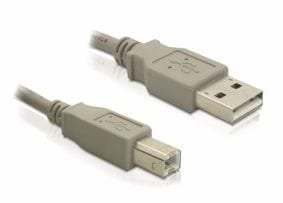
This is a 3.0 cable also called standard B (3.0-B)
usb3.JPG
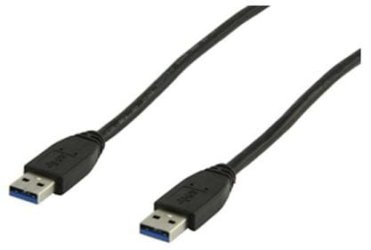
This is a 2.0 cable also called standard A (2.0-A)
usb2.JPG

Do you have both, what type of cabling came with the 1901?

This site shows three USB connections on your 5110, one on each side, left and right, and one in the back. If you look closely the one on the right and the one on the back are marked with a SS (Super Speed) which signifies they are 3.0ports, the one on the left has no markings and is the 2.0port, and they are all rectangular.

Because I can't seem to find a good image of the 1901 check the back were the connections are. It looks to me that the USB connections in the back are the rectangular type, but you need to check to see if they are.

Then all you need to do is match up the connectors. 3.0 is backward compatible with 2.0, but for best performance you should try to stay with the 3.0ports.

To see if you can enhance performance try different connections, as long as the connectors fit do not force any of them, do not try to force a type B into a type A or vice versa.

I'm not sure if the 5110 and 1901 are hot-swappable you may not want to take that chance on ruining them and change or add the connectors while shut down.

 

My Computer

Computer type
PC/Desktop
Computer Manufacturer/Model Number
Gateway DX4831-01e (Mid-Tower Desktop)
OS
Originally Win 7 Hm Prem x64 Ver 6.1.7600 Build 7601-SP1 | Upgraded to Windows 10 December 14, 2019
CPU
Intel i3 530 2.93GHz, 2933MHz 2 Cores 4 Logical Processors
Motherboard
Gateway H57M01 133 megahertz
Memory
6GB of 1,333MHz DDR3 SDRAM
Graphics Card(s)
32MB Intel Graphics Media Accelerator HD IGChip
Sound Card
Realtek High Definition Audio
Monitor(s) Displays
Gateway HX2000 20inch TFT active matrix TN
Screen Resolution
1600 x 900 x 59 hertz
Hard Drives
WDC WD10EADS-00M2B0 [HDD] (1000.20 GB) -- drive 0,
HL-DT-ST DVDRAM GH41N [CD-ROM dr]
Four card readers, and Four USB 2.0
PSU
300watts.
Case
Mid-Tower Desktop
Cooling
Stock from Gateway
Keyboard
Natural Ergonomic Keyboard 4000, see Other Info
Mouse
Orig. Gateway wore out now using Insignia USB wired optical
Internet Speed
Vz FIOS 10ms png 57.64Mbps down 65.53Mbps up Speedtest.org
Antivirus
Zamana Anti-logger with Anti-malware, MSE, Windows Firewall,
Browser
IE11.0.9600.19399-Upd ver11.0.135, Firefox 68.0.1 x64
Other Info
System Specs by Belarc.

BIOS: American Megatrends Inc. P01-A0 11/17/2009

Replaced the MS 'Natural' Standard PS/2 Enhanced 101-102 Keyboard with a new Natural Ergonomic Keyboard 4000 on August 1st 2014.

Canon Pixma MG3222 Printer.

Updated to IE11 on 12102015 | Fios Quantum Router g1100

Additional AV: SpywareBlaster, manual Mbam, SAS
I'm not sure i understood - i'm using a VGA cable to get an image on the monitor. I want to use the UBS's for flash drives keyboards etc, but i can't get access to them.

Hi borisyordanov11,

In addition to what Anak said: Please make sure that you have connected USB upstream cable to the monitor from the system. And then install these drivers for the Monitor:

http://downloads.dell.com/FOLDER01346291M/1/DELL_D1901N-MONITOR_A00-00_R233540.exe

Please check the same and let us know the results.

I should use a cable like this - http://www.onyougo.com/delock-cable-usb-20-a-b-upstream-malemale-3m_iphw3842567.jpg

Not one like this - http://www.technopolis.bg/img/catalog/E1/E106BD2A5B2B5BF1986718A9056218BC.jpg
?

Hi borisyordanov11,

It is correctly suggested by Anak to use the first cable. It is like any printer USB cable.

There must be cable supplied along with the Monitor. Also, to add it is not mandatory to use USB 3.0 port only to get the Monitor USB ports to work.

You can use any of the USB 2.0 and above ports on any system and it should make the USB on the Monitor to work.

If you have any further queries feel free to reply to us.
 

My Computer

Computer type
PC/Desktop
OS
Winndows 7 32 bit
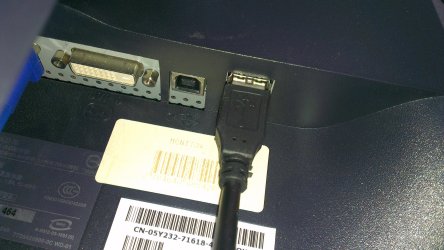
The problem is i got this monitor second hand a few years ago and have no cables/manuals/etc. So i bought a usb cable, a standard A (2.0-A). I put one end in the usb port at the back of the monitor (they are standard 2.0 not 3.0) and i put the other end of the cable in the usb port of my laptop. I tried different combinations - i switched trough every port on my laptop and each on on my monitor. And nothing happened. And yes the monitor has both
4 x Hi-Speed USB downstream - 4 pin USB Type A and 1 x Hi-Speed USB upstream - 4 pin USB Type B (check the attached image)

That's why i asked if i should use a standard B (3.0-B) cable because right now (with the type A cable) it's as if the usb's aren't connected.

Like you said earlier all you need to do is connect the two devices and they should start working, without any installations and what not. So i'm starting to suspect the ports are not even working.

Also - i don't know if this is relevant but there seems to be no power in the monitor's usb ports (they won't charge my phone). Aren't they powered by the monitor's supply?
 

Attachments

  • IMAG0587.jpg
    IMAG0587.jpg
    776.9 KB · Views: 1

My Computer

Computer type
PC/Desktop
Computer Manufacturer/Model Number
Dell
OS
Windows 7 Ultimate x64
CPU
i5-2430M 2.4 GHz
Memory
8 GB
Graphics Card(s)
GeForce GT525m
Browser
Chrome,Firefox
You have to have the 1 x Hi-Speed USB upstream - 4 pin USB Type B attached before the downstream ports are active. Use what ever style cable/plug is needed on the downstream.
 

My Computer

Computer type
PC/Desktop
Computer Manufacturer/Model Number
Custom, Dell and Lenono LT's
OS
Win8/8.1,Win7-U64, Vista U64, uncounted Linux distor's
CPU
AMD and Intell, 9590, 8350, i5 3570k
Motherboard
CFVFZ, GA990FXA, Z77e-itx
Memory
Corsair G Skill
Graphics Card(s)
Crossfired Sapphire HD 7950 Vapor-X, ASUS R9 280X TOP
Sound Card
Realtek ALC889
Monitor(s) Displays
ViewSonic VX2770SMH 27" / ViewSonic VX2433 LCD 24"
Screen Resolution
1080i HD
Hard Drives
Samsung SSD 840 Pro
OCZ Agility 3's
OCZ Vector's
WD's Blue, red, green, Velociraptors
Seagate USB3 & Hybrid's
ASUS Blu-Ray
ASUS DVD
PSU
Corsair AX1200i, Seasonice 850 Gold
Case
Cooler Master HAF 922 & HAF 932, Lian Li Train case.
Cooling
Air, Glacer 240L expanded, custom EK loop with duel D5's
Keyboard
Microsoft SideWinder X4 USB Keyboard / Logitech 250 PS2
Mouse
Logitech G500 / MS wireless 5000
Internet Speed
Best of 5ms / 75+ dn / 12+ up More or less.
Antivirus
MS esentials-MalwareBytes
Browser
Firefox Chromebook
Thank you - that's what i needed to know. I'll get one and see if works.
 

My Computer

Computer type
PC/Desktop
Computer Manufacturer/Model Number
Dell
OS
Windows 7 Ultimate x64
CPU
i5-2430M 2.4 GHz
Memory
8 GB
Graphics Card(s)
GeForce GT525m
Browser
Chrome,Firefox

My Computer

Computer type
PC/Desktop
Computer Manufacturer/Model Number
Gateway DX4831-01e (Mid-Tower Desktop)
OS
Originally Win 7 Hm Prem x64 Ver 6.1.7600 Build 7601-SP1 | Upgraded to Windows 10 December 14, 2019
CPU
Intel i3 530 2.93GHz, 2933MHz 2 Cores 4 Logical Processors
Motherboard
Gateway H57M01 133 megahertz
Memory
6GB of 1,333MHz DDR3 SDRAM
Graphics Card(s)
32MB Intel Graphics Media Accelerator HD IGChip
Sound Card
Realtek High Definition Audio
Monitor(s) Displays
Gateway HX2000 20inch TFT active matrix TN
Screen Resolution
1600 x 900 x 59 hertz
Hard Drives
WDC WD10EADS-00M2B0 [HDD] (1000.20 GB) -- drive 0,
HL-DT-ST DVDRAM GH41N [CD-ROM dr]
Four card readers, and Four USB 2.0
PSU
300watts.
Case
Mid-Tower Desktop
Cooling
Stock from Gateway
Keyboard
Natural Ergonomic Keyboard 4000, see Other Info
Mouse
Orig. Gateway wore out now using Insignia USB wired optical
Internet Speed
Vz FIOS 10ms png 57.64Mbps down 65.53Mbps up Speedtest.org
Antivirus
Zamana Anti-logger with Anti-malware, MSE, Windows Firewall,
Browser
IE11.0.9600.19399-Upd ver11.0.135, Firefox 68.0.1 x64
Other Info
System Specs by Belarc.

BIOS: American Megatrends Inc. P01-A0 11/17/2009

Replaced the MS 'Natural' Standard PS/2 Enhanced 101-102 Keyboard with a new Natural Ergonomic Keyboard 4000 on August 1st 2014.

Canon Pixma MG3222 Printer.

Updated to IE11 on 12102015 | Fios Quantum Router g1100

Additional AV: SpywareBlaster, manual Mbam, SAS
I already tried that - no effect... I'll keep you posted
 

My Computer

Computer type
PC/Desktop
Computer Manufacturer/Model Number
Dell
OS
Windows 7 Ultimate x64
CPU
i5-2430M 2.4 GHz
Memory
8 GB
Graphics Card(s)
GeForce GT525m
Browser
Chrome,Firefox
Back
Top