Don't Know Why

My Computer

Computer type
PC/Desktop
Computer Manufacturer/Model Number
Own build
OS
Windows 7x64 Home Premium SP1
CPU
Intel i7 2600k
Motherboard
ASUS P8Z68 Deluxe
Memory
G.Skill Ripjaws (DDR3-1600) 2x4GB
Graphics Card(s)
Nvidia GeForce GTS 450; Intel HD Graphics 3000(GT2+)
Monitor(s) Displays
Dell Ultrasharp IPS panel U2311H, Samsung SyncMaster P2350
Screen Resolution
1920x1080
Hard Drives
Samsung 850 Pro SSD 256GB, Samsung SSD 840 120GB, Seagates 1TB Barracuda ST31000528AS x2
PSU
Seasonic M12II 520W
Case
Lian Li Lancool PC-K60
Cooling
Case: 1x120mm, 3x140mm CPU: Hyper 212+
Keyboard
Logitech MK520 (wireless)
Mouse
Logitech MK520
Internet Speed
6-7 Mbps
Antivirus
Norton Security Premium, Malwarebytes on 2 (MSE on 3rd PC)
Browser
FireFox
Other Info
Audio: Logitech Z523 2.1
Bare Foot Kid: You probably read where I switched my cables (post 16) and things finally got back to normal. I'm sure you have already tried this. I'd like to know if you did and what the outcome was.
 

My Computer

Computer Manufacturer/Model Number
Intel I7 860
OS
Windows 7 home premium 64bit
CPU
Intel I7 860
Motherboard
EVGA P55 200 Classified 3x SLI
Memory
16 gig Corsair Vengence
Graphics Card(s)
EVGA GTX 560 TI
Sound Card
Soundblaster X-FI
Monitor(s) Displays
Asus, Sony Bravia
Hard Drives
C; WD Velociraptor 300gig
D; Seagate, 500gig
E; WD 500gig
PSU
Kingwin ABT-1000MA1S
Case
Thermaltake Armor+
Cooling
Noctua NH-D14
Keyboard
MS 4000
Mouse
Logitech Trackman Wheel
Internet Speed
Insight BroadBand 20.0
Unfortunately the problem is the apparent disconnect between the motherboard/BIOS sata port numbering and the Windows OS Disk numbering.
I haven't personally had the problem but reading above - BFK certainly has.
 

My Computer

Computer type
PC/Desktop
Computer Manufacturer/Model Number
Own build
OS
Windows 7x64 Home Premium SP1
CPU
Intel i7 2600k
Motherboard
ASUS P8Z68 Deluxe
Memory
G.Skill Ripjaws (DDR3-1600) 2x4GB
Graphics Card(s)
Nvidia GeForce GTS 450; Intel HD Graphics 3000(GT2+)
Monitor(s) Displays
Dell Ultrasharp IPS panel U2311H, Samsung SyncMaster P2350
Screen Resolution
1920x1080
Hard Drives
Samsung 850 Pro SSD 256GB, Samsung SSD 840 120GB, Seagates 1TB Barracuda ST31000528AS x2
PSU
Seasonic M12II 520W
Case
Lian Li Lancool PC-K60
Cooling
Case: 1x120mm, 3x140mm CPU: Hyper 212+
Keyboard
Logitech MK520 (wireless)
Mouse
Logitech MK520
Internet Speed
6-7 Mbps
Antivirus
Norton Security Premium, Malwarebytes on 2 (MSE on 3rd PC)
Browser
FireFox
Other Info
Audio: Logitech Z523 2.1
mjf: I don't know much about computers, I can build them but when it comes to software, I'm at a total loss. I usually rely on a friend of mine to help me there. However in this case, this is like you said possibly hardware & software related. Hardware wise I would try this: Take C and place it into SATA 1, WHY? Well, Windows is going to put C drive in 1 anyway, what can it hurt, then put D into 0, reboot and see what happens. It's a disconnect between C & D, possibly the MB, who knows. In my case leaving C in 0 and putting D in 2 fixed the problem and I have checked since doing that and everything is fine.
 

My Computer

Computer Manufacturer/Model Number
Intel I7 860
OS
Windows 7 home premium 64bit
CPU
Intel I7 860
Motherboard
EVGA P55 200 Classified 3x SLI
Memory
16 gig Corsair Vengence
Graphics Card(s)
EVGA GTX 560 TI
Sound Card
Soundblaster X-FI
Monitor(s) Displays
Asus, Sony Bravia
Hard Drives
C; WD Velociraptor 300gig
D; Seagate, 500gig
E; WD 500gig
PSU
Kingwin ABT-1000MA1S
Case
Thermaltake Armor+
Cooling
Noctua NH-D14
Keyboard
MS 4000
Mouse
Logitech Trackman Wheel
Internet Speed
Insight BroadBand 20.0
Bare Foot Kid: You probably read where I switched my cables (post 16) and things finally got back to normal. I'm sure you have already tried this. I'd like to know if you did and what the outcome was.

Hello mate, thanks for the input and good to see you got yours sorted.


If I listed all the different scenarios I've tried it would fill a page of text.
 

My Computer

Computer Manufacturer/Model Number
* BFK Customs *
OS
W 7 64-bit Ultimate
CPU
Intel Q9550 Yorkfield
Motherboard
ASUS P5Q Pro
Memory
8GB Dominator 8500C5D
Graphics Card(s)
ATI : XFX 5870
Sound Card
Realtek HD Audio 7-1
Monitor(s) Displays
1x 47" LCD HDMI & 3x 26" LCD HDMI
Screen Resolution
1920x1080P & 1920x1200
Hard Drives
1x 80GB Intel X25-M G2 SSD : 1x 500GB & 1x 640GB WD Caviar Black(s)
PSU
Corsair 620HX
Case
Cooler Master RC-690
Cooling
Tuniq Tower 120, 2x 140mm and 3x 120mm case fans
Keyboard
Microsoft 500
Mouse
Razer Diamondback 3G
Internet Speed
14 Mb/s
Other Info
1x Koutech 3Gb/s SATA HDD Hot Swap Rack
bfg: I'm sure it would. I know how things can get frustrating, sometimes I get frustrated just trying to get my pants on.
Please don't get me wrong for asking this but I can't help wondering why so many partitions? Myself, I hate partitions. I would rather have a hundred drives rather than a hundred partitions. Yes it can get expensive but if 1 hard drive goes out you only loose whats on that drive, but if you lose a hard drive that has more than 1 partition you stand to lose much more. Yea, there's a thing called backup but now you have to partition, then restore, why not just restore?. I have a total of 5 drives, 3 internal, no larger than 500gig, and 2 external again no larger than 500gigs. My programs are on C and all my data goes to folders on D. No data is stored on C. E is my work drive so if I want to play with something I use it. G (external) is my backup/programs drive. Whenever I have to re install something, I go here and install and all my stuff is backed up here as well. H (external) is my Windows Image disk, I think the name says what it's used for. I also have two other USB drives which I seldom use but on one of these I backup my G drive just in case.
You know more about Windows than I ever will so if you can't fix the problem, then I guess it can't be fixed. I guess I was just lucky in my case. But if you're like me, persistence will win out and the you can post how to fix this issue.

 

My Computer

Computer Manufacturer/Model Number
Intel I7 860
OS
Windows 7 home premium 64bit
CPU
Intel I7 860
Motherboard
EVGA P55 200 Classified 3x SLI
Memory
16 gig Corsair Vengence
Graphics Card(s)
EVGA GTX 560 TI
Sound Card
Soundblaster X-FI
Monitor(s) Displays
Asus, Sony Bravia
Hard Drives
C; WD Velociraptor 300gig
D; Seagate, 500gig
E; WD 500gig
PSU
Kingwin ABT-1000MA1S
Case
Thermaltake Armor+
Cooling
Noctua NH-D14
Keyboard
MS 4000
Mouse
Logitech Trackman Wheel
Internet Speed
Insight BroadBand 20.0
Hello mate.


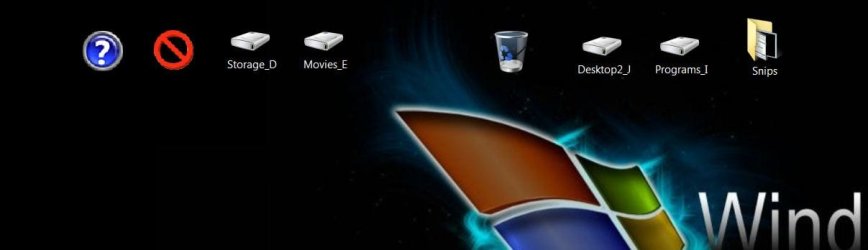
I use partitions like (I think) you use folders, I compartmentalize everything and I absolutely loath Windows 7 Libraries, I don't want Windows deciding where something goes, 'stuff' is mine and I want it where I want it.

I create shortcuts to the partitions I use the most on the desktop of my secondary monitor for easy access, I've just started getting this install in order and this is what I've done so far.

click to enlarge
desk.JPG
 

My Computer

Computer Manufacturer/Model Number
* BFK Customs *
OS
W 7 64-bit Ultimate
CPU
Intel Q9550 Yorkfield
Motherboard
ASUS P5Q Pro
Memory
8GB Dominator 8500C5D
Graphics Card(s)
ATI : XFX 5870
Sound Card
Realtek HD Audio 7-1
Monitor(s) Displays
1x 47" LCD HDMI & 3x 26" LCD HDMI
Screen Resolution
1920x1080P & 1920x1200
Hard Drives
1x 80GB Intel X25-M G2 SSD : 1x 500GB & 1x 640GB WD Caviar Black(s)
PSU
Corsair 620HX
Case
Cooler Master RC-690
Cooling
Tuniq Tower 120, 2x 140mm and 3x 120mm case fans
Keyboard
Microsoft 500
Mouse
Razer Diamondback 3G
Internet Speed
14 Mb/s
Other Info
1x Koutech 3Gb/s SATA HDD Hot Swap Rack
I understand what your saying in regards to Windows libraries. I hate the way it hides everything. I have a program which I use to install/uninstall programs and it finds everything the program installed to include the program folder. I think may instead of calling it Windows 7 they should have called it Window Blinds.
In all honesty I hate folders as well as partitions but you have to put things somewhere. In some cases, folders can get quite deep, that could cause some problems as well. I kinda wish there was a way to color the folders. I've tried to change the way a folder looks, and I know you can,but I've never been able to do it the folder always looks the same, maybe I'm doing something wrong, I don't know.
Anyway, in regards to the disk numbering, I guess as long as Windows boots and isn't casing any problems, I guess were're stuck with it. The only thing though is to remember that C is Disk 1 and to disconnect all other disks prior to fixing C should the need arise. I guess that's the bottom line.
I just happen to come across the fact that they are in the process of making a Windows 8. Maybe, just maybe, they might have resolved the problem in this OS. I have no idea as to when they're going to release it, you probably know more about that than I do, but I guess we'll just have to wait and see.
 

My Computer

Computer Manufacturer/Model Number
Intel I7 860
OS
Windows 7 home premium 64bit
CPU
Intel I7 860
Motherboard
EVGA P55 200 Classified 3x SLI
Memory
16 gig Corsair Vengence
Graphics Card(s)
EVGA GTX 560 TI
Sound Card
Soundblaster X-FI
Monitor(s) Displays
Asus, Sony Bravia
Hard Drives
C; WD Velociraptor 300gig
D; Seagate, 500gig
E; WD 500gig
PSU
Kingwin ABT-1000MA1S
Case
Thermaltake Armor+
Cooling
Noctua NH-D14
Keyboard
MS 4000
Mouse
Logitech Trackman Wheel
Internet Speed
Insight BroadBand 20.0
Yes there's a Windows 8 coming, have a look at this link below. ;)


My Computer

Computer Manufacturer/Model Number
* BFK Customs *
OS
W 7 64-bit Ultimate
CPU
Intel Q9550 Yorkfield
Motherboard
ASUS P5Q Pro
Memory
8GB Dominator 8500C5D
Graphics Card(s)
ATI : XFX 5870
Sound Card
Realtek HD Audio 7-1
Monitor(s) Displays
1x 47" LCD HDMI & 3x 26" LCD HDMI
Screen Resolution
1920x1080P & 1920x1200
Hard Drives
1x 80GB Intel X25-M G2 SSD : 1x 500GB & 1x 640GB WD Caviar Black(s)
PSU
Corsair 620HX
Case
Cooler Master RC-690
Cooling
Tuniq Tower 120, 2x 140mm and 3x 120mm case fans
Keyboard
Microsoft 500
Mouse
Razer Diamondback 3G
Internet Speed
14 Mb/s
Other Info
1x Koutech 3Gb/s SATA HDD Hot Swap Rack
Why Windows Keeps the Disk Number

This is how I currently see process.
The BIOS program understands the PC hardware and maintains the list of bootable options on offer to the OS. Once the BIOS determines a HDD has an appropriate MBR, control is passed to the MBR boot code which passes control over to the active partition. The bootmanager along with the BCD determine the location of winload.exe which is run to load the Windows 7 OS. It's at this stage the OS proper takes over and it manages the OS Disk numbering independently of the physical Port numbering.
For the installed HDDs the OS uses the disk signature which is a unique 4 byte code which lives in the MBR. The OS generates this signature when the MBR is first created during initialisation and a disk number is assigned. This assignment is stored in the registry.
disksig.JPG
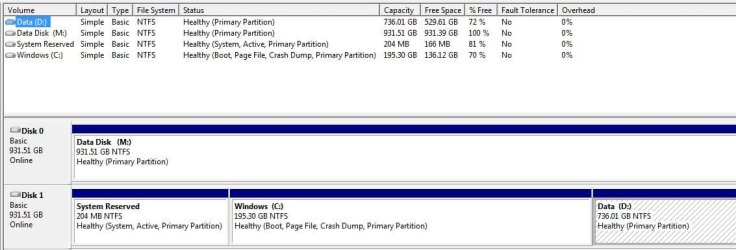
This shows Disk 0 and Disk 1 in the registry. Disk 0 is the OS disk and Disk 1 is a Data disk.
When the Data Disk is unallocated and the MBR zeroed then initialized and formatted, Disk Management shows it in Disk 0 position.
DM2.JPG
When the PC is rebooted the OS assigns Disk 0 to the disk with the matching disk signature in the registry.
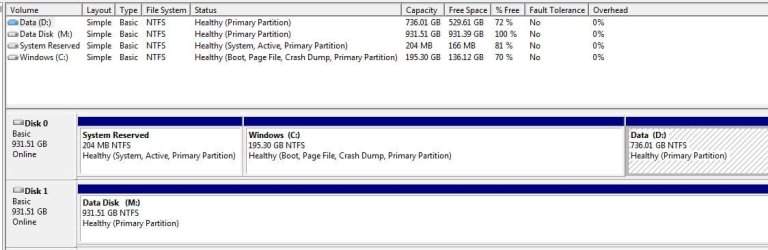
At the end of this test the OS is still Disk 0 and the Data disk is still Disk 1 but now with a new signature on the disk and in the registry.

Also Disk 0 is on Sata Port 6 and Disk 1 is on Sata Port 1.
 

Attachments

  • DM3.JPG
    DM3.JPG
    60 KB · Views: 20
Last edited:

My Computer

Computer type
PC/Desktop
Computer Manufacturer/Model Number
Own build
OS
Windows 7x64 Home Premium SP1
CPU
Intel i7 2600k
Motherboard
ASUS P8Z68 Deluxe
Memory
G.Skill Ripjaws (DDR3-1600) 2x4GB
Graphics Card(s)
Nvidia GeForce GTS 450; Intel HD Graphics 3000(GT2+)
Monitor(s) Displays
Dell Ultrasharp IPS panel U2311H, Samsung SyncMaster P2350
Screen Resolution
1920x1080
Hard Drives
Samsung 850 Pro SSD 256GB, Samsung SSD 840 120GB, Seagates 1TB Barracuda ST31000528AS x2
PSU
Seasonic M12II 520W
Case
Lian Li Lancool PC-K60
Cooling
Case: 1x120mm, 3x140mm CPU: Hyper 212+
Keyboard
Logitech MK520 (wireless)
Mouse
Logitech MK520
Internet Speed
6-7 Mbps
Antivirus
Norton Security Premium, Malwarebytes on 2 (MSE on 3rd PC)
Browser
FireFox
Other Info
Audio: Logitech Z523 2.1
Good info, but how you changed signatures, etc? My wife's computer has exactly the same issue, and i dont know how to fix it :(
 

My Computer

Computer type
PC/Desktop
OS
Microsoft Windows 10 Professional / Windows 7 Professional
CPU
Intel i5-3570
Motherboard
Lenovo Mahobay
Memory
16GB DDR3
Graphics Card(s)
AMD Radeon HD 7850 2GB
Sound Card
(1) Realtek HD Audio (2) AMD HD Audio
Monitor(s) Displays
LG LS192WS
Screen Resolution
1440 x 900 @ 32bit color
Hard Drives
(1) SUV300S37A/120G (2) ST3500413AS SATA Disk Device AHCI mode enabled.
PSU
Corsair HX620
Case
Thermaltake V4 Black Edition
Cooling
Cooler Master Hyper 212 + Artic Silver 5 on CPU/GPU
Keyboard
Dell SK-8115
Mouse
Razer Copperhead with MAPED mat (awesome!)
Internet Speed
100 Mbps up/down
Browser
Chrome
Good info, but how you changed signatures, etc? My wife's computer has exactly the same issue, and i dont know how to fix it :(
This has been a problem stated in this forum and outside for some time. Changing disk signatures is easy. But I'd hold off on this for a while.

I'm waiting for some feedback on what I'm putting forward.
 

My Computer

Computer type
PC/Desktop
Computer Manufacturer/Model Number
Own build
OS
Windows 7x64 Home Premium SP1
CPU
Intel i7 2600k
Motherboard
ASUS P8Z68 Deluxe
Memory
G.Skill Ripjaws (DDR3-1600) 2x4GB
Graphics Card(s)
Nvidia GeForce GTS 450; Intel HD Graphics 3000(GT2+)
Monitor(s) Displays
Dell Ultrasharp IPS panel U2311H, Samsung SyncMaster P2350
Screen Resolution
1920x1080
Hard Drives
Samsung 850 Pro SSD 256GB, Samsung SSD 840 120GB, Seagates 1TB Barracuda ST31000528AS x2
PSU
Seasonic M12II 520W
Case
Lian Li Lancool PC-K60
Cooling
Case: 1x120mm, 3x140mm CPU: Hyper 212+
Keyboard
Logitech MK520 (wireless)
Mouse
Logitech MK520
Internet Speed
6-7 Mbps
Antivirus
Norton Security Premium, Malwarebytes on 2 (MSE on 3rd PC)
Browser
FireFox
Other Info
Audio: Logitech Z523 2.1
mjf: I will grant you the fact that this is what and how the system is supposed to operate. However, can you explain two things.
1. If a drive is the only one in the system, and that drive is 'Primary, Active" and then another drive is introduced, this drive simply formatted and a data disk, why would it knock Disk 0 to disk 1? Is it because of the registry? Or is it the formatting? How Can I read this code in the MBR on the disk and match it to the data in the registry?
2. You said that " Disk 0 is on SATA Port 6 and Disk 1 is on SATA port 1", where can I find this information? Is there something that will tell me how my SATA ports are set up or do I go by the manufacturer?
 

My Computer

Computer Manufacturer/Model Number
Intel I7 860
OS
Windows 7 home premium 64bit
CPU
Intel I7 860
Motherboard
EVGA P55 200 Classified 3x SLI
Memory
16 gig Corsair Vengence
Graphics Card(s)
EVGA GTX 560 TI
Sound Card
Soundblaster X-FI
Monitor(s) Displays
Asus, Sony Bravia
Hard Drives
C; WD Velociraptor 300gig
D; Seagate, 500gig
E; WD 500gig
PSU
Kingwin ABT-1000MA1S
Case
Thermaltake Armor+
Cooling
Noctua NH-D14
Keyboard
MS 4000
Mouse
Logitech Trackman Wheel
Internet Speed
Insight BroadBand 20.0
I have tried to stress that I am feeling my way on this matter in the absence of appropriate reference material or input from others.

In terms of sata ports or channel numbers you can simply go
computer > right click a disk partition> select hardware tab
you will see the channel numbers for the sata devices.
It appears that the OS disk numbers are assigned in the registry. Here disk numbers are assigned to disk signatures. The OS disk numbers are not the same as the port or channel numbers. See my screen shot.

1) for a drive to be bumped by a "new" data disk from 0 to number 1 position, I believe the data disk must have an existing disk signature that is associated with disk number 0. Formatting will not wipe the disk signature. Windows will assign a disk signature if it initializes the disk and creates an MBR.
One of my screenshots show the location of the disk signature in the MBR which can be viewed with a Hex editor or from an elevated command prompt type
>diskpart
>list disk
..........the numbers of your disks are listed
> select disk n
.....n=0, 1, etc
>uniqueid disk
....will list the hex disk signature in the MBR
>exit

2)My reference to sata port 1 and 6 was just MY setup. My port 1 (channel 0 :banghead:
is a sata/6 so I have my Windows disk number 0 associated with the disk signature of my boot disk which is physically connected to my sata/3G port 6.
Phew!!!!
--------------------------------------
So look at the disk signature of the disk which insists on taking the 0 place then look at the registry.
 

My Computer

Computer type
PC/Desktop
Computer Manufacturer/Model Number
Own build
OS
Windows 7x64 Home Premium SP1
CPU
Intel i7 2600k
Motherboard
ASUS P8Z68 Deluxe
Memory
G.Skill Ripjaws (DDR3-1600) 2x4GB
Graphics Card(s)
Nvidia GeForce GTS 450; Intel HD Graphics 3000(GT2+)
Monitor(s) Displays
Dell Ultrasharp IPS panel U2311H, Samsung SyncMaster P2350
Screen Resolution
1920x1080
Hard Drives
Samsung 850 Pro SSD 256GB, Samsung SSD 840 120GB, Seagates 1TB Barracuda ST31000528AS x2
PSU
Seasonic M12II 520W
Case
Lian Li Lancool PC-K60
Cooling
Case: 1x120mm, 3x140mm CPU: Hyper 212+
Keyboard
Logitech MK520 (wireless)
Mouse
Logitech MK520
Internet Speed
6-7 Mbps
Antivirus
Norton Security Premium, Malwarebytes on 2 (MSE on 3rd PC)
Browser
FireFox
Other Info
Audio: Logitech Z523 2.1
I understood that you were giving your perspective as at how things worked, I happened to find a post from 2003 that basically said the same thing, only the guy giving the information was from Microsoft (I believe) and in a heck of a lot more detail, about 3 pages worth.
In regards to the SATA port numbering, I kinda figured that your motherboard was set up that way. Not all motherboards are set up the same. On my MB I have 6 ports in sets of 2, DISK 0 being the first and so on. Whats weird though is that if I place Disk 1 next to Disk 0, the way it's supposed to be according to the manufacturer, it will knock Disk 0 out of it's position. I even used DISKPART to clean the drive and that didn't work. My solution was to put DISK 1 where DISK 2 should be and everything fell into place. Why? I have no idea.
I am not a computer wiz but I do learn quickly and I'm glad you listed how to find the information and I'm gonna do just that.
 

My Computer

Computer Manufacturer/Model Number
Intel I7 860
OS
Windows 7 home premium 64bit
CPU
Intel I7 860
Motherboard
EVGA P55 200 Classified 3x SLI
Memory
16 gig Corsair Vengence
Graphics Card(s)
EVGA GTX 560 TI
Sound Card
Soundblaster X-FI
Monitor(s) Displays
Asus, Sony Bravia
Hard Drives
C; WD Velociraptor 300gig
D; Seagate, 500gig
E; WD 500gig
PSU
Kingwin ABT-1000MA1S
Case
Thermaltake Armor+
Cooling
Noctua NH-D14
Keyboard
MS 4000
Mouse
Logitech Trackman Wheel
Internet Speed
Insight BroadBand 20.0
I understood that you were giving your perspective as at how things worked, I happened to find a post from 2003 that basically said the same thing, only the guy giving the information was from Microsoft (I believe) and in a heck of a lot more detail, about 3 pages worth.
I'd like to read it, can you give the reference please.
 

My Computer

Computer type
PC/Desktop
Computer Manufacturer/Model Number
Own build
OS
Windows 7x64 Home Premium SP1
CPU
Intel i7 2600k
Motherboard
ASUS P8Z68 Deluxe
Memory
G.Skill Ripjaws (DDR3-1600) 2x4GB
Graphics Card(s)
Nvidia GeForce GTS 450; Intel HD Graphics 3000(GT2+)
Monitor(s) Displays
Dell Ultrasharp IPS panel U2311H, Samsung SyncMaster P2350
Screen Resolution
1920x1080
Hard Drives
Samsung 850 Pro SSD 256GB, Samsung SSD 840 120GB, Seagates 1TB Barracuda ST31000528AS x2
PSU
Seasonic M12II 520W
Case
Lian Li Lancool PC-K60
Cooling
Case: 1x120mm, 3x140mm CPU: Hyper 212+
Keyboard
Logitech MK520 (wireless)
Mouse
Logitech MK520
Internet Speed
6-7 Mbps
Antivirus
Norton Security Premium, Malwarebytes on 2 (MSE on 3rd PC)
Browser
FireFox
Other Info
Audio: Logitech Z523 2.1
If I can find it again
 

My Computer

Computer Manufacturer/Model Number
Intel I7 860
OS
Windows 7 home premium 64bit
CPU
Intel I7 860
Motherboard
EVGA P55 200 Classified 3x SLI
Memory
16 gig Corsair Vengence
Graphics Card(s)
EVGA GTX 560 TI
Sound Card
Soundblaster X-FI
Monitor(s) Displays
Asus, Sony Bravia
Hard Drives
C; WD Velociraptor 300gig
D; Seagate, 500gig
E; WD 500gig
PSU
Kingwin ABT-1000MA1S
Case
Thermaltake Armor+
Cooling
Noctua NH-D14
Keyboard
MS 4000
Mouse
Logitech Trackman Wheel
Internet Speed
Insight BroadBand 20.0

My Computer

Computer Manufacturer/Model Number
Intel I7 860
OS
Windows 7 home premium 64bit
CPU
Intel I7 860
Motherboard
EVGA P55 200 Classified 3x SLI
Memory
16 gig Corsair Vengence
Graphics Card(s)
EVGA GTX 560 TI
Sound Card
Soundblaster X-FI
Monitor(s) Displays
Asus, Sony Bravia
Hard Drives
C; WD Velociraptor 300gig
D; Seagate, 500gig
E; WD 500gig
PSU
Kingwin ABT-1000MA1S
Case
Thermaltake Armor+
Cooling
Noctua NH-D14
Keyboard
MS 4000
Mouse
Logitech Trackman Wheel
Internet Speed
Insight BroadBand 20.0
OK, I have news about this issue, installed the AMD AHCI drivers for my wife's computer and it works way better and the sata ports order got corrected too.
 

My Computer

Computer type
PC/Desktop
OS
Microsoft Windows 10 Professional / Windows 7 Professional
CPU
Intel i5-3570
Motherboard
Lenovo Mahobay
Memory
16GB DDR3
Graphics Card(s)
AMD Radeon HD 7850 2GB
Sound Card
(1) Realtek HD Audio (2) AMD HD Audio
Monitor(s) Displays
LG LS192WS
Screen Resolution
1440 x 900 @ 32bit color
Hard Drives
(1) SUV300S37A/120G (2) ST3500413AS SATA Disk Device AHCI mode enabled.
PSU
Corsair HX620
Case
Thermaltake V4 Black Edition
Cooling
Cooler Master Hyper 212 + Artic Silver 5 on CPU/GPU
Keyboard
Dell SK-8115
Mouse
Razer Copperhead with MAPED mat (awesome!)
Internet Speed
100 Mbps up/down
Browser
Chrome

My Computer

Computer type
PC/Desktop
Computer Manufacturer/Model Number
Own build
OS
Windows 7x64 Home Premium SP1
CPU
Intel i7 2600k
Motherboard
ASUS P8Z68 Deluxe
Memory
G.Skill Ripjaws (DDR3-1600) 2x4GB
Graphics Card(s)
Nvidia GeForce GTS 450; Intel HD Graphics 3000(GT2+)
Monitor(s) Displays
Dell Ultrasharp IPS panel U2311H, Samsung SyncMaster P2350
Screen Resolution
1920x1080
Hard Drives
Samsung 850 Pro SSD 256GB, Samsung SSD 840 120GB, Seagates 1TB Barracuda ST31000528AS x2
PSU
Seasonic M12II 520W
Case
Lian Li Lancool PC-K60
Cooling
Case: 1x120mm, 3x140mm CPU: Hyper 212+
Keyboard
Logitech MK520 (wireless)
Mouse
Logitech MK520
Internet Speed
6-7 Mbps
Antivirus
Norton Security Premium, Malwarebytes on 2 (MSE on 3rd PC)
Browser
FireFox
Other Info
Audio: Logitech Z523 2.1
Back
Top