That is good to know.
So, I take it that doing a drive clean up and releasing the drive letters and registry entries pertaining to the non-present drives, has resolved the problem of that one drive going intermittent.
I was really perturbed with that one CDROM drive that stole one drive letter that prevented you from assigning sequential drive letters to the internal HDD drives. Knowing fully well that it could come either from a virtual drive software and worse still from a WD external HDD with Smartware ( that cannot by any normal means be done away with) made me anxious. Reason why I was harsh about connecting an external drive while you are in the process of cleanup.

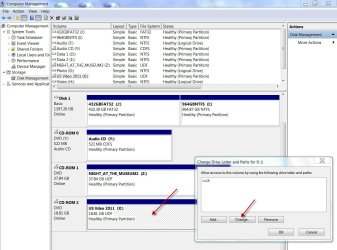
Ok now that you have conceded that it was indeed coming from a virtual drive software, here is how to give it a permanent drive letter.
Enable your virtual CDROM drive.
Mount an ISO on it.
Now go to Disk Management. You can see your Virtual drive with the automatically assigned drive letter.
Change the drive letter to one of the last few alphaphets. ( I had given it the drive letter X with the physical drives given Y and Z as in post #.18. Without anything mounted on it, the VCD will not show up in Windows Disk Management and so you cannot assign a specific drive letter to it.)
If you are plugging in and plugging out innumerable external drives and frequently - which seems to be true in your case - sooner or later you will again get into the problem of some drives not showing up due to drive letter confusion. So perform the drive Clean up periodically to flush out the non-present devices locking the drive letters in the registry.
As for as rearranging the disk numbers like Disk 0 , disk 1 etc.,, I really do not know whether it really matters, though it will look nice that way. I shall as I said earlier leave it to Britton30 to elaborate and guide you on it. ( I am not plain competent
)
Whether you should remove the active flags in non-system drives? As I said in post #8, theoretically as long as you are booting right it should be OK. But we always want to remain safe. Isn't it? From a practical standpoint, if you are not a multi OS operator as TVeblen pointed out and know your way, it is safer that you remove it from non-system drives.
If your problems have really been resolved, you may mark this thread as solved that would benefit others.
Have a nice day.