Drop-down menu items stay permanently on screen

Mustkunstn1k

New member
Local time
2:29 AM
Messages
24
I've been having this quite a weird bug, that has been appearing quite a few times recently.

Basically I select something from a drop-down menu (be it either right-clicking on the desktop, on a folder or just selecting something in some of the programs) and for some reasons the selection stays visible. Even if I change windows, go to full-screen applications or whatever, it just stays here.

I basically have to restart my computer pretty much (although I do think it has disappeared on it's own since sometimes I've just tried ignoring it).

It's especially annoying if I want to watch a movie or something.

Here's an image:
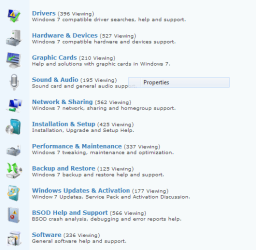
Capture2.PNG

Does anybody have any idea how to get rid of it or how to stop it from appearing?
 

My Computer My Computer

OS
Windows 7
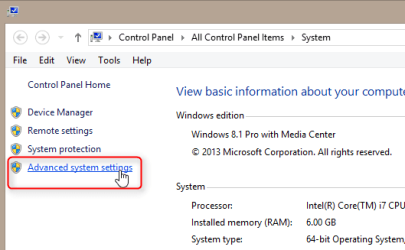
  • Open Control Panel > System (or right click Computer on the right pane of the Start Menu and select Properties)
  • Select Advanced system settings:
    2014-01-07_18h46_27.png
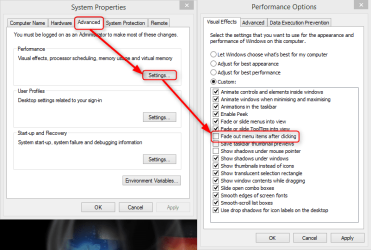
  • Click Settings under Performance, unselect Fade out menu items after clicking:
    2014-01-07_18h51_34.png
  • Click Apply to save settings
  • After reboot you can enable Fade out menu items after clicking again, the phantom menus should be gone.

Kari
 

My Computer My Computer

Computer type
Laptop
Computer Manufacturer/Model Number
HP ENVY 17-1150eg
OS
Windows 10 Pro x64 EN-GB
CPU
1.6 GHz Intel Core i7-720QM Processor
Memory
6 GB
Graphics Card(s)
ATI Mobility Radeon HD 5850 Graphics
Sound Card
Beats sound system with integrated subwoofer
Monitor(s) Displays
17" laptop display, 22" LED and 32" Full HD TV through HDMI
Screen Resolution
1600*900 (1), 1920*1080 (2&3)
Hard Drives
Internal: 2 x 500 GB SATA Hard Disk Drive 7200 rpm
External: 2TB for backups, 3TB USB3 network drive for media
Cooling
As Envy runs a bit warm, I have it on a Cooler Master pad
Keyboard
Logitech diNovo Media Desktop Laser (bluetooth)
Mouse
Logitech Performance Mouse MX
Internet Speed
50/10 Mbps VDSL
Antivirus
Windows Defender 4.3.9431.0
Browser
Maxthon 3.5.2., IE11
Thanks, I hope the won't be appearing anymore.
 

My Computer My Computer

OS
Windows 7
If it does, do the disable-reboot-enable cycle again :).
 

My Computer My Computer

Computer type
Laptop
Computer Manufacturer/Model Number
HP ENVY 17-1150eg
OS
Windows 10 Pro x64 EN-GB
CPU
1.6 GHz Intel Core i7-720QM Processor
Memory
6 GB
Graphics Card(s)
ATI Mobility Radeon HD 5850 Graphics
Sound Card
Beats sound system with integrated subwoofer
Monitor(s) Displays
17" laptop display, 22" LED and 32" Full HD TV through HDMI
Screen Resolution
1600*900 (1), 1920*1080 (2&3)
Hard Drives
Internal: 2 x 500 GB SATA Hard Disk Drive 7200 rpm
External: 2TB for backups, 3TB USB3 network drive for media
Cooling
As Envy runs a bit warm, I have it on a Cooler Master pad
Keyboard
Logitech diNovo Media Desktop Laser (bluetooth)
Mouse
Logitech Performance Mouse MX
Internet Speed
50/10 Mbps VDSL
Antivirus
Windows Defender 4.3.9431.0
Browser
Maxthon 3.5.2., IE11
Back
Top