Solved DSN Issues!! Plz help me!!

AFeinauer

New member
Local time
9:12 PM
Messages
35
Hi... I am new to having this sort of problem with any pc. I recently bought a laptop and it would use my wireless wifi great. Then after about a week it just stopped working. I tried erasing files, restarting, defraging... Anyways I found this windows forum site and searched and found a few helpful tips. My laptop says it has no dsn connection. I installed the dsn jumper on my phone and downloaded it to my pc since I couldnt even get online. I picked a dsn and it would work but was slow or would work for a few minutes. Then I found that someone suggested the numbers: 208.67.222.222 & 208.67.220.220. This set of numbers worked great for the past few days. Now I come home and I had to reinstall the dsnjumper because it somehow quit working and now none of the dsn numbers are working! So frustrating! I would love for somebody to help me! Either how to make my pc work without rhis jumper program or if I have to have it then a good dsn number perhaps? I just am not familiar with having weird issues like this, why would this happen out of nowhere??! My pc is an hp pavillion with windows 7 home premium. I have no idea what else would be needed for someone to help me, but just ask me! :) Thank you so much for your help!
 

My Computer

OS
Windows 7 home premium
I would be so grateful for some help! :/
 

My Computer

OS
Windows 7 home premium
Can you give more detail to how you are networked. i.e. ISP, modem, router, switches, etc? And you don't need the dnsjumper as windows provides a way to point to specific dns addresses pretty well already. Once we get more details we can have a better picture of your setup.
 

My Computer

Computer type
PC/Desktop
Computer Manufacturer/Model Number
Custom Build
OS
Windows 7 Pro 64bit build 7601 SP1
CPU
Intel Core I5 3570K 3.4Ghz w/ Zalman CNPS9900NT RT
Motherboard
MSI Z77A-G45 Gaming
Memory
G.Skill F3-12800CL9D-8GbXL ; 4Gx2
Graphics Card(s)
EVGA Geforce GTX 770 Superclocked
Sound Card
Creative Sound Blaster Z
Monitor(s) Displays
Dual ViewSonic VX2770Smh-LED Black 27"IPS-Panel
Screen Resolution
1920x1080
Hard Drives
Kingston Hyper X 240GB SSD Win8 Pro 64bit 6GB/s Sata III
Intel 335 Series SSD 240GB Win8 Storage 6GB/s Sata III
Intel 320 Series SSD 600GB Storage 3GB/s Sata II
Western Digital Scorpio Black 1TB - Docked via Esata
PSU
Coolermaster GX 750W
Case
Corsair Vengence C70
Cooling
Coolermaster 120mm and Enermax 140mm
Keyboard
Corsair Vengence K70
Mouse
Logitech G500
Internet Speed
22mbps+
Browser
Firefox, Chrome, IE
Other Info
Swan M50W 2.1 speakers
APC UPS
Thermaltake BlacX HDD Dock
Samsung BD Optical Drive
Netgear WNDR4500
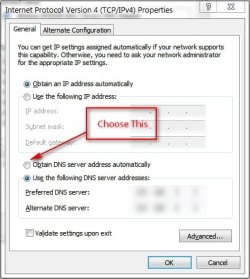
try setting your internet DNS to automatic ...

Control Panel > Network and Internet > Network and Sharing Center
and on the left side pane you'll see Change adapter settings,
click on it then right-click on your Wireless Network Connection choose Properties
then look for TCP/IPv4 double-click it and choose Obtain DNS server address automatically

ScreenShot00132.jpg

Click OK to all dialogue window.

Clear history and cache on your browser, exit it then re-open and browse if it works or not.
If not, you might consider entering manually for a Google DNS...

also try to scan your PC with Malwarebytes Anti-Malware along with Microsoft Security Essentials.
Post back for your results.
 

My Computer

Computer Manufacturer/Model Number
HP G62-340US Notebook
OS
Win7 Pro SP1 x64
CPU
AMD K10 Athlon(tm) II P340 Dual-Core Processor ~2.2GHz
Motherboard
Hewlett-Packard 1444 69.37/AMD 785GX/BIOS F29
Memory
DDR3 4.0GB (3.74 Usable)
Graphics Card(s)
AMD M880G with ATI Mobility Radeon HD 4250 256MB Video
Sound Card
ATI RS785/RS880 - High Definition Audio Controller
Monitor(s) Displays
SAMSUNG 156AT09-H04
Screen Resolution
1366x768 - 344 x 194 mm, Pixel Clock 69.30 MHz
Hard Drives
WDC WD3200BEVT-60A23T0 320GB
Other Info
Bought on July 03, 2011
I have a wireless router. And I an about to try what u guys said. Thank you so so much for your help! :)
 

My Computer

OS
Windows 7 home premium
Ok, I set the dns to automatic and cleared the history like u said... Still not working. How do I do the third step of scanning with malware and microsoft security?
 

My Computer

OS
Windows 7 home premium
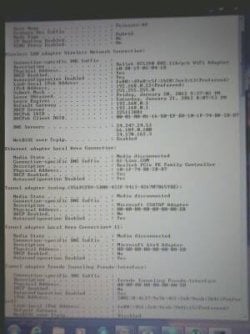
This is my pc information. Also when I tried running windows defender since I cant run the two antimalware programs above due to no internet to download them... I got this error message:
Error found 0x80072ee7
Server name or address could not be resolved.

Sooo.. Thats where im at so far...:/
 

Attachments

  • uploadfromtaptalk1327116109554.jpg
    uploadfromtaptalk1327116109554.jpg
    31 KB · Views: 22

My Computer

OS
Windows 7 home premium
Wow, just realized I posted dsn issues instead of dns issues.... Lol. Yea, im still new to this as you can see! Still.waiting for someone to give me some pointers tho!! :)
 

My Computer

OS
Windows 7 home premium
Do you have a second computer that's working?
Do you have any security software installed already that you can scan with?
Have you already power cycled the router and modem?
Can you provide an picture of your Ipconfig /all?
 

My Computer

Computer type
PC/Desktop
Computer Manufacturer/Model Number
Custom Build
OS
Windows 7 Pro 64bit build 7601 SP1
CPU
Intel Core I5 3570K 3.4Ghz w/ Zalman CNPS9900NT RT
Motherboard
MSI Z77A-G45 Gaming
Memory
G.Skill F3-12800CL9D-8GbXL ; 4Gx2
Graphics Card(s)
EVGA Geforce GTX 770 Superclocked
Sound Card
Creative Sound Blaster Z
Monitor(s) Displays
Dual ViewSonic VX2770Smh-LED Black 27"IPS-Panel
Screen Resolution
1920x1080
Hard Drives
Kingston Hyper X 240GB SSD Win8 Pro 64bit 6GB/s Sata III
Intel 335 Series SSD 240GB Win8 Storage 6GB/s Sata III
Intel 320 Series SSD 600GB Storage 3GB/s Sata II
Western Digital Scorpio Black 1TB - Docked via Esata
PSU
Coolermaster GX 750W
Case
Corsair Vengence C70
Cooling
Coolermaster 120mm and Enermax 140mm
Keyboard
Corsair Vengence K70
Mouse
Logitech G500
Internet Speed
22mbps+
Browser
Firefox, Chrome, IE
Other Info
Swan M50W 2.1 speakers
APC UPS
Thermaltake BlacX HDD Dock
Samsung BD Optical Drive
Netgear WNDR4500
I do not have another pc no... And the only scanner I have is norton and that doesnt show any detections. I am at work right now when I get home I can give u more info. Thanks for getting back with me! :)
 

My Computer

OS
Windows 7 home premium
How about deleting your hosts file?

C:\Windows\System32\drivers\etc\

there's no extension for the hosts file.. Be sure to back it up first before deleting (copy them to desktop, so you can restore them later if needed)
 

My Computer

Computer Manufacturer/Model Number
HP G62-340US Notebook
OS
Win7 Pro SP1 x64
CPU
AMD K10 Athlon(tm) II P340 Dual-Core Processor ~2.2GHz
Motherboard
Hewlett-Packard 1444 69.37/AMD 785GX/BIOS F29
Memory
DDR3 4.0GB (3.74 Usable)
Graphics Card(s)
AMD M880G with ATI Mobility Radeon HD 4250 256MB Video
Sound Card
ATI RS785/RS880 - High Definition Audio Controller
Monitor(s) Displays
SAMSUNG 156AT09-H04
Screen Resolution
1366x768 - 344 x 194 mm, Pixel Clock 69.30 MHz
Hard Drives
WDC WD3200BEVT-60A23T0 320GB
Other Info
Bought on July 03, 2011
Okay this was the only way I could get it up.. Thru my phone. Hope this works for you! Im about to try what you guys said. Thanks so much for your time and help!!
 

Attachments

  • uploadfromtaptalk1327192500878.jpg
    uploadfromtaptalk1327192500878.jpg
    16.4 KB · Views: 12

My Computer

OS
Windows 7 home premium
Ok tried deleting the hosts files... Didnt do anything. Umm... And I dont know how to power cycle?? I turned the internet connection off and on but I have a feeling thats not what you mean... And I have a question... Does my local area connection need to be working even though my linkys wifi is connected?
 

My Computer

OS
Windows 7 home premium
Did you try rebooting you modem?
 

My Computer

Computer Manufacturer/Model Number
Sony Vaio VGN-NW120J/S
OS
Windows 7
CPU
Intel Core 2 T6500 / 2.10 Ghz
Memory
4gb
Graphics Card(s)
Mobile Intel Graphics Media Accelerator 4500MHD
Monitor(s) Displays
15.5 / 1366x768
Hard Drives
Western Digital Scorpio Black WD3200BEKT
did you update drivers?
 

My Computer

Computer Manufacturer/Model Number
Sony Vaio VGN-NW120J/S
OS
Windows 7
CPU
Intel Core 2 T6500 / 2.10 Ghz
Memory
4gb
Graphics Card(s)
Mobile Intel Graphics Media Accelerator 4500MHD
Monitor(s) Displays
15.5 / 1366x768
Hard Drives
Western Digital Scorpio Black WD3200BEKT
Okay... My pc will load a page online but it takes up to 15 seconds sometimes and half the time I have to click on the link 5 times before it goes to the page.... It says the same error as before dns error. But if I keep trying the link it eventually works... any thoughts on this??? Im lost..
 

My Computer

OS
Windows 7 home premium
From the screenshot you have 3 different dns addresses it's pointing to. If you set it to automatic that's a little unusual. Or did you manually input those? Also are you still using that dnsjumper? I would uninstall that and windows configure the dns.

By "power cycle" I mean to just power off the modem and or router and turn back on.
 

My Computer

Computer type
PC/Desktop
Computer Manufacturer/Model Number
Custom Build
OS
Windows 7 Pro 64bit build 7601 SP1
CPU
Intel Core I5 3570K 3.4Ghz w/ Zalman CNPS9900NT RT
Motherboard
MSI Z77A-G45 Gaming
Memory
G.Skill F3-12800CL9D-8GbXL ; 4Gx2
Graphics Card(s)
EVGA Geforce GTX 770 Superclocked
Sound Card
Creative Sound Blaster Z
Monitor(s) Displays
Dual ViewSonic VX2770Smh-LED Black 27"IPS-Panel
Screen Resolution
1920x1080
Hard Drives
Kingston Hyper X 240GB SSD Win8 Pro 64bit 6GB/s Sata III
Intel 335 Series SSD 240GB Win8 Storage 6GB/s Sata III
Intel 320 Series SSD 600GB Storage 3GB/s Sata II
Western Digital Scorpio Black 1TB - Docked via Esata
PSU
Coolermaster GX 750W
Case
Corsair Vengence C70
Cooling
Coolermaster 120mm and Enermax 140mm
Keyboard
Corsair Vengence K70
Mouse
Logitech G500
Internet Speed
22mbps+
Browser
Firefox, Chrome, IE
Other Info
Swan M50W 2.1 speakers
APC UPS
Thermaltake BlacX HDD Dock
Samsung BD Optical Drive
Netgear WNDR4500
I unistalled the jumper, but im going to double check cause it acted funny every now and then.. And yes I turned the routter on and off... I get the internet to come up but it takes a few loads sometimes to get it up. I had not tried to keep reloading the page. But when the page doesnt load it says there is a problem with the dns...
 

My Computer

OS
Windows 7 home premium
Back
Top