Enable test mode to solve USB problems?

Windows Help and Support now working.
 

My Computer My Computer

At a glance

Windows 7 Home Premium 64 bit3rd generation Intel Core i7-3610QM Processor8GB DDR3 1600MHz RAM (2 DIMM); 750GB 7200RPM ...2GB (2048MB) NVIDIA GeForce GT 650M GDDR5 Gra...
Computer type
PC/Desktop
Computer Manufacturer/Model Number
HP Pavilian DV7-7012 notebook
OS
Windows 7 Home Premium 64 bit
CPU
3rd generation Intel Core i7-3610QM Processor
Motherboard
2.30GHz
Memory
8GB DDR3 1600MHz RAM (2 DIMM); 750GB 7200RPM hard drive
Graphics Card(s)
2GB (2048MB) NVIDIA GeForce GT 650M GDDR5 Graphics
Hard Drives
750GB 7200RPM hard drive with HP ProtectSmart Hard Drive Protection
Antivirus
Microsoft
Browser
Firefox, Chrome, Microsoft
I think I've exhausted troubleshooting in a step-by-step manner. But I think I discovered an interesting piece of information about your machine. Sometimes all it takes is stepping away from an issue.

(1) Your dv7 seems to be able to hold two drives (per the service manual)
http://h10032.www1.hp.com/ctg/Manual/c03221579.pdf [PDF]
HP doesn't always point to the correct manual. The fact that I know about a laptop with two HHDs comes from helping another member solve an issue. After a few false starts we found the right service manual and could proceed - but it was in that manual that I learned she had a laptop that could hold two drives. I checked and it appears that your machine can also hold two drives. Compare your laptop to the manual, that's the only way to be sure.

IF HP pointed me to the wrong service manual (again!) then you can still accomplish the same result by using an external enclosure for to house your existing HDD. Using an external HDD enclosure assumes that the USB issue gets resolved by updating BIOS and re-installing Windows. Not to be defeated by technology, there might be a Firewire port on your machine and there might be an external enclosure that supports that connection.​

(2) I did not fully consider your concern about discs being in MI

Taken together, a Clean install seems to be the best route forward. The BIOS still needs to be flashed BEFORE the install.
I can't help allay your fears about flashing BIOS more than what I've already posted, but I understand them.
Here's what I propose
  1. Flash the BIOS to F.0A - required.
    If you have to pay the shop to correct it, then that's the reality.
    If the BIOS is NOT corrected, there's no sense in proceeding and you can ignore the rest of this post.

  2. Purchase a new main drive.
    I suggest an SSD. It doesn't have to be massive, 30 GB is more than sufficient to hold the Operating System.
    The original HDD can serve as your data disk when it is reconnected after the Clean install - that's where most of the space is used anyway (music, documents, pictures, videos, etc)

  3. Create Windows install media from the Official MS store.
    This is where I did not fully consider the discs being in MI and the light only came on light when you posted information about the HP Recovery partition.
There are well written tutorials that describe the entire process, from creating Windows 7 install media to reinstalling vendor specific applications after Windows is installed. The tutorials describe every aspect of the process from backing up your data to making sure you have license keys for any software you previously purchased so that you can reinstall you favorite programs.
Both tutorials cover much of the same information, the OEM version includes more about specific vendors.
Both tell you how to create Windows 7 install media. The only things you'll need to install Windows the are the official ISO, a DVD-R or 4 GB flash drive, the tool to write the media, and the Windows License key on the COA sticker (on the bottom of your laptop od in the battery compartment)

You can skip the sections on back since you'll retain the original HDD
Your system is NOT UEFI, so you can skip those notations as well.


Take a read and ask any questions - I or other members will be glad to answer.
 

My Computer My Computer

At a glance

x64 (6.3.9600) Win8.1 Pro & soon dual boot x6...AMD A6-3420M APU with Radeon(tm) HD Graphics6.00 GBAMD Radeon(TM) HD 6520G
Computer type
Laptop
Computer Manufacturer/Model Number
HP Pavilion dv6-6c10us
OS
x64 (6.3.9600) Win8.1 Pro & soon dual boot x64 (6.1.7601) Win7_SP1 HomePrem
CPU
AMD A6-3420M APU with Radeon(tm) HD Graphics
Motherboard
Hewlett-Packard 1805
Memory
6.00 GB
Graphics Card(s)
AMD Radeon(TM) HD 6520G
Sound Card
(1) AMD High Definition Audio Device (2) IDT High Definiti
Monitor(s) Displays
HP W2072a 20" LCD (1600 x 900) @ 60 Hz
Screen Resolution
1366 x 768 x 32 bits (4294967296 colors) @ 60 Hz
Hard Drives
ST640LM0 00 HM641JI SATA Disk Device
Keyboard
Logitech k520 wireless KB
Mouse
Logitech m320 wireless mouse (bundled with KB)
Internet Speed
15/5 | 54 MB Wireless 'n'
Antivirus
Realtime: Defender or Avast | On-demand: Malwarebytes, ESET
Browser
IE 11 on Win8, IE 10 on win 7
Other Info
Media: [Gimp, Audacity, VLC] || Comm: [WEmail 2012, Skype] || Productivity: [OpenOffice,| Textpad] || Utils: [Sysinternals, cCleaner, Speccy, Defraggler]
Thanks you posted a few posts while I was typing

It cannot be determined when the BIOS was updated - ok

You DO have an HP_TOOLS partition - it's the last one. But, you also said you didn't have (or see) a reference to
HP Unified Extensible Firmware Interface (UEFI) Support Environment in Programs and Features. That could be my wrong assumption that it would show up there - it should. You can always get the software form the support page on HP. The issue I was concerned about was that the software relies on the HP_TOOLS partition and I didn't want to go through the process of changing your partitioning schema.

Intel Management Engine was uninstalled but did not change the USB device status - it was a long shot.

You made a Recovery disc - keep it safe, it's a good thing to have handy when the swamp is filling and the alligators are nipping at your nose ;)

Windows Help and Support is working - what made it work? Not important - just curious.

Ok, I suppose this is where I yell uncle. You've done a lot and have been great doing all the stuff I asked you to do.
The only things left is my post above about a clean install.
The lynchpin is still BIOS, perhaps even more so with a clean install.
I gave you a lot to chew on, so take your time and digest as much as you are able. Ask questions.

It has been my pleasure working with you and the other members on this issue. I am sorry there wasn't a better outcome.

All is not lost though. I provided an alternate path and other members might drop by with their suggestions.

I'll stay subscribed to your thread and watch - I always learn from other members so maybe they have better magic.

Best regards

Bill
.
 

My Computer My Computer

At a glance

x64 (6.3.9600) Win8.1 Pro & soon dual boot x6...AMD A6-3420M APU with Radeon(tm) HD Graphics6.00 GBAMD Radeon(TM) HD 6520G
Computer type
Laptop
Computer Manufacturer/Model Number
HP Pavilion dv6-6c10us
OS
x64 (6.3.9600) Win8.1 Pro & soon dual boot x64 (6.1.7601) Win7_SP1 HomePrem
CPU
AMD A6-3420M APU with Radeon(tm) HD Graphics
Motherboard
Hewlett-Packard 1805
Memory
6.00 GB
Graphics Card(s)
AMD Radeon(TM) HD 6520G
Sound Card
(1) AMD High Definition Audio Device (2) IDT High Definiti
Monitor(s) Displays
HP W2072a 20" LCD (1600 x 900) @ 60 Hz
Screen Resolution
1366 x 768 x 32 bits (4294967296 colors) @ 60 Hz
Hard Drives
ST640LM0 00 HM641JI SATA Disk Device
Keyboard
Logitech k520 wireless KB
Mouse
Logitech m320 wireless mouse (bundled with KB)
Internet Speed
15/5 | 54 MB Wireless 'n'
Antivirus
Realtime: Defender or Avast | On-demand: Malwarebytes, ESET
Browser
IE 11 on Win8, IE 10 on win 7
Other Info
Media: [Gimp, Audacity, VLC] || Comm: [WEmail 2012, Skype] || Productivity: [OpenOffice,| Textpad] || Utils: [Sysinternals, cCleaner, Speccy, Defraggler]
Ok. I am going out for a couple hours and will flash the bios when I get back. If I read all this right, you are telling me to install a second hard drive that will hold the operating system only. Everything else will be on the other hard drive. Then when I reinstall windows it will not affect the other files. Is that right? Is that a backup procedure? I would still need another drive for a backup, right?
 

My Computer My Computer

At a glance

Windows 7 Home Premium 64 bit3rd generation Intel Core i7-3610QM Processor8GB DDR3 1600MHz RAM (2 DIMM); 750GB 7200RPM ...2GB (2048MB) NVIDIA GeForce GT 650M GDDR5 Gra...
Computer type
PC/Desktop
Computer Manufacturer/Model Number
HP Pavilian DV7-7012 notebook
OS
Windows 7 Home Premium 64 bit
CPU
3rd generation Intel Core i7-3610QM Processor
Motherboard
2.30GHz
Memory
8GB DDR3 1600MHz RAM (2 DIMM); 750GB 7200RPM hard drive
Graphics Card(s)
2GB (2048MB) NVIDIA GeForce GT 650M GDDR5 Graphics
Hard Drives
750GB 7200RPM hard drive with HP ProtectSmart Hard Drive Protection
Antivirus
Microsoft
Browser
Firefox, Chrome, Microsoft
Ok. I am going out for a couple hours and will flash the bios when I get back. If I read all this right, you are telling me to install a second hard drive that will hold the operating system only. Everything else will be on the other hard drive. Then when I reinstall windows it will not affect the other files. Is that right? Is that a backup procedure? I would still need another drive for a backup, right?

I think you have a good handle on the process and you pointed out to me that I need to make a correction.

So we can easily converse about the drives without ambiguity, I think 2nd drive is not a good description.
2nd drive could mean a physical placement or electrical connection or both.

Let's use new and old so no one reading your thread has to guess. It will make it easier for me anyway.

The old drive will be physically removed from the laptop.
The new drive will be placed where the old drive was in the laptop.
The old drive will sit on the table until after the install is completed.

Windows will be installed on the new drive in the machine.
You can test the USB ports - they should work.

The tutorial gets Windows up-to-date including all drivers Windows has to offer.
Windows Update gets you 98% driver complete, if there are any missing drivers (unusual) the HP support site is the place to get them.

At this point you have, for all intents and purposes, a new Windows machine.

Here's where you made me think and that always a good thing. I said you could skip the backup section and that's what I need to correct or clarify.
:ar: The only real backup is data that never goes back into a live machine. It can be copied to a live machine, but the backup itself is kept separate.

You have a new Windows install on the new drive and your data is on the old HDD sitting on the table - that's a good backup.

There are two scenarios, one where the new drive is an SSD, and the other where the new Drive is a HDD.

If you get a new HDD, then the old drive is you backup and all you need to do is copy your data to the new drive.

If you get a new SDD, the scenario might change depending on the capacity.
A small SSD is less expensive, but doesn't hold much data. Adding another HDD for backup or for data adds to the complexity and cost of this operation. The complexity is mostly in explaining the difference :)

Do you need another new drive? Maybe - you need to tell me your plans on the new drive (SSD or HDD, small SSD with OS only + data drive, or big SSD, no data drive)

The capacity of the new HDD will NOT require a tertiary HDD for backup, nor will a large SSD ($$).
A small SSD will require a tertiary HDD, but that should go in the machine and the old HDD can be your backup.

There's a third option - a hybrid drive.
There's a fourth option - a new SSD and use the old HDD as data - technically not a backup.

I think I'll wait for you to return and ask more questions.

Bill
 

My Computer My Computer

At a glance

x64 (6.3.9600) Win8.1 Pro & soon dual boot x6...AMD A6-3420M APU with Radeon(tm) HD Graphics6.00 GBAMD Radeon(TM) HD 6520G
Computer type
Laptop
Computer Manufacturer/Model Number
HP Pavilion dv6-6c10us
OS
x64 (6.3.9600) Win8.1 Pro & soon dual boot x64 (6.1.7601) Win7_SP1 HomePrem
CPU
AMD A6-3420M APU with Radeon(tm) HD Graphics
Motherboard
Hewlett-Packard 1805
Memory
6.00 GB
Graphics Card(s)
AMD Radeon(TM) HD 6520G
Sound Card
(1) AMD High Definition Audio Device (2) IDT High Definiti
Monitor(s) Displays
HP W2072a 20" LCD (1600 x 900) @ 60 Hz
Screen Resolution
1366 x 768 x 32 bits (4294967296 colors) @ 60 Hz
Hard Drives
ST640LM0 00 HM641JI SATA Disk Device
Keyboard
Logitech k520 wireless KB
Mouse
Logitech m320 wireless mouse (bundled with KB)
Internet Speed
15/5 | 54 MB Wireless 'n'
Antivirus
Realtime: Defender or Avast | On-demand: Malwarebytes, ESET
Browser
IE 11 on Win8, IE 10 on win 7
Other Info
Media: [Gimp, Audacity, VLC] || Comm: [WEmail 2012, Skype] || Productivity: [OpenOffice,| Textpad] || Utils: [Sysinternals, cCleaner, Speccy, Defraggler]
Remembered one last trick

http://www.sevenforums.com/tutorials/700-system-restore.html

The name is not what it sounds like, Windows 7 creates snapshot 'copies' of system files during certain operations (Windows Update is one) and at regularly scheduled intervals. It does not make copies of your data.

System Restore in this context means System files are restored from those copies. The copies are called Restore Points.

Steps 2, 3, 4, and 5 in OPTION ONE of the tutorial describe 4 ways to launch System Restore.
You only have to do one of those steps

Step 6 gets you into the actual restore process

Step 7 The windows shown here will pop up if you don't have any restore points
Press the [Cancel] button - this trick won't help the issue on your machine - there's nothing to restore.

Step 8 The window shown here displays the most recent Restore Point, you don't want to Restore that one
Click the radio button next to
picture.php
Choose a different restore point

Step 9 The window shown here displays some of the available Restore Points
From the data you posted during troubleshooting, I think the touchpad started having trouble around 12/17
other things started having trouble around 12/24

You know when all of this started better than anyone else, so the point of this exercise is to find a Restore point earlier than when the trouble started and restore that one.

Let's say 12/17 is correct - the USB ports worked then but the touchpad was not

Look for a Restore point before 12/17
a day before would be great

If you don't see one earlier, check to see if there are any earlier ones that aren't being shown.
picture.php
Show other restore points

If there are no Restore Points earlier than when the touchpad started having problems, then
Press the [Cancel] button - this trick won't help the issue on oyur machine - there isn't a Restore Point early enough.

This is another tutorial some people have trouble following - they pick the wrong restore point or the don't dig deep enough (they miss choose a different or miss show more

It's important to look first - System Restore is limited to a certain amount of space. Restoring a Restore Point creates a Restore Point ... if the new Restore Point exceeds that amount of space, older Restore Points are deleted to make room.

If you post each screen, then I or another member can help guide you. You, however are the only one who has the date of the first occurrence. I only looked at one log - the trouble might have begun before that.

Part voodoo, part best guess, part luck.

Try to remember when the USB ports stopped working - that to me is more important that the touchpad.
What I don't want you to do, is restore a Restore Point where neither worked. That would be bad.

Bill
.

 

My Computer My Computer

At a glance

x64 (6.3.9600) Win8.1 Pro & soon dual boot x6...AMD A6-3420M APU with Radeon(tm) HD Graphics6.00 GBAMD Radeon(TM) HD 6520G
Computer type
Laptop
Computer Manufacturer/Model Number
HP Pavilion dv6-6c10us
OS
x64 (6.3.9600) Win8.1 Pro & soon dual boot x64 (6.1.7601) Win7_SP1 HomePrem
CPU
AMD A6-3420M APU with Radeon(tm) HD Graphics
Motherboard
Hewlett-Packard 1805
Memory
6.00 GB
Graphics Card(s)
AMD Radeon(TM) HD 6520G
Sound Card
(1) AMD High Definition Audio Device (2) IDT High Definiti
Monitor(s) Displays
HP W2072a 20" LCD (1600 x 900) @ 60 Hz
Screen Resolution
1366 x 768 x 32 bits (4294967296 colors) @ 60 Hz
Hard Drives
ST640LM0 00 HM641JI SATA Disk Device
Keyboard
Logitech k520 wireless KB
Mouse
Logitech m320 wireless mouse (bundled with KB)
Internet Speed
15/5 | 54 MB Wireless 'n'
Antivirus
Realtime: Defender or Avast | On-demand: Malwarebytes, ESET
Browser
IE 11 on Win8, IE 10 on win 7
Other Info
Media: [Gimp, Audacity, VLC] || Comm: [WEmail 2012, Skype] || Productivity: [OpenOffice,| Textpad] || Utils: [Sysinternals, cCleaner, Speccy, Defraggler]
I tried system restore before posting to this board. It would not show me a restore point early enough to correct the problem, which started Dec. 26.The USBs and touchpad went out at the same time, but I was able to get the touchpad back. I did do a system restore to an earlier date but after Dec. 26, which is what you are saying I shouldn't have done. Stupid me.
I'm going to have to decide whether I think I am capable of switching out hard drives. This may be beyond my capabilities.

I am gearing up to flash the bios. Need to look over the instructions again.
 

My Computer My Computer

At a glance

Windows 7 Home Premium 64 bit3rd generation Intel Core i7-3610QM Processor8GB DDR3 1600MHz RAM (2 DIMM); 750GB 7200RPM ...2GB (2048MB) NVIDIA GeForce GT 650M GDDR5 Gra...
Computer type
PC/Desktop
Computer Manufacturer/Model Number
HP Pavilian DV7-7012 notebook
OS
Windows 7 Home Premium 64 bit
CPU
3rd generation Intel Core i7-3610QM Processor
Motherboard
2.30GHz
Memory
8GB DDR3 1600MHz RAM (2 DIMM); 750GB 7200RPM hard drive
Graphics Card(s)
2GB (2048MB) NVIDIA GeForce GT 650M GDDR5 Graphics
Hard Drives
750GB 7200RPM hard drive with HP ProtectSmart Hard Drive Protection
Antivirus
Microsoft
Browser
Firefox, Chrome, Microsoft

My Computer My Computer

At a glance

Windows 7 Home Premium 64 bit3rd generation Intel Core i7-3610QM Processor8GB DDR3 1600MHz RAM (2 DIMM); 750GB 7200RPM ...2GB (2048MB) NVIDIA GeForce GT 650M GDDR5 Gra...
Computer type
PC/Desktop
Computer Manufacturer/Model Number
HP Pavilian DV7-7012 notebook
OS
Windows 7 Home Premium 64 bit
CPU
3rd generation Intel Core i7-3610QM Processor
Motherboard
2.30GHz
Memory
8GB DDR3 1600MHz RAM (2 DIMM); 750GB 7200RPM hard drive
Graphics Card(s)
2GB (2048MB) NVIDIA GeForce GT 650M GDDR5 Graphics
Hard Drives
750GB 7200RPM hard drive with HP ProtectSmart Hard Drive Protection
Antivirus
Microsoft
Browser
Firefox, Chrome, Microsoft
Also, I thought I read that I should disable the virus software before flashing the bios, but I can't find where I saw that. Should I do that?
 

My Computer My Computer

At a glance

Windows 7 Home Premium 64 bit3rd generation Intel Core i7-3610QM Processor8GB DDR3 1600MHz RAM (2 DIMM); 750GB 7200RPM ...2GB (2048MB) NVIDIA GeForce GT 650M GDDR5 Gra...
Computer type
PC/Desktop
Computer Manufacturer/Model Number
HP Pavilian DV7-7012 notebook
OS
Windows 7 Home Premium 64 bit
CPU
3rd generation Intel Core i7-3610QM Processor
Motherboard
2.30GHz
Memory
8GB DDR3 1600MHz RAM (2 DIMM); 750GB 7200RPM hard drive
Graphics Card(s)
2GB (2048MB) NVIDIA GeForce GT 650M GDDR5 Graphics
Hard Drives
750GB 7200RPM hard drive with HP ProtectSmart Hard Drive Protection
Antivirus
Microsoft
Browser
Firefox, Chrome, Microsoft
I decided to go ahead and flash the bios. It worked. I looked in the settings to see if it was the new bios. It now shows Insyde F.0A 5/2/2012. My question is why the older bios F.0B showed a newer date: Insyde F.0B 6/19/2012. Does that mean I now have an older bios than the one I had before? It did say on the microsoft site that F.0A was the newest bios.

My USBs still don't work and still show code 52 in device manager.

I am also wondering if I should go back and restart some stuff that I changed, such as services.
 
Last edited:

My Computer My Computer

At a glance

Windows 7 Home Premium 64 bit3rd generation Intel Core i7-3610QM Processor8GB DDR3 1600MHz RAM (2 DIMM); 750GB 7200RPM ...2GB (2048MB) NVIDIA GeForce GT 650M GDDR5 Gra...
Computer type
PC/Desktop
Computer Manufacturer/Model Number
HP Pavilian DV7-7012 notebook
OS
Windows 7 Home Premium 64 bit
CPU
3rd generation Intel Core i7-3610QM Processor
Motherboard
2.30GHz
Memory
8GB DDR3 1600MHz RAM (2 DIMM); 750GB 7200RPM hard drive
Graphics Card(s)
2GB (2048MB) NVIDIA GeForce GT 650M GDDR5 Graphics
Hard Drives
750GB 7200RPM hard drive with HP ProtectSmart Hard Drive Protection
Antivirus
Microsoft
Browser
Firefox, Chrome, Microsoft
Ah, I see - the restore point to you did before got your touchpad back. There was nothing stupid about what you did. You picked the earliest one available to you.

Drivers that don't come from the vendor (PC maker or part maker) are always suspect. It is a practice that I tell folks NEVER to do.
Members have fixed many, many, many issues on this forum simply by telling the other member to reinstall a driver from the maker. It happens a lot. The information from the site you linked appears to be identical to what HP reports.
Driver Name: HP Notebook System BIOS Update (Intel Processors)
Driver Version: F.0B
Release Date: 2011-03-25

Anti-virus (AV) ... yes, it says that ... but I don't think it's all that important - I've flashed BIOS 100s of time and I have yet to disable AV. To be honest, I forget about it when I'm doing it. It's a moot point now. :)

Good for you! BIOS can be scary because it does have the potential to brick a system if done wrong. People always put the scare into you as well - like the tech guy. BIOS should be carefully researched and only flashed when the update fixes an issue on your machine that the machine is exhibiting. The only other case is to correct a BIOS version. Flashing BIOS just to get the highest version is wrong. BIOS is not like any other software on your machine - it is not something you need to update just to update. There should be a very good reason.

I'm curious about the dates.
F.0B shows 2011-03-25
F.0A shows 2012-05-11

Those dates come from HP (Guru also has the 2011-03-25 date)

I checked your previous Speccy log and yep, it reports the date you posted. Dates are always strange - is it the date the information was posted, the internal date of the program, the modified, created, or accessed date. If there's a significant difference, I dig deeper. In this case the F.0B BIOS was wrong per HP, so that date doesn't matter. it could be yesterday and it would still be the wrong BIOS for your machine.

BIOS is correct on your machine.

The flash should have set BIOS to defaults, but it might also have read what was there and restored those values to the new microcode.

Restart the machine and go into BIOS - load default and save
That guarantees your machine has the default values - no guessing.

Hold off on starting services or startup objects.

Uninstall the USB devices - yes to remove software if that is an option

Restart your machine

Manually run Windows Update (WU) and look in the optional offerings. Select them all
press the install button

Restart the machine when WU finishes.

I'll pick up tomorrow.

Thanks

Bill
 

My Computer My Computer

At a glance

x64 (6.3.9600) Win8.1 Pro & soon dual boot x6...AMD A6-3420M APU with Radeon(tm) HD Graphics6.00 GBAMD Radeon(TM) HD 6520G
Computer type
Laptop
Computer Manufacturer/Model Number
HP Pavilion dv6-6c10us
OS
x64 (6.3.9600) Win8.1 Pro & soon dual boot x64 (6.1.7601) Win7_SP1 HomePrem
CPU
AMD A6-3420M APU with Radeon(tm) HD Graphics
Motherboard
Hewlett-Packard 1805
Memory
6.00 GB
Graphics Card(s)
AMD Radeon(TM) HD 6520G
Sound Card
(1) AMD High Definition Audio Device (2) IDT High Definiti
Monitor(s) Displays
HP W2072a 20" LCD (1600 x 900) @ 60 Hz
Screen Resolution
1366 x 768 x 32 bits (4294967296 colors) @ 60 Hz
Hard Drives
ST640LM0 00 HM641JI SATA Disk Device
Keyboard
Logitech k520 wireless KB
Mouse
Logitech m320 wireless mouse (bundled with KB)
Internet Speed
15/5 | 54 MB Wireless 'n'
Antivirus
Realtime: Defender or Avast | On-demand: Malwarebytes, ESET
Browser
IE 11 on Win8, IE 10 on win 7
Other Info
Media: [Gimp, Audacity, VLC] || Comm: [WEmail 2012, Skype] || Productivity: [OpenOffice,| Textpad] || Utils: [Sysinternals, cCleaner, Speccy, Defraggler]
I'm running a full virus scan right now so I will do the new stuff in the morning. Thanks again for your help.
 

My Computer My Computer

At a glance

Windows 7 Home Premium 64 bit3rd generation Intel Core i7-3610QM Processor8GB DDR3 1600MHz RAM (2 DIMM); 750GB 7200RPM ...2GB (2048MB) NVIDIA GeForce GT 650M GDDR5 Gra...
Computer type
PC/Desktop
Computer Manufacturer/Model Number
HP Pavilian DV7-7012 notebook
OS
Windows 7 Home Premium 64 bit
CPU
3rd generation Intel Core i7-3610QM Processor
Motherboard
2.30GHz
Memory
8GB DDR3 1600MHz RAM (2 DIMM); 750GB 7200RPM hard drive
Graphics Card(s)
2GB (2048MB) NVIDIA GeForce GT 650M GDDR5 Graphics
Hard Drives
750GB 7200RPM hard drive with HP ProtectSmart Hard Drive Protection
Antivirus
Microsoft
Browser
Firefox, Chrome, Microsoft
The virus scan is still chugging away. Don't know how long this will take. I'm getting a message "Preliminary scan results show that malicious or potentially unwanted software might exist on your system. You can review detected items when the scan is completed." So I guess I will let it carry on.
 

My Computer My Computer

At a glance

Windows 7 Home Premium 64 bit3rd generation Intel Core i7-3610QM Processor8GB DDR3 1600MHz RAM (2 DIMM); 750GB 7200RPM ...2GB (2048MB) NVIDIA GeForce GT 650M GDDR5 Gra...
Computer type
PC/Desktop
Computer Manufacturer/Model Number
HP Pavilian DV7-7012 notebook
OS
Windows 7 Home Premium 64 bit
CPU
3rd generation Intel Core i7-3610QM Processor
Motherboard
2.30GHz
Memory
8GB DDR3 1600MHz RAM (2 DIMM); 750GB 7200RPM hard drive
Graphics Card(s)
2GB (2048MB) NVIDIA GeForce GT 650M GDDR5 Graphics
Hard Drives
750GB 7200RPM hard drive with HP ProtectSmart Hard Drive Protection
Antivirus
Microsoft
Browser
Firefox, Chrome, Microsoft
While waiting for the virus scan, I decided to look at anything that happened with my computer on Dec. 26, the day the USB ports went funky. Two items were installed that day: NVDIA update 1.152.2 and NVIDIA graphics Driver 331.65. It looks like there might be some issues with those, but don't know if they would affect USB port function.
I also found a reference to USB related problems with Windows Service Pack 1. I looked on my computer and this is installed. Here is a link to the problem: Binary files in some USB drivers are not updated after you install Windows 7 SP1 or Windows Server 2008 R2 SP1
Are either of these possible reasons why my USB ports aren't working right?
 

My Computer My Computer

At a glance

Windows 7 Home Premium 64 bit3rd generation Intel Core i7-3610QM Processor8GB DDR3 1600MHz RAM (2 DIMM); 750GB 7200RPM ...2GB (2048MB) NVIDIA GeForce GT 650M GDDR5 Gra...
Computer type
PC/Desktop
Computer Manufacturer/Model Number
HP Pavilian DV7-7012 notebook
OS
Windows 7 Home Premium 64 bit
CPU
3rd generation Intel Core i7-3610QM Processor
Motherboard
2.30GHz
Memory
8GB DDR3 1600MHz RAM (2 DIMM); 750GB 7200RPM hard drive
Graphics Card(s)
2GB (2048MB) NVIDIA GeForce GT 650M GDDR5 Graphics
Hard Drives
750GB 7200RPM hard drive with HP ProtectSmart Hard Drive Protection
Antivirus
Microsoft
Browser
Firefox, Chrome, Microsoft
I was thinking of asking you to run a deeper scan for malware. Good thinking on your part.

MS Security Essentials?

I thought you had previously scanned your system and it found nothing, we also ran AdwCleaner and cleaned up what it found.

Did you run WU before the scan?

A lot has changed that might have made a difference - disabling services and startup objects might have moved something out of the way and MSE might have been updated.

Anyway, yes let it finish and please post the results of any threats found.
Give me a few minutes to figure out the best way for you to get the information on the thread.
 

My Computer My Computer

At a glance

x64 (6.3.9600) Win8.1 Pro & soon dual boot x6...AMD A6-3420M APU with Radeon(tm) HD Graphics6.00 GBAMD Radeon(TM) HD 6520G
Computer type
Laptop
Computer Manufacturer/Model Number
HP Pavilion dv6-6c10us
OS
x64 (6.3.9600) Win8.1 Pro & soon dual boot x64 (6.1.7601) Win7_SP1 HomePrem
CPU
AMD A6-3420M APU with Radeon(tm) HD Graphics
Motherboard
Hewlett-Packard 1805
Memory
6.00 GB
Graphics Card(s)
AMD Radeon(TM) HD 6520G
Sound Card
(1) AMD High Definition Audio Device (2) IDT High Definiti
Monitor(s) Displays
HP W2072a 20" LCD (1600 x 900) @ 60 Hz
Screen Resolution
1366 x 768 x 32 bits (4294967296 colors) @ 60 Hz
Hard Drives
ST640LM0 00 HM641JI SATA Disk Device
Keyboard
Logitech k520 wireless KB
Mouse
Logitech m320 wireless mouse (bundled with KB)
Internet Speed
15/5 | 54 MB Wireless 'n'
Antivirus
Realtime: Defender or Avast | On-demand: Malwarebytes, ESET
Browser
IE 11 on Win8, IE 10 on win 7
Other Info
Media: [Gimp, Audacity, VLC] || Comm: [WEmail 2012, Skype] || Productivity: [OpenOffice,| Textpad] || Utils: [Sysinternals, cCleaner, Speccy, Defraggler]
Oh no! You're becoming a full fledged geek ;)

At this point, who knows what caused it, ... I'd rather spend time either trying to find a way to fix it or bite the bullet and help you do a fresh install. Sure the forensics might help identify the cause and thereby a solution, but that's more than I am willing to do.

Don't let my comment dissuade you from digging and asking - I'm just not going to hunt down everything - ok?

+edit
The USB link was actually a good read, but...
Therefore, some USB related binaries are not copied correctly when you install SP1 for these operating systems.

When was SP1 installed on your system - quite a while ago I suspect.

but if it was around the time your machine began to have issues, then ..... hmmmm
-edit
 

My Computer My Computer

At a glance

x64 (6.3.9600) Win8.1 Pro & soon dual boot x6...AMD A6-3420M APU with Radeon(tm) HD Graphics6.00 GBAMD Radeon(TM) HD 6520G
Computer type
Laptop
Computer Manufacturer/Model Number
HP Pavilion dv6-6c10us
OS
x64 (6.3.9600) Win8.1 Pro & soon dual boot x64 (6.1.7601) Win7_SP1 HomePrem
CPU
AMD A6-3420M APU with Radeon(tm) HD Graphics
Motherboard
Hewlett-Packard 1805
Memory
6.00 GB
Graphics Card(s)
AMD Radeon(TM) HD 6520G
Sound Card
(1) AMD High Definition Audio Device (2) IDT High Definiti
Monitor(s) Displays
HP W2072a 20" LCD (1600 x 900) @ 60 Hz
Screen Resolution
1366 x 768 x 32 bits (4294967296 colors) @ 60 Hz
Hard Drives
ST640LM0 00 HM641JI SATA Disk Device
Keyboard
Logitech k520 wireless KB
Mouse
Logitech m320 wireless mouse (bundled with KB)
Internet Speed
15/5 | 54 MB Wireless 'n'
Antivirus
Realtime: Defender or Avast | On-demand: Malwarebytes, ESET
Browser
IE 11 on Win8, IE 10 on win 7
Other Info
Media: [Gimp, Audacity, VLC] || Comm: [WEmail 2012, Skype] || Productivity: [OpenOffice,| Textpad] || Utils: [Sysinternals, cCleaner, Speccy, Defraggler]
I ran the virus scan after Christmas but it didn't take this long.
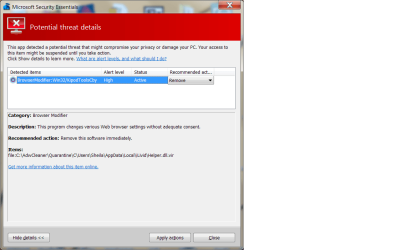
The virus scan just finished. Only found one thing. I have attached a screenshot. Doesn't look like anything that would affect USBs. I'm going to click remove unless you tell me otherwise. I ran MS Security Essentials.
I don't know when SP1 was installed. Don't know how to tell. Don't see it in control panel programs.
I understand not wanting to hunt down everything. I'm ready for a clean install, but can't decide whether to just take it back to the tech guys and have them do it for $120 or buy another drive and try to install it myself and then do the windows install myself. My husband doesn't think trying to put in the second drive is a good idea given my lack of experience in such endeavors. Either way I guess I will lose some software that I won't be able to reinstall until May. The third solution is to wait until I get back to Michigan in May and just use my touchpad until then. But then I am back to whether to buy another harddrive because all my files aren't back up. I'm going to have to think on this a while.
 

Attachments

  • virus scan results jan 14.png
    virus scan results jan 14.png
    30.7 KB · Views: 3

My Computer My Computer

At a glance

Windows 7 Home Premium 64 bit3rd generation Intel Core i7-3610QM Processor8GB DDR3 1600MHz RAM (2 DIMM); 750GB 7200RPM ...2GB (2048MB) NVIDIA GeForce GT 650M GDDR5 Gra...
Computer type
PC/Desktop
Computer Manufacturer/Model Number
HP Pavilian DV7-7012 notebook
OS
Windows 7 Home Premium 64 bit
CPU
3rd generation Intel Core i7-3610QM Processor
Motherboard
2.30GHz
Memory
8GB DDR3 1600MHz RAM (2 DIMM); 750GB 7200RPM hard drive
Graphics Card(s)
2GB (2048MB) NVIDIA GeForce GT 650M GDDR5 Graphics
Hard Drives
750GB 7200RPM hard drive with HP ProtectSmart Hard Drive Protection
Antivirus
Microsoft
Browser
Firefox, Chrome, Microsoft
Go ahead and remove it - it's in the AdwCleaner quarantine, so it's an artifact of that scan.

But yes .. remove it
 

My Computer My Computer

At a glance

x64 (6.3.9600) Win8.1 Pro & soon dual boot x6...AMD A6-3420M APU with Radeon(tm) HD Graphics6.00 GBAMD Radeon(TM) HD 6520G
Computer type
Laptop
Computer Manufacturer/Model Number
HP Pavilion dv6-6c10us
OS
x64 (6.3.9600) Win8.1 Pro & soon dual boot x64 (6.1.7601) Win7_SP1 HomePrem
CPU
AMD A6-3420M APU with Radeon(tm) HD Graphics
Motherboard
Hewlett-Packard 1805
Memory
6.00 GB
Graphics Card(s)
AMD Radeon(TM) HD 6520G
Sound Card
(1) AMD High Definition Audio Device (2) IDT High Definiti
Monitor(s) Displays
HP W2072a 20" LCD (1600 x 900) @ 60 Hz
Screen Resolution
1366 x 768 x 32 bits (4294967296 colors) @ 60 Hz
Hard Drives
ST640LM0 00 HM641JI SATA Disk Device
Keyboard
Logitech k520 wireless KB
Mouse
Logitech m320 wireless mouse (bundled with KB)
Internet Speed
15/5 | 54 MB Wireless 'n'
Antivirus
Realtime: Defender or Avast | On-demand: Malwarebytes, ESET
Browser
IE 11 on Win8, IE 10 on win 7
Other Info
Media: [Gimp, Audacity, VLC] || Comm: [WEmail 2012, Skype] || Productivity: [OpenOffice,| Textpad] || Utils: [Sysinternals, cCleaner, Speccy, Defraggler]
$120 to install a drive? Plus the cost of the drive ($50??) plus what the first visit to the tech guys ...

I would wait - there's always a few ways to accomplish what you're trying to accomplish

Your time is what you should consider, my time is free and I have lots of free time ;)

back after reading some more stuff.
 

My Computer My Computer

At a glance

x64 (6.3.9600) Win8.1 Pro & soon dual boot x6...AMD A6-3420M APU with Radeon(tm) HD Graphics6.00 GBAMD Radeon(TM) HD 6520G
Computer type
Laptop
Computer Manufacturer/Model Number
HP Pavilion dv6-6c10us
OS
x64 (6.3.9600) Win8.1 Pro & soon dual boot x64 (6.1.7601) Win7_SP1 HomePrem
CPU
AMD A6-3420M APU with Radeon(tm) HD Graphics
Motherboard
Hewlett-Packard 1805
Memory
6.00 GB
Graphics Card(s)
AMD Radeon(TM) HD 6520G
Sound Card
(1) AMD High Definition Audio Device (2) IDT High Definiti
Monitor(s) Displays
HP W2072a 20" LCD (1600 x 900) @ 60 Hz
Screen Resolution
1366 x 768 x 32 bits (4294967296 colors) @ 60 Hz
Hard Drives
ST640LM0 00 HM641JI SATA Disk Device
Keyboard
Logitech k520 wireless KB
Mouse
Logitech m320 wireless mouse (bundled with KB)
Internet Speed
15/5 | 54 MB Wireless 'n'
Antivirus
Realtime: Defender or Avast | On-demand: Malwarebytes, ESET
Browser
IE 11 on Win8, IE 10 on win 7
Other Info
Media: [Gimp, Audacity, VLC] || Comm: [WEmail 2012, Skype] || Productivity: [OpenOffice,| Textpad] || Utils: [Sysinternals, cCleaner, Speccy, Defraggler]
I ran the virus scan after Christmas but it didn't take this long.
The virus scan just finished. Only found one thing. I have attached a screenshot. Doesn't look like anything that would affect USBs. I'm going to click remove unless you tell me otherwise. I ran MS Security Essentials.
I don't know when SP1 was installed. Don't know how to tell. Don't see it in control panel programs.
I understand not wanting to hunt down everything. I'm ready for a clean install, but can't decide whether to just take it back to the tech guys and have them do it for $120 or buy another drive and try to install it myself and then do the windows install myself. My husband doesn't think trying to put in the second drive is a good idea given my lack of experience in such endeavors. Either way I guess I will lose some software that I won't be able to reinstall until May. The third solution is to wait until I get back to Michigan in May and just use my touchpad until then. But then I am back to whether to buy another harddrive because all my files aren't back up. I'm going to have to think on this a while.

Our tutorials have been created and adjusted with the experience of installing and repairing thousands of Windows 7 installations. You seem to have plenty of knowledge to do the install yourself with the guidance of the team here. If you do decide to do this, your second hard drive will be completely removed during the installation process so there is really nothing you can do to affect that drive other than dropping it or something like that.

Ultimately its up to you, but I think you have a great chance of success.
 

My Computer My Computer

At a glance

Dual Boot: Windows 8.1 & Server 2012r2 VMs: K...A10 7700 Kavari SteamRoller8GB DDR3 SDRAM PC3-85001024MB ATI AMD Radeon R7 Graphics
Computer type
PC/Desktop
Computer Manufacturer/Model Number
Custom
OS
Dual Boot: Windows 8.1 & Server 2012r2 VMs: Kali Linux, Backbox, Matriux, Windows 8.1
CPU
A10 7700 Kavari SteamRoller
Motherboard
ASUS A88XM-PLUS (FM2+ )
Memory
8GB DDR3 SDRAM PC3-8500
Graphics Card(s)
1024MB ATI AMD Radeon R7 Graphics
Sound Card
Realtek High Definition Audio
Monitor(s) Displays
Samsung
Hard Drives
SSD Crucial 120gb
WD VelociRaptor 1tb
PSU
Rosewill Gaming 650w
Case
Rosewill Galaxy 2
Internet Speed
55/12
Antivirus
Malwarebytes, MSE, SAS
Browser
FireFox, Chrome
Back
Top