
Encoding Speed

seekermeister

Old School
Guru
Gold Member
VIP
Local time
4:00 PM
Messages
6,618
Location
Indian Territory
I have noticed that the encoding speed varies widely, while encoding from a DVD. So far I have experienced anywhere from 60 FPS to 279 FPS. This can not be due to disk condition or hardware/software in use, because with all of these being equal, the speed is quite different with each disk.

I suppose that it is possible that the type of encryption involved might be a factor, but I don't feel that it is. This leaves only one thing to come to mind...The encoding software that I'm using has settings for bit rate or file size, which varies with each disk, without me changing anything. I sort of understand the file size setting, but I'm quite unclear about bit rate.

Since the frame rate is a separate setting, which is never changed, obviously bit rate and frame rate do not relate to each other. This leaves the question of exactly what bit rate effects? Will changing the bit rate to a higher number cause the encoding to finish faster, or does that simply effect the amount of data within each frame, thus bearing on the image quality?
 

My Computer

Computer Manufacturer/Model Number
DIY
OS
W7x64 Pro, SuSe 12.1/** W7 x64 Pro, XP MCE
CPU
Phenom II 1090T w/Noctua NH-D14 /**4400+ X2 w/CM Hyper TX 3
Motherboard
ASRock 890FX Deluxe 4/**A8N-SLI
Memory
2 x 2GB Patriot PGS34g1600LLKA/**4x1GB Corsair VS
Graphics Card(s)
EVGA GTX460 SC/**EVGA 8800GTS
Sound Card
Asus Xonar D2X/**Xonar D1
Monitor(s) Displays
Acer X233H, Dell E152FPc /**LG M237-WD
Screen Resolution
1920x1080 & 1024x768/**1980x1080
Hard Drives
WDC 2TB, 1.5TB, 1TB, 500GB,Seagate 500GB , Maxtor 80GB /**500GB Seagate & WDC 1TB Black
PSU
CM RS600 w/ APC BX1000G/**Antec 500 TP w/ APC BX1000
Case
HAF922/**Antec 1040IIB
Cooling
3x200mm, 1x140 and 1x120mm/**5x80mm fans
Keyboard
Logitech Media USB/**Saitek Eclipse
Mouse
Cordless Trackman Wheel/**Ditto
Internet Speed
3.3Mbps
Other Info
SB 560 5.1 w/ Sennheiser RS140/**Creative T20 speakers, Dvico FusionHDTV7 Gold RT, Cisco E3000, HP 5510V AIO, Linksys E3000, Belkin F5U237 hub and **F5D8055 adapter
(** = 2nd rig)
you've got it right - it simply effects the amount of data within each frame - it's the rate that bits are being used up.

low bit rate = only a few bits (or kilobytes) used for each frame (or second) = crummy pixellated boxy picture

i'm not sure what bearing it would have on encoding speed - i suppose at a high bit rate there's more data to process and store, so it may take longer. i reckon it's relatively easier to do a 'quick and dirty' rip than a hi-q one.

you've also noticed that different discs encode at different speeds. there are many variables at play here, one of them being that a fast action movie with lots of motion and movement in each frame would need more data and more work (and hence time) to encode than a slow film where things don't move that much.
 

My Computer

Computer Manufacturer/Model Number
mickey megabyte 1234
OS
ultimate 64 sp1
CPU
i5 2500K [email protected]
Motherboard
MSI P67A-GD53
Memory
8 gigs GSkill Ripjaws 1600
Graphics Card(s)
amd hd6950
Sound Card
creative x-fi gamer
Monitor(s) Displays
samsung 24"
Screen Resolution
1920x1080
Hard Drives
ocz vertex 2e 60 gig, samsung f3 1tb, buffalo 2tb ext
PSU
antec 550
Case
antec three hundred
Cooling
i'm a cooling fan
Keyboard
saitek eclipse ii
Mouse
logitech g3
Internet Speed
about 4 Mbps
Other Info
i love win7
  • Like
Reactions: whs
I did consider the amount of action within a scene, but that didn't seem to account for the differences, because with two disks of about the same quality, action, etc. they do not necessarily encode at similar speeds. I'm simply trying to determine if there is anything that I can do, that would speedup the chore, without degrading the output?
 

My Computer

Computer Manufacturer/Model Number
DIY
OS
W7x64 Pro, SuSe 12.1/** W7 x64 Pro, XP MCE
CPU
Phenom II 1090T w/Noctua NH-D14 /**4400+ X2 w/CM Hyper TX 3
Motherboard
ASRock 890FX Deluxe 4/**A8N-SLI
Memory
2 x 2GB Patriot PGS34g1600LLKA/**4x1GB Corsair VS
Graphics Card(s)
EVGA GTX460 SC/**EVGA 8800GTS
Sound Card
Asus Xonar D2X/**Xonar D1
Monitor(s) Displays
Acer X233H, Dell E152FPc /**LG M237-WD
Screen Resolution
1920x1080 & 1024x768/**1980x1080
Hard Drives
WDC 2TB, 1.5TB, 1TB, 500GB,Seagate 500GB , Maxtor 80GB /**500GB Seagate & WDC 1TB Black
PSU
CM RS600 w/ APC BX1000G/**Antec 500 TP w/ APC BX1000
Case
HAF922/**Antec 1040IIB
Cooling
3x200mm, 1x140 and 1x120mm/**5x80mm fans
Keyboard
Logitech Media USB/**Saitek Eclipse
Mouse
Cordless Trackman Wheel/**Ditto
Internet Speed
3.3Mbps
Other Info
SB 560 5.1 w/ Sennheiser RS140/**Creative T20 speakers, Dvico FusionHDTV7 Gold RT, Cisco E3000, HP 5510V AIO, Linksys E3000, Belkin F5U237 hub and **F5D8055 adapter
(** = 2nd rig)
If you are using the same setting for everything ..
My guess would be that the ones that take longer are being de-interlaced.


A few things can impact the encoding time.

1 being if the Video needs to be de-interlaced. De-Interlacing a Interlaced Video adds a little extra time vs encoding a Progressive Source.
Since A Progressive Source just starts being encoded ... Interlaced Sources must go through the De-Interlace process first.

Next would be if you're resizing. This depends on resizer used and how much its being changed. Usually not a huge impact though at DVD resolutions.

And then what settings the encoder is actually using.

The main setting that affects the overall quality the most, would be Bit Rate.
Higher rates take a bit longer to encode as well, but Higher bit rates usully have better looking results.

But although higher bit rates may add bit of time to your encoding, it should be fairly consistant (time wise)for each video you encode at the same settings.
 

My Computer

Computer Manufacturer/Model Number
Custom (Self Build)
OS
Windows 7 Home Premium 64bit
CPU
Intel Core i7 2700k
Motherboard
eVGA P67 SLI
Memory
8GB Mushkin Redline Ridgebacks @1866
Graphics Card(s)
EVGA GTX570 SC
Sound Card
XiFi Titanium HD
Monitor(s) Displays
LG W2453V
Screen Resolution
1920x1080
Hard Drives
Intel 320 80GB -- Intel X25-V 40GB --WD Black 1TB x2 -- WD Blue 640GB
PSU
Seasonic x750
Case
Corsair 600T SE White
Cooling
eVGA Superclocked CPU Cooler
Keyboard
Saitek Cyborg
Antivirus
Kaspersky
Browser
IE
Other Info
LG BD/DVD
i wonder if some discs are simply able to be read faster?

quality of source discs? some discs are 1x, 2x, 4x etc....multilayer?

how much time is actually spent reading the data off the disc, compared to actually encoding and writing it?

how fragmented was your hard drive during ripping?

different discs are also compressed by differing amounts in the first place.

lots of other factors too i'm sure, i haven't ripped for a while.
 

My Computer

Computer Manufacturer/Model Number
mickey megabyte 1234
OS
ultimate 64 sp1
CPU
i5 2500K [email protected]
Motherboard
MSI P67A-GD53
Memory
8 gigs GSkill Ripjaws 1600
Graphics Card(s)
amd hd6950
Sound Card
creative x-fi gamer
Monitor(s) Displays
samsung 24"
Screen Resolution
1920x1080
Hard Drives
ocz vertex 2e 60 gig, samsung f3 1tb, buffalo 2tb ext
PSU
antec 550
Case
antec three hundred
Cooling
i'm a cooling fan
Keyboard
saitek eclipse ii
Mouse
logitech g3
Internet Speed
about 4 Mbps
Other Info
i love win7
Wishmaster,

I'm using default setting for everything. therefore the only differences would be those caused by what is set by the source itself. Generally, the speed of encoding doesn't vary much on one disk, regardless of the type of action going on at the time. The big differences is from disk to disk. As far as interlacing goes, I do remember a checkbox for enabling/disabling it on another encoder that I have installed, but don't remember it on the one that I'm using.
 

My Computer

Computer Manufacturer/Model Number
DIY
OS
W7x64 Pro, SuSe 12.1/** W7 x64 Pro, XP MCE
CPU
Phenom II 1090T w/Noctua NH-D14 /**4400+ X2 w/CM Hyper TX 3
Motherboard
ASRock 890FX Deluxe 4/**A8N-SLI
Memory
2 x 2GB Patriot PGS34g1600LLKA/**4x1GB Corsair VS
Graphics Card(s)
EVGA GTX460 SC/**EVGA 8800GTS
Sound Card
Asus Xonar D2X/**Xonar D1
Monitor(s) Displays
Acer X233H, Dell E152FPc /**LG M237-WD
Screen Resolution
1920x1080 & 1024x768/**1980x1080
Hard Drives
WDC 2TB, 1.5TB, 1TB, 500GB,Seagate 500GB , Maxtor 80GB /**500GB Seagate & WDC 1TB Black
PSU
CM RS600 w/ APC BX1000G/**Antec 500 TP w/ APC BX1000
Case
HAF922/**Antec 1040IIB
Cooling
3x200mm, 1x140 and 1x120mm/**5x80mm fans
Keyboard
Logitech Media USB/**Saitek Eclipse
Mouse
Cordless Trackman Wheel/**Ditto
Internet Speed
3.3Mbps
Other Info
SB 560 5.1 w/ Sennheiser RS140/**Creative T20 speakers, Dvico FusionHDTV7 Gold RT, Cisco E3000, HP 5510V AIO, Linksys E3000, Belkin F5U237 hub and **F5D8055 adapter
(** = 2nd rig)
I believe a DL DVD does indeed have a slower read rate. It depends on the drive itself.


What you can try to know for sure.

Just use the copy disc feature, and rip the entire dvd as it is to your HD.
Then use the program to open that folder, (it should view it as a DVD) and encode that way. Should be much faster.

Personally,I always rip to the entire disc to the HD first, then work with it for encoding.
 

My Computer

Computer Manufacturer/Model Number
Custom (Self Build)
OS
Windows 7 Home Premium 64bit
CPU
Intel Core i7 2700k
Motherboard
eVGA P67 SLI
Memory
8GB Mushkin Redline Ridgebacks @1866
Graphics Card(s)
EVGA GTX570 SC
Sound Card
XiFi Titanium HD
Monitor(s) Displays
LG W2453V
Screen Resolution
1920x1080
Hard Drives
Intel 320 80GB -- Intel X25-V 40GB --WD Black 1TB x2 -- WD Blue 640GB
PSU
Seasonic x750
Case
Corsair 600T SE White
Cooling
eVGA Superclocked CPU Cooler
Keyboard
Saitek Cyborg
Antivirus
Kaspersky
Browser
IE
Other Info
LG BD/DVD
I believe a DL DVD does indeed have a slower read rate. It depends on the drive itself.


What you can try to know for sure.

Just use the copy disc feature, and rip the entire dvd as it is to your HD.
Then use the program to open that folder, (it should view it as a DVD) and encode that way. Should be much faster.

Personally,I always rip to the entire disc to the HD first, then work with it for encoding.

That might be good for a learning experience, but it would defeat the purpose of speeding up the chore at hand, so I doubt that I will do so.
 

My Computer

Computer Manufacturer/Model Number
DIY
OS
W7x64 Pro, SuSe 12.1/** W7 x64 Pro, XP MCE
CPU
Phenom II 1090T w/Noctua NH-D14 /**4400+ X2 w/CM Hyper TX 3
Motherboard
ASRock 890FX Deluxe 4/**A8N-SLI
Memory
2 x 2GB Patriot PGS34g1600LLKA/**4x1GB Corsair VS
Graphics Card(s)
EVGA GTX460 SC/**EVGA 8800GTS
Sound Card
Asus Xonar D2X/**Xonar D1
Monitor(s) Displays
Acer X233H, Dell E152FPc /**LG M237-WD
Screen Resolution
1920x1080 & 1024x768/**1980x1080
Hard Drives
WDC 2TB, 1.5TB, 1TB, 500GB,Seagate 500GB , Maxtor 80GB /**500GB Seagate & WDC 1TB Black
PSU
CM RS600 w/ APC BX1000G/**Antec 500 TP w/ APC BX1000
Case
HAF922/**Antec 1040IIB
Cooling
3x200mm, 1x140 and 1x120mm/**5x80mm fans
Keyboard
Logitech Media USB/**Saitek Eclipse
Mouse
Cordless Trackman Wheel/**Ditto
Internet Speed
3.3Mbps
Other Info
SB 560 5.1 w/ Sennheiser RS140/**Creative T20 speakers, Dvico FusionHDTV7 Gold RT, Cisco E3000, HP 5510V AIO, Linksys E3000, Belkin F5U237 hub and **F5D8055 adapter
(** = 2nd rig)
Anydvd to the rescue! On a more serious note though seeker unreadable cells are what is causing the speed difference and what they call dvd structure protection, makes it even worse but Anydvd, DVDFab, should remove that when you rip to hard drive and it will be smooth sailing from there...

Actually, the program that I'm using is DVDFab. I'm somewhat familiar with AnyDVD, but I thought that it's primary purpose was to eliminate the need for a Blu Ray Player. I didn't know that it had ripping abilities.

I will be looking for a different ripper soon, because ~20% of my DVDs would not work with DVDFab, even though I know that they are playable. On a couple of them, after the encoder analyzed the disk, it did not find the main video file, but the majority of the time it did, but was not able to work with it. The FPS would start to increase, then drop back down to nearly zero, without producing anything in the preview pane.

The problem is, that most other encoder that I have found, are less intuitive, and seem over my head, or they are expensive, and over my pocketbook.
 

My Computer

Computer Manufacturer/Model Number
DIY
OS
W7x64 Pro, SuSe 12.1/** W7 x64 Pro, XP MCE
CPU
Phenom II 1090T w/Noctua NH-D14 /**4400+ X2 w/CM Hyper TX 3
Motherboard
ASRock 890FX Deluxe 4/**A8N-SLI
Memory
2 x 2GB Patriot PGS34g1600LLKA/**4x1GB Corsair VS
Graphics Card(s)
EVGA GTX460 SC/**EVGA 8800GTS
Sound Card
Asus Xonar D2X/**Xonar D1
Monitor(s) Displays
Acer X233H, Dell E152FPc /**LG M237-WD
Screen Resolution
1920x1080 & 1024x768/**1980x1080
Hard Drives
WDC 2TB, 1.5TB, 1TB, 500GB,Seagate 500GB , Maxtor 80GB /**500GB Seagate & WDC 1TB Black
PSU
CM RS600 w/ APC BX1000G/**Antec 500 TP w/ APC BX1000
Case
HAF922/**Antec 1040IIB
Cooling
3x200mm, 1x140 and 1x120mm/**5x80mm fans
Keyboard
Logitech Media USB/**Saitek Eclipse
Mouse
Cordless Trackman Wheel/**Ditto
Internet Speed
3.3Mbps
Other Info
SB 560 5.1 w/ Sennheiser RS140/**Creative T20 speakers, Dvico FusionHDTV7 Gold RT, Cisco E3000, HP 5510V AIO, Linksys E3000, Belkin F5U237 hub and **F5D8055 adapter
(** = 2nd rig)
It actually does speed up the process though. Since it can read and analyse the disc from the HD much, much faster than from the disc.

If Im not mistaken, the Decrypter part of DVD Fab is free correct?
So you can rip the entire disc of just full movie to your HD.

I do not think DVDFAb has the capability of decrypting on the fly however.
AnyDVD for example, is a driver the runs in real time while you play a movie (DVD or BD).
(I could be mistaken here)


There are other alternatives, that are free such as MEGUI or Handbrake for the actual encoding process one the movie is on the HD.

I know there can seem to be alot to learn when it comes to Video Encoding.
But honestly, it isn't as complicated as it seems to be, once you start getting the hang of it.

The big thing with setting up the encoder yourself (at least IMHO) is the trial and error stage.

And by that I mean, finding what settings look good to you, and are worth the encoding time to achieve.

This may take a few trial and error test runs to find your personal preference, but in the end its worth it I think, and you do learn alot about the encoder settings.

I would try a couple encodes with MeGUI, using its DXVA preset and a1600bit rate or so to start with.
Not much to deal with encoder settings that way to get started. You may find you like it much better, than again maybe not. :)
 

My Computer

Computer Manufacturer/Model Number
Custom (Self Build)
OS
Windows 7 Home Premium 64bit
CPU
Intel Core i7 2700k
Motherboard
eVGA P67 SLI
Memory
8GB Mushkin Redline Ridgebacks @1866
Graphics Card(s)
EVGA GTX570 SC
Sound Card
XiFi Titanium HD
Monitor(s) Displays
LG W2453V
Screen Resolution
1920x1080
Hard Drives
Intel 320 80GB -- Intel X25-V 40GB --WD Black 1TB x2 -- WD Blue 640GB
PSU
Seasonic x750
Case
Corsair 600T SE White
Cooling
eVGA Superclocked CPU Cooler
Keyboard
Saitek Cyborg
Antivirus
Kaspersky
Browser
IE
Other Info
LG BD/DVD
I had thought about experimenting with MeGUI some more, but I got blocked at the most first couple of most basic steps. The first window want you to browse to some Avisynth script. The input section wants you to browse to the audio input, but I know that the audio-TS folder on the DVD is always empty. It then ask for a location for audio output, but with DVDFab, the output is only one file...both audio and video. When I get confused this quick, I have a tendency to give up.
 

My Computer

Computer Manufacturer/Model Number
DIY
OS
W7x64 Pro, SuSe 12.1/** W7 x64 Pro, XP MCE
CPU
Phenom II 1090T w/Noctua NH-D14 /**4400+ X2 w/CM Hyper TX 3
Motherboard
ASRock 890FX Deluxe 4/**A8N-SLI
Memory
2 x 2GB Patriot PGS34g1600LLKA/**4x1GB Corsair VS
Graphics Card(s)
EVGA GTX460 SC/**EVGA 8800GTS
Sound Card
Asus Xonar D2X/**Xonar D1
Monitor(s) Displays
Acer X233H, Dell E152FPc /**LG M237-WD
Screen Resolution
1920x1080 & 1024x768/**1980x1080
Hard Drives
WDC 2TB, 1.5TB, 1TB, 500GB,Seagate 500GB , Maxtor 80GB /**500GB Seagate & WDC 1TB Black
PSU
CM RS600 w/ APC BX1000G/**Antec 500 TP w/ APC BX1000
Case
HAF922/**Antec 1040IIB
Cooling
3x200mm, 1x140 and 1x120mm/**5x80mm fans
Keyboard
Logitech Media USB/**Saitek Eclipse
Mouse
Cordless Trackman Wheel/**Ditto
Internet Speed
3.3Mbps
Other Info
SB 560 5.1 w/ Sennheiser RS140/**Creative T20 speakers, Dvico FusionHDTV7 Gold RT, Cisco E3000, HP 5510V AIO, Linksys E3000, Belkin F5U237 hub and **F5D8055 adapter
(** = 2nd rig)
The easiest way to do a DVD is this:

Use DVD FAb to decrypt the main mivie to your HD.
Then, open Megui, and in tools Choose File Indexer.
Que and start the job.

Me GUI will next open a avisynth script for you to edit, resize , de-interlace etc.
It also has already demuxed the audio file in the same location you ripped the movie too.

The Audio output location is just a Temp location untill the complete file gets muxed together.
For example, after indexing the DVD, youll likely have a AC3 file (the original Audio)

If recoding to AAC , it just encodes the original audio to AAC format, and stores it somewhere until after the Video is done.
You can also choose to keep the original Audio intact. Just encode the Video Stream only, the mux the H264 video file with the original Audio.


Have a look at my tutorial, it may be of some help.
http://www.sevenforums.com/tutorials/104382-video-encoding-x264-megui.html?ltr=V

The 1st section is just about set up, and the second post is about actually encoding.

As far as setup, You do still need to install AVIsynth, and MeGUI.
For DVDs, you really dont need FFDshow however. You can encode with Win7s built in codec.

For BluRay content, its a bit different story there. I also just prefer FFDshow personally.

Also, my advice would be that while you learning, I would just start of with a Preset for Max Compatabiltiy DXVA, or AVCHD.
This is a very good starting point.

Just change to Automated 2 Pass, and change the bitrate.
Once you get the hang of making your scripts, and encoding files, then start learning the how the encoder settings work, and tweak to your preferences and/or needs.

I'll be glad to help you out if you want to learn about it.
 

My Computer

Computer Manufacturer/Model Number
Custom (Self Build)
OS
Windows 7 Home Premium 64bit
CPU
Intel Core i7 2700k
Motherboard
eVGA P67 SLI
Memory
8GB Mushkin Redline Ridgebacks @1866
Graphics Card(s)
EVGA GTX570 SC
Sound Card
XiFi Titanium HD
Monitor(s) Displays
LG W2453V
Screen Resolution
1920x1080
Hard Drives
Intel 320 80GB -- Intel X25-V 40GB --WD Black 1TB x2 -- WD Blue 640GB
PSU
Seasonic x750
Case
Corsair 600T SE White
Cooling
eVGA Superclocked CPU Cooler
Keyboard
Saitek Cyborg
Antivirus
Kaspersky
Browser
IE
Other Info
LG BD/DVD
I may well need help, but I won't know what to ask until I start using it. I also found another toy to play with called Ripit4me. It looks very simple, but it does depend on DVD Decrypter, which is no longer supported, so I'm unsure how well it will work. From what I read, it sort of sounds as though the program uses it's own decryption, and perhaps just uses DVD Decrypter as an engine...I don't know.
 

My Computer

Computer Manufacturer/Model Number
DIY
OS
W7x64 Pro, SuSe 12.1/** W7 x64 Pro, XP MCE
CPU
Phenom II 1090T w/Noctua NH-D14 /**4400+ X2 w/CM Hyper TX 3
Motherboard
ASRock 890FX Deluxe 4/**A8N-SLI
Memory
2 x 2GB Patriot PGS34g1600LLKA/**4x1GB Corsair VS
Graphics Card(s)
EVGA GTX460 SC/**EVGA 8800GTS
Sound Card
Asus Xonar D2X/**Xonar D1
Monitor(s) Displays
Acer X233H, Dell E152FPc /**LG M237-WD
Screen Resolution
1920x1080 & 1024x768/**1980x1080
Hard Drives
WDC 2TB, 1.5TB, 1TB, 500GB,Seagate 500GB , Maxtor 80GB /**500GB Seagate & WDC 1TB Black
PSU
CM RS600 w/ APC BX1000G/**Antec 500 TP w/ APC BX1000
Case
HAF922/**Antec 1040IIB
Cooling
3x200mm, 1x140 and 1x120mm/**5x80mm fans
Keyboard
Logitech Media USB/**Saitek Eclipse
Mouse
Cordless Trackman Wheel/**Ditto
Internet Speed
3.3Mbps
Other Info
SB 560 5.1 w/ Sennheiser RS140/**Creative T20 speakers, Dvico FusionHDTV7 Gold RT, Cisco E3000, HP 5510V AIO, Linksys E3000, Belkin F5U237 hub and **F5D8055 adapter
(** = 2nd rig)
Im not sure either.
I do know DVD Decrypter works OK for older DVDs, but not so much on newer stuff.

In terms of Decrypting I would just DVDFAB though.

Never heard of that encoder either.


Do you by chance have Nero?
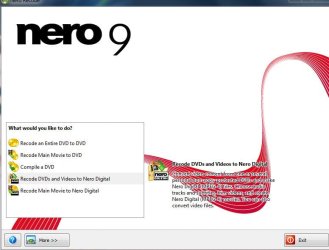
Nero has a lot of DVD copy features,in the Nero Recode section, and also the abiltiy to convert Videos and DVDs to Nero Digital. (Which is just H264+AAC inside a MP4)

For what it is, it does quite well actually. And very minimal input other than how high of quality you want (or files size target)

I only ask because I know sometimes people remove everything in Nero other than Burning ROM, sometimes not realizing what features it offered or if it was needed.
 

My Computer

Computer Manufacturer/Model Number
Custom (Self Build)
OS
Windows 7 Home Premium 64bit
CPU
Intel Core i7 2700k
Motherboard
eVGA P67 SLI
Memory
8GB Mushkin Redline Ridgebacks @1866
Graphics Card(s)
EVGA GTX570 SC
Sound Card
XiFi Titanium HD
Monitor(s) Displays
LG W2453V
Screen Resolution
1920x1080
Hard Drives
Intel 320 80GB -- Intel X25-V 40GB --WD Black 1TB x2 -- WD Blue 640GB
PSU
Seasonic x750
Case
Corsair 600T SE White
Cooling
eVGA Superclocked CPU Cooler
Keyboard
Saitek Cyborg
Antivirus
Kaspersky
Browser
IE
Other Info
LG BD/DVD
Yes, I have Nero 8, and as far as I know, everything is installed, but I find nothing called Recode, or looks like it is for ripping. Where do I look?
 

My Computer

Computer Manufacturer/Model Number
DIY
OS
W7x64 Pro, SuSe 12.1/** W7 x64 Pro, XP MCE
CPU
Phenom II 1090T w/Noctua NH-D14 /**4400+ X2 w/CM Hyper TX 3
Motherboard
ASRock 890FX Deluxe 4/**A8N-SLI
Memory
2 x 2GB Patriot PGS34g1600LLKA/**4x1GB Corsair VS
Graphics Card(s)
EVGA GTX460 SC/**EVGA 8800GTS
Sound Card
Asus Xonar D2X/**Xonar D1
Monitor(s) Displays
Acer X233H, Dell E152FPc /**LG M237-WD
Screen Resolution
1920x1080 & 1024x768/**1980x1080
Hard Drives
WDC 2TB, 1.5TB, 1TB, 500GB,Seagate 500GB , Maxtor 80GB /**500GB Seagate & WDC 1TB Black
PSU
CM RS600 w/ APC BX1000G/**Antec 500 TP w/ APC BX1000
Case
HAF922/**Antec 1040IIB
Cooling
3x200mm, 1x140 and 1x120mm/**5x80mm fans
Keyboard
Logitech Media USB/**Saitek Eclipse
Mouse
Cordless Trackman Wheel/**Ditto
Internet Speed
3.3Mbps
Other Info
SB 560 5.1 w/ Sennheiser RS140/**Creative T20 speakers, Dvico FusionHDTV7 Gold RT, Cisco E3000, HP 5510V AIO, Linksys E3000, Belkin F5U237 hub and **F5D8055 adapter
(** = 2nd rig)
I have used nero 8 earlier . There is a start orb like button at the left bottom .... click on it .... it will stack all applications of nero installed . Nero recode is there in that list . That's a nice option for shrinking DVDs .
 

My Computer

Computer type
PC/Desktop
Computer Manufacturer/Model Number
Self Assembled
OS
Microsoft Windows 10 Pro Insider Preview 64-bit
CPU
Intel(R) Core(TM) i3-4130 CPU @ 3.40GHz
Motherboard
Gigabyte Technology Co., Ltd. B85M-D3H
Memory
Corsair Vengence 4GB x2 (8.00GB Dual-Channel DDR3 @ 798MHz)
Graphics Card(s)
2047MB GeForce GTS 450 (ZOTAC International)
Sound Card
Onboard (Realtek High Definition Audio)
Monitor(s) Displays
LG Flatron E2040T
Screen Resolution
1600x900
Hard Drives
Western Digital 1 TB
Seagate 500 GB
PSU
Corsair VS550
Case
Cooler Master K380
Cooling
Cooler Master Seidon 120V Plus
Keyboard
Logitech MK260r
Mouse
Logitech MK260r
Internet Speed
PMPL Broadband
Antivirus
Windows Defender + MBAM
Browser
Firefox
Other Info
Dell Studio 15" Laptop
Since you already have it, it would certainly be worth a try. May be just what you're searching for.

As Arc said. There a Program called Nero StartSmart that can take you all of the various programs.
I honestly forget how its laid out, as I have Version 9 which chnaged the StartSmart layout a bit.

You may also find it in the Start Menu, in the Nero Folder.

In the Start Menu / Nero Folder/ its called Nero Recode.


My version is slightly different, but should look similar to this snip. You want the Recoded DVDs and Videos to Nero Digital, if you are wanting to create a MP4 file. Or the recode main movie to Nero Digital.

The only thing Im not sure if DVDFab can decrypt the disc on the fly like AnyDVD does.
So you may still need to decrypt it and rip the entire disc to your HD, then point Nero to that folder. It will see it as a DVD, but can not convert CopyProtected material.
 

Attachments

  • Capture.JPG
    Capture.JPG
    49.9 KB · Views: 4

My Computer

Computer Manufacturer/Model Number
Custom (Self Build)
OS
Windows 7 Home Premium 64bit
CPU
Intel Core i7 2700k
Motherboard
eVGA P67 SLI
Memory
8GB Mushkin Redline Ridgebacks @1866
Graphics Card(s)
EVGA GTX570 SC
Sound Card
XiFi Titanium HD
Monitor(s) Displays
LG W2453V
Screen Resolution
1920x1080
Hard Drives
Intel 320 80GB -- Intel X25-V 40GB --WD Black 1TB x2 -- WD Blue 640GB
PSU
Seasonic x750
Case
Corsair 600T SE White
Cooling
eVGA Superclocked CPU Cooler
Keyboard
Saitek Cyborg
Antivirus
Kaspersky
Browser
IE
Other Info
LG BD/DVD
Recode is not listed on the menu button at the bottom left corner. Now that I think of it, what I have is OEM...maybe it wasn't included.

EDIT: I'm not certain that it is exactly what you mean, but DVDFab does have decryption capability. It lists a number of ways that it decrypts each DVD, but I'm not sure that it is complete.
 

My Computer

Computer Manufacturer/Model Number
DIY
OS
W7x64 Pro, SuSe 12.1/** W7 x64 Pro, XP MCE
CPU
Phenom II 1090T w/Noctua NH-D14 /**4400+ X2 w/CM Hyper TX 3
Motherboard
ASRock 890FX Deluxe 4/**A8N-SLI
Memory
2 x 2GB Patriot PGS34g1600LLKA/**4x1GB Corsair VS
Graphics Card(s)
EVGA GTX460 SC/**EVGA 8800GTS
Sound Card
Asus Xonar D2X/**Xonar D1
Monitor(s) Displays
Acer X233H, Dell E152FPc /**LG M237-WD
Screen Resolution
1920x1080 & 1024x768/**1980x1080
Hard Drives
WDC 2TB, 1.5TB, 1TB, 500GB,Seagate 500GB , Maxtor 80GB /**500GB Seagate & WDC 1TB Black
PSU
CM RS600 w/ APC BX1000G/**Antec 500 TP w/ APC BX1000
Case
HAF922/**Antec 1040IIB
Cooling
3x200mm, 1x140 and 1x120mm/**5x80mm fans
Keyboard
Logitech Media USB/**Saitek Eclipse
Mouse
Cordless Trackman Wheel/**Ditto
Internet Speed
3.3Mbps
Other Info
SB 560 5.1 w/ Sennheiser RS140/**Creative T20 speakers, Dvico FusionHDTV7 Gold RT, Cisco E3000, HP 5510V AIO, Linksys E3000, Belkin F5U237 hub and **F5D8055 adapter
(** = 2nd rig)
Recode is not listed on the menu button at the bottom left corner. Now that I think of it, what I have is OEM...maybe it wasn't included.

EDIT: I'm not certain that it is exactly what you mean, but DVDFab does have decryption capability. It lists a number of ways that it decrypts each DVD, but I'm not sure that it is complete.

Ah .. You may have what they call the light or essential version,. which is basically the Burning utility only.


I was refering to its Copy part. CopyEntire Disc or Copy main Movie to HD. Im fairly sure this part is free isn't it?
I know it decrypts the files and writes them to the HD, but I was unsure if it actually decrypts in real time, as say AnyDVD will do.

Meaning, you can't just have it running and use another program to copy or convert the disc. You need to copy the disc the HD first to have it decrypted.

This was my understanding of it, so I very well may be wrong. Please correct me if so.
 

My Computer

Computer Manufacturer/Model Number
Custom (Self Build)
OS
Windows 7 Home Premium 64bit
CPU
Intel Core i7 2700k
Motherboard
eVGA P67 SLI
Memory
8GB Mushkin Redline Ridgebacks @1866
Graphics Card(s)
EVGA GTX570 SC
Sound Card
XiFi Titanium HD
Monitor(s) Displays
LG W2453V
Screen Resolution
1920x1080
Hard Drives
Intel 320 80GB -- Intel X25-V 40GB --WD Black 1TB x2 -- WD Blue 640GB
PSU
Seasonic x750
Case
Corsair 600T SE White
Cooling
eVGA Superclocked CPU Cooler
Keyboard
Saitek Cyborg
Antivirus
Kaspersky
Browser
IE
Other Info
LG BD/DVD
No, the only things missing in what I have in DVDFab are a couple of Blu Ray functions, for DVD it is complete. The DVD Copy portion is not free, but I have it, only I have not used it yet, only the ripper part. Therefore, I don't know what decryption function exist in the DVD Copy module.

EDIT: Disregard what I said, I got my wires crossed and thought you were speaking of DVDFab, not Nero Recode.
 
Last edited:

My Computer

Computer Manufacturer/Model Number
DIY
OS
W7x64 Pro, SuSe 12.1/** W7 x64 Pro, XP MCE
CPU
Phenom II 1090T w/Noctua NH-D14 /**4400+ X2 w/CM Hyper TX 3
Motherboard
ASRock 890FX Deluxe 4/**A8N-SLI
Memory
2 x 2GB Patriot PGS34g1600LLKA/**4x1GB Corsair VS
Graphics Card(s)
EVGA GTX460 SC/**EVGA 8800GTS
Sound Card
Asus Xonar D2X/**Xonar D1
Monitor(s) Displays
Acer X233H, Dell E152FPc /**LG M237-WD
Screen Resolution
1920x1080 & 1024x768/**1980x1080
Hard Drives
WDC 2TB, 1.5TB, 1TB, 500GB,Seagate 500GB , Maxtor 80GB /**500GB Seagate & WDC 1TB Black
PSU
CM RS600 w/ APC BX1000G/**Antec 500 TP w/ APC BX1000
Case
HAF922/**Antec 1040IIB
Cooling
3x200mm, 1x140 and 1x120mm/**5x80mm fans
Keyboard
Logitech Media USB/**Saitek Eclipse
Mouse
Cordless Trackman Wheel/**Ditto
Internet Speed
3.3Mbps
Other Info
SB 560 5.1 w/ Sennheiser RS140/**Creative T20 speakers, Dvico FusionHDTV7 Gold RT, Cisco E3000, HP 5510V AIO, Linksys E3000, Belkin F5U237 hub and **F5D8055 adapter
(** = 2nd rig)
Back
Top