
Encoding Speed

I found a download for Recode and installed it. It appears that it doesn't interface with Smart Starts, but it does appear to be able to rip or copy. I will try it later.
 

My Computer

Computer Manufacturer/Model Number
DIY
OS
W7x64 Pro, SuSe 12.1/** W7 x64 Pro, XP MCE
CPU
Phenom II 1090T w/Noctua NH-D14 /**4400+ X2 w/CM Hyper TX 3
Motherboard
ASRock 890FX Deluxe 4/**A8N-SLI
Memory
2 x 2GB Patriot PGS34g1600LLKA/**4x1GB Corsair VS
Graphics Card(s)
EVGA GTX460 SC/**EVGA 8800GTS
Sound Card
Asus Xonar D2X/**Xonar D1
Monitor(s) Displays
Acer X233H, Dell E152FPc /**LG M237-WD
Screen Resolution
1920x1080 & 1024x768/**1980x1080
Hard Drives
WDC 2TB, 1.5TB, 1TB, 500GB,Seagate 500GB , Maxtor 80GB /**500GB Seagate & WDC 1TB Black
PSU
CM RS600 w/ APC BX1000G/**Antec 500 TP w/ APC BX1000
Case
HAF922/**Antec 1040IIB
Cooling
3x200mm, 1x140 and 1x120mm/**5x80mm fans
Keyboard
Logitech Media USB/**Saitek Eclipse
Mouse
Cordless Trackman Wheel/**Ditto
Internet Speed
3.3Mbps
Other Info
SB 560 5.1 w/ Sennheiser RS140/**Creative T20 speakers, Dvico FusionHDTV7 Gold RT, Cisco E3000, HP 5510V AIO, Linksys E3000, Belkin F5U237 hub and **F5D8055 adapter
(** = 2nd rig)
Recode is not listed on the menu button at the bottom left corner. Now that I think of it, what I have is OEM...maybe it wasn't included.

EDIT: I'm not certain that it is exactly what you mean, but DVDFab does have decryption capability. It lists a number of ways that it decrypts each DVD, but I'm not sure that it is complete.

Ah .. You may have what they call the light or essential version,. which is basically the Burning utility only.


I was refering to its Copy part. CopyEntire Disc or Copy main Movie to HD. Im fairly sure this part is free isn't it?
I know it decrypts the files and writes them to the HD, but I was unsure if it actually decrypts in real time, as say AnyDVD will do.

Meaning, you can't just have it running and use another program to copy or convert the disc. You need to copy the disc the HD first to have it decrypted.

This was my understanding of it, so I very well may be wrong. Please correct me if so.

I just finished the first run with what would work with DVDFab, and opened Nero Recode to try to continue, but I found the notation on both of it's functions (copy disk, or copy main movie) that it would only work on non-copy-protected disks. So I doubt that it would be of any use for me, because if I had to decrypt with some other program first, I don't know what I would need Recode for.

Now to try batting with one of the other programs I have installed.
 

My Computer

Computer Manufacturer/Model Number
DIY
OS
W7x64 Pro, SuSe 12.1/** W7 x64 Pro, XP MCE
CPU
Phenom II 1090T w/Noctua NH-D14 /**4400+ X2 w/CM Hyper TX 3
Motherboard
ASRock 890FX Deluxe 4/**A8N-SLI
Memory
2 x 2GB Patriot PGS34g1600LLKA/**4x1GB Corsair VS
Graphics Card(s)
EVGA GTX460 SC/**EVGA 8800GTS
Sound Card
Asus Xonar D2X/**Xonar D1
Monitor(s) Displays
Acer X233H, Dell E152FPc /**LG M237-WD
Screen Resolution
1920x1080 & 1024x768/**1980x1080
Hard Drives
WDC 2TB, 1.5TB, 1TB, 500GB,Seagate 500GB , Maxtor 80GB /**500GB Seagate & WDC 1TB Black
PSU
CM RS600 w/ APC BX1000G/**Antec 500 TP w/ APC BX1000
Case
HAF922/**Antec 1040IIB
Cooling
3x200mm, 1x140 and 1x120mm/**5x80mm fans
Keyboard
Logitech Media USB/**Saitek Eclipse
Mouse
Cordless Trackman Wheel/**Ditto
Internet Speed
3.3Mbps
Other Info
SB 560 5.1 w/ Sennheiser RS140/**Creative T20 speakers, Dvico FusionHDTV7 Gold RT, Cisco E3000, HP 5510V AIO, Linksys E3000, Belkin F5U237 hub and **F5D8055 adapter
(** = 2nd rig)
Okay, I just ran AnyDVD on one disk, and even though it was very fast, it was also very confusing. First, I found no means to simply rip the movie, only to copy the disk. Of course, this produced a series of .BUP, .IFO and .VOB files, but instead of one file being the largest, containing the movie, it appears that there are two. Also, with .VOB extensions, they don't open with my preferred player, they opened with PowerDVD instead. I already have enough variety in this respect to deal with, so how do I get AnyDVD to behave as I want it to?

EDIT: Another factor with this arrangement is that with sum of the two .VOB files is ~2GBs, which is far larger than I have been getting on similar disks. I really like keeping things compact, because with ~850 movies, I still have ~300GBs of free space left on a 1 TB drive. It appears that this will eat that free space up twice as quick.
 

My Computer

Computer Manufacturer/Model Number
DIY
OS
W7x64 Pro, SuSe 12.1/** W7 x64 Pro, XP MCE
CPU
Phenom II 1090T w/Noctua NH-D14 /**4400+ X2 w/CM Hyper TX 3
Motherboard
ASRock 890FX Deluxe 4/**A8N-SLI
Memory
2 x 2GB Patriot PGS34g1600LLKA/**4x1GB Corsair VS
Graphics Card(s)
EVGA GTX460 SC/**EVGA 8800GTS
Sound Card
Asus Xonar D2X/**Xonar D1
Monitor(s) Displays
Acer X233H, Dell E152FPc /**LG M237-WD
Screen Resolution
1920x1080 & 1024x768/**1980x1080
Hard Drives
WDC 2TB, 1.5TB, 1TB, 500GB,Seagate 500GB , Maxtor 80GB /**500GB Seagate & WDC 1TB Black
PSU
CM RS600 w/ APC BX1000G/**Antec 500 TP w/ APC BX1000
Case
HAF922/**Antec 1040IIB
Cooling
3x200mm, 1x140 and 1x120mm/**5x80mm fans
Keyboard
Logitech Media USB/**Saitek Eclipse
Mouse
Cordless Trackman Wheel/**Ditto
Internet Speed
3.3Mbps
Other Info
SB 560 5.1 w/ Sennheiser RS140/**Creative T20 speakers, Dvico FusionHDTV7 Gold RT, Cisco E3000, HP 5510V AIO, Linksys E3000, Belkin F5U237 hub and **F5D8055 adapter
(** = 2nd rig)
Have you tried DVD Decrypter to rip the movie ?

It's too late of night here , I will install nero 8 again tomorrow to see why you are not getting the nero digital option .
 

My Computer

Computer type
PC/Desktop
Computer Manufacturer/Model Number
Self Assembled
OS
Microsoft Windows 10 Pro Insider Preview 64-bit
CPU
Intel(R) Core(TM) i3-4130 CPU @ 3.40GHz
Motherboard
Gigabyte Technology Co., Ltd. B85M-D3H
Memory
Corsair Vengence 4GB x2 (8.00GB Dual-Channel DDR3 @ 798MHz)
Graphics Card(s)
2047MB GeForce GTS 450 (ZOTAC International)
Sound Card
Onboard (Realtek High Definition Audio)
Monitor(s) Displays
LG Flatron E2040T
Screen Resolution
1600x900
Hard Drives
Western Digital 1 TB
Seagate 500 GB
PSU
Corsair VS550
Case
Cooler Master K380
Cooling
Cooler Master Seidon 120V Plus
Keyboard
Logitech MK260r
Mouse
Logitech MK260r
Internet Speed
PMPL Broadband
Antivirus
Windows Defender + MBAM
Browser
Firefox
Other Info
Dell Studio 15" Laptop
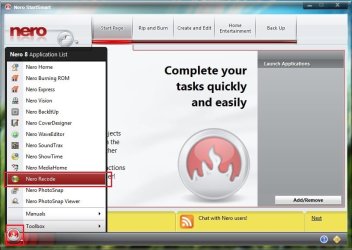
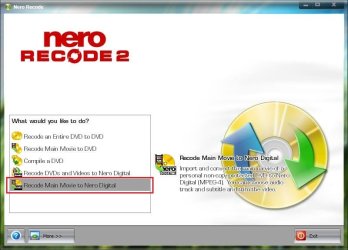
Ok here it goes .... forst click the StartSmart orb button, and select Nero Recode from the application list .
Untitled.jpg

So the Nero Recode Application window will be opened .... and there is the conversion to Nero Digital option at the bottom .
Capture.JPG
 

My Computer

Computer type
PC/Desktop
Computer Manufacturer/Model Number
Self Assembled
OS
Microsoft Windows 10 Pro Insider Preview 64-bit
CPU
Intel(R) Core(TM) i3-4130 CPU @ 3.40GHz
Motherboard
Gigabyte Technology Co., Ltd. B85M-D3H
Memory
Corsair Vengence 4GB x2 (8.00GB Dual-Channel DDR3 @ 798MHz)
Graphics Card(s)
2047MB GeForce GTS 450 (ZOTAC International)
Sound Card
Onboard (Realtek High Definition Audio)
Monitor(s) Displays
LG Flatron E2040T
Screen Resolution
1600x900
Hard Drives
Western Digital 1 TB
Seagate 500 GB
PSU
Corsair VS550
Case
Cooler Master K380
Cooling
Cooler Master Seidon 120V Plus
Keyboard
Logitech MK260r
Mouse
Logitech MK260r
Internet Speed
PMPL Broadband
Antivirus
Windows Defender + MBAM
Browser
Firefox
Other Info
Dell Studio 15" Laptop
Have you tried DVD Decrypter to rip the movie ?

It's too late of night here , I will install nero 8 again tomorrow to see why you are not getting the nero digital option .
I just did (on your suggestion) and the output was the same as with AnyDVD...multiple files of greater volume than I want. Both programs required me to select a target folder for each rip, which is also a bit annoying.

I have used DVD Shrink, for the purpose of reducing the file sizes before, but I would think that there is some other program with would streamline the operation.

The only really good thing that I have found with both AnyDVD and with DVD Decrypter, is that neither of them seem to require any noticeable CPU usage.
 

My Computer

Computer Manufacturer/Model Number
DIY
OS
W7x64 Pro, SuSe 12.1/** W7 x64 Pro, XP MCE
CPU
Phenom II 1090T w/Noctua NH-D14 /**4400+ X2 w/CM Hyper TX 3
Motherboard
ASRock 890FX Deluxe 4/**A8N-SLI
Memory
2 x 2GB Patriot PGS34g1600LLKA/**4x1GB Corsair VS
Graphics Card(s)
EVGA GTX460 SC/**EVGA 8800GTS
Sound Card
Asus Xonar D2X/**Xonar D1
Monitor(s) Displays
Acer X233H, Dell E152FPc /**LG M237-WD
Screen Resolution
1920x1080 & 1024x768/**1980x1080
Hard Drives
WDC 2TB, 1.5TB, 1TB, 500GB,Seagate 500GB , Maxtor 80GB /**500GB Seagate & WDC 1TB Black
PSU
CM RS600 w/ APC BX1000G/**Antec 500 TP w/ APC BX1000
Case
HAF922/**Antec 1040IIB
Cooling
3x200mm, 1x140 and 1x120mm/**5x80mm fans
Keyboard
Logitech Media USB/**Saitek Eclipse
Mouse
Cordless Trackman Wheel/**Ditto
Internet Speed
3.3Mbps
Other Info
SB 560 5.1 w/ Sennheiser RS140/**Creative T20 speakers, Dvico FusionHDTV7 Gold RT, Cisco E3000, HP 5510V AIO, Linksys E3000, Belkin F5U237 hub and **F5D8055 adapter
(** = 2nd rig)
Ok here it goes .... forst click the StartSmart orb button, and select Nero Recode from the application list .
View attachment 131485

So the Nero Recode Application window will be opened .... and there is the conversion to Nero Digital option at the bottom .
View attachment 131486
Thanks, but had you read the previous posts in the thread, you would have found that since my Nero is OEM, it does not include Recode. I had to download a freeware version of it, which does not interface with SmartStart, nor does decryption.

I suspect that this freeware version is more limited than it is with the retail version of Nero, but I'm not inclined to upgrade for just simply this issue.
 

My Computer

Computer Manufacturer/Model Number
DIY
OS
W7x64 Pro, SuSe 12.1/** W7 x64 Pro, XP MCE
CPU
Phenom II 1090T w/Noctua NH-D14 /**4400+ X2 w/CM Hyper TX 3
Motherboard
ASRock 890FX Deluxe 4/**A8N-SLI
Memory
2 x 2GB Patriot PGS34g1600LLKA/**4x1GB Corsair VS
Graphics Card(s)
EVGA GTX460 SC/**EVGA 8800GTS
Sound Card
Asus Xonar D2X/**Xonar D1
Monitor(s) Displays
Acer X233H, Dell E152FPc /**LG M237-WD
Screen Resolution
1920x1080 & 1024x768/**1980x1080
Hard Drives
WDC 2TB, 1.5TB, 1TB, 500GB,Seagate 500GB , Maxtor 80GB /**500GB Seagate & WDC 1TB Black
PSU
CM RS600 w/ APC BX1000G/**Antec 500 TP w/ APC BX1000
Case
HAF922/**Antec 1040IIB
Cooling
3x200mm, 1x140 and 1x120mm/**5x80mm fans
Keyboard
Logitech Media USB/**Saitek Eclipse
Mouse
Cordless Trackman Wheel/**Ditto
Internet Speed
3.3Mbps
Other Info
SB 560 5.1 w/ Sennheiser RS140/**Creative T20 speakers, Dvico FusionHDTV7 Gold RT, Cisco E3000, HP 5510V AIO, Linksys E3000, Belkin F5U237 hub and **F5D8055 adapter
(** = 2nd rig)
Ok here it goes .... forst click the StartSmart orb button, and select Nero Recode from the application list .
View attachment 131485

So the Nero Recode Application window will be opened .... and there is the conversion to Nero Digital option at the bottom .
View attachment 131486

I just noticed that even with the method you selected, that it has the same notation on the right side of the interface, saying that it will not copy protected DVDs.
 

My Computer

Computer Manufacturer/Model Number
DIY
OS
W7x64 Pro, SuSe 12.1/** W7 x64 Pro, XP MCE
CPU
Phenom II 1090T w/Noctua NH-D14 /**4400+ X2 w/CM Hyper TX 3
Motherboard
ASRock 890FX Deluxe 4/**A8N-SLI
Memory
2 x 2GB Patriot PGS34g1600LLKA/**4x1GB Corsair VS
Graphics Card(s)
EVGA GTX460 SC/**EVGA 8800GTS
Sound Card
Asus Xonar D2X/**Xonar D1
Monitor(s) Displays
Acer X233H, Dell E152FPc /**LG M237-WD
Screen Resolution
1920x1080 & 1024x768/**1980x1080
Hard Drives
WDC 2TB, 1.5TB, 1TB, 500GB,Seagate 500GB , Maxtor 80GB /**500GB Seagate & WDC 1TB Black
PSU
CM RS600 w/ APC BX1000G/**Antec 500 TP w/ APC BX1000
Case
HAF922/**Antec 1040IIB
Cooling
3x200mm, 1x140 and 1x120mm/**5x80mm fans
Keyboard
Logitech Media USB/**Saitek Eclipse
Mouse
Cordless Trackman Wheel/**Ditto
Internet Speed
3.3Mbps
Other Info
SB 560 5.1 w/ Sennheiser RS140/**Creative T20 speakers, Dvico FusionHDTV7 Gold RT, Cisco E3000, HP 5510V AIO, Linksys E3000, Belkin F5U237 hub and **F5D8055 adapter
(** = 2nd rig)
I just noticed that even with the method you selected, that it has the same notation on the right side of the interface, saying that it will not copy protected DVDs.
I dont have much more experience with nero recode .... I use HandBrake to rip my DVDs for desktop viewing and adding to Media Center library :) That's the easiest option to me .
 

My Computer

Computer type
PC/Desktop
Computer Manufacturer/Model Number
Self Assembled
OS
Microsoft Windows 10 Pro Insider Preview 64-bit
CPU
Intel(R) Core(TM) i3-4130 CPU @ 3.40GHz
Motherboard
Gigabyte Technology Co., Ltd. B85M-D3H
Memory
Corsair Vengence 4GB x2 (8.00GB Dual-Channel DDR3 @ 798MHz)
Graphics Card(s)
2047MB GeForce GTS 450 (ZOTAC International)
Sound Card
Onboard (Realtek High Definition Audio)
Monitor(s) Displays
LG Flatron E2040T
Screen Resolution
1600x900
Hard Drives
Western Digital 1 TB
Seagate 500 GB
PSU
Corsair VS550
Case
Cooler Master K380
Cooling
Cooler Master Seidon 120V Plus
Keyboard
Logitech MK260r
Mouse
Logitech MK260r
Internet Speed
PMPL Broadband
Antivirus
Windows Defender + MBAM
Browser
Firefox
Other Info
Dell Studio 15" Laptop
I just noticed that even with the method you selected, that it has the same notation on the right side of the interface, saying that it will not copy protected DVDs.
I dont have much more experience with nero recode .... I use HandBrake to rip my DVDs for desktop viewing and adding to Media Center library :) That's the easiest option to me .

It may get the job done, but at a snail's pace. I just started one disk, and it is only running at ~22FPS and it's estimated finish is over 2 hours, which is longer than it takes to play the movie in a regular player. Also, it runs the CPU as high as DVDFab does. The only thing that I see so far that is good, is that it appears that it will eventually finish the disk.

EDIT: Handbrake says that it will take ~2:08...plus the few that it has already ran, to finish. The play time of the DVD is 97 minutes, which DVDFab would take ~28 minutes to complete...if it would work with this DVD. Why it doesn't baffles me, because it does not have any copy protection at all.
 

My Computer

Computer Manufacturer/Model Number
DIY
OS
W7x64 Pro, SuSe 12.1/** W7 x64 Pro, XP MCE
CPU
Phenom II 1090T w/Noctua NH-D14 /**4400+ X2 w/CM Hyper TX 3
Motherboard
ASRock 890FX Deluxe 4/**A8N-SLI
Memory
2 x 2GB Patriot PGS34g1600LLKA/**4x1GB Corsair VS
Graphics Card(s)
EVGA GTX460 SC/**EVGA 8800GTS
Sound Card
Asus Xonar D2X/**Xonar D1
Monitor(s) Displays
Acer X233H, Dell E152FPc /**LG M237-WD
Screen Resolution
1920x1080 & 1024x768/**1980x1080
Hard Drives
WDC 2TB, 1.5TB, 1TB, 500GB,Seagate 500GB , Maxtor 80GB /**500GB Seagate & WDC 1TB Black
PSU
CM RS600 w/ APC BX1000G/**Antec 500 TP w/ APC BX1000
Case
HAF922/**Antec 1040IIB
Cooling
3x200mm, 1x140 and 1x120mm/**5x80mm fans
Keyboard
Logitech Media USB/**Saitek Eclipse
Mouse
Cordless Trackman Wheel/**Ditto
Internet Speed
3.3Mbps
Other Info
SB 560 5.1 w/ Sennheiser RS140/**Creative T20 speakers, Dvico FusionHDTV7 Gold RT, Cisco E3000, HP 5510V AIO, Linksys E3000, Belkin F5U237 hub and **F5D8055 adapter
(** = 2nd rig)
At this point, unless someone can suggest something better, I will have to choose between using a program that is so slow, that it may take as much time to finish the DVDs that DVDFab couldn't handle, as it did to rip the one's that it could. I would really like to finish this job some time this year, so I'm all ears as to either something comparable to DVDFab or a means to make DVDFab work on these DVDs as it should.
 

My Computer

Computer Manufacturer/Model Number
DIY
OS
W7x64 Pro, SuSe 12.1/** W7 x64 Pro, XP MCE
CPU
Phenom II 1090T w/Noctua NH-D14 /**4400+ X2 w/CM Hyper TX 3
Motherboard
ASRock 890FX Deluxe 4/**A8N-SLI
Memory
2 x 2GB Patriot PGS34g1600LLKA/**4x1GB Corsair VS
Graphics Card(s)
EVGA GTX460 SC/**EVGA 8800GTS
Sound Card
Asus Xonar D2X/**Xonar D1
Monitor(s) Displays
Acer X233H, Dell E152FPc /**LG M237-WD
Screen Resolution
1920x1080 & 1024x768/**1980x1080
Hard Drives
WDC 2TB, 1.5TB, 1TB, 500GB,Seagate 500GB , Maxtor 80GB /**500GB Seagate & WDC 1TB Black
PSU
CM RS600 w/ APC BX1000G/**Antec 500 TP w/ APC BX1000
Case
HAF922/**Antec 1040IIB
Cooling
3x200mm, 1x140 and 1x120mm/**5x80mm fans
Keyboard
Logitech Media USB/**Saitek Eclipse
Mouse
Cordless Trackman Wheel/**Ditto
Internet Speed
3.3Mbps
Other Info
SB 560 5.1 w/ Sennheiser RS140/**Creative T20 speakers, Dvico FusionHDTV7 Gold RT, Cisco E3000, HP 5510V AIO, Linksys E3000, Belkin F5U237 hub and **F5D8055 adapter
(** = 2nd rig)
Seeker, I am a bit confused, so please forgive me if I am misunderstanding here.


Nero can handle the files, but you need to use DVD Fabs Copy Disc feature, or its Copy Full movie feature to rip the DVD to your HD.
The result will be the entire DVD (untouched Qualitywise) on your HD that has no copy Protection. It has been decrypted.


AnyDVD can decrypt on the fly for whatever program you wish to use. It also has a Rip function, which will copy the entire DVD to your HD, which also leaves the FULL untouched disc without and protection to work with, same as DVDFAB.


All you have really accomplished at this stage, with AnyDVD or DVDFAB, is moving the contents of the disc to your HardDrive and removing any protections on it.

At this point, you use whichever other encoder you want to use.
Nero Recode, MEGUI, Handbrake etc.


The reason you can encode directly from disc with DVDFAB, is it decrypts on the fly for its own personal use. Not for other programs.

Ripping to HD is really the best way to go IMHO to work with a DVD, as its faster and easier for the encoders.


After you encode a compressed copy, you can delete the Full DVD copy from your HD and keep just the recoded file.


Depending what settings you use, Handbrake and Megui will be slower encoders. They are however, more accurate.
They can crunch a 4.5GB DVD down to 1GB, and look nearly perfect.

Nero (again dependant on quality settings used) will be faster than the other 2, with quite decent results. Just not quite as good.


As far as DVDFAb, I would attempt just copying the entire disc to the HD. See if it is able to do so.
Then, try its encoding option, directing it to the location you copyed the disc to.
 

My Computer

Computer Manufacturer/Model Number
Custom (Self Build)
OS
Windows 7 Home Premium 64bit
CPU
Intel Core i7 2700k
Motherboard
eVGA P67 SLI
Memory
8GB Mushkin Redline Ridgebacks @1866
Graphics Card(s)
EVGA GTX570 SC
Sound Card
XiFi Titanium HD
Monitor(s) Displays
LG W2453V
Screen Resolution
1920x1080
Hard Drives
Intel 320 80GB -- Intel X25-V 40GB --WD Black 1TB x2 -- WD Blue 640GB
PSU
Seasonic x750
Case
Corsair 600T SE White
Cooling
eVGA Superclocked CPU Cooler
Keyboard
Saitek Cyborg
Antivirus
Kaspersky
Browser
IE
Other Info
LG BD/DVD
I can understand your confusion, partly because it is based on my own, and partly because you and I continue to think in two different directions. Perhaps I misunderstand, but it seems that you want me to rip to a format that will end up with multiple .vob files, instead of a single .mpeg or .mkv file, which I would then need to decrypt. I would be willing to do that, except that I do not understand how multiple .vob files can be used to obtain a single file of any format. Maybe I am missing something, but I fail to see how I could use multiple files for a single movie conveniently, nor do I understand how collectorz would properly catalog them?

I am making "some" headway with WinX DVD, and I think that I see why DVDFab is having a problem with many of my disks. When WinX DVD starts to display the movie in the preview screen, it shows a logo screen of the distributor, followed by the interactive menus. Sometimes the preview will continue on automatically after a minute of so displaying those extra screens, and sometimes it just remains there. This is with only the main movie file selected, which normally avoids those screens.

Doing things this way is a long rocky row to hoe, but at least it is going somewhere. If I'm missing something in your explanation, please feel free to enlighten me.
 

My Computer

Computer Manufacturer/Model Number
DIY
OS
W7x64 Pro, SuSe 12.1/** W7 x64 Pro, XP MCE
CPU
Phenom II 1090T w/Noctua NH-D14 /**4400+ X2 w/CM Hyper TX 3
Motherboard
ASRock 890FX Deluxe 4/**A8N-SLI
Memory
2 x 2GB Patriot PGS34g1600LLKA/**4x1GB Corsair VS
Graphics Card(s)
EVGA GTX460 SC/**EVGA 8800GTS
Sound Card
Asus Xonar D2X/**Xonar D1
Monitor(s) Displays
Acer X233H, Dell E152FPc /**LG M237-WD
Screen Resolution
1920x1080 & 1024x768/**1980x1080
Hard Drives
WDC 2TB, 1.5TB, 1TB, 500GB,Seagate 500GB , Maxtor 80GB /**500GB Seagate & WDC 1TB Black
PSU
CM RS600 w/ APC BX1000G/**Antec 500 TP w/ APC BX1000
Case
HAF922/**Antec 1040IIB
Cooling
3x200mm, 1x140 and 1x120mm/**5x80mm fans
Keyboard
Logitech Media USB/**Saitek Eclipse
Mouse
Cordless Trackman Wheel/**Ditto
Internet Speed
3.3Mbps
Other Info
SB 560 5.1 w/ Sennheiser RS140/**Creative T20 speakers, Dvico FusionHDTV7 Gold RT, Cisco E3000, HP 5510V AIO, Linksys E3000, Belkin F5U237 hub and **F5D8055 adapter
(** = 2nd rig)
When you rip the DVD to your HardDrive, with either AnyDVD or DVDFab, it removes the copy protection.

If you open the folder you will find it is an exact copy of the DVD structure. For example,If you browse the files on the actuall DVD, you will find it will be the same as the files on your HD. Both with multiple VOBS.

The only difference is, the Protection is gone from the one on the HD, and, a encoder can read it much faster than directly off the disc. You can use any encoder you choose now to encode o a MPV,AVI,MKV .. whatever your choice without the error of being copy protected.


This way, when you go to encode the DVD to a file, and the encoder you wish to use asks you for the DVD, you simply point it toward that Folder you copied.

The encoder, thinks its the original DVD. Because, it actually is.
Its just on the HD instead of a disc.

Another good reson to do it this way, is that depending which encoder you prefer, many will let you Que up jobs.
So you can copy say 3 or 4 Disc to your HD. Set each movie up in the encoder and start it encoding before you go to bed.
The next morning they are all done. You can then delete the full discs off you drive and keep the 3 or 4 files you encoded.
 
Last edited:

My Computer

Computer Manufacturer/Model Number
Custom (Self Build)
OS
Windows 7 Home Premium 64bit
CPU
Intel Core i7 2700k
Motherboard
eVGA P67 SLI
Memory
8GB Mushkin Redline Ridgebacks @1866
Graphics Card(s)
EVGA GTX570 SC
Sound Card
XiFi Titanium HD
Monitor(s) Displays
LG W2453V
Screen Resolution
1920x1080
Hard Drives
Intel 320 80GB -- Intel X25-V 40GB --WD Black 1TB x2 -- WD Blue 640GB
PSU
Seasonic x750
Case
Corsair 600T SE White
Cooling
eVGA Superclocked CPU Cooler
Keyboard
Saitek Cyborg
Antivirus
Kaspersky
Browser
IE
Other Info
LG BD/DVD
Okay, I'm beginning to see the light. I used DVDFab to copy only the main movie, to save a little time, but a couple of things that I noticed was that the preview screen displayed it in wide screen, when the movie is full screen (a bit squashed). I then went back DVD Copy and used the Merge option, but even though at first it appeared that it was going to only have 1 file as output, it still had 3 VTS files. I then tried using the Video Converter, but it lists 2 output files, instead of one. I'm starting out down your path, but getting lost along the way.

EDIT: When I ran those files in the converter, it changed back to regular full screen. I guess that the files on the DVD don't know the difference between WS and FS.

EDIT 2: I thought that the converter might merge the two files listed into one, but I was wrong...it gave 2 .mkv files as output.

EDIT 3: Using the ripper on DVDFab gave the same result as when trying to use it directly from the DVD...it failed.
 
Last edited:

My Computer

Computer Manufacturer/Model Number
DIY
OS
W7x64 Pro, SuSe 12.1/** W7 x64 Pro, XP MCE
CPU
Phenom II 1090T w/Noctua NH-D14 /**4400+ X2 w/CM Hyper TX 3
Motherboard
ASRock 890FX Deluxe 4/**A8N-SLI
Memory
2 x 2GB Patriot PGS34g1600LLKA/**4x1GB Corsair VS
Graphics Card(s)
EVGA GTX460 SC/**EVGA 8800GTS
Sound Card
Asus Xonar D2X/**Xonar D1
Monitor(s) Displays
Acer X233H, Dell E152FPc /**LG M237-WD
Screen Resolution
1920x1080 & 1024x768/**1980x1080
Hard Drives
WDC 2TB, 1.5TB, 1TB, 500GB,Seagate 500GB , Maxtor 80GB /**500GB Seagate & WDC 1TB Black
PSU
CM RS600 w/ APC BX1000G/**Antec 500 TP w/ APC BX1000
Case
HAF922/**Antec 1040IIB
Cooling
3x200mm, 1x140 and 1x120mm/**5x80mm fans
Keyboard
Logitech Media USB/**Saitek Eclipse
Mouse
Cordless Trackman Wheel/**Ditto
Internet Speed
3.3Mbps
Other Info
SB 560 5.1 w/ Sennheiser RS140/**Creative T20 speakers, Dvico FusionHDTV7 Gold RT, Cisco E3000, HP 5510V AIO, Linksys E3000, Belkin F5U237 hub and **F5D8055 adapter
(** = 2nd rig)
Okay, I'm beginning to see the light. I used DVDFab to copy only the main movie, to save a little time, but a couple of things that I noticed was that the preview screen displayed it in wide screen, when the movie is full screen (a bit squashed). I then went back DVD Copy and used the Merge option, but even though at first it appeared that it was going to only have 1 file as output, it still had 3 VTS files. I then tried using the Video Converter, but it lists 2 output files, instead of one. I'm starting out down your path, but getting lost along the way.

EDIT: When I ran those files in the converter, it changed back to regular full screen. I guess that the files on the DVD don't know the difference between WC and FS.


A full, uncompressed version of a DVD will have multiple VOB files.
Typically, most VOBs are .99GB insize, and then it goes to the next one.


Normally, if you just point the encoder to the folder, it should be able to read from there. Just use the open folder option.

If you want, or need to depending on the program, open the actual files. (For example to Index it with MeGUIs File Indexer)

What you want is the very 1st .VOB that is .99GB in Size, as this one is the start of the movie.

Don't worry to much about the .VOB being split into pieces.
It works kind of like if you have a .ZIP or .7z file that in 3 parts, you need only start unzipping the 1st one, and it automatically reads from the others when needed. Multiple pieces, but its actually 1 continuous file.


Im not familiar with that aprticular program.
But usually, when you open the file, there should be something that give some details about the stream such as resolution.
 

My Computer

Computer Manufacturer/Model Number
Custom (Self Build)
OS
Windows 7 Home Premium 64bit
CPU
Intel Core i7 2700k
Motherboard
eVGA P67 SLI
Memory
8GB Mushkin Redline Ridgebacks @1866
Graphics Card(s)
EVGA GTX570 SC
Sound Card
XiFi Titanium HD
Monitor(s) Displays
LG W2453V
Screen Resolution
1920x1080
Hard Drives
Intel 320 80GB -- Intel X25-V 40GB --WD Black 1TB x2 -- WD Blue 640GB
PSU
Seasonic x750
Case
Corsair 600T SE White
Cooling
eVGA Superclocked CPU Cooler
Keyboard
Saitek Cyborg
Antivirus
Kaspersky
Browser
IE
Other Info
LG BD/DVD
The problem with having the file in pieces is not a matter of whether the encoder can work with them or not, but whether the player will. I just selected the first .mkv file of one movie in VLC, and when it reached the end of the first file, it quit. Even if the files could be chained together in play, the sum of the files is larger than if it had been ripped in the first place. For instance, one movie that I just checked had 1 file of 1,048,574kbs, the second also 1,048,574kbs and a third of 1,036,210kbs for a total of 3,133,358kbs, which is probably twice the size of the ripped file...space counts.
 

My Computer

Computer Manufacturer/Model Number
DIY
OS
W7x64 Pro, SuSe 12.1/** W7 x64 Pro, XP MCE
CPU
Phenom II 1090T w/Noctua NH-D14 /**4400+ X2 w/CM Hyper TX 3
Motherboard
ASRock 890FX Deluxe 4/**A8N-SLI
Memory
2 x 2GB Patriot PGS34g1600LLKA/**4x1GB Corsair VS
Graphics Card(s)
EVGA GTX460 SC/**EVGA 8800GTS
Sound Card
Asus Xonar D2X/**Xonar D1
Monitor(s) Displays
Acer X233H, Dell E152FPc /**LG M237-WD
Screen Resolution
1920x1080 & 1024x768/**1980x1080
Hard Drives
WDC 2TB, 1.5TB, 1TB, 500GB,Seagate 500GB , Maxtor 80GB /**500GB Seagate & WDC 1TB Black
PSU
CM RS600 w/ APC BX1000G/**Antec 500 TP w/ APC BX1000
Case
HAF922/**Antec 1040IIB
Cooling
3x200mm, 1x140 and 1x120mm/**5x80mm fans
Keyboard
Logitech Media USB/**Saitek Eclipse
Mouse
Cordless Trackman Wheel/**Ditto
Internet Speed
3.3Mbps
Other Info
SB 560 5.1 w/ Sennheiser RS140/**Creative T20 speakers, Dvico FusionHDTV7 Gold RT, Cisco E3000, HP 5510V AIO, Linksys E3000, Belkin F5U237 hub and **F5D8055 adapter
(** = 2nd rig)
Ah I see.

TBH, Im not sure why it would be encoding each VOB as a separate file.
I mostly just familiar with MEGUI and Nero.

Maybe it is just the way that particular program works.
Will DVD FAB open the folder as a single movie without encoding all the separate pieces?

You can merge all the MKVs into a single file. But it shouldnt be encoding it all in pieces.
 

My Computer

Computer Manufacturer/Model Number
Custom (Self Build)
OS
Windows 7 Home Premium 64bit
CPU
Intel Core i7 2700k
Motherboard
eVGA P67 SLI
Memory
8GB Mushkin Redline Ridgebacks @1866
Graphics Card(s)
EVGA GTX570 SC
Sound Card
XiFi Titanium HD
Monitor(s) Displays
LG W2453V
Screen Resolution
1920x1080
Hard Drives
Intel 320 80GB -- Intel X25-V 40GB --WD Black 1TB x2 -- WD Blue 640GB
PSU
Seasonic x750
Case
Corsair 600T SE White
Cooling
eVGA Superclocked CPU Cooler
Keyboard
Saitek Cyborg
Antivirus
Kaspersky
Browser
IE
Other Info
LG BD/DVD
It's not just DVDFab, because AnyDVD also came out in pieces the same way. You say that I can merge the MKVs, but if that is true, I don't know how. I did Google for a means of splitting an MKV, because of some multi-feature movies being combined as one, and I found nothing. I recall a remark that I read elsewhere, that said that it was necessary to convert a MKV to a MPEG or something else to do something like that, and then convert it back to MKV afterward...maybe for the lack of capable software...I don't know.

MeGUI is about the only program that we have talked about, that I haven't tried yet, because of lack of understanding. The big problem is that I do not know what to put into the avisynth window, and until I do, the program will go nowhere.
 

My Computer

Computer Manufacturer/Model Number
DIY
OS
W7x64 Pro, SuSe 12.1/** W7 x64 Pro, XP MCE
CPU
Phenom II 1090T w/Noctua NH-D14 /**4400+ X2 w/CM Hyper TX 3
Motherboard
ASRock 890FX Deluxe 4/**A8N-SLI
Memory
2 x 2GB Patriot PGS34g1600LLKA/**4x1GB Corsair VS
Graphics Card(s)
EVGA GTX460 SC/**EVGA 8800GTS
Sound Card
Asus Xonar D2X/**Xonar D1
Monitor(s) Displays
Acer X233H, Dell E152FPc /**LG M237-WD
Screen Resolution
1920x1080 & 1024x768/**1980x1080
Hard Drives
WDC 2TB, 1.5TB, 1TB, 500GB,Seagate 500GB , Maxtor 80GB /**500GB Seagate & WDC 1TB Black
PSU
CM RS600 w/ APC BX1000G/**Antec 500 TP w/ APC BX1000
Case
HAF922/**Antec 1040IIB
Cooling
3x200mm, 1x140 and 1x120mm/**5x80mm fans
Keyboard
Logitech Media USB/**Saitek Eclipse
Mouse
Cordless Trackman Wheel/**Ditto
Internet Speed
3.3Mbps
Other Info
SB 560 5.1 w/ Sennheiser RS140/**Creative T20 speakers, Dvico FusionHDTV7 Gold RT, Cisco E3000, HP 5510V AIO, Linksys E3000, Belkin F5U237 hub and **F5D8055 adapter
(** = 2nd rig)
Did you go through the tutortial I wrote up?

It will walk you through step by step how to create a MP4 or MKV from a DVD folder.

When you decrypty the DVD to the HD, with AnyDVD or DVDFab, it will be in pieces and quite large. Its simply the DVD itself without protection.

That entire process is simply removing the protection and writing to the HD to be easier to work with. Theres no recoding at all being done.


Converting an orginal DVD --> MKV or MP4 is all you need to do.
When you get into recoding multiple times, the final video will look really bad.

Try this:
Open MeGUI.
In tools, click on File Inder
In that complete folder you ripped to the HD, choose the very first .99GB .VOB file.
Que the job, and then run it.

In the Avisynth script that pops up, click on the filters Tab, and then press the analyse button.
When its done, go back to the I/O tab, and just check the clever Anamorphic Encoding button, and then save the script.

MeGUI should have your script and audio imported now.

For now, in the Encoder Setting choose Unrestricted DXVA , and press config.
In that Window, for Modes Choose Automated 2 Pass
Then set the Bitrate to 1500

For Audio choose Nero LC96kbp and press the Config.
You can change it to Down mix to stereo if you choose or keep the 5.1 track.
If you downmix to stereo, an Adaptive Bitrate of around 192 or 226 will be good for now.
((You may need to DL the NERO encoder, its all free))

Then just press Auto Encode, and choose what Container you want, (MP4 or MKV) , a save location and start it.

You can adjust all these values higher or lower later, but this should be a pretty quick encode that will get you started and learning whats going on.
 

My Computer

Computer Manufacturer/Model Number
Custom (Self Build)
OS
Windows 7 Home Premium 64bit
CPU
Intel Core i7 2700k
Motherboard
eVGA P67 SLI
Memory
8GB Mushkin Redline Ridgebacks @1866
Graphics Card(s)
EVGA GTX570 SC
Sound Card
XiFi Titanium HD
Monitor(s) Displays
LG W2453V
Screen Resolution
1920x1080
Hard Drives
Intel 320 80GB -- Intel X25-V 40GB --WD Black 1TB x2 -- WD Blue 640GB
PSU
Seasonic x750
Case
Corsair 600T SE White
Cooling
eVGA Superclocked CPU Cooler
Keyboard
Saitek Cyborg
Antivirus
Kaspersky
Browser
IE
Other Info
LG BD/DVD
Back
Top