
Encoding Speed

The odd thing is that DVDFab only does a single pass by default, which I never changed, and it got good results. Obviously, a single pass is quicker than two, so DVDFab is getting both speed and quality at the same time. Everything else that I have tried is always slower, and too often of less quality. The only problem with DVDFab is that it failed on a significant number of my DVDs, and I'm having to use some other ripper in it's place to finish the job.
 

My Computer

Computer Manufacturer/Model Number
DIY
OS
W7x64 Pro, SuSe 12.1/** W7 x64 Pro, XP MCE
CPU
Phenom II 1090T w/Noctua NH-D14 /**4400+ X2 w/CM Hyper TX 3
Motherboard
ASRock 890FX Deluxe 4/**A8N-SLI
Memory
2 x 2GB Patriot PGS34g1600LLKA/**4x1GB Corsair VS
Graphics Card(s)
EVGA GTX460 SC/**EVGA 8800GTS
Sound Card
Asus Xonar D2X/**Xonar D1
Monitor(s) Displays
Acer X233H, Dell E152FPc /**LG M237-WD
Screen Resolution
1920x1080 & 1024x768/**1980x1080
Hard Drives
WDC 2TB, 1.5TB, 1TB, 500GB,Seagate 500GB , Maxtor 80GB /**500GB Seagate & WDC 1TB Black
PSU
CM RS600 w/ APC BX1000G/**Antec 500 TP w/ APC BX1000
Case
HAF922/**Antec 1040IIB
Cooling
3x200mm, 1x140 and 1x120mm/**5x80mm fans
Keyboard
Logitech Media USB/**Saitek Eclipse
Mouse
Cordless Trackman Wheel/**Ditto
Internet Speed
3.3Mbps
Other Info
SB 560 5.1 w/ Sennheiser RS140/**Creative T20 speakers, Dvico FusionHDTV7 Gold RT, Cisco E3000, HP 5510V AIO, Linksys E3000, Belkin F5U237 hub and **F5D8055 adapter
(** = 2nd rig)
Yes, going above the the orginal sources bit rate will not help anything.

You just want to find one that keeps the quality looking good, as of course a bit lower than the original so the file will be smaller. Since thats the purpose of recoding.

The bitrate calculators are handy for hitting a certain file size.

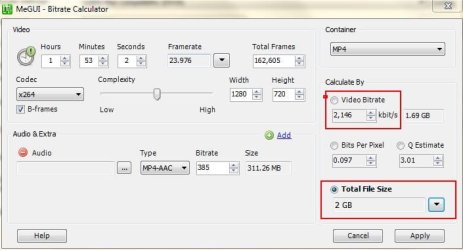
Lets say, for example you have these requirements you want or need:
1) Use AAC 5.1 Audio at 385kbs
2) Use a MP4 Container
3) The total File size can not exceed 2GB

The bitrate calculator will help you find the maximum bitrate you can use, while still maintaining the requirements you want or need.

Set the movie length
Select Audio Codec and Bitrate (In this case AAC 385)
Select the conatiner you are going to use, in this example MP4.
Finaly, set the total size you are aiming for.

As you can see here, its telling me that if I want the File to be 2GB in size, I need to use up to a 2,146 Bitrate without exceeding that size.
Capture.JPG


Theres a bitrate calculator in MeGUI (since you already have it) in the tools menu if you would like to check it out.


As far as bit rates go, theres a point where blockiness goes away.
Further increses will help improve quality and detail in complex scenes.

But you will not be able to make the encode better than the original.
 

My Computer

Computer Manufacturer/Model Number
Custom (Self Build)
OS
Windows 7 Home Premium 64bit
CPU
Intel Core i7 2700k
Motherboard
eVGA P67 SLI
Memory
8GB Mushkin Redline Ridgebacks @1866
Graphics Card(s)
EVGA GTX570 SC
Sound Card
XiFi Titanium HD
Monitor(s) Displays
LG W2453V
Screen Resolution
1920x1080
Hard Drives
Intel 320 80GB -- Intel X25-V 40GB --WD Black 1TB x2 -- WD Blue 640GB
PSU
Seasonic x750
Case
Corsair 600T SE White
Cooling
eVGA Superclocked CPU Cooler
Keyboard
Saitek Cyborg
Antivirus
Kaspersky
Browser
IE
Other Info
LG BD/DVD
The odd thing is that DVDFab only does a single pass by default, which I never changed, and it got good results. Obviously, a single pass is quicker than two, so DVDFab is getting both speed and quality at the same time. Everything else that I have tried is always slower, and too often of less quality. The only problem with DVDFab is that it failed on a significant number of my DVDs, and I'm having to use some other ripper in it's place to finish the job.


The main advantage to a 2 pass encode is effeciency. True, it takes a bit longer.
But it works a bit like this:

In a 1 pass encode, the encoder attempts to maintain an average Bitrate, or average quality setting.
In somewhat guesses as to the best way to do this.

In a 2 pass encode, the encoder runs through the entire film, and analyses it.
It can then make a better decision as how to allocate everything.

For example, if you want a average bitrate of 1500. It may decide with a 2pass encode that:

In scene 4, I can get by with just a 1000 bit rate. Not much going on here.
But in Scene 5, It should really be around 2000.
By doing that first pass, it has a better idea of how to calculate where to increase, or lower bitrates to acieve the best results.

By the time its all said and done, the overall average bitrate will be what you set it at.


Now if you prefer the 1 pass type encode (many do) MEGUI does have that option.
It will attempt to maintain a constant quality throughout the entire film.

However, it does not take average bitrate or file size into account.
That can be controlled a little bit by the Quality setting.
Its also alot faster.

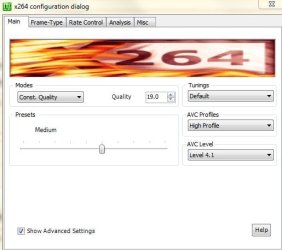
Try These settings if you want to try it like that:
Capture.JPG

In Const. Quailty settings The lower the number the Higher the Quality of the file. But also, the larger the file.

Larger numbers = less quality , smaller file sizes.

Generally, 19-21 are good areas.

20 should be fairly fast, with decent quality and file sizer.
19 a bit better, but slightly larger file size.


I only mention this because I didn't when we discussing this yetserday.
I probably should have being as you did mention you wanted it as fast as possible.
 

My Computer

Computer Manufacturer/Model Number
Custom (Self Build)
OS
Windows 7 Home Premium 64bit
CPU
Intel Core i7 2700k
Motherboard
eVGA P67 SLI
Memory
8GB Mushkin Redline Ridgebacks @1866
Graphics Card(s)
EVGA GTX570 SC
Sound Card
XiFi Titanium HD
Monitor(s) Displays
LG W2453V
Screen Resolution
1920x1080
Hard Drives
Intel 320 80GB -- Intel X25-V 40GB --WD Black 1TB x2 -- WD Blue 640GB
PSU
Seasonic x750
Case
Corsair 600T SE White
Cooling
eVGA Superclocked CPU Cooler
Keyboard
Saitek Cyborg
Antivirus
Kaspersky
Browser
IE
Other Info
LG BD/DVD
My desire is to simply equal the orignal, with the smallest file size possible, and do it as fast as possible. When you speak of increases improving quality and detail, are you saying that about using a number greater than minimal, or greater than the source? If I'm understanding, using too high of a bitrate won't effect anything, but using too small of a number will...right?
 

My Computer

Computer Manufacturer/Model Number
DIY
OS
W7x64 Pro, SuSe 12.1/** W7 x64 Pro, XP MCE
CPU
Phenom II 1090T w/Noctua NH-D14 /**4400+ X2 w/CM Hyper TX 3
Motherboard
ASRock 890FX Deluxe 4/**A8N-SLI
Memory
2 x 2GB Patriot PGS34g1600LLKA/**4x1GB Corsair VS
Graphics Card(s)
EVGA GTX460 SC/**EVGA 8800GTS
Sound Card
Asus Xonar D2X/**Xonar D1
Monitor(s) Displays
Acer X233H, Dell E152FPc /**LG M237-WD
Screen Resolution
1920x1080 & 1024x768/**1980x1080
Hard Drives
WDC 2TB, 1.5TB, 1TB, 500GB,Seagate 500GB , Maxtor 80GB /**500GB Seagate & WDC 1TB Black
PSU
CM RS600 w/ APC BX1000G/**Antec 500 TP w/ APC BX1000
Case
HAF922/**Antec 1040IIB
Cooling
3x200mm, 1x140 and 1x120mm/**5x80mm fans
Keyboard
Logitech Media USB/**Saitek Eclipse
Mouse
Cordless Trackman Wheel/**Ditto
Internet Speed
3.3Mbps
Other Info
SB 560 5.1 w/ Sennheiser RS140/**Creative T20 speakers, Dvico FusionHDTV7 Gold RT, Cisco E3000, HP 5510V AIO, Linksys E3000, Belkin F5U237 hub and **F5D8055 adapter
(** = 2nd rig)
My desire is to simply equal the orignal, with the smallest file size possible, and do it as fast as possible. When you speaking of increases improving quality and detail, are you saying that about using a number greater than minimal, or greater than the source? If I'm understanding, using too high of a bitrate won't effect anything, but using too small of a number will...right?


Yes to small of a bit rate will lead to blockiness and overall poor image quality.

Generally speaking, I like to keep a DVD at 1500 at the least, up to around 2000.
It depends on the DVD itself.

Ive just found that using at least 1500 usually looks good overall, which is why I suggested starting there and then increasing it as you see fit.


But keep in mind, any encoder that uses a Const. Quality type of setting, will not allow you to adjust bit rate. It just tries to keep thing at a set Quality level, no matter how much it needs to do it with.
As I mention, increasing the Quality setting can make the files smaller though if you want them to be.

In ways this is a good thing. Because it may encode one DVD with average bitrate of say 1500, and the next one may average 1900, even though you used the same settings.
This is because thats what it decided was needed for that particular film.
 

My Computer

Computer Manufacturer/Model Number
Custom (Self Build)
OS
Windows 7 Home Premium 64bit
CPU
Intel Core i7 2700k
Motherboard
eVGA P67 SLI
Memory
8GB Mushkin Redline Ridgebacks @1866
Graphics Card(s)
EVGA GTX570 SC
Sound Card
XiFi Titanium HD
Monitor(s) Displays
LG W2453V
Screen Resolution
1920x1080
Hard Drives
Intel 320 80GB -- Intel X25-V 40GB --WD Black 1TB x2 -- WD Blue 640GB
PSU
Seasonic x750
Case
Corsair 600T SE White
Cooling
eVGA Superclocked CPU Cooler
Keyboard
Saitek Cyborg
Antivirus
Kaspersky
Browser
IE
Other Info
LG BD/DVD
That doesn't quite answer all of my question. Let me rephrase...since the original can't be improved, the objective is to encode the data exactly as it is on the DVD...yes? If this is so, it would seem that the ideal solution would be to use an encoder that automatically analyzes all of the factors necessary to obtain that result. Since this does not seem to be the case, is there a means to obtain the source's data statistics, so that these can be used, rather than resorting to rules of thumb?

EDIT: Nevermind, after thinking about it, I realized that would only result in a huge file size, like when copying a DVD to the drive.
 

My Computer

Computer Manufacturer/Model Number
DIY
OS
W7x64 Pro, SuSe 12.1/** W7 x64 Pro, XP MCE
CPU
Phenom II 1090T w/Noctua NH-D14 /**4400+ X2 w/CM Hyper TX 3
Motherboard
ASRock 890FX Deluxe 4/**A8N-SLI
Memory
2 x 2GB Patriot PGS34g1600LLKA/**4x1GB Corsair VS
Graphics Card(s)
EVGA GTX460 SC/**EVGA 8800GTS
Sound Card
Asus Xonar D2X/**Xonar D1
Monitor(s) Displays
Acer X233H, Dell E152FPc /**LG M237-WD
Screen Resolution
1920x1080 & 1024x768/**1980x1080
Hard Drives
WDC 2TB, 1.5TB, 1TB, 500GB,Seagate 500GB , Maxtor 80GB /**500GB Seagate & WDC 1TB Black
PSU
CM RS600 w/ APC BX1000G/**Antec 500 TP w/ APC BX1000
Case
HAF922/**Antec 1040IIB
Cooling
3x200mm, 1x140 and 1x120mm/**5x80mm fans
Keyboard
Logitech Media USB/**Saitek Eclipse
Mouse
Cordless Trackman Wheel/**Ditto
Internet Speed
3.3Mbps
Other Info
SB 560 5.1 w/ Sennheiser RS140/**Creative T20 speakers, Dvico FusionHDTV7 Gold RT, Cisco E3000, HP 5510V AIO, Linksys E3000, Belkin F5U237 hub and **F5D8055 adapter
(** = 2nd rig)
Well, not exactly.
It doesnt always mean a larger file.

But, the thing is you can't have it both ways.

And by that I mean, if you are after speed, you can encode Videos quite quickly, but they will be lacking in overall Quality because of it.

If you are after quality, then you will be lacking in encoding speed because of it.


There are many other factors other than the bitrate that affect the overall quality. Although bitrate is typically considered the major one.
For example, ME Range, ME Algorithm, Subpixel Refinements, B-Frames, Lookahead ...


All of these settings set to higher values will make the encode look better, even though the bitrate itself is the same. It basically how the x264 compresses and reproduces the original image.
Unfortunately, it also takes time for the encoder to encode this way.
The good thing about it though, is that these quality gains can be achieved with the same bitrates and filesize.


It really comes down to preference, and what you think is the best balance between Quality and speed.

I do apologize if I am confusing you more than helping.
Even though I know how, Im not that great at explaining it sometimes. :(
 

My Computer

Computer Manufacturer/Model Number
Custom (Self Build)
OS
Windows 7 Home Premium 64bit
CPU
Intel Core i7 2700k
Motherboard
eVGA P67 SLI
Memory
8GB Mushkin Redline Ridgebacks @1866
Graphics Card(s)
EVGA GTX570 SC
Sound Card
XiFi Titanium HD
Monitor(s) Displays
LG W2453V
Screen Resolution
1920x1080
Hard Drives
Intel 320 80GB -- Intel X25-V 40GB --WD Black 1TB x2 -- WD Blue 640GB
PSU
Seasonic x750
Case
Corsair 600T SE White
Cooling
eVGA Superclocked CPU Cooler
Keyboard
Saitek Cyborg
Antivirus
Kaspersky
Browser
IE
Other Info
LG BD/DVD
I would agree, AnyDVD is certainly worth having.

I really do not use Xvid much, as I prefer the x264. It looks much better to me.

I typically stick with the H264 codec for video, and either AC3 or AAC for audio.
Conatiners are usually MP4 or MKV, depending on what it is, and the file size.
 

My Computer

Computer Manufacturer/Model Number
Custom (Self Build)
OS
Windows 7 Home Premium 64bit
CPU
Intel Core i7 2700k
Motherboard
eVGA P67 SLI
Memory
8GB Mushkin Redline Ridgebacks @1866
Graphics Card(s)
EVGA GTX570 SC
Sound Card
XiFi Titanium HD
Monitor(s) Displays
LG W2453V
Screen Resolution
1920x1080
Hard Drives
Intel 320 80GB -- Intel X25-V 40GB --WD Black 1TB x2 -- WD Blue 640GB
PSU
Seasonic x750
Case
Corsair 600T SE White
Cooling
eVGA Superclocked CPU Cooler
Keyboard
Saitek Cyborg
Antivirus
Kaspersky
Browser
IE
Other Info
LG BD/DVD
Hi Wishmaster and seeker, I believe the best encoder your gonna find and software for the job is DVD Rebuilder I guarantee no other dvd rebuilding encoder is better for the price. I've use it and seen unbelievable results and the price is worthy of the software, if you two are this into ripping movies and encoding them then Anydvd is what I use to rip to the harddrive and then use dvd rebuilder to encode with some very high quality encoders even cce encoders can be used which are the best. The only draw back is that it takes a little knowledge on how to set it up to use the cce encoder trial version (cause it is a 1000 dollar encoder) which use can use with a piece of software that allows the trial to be used like it should, it's not a hack or anything bad but I will tell you I did some movies that the quality was poor and they came out like butter afterwards....This is if you have some priceless stuff you want to restore or if this is your hobbie. Wishmaster your know what your talking about do you do xvid and all that without one click apps?;)
It sounds to me that you are more into this than I am. A $1000 encoder is not something that I would even consider, unless it was for a means to make a profit, and for me, this is just something that I want to do for myself. I don't even consider it a hobby, unless I knew a lot more about it than I do.

I just came across a movie, which I had encoded twice by accident. Once in DVDFab, and once in WinX DVD. I just ran both, for the purpose of deciding which to keep. The DVDFab file is in MKV, and the WinX DVD file is in MPG. Even though neither of them were truly perfect, DVDFab was noticeably better, even though it's file size was ~200,000KBs smaller, and I'm certain that it took less time to run.

I just ran the movie directly from the DVD, and it appears that the DVDFab copy is as good as the DVD, so I doubt that a $1000 encoder would do any better.
 

My Computer

Computer Manufacturer/Model Number
DIY
OS
W7x64 Pro, SuSe 12.1/** W7 x64 Pro, XP MCE
CPU
Phenom II 1090T w/Noctua NH-D14 /**4400+ X2 w/CM Hyper TX 3
Motherboard
ASRock 890FX Deluxe 4/**A8N-SLI
Memory
2 x 2GB Patriot PGS34g1600LLKA/**4x1GB Corsair VS
Graphics Card(s)
EVGA GTX460 SC/**EVGA 8800GTS
Sound Card
Asus Xonar D2X/**Xonar D1
Monitor(s) Displays
Acer X233H, Dell E152FPc /**LG M237-WD
Screen Resolution
1920x1080 & 1024x768/**1980x1080
Hard Drives
WDC 2TB, 1.5TB, 1TB, 500GB,Seagate 500GB , Maxtor 80GB /**500GB Seagate & WDC 1TB Black
PSU
CM RS600 w/ APC BX1000G/**Antec 500 TP w/ APC BX1000
Case
HAF922/**Antec 1040IIB
Cooling
3x200mm, 1x140 and 1x120mm/**5x80mm fans
Keyboard
Logitech Media USB/**Saitek Eclipse
Mouse
Cordless Trackman Wheel/**Ditto
Internet Speed
3.3Mbps
Other Info
SB 560 5.1 w/ Sennheiser RS140/**Creative T20 speakers, Dvico FusionHDTV7 Gold RT, Cisco E3000, HP 5510V AIO, Linksys E3000, Belkin F5U237 hub and **F5D8055 adapter
(** = 2nd rig)
Some of my videos have a bit of audio noise in them. I can reduce this by adjusting the settings on my sound card, but I was wondering if there is a way to eliminate this while encoding the movie?
 

My Computer

Computer Manufacturer/Model Number
DIY
OS
W7x64 Pro, SuSe 12.1/** W7 x64 Pro, XP MCE
CPU
Phenom II 1090T w/Noctua NH-D14 /**4400+ X2 w/CM Hyper TX 3
Motherboard
ASRock 890FX Deluxe 4/**A8N-SLI
Memory
2 x 2GB Patriot PGS34g1600LLKA/**4x1GB Corsair VS
Graphics Card(s)
EVGA GTX460 SC/**EVGA 8800GTS
Sound Card
Asus Xonar D2X/**Xonar D1
Monitor(s) Displays
Acer X233H, Dell E152FPc /**LG M237-WD
Screen Resolution
1920x1080 & 1024x768/**1980x1080
Hard Drives
WDC 2TB, 1.5TB, 1TB, 500GB,Seagate 500GB , Maxtor 80GB /**500GB Seagate & WDC 1TB Black
PSU
CM RS600 w/ APC BX1000G/**Antec 500 TP w/ APC BX1000
Case
HAF922/**Antec 1040IIB
Cooling
3x200mm, 1x140 and 1x120mm/**5x80mm fans
Keyboard
Logitech Media USB/**Saitek Eclipse
Mouse
Cordless Trackman Wheel/**Ditto
Internet Speed
3.3Mbps
Other Info
SB 560 5.1 w/ Sennheiser RS140/**Creative T20 speakers, Dvico FusionHDTV7 Gold RT, Cisco E3000, HP 5510V AIO, Linksys E3000, Belkin F5U237 hub and **F5D8055 adapter
(** = 2nd rig)
I'm not positive that it is what you are referring to, but from what I read, this is what once was called dvd-region free:

DVD Region+CSS Free - Watch & Copy Any DVD! Remove Region, CSS, ARccOS, etc.

I haven't worked with it yet, so I can't say if it solves anything or not.

EDIT: After thinking about it, I don't think that the problem has anything to do with regions, because all of my DVDs are either region 1 or region-free. In fact most, if not all of the DVDs that had problems in DVDFab were regionless.
 
Last edited:

My Computer

Computer Manufacturer/Model Number
DIY
OS
W7x64 Pro, SuSe 12.1/** W7 x64 Pro, XP MCE
CPU
Phenom II 1090T w/Noctua NH-D14 /**4400+ X2 w/CM Hyper TX 3
Motherboard
ASRock 890FX Deluxe 4/**A8N-SLI
Memory
2 x 2GB Patriot PGS34g1600LLKA/**4x1GB Corsair VS
Graphics Card(s)
EVGA GTX460 SC/**EVGA 8800GTS
Sound Card
Asus Xonar D2X/**Xonar D1
Monitor(s) Displays
Acer X233H, Dell E152FPc /**LG M237-WD
Screen Resolution
1920x1080 & 1024x768/**1980x1080
Hard Drives
WDC 2TB, 1.5TB, 1TB, 500GB,Seagate 500GB , Maxtor 80GB /**500GB Seagate & WDC 1TB Black
PSU
CM RS600 w/ APC BX1000G/**Antec 500 TP w/ APC BX1000
Case
HAF922/**Antec 1040IIB
Cooling
3x200mm, 1x140 and 1x120mm/**5x80mm fans
Keyboard
Logitech Media USB/**Saitek Eclipse
Mouse
Cordless Trackman Wheel/**Ditto
Internet Speed
3.3Mbps
Other Info
SB 560 5.1 w/ Sennheiser RS140/**Creative T20 speakers, Dvico FusionHDTV7 Gold RT, Cisco E3000, HP 5510V AIO, Linksys E3000, Belkin F5U237 hub and **F5D8055 adapter
(** = 2nd rig)
Actually on the page that I found the link to it, it specifically said that it is the program previously known as DVD Region-Free. Apparently, DVDFab acquired it, and added a bit more to it.
 

My Computer

Computer Manufacturer/Model Number
DIY
OS
W7x64 Pro, SuSe 12.1/** W7 x64 Pro, XP MCE
CPU
Phenom II 1090T w/Noctua NH-D14 /**4400+ X2 w/CM Hyper TX 3
Motherboard
ASRock 890FX Deluxe 4/**A8N-SLI
Memory
2 x 2GB Patriot PGS34g1600LLKA/**4x1GB Corsair VS
Graphics Card(s)
EVGA GTX460 SC/**EVGA 8800GTS
Sound Card
Asus Xonar D2X/**Xonar D1
Monitor(s) Displays
Acer X233H, Dell E152FPc /**LG M237-WD
Screen Resolution
1920x1080 & 1024x768/**1980x1080
Hard Drives
WDC 2TB, 1.5TB, 1TB, 500GB,Seagate 500GB , Maxtor 80GB /**500GB Seagate & WDC 1TB Black
PSU
CM RS600 w/ APC BX1000G/**Antec 500 TP w/ APC BX1000
Case
HAF922/**Antec 1040IIB
Cooling
3x200mm, 1x140 and 1x120mm/**5x80mm fans
Keyboard
Logitech Media USB/**Saitek Eclipse
Mouse
Cordless Trackman Wheel/**Ditto
Internet Speed
3.3Mbps
Other Info
SB 560 5.1 w/ Sennheiser RS140/**Creative T20 speakers, Dvico FusionHDTV7 Gold RT, Cisco E3000, HP 5510V AIO, Linksys E3000, Belkin F5U237 hub and **F5D8055 adapter
(** = 2nd rig)
Some of my videos have a bit of audio noise in them. I can reduce this by adjusting the settings on my sound card, but I was wondering if there is a way to eliminate this while encoding the movie?
Since no one has responded to this question, does that mean that it can't be done?
 

My Computer

Computer Manufacturer/Model Number
DIY
OS
W7x64 Pro, SuSe 12.1/** W7 x64 Pro, XP MCE
CPU
Phenom II 1090T w/Noctua NH-D14 /**4400+ X2 w/CM Hyper TX 3
Motherboard
ASRock 890FX Deluxe 4/**A8N-SLI
Memory
2 x 2GB Patriot PGS34g1600LLKA/**4x1GB Corsair VS
Graphics Card(s)
EVGA GTX460 SC/**EVGA 8800GTS
Sound Card
Asus Xonar D2X/**Xonar D1
Monitor(s) Displays
Acer X233H, Dell E152FPc /**LG M237-WD
Screen Resolution
1920x1080 & 1024x768/**1980x1080
Hard Drives
WDC 2TB, 1.5TB, 1TB, 500GB,Seagate 500GB , Maxtor 80GB /**500GB Seagate & WDC 1TB Black
PSU
CM RS600 w/ APC BX1000G/**Antec 500 TP w/ APC BX1000
Case
HAF922/**Antec 1040IIB
Cooling
3x200mm, 1x140 and 1x120mm/**5x80mm fans
Keyboard
Logitech Media USB/**Saitek Eclipse
Mouse
Cordless Trackman Wheel/**Ditto
Internet Speed
3.3Mbps
Other Info
SB 560 5.1 w/ Sennheiser RS140/**Creative T20 speakers, Dvico FusionHDTV7 Gold RT, Cisco E3000, HP 5510V AIO, Linksys E3000, Belkin F5U237 hub and **F5D8055 adapter
(** = 2nd rig)
TBH, Im not sure exactly what you mean.


Is this noise present in the original?

If so, then the only way would perhaps edit the original in a Audio Editing Program like Audacity, or Neros Wave Editor/Soundtrax.

Then encode it to the format you prefer.

The only time Ive had mine come out with extra noise, was if the original was that way.
 

My Computer

Computer Manufacturer/Model Number
Custom (Self Build)
OS
Windows 7 Home Premium 64bit
CPU
Intel Core i7 2700k
Motherboard
eVGA P67 SLI
Memory
8GB Mushkin Redline Ridgebacks @1866
Graphics Card(s)
EVGA GTX570 SC
Sound Card
XiFi Titanium HD
Monitor(s) Displays
LG W2453V
Screen Resolution
1920x1080
Hard Drives
Intel 320 80GB -- Intel X25-V 40GB --WD Black 1TB x2 -- WD Blue 640GB
PSU
Seasonic x750
Case
Corsair 600T SE White
Cooling
eVGA Superclocked CPU Cooler
Keyboard
Saitek Cyborg
Antivirus
Kaspersky
Browser
IE
Other Info
LG BD/DVD
Some of my videos have a bit of audio noise in them. I can reduce this by adjusting the settings on my sound card, but I was wondering if there is a way to eliminate this while encoding the movie?
Since no one has responded to this question, does that mean that it can't be
done?

Yes but not with dvdfab but with dvd rebuilder if you know how to use it. Some of the encoders it comes with have all kinds of noise reduction and audio settings....
I did install DVD Rebuilder yesterday, but all that I did was to stare at the interface. Apparently, it requires dependencies for it to work, and I haven't had time to figure it out.

EDIT: I did a little tinkering with it a bit ago, but really didn't know what I was doing. I just selected one of the encoders that it apparently did have, loaded a DVD, selected the prepare button (which finished reasonaby quickly), pressed the encode button (which after indicating that it started, gave no indication of progress), after perhaps 30 minutes, I pressed the abort button, and the overall progress suddenly indicated 13%. I never got to the rebuild button, so I don't know what that would do, but since it didn't have a selection for the file format to use, nor ever asked for it, I got the feeling that it was still going to spit out a file in a form and size that I did not want.

Will this end up with a .mpg or .mkv with nothing but the main movie at some point?
 
Last edited:

My Computer

Computer Manufacturer/Model Number
DIY
OS
W7x64 Pro, SuSe 12.1/** W7 x64 Pro, XP MCE
CPU
Phenom II 1090T w/Noctua NH-D14 /**4400+ X2 w/CM Hyper TX 3
Motherboard
ASRock 890FX Deluxe 4/**A8N-SLI
Memory
2 x 2GB Patriot PGS34g1600LLKA/**4x1GB Corsair VS
Graphics Card(s)
EVGA GTX460 SC/**EVGA 8800GTS
Sound Card
Asus Xonar D2X/**Xonar D1
Monitor(s) Displays
Acer X233H, Dell E152FPc /**LG M237-WD
Screen Resolution
1920x1080 & 1024x768/**1980x1080
Hard Drives
WDC 2TB, 1.5TB, 1TB, 500GB,Seagate 500GB , Maxtor 80GB /**500GB Seagate & WDC 1TB Black
PSU
CM RS600 w/ APC BX1000G/**Antec 500 TP w/ APC BX1000
Case
HAF922/**Antec 1040IIB
Cooling
3x200mm, 1x140 and 1x120mm/**5x80mm fans
Keyboard
Logitech Media USB/**Saitek Eclipse
Mouse
Cordless Trackman Wheel/**Ditto
Internet Speed
3.3Mbps
Other Info
SB 560 5.1 w/ Sennheiser RS140/**Creative T20 speakers, Dvico FusionHDTV7 Gold RT, Cisco E3000, HP 5510V AIO, Linksys E3000, Belkin F5U237 hub and **F5D8055 adapter
(** = 2nd rig)
I can understand the direction that you are coming from, and would consider doing as you suggest, except that I do not want to spend a lot of time trying to learn something that will not provide what I'm looking for in the first place. That is why I asked if DVD Rebuilder, if used properly, will end up with either a .mpg or .mkv file, containing only the movie, in a compact fashion? If you would answer this, I could then decide whether to toil with it or not.

EDIT: I should have added to my question the time factor...to obtain the final result, how long does it take for the average movie?

EDIT 2: Somehow, I missed your last statement, before I posted...you say that the end result is an iso. That would mean that it would require a virtual drive for it to be played...right?
 

My Computer

Computer Manufacturer/Model Number
DIY
OS
W7x64 Pro, SuSe 12.1/** W7 x64 Pro, XP MCE
CPU
Phenom II 1090T w/Noctua NH-D14 /**4400+ X2 w/CM Hyper TX 3
Motherboard
ASRock 890FX Deluxe 4/**A8N-SLI
Memory
2 x 2GB Patriot PGS34g1600LLKA/**4x1GB Corsair VS
Graphics Card(s)
EVGA GTX460 SC/**EVGA 8800GTS
Sound Card
Asus Xonar D2X/**Xonar D1
Monitor(s) Displays
Acer X233H, Dell E152FPc /**LG M237-WD
Screen Resolution
1920x1080 & 1024x768/**1980x1080
Hard Drives
WDC 2TB, 1.5TB, 1TB, 500GB,Seagate 500GB , Maxtor 80GB /**500GB Seagate & WDC 1TB Black
PSU
CM RS600 w/ APC BX1000G/**Antec 500 TP w/ APC BX1000
Case
HAF922/**Antec 1040IIB
Cooling
3x200mm, 1x140 and 1x120mm/**5x80mm fans
Keyboard
Logitech Media USB/**Saitek Eclipse
Mouse
Cordless Trackman Wheel/**Ditto
Internet Speed
3.3Mbps
Other Info
SB 560 5.1 w/ Sennheiser RS140/**Creative T20 speakers, Dvico FusionHDTV7 Gold RT, Cisco E3000, HP 5510V AIO, Linksys E3000, Belkin F5U237 hub and **F5D8055 adapter
(** = 2nd rig)
I don't care how good the program performs, if it takes 8 hours to finish, I will do something else. I even consider two hours a long time, which I would only consider if necessary to deal with a problem on a certain video. I'm very glad that I asked, and that you answered my question in this regard, because I seriously doubt that I will spend the time necessary to learn the program. Thanks.
 

My Computer

Computer Manufacturer/Model Number
DIY
OS
W7x64 Pro, SuSe 12.1/** W7 x64 Pro, XP MCE
CPU
Phenom II 1090T w/Noctua NH-D14 /**4400+ X2 w/CM Hyper TX 3
Motherboard
ASRock 890FX Deluxe 4/**A8N-SLI
Memory
2 x 2GB Patriot PGS34g1600LLKA/**4x1GB Corsair VS
Graphics Card(s)
EVGA GTX460 SC/**EVGA 8800GTS
Sound Card
Asus Xonar D2X/**Xonar D1
Monitor(s) Displays
Acer X233H, Dell E152FPc /**LG M237-WD
Screen Resolution
1920x1080 & 1024x768/**1980x1080
Hard Drives
WDC 2TB, 1.5TB, 1TB, 500GB,Seagate 500GB , Maxtor 80GB /**500GB Seagate & WDC 1TB Black
PSU
CM RS600 w/ APC BX1000G/**Antec 500 TP w/ APC BX1000
Case
HAF922/**Antec 1040IIB
Cooling
3x200mm, 1x140 and 1x120mm/**5x80mm fans
Keyboard
Logitech Media USB/**Saitek Eclipse
Mouse
Cordless Trackman Wheel/**Ditto
Internet Speed
3.3Mbps
Other Info
SB 560 5.1 w/ Sennheiser RS140/**Creative T20 speakers, Dvico FusionHDTV7 Gold RT, Cisco E3000, HP 5510V AIO, Linksys E3000, Belkin F5U237 hub and **F5D8055 adapter
(** = 2nd rig)
I've finished encoding the entire collection, except for 15 DVDs that had problems in both DVDFab and WinX DVD Ripper. I decided to take another whack at them, using other alternatives...I ran into some strange problems on the very first one. I tried it once more with DVDFab, but booted in W7, instead of XP, hoping there would be a difference. There was, but not one that provided a solution. Instead of DVDFab simply not starting on the disk, it encoded the first few minutes, and then stopped. Instead of ripping, I then tried to copy both the main movie, and then the entire disk with DVDFab, but that failed in a similar fashion, therefore I'm unable to use MeGUI.

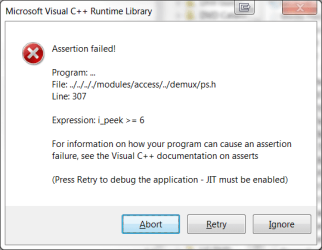
Since the movie played perfectly when I first got it (using PowerDVD), I decided to try playing it again...first with VLC, but that popped the error window in the screenshot below, at about the same amount of time into the movie as with the encoders. I then ran it with Media Player, and it ran the entire movie perfectly without even a hiccup.

I don't know if the problem is some kind of protection on the disk or some kind of software problem common to the encoders and OSs that I've used? The only thing that I can think of now, is if there is some kind of recorder that would simply copy the screen and sound while playing the move...something like you do recording sound on a Creative sound card with What U Hear (It would need to be What U See And Hear)?

This problem has caused me to postpone trying the other movies, because they may have the same problem as this one.
 

Attachments

  • High And Mighty Bug.png
    High And Mighty Bug.png
    15 KB · Views: 1

My Computer

Computer Manufacturer/Model Number
DIY
OS
W7x64 Pro, SuSe 12.1/** W7 x64 Pro, XP MCE
CPU
Phenom II 1090T w/Noctua NH-D14 /**4400+ X2 w/CM Hyper TX 3
Motherboard
ASRock 890FX Deluxe 4/**A8N-SLI
Memory
2 x 2GB Patriot PGS34g1600LLKA/**4x1GB Corsair VS
Graphics Card(s)
EVGA GTX460 SC/**EVGA 8800GTS
Sound Card
Asus Xonar D2X/**Xonar D1
Monitor(s) Displays
Acer X233H, Dell E152FPc /**LG M237-WD
Screen Resolution
1920x1080 & 1024x768/**1980x1080
Hard Drives
WDC 2TB, 1.5TB, 1TB, 500GB,Seagate 500GB , Maxtor 80GB /**500GB Seagate & WDC 1TB Black
PSU
CM RS600 w/ APC BX1000G/**Antec 500 TP w/ APC BX1000
Case
HAF922/**Antec 1040IIB
Cooling
3x200mm, 1x140 and 1x120mm/**5x80mm fans
Keyboard
Logitech Media USB/**Saitek Eclipse
Mouse
Cordless Trackman Wheel/**Ditto
Internet Speed
3.3Mbps
Other Info
SB 560 5.1 w/ Sennheiser RS140/**Creative T20 speakers, Dvico FusionHDTV7 Gold RT, Cisco E3000, HP 5510V AIO, Linksys E3000, Belkin F5U237 hub and **F5D8055 adapter
(** = 2nd rig)
I just tried both to rip and to copy the main movie on the only BD movie that I have, with DVDFab, and despite the fact that it appeared to proceed normally, and the program reported that it was successful, both the audio and video stuttered significantly on play back. I have no idea if this is a matter of settings or what?
 

My Computer

Computer Manufacturer/Model Number
DIY
OS
W7x64 Pro, SuSe 12.1/** W7 x64 Pro, XP MCE
CPU
Phenom II 1090T w/Noctua NH-D14 /**4400+ X2 w/CM Hyper TX 3
Motherboard
ASRock 890FX Deluxe 4/**A8N-SLI
Memory
2 x 2GB Patriot PGS34g1600LLKA/**4x1GB Corsair VS
Graphics Card(s)
EVGA GTX460 SC/**EVGA 8800GTS
Sound Card
Asus Xonar D2X/**Xonar D1
Monitor(s) Displays
Acer X233H, Dell E152FPc /**LG M237-WD
Screen Resolution
1920x1080 & 1024x768/**1980x1080
Hard Drives
WDC 2TB, 1.5TB, 1TB, 500GB,Seagate 500GB , Maxtor 80GB /**500GB Seagate & WDC 1TB Black
PSU
CM RS600 w/ APC BX1000G/**Antec 500 TP w/ APC BX1000
Case
HAF922/**Antec 1040IIB
Cooling
3x200mm, 1x140 and 1x120mm/**5x80mm fans
Keyboard
Logitech Media USB/**Saitek Eclipse
Mouse
Cordless Trackman Wheel/**Ditto
Internet Speed
3.3Mbps
Other Info
SB 560 5.1 w/ Sennheiser RS140/**Creative T20 speakers, Dvico FusionHDTV7 Gold RT, Cisco E3000, HP 5510V AIO, Linksys E3000, Belkin F5U237 hub and **F5D8055 adapter
(** = 2nd rig)
I just tried that same BD in another ripper that I downloaded, and it played perfectly. Unfortunately, the evaluation function only allowed the first 5 minutes to be encoded, but at least that seemed to rule out problems with the BD player or something else.
 

My Computer

Computer Manufacturer/Model Number
DIY
OS
W7x64 Pro, SuSe 12.1/** W7 x64 Pro, XP MCE
CPU
Phenom II 1090T w/Noctua NH-D14 /**4400+ X2 w/CM Hyper TX 3
Motherboard
ASRock 890FX Deluxe 4/**A8N-SLI
Memory
2 x 2GB Patriot PGS34g1600LLKA/**4x1GB Corsair VS
Graphics Card(s)
EVGA GTX460 SC/**EVGA 8800GTS
Sound Card
Asus Xonar D2X/**Xonar D1
Monitor(s) Displays
Acer X233H, Dell E152FPc /**LG M237-WD
Screen Resolution
1920x1080 & 1024x768/**1980x1080
Hard Drives
WDC 2TB, 1.5TB, 1TB, 500GB,Seagate 500GB , Maxtor 80GB /**500GB Seagate & WDC 1TB Black
PSU
CM RS600 w/ APC BX1000G/**Antec 500 TP w/ APC BX1000
Case
HAF922/**Antec 1040IIB
Cooling
3x200mm, 1x140 and 1x120mm/**5x80mm fans
Keyboard
Logitech Media USB/**Saitek Eclipse
Mouse
Cordless Trackman Wheel/**Ditto
Internet Speed
3.3Mbps
Other Info
SB 560 5.1 w/ Sennheiser RS140/**Creative T20 speakers, Dvico FusionHDTV7 Gold RT, Cisco E3000, HP 5510V AIO, Linksys E3000, Belkin F5U237 hub and **F5D8055 adapter
(** = 2nd rig)
Back
Top