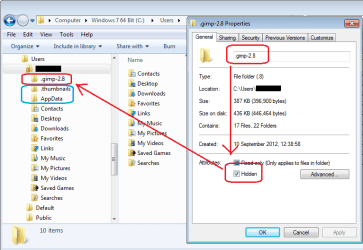
... That preference was already sent to "Don't show ...." (but I had set it to "Show ..." temporarily earlier in the day
If I pick "Show ..." then they appear in the right-hand side too.
-------------------
Ah ha - I may have found something.
Today, when I looked again at the folder, the "hidden" folders were not shown (just what I wanted). I set the Folder Option preference to "Show ..." and they appeared in the right-hand side, but NOT in the folder tree. Clicking [View] >> Refresh did not display them there either. Closing Explorer and re-opening it triggered a refresh.
So:
-- changing the "Show/Don't show" preference does not refresh the folder tree,
-- [View] >> Refresh does not (necessarily) update the folder tree,
-- Closing and re-opening Explorer sorts it out.
If you see the same behaviour, it may be worth adding that last point to the tutorial.