Export email addresses from Word to Windows Live Mail

Wembley

New member
Local time
2:21 PM
Messages
4
I am sorry if this question has been posted elsewhere in the Forum, but I have not been able to find anything that relates. I am trying to export a list of email addresses from a Word document into Windows Live Mail. I have tried to cut and paste, but it just doesn't work. Has anyone any idea how I can achieve this? Thanks for your help.
 

My Computer My Computer

At a glance

Windows 7 64 bit
Computer type
Laptop
Computer Manufacturer/Model Number
Dell
OS
Windows 7 64 bit
Antivirus
AVG
Browser
Firefox
Welcome again to Seven Forums Wembley ;) You'd want to see if you can convert the file into a .csv file that you can then import into WLM. See if these instructions allow you to create a .csv file

How to Change a Word File to a Comma Delimited File

Then use these instructions to import the .csv file

To import offline contacts into Windows Live Mail

Open Windows Live Mail by clicking the Start button . In the search box, type Mail, and then, in the list of results, click Windows Live Mail.

9fbf8917-861e-4b62-b836-3a0217fbd982_17.jpg

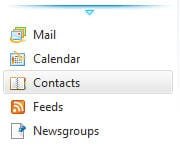
In the lower-left corner, select Contacts.


Click Import on the ribbon.


Select the file format that matches your exported contacts (.csv or .vcf).


Click Browse and then select the folder containing your exported contacts.


Click Next and select the check boxes next to the fields that you want to import.


Click Finish.

How do I import and export email, contacts, and calendars with Windows Live Mail? - Windows Help

A Guy
 

My Computer My Computer

At a glance

Windows 10 Home x64INTEL Core i5-750 Quad-Core 3.37GHzHyperX Fury Black Series 8GB (2 x 4GB) 1866MhzEVGA GeForce GTX 750 Superclocked 1GB 128-Bit...
Computer type
PC/Desktop
OS
Windows 10 Home x64
CPU
INTEL Core i5-750 Quad-Core 3.37GHz
Motherboard
ASUS P7P55D
Memory
HyperX Fury Black Series 8GB (2 x 4GB) 1866Mhz
Graphics Card(s)
EVGA GeForce GTX 750 Superclocked 1GB 128-Bit GDDR5
Monitor(s) Displays
LG 32MA68HY 32" IPS
Screen Resolution
1920 x 1080
Hard Drives
Samsung 840 Evo 120GB, SEAGATE 500GB Barracuda® 7200.12, SATA 3 Gb/s, 7200 RPM, 16MB cache
PSU
ANTEC TruePower New TP-550, 80 PLUS, 550W
Case
ANTEC Three Hundred Illusion
Cooling
COOLER MASTER Hyper 212 Plus, 4 x 120mm 1 x 140mm Noctua's
Internet Speed
85 + Mbps
Antivirus
Avast
Browser
Vivaldi
Hi A Guy, I have done all the things suggested, and all that has happened is that I now have dozens of duplications in my contact list and no sign of the distribution list I was trying to import:cry: Do you have any suggestions as to how I can sort this mess out??!!!
 

My Computer My Computer

At a glance

Windows 7 64 bit
Computer type
Laptop
Computer Manufacturer/Model Number
Dell
OS
Windows 7 64 bit
Antivirus
AVG
Browser
Firefox
Oh boy, it sounds like you weren't just trying to import some addresses, you were trying to import a list of addresses to stay as a list? I'll post for some experts, I'm not much use during the week. Hang in there.

A Guy
 

My Computer My Computer

At a glance

Windows 10 Home x64INTEL Core i5-750 Quad-Core 3.37GHzHyperX Fury Black Series 8GB (2 x 4GB) 1866MhzEVGA GeForce GTX 750 Superclocked 1GB 128-Bit...
Computer type
PC/Desktop
OS
Windows 10 Home x64
CPU
INTEL Core i5-750 Quad-Core 3.37GHz
Motherboard
ASUS P7P55D
Memory
HyperX Fury Black Series 8GB (2 x 4GB) 1866Mhz
Graphics Card(s)
EVGA GeForce GTX 750 Superclocked 1GB 128-Bit GDDR5
Monitor(s) Displays
LG 32MA68HY 32" IPS
Screen Resolution
1920 x 1080
Hard Drives
Samsung 840 Evo 120GB, SEAGATE 500GB Barracuda® 7200.12, SATA 3 Gb/s, 7200 RPM, 16MB cache
PSU
ANTEC TruePower New TP-550, 80 PLUS, 550W
Case
ANTEC Three Hundred Illusion
Cooling
COOLER MASTER Hyper 212 Plus, 4 x 120mm 1 x 140mm Noctua's
Internet Speed
85 + Mbps
Antivirus
Avast
Browser
Vivaldi
Hi A Guy, I have done all the things suggested, and all that has happened is that I now have dozens of duplications in my contact list and no sign of the distribution list I was trying to import:cry: Do you have any suggestions as to how I can sort this mess out??!!!
I'm confused. Why were you importing contacts that already existed?

Are you trying to create a list of contacts from "All Contacts" that are in this distribution list?

If so, all you need to do is create a new category. Name it "Distribution" or something meaningful to you. Click on All Contacts then in the list of contacts, select the ones you want and drag them to the Distribution category in the left pane. It's just like moving files. Contacts will still show in All Contacts but the ones you have selected will now appear when you click on the new category. You can have any number of categories but a contact can only be in a single category at a time. And you can move and copy them between categories. If you have duplicate contacts, these can be placed into another category or deleted.
 
Last edited:

My Computer My Computer

At a glance

Windows 7 Pro-x64i7-2600 3.4GHz - 3.8GHz Turbo8Gb - 2x4GB, Muskin 991770 PC3-1333Integrated Intel HD 2000
Computer type
PC/Desktop
Computer Manufacturer/Model Number
Built 2/11/2011
OS
Windows 7 Pro-x64
CPU
i7-2600 3.4GHz - 3.8GHz Turbo
Motherboard
Intel DH67BL-B3
Memory
8Gb - 2x4GB, Muskin 991770 PC3-1333
Graphics Card(s)
Integrated Intel HD 2000
Sound Card
Integrated Intel 10.1 HD, RealTek ALC892
Monitor(s) Displays
Asus LCD VH222H, Haier HL24XSL2a
Screen Resolution
1920x1080, 1920x1080
Hard Drives
Crucial SSD C300-128Gb,
Western Digital WD5002AALX - 500Gb,
Western Digital WD7501AALS - 750Gb
PSU
Seasonic 650W 80+ Gold Modular
Case
Rosewill Defender
Cooling
Stock CPU, Four 120mm case fans, PCH fan added
Keyboard
Logitech EX100 Y-RBH94 Wireless
Mouse
Logitech EX100 M-RCE95 Wireless
Internet Speed
3.0/1.5 Mbs
Antivirus
Microsoft Security Essentials
Browser
Microsoft Internet Explorer 11
Other Info
Antec Veris Premier-Multimedia IR Station,
Cyber Accoustics-3602 Speakers,
AFT XM-5U Card Reader,
Hauppauge TV-HVR-2250,
Sony LX300 USB Turntable
Hi A Guy, I have done all the things suggested, and all that has happened is that I now have dozens of duplications in my contact list and no sign of the distribution list I was trying to import:cry: Do you have any suggestions as to how I can sort this mess out??!!!

Hi,

I'm not sure how you got dozens of duplicates, but that's really not important.

I've made this mess a few times myself and sorting it out isn't fun or easy. The best I can offer is for you to export all of your contacts to a .csv file

Make sure you select all fields for the export by ticking all of the checkboxes.

Then open the .csv file in Excel or another spreadsheet application.

Select the entire spreadsheet (Ctrl+A) and sort by the column with last name (surname), and the column with first name (givenname).

Hopefully the entries truly are duplicates and you can go row-by-row removing the extraneous contacts.

Now you have a base and a backup of your contacts.

Make sure you have all of your contacts in that .csv file..... because you're about to delete all of the contacts in WLM

Launch WLM
open contacts
select all (Ctrl+A)
press the delete key

Click import on the contacts home ribbon and specify the .csv file you sorted out.

There are some limitations to any eMail client import/export. Mailing lists for instance - I don't recall any client importing or exporting lists. Mostly because the list relies on the contact being defined in a database and the list is juts a pointer to the real entry.

Ask any questions before hitting the delete key. Had you asked about distribution lists, the answer you received would have been different. C'est la vie!

Bill
.

 

My Computer My Computer

At a glance

x64 (6.3.9600) Win8.1 Pro & soon dual boot x6...AMD A6-3420M APU with Radeon(tm) HD Graphics6.00 GBAMD Radeon(TM) HD 6520G
Computer type
Laptop
Computer Manufacturer/Model Number
HP Pavilion dv6-6c10us
OS
x64 (6.3.9600) Win8.1 Pro & soon dual boot x64 (6.1.7601) Win7_SP1 HomePrem
CPU
AMD A6-3420M APU with Radeon(tm) HD Graphics
Motherboard
Hewlett-Packard 1805
Memory
6.00 GB
Graphics Card(s)
AMD Radeon(TM) HD 6520G
Sound Card
(1) AMD High Definition Audio Device (2) IDT High Definiti
Monitor(s) Displays
HP W2072a 20" LCD (1600 x 900) @ 60 Hz
Screen Resolution
1366 x 768 x 32 bits (4294967296 colors) @ 60 Hz
Hard Drives
ST640LM0 00 HM641JI SATA Disk Device
Keyboard
Logitech k520 wireless KB
Mouse
Logitech m320 wireless mouse (bundled with KB)
Internet Speed
15/5 | 54 MB Wireless 'n'
Antivirus
Realtime: Defender or Avast | On-demand: Malwarebytes, ESET
Browser
IE 11 on Win8, IE 10 on win 7
Other Info
Media: [Gimp, Audacity, VLC] || Comm: [WEmail 2012, Skype] || Productivity: [OpenOffice,| Textpad] || Utils: [Sysinternals, cCleaner, Speccy, Defraggler]
Hi Slartybart, thanks for your reply. I suppose it actually is a distribution list!! In fact I think I have now managed to get the contacts into my own contact list and now just have to deal with over 600 duplications!! I want to do as you suggest, but how do I make my contacts list into a .csv file?
 

My Computer My Computer

At a glance

Windows 7 64 bit
Computer type
Laptop
Computer Manufacturer/Model Number
Dell
OS
Windows 7 64 bit
Antivirus
AVG
Browser
Firefox
Open Windows Essentials (Live) Mail (WEM or WLM)
Press the Contacts icon
Select Export from the Home Ribbon
Select Comma Separated Values (.CSV) as the export format
Press the Browse button, and name the output file (Default folder is Documents)
tick all of the fields to export
Press the Finish button

Open the .CSV file in your spreadsheet program to check that everything was exported correctly
If it doesn't look like the fields are separate columns, you probably didn't have the correct delimiter specified when you opened the spreadsheet.
Close it and open it again - make sure the comma delimiter is ticked (probably a good idea to have ONLY the comma delimiter ticked).
You can export the contacts as many times as you need - I wish they had a check all on the fields to export, but alas...
It's important at this point to be certain of the data, the next steps will remove the contacts from WLM

Then the fun begins!

Select the entire spreadsheet (Ctrl+A)
Select sort from the data menu

I changed my mind on the sort
In one sort operation (three sort field column selections: sort on Email Address, Last Name, and First Name
This will make it a little easier than sorting only by Last Name, First Name

It's work, but after reviewing a few addresses, you see a pattern.
Delete the rows with duplicate addresses, keeping one with a good address.

When you're satisfied that you have cleaned up the contacts list,

Save AS a new .CSV file. Keep the original file as your backup.

Are you sure you have the original export file?
Is your new contact list, sans duplicates, ready to ne imported?

Launch WLM
open contacts
select all (Ctrl+A)
press the delete key

Click import on the contacts home ribbon and specify the .csv file you sorted out.

There are some limitations to any eMail client import/export. Mailing lists for instance - I don't recall any client importing or exporting lists. Mostly because the list relies on the contact being defined in a database and the list is juts a pointer to the real entry.

This is important because the Category lists (distribution lists) you made are gone or invalid. These will have to be created anew. Sorry about the bad news.

Ask any questions before hitting the delete key.
 

My Computer My Computer

At a glance

x64 (6.3.9600) Win8.1 Pro & soon dual boot x6...AMD A6-3420M APU with Radeon(tm) HD Graphics6.00 GBAMD Radeon(TM) HD 6520G
Computer type
Laptop
Computer Manufacturer/Model Number
HP Pavilion dv6-6c10us
OS
x64 (6.3.9600) Win8.1 Pro & soon dual boot x64 (6.1.7601) Win7_SP1 HomePrem
CPU
AMD A6-3420M APU with Radeon(tm) HD Graphics
Motherboard
Hewlett-Packard 1805
Memory
6.00 GB
Graphics Card(s)
AMD Radeon(TM) HD 6520G
Sound Card
(1) AMD High Definition Audio Device (2) IDT High Definiti
Monitor(s) Displays
HP W2072a 20" LCD (1600 x 900) @ 60 Hz
Screen Resolution
1366 x 768 x 32 bits (4294967296 colors) @ 60 Hz
Hard Drives
ST640LM0 00 HM641JI SATA Disk Device
Keyboard
Logitech k520 wireless KB
Mouse
Logitech m320 wireless mouse (bundled with KB)
Internet Speed
15/5 | 54 MB Wireless 'n'
Antivirus
Realtime: Defender or Avast | On-demand: Malwarebytes, ESET
Browser
IE 11 on Win8, IE 10 on win 7
Other Info
Media: [Gimp, Audacity, VLC] || Comm: [WEmail 2012, Skype] || Productivity: [OpenOffice,| Textpad] || Utils: [Sysinternals, cCleaner, Speccy, Defraggler]
Back
Top