Solved External Hard Drive error ~$WV.FAT32

Thanks to the mods/admins for merging the two threads. Good job.:)

In the screenshot @ posts #21 and 25 ( both same), the OP is seen running the LLF Tool on a Seagate Portable SF04 500.1 GB external drive. He had also mentioned Seagate in one of the posts.

The external drive in the last RKreport shows Toshiba External USB 3.0 USB device, perhaps 1TB.

OP needs to clarify this.
 

My Computer My Computer

OS
Windows 7 Home Premium 32 bit
In Disk Management, do you see any unallocated space?
If so, what is the size?
Is the external hard drive bootable?


Yeah, here it is. Capture4.JPG

That Toshiba was my other ext.Hd, guess that i did plug the wrong HD when i did the scan, sorry!

Uhm, yeah I guess so. But all of my backup files are in there, which I can't afford any memory to place all of the files in that Hd in case that i need to format it too.

Here's the Shortcut fix report, View attachment RKreport[2]_SC_03192013_02d2106.txt
 

My Computer My Computer

Computer type
Laptop
Computer Manufacturer/Model Number
acer
OS
windows 7 ultimate 32bit
Another clarification Flippylumpy.

Is the screenshot above that of the Seagate external drive before you ran the shortcut fix or after you ran the shortcut fix? We do miss the RK report with the Seagate external drive plugged in. I would have loved to see how MBR was reported there.

In other words, were you able to see the drive in DiskManagement even before running the shortcut fix?

Now let us wait for cottonball.
 

My Computer My Computer

OS
Windows 7 Home Premium 32 bit
@Jumanji

It is already there before i ran the shortcut fix. Maybe I just did not notice that part of the disk management before cause I always just look at the Volume list part.
 

My Computer My Computer

Computer type
Laptop
Computer Manufacturer/Model Number
acer
OS
windows 7 ultimate 32bit
The Shortcuts should be gone by now.

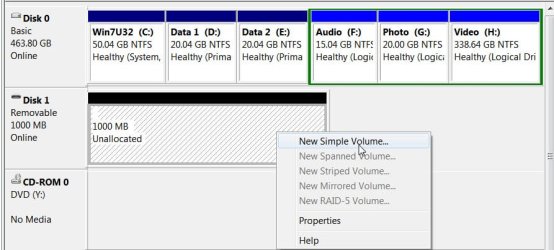
Disk Management shows Unallocated space in Disk 1 of about +/- 465GB

The External drive in question, at one point named Letrang (Tagalog: Letter) H:, with a size of +/- 465GB happens to be the same size!

If this drive was LLF, and there is no Partition, I don't think it will be showing in a RogueKiller report, or any other malware tool which identifies partitions as infected, etc. Someone please correct me if I am wrong!!

~~~~
Let's see if we can figure this out...

Please run the Command Prompt as Administrator and do some checking:

Please click on the Start button.
In the seasch box above, type: cmd
Right-click the cmd entry that appears at the top of the programs list, and select: Run as Administrator

Right-click next to the blinking cursor of the Command Prompt, and paste each line in the quote box below, one at a time, and after each line, press Enter:

Diskpart
list volume
select disk 1
detail disk

To provide the information in your next reply, right-click the upper frame of the Command Prompt, and select: Edit > Select all
Go back to the upper frame, right-click, and select: Copy
Open Notepad, and Paste the info on it, and from there provide it in your reply.


~~~~
Also, please download:
32-bit Downloading ListParts
64-bit Downloading ListParts
Save to the Desktop.

Double-click the downloaded file to run the program.

lp.gif


Check: List BCD
Click: Scan

When done, please post the Result.txt in your reply.
 

My Computer My Computer

Computer type
PC/Desktop
Computer Manufacturer/Model Number
An ol' eMachines
OS
Windows 7 Home Premium
Internet Speed
Fine for me...I'm retired!
Hum now my two cents worth I keep seeing that Yontoo mentioned in those reports - it is a well I had better keep my language agreeable - APITA and a pig to get rid of, and one that downloads to the unwary with other apps.

I don't know what anyone else thinks?

Personally I had to dig into the registry to get rid of it but that is my experience of it.:)
 

My Computer My Computer

Computer type
PC/Desktop
Computer Manufacturer/Model Number
Own build (new) Desk1 / Asus ROG Win 7 / Desk2 1st build
OS
Desk1 7 Home Prem / Desk2 10 Pro / Main lap Asus ROG 10 Pro 2 laptop Toshiba 7 Pro Asus P2520 7 & 10
CPU
Desk1 i5 3750K / Laptop i7 GTX 860M / Desk2 i5 2500
Motherboard
Desk1 Asus P877-V / Desk2 Gigabyte H67 UD3H / Laptop ?
Memory
Desk1 8GB (1866) / Desk2 16GB (1333) / Laptop 8Gb DDR3
Graphics Card(s)
Desk 1& 2NVidia GTX 650 & Laptops on board Intel
Sound Card
Desk 1 & 2 -XONAR DG Realtek High Def audio Laptop
Monitor(s) Displays
Desk 1 Benq HD 2450 / Desk2 Philips 24" / Laptop 17.5"
Screen Resolution
1920x1080 D1 & D2 & Laptop 1
Hard Drives
Desk1 Samsung 120GB 830 SSD
Asus ROG 256GB 850 Pro SSD
Desk2 Samsung 840 256 SSD
Toshiba 120GB EVO
PSU
Desk 1 Corsair HX 1050/ Laptop ? / Desk 2 Corsair HX 650
Case
Desk 1 Cooler HAF XM ? Toshiba laptop / Desk2 Coolermaster
Cooling
Fans on all Desk1 -2 Desk2 - all Coolermasters 5 Laptop ?
Keyboard
Desk 1 MS Sidewinder X6 Desk 2 MS Sidewinder X 4
Mouse
Desk 1&2 - Gigabyte MS 900 gamer - laptop - Logitec wireless
Internet Speed
ADSL2+
Other Info
One other Desktop (tester) and spare Toshba laptop both with SSD's
Running Kaspersky 2016 ISS on all machines config'd identically
Logitec audio stereo systems on each machine (x3)
Canon MG5250MFC
Router/modem TP-Link running WPA2SK
@ICit2lol,

In Post #2, you suggested AdwCleaner, and it does dig into the Registry.

Also, RogueKiller was run later on.

Between those two proggies, the pita was toasted, and it didn't even get any olive oil!!
 

My Computer My Computer

Computer type
PC/Desktop
Computer Manufacturer/Model Number
An ol' eMachines
OS
Windows 7 Home Premium
Internet Speed
Fine for me...I'm retired!
@ICit2lol,

In Post #2, you suggested AdwCleaner, and it does dig into the Registry.

Also, RogueKiller was run later on.

Between those two proggies, the pita was toasted, and it didn't even get any olive oil!!
Yes mate but I don't remember having seen that it had been run. The rotten thing is a type of control where you go app and personally I found it such a hindrance, and very unnecessary.
So it had me wanting to get rid of real quick only to find it is a stubborn rat and doing it from the reg myself was the only answer.
 

My Computer My Computer

Computer type
PC/Desktop
Computer Manufacturer/Model Number
Own build (new) Desk1 / Asus ROG Win 7 / Desk2 1st build
OS
Desk1 7 Home Prem / Desk2 10 Pro / Main lap Asus ROG 10 Pro 2 laptop Toshiba 7 Pro Asus P2520 7 & 10
CPU
Desk1 i5 3750K / Laptop i7 GTX 860M / Desk2 i5 2500
Motherboard
Desk1 Asus P877-V / Desk2 Gigabyte H67 UD3H / Laptop ?
Memory
Desk1 8GB (1866) / Desk2 16GB (1333) / Laptop 8Gb DDR3
Graphics Card(s)
Desk 1& 2NVidia GTX 650 & Laptops on board Intel
Sound Card
Desk 1 & 2 -XONAR DG Realtek High Def audio Laptop
Monitor(s) Displays
Desk 1 Benq HD 2450 / Desk2 Philips 24" / Laptop 17.5"
Screen Resolution
1920x1080 D1 & D2 & Laptop 1
Hard Drives
Desk1 Samsung 120GB 830 SSD
Asus ROG 256GB 850 Pro SSD
Desk2 Samsung 840 256 SSD
Toshiba 120GB EVO
PSU
Desk 1 Corsair HX 1050/ Laptop ? / Desk 2 Corsair HX 650
Case
Desk 1 Cooler HAF XM ? Toshiba laptop / Desk2 Coolermaster
Cooling
Fans on all Desk1 -2 Desk2 - all Coolermasters 5 Laptop ?
Keyboard
Desk 1 MS Sidewinder X6 Desk 2 MS Sidewinder X 4
Mouse
Desk 1&2 - Gigabyte MS 900 gamer - laptop - Logitec wireless
Internet Speed
ADSL2+
Other Info
One other Desktop (tester) and spare Toshba laptop both with SSD's
Running Kaspersky 2016 ISS on all machines config'd identically
Logitec audio stereo systems on each machine (x3)
Canon MG5250MFC
Router/modem TP-Link running WPA2SK
Flippylumpy,

Thanks for the info!

Partitions of Disk 1:
===============
Disk ID: 6B8EB0C8
There are no partitions on this disk to show.


@jumanji

Your guidance is needed to proceed! :D
 

My Computer My Computer

Computer type
PC/Desktop
Computer Manufacturer/Model Number
An ol' eMachines
OS
Windows 7 Home Premium
Internet Speed
Fine for me...I'm retired!
Simple, Flippylumpy

Just rightclick on the unallocated space, click on New Simple Volume and format your drive with the wizard that kicks in. (assign drive letter, file system, Volume label etc., and quick format.) I think that should go through without any problems.

20-03-2013 21-22-23.jpg

(yep, I was just experimenting and had an unallocated pendrive and sure I had used LLF Tool to lowlevel format, Partition Wizard to make it unallocated and trying all sorts of things. :D)

Thanks to cottonball for cleansing your PC and making this possible.
 
Last edited:

My Computer My Computer

OS
Windows 7 Home Premium 32 bit
Any time jumanji, glad to help.

If any time in the future you get someone with malware, just let me know, and will do my best.

Regards...
 

My Computer My Computer

Computer type
PC/Desktop
Computer Manufacturer/Model Number
An ol' eMachines
OS
Windows 7 Home Premium
Internet Speed
Fine for me...I'm retired!
woah, Thank you so much guys! I appreciate the time you spend here to discuss and solve me problem, It was really informative. Ohmm, one more thing, how do I revert the Unhide.exe effect?
 

My Computer My Computer

Computer type
Laptop
Computer Manufacturer/Model Number
acer
OS
windows 7 ultimate 32bit
I haven't used unhide.exe anytime and so I wouldn't know what effect you are mentioning.

If you mention in detail what exactly is the "effect" that you may want to undo, perhaps some solution may be forthcoming. Let us see whether cottonball has something to say on it.
 

My Computer My Computer

OS
Windows 7 Home Premium 32 bit
Here we go...

To hide the files in Windows, reverse the steps that follow:

Close all programs so that you are at the Desktop.

Go to Start > Control Panel > Appearance and Personalization > Folder Options

In Folder Opgtions > View tab:
Uncheck: Show Hidden Files or Folders
Under the Hidden files and folders section uncheck: Show hidden files, folders, or drives
Check: Hide extensions for known file types
Remove the check from: Hide protected operating system files (Recommended)

Press: Apply > OK

For other files not governed by Windows Folder Options, manually hide
them by right-clicking on the file, selecting Properties, and checking the Attributes box
next to Hidden.
 

My Computer My Computer

Computer type
PC/Desktop
Computer Manufacturer/Model Number
An ol' eMachines
OS
Windows 7 Home Premium
Internet Speed
Fine for me...I'm retired!
That works, now I can use all the stuffs I learned here if it happens again. Thanks again guys, specially for Jumanji who helped me from the very start. :D
 

My Computer My Computer

Computer type
Laptop
Computer Manufacturer/Model Number
acer
OS
windows 7 ultimate 32bit
Glad to see the solved tick mark on this thread. While I do rightly take pride in what I had done on this thread, a major part, that of cleansing your PC of all malware, was carried out by mate cottonball, the Malware Buster.:)

I had no doubt whatsoever that once your PC was clean, your external hard disk can be fixed. I also knew that it could have easily been done on another clean PC but the need of the hour was cleansing your PC and that is why I diverted you to the System Security sub-forum.

As Slartybart rightly said (" Soon enough FlippyLumpy will be an expert" ) in his post #35, you are one now :D , thanks to SevenForums.

I also appreciate your perseverance and following the instructions to the dot throughout this thread.

Have a good night.
 

My Computer My Computer

OS
Windows 7 Home Premium 32 bit
@Flippy lumpy

Thanks again guys, specially for Jumanji who helped me from the very start.

Rightly so. jumanji is very knowledgeable, and a true expert.


@jumanji,
Malware Buster??

I like to destroy malware like a heat seeking missile!

...as long as the missile does not turn around and hit me in the...rear!!!
 

My Computer My Computer

Computer type
PC/Desktop
Computer Manufacturer/Model Number
An ol' eMachines
OS
Windows 7 Home Premium
Internet Speed
Fine for me...I'm retired!
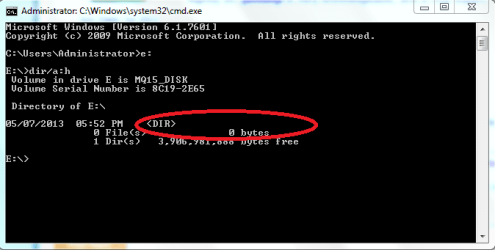
Hello sir. I am having the same problem with my USB Flash Drive. I did all as directed by jumanji in post#11. Now WinRAR shows the drive empty. Windows Explorer also shows "This folder is empty". Although it shows 3.73 as total size and 3.63 free. This hints me that my data is still there on the flash drive.

Attached is the result of DIR/A:H in CMD. It shows a DIR without any name.
 

Attachments

  • Capture.PNG
    Capture.PNG
    11.4 KB · Views: 7

My Computer My Computer

Computer Manufacturer/Model Number
HP Pavillion DV67000
OS
Windows 7 Ultimate 32bit
CPU
Interl(R) Pentium(R) Dual CPU T2390 @ 1.86GHz 1.87Ghz
Motherboard
Quanta 30D2
Memory
1024MBytes (DDR2)
Graphics Card(s)
NVIDIA GeForce 8400M GS
Sound Card
Realtek High Definition Audio
Monitor(s) Displays
Generic PnP Monitor (Mobile PC Display)
Screen Resolution
1200 x 800
Hard Drives
WDC WD120BEVS-60USTO ATA Device
Keyboard
HID Keyboard Device (Standard PS/2 Keyboard)
Mouse
Synaptics PS/2 Port TouchPad
Internet Speed
Down=0.93 Mb/s Up=0.21 Mb/s Ping=85 m/s (from speedtest.net)
Other Info
Batteries:
Microsoft AC Adapter
Microsoft ACPI-Compliant Control Method Battery
Microsoft Composite Battery
Shut down your computer completely after safely removing your pen drive.

Reboot and plug in your pen drive.

Run WinRAR and explore the contents of your pen drive and post a screenshot of it.

Afterwards, close WinRAR ( do not plug out the pen drive) and take a screenshot of Windows Disk Management. Let us see how the pen drive shows up in Disk Management. http://www.sevenforums.com/tutorials/274797-disk-management-post-screen-capture-image.html

I shall be back here after another six hours and then examine it. So you have all the time in the world.:)

( I only hope that you have not deleted all the files in WinRAR. You should have examined the contents of each and every folder and deleted only what obviously are not your data files/folders. Let us see.)
 

My Computer My Computer

OS
Windows 7 Home Premium 32 bit
Back
Top