Solved External Hard Drive error ~$WV.FAT32

Thanks.
Here is all that you asked for:
 

Attachments

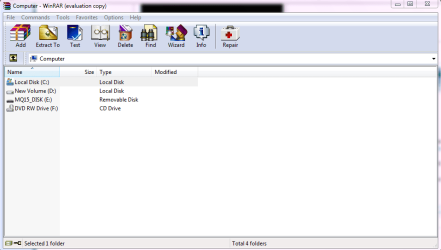
  • before dbl clck.PNG
    before dbl clck.PNG
    20.6 KB · Views: 5
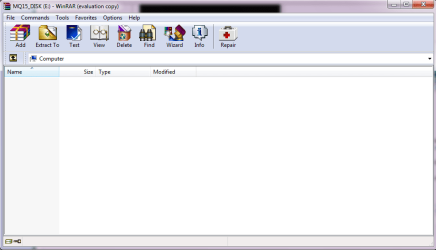
  • after dbl clck.PNG
    after dbl clck.PNG
    18 KB · Views: 5
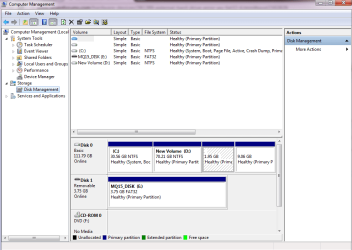
  • Win Dsk Mgmnt.PNG
    Win Dsk Mgmnt.PNG
    28.7 KB · Views: 5

My Computer My Computer

Computer Manufacturer/Model Number
HP Pavillion DV67000
OS
Windows 7 Ultimate 32bit
CPU
Interl(R) Pentium(R) Dual CPU T2390 @ 1.86GHz 1.87Ghz
Motherboard
Quanta 30D2
Memory
1024MBytes (DDR2)
Graphics Card(s)
NVIDIA GeForce 8400M GS
Sound Card
Realtek High Definition Audio
Monitor(s) Displays
Generic PnP Monitor (Mobile PC Display)
Screen Resolution
1200 x 800
Hard Drives
WDC WD120BEVS-60USTO ATA Device
Keyboard
HID Keyboard Device (Standard PS/2 Keyboard)
Mouse
Synaptics PS/2 Port TouchPad
Internet Speed
Down=0.93 Mb/s Up=0.21 Mb/s Ping=85 m/s (from speedtest.net)
Other Info
Batteries:
Microsoft AC Adapter
Microsoft ACPI-Compliant Control Method Battery
Microsoft Composite Battery
Strange!!!!

1. When you ran WinRAR for the first time following jumanji's procedure ;) and double clicked on MQ15- Disk E, what did you see? Did it show you any contents? Did you delete anything? Was that label given by you?

2. What exactly prompted you to try WinRAR or the procedures outlined in this thread? Did you get the same exact error message or what was it?

I am surprised here because if you double click on the drive, it should show the contents of that drive but here it takes you to Computer and shows blank.

You may do well if you restate your problem from the beginning.
 

My Computer My Computer

OS
Windows 7 Home Premium 32 bit
Mystery resolved.

Curious, I just ran a quick trial.

I tried WinRAR on an empty 1 GB pen drive. ( I always start with a clean drive. So I did a low level format and then a regular format with HP Tool, which I ever use)

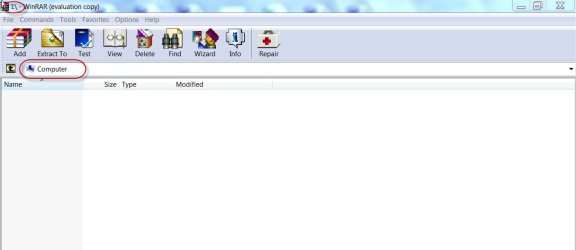
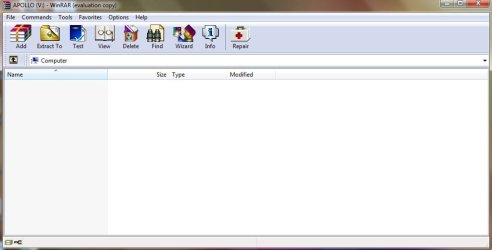
When I run WinRAR, explore the computer and then double click on my empty I drive, though the Title bar takes me to the I drive, WinRAR stays in computer - contents blank.

10-05-2013 21-29-10.jpg

And so, mq15, your pen drive really has got nothing in its belly. ( WinRAR will show even hidden files, which is why we used it here to see the virus hidden files and suspicious files)

Now what exactly is your problem?
 

My Computer My Computer

OS
Windows 7 Home Premium 32 bit

My Computer My Computer

Computer type
PC/Desktop
Computer Manufacturer/Model Number
Custom Build MPCBS AMII
OS
Windows 7 Professional x64
CPU
AMD Athlon II x4 3.00 GHz
Motherboard
MSI GF615M-p33
Memory
16GB Kingston DDR3
Graphics Card(s)
Nvidia 8600 (dual DVI out for 2 monitors)
Sound Card
Onboard
Monitor(s) Displays
Acer H233H 23", ASUS 23"
Screen Resolution
1366 x 768
Hard Drives
(2) WD Blue 1 TB 3 partitions, (1) Seagate 7200 500GB with 2 partitions for useless and frequently deleted data Looking forward do an ssd for os soon.
PSU
Corsair 1100Watt
Case
Apevia HAF
Cooling
HAF AMD High Profile Heat sink and fan
Keyboard
wireless Logitech
Mouse
wireless Logitech
Internet Speed
16 mbps
Antivirus
eSet, AVG, Clam and Clamwin (depends on machine)
Browser
Firefox
Other Info
(9) Win 7 machines all x64 (POS Updated to Windows 7 pro YEA), (4) Linux machines x64 and x86 including a v3000 compaq lappy brought back to life with Mint 9 used to scan drives, (1) Linux Machine dual boot XP Pro (for testing and destroying), (1) Win 7 pro x64/Win 8.1 Lenovo Laptop Dual Boot.
........Also might I suggest a clean thread ;)

You are absolutely correct.

In his post #59 he said " I am having the same problem with my USB Flash Drive"

Now I am wondering whether he really got an error message as in the title of this thread and why at all he entered into this thread.
 

My Computer My Computer

OS
Windows 7 Home Premium 32 bit
Hi,

I have a very similar issue but am unsure how to read into the data.

When I open my Toshiba external, it now shows a shortcut to the external like this:

Image - TinyPic - Free Image Hosting, Photo Sharing & Video Hosting

It's never done that before. Now, when I click this new shortcut, this pops up:

Image - TinyPic - Free Image Hosting, Photo Sharing & Video Hosting

I ran disk management (healthy). I skipped past WinRAR and decided to check to make sure the source wasn't my computer. This is where I could really use some help and guidance! Here's the report after I ran a scan on malware threats (ran through RogueKiller)


Operating System : Windows 7 (6.1.7601 Service Pack 1) 64 bits version
Started in : Normal mode
User : Owner [Admin rights]
Mode : Scan -- Date : 05/11/2013 08:26:28
| ARK || FAK || MBR |

¤¤¤ Bad processes : 1 ¤¤¤
[SVCHOST] svchost.exe -- C:\Windows\SysWOW64\svchost.exe [x] -> KILLED [TermProc]

¤¤¤ Registry Entries : 6 ¤¤¤
[DNS] HKLM\[...]\ControlSet001\Services\Tcpip\Interfaces\{FD384747-C343-4AE3-B338-90B3725EC0E4} : NameServer (203.144.95.100 203.144.65.2) -> FOUND
[HJ SMENU] HKCU\[...]\Advanced : Start_ShowSearch (0) -> FOUND
[HJ SMENU] HKCU\[...]\Advanced : Start_ShowSetProgramAccessAndDefaults (0) -> FOUND
[HJ DESK] HKLM\[...]\NewStartPanel : {59031a47-3f72-44a7-89c5-5595fe6b30ee} (1) -> FOUND
[HJ DESK] HKLM\[...]\NewStartPanel : {20D04FE0-3AEA-1069-A2D8-08002B30309D} (1) -> FOUND
[HJ INPROC][ZeroAccess] HKCR\[...]\InprocServer32 : (C:\Users\Owner\AppData\Local\{1f957569-cd63-6237-8ca9-0c9e5cb16265}\n) [-] -> FOUND

¤¤¤ Particular Files / Folders: ¤¤¤
[ZeroAccess][FILE] n : C:\Users\Owner\AppData\Local\{1f957569-cd63-6237-8ca9-0c9e5cb16265}\n [-] --> FOUND
[ZeroAccess][FILE] @ : C:\Users\Owner\AppData\Local\{1f957569-cd63-6237-8ca9-0c9e5cb16265}\@ [-] --> FOUND
[ZeroAccess][FOLDER] U : C:\Users\Owner\AppData\Local\{1f957569-cd63-6237-8ca9-0c9e5cb16265}\U --> FOUND
[ZeroAccess][FOLDER] L : C:\Users\Owner\AppData\Local\{1f957569-cd63-6237-8ca9-0c9e5cb16265}\L --> FOUND
[ZeroAccess][FILE] Desktop.ini : C:\Windows\Assembly\GAC_32\Desktop.ini [-] --> FOUND
[ZeroAccess][FILE] Desktop.ini : C:\Windows\Assembly\GAC_64\Desktop.ini [-] --> FOUND

¤¤¤ Driver : [NOT LOADED] ¤¤¤

¤¤¤ Infection : ZeroAccess ¤¤¤

¤¤¤ HOSTS File: ¤¤¤
--> C:\Windows\system32\drivers\etc\hosts


¤¤¤ MBR Check: ¤¤¤

+++++ PhysicalDrive0: ST950032 5AS SATA Disk Device +++++
--- User ---
[MBR] 9b221d57aa32fe731e936f545e8a54d3
[BSP] 48b55f46929f8f3b3a0db8344e9d9e6e : Windows 7/8 MBR Code
Partition table:
0 - [ACTIVE] NTFS (0x07) [VISIBLE] Offset (sectors): 2048 | Size: 199 Mo
1 - [XXXXXX] NTFS (0x07) [VISIBLE] Offset (sectors): 409600 | Size: 461216 Mo
2 - [XXXXXX] NTFS (0x07) [VISIBLE] Offset (sectors): 944979968 | Size: 15420 Mo
3 - [XXXXXX] FAT32-LBA (0x0c) [VISIBLE] Offset (sectors): 976560128 | Size: 103 Mo
User = LL1 ... OK!
User = LL2 ... OK!

+++++ PhysicalDrive2: TOSHIBA External USB 3.0 USB Device +++++
--- User ---
[MBR] 06fc92b188bd3f212a572364a023fc21
[BSP] d5d076cfc99131223e5e5999a68b254c : Windows Vista MBR Code
Partition table:
0 - [XXXXXX] NTFS (0x07) [VISIBLE] Offset (sectors): 2048 | Size: 305243 Mo
User = LL1 ... OK!
Error reading LL2 MBR!

Finished : << RKreport[1]_S_05112013_02d0826.txt >>
RKreport[1]_S_05112013_02d0826.txt

Is the source of my problem in this data at all? My main concern is that the issue stems from the computer and not the external!
 

My Computer My Computer

Computer type
Laptop
Computer Manufacturer/Model Number
HP
OS
Windows 7 Home Premium 64bit
CPU
AMD
Your PC is definitely infected and needs to be cleaned - no doubt about it.

I am sending a PM to mate cottonball to look into the RogueKiller report and advise ..

So hang on.
 
Last edited:

My Computer My Computer

OS
Windows 7 Home Premium 32 bit
Thanks, jumanji!

ducat1base,

Since this is a malware issue, please start your own topic in the following forum:
System Security - Windows 7 Help Forums

Please title the topic: ZeroAccess! Attention: cottonball

Also, post the RogueKiller report.

Will be glad to assist you there. :)
 

My Computer My Computer

Computer type
PC/Desktop
Computer Manufacturer/Model Number
An ol' eMachines
OS
Windows 7 Home Premium
Internet Speed
Fine for me...I'm retired!
This is so great

i read about all your discussions and it really helped me. i also encountered the same problem and this really helped.. thanks to everyone.. cheers!
 

My Computer My Computer

Computer type
Laptop
Computer Manufacturer/Model Number
Asus/K53SV
OS
Windows 7 Ultimate x64
Antivirus
avast
Browser
mozilla
Hi efren buada,

Welcome to SevenForums and you are, without doubt, on a distinguished road.;)

Glad that you could find your way through from this longwinding thread.

Inasmuch as the hidden data was important, the HDD was gotten rid of all alien files and folders using WinRAR and the data files in it were unhidden with the attrib command. In order to sanitise the HDD, the data was backed up elsewhere and low level formatting it was undertaken.

At this stage, the malware from the PC kicked in and aborted the lowlevel formatting quarterway through :) making it inaccessible again. Mate cottonball helped the OP to cleanse the PC. Once the PC was clean, the ext HDD was seen automatically and was formatted.

ducat1base (post #66) has a similar problem. He skipped the WinRAR procedure and wanted to have the PC and the ext. HDD treated together to get rid of the problem.

Mate cottonball is helping out ducat1base here http://www.sevenforums.com/system-security/290053-zeroAccess-attention-cottonball.html

Well, that throws out an interesting question whether one should treat the ext. HDD and the PC separately or to treat these together as in the zeroAccess thread.

That, I would think, will depend upon how paranoid the OP is in retrieving his data first.:)
 

My Computer My Computer

OS
Windows 7 Home Premium 32 bit
That's about all.

I hope you can access all the files/folders you want and those are ok.

What I say here now is optional but recommended.

1. Backup all your wanted data into another drive.

2. Download Windows Executable (works without installation) version of HDD Lowlevel format tool from HDDGURU: HDD LLF Low Level Format Tool

3.Also download the HP USB Disk Storage Format Tool 2.2.3 from Download HP USB Disk Storage Format Tool 2.2.3 Free - Windows-based Format Utility for HP Drive Key or DiskOnKey USB Device - Softpedia This is again a Windows executable requiring no installation.

4. Reboot and plug-in only this external drive which you want to sanitise. ( Remove all other external drives/pendrives so that you don't make a mistake of selecting a wrong drive)


5. Run the lowlevel format Tool and do the lowlevel format. This will write zeroes on all sectors and initialise the drive to the factory condition. You will see the progress bar and wait till it completes. Close the tool when done.

View attachment 258822

View attachment 258823

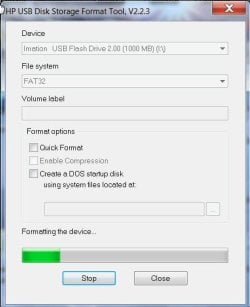
6. Now do a regular format with the HP Tool. Right click on the executable and Run as administrator. When format is complete , close the tool

View attachment 258824

Now your drive is as clean and new as fresh from the factory.

You may transfer all your data back to it.

( Do ensure that your computer and other drives attached to it are virus-free)

If your problems are resolved mark this thread as solved.

What we have done thus far:

1. Check for any suspicious and other files/ folders and delete them keeping only the wanted folders/files using WinRAR (which can show even superhidden files)

2. Unhide the rest of the files/folders which the virus had hidden

3. Sanitise the drive leaving nothing to chance.



Messed up things for me...:(:confused::cry:
I performed:
1. Data backup by WinRar... Successful
2. Lowlevel format via Lowlevel format Tool... Successful
3. now when i am going for the "HP USB Disk Storage Format Tool"... :cry:
Here, in the dialog box Device dropdown the disk is not present. When i check in disk management, the harddisk is unallocated in black color. And right click not showing "Basic Volume" option...

Please help me out ...:huh:

-
Regards,
Vilas
 

My Computer My Computer

Computer type
PC/Desktop
OS
Win 7
Done and fixed at own.

If you value for your devices and data; Please don't go for these tools HDD LLF Low Level Format Tool, HP USB Disk Storage Format Tool. You can not count always on this.. I have experienced for Seagate External Hard Disk (500 GB) and a 4 GB pen drive.

Regards,
Vilas
 

My Computer My Computer

Computer type
PC/Desktop
OS
Win 7
Data backup by WinRAR, successful.

HDD Lowlevel Format Tool - successful.(?)

Your gripe against HP USB Disk Storage Format Tool is not explained.

The device is not shown. Which device you have not mentioned. Was it your 500 GB Seagate external drive or 4GB pen drive?

One should also understand that HDD Lowlevel Format Tool does not do anything destructive. It merely writes zeros to all sectors to any hard drive, same as Disk Part clean all.

Since you had a Seagate HDD, you could have done the same thing with the Seagate Seatools for Windows and DOS. Please do read about it. The HDD LLF Tool does it for all HDDs.

You only mention "Done and fixed at own" but do not mention what you did.

Can you please tell us what you did that fixed it.

It would definitely help us understand it better and would also help those who find they are unable to format using the HP Tool.
 
Last edited:

My Computer My Computer

OS
Windows 7 Home Premium 32 bit
To check the veracity of your statement, I did a small experiment, which anybody can do.

I pulled out my Imation 1 GB pen drive - the first pendrive I acquired paying a fantastic amount then. It was a bootable MSDOS drive I created using Rufus. It also had Test Disk for DOS from which I could run Test Disk and PhotoRec booting from the pen drive.

I ran HDD Low level Format Tool to write zeros to all sectors. After that the Pen drive appeared RAW in Windows Disk Management asking me to format it. As a matter of fact, I always write zeros to the first sector whenever I want to create a RAW drive. The following screenshots apply.

1. All sectors zeroed with the HDD LLF Tool. ( The screenshot shows only the first Sector but I had checked that all sectors are zeros.)

18-10-2013 19-43-07.jpg

2, The pen drive in Windows Disk Management. Shows as RAW.

18-10-2013 19-47-22.jpg

After that I used the HP format utility to format it.

3. Formatting in progress. As one can see the HP utility did see the pen drive and formatted it.

18-10-2013 19-49-48.jpg

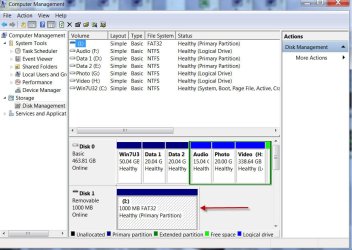
4. The pen drive in Windows Disk Management after successful formatting with the HP tool. I did a full format.

18-10-2013 19-59-18.jpg

In the circumstances, I wouldn't buy your advice.:huh:

EDIT: I didn't see your post #71 earlier since I was preoccupied with so many other things and was also out of station.
 
Last edited:

My Computer My Computer

OS
Windows 7 Home Premium 32 bit
Hello Jumanji...
Thanks for your reply.. here I tried to explain my scinario... please let me know in case of additional details required.

I had formatted Seagate HD (500GB) useing the HDD LLF Low Level Format Tool on WIN7 (64 bit); after that tried HP USB Disk Storage Format Tool as a second step to format. However formatted harddisk was not listed in the tool's drop down, so can't proceed with the next step. In disk management the HDD was in black color (at 2nd step from your reply). also was not able to create the partition as well.
Afterwords i tried to connect to WIN XP laptop, it allowed me to create partition in disk management. so created.

but partially solved. because, NOw strenge thing is; I placed some data on HDD, tested by connecting HDD many times to my same machine... it was working fine. BUT when i connect this HDD to any 32 bit device (win XP)... and again connect to WIN7 (64 bit)... the original issue "External Hard Drive error ~$WV.FAT32" (or "External Hard Drive error ~$*****.FAT32") occuring... HDD works fine only if i am not going to connect this HDD to any 32 bit OS laptop... same this is happening with my iBall 4GB pen drive (used same tools)..
 

My Computer My Computer

Computer type
PC/Desktop
OS
Win 7
As far as the first part of your post, I always do my experiments on my Windows 7 32 bit desk top.

I shall do it now on my Win7 64bit laptop and check on it but that is gonna take sometime.

As far as the second part is concerned, I would presume that your 32 bit machine (and probably your 64 bit machine too) is infected. You may seek help from the Virus killers here on cleansing up your PCs by raising a query in the Security subforum .( That had never been my cup of Tea.:)) Once all the machines where you plugged in the devices are cleared, get rid of all suspicious files on your drives with the WinRAR method. ( You can do that even now but after that do not plug the devices in any of those PCs till your PCs are cleared of all infections.)

EDIT: Honestly, I don't remember what all has gone through in this thread. I have only a 3 day memory :o and have to find sometime to go through it again.
 

My Computer My Computer

OS
Windows 7 Home Premium 32 bit
Than kyou Jumanji...

I had formatted my Laptop... then installed McAfee antivirus... performed scan for my Hard Disk.. found some virus.. deleted/quarantine the visruses found... re-connected the HDD.. and got into this issue.. Then followed steps mentioed in my post #71. :confused:

Previously also I had same OS.. (Win 7 64 bit OS).. however, HDD was working fine at start then observed "ShortCut" visrus.. so preceed with this all :shock:..

-
Regards,
Vilas
 

My Computer My Computer

Computer type
PC/Desktop
OS
Win 7
Vills I have been watching and Jumanji has got you fixed but for my two cents worth mate I would not put McAfee within shouting distance of my machines in my own personal view it is rubbish.

It throws a lot of false positives and is not well rated by the major test sites.

If yo want and ths is purely your choice of course you can pick something else paid or get one free from here Probably the Best Free Security List in the World - Page 2 any except AVG another piece of what I consider annoying junk.

for some good on call scanners that will not interfere with the main security try these

http://www.superantispyware.com/

http://www.malwarebytes.org/products/malwarebytes_free/

http://www.bleepingcomputer.com/download/adwcleaner/

download from bleeping computer

delete any rubbish they find:)

PS I meant to mention that there are other programs withing the main link
 

My Computer My Computer

Computer type
PC/Desktop
Computer Manufacturer/Model Number
Own build (new) Desk1 / Asus ROG Win 7 / Desk2 1st build
OS
Desk1 7 Home Prem / Desk2 10 Pro / Main lap Asus ROG 10 Pro 2 laptop Toshiba 7 Pro Asus P2520 7 & 10
CPU
Desk1 i5 3750K / Laptop i7 GTX 860M / Desk2 i5 2500
Motherboard
Desk1 Asus P877-V / Desk2 Gigabyte H67 UD3H / Laptop ?
Memory
Desk1 8GB (1866) / Desk2 16GB (1333) / Laptop 8Gb DDR3
Graphics Card(s)
Desk 1& 2NVidia GTX 650 & Laptops on board Intel
Sound Card
Desk 1 & 2 -XONAR DG Realtek High Def audio Laptop
Monitor(s) Displays
Desk 1 Benq HD 2450 / Desk2 Philips 24" / Laptop 17.5"
Screen Resolution
1920x1080 D1 & D2 & Laptop 1
Hard Drives
Desk1 Samsung 120GB 830 SSD
Asus ROG 256GB 850 Pro SSD
Desk2 Samsung 840 256 SSD
Toshiba 120GB EVO
PSU
Desk 1 Corsair HX 1050/ Laptop ? / Desk 2 Corsair HX 650
Case
Desk 1 Cooler HAF XM ? Toshiba laptop / Desk2 Coolermaster
Cooling
Fans on all Desk1 -2 Desk2 - all Coolermasters 5 Laptop ?
Keyboard
Desk 1 MS Sidewinder X6 Desk 2 MS Sidewinder X 4
Mouse
Desk 1&2 - Gigabyte MS 900 gamer - laptop - Logitec wireless
Internet Speed
ADSL2+
Other Info
One other Desktop (tester) and spare Toshba laptop both with SSD's
Running Kaspersky 2016 ISS on all machines config'd identically
Logitec audio stereo systems on each machine (x3)
Canon MG5250MFC
Router/modem TP-Link running WPA2SK
Thank you ICit2lol :)
 

My Computer My Computer

Computer type
PC/Desktop
OS
Win 7
Hello Guys,
I was having similar issue but the error was different "There was a problem starting ~$WRN.FAT32".
When I saw jumanji's steps solved the similar issue I followed the same :)
But I guess i have done mistake without asking on this forum as I deleted all files winrar was showing,
I deleted following files from winrar,
Apollo....ink (shortcut, size 702)
Thumbs.db
autorun.inf
desktop.ini
Recycle Bin

but now disk does not show anything. even winrar does not show any files.
any help would be appreciated.

I have run "attrib -h -r -s /s /d v:\*.*" but no luck :(

thanks.
 

Attachments

  • disk mgmt.jpg
    disk mgmt.jpg
    110.7 KB · Views: 3
  • rar.jpg
    rar.jpg
    31.6 KB · Views: 0

My Computer My Computer

Computer type
Laptop
Computer Manufacturer/Model Number
Acer
OS
Windows 7 home 32bit
CPU
i3
Memory
4gb
Back
Top