External Hard Drive Problem

ACWN

Crazy Ferret Lady
Power User
Local time
4:41 PM
Messages
136
Location
The desert
My fiancee has an external hard drive from Fabrik, a SimpleDrive. Its a TB in size. He's using it on his Windows XP. However, yesterday it stopped working. Sortve. It works in that the light comes on when its plugged in and powered up, and it shows up in the device manager, but he cannot access it in My Computer.

I took it to see if I could get it to work on my computer. The same issue happens. It installed fine. Light comes on. Its in the Device Manager where it says its recognized and running properly, and also shows up in Devices and Printers, but it doesnt show up in My Computer.

Uninstalling and reinstalling from the Device Manager doesnt do anything.


After much googling, I found my way to the Disk Management. The disk is there in the bottom half, but its labeled as Disk 1 - unknown - not initialized.

Right clicking and clicking on Initialize Disk brings up a window with the options of a Master Boot Record or GUID Partition Table. Neither do anything. When I hit okay, all I get is "Incorrect Function".


The only info that google searchs tell me is to right click and change Drive Letter and Path. I cant do that.


I cannot find anything else via google, so I came here in hopes that someone could help. He has a LOT of important info on this drive so I cant just reformat it.

And yes, I contacted the company, but it may take until Tuesday before I hear anything from them.


Any suggestions, or should we just wait till the company gets back to us?
 

My Computer

Computer type
Laptop
Computer Manufacturer/Model Number
HP HDX16 Notebook
OS
Windows 7 Ultimate Home 64
CPU
Intel Core Duo @ 3.06GHz
Motherboard
Quanta 361B
Graphics Card(s)
NVDIA GeForce GT 130M
Sound Card
IDT HD Audio Codec
Screen Resolution
1920 x 1080
Hard Drives
500GB Seagate
Mouse
Wacom Intuos4
Antivirus
Norton Internet Security
Browser
IE10

My Computer

Computer Manufacturer/Model Number
HP, Dell, Gateway, Toshiba - 4 laptops and 2 desktops
OS
Vista, Windows7, Mint Mate, Zorin, Windows 8
CPU
from 1.6GHz Duo to i7
Monitor(s) Displays
2x HP w2207
Hard Drives
5x HDD, 7x SSD, 12x Externals
Keyboard
with trackball - no mices
Mouse
Trackball mice
Internet Speed
DSL 6000
I wont lose any data on the disk if I do this, right? Just wanna make sure...
 

My Computer

Computer type
Laptop
Computer Manufacturer/Model Number
HP HDX16 Notebook
OS
Windows 7 Ultimate Home 64
CPU
Intel Core Duo @ 3.06GHz
Motherboard
Quanta 361B
Graphics Card(s)
NVDIA GeForce GT 130M
Sound Card
IDT HD Audio Codec
Screen Resolution
1920 x 1080
Hard Drives
500GB Seagate
Mouse
Wacom Intuos4
Antivirus
Norton Internet Security
Browser
IE10
In principle you should not lose data. But that is in principle. Who knows what mistakes you are going to make. But what else are your options?
 

My Computer

Computer Manufacturer/Model Number
HP, Dell, Gateway, Toshiba - 4 laptops and 2 desktops
OS
Vista, Windows7, Mint Mate, Zorin, Windows 8
CPU
from 1.6GHz Duo to i7
Monitor(s) Displays
2x HP w2207
Hard Drives
5x HDD, 7x SSD, 12x Externals
Keyboard
with trackball - no mices
Mouse
Trackball mice
Internet Speed
DSL 6000
Yeah, good point. Kinda hard to make a mistake if I follow the instructions - which is what I plan to do and why I asked. Okay. I'll post again if it works or not. Keep your fingers crossed for me!


EDIT: Okay, I dont know what I'm doing. I tried to follow the instructions as they're listed on the wiki page. They dont match the version I had to end up getting. The second link leads to a page for downloading, but the windows download wont unzip, its corrupted. Tried downloading it from another location, same issue. I had to google for it and found version 6.10.

And the external drive does not show up in the program. There is only 2 options. I checked to make sure. Ran the program while the drive is plugged in and while it wasnt. No change.


So I'm guessing we're up the creek with out a paddle?
 
Last edited:

My Computer

Computer type
Laptop
Computer Manufacturer/Model Number
HP HDX16 Notebook
OS
Windows 7 Ultimate Home 64
CPU
Intel Core Duo @ 3.06GHz
Motherboard
Quanta 361B
Graphics Card(s)
NVDIA GeForce GT 130M
Sound Card
IDT HD Audio Codec
Screen Resolution
1920 x 1080
Hard Drives
500GB Seagate
Mouse
Wacom Intuos4
Antivirus
Norton Internet Security
Browser
IE10
fabrik? never heard of them you will be better off in the future with a brand like western digital
 

My Computer

OS
Windows 7 Ultimate 64bit
CPU
AMD Phenom II X4 945 @3.0ghz
Motherboard
Asrock
Memory
4gb kingston hyperX
Graphics Card(s)
1gb Radeon HD 5670
The drive may be fine inside of the enclosure and the enclosure could be bad.
If the drive is still under warranty, you could send it in for a replacement but you lose your data.
If the data is worth more than voiding the warranty, then open it up and remove the drive and put it into your computer, or into another USB enclosure and see if the drive works.

I've had a couple of enclosures go bad and the drive inside was still functional.

Where are his backup files? You aren't supposed to have a LOT of important files on just 1 drive.
 

My Computer

Computer Manufacturer/Model Number
HAL-9000
OS
Windows 7 Ultimate 64bit
CPU
Intel i7 3770K
Motherboard
Asus Sabertooth Z77
Memory
16GB DDR3 1333 Corsair XMS3
Graphics Card(s)
XFX HD6950 2GB EyeFinity
Sound Card
Logitech G35 & Sennheiser PC135 & VIA HD
Monitor(s) Displays
23" HP 2310e, 23" Samsung B2230, 21.5" Viewsonic
Screen Resolution
5760x1080
Hard Drives
16TB of Storage
128GB & 256GB Crucial M4 SSD's, 2X 1TB WD Black, 3x 2TB WD, 3x 2TB Samsung F4, 1.5TB Seagate, WD 500GB,
PSU
Antec True Power New 650watt
Case
Cooler Master HAF-932
Cooling
Corsair H60 Hydro Cooler, 3x 230mm Fans, 2x120mm Fan
Keyboard
Logitech G15 and G13
Mouse
Logitech G700 Gaming Mouse
Internet Speed
50/10 Mbit
Other Info
Speakers : Alesis M1 Active Mk2 Studio Monitors , APC RS 1200 UPS, HP 4500DN Color Laser, HP P1006 mono Laser, Kodak 8500 Dye-Sub, Epson 1280 inkjet, Epson Worforce 610 MFC
Hi ACWN,

In windows Explorer you said that the disk can't be accessed; but can you see it there (in my computer)? and importantly does it have a drive letter attached to it?

If so you it may be possible to run a check disk on it. If so right click on it, go to properties / tools menu / Check now.

If not, there are a few approaches, I will list all I can think of:

1. Try to get it to read:
- Unplug the drive and reboot the PC
- Turn on the drive power to spin up the drive
- Listen to the drive, you'll hear it start, when it the sound peaks and it appears to be spinning at its fastest, plug in the USB cable.
- This is particularly useful if the drive or the more usually the hardware that attaches it to the usb port is a little faulty and slow to read to the drive. While it's still booting up windows finds the usb but can't read the drive and times out. This way the drive is already spinning at full speed and it can be read by the hardware (it's case) almost immediately.

2. If this fails
- Repeat the steps in different USB ports on your computer to rule out the port or the USB controller as an issue.
- Repeat the steps on another computer.
- Try to swap the USB cable

3. If it still this fails
- Consider sourcing a recovery program that can read RAW disks, this way you can recover your data regardless of a broken MBR or corrupt partition tables. There's many free ones about which I always go for first.
- Download free partitioning software such as partition wizard to run a checkdisk on an uninitialized disk or a disk without a recognized partition structure

If at any stage you are able to read your disk, back everything up asap (i guess you know that though)

If you begin to play with partitioning software or disk manager in windows,it may be an idea to recover the data first with the recovery software so that the partition or MBR is not further damaged.

I wish you luck and if you would like any further clarification on terms or anything, please ask, we are here to help. :D
 

My Computer

Computer Manufacturer/Model Number
Custom Hack job
OS
Windows 7 Ultimate 64 bit
CPU
Intel(R) Core(TM)2 Quad CPU Q8200 @ 2.33GHz
Motherboard
GigaByte EP45-UD3
Memory
8 GB Kingston
Graphics Card(s)
Nvidia GeForce 9600GT
Sound Card
Soundblaster Audigy
Monitor(s) Displays
AOC x2 22"
Hard Drives
2 x Samsung 500GB (RAID)
2 x Samsung 2TB
1 x WD Green 2TB
1 x Seagate 1TB
1 x Samsung 500GB
PSU
Thermaltake QFan 750W
Case
CM Scout Gaming
Cooling
Coolermaster V10
Keyboard
Microsoft Wireless Keyboard 1000
Mouse
Microsoft Wireless Optical 2000
Internet Speed
320
Other Info
Winfast PVR2000CP
LG DVD-RAM DVD/RW/DL Super Multi
Linksys WMP300Nx2 Wireless Adapter
yeah.. if the disk is visible. maybe you can try chkdsk (dive letter): /f
 

My Computer

OS
window's 7
CPU
core 2 quad
Motherboard
gigabyte
Memory
2gb corsair
Graphics Card(s)
ati hd4850
Monitor(s) Displays
lg
Screen Resolution
1600 X 900
Case
power logic
Other Info
none of the spec above is accurate
Krispy - looking for helpful advice here, thank you.

Zepher - Yeah, I know you shouldnt. He usually burns things to CDs and what not, but the problem is is that we're broke and pretty well out of CDs. Its better than him keeping it on the laptop which would have fried it a lot sooner. But thanks, if the company doesnt have any options for us, we'll try replacing the housing.

Tim - Thanks... but no. I said the disk ISNT visible in My Computer. Computer installs it, reads it and it shows up in the Device Manager, but its not fully connecting to the computer because when we attempt to access it in the Disk Manager, it will not initialize - it says its an incorrect function. On his computer, it doesnt even show up in the Disk Manager and keeps disconnecting and reconnecting from the Device Manager.

However, I'll take a look into the recovery program. Thanks.

Oh, what recovery program do you recommend. You suggested it, but didnt recommend one. Thanks
 

My Computer

Computer type
Laptop
Computer Manufacturer/Model Number
HP HDX16 Notebook
OS
Windows 7 Ultimate Home 64
CPU
Intel Core Duo @ 3.06GHz
Motherboard
Quanta 361B
Graphics Card(s)
NVDIA GeForce GT 130M
Sound Card
IDT HD Audio Codec
Screen Resolution
1920 x 1080
Hard Drives
500GB Seagate
Mouse
Wacom Intuos4
Antivirus
Norton Internet Security
Browser
IE10
make your choice here

i recommended Recuva though
 

My Computer

OS
window's 7
CPU
core 2 quad
Motherboard
gigabyte
Memory
2gb corsair
Graphics Card(s)
ati hd4850
Monitor(s) Displays
lg
Screen Resolution
1600 X 900
Case
power logic
Other Info
none of the spec above is accurate
Thanks, kucing, but after some poking around, trying to do Tim's suggestion I found out that unfortunately because our computers cannot fully access the drive, the only way to recover the data is to send it in to have someone physically recover the data. I'm guessing by opening it up and pulling the drive out to read it.

We're beginning to think its the USB hub in the back of the drive that has been damaged because if you move it, it unplugs on his system. Something got yanked and broke off inside, possibly. So I guess our only option is to try and Macgyver a set up to get the info off of it until we can afford to pay someone else to do it.
 

My Computer

Computer type
Laptop
Computer Manufacturer/Model Number
HP HDX16 Notebook
OS
Windows 7 Ultimate Home 64
CPU
Intel Core Duo @ 3.06GHz
Motherboard
Quanta 361B
Graphics Card(s)
NVDIA GeForce GT 130M
Sound Card
IDT HD Audio Codec
Screen Resolution
1920 x 1080
Hard Drives
500GB Seagate
Mouse
Wacom Intuos4
Antivirus
Norton Internet Security
Browser
IE10
i wish you gud luck mate :D
 

My Computer

OS
window's 7
CPU
core 2 quad
Motherboard
gigabyte
Memory
2gb corsair
Graphics Card(s)
ati hd4850
Monitor(s) Displays
lg
Screen Resolution
1600 X 900
Case
power logic
Other Info
none of the spec above is accurate
Thanks, kucing, but after some poking around, trying to do Tim's suggestion I found out that unfortunately because our computers cannot fully access the drive, the only way to recover the data is to send it in to have someone physically recover the data. I'm guessing by opening it up and pulling the drive out to read it.

We're beginning to think its the USB hub in the back of the drive that has been damaged because if you move it, it unplugs on his system. Something got yanked and broke off inside, possibly. So I guess our only option is to try and Macgyver a set up to get the info off of it until we can afford to pay someone else to do it.

Hi ACWN,

You could always open it up your self. If it's a standard drive inside (and I bet you it is) you could purchase another enclosure (for the corresponding drive type e.g. Sata, IDE). If the technician at your local IT shop is nice, they might even put it in for you. I would say to the technician that you'll only buy a new enclosure if the drive can be accessed. Then get them to test and show you that it works. That way you only buy if it 'is' the solution.

I wish you luck!
 

My Computer

Computer Manufacturer/Model Number
Custom Hack job
OS
Windows 7 Ultimate 64 bit
CPU
Intel(R) Core(TM)2 Quad CPU Q8200 @ 2.33GHz
Motherboard
GigaByte EP45-UD3
Memory
8 GB Kingston
Graphics Card(s)
Nvidia GeForce 9600GT
Sound Card
Soundblaster Audigy
Monitor(s) Displays
AOC x2 22"
Hard Drives
2 x Samsung 500GB (RAID)
2 x Samsung 2TB
1 x WD Green 2TB
1 x Seagate 1TB
1 x Samsung 500GB
PSU
Thermaltake QFan 750W
Case
CM Scout Gaming
Cooling
Coolermaster V10
Keyboard
Microsoft Wireless Keyboard 1000
Mouse
Microsoft Wireless Optical 2000
Internet Speed
320
Other Info
Winfast PVR2000CP
LG DVD-RAM DVD/RW/DL Super Multi
Linksys WMP300Nx2 Wireless Adapter
Thanks, kucing, but after some poking around, trying to do Tim's suggestion I found out that unfortunately because our computers cannot fully access the drive, the only way to recover the data is to send it in to have someone physically recover the data. I'm guessing by opening it up and pulling the drive out to read it.

We're beginning to think its the USB hub in the back of the drive that has been damaged because if you move it, it unplugs on his system. Something got yanked and broke off inside, possibly. So I guess our only option is to try and Macgyver a set up to get the info off of it until we can afford to pay someone else to do it.

Hi ACWN,

You could always open it up your self. If it's a standard drive inside (and I bet you it is) you could purchase another enclosure (for the corresponding drive type e.g. Sata, IDE). If the technician at your local IT shop is nice, they might even put it in for you. I would say to the technician that you'll only buy a new enclosure if the drive can be accessed. Then get them to test and show you that it works. That way you only buy if it 'is' the solution.

I wish you luck!

Expanding on Tim's thoughts.

I use a Tri-Head USB adapter kit I got off of eBay for testing HD's externally.
Works with IDE laptop & desktop, & SATA drives. I think you can still find them for less than $10 on eBay.
 

Attachments

  • Tri_Head_tb24611.jpg
    Tri_Head_tb24611.jpg
    19.7 KB · Views: 9

My Computer

Computer type
PC/Desktop
Computer Manufacturer/Model Number
Built them myself, Science Experiments !
OS
Win7 Enterprise, Win7 x86 (Ult 7600), Win7 x64 Ult 7600, TechNet RTM on AMD x64 (2.8Ghz)
CPU
AMD fx8350 4ghz, AMD-32 2400mhz, AMD-64 3200mhz, AMDx64 2.8G
Motherboard
SIS 755, ECS-K8M890M-M (Ult 7600), GigaByte & others
Memory
2gb, 4gb on the Ult 7600, 4gb on Technet RTM, 32gb on FX8350
Graphics Card(s)
Draw my own Graphics, several nVidia cards
Sound Card
on motherboard
Monitor(s) Displays
19" flat scr, 28" I-Inc widescr,22" Emprex Widescr, 23" Acer
Screen Resolution
1280 x 1024, 1440 x 900, 1920 x 1080
Hard Drives
6 pata Ide HD's & 2 Sata HD's
added 80gb external on Ult 7600 computer,
numerous extra 1tb, 2TB, 3Tb SATA HD's
A collection of ext HD Docks w/ HDs
PSU
430w, 550w, 600w, 700, 800, etc
Case
All Generic Full Towers
Cooling
Open Air & a few fans, some w/ colored LEDs
Keyboard
Compaq & Dell recycled from GoodWill
Mouse
Made in China Optical Wired Mouse
Internet Speed
Fast Cable InterNet
Antivirus
AVG Free on 24 different Desktops, NO Problems!
Browser
IE 8 is preferred, but use FireFox sometimes
Other Info
Linksys Routers, switches, & Hubs
Too Many USB Flash Drives to count, Biggest is 64GB !
Eight computers in my home network.
Sixteen computers at my business network.
Linked via TeamViewer !
Lots of old used spare computer parts everywhere!
Well, we DID just open it up and it IS a normal hard drive. So we just need to figure out how we're going to test it to see if its the USB port thats gone bad on us. Thanks for the advice, Tim.

Doc, we may just try that! Off to eBay!

Thanks guys, at least we have some hope again.


Oh, yeah. And if any one is interested... the enclosure mightve been Fabrik, but the drive itself is Western Digital.
 

My Computer

Computer type
Laptop
Computer Manufacturer/Model Number
HP HDX16 Notebook
OS
Windows 7 Ultimate Home 64
CPU
Intel Core Duo @ 3.06GHz
Motherboard
Quanta 361B
Graphics Card(s)
NVDIA GeForce GT 130M
Sound Card
IDT HD Audio Codec
Screen Resolution
1920 x 1080
Hard Drives
500GB Seagate
Mouse
Wacom Intuos4
Antivirus
Norton Internet Security
Browser
IE10
Well, we DID just open it up and it IS a normal hard drive. So we just need to figure out how we're going to test it to see if its the USB port thats gone bad on us. Thanks for the advice, Tim.

Doc, we may just try that! Off to eBay!

Thanks guys, at least we have some hope again.


Oh, yeah. And if any one is interested... the enclosure mightve been Fabrik, but the drive itself is Western Digital.

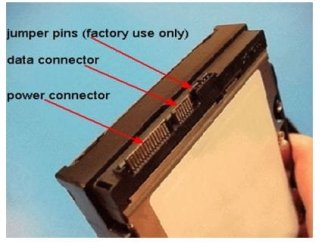
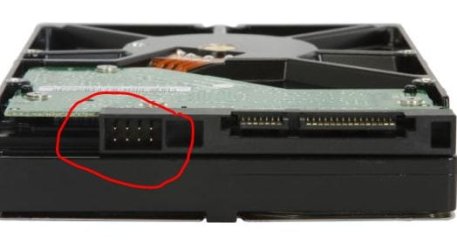
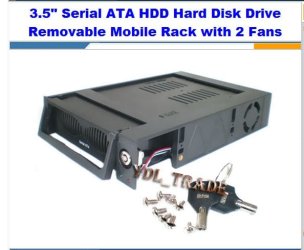
Is the WD drive IDE or SATA connections?

Pics of SATA HD's
 

Attachments

  • Sata_HD_Info_Connections.JPG
    Sata_HD_Info_Connections.JPG
    27.1 KB · Views: 4
  • Sata_Jumpers.JPG
    Sata_Jumpers.JPG
    22.4 KB · Views: 4
  • SATA_Removable_Mobile_Rack.JPG
    SATA_Removable_Mobile_Rack.JPG
    40.2 KB · Views: 1
Last edited:

My Computer

Computer type
PC/Desktop
Computer Manufacturer/Model Number
Built them myself, Science Experiments !
OS
Win7 Enterprise, Win7 x86 (Ult 7600), Win7 x64 Ult 7600, TechNet RTM on AMD x64 (2.8Ghz)
CPU
AMD fx8350 4ghz, AMD-32 2400mhz, AMD-64 3200mhz, AMDx64 2.8G
Motherboard
SIS 755, ECS-K8M890M-M (Ult 7600), GigaByte & others
Memory
2gb, 4gb on the Ult 7600, 4gb on Technet RTM, 32gb on FX8350
Graphics Card(s)
Draw my own Graphics, several nVidia cards
Sound Card
on motherboard
Monitor(s) Displays
19" flat scr, 28" I-Inc widescr,22" Emprex Widescr, 23" Acer
Screen Resolution
1280 x 1024, 1440 x 900, 1920 x 1080
Hard Drives
6 pata Ide HD's & 2 Sata HD's
added 80gb external on Ult 7600 computer,
numerous extra 1tb, 2TB, 3Tb SATA HD's
A collection of ext HD Docks w/ HDs
PSU
430w, 550w, 600w, 700, 800, etc
Case
All Generic Full Towers
Cooling
Open Air & a few fans, some w/ colored LEDs
Keyboard
Compaq & Dell recycled from GoodWill
Mouse
Made in China Optical Wired Mouse
Internet Speed
Fast Cable InterNet
Antivirus
AVG Free on 24 different Desktops, NO Problems!
Browser
IE 8 is preferred, but use FireFox sometimes
Other Info
Linksys Routers, switches, & Hubs
Too Many USB Flash Drives to count, Biggest is 64GB !
Eight computers in my home network.
Sixteen computers at my business network.
Linked via TeamViewer !
Lots of old used spare computer parts everywhere!
That's good news on a standard drive inside, fingers crossed now that the drive itself is a-ok!

I'll second Doc's suggestion on the Tri-Head USB adapter kit, I have couple in the drawer. Mine were A$20 so much cheaper than an external case and fantastic for recovery use as they work with more than one drive type (as Doc showed in his pics). They're not so practical for every day use though.... but all homes should have one ;)
 

My Computer

Computer Manufacturer/Model Number
Custom Hack job
OS
Windows 7 Ultimate 64 bit
CPU
Intel(R) Core(TM)2 Quad CPU Q8200 @ 2.33GHz
Motherboard
GigaByte EP45-UD3
Memory
8 GB Kingston
Graphics Card(s)
Nvidia GeForce 9600GT
Sound Card
Soundblaster Audigy
Monitor(s) Displays
AOC x2 22"
Hard Drives
2 x Samsung 500GB (RAID)
2 x Samsung 2TB
1 x WD Green 2TB
1 x Seagate 1TB
1 x Samsung 500GB
PSU
Thermaltake QFan 750W
Case
CM Scout Gaming
Cooling
Coolermaster V10
Keyboard
Microsoft Wireless Keyboard 1000
Mouse
Microsoft Wireless Optical 2000
Internet Speed
320
Other Info
Winfast PVR2000CP
LG DVD-RAM DVD/RW/DL Super Multi
Linksys WMP300Nx2 Wireless Adapter
It looks like the top two pictures. He's going to put it in his brother's desktop today (I think) to see if it'll work. He doesnt want to wait to have the kit sent from eBay.
 
Last edited:

My Computer

Computer type
Laptop
Computer Manufacturer/Model Number
HP HDX16 Notebook
OS
Windows 7 Ultimate Home 64
CPU
Intel Core Duo @ 3.06GHz
Motherboard
Quanta 361B
Graphics Card(s)
NVDIA GeForce GT 130M
Sound Card
IDT HD Audio Codec
Screen Resolution
1920 x 1080
Hard Drives
500GB Seagate
Mouse
Wacom Intuos4
Antivirus
Norton Internet Security
Browser
IE10
*fingers crossed* :)
 

My Computer

Computer Manufacturer/Model Number
Custom Hack job
OS
Windows 7 Ultimate 64 bit
CPU
Intel(R) Core(TM)2 Quad CPU Q8200 @ 2.33GHz
Motherboard
GigaByte EP45-UD3
Memory
8 GB Kingston
Graphics Card(s)
Nvidia GeForce 9600GT
Sound Card
Soundblaster Audigy
Monitor(s) Displays
AOC x2 22"
Hard Drives
2 x Samsung 500GB (RAID)
2 x Samsung 2TB
1 x WD Green 2TB
1 x Seagate 1TB
1 x Samsung 500GB
PSU
Thermaltake QFan 750W
Case
CM Scout Gaming
Cooling
Coolermaster V10
Keyboard
Microsoft Wireless Keyboard 1000
Mouse
Microsoft Wireless Optical 2000
Internet Speed
320
Other Info
Winfast PVR2000CP
LG DVD-RAM DVD/RW/DL Super Multi
Linksys WMP300Nx2 Wireless Adapter
Back
Top