External hardrive not "loading".

Dear De Vandal,
Tech.wise what you said in your posts is true! Clicking sounds are very bad indeed! I was a member of techguy.org and my area of interest was"general security". One of my friend's signature tune on the site was "if you do not take backup of a backup ,then the original backup is as good as gone"!

My understanding of there HDs ,especially the Extn. ones is, a lot of "movement" during transport is the harbinger of all the trouble! I stay in an East-coastal city named "Nellore" which is 112 miles from Madras in India (now, renamed as Chennai) and i went by car to bring the Extn.HDD(Seagate Free Agent Pro), rather than receiving it by courier!:cool:

Contrary to perceptions, the road from my place to Madras (National Highway-5) is a 6 lane toll road and is akin to driving on a German Autobahn! If that is the kind of care,one is willing to bestow on such "rugged but delicate" hardware, it will respond in kind! Does it not?(with a few exceptions);)

The Acronis Drive Monitor results show that there are "uncorrectable" sectors, or "bad blocks and the "health" is not all that bad (77%), as the recommendation by the program is to buy a new one if the health degrades below 50%!
Regards,
Sreedhav:)
 

My Computer

Computer Manufacturer/Model Number
Sony Vaio C series VPCCB35FN laptop
OS
MS Windows 7 Home Premium 64-bit SP1
CPU
IntelCore [email protected]; Sandy Bridge 32nm Tech.
Motherboard
Sony Vaio Version:C609NJYJ
Memory
4096Mb RAM; Single ChannelDDR3@665MHz; DRAM Freq:662MHz
Graphics Card(s)
AMD Radeon HD 6630M; GPU:Whistler;BIOS Core&mem Clock:123.36
Sound Card
REALTEK High Definition Audio Device; INTEL Display Card
Monitor(s) Displays
Generic PnP Intel HD;Resolution:1920*1040 Pixels; BPP:32bits
Screen Resolution
Current Resolution:1920*1080 Pixels; Monitor Frequency:60Hz
Hard Drives
Internal HD:TOSHIBA MK5061GSY; Real Size:488 GB;NTFS; 3 Partitions; SATA; HEADS:16

External HDD: WD Elements 1023 PORTABLE; Estimated Size: 1TB; NTFS; 3 Partitions
Cooling
Lateral Exhaust with a Cooling Pad Placed Beneath.
Keyboard
Logitech Bluetooth+ Generic Integrated K-B
Mouse
Logitech Bluetooth
Internet Speed
2MBPS
Other Info
1)Trend Micro Titanium Maximum Security Suite Version:3
2)SAS-PRO

3)MBAM--PRO


4)WATERFOX+IE9 +WOT+LINKEXTEND+ DRWEBCUREIT LINK CHECKER

5)SPYWAREBLASTER

6) WINPATROL PLUS

7) SANDBOXIE and
8) A BIT OF COMMON SENSE.
sreedhav

It is reasonable that you can trust the validity of the diagnostic health report. ALL drives, either currently or eventually, contain bad blocks and unrecoverable sectors.

What you must consider is the author or agent of the diagnostic program itself - it is provided by the party who will have to honor the warranty. 50% health before you RMA the drive is absurd and will likely take you outside of the warranty period.

RMA that drive. I would not bother with such effort in transporting the drive, however, unless you enjoy the ride. The mechanisms that can fail due to poor handling will likely fail immediately if they are subject to shipment mishandling. Bad sectors and clusters are not likely to occur as a result of moving a drive without power. Shock while spinning is another matter.
 

My Computer

OS
Windows 7 Ultimate x64
CPU
P4 3.2
Motherboard
Intel 815GM
Memory
DDR 400
Graphics Card(s)
ATI HD3850
Sound Card
C-Media 7.1
Monitor(s) Displays
SyncMaster 244T
Screen Resolution
1920*1200
Hard Drives
Several
PSU
500
Case
PowerSpec $24
Cooling
ThermalTake copper
Internet Speed
Blazing
2TB are at the limit for MBR/BIOS systems. They should be fine of course but sometimes problems arise.
I suggest you try these tools

Download Center - Crystal Dew World
CrystalDiskInfo will give you a health readout (SMART data) for the disk

Partition Wizard Bootable CD allows user to boot computer directly to manage partition.
Partition wizard will give you another view to windows disk management (sometimes more reliable). You can do a "check file system", and "explore partition" if it will let you.

If you get to the stage of needing to recover files try
Recuva - Undelete, Unerase, File and Disk Recovery - Free Download
 

My Computer

Computer type
PC/Desktop
Computer Manufacturer/Model Number
Own build
OS
Windows 7x64 Home Premium SP1
CPU
Intel i7 2600k
Motherboard
ASUS P8Z68 Deluxe
Memory
G.Skill Ripjaws (DDR3-1600) 2x4GB
Graphics Card(s)
Nvidia GeForce GTS 450; Intel HD Graphics 3000(GT2+)
Monitor(s) Displays
Dell Ultrasharp IPS panel U2311H, Samsung SyncMaster P2350
Screen Resolution
1920x1080
Hard Drives
Samsung 850 Pro SSD 256GB, Samsung SSD 840 120GB, Seagates 1TB Barracuda ST31000528AS x2
PSU
Seasonic M12II 520W
Case
Lian Li Lancool PC-K60
Cooling
Case: 1x120mm, 3x140mm CPU: Hyper 212+
Keyboard
Logitech MK520 (wireless)
Mouse
Logitech MK520
Internet Speed
6-7 Mbps
Antivirus
Norton Security Premium, Malwarebytes on 2 (MSE on 3rd PC)
Browser
FireFox
Other Info
Audio: Logitech Z523 2.1
sreedhav

It is reasonable that you can trust the validity of the diagnostic health report. ALL drives, either currently or eventually, contain bad blocks and unrecoverable sectors.

What you must consider is the author or agent of the diagnostic program itself - it is provided by the party who will have to honor the warranty. 50% health before you RMA the drive is absurd and will likely take you outside of the warranty period.

RMA that drive. I would not bother with such effort in transporting the drive, however, unless you enjoy the ride. The mechanisms that can fail due to poor handling will likely fail immediately if they are subject to shipment mishandling. Bad sectors and clusters are not likely to occur as a result of moving a drive without power. Shock while spinning is another matter.

Dear De Vandal, It was an educative post! Thanks ! I really enjoyed the ride for two reasons,the courier handlers in INDIA are most unreliable and secondly, my kids were studying in Madras and i could pay a flying visit and in the process collect the extn.HD (4 years back). My first recommendation to the @op should/would be to chill it! 1)Stop using it pronto! and 2) cover it with a towel and cool it in the refrigerator! I have seen miracles happen with that advise! I am now typing from a Toshiba lappy and it has a 320 GB internal HD. The Acronis D.Monitor showed it's health to be 47%, with bad blocks, 20 days back! When i posted the prob. in this forum, i was advised to immediately stop using the laptop and to cool the Internal HD! I decided to cool the entire laptop instead! i covered it with a towel and PUT IT IN THE DEEP FREEZER FOR 15 MINUTES (sorry for the bold type!) at intervals of 45 minutes thrice! Then with trepidition i started the machine and went thru' the routine of chkdsk /R and chkdsk /F and the laptop's purring along! Surprise: the health climbed to 92% and is staying there(according to Acronis drive monitor). A chkdsk done later revealed NO BAD SECTORS. You treat these thinking machines with loving care and they return it in multiples is my philosophy! Regards, Sreedhav ps: this browser's acting up and everything i type in paras is coming out as a pack! Sorry for causing sore eyes!
 

My Computer

Computer Manufacturer/Model Number
Sony Vaio C series VPCCB35FN laptop
OS
MS Windows 7 Home Premium 64-bit SP1
CPU
IntelCore [email protected]; Sandy Bridge 32nm Tech.
Motherboard
Sony Vaio Version:C609NJYJ
Memory
4096Mb RAM; Single ChannelDDR3@665MHz; DRAM Freq:662MHz
Graphics Card(s)
AMD Radeon HD 6630M; GPU:Whistler;BIOS Core&mem Clock:123.36
Sound Card
REALTEK High Definition Audio Device; INTEL Display Card
Monitor(s) Displays
Generic PnP Intel HD;Resolution:1920*1040 Pixels; BPP:32bits
Screen Resolution
Current Resolution:1920*1080 Pixels; Monitor Frequency:60Hz
Hard Drives
Internal HD:TOSHIBA MK5061GSY; Real Size:488 GB;NTFS; 3 Partitions; SATA; HEADS:16

External HDD: WD Elements 1023 PORTABLE; Estimated Size: 1TB; NTFS; 3 Partitions
Cooling
Lateral Exhaust with a Cooling Pad Placed Beneath.
Keyboard
Logitech Bluetooth+ Generic Integrated K-B
Mouse
Logitech Bluetooth
Internet Speed
2MBPS
Other Info
1)Trend Micro Titanium Maximum Security Suite Version:3
2)SAS-PRO

3)MBAM--PRO


4)WATERFOX+IE9 +WOT+LINKEXTEND+ DRWEBCUREIT LINK CHECKER

5)SPYWAREBLASTER

6) WINPATROL PLUS

7) SANDBOXIE and
8) A BIT OF COMMON SENSE.
My options are; to deep freeze my hard drive, try to recover the data, then format since it's possible. I have everything set up. I'll post back when I have the option of my results.

Piriform Recuva states that I must format the drive before I can use it. I'll try to boot into Ubuntu and see what happens. I'll try a few different tools for recovery, then, if all is lost, I may simply need to format...

--- EDIT ---
Huh, Recuva began the scan, it'll take a while but it's scanning. 13% done so far, let's hope for the best.
 

My Computer

Computer Manufacturer/Model Number
Custom
OS
Windows 8 Professional 64-bit
CPU
Intel Core i3-2100
Motherboard
ASRock Intel Z68M/USB3
Memory
4GB
Graphics Card(s)
GeForece GTX 550 Ti
Screen Resolution
1680 x 1050
PSU
750w
Dear Skulblaka,
QUOTE " Huh, Recuva began the scan, it'll take a while but it's scanning. 13% done so far, let's hope for the best." UNQUOTE. That's good news indeed. scanning a 2TB HD will take time! Being a cool cat as you are, you may take another nap:D! I am really happy that you are using Recuva,from the piriform stable! The one redeeming point is your disk health being 77%!

Best wishes,
Sreedhav:)
 

My Computer

Computer Manufacturer/Model Number
Sony Vaio C series VPCCB35FN laptop
OS
MS Windows 7 Home Premium 64-bit SP1
CPU
IntelCore [email protected]; Sandy Bridge 32nm Tech.
Motherboard
Sony Vaio Version:C609NJYJ
Memory
4096Mb RAM; Single ChannelDDR3@665MHz; DRAM Freq:662MHz
Graphics Card(s)
AMD Radeon HD 6630M; GPU:Whistler;BIOS Core&mem Clock:123.36
Sound Card
REALTEK High Definition Audio Device; INTEL Display Card
Monitor(s) Displays
Generic PnP Intel HD;Resolution:1920*1040 Pixels; BPP:32bits
Screen Resolution
Current Resolution:1920*1080 Pixels; Monitor Frequency:60Hz
Hard Drives
Internal HD:TOSHIBA MK5061GSY; Real Size:488 GB;NTFS; 3 Partitions; SATA; HEADS:16

External HDD: WD Elements 1023 PORTABLE; Estimated Size: 1TB; NTFS; 3 Partitions
Cooling
Lateral Exhaust with a Cooling Pad Placed Beneath.
Keyboard
Logitech Bluetooth+ Generic Integrated K-B
Mouse
Logitech Bluetooth
Internet Speed
2MBPS
Other Info
1)Trend Micro Titanium Maximum Security Suite Version:3
2)SAS-PRO

3)MBAM--PRO


4)WATERFOX+IE9 +WOT+LINKEXTEND+ DRWEBCUREIT LINK CHECKER

5)SPYWAREBLASTER

6) WINPATROL PLUS

7) SANDBOXIE and
8) A BIT OF COMMON SENSE.
It's great news that there is a chance for recovery, once I see the results of the scan I'll post back.

Many of you have helped will receive +1 reputation.

Also, the constant clicking of the external hard drive, is there a possible way of fixing? One of you provided a link to hard drive problems involving that, I have yet to check it. I will once I get home.
 

My Computer

Computer Manufacturer/Model Number
Custom
OS
Windows 8 Professional 64-bit
CPU
Intel Core i3-2100
Motherboard
ASRock Intel Z68M/USB3
Memory
4GB
Graphics Card(s)
GeForece GTX 550 Ti
Screen Resolution
1680 x 1050
PSU
750w
Once you have recovered your data, secure it on another drive and RMA the clicking one.

There is a limited amount of physical repair that can be performed on a drive.
 

My Computer

OS
Windows 7 Ultimate x64
CPU
P4 3.2
Motherboard
Intel 815GM
Memory
DDR 400
Graphics Card(s)
ATI HD3850
Sound Card
C-Media 7.1
Monitor(s) Displays
SyncMaster 244T
Screen Resolution
1920*1200
Hard Drives
Several
PSU
500
Case
PowerSpec $24
Cooling
ThermalTake copper
Internet Speed
Blazing
Read my post #23 again. In addition to Recuva the other two tips are worth others considering when in a similar situation.


PS: I don't recall the OP having a clicking noise.
 

My Computer

Computer type
PC/Desktop
Computer Manufacturer/Model Number
Own build
OS
Windows 7x64 Home Premium SP1
CPU
Intel i7 2600k
Motherboard
ASUS P8Z68 Deluxe
Memory
G.Skill Ripjaws (DDR3-1600) 2x4GB
Graphics Card(s)
Nvidia GeForce GTS 450; Intel HD Graphics 3000(GT2+)
Monitor(s) Displays
Dell Ultrasharp IPS panel U2311H, Samsung SyncMaster P2350
Screen Resolution
1920x1080
Hard Drives
Samsung 850 Pro SSD 256GB, Samsung SSD 840 120GB, Seagates 1TB Barracuda ST31000528AS x2
PSU
Seasonic M12II 520W
Case
Lian Li Lancool PC-K60
Cooling
Case: 1x120mm, 3x140mm CPU: Hyper 212+
Keyboard
Logitech MK520 (wireless)
Mouse
Logitech MK520
Internet Speed
6-7 Mbps
Antivirus
Norton Security Premium, Malwarebytes on 2 (MSE on 3rd PC)
Browser
FireFox
Other Info
Audio: Logitech Z523 2.1
I need to have these defined, I'm not are what they mean; "OP" and "RMA".
 

My Computer

Computer Manufacturer/Model Number
Custom
OS
Windows 8 Professional 64-bit
CPU
Intel Core i3-2100
Motherboard
ASRock Intel Z68M/USB3
Memory
4GB
Graphics Card(s)
GeForece GTX 550 Ti
Screen Resolution
1680 x 1050
PSU
750w
OP - thread starter, original post

RMA - Return Material Authorization, a number or code assigned by the mfgr necessary to return a part under warranty. Contact the warranty provider/mfgr to acquire one. Don't return to mfgr without one.

PS: I don't recall the OP having a clicking noise.
Post 3
 

My Computer

OS
Windows 7 Ultimate x64
CPU
P4 3.2
Motherboard
Intel 815GM
Memory
DDR 400
Graphics Card(s)
ATI HD3850
Sound Card
C-Media 7.1
Monitor(s) Displays
SyncMaster 244T
Screen Resolution
1920*1200
Hard Drives
Several
PSU
500
Case
PowerSpec $24
Cooling
ThermalTake copper
Internet Speed
Blazing
OP - thread starter, original post

RMA - Return Material Authorization, a number or code assigned by the mfgr necessary to return a part under warranty. Contact the warranty provider/mfgr to acquire one. Don't return to mfgr without one.

PS: I don't recall the OP having a clicking noise.
Post 3

I should've probably mentioned this earlier, I have no warranty on the drive.
 

My Computer

Computer Manufacturer/Model Number
Custom
OS
Windows 8 Professional 64-bit
CPU
Intel Core i3-2100
Motherboard
ASRock Intel Z68M/USB3
Memory
4GB
Graphics Card(s)
GeForece GTX 550 Ti
Screen Resolution
1680 x 1050
PSU
750w
Hi there, Skul, did you try to access the HDD via Ubuntu Live CD? how did it go?
 

My Computer

Computer type
PC/Desktop
OS
Windows

My Computer

OS
Windows 7 Ultimate x64
CPU
P4 3.2
Motherboard
Intel 815GM
Memory
DDR 400
Graphics Card(s)
ATI HD3850
Sound Card
C-Media 7.1
Monitor(s) Displays
SyncMaster 244T
Screen Resolution
1920*1200
Hard Drives
Several
PSU
500
Case
PowerSpec $24
Cooling
ThermalTake copper
Internet Speed
Blazing
Hi there, Skul, did you try to access the HDD via Ubuntu Live CD? how did it go?
I began the scan before used Ubuntu, heh, I guess I was in a rush. This scan should show some results in about two hours.
 

My Computer

Computer Manufacturer/Model Number
Custom
OS
Windows 8 Professional 64-bit
CPU
Intel Core i3-2100
Motherboard
ASRock Intel Z68M/USB3
Memory
4GB
Graphics Card(s)
GeForece GTX 550 Ti
Screen Resolution
1680 x 1050
PSU
750w
I see, well... keep us updated, and hopefully you'll recover all the data you need. :)

Cheers, Skul!
 

My Computer

Computer type
PC/Desktop
OS
Windows
Clicking sounds from a hard disk drive may emanate from the head actuator as the drive repetitively tries to recover from one or more errors. The clicking sounds can be the heads repetitively loading or unloading, or they can be the sounds of the actuator striking a stop, or both.

See Failing hard drive sounds - Datacent.com - Datacent for audible samples.
None of those sounds were like mine, on that site the sounds sounded very serious.

Anyway, what could have caused a problem with my drive, I don't remember doing anything serious with it, besides the defrag. Could that have been the problem?

--- EDIT ---

Huh, just checked with the Seagate Warrant and Return Status, my drive, it states, is under warranty. I guess I need to call customer service.
 

My Computer

Computer Manufacturer/Model Number
Custom
OS
Windows 8 Professional 64-bit
CPU
Intel Core i3-2100
Motherboard
ASRock Intel Z68M/USB3
Memory
4GB
Graphics Card(s)
GeForece GTX 550 Ti
Screen Resolution
1680 x 1050
PSU
750w
OP - thread starter, original post

RMA - Return Material Authorization, a number or code assigned by the mfgr necessary to return a part under warranty. Contact the warranty provider/mfgr to acquire one. Don't return to mfgr without one.

PS: I don't recall the OP having a clicking noise.
Post 3
Read post #3 again. I interpreted to mean no "usual click of death" noise.
Maybe you misinterpreted.
 

My Computer

Computer type
PC/Desktop
Computer Manufacturer/Model Number
Own build
OS
Windows 7x64 Home Premium SP1
CPU
Intel i7 2600k
Motherboard
ASUS P8Z68 Deluxe
Memory
G.Skill Ripjaws (DDR3-1600) 2x4GB
Graphics Card(s)
Nvidia GeForce GTS 450; Intel HD Graphics 3000(GT2+)
Monitor(s) Displays
Dell Ultrasharp IPS panel U2311H, Samsung SyncMaster P2350
Screen Resolution
1920x1080
Hard Drives
Samsung 850 Pro SSD 256GB, Samsung SSD 840 120GB, Seagates 1TB Barracuda ST31000528AS x2
PSU
Seasonic M12II 520W
Case
Lian Li Lancool PC-K60
Cooling
Case: 1x120mm, 3x140mm CPU: Hyper 212+
Keyboard
Logitech MK520 (wireless)
Mouse
Logitech MK520
Internet Speed
6-7 Mbps
Antivirus
Norton Security Premium, Malwarebytes on 2 (MSE on 3rd PC)
Browser
FireFox
Other Info
Audio: Logitech Z523 2.1
Well, it'd be in vain, I cannot recover those files. They're unrecoverable, I'll try to contact Seagate customer service for an exchange since I still have the warranty for the drive. Hopefully everything will be alright and the clicking noise that the drive made wasn't normal.

--- EDIT ---

I gave reputation to those who helped, thanks for all of your assistance. I began recovering my data, but it will take weeks, unfortunately. I'll try to exchange this drive for a "working" one with no clicks if it's not normal.
 

My Computer

Computer Manufacturer/Model Number
Custom
OS
Windows 8 Professional 64-bit
CPU
Intel Core i3-2100
Motherboard
ASRock Intel Z68M/USB3
Memory
4GB
Graphics Card(s)
GeForece GTX 550 Ti
Screen Resolution
1680 x 1050
PSU
750w
Read my post #23 again. In addition to Recuva the other two tips are worth others considering when in a similar situation.


PS: I don't recall the OP having a clicking noise.

Dear mjf,
Skul did mention that clicking sounds were emanating from the external HD since quite some time! Probably that should have been the "point in time" when the RMA was followed! Those waters have already flown away, from under the bridge! :(

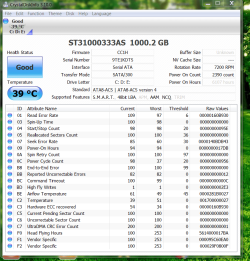
The Crystal disk info' is very useful, this is what i personally feel is "collateral learning"! Thanks for that! Kindly view the snap of my desktop Seagate 1 TB internal disk! Since i do not know how to interpret the results, i request De Vandal:geek: AND MJF:geek:
TO HELP ME WITH THIS
!

Regards,
Sreedhav
 

Attachments

  • CrystalDiskInfo.png
    CrystalDiskInfo.png
    83.9 KB · Views: 5

My Computer

Computer Manufacturer/Model Number
Sony Vaio C series VPCCB35FN laptop
OS
MS Windows 7 Home Premium 64-bit SP1
CPU
IntelCore [email protected]; Sandy Bridge 32nm Tech.
Motherboard
Sony Vaio Version:C609NJYJ
Memory
4096Mb RAM; Single ChannelDDR3@665MHz; DRAM Freq:662MHz
Graphics Card(s)
AMD Radeon HD 6630M; GPU:Whistler;BIOS Core&mem Clock:123.36
Sound Card
REALTEK High Definition Audio Device; INTEL Display Card
Monitor(s) Displays
Generic PnP Intel HD;Resolution:1920*1040 Pixels; BPP:32bits
Screen Resolution
Current Resolution:1920*1080 Pixels; Monitor Frequency:60Hz
Hard Drives
Internal HD:TOSHIBA MK5061GSY; Real Size:488 GB;NTFS; 3 Partitions; SATA; HEADS:16

External HDD: WD Elements 1023 PORTABLE; Estimated Size: 1TB; NTFS; 3 Partitions
Cooling
Lateral Exhaust with a Cooling Pad Placed Beneath.
Keyboard
Logitech Bluetooth+ Generic Integrated K-B
Mouse
Logitech Bluetooth
Internet Speed
2MBPS
Other Info
1)Trend Micro Titanium Maximum Security Suite Version:3
2)SAS-PRO

3)MBAM--PRO


4)WATERFOX+IE9 +WOT+LINKEXTEND+ DRWEBCUREIT LINK CHECKER

5)SPYWAREBLASTER

6) WINPATROL PLUS

7) SANDBOXIE and
8) A BIT OF COMMON SENSE.
Back
Top