External HD Not Recognize

junrie

New member
Local time
9:36 PM
Messages
12
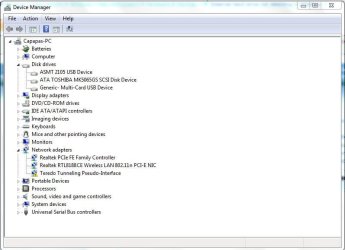
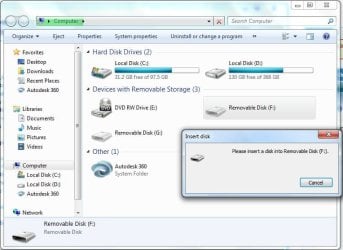
Hello, I have a Windows 7 Professional x64.. My Problem is that my external hard disk mass storage cannot be detected,i cant see the mass storage of my external drive in device management and disk management. Instead there is one that is detected "ASMT 2105 USB Device" yet it is 0 bytes and i cant access, it says insert disk..yet i connected the external drive on my computer. my external drive is Toshiba 3.0

Hoping for your replies and learn what to do, because i have so many important files in my external hard drive. thank you!!
 

Attachments
  • Capture1.JPG
    Capture1.JPG
    61.1 KB · Views: 1
  • Capture.JPG
    Capture.JPG
    48.7 KB · Views: 0

My Computer

Computer type
Laptop
Computer Manufacturer/Model Number
Toshiba
OS
Windows 7 Professional x64
CPU
Intel Celeron Dual-Core T3500
Memory
4 gb
Graphics Card(s)
intel graphics
Antivirus
ESET Smart Security 8
Browser
Mozilla, Google, Comodo
Hi and welcome to SevenForums,
Shut down your machine = Power off.
Disconnect the external,
Power up and after login reconnect it into a different usb port,
Make sure the external if it has a power switch it is on as well,
Cheers.
 

My Computer

Computer type
PC/Desktop
Computer Manufacturer/Model Number
Custom assembled by me :}
OS
Win-7-Pro64bit 7-H-Prem-64bit
CPU
i7-5930K 2nd i9-9940x both water blocked VRM's too
Motherboard
ASUS SABERTOOTH X99 2nd ASUS x299 Apex
Memory
Trident-z 3200C14 2nd Trident-z 3600C16
Graphics Card(s)
EVGA 1080ti ftw3 2nd Titan Xp both water blocked
Sound Card
Built-in Realtek
Monitor(s) Displays
1-AOC G2460PG 24"G-Sync 144Hz/ 2nd 1-ASUS VG248QE 24" 144Hz
Screen Resolution
1920 x 1080 144Hz
Hard Drives
2-Samsung M.2 Evo & Evo Plus
2-Samsung 850 EVO 500GB SSD's/ 3-2.5 W.D. Black 1tb-&3-1tb/3-3.5 WD Black 1tb hdd's
PSU
EVGA SuperNOVA 1000-P2 2nd 1200-P2
Case
2-Corsair Obsidian Series 450D Black ATX Mid Tower
Cooling
Custom water loops
Keyboard
Logitech G710+/ 2nd Logitech G910
Mouse
2-RedDragon M901 Perdition 16400 dpi Gaming mouse = wired
Internet Speed
Comcast Ping 19ms 89.31mbps download speed 6.12mbps upload
Antivirus
Malwarebytes Pro/ Superantispyware Pro
Browser
FireFox & Pale moon
Other Info
2nd ASUS X299 Apex/Intel i9-9940x with Custom water loop/7H-Prem-x64/Corsair 450D case/Ram Trident-z 3600C16 4x8gb / Samsung970Evo plus 500gb SSD/Dual ssd EZ swap evo/PSU EVGA SuperNova 1200w-P2 80+Platinum/GPU Titan Xp /8-ML-140 on push-pull on 2-280GTX rads
Thank you for your reply, ive had done that... and i also connected it to a different ports, my laptop has only 2 ports, but it still the same... some times, it detect the mass storage but after a few minutes, it removes automatically and then cannot detect again..
 

My Computer

Computer type
Laptop
Computer Manufacturer/Model Number
Toshiba
OS
Windows 7 Professional x64
CPU
Intel Celeron Dual-Core T3500
Memory
4 gb
Graphics Card(s)
intel graphics
Antivirus
ESET Smart Security 8
Browser
Mozilla, Google, Comodo
Hi,
Post the exact model of the external device,
Might be Eset blocking the device is Eset new to the machine ?
 

My Computer

Computer type
PC/Desktop
Computer Manufacturer/Model Number
Custom assembled by me :}
OS
Win-7-Pro64bit 7-H-Prem-64bit
CPU
i7-5930K 2nd i9-9940x both water blocked VRM's too
Motherboard
ASUS SABERTOOTH X99 2nd ASUS x299 Apex
Memory
Trident-z 3200C14 2nd Trident-z 3600C16
Graphics Card(s)
EVGA 1080ti ftw3 2nd Titan Xp both water blocked
Sound Card
Built-in Realtek
Monitor(s) Displays
1-AOC G2460PG 24"G-Sync 144Hz/ 2nd 1-ASUS VG248QE 24" 144Hz
Screen Resolution
1920 x 1080 144Hz
Hard Drives
2-Samsung M.2 Evo & Evo Plus
2-Samsung 850 EVO 500GB SSD's/ 3-2.5 W.D. Black 1tb-&3-1tb/3-3.5 WD Black 1tb hdd's
PSU
EVGA SuperNOVA 1000-P2 2nd 1200-P2
Case
2-Corsair Obsidian Series 450D Black ATX Mid Tower
Cooling
Custom water loops
Keyboard
Logitech G710+/ 2nd Logitech G910
Mouse
2-RedDragon M901 Perdition 16400 dpi Gaming mouse = wired
Internet Speed
Comcast Ping 19ms 89.31mbps download speed 6.12mbps upload
Antivirus
Malwarebytes Pro/ Superantispyware Pro
Browser
FireFox & Pale moon
Other Info
2nd ASUS X299 Apex/Intel i9-9940x with Custom water loop/7H-Prem-x64/Corsair 450D case/Ram Trident-z 3600C16 4x8gb / Samsung970Evo plus 500gb SSD/Dual ssd EZ swap evo/PSU EVGA SuperNova 1200w-P2 80+Platinum/GPU Titan Xp /8-ML-140 on push-pull on 2-280GTX rads
Did you use it in any other computer?..
 

My Computer

Computer type
PC/Desktop
OS
Windows 7 Ultimate 64 bit
CPU
Intel pentium 3
Motherboard
MSI
Memory
2GB RAM DDR 3
Graphics Card(s)
Intel HD Graphics
Sound Card
Realtek Audio
Monitor(s) Displays
zenware
Screen Resolution
1680x1050
Hard Drives
80 GB
Case
i-Max
Cooling
Cooler Master
Keyboard
A4TECH
Mouse
edvan
Antivirus
Avast Anti virus 2015
Browser
Google chrome
I dont yet try it to the other computer...my external hard drive is toshiba 500gb and a 3.0.... If ever it will run on other computers, i want to know or learn how to manage it on my own laptop...

I appreciate all your reply thank you very much!
 

My Computer

Computer type
Laptop
Computer Manufacturer/Model Number
Toshiba
OS
Windows 7 Professional x64
CPU
Intel Celeron Dual-Core T3500
Memory
4 gb
Graphics Card(s)
intel graphics
Antivirus
ESET Smart Security 8
Browser
Mozilla, Google, Comodo
right click computer-->manage-->disk management-->right click removable drive-->change the drive letter
 

My Computer

Computer type
PC/Desktop
OS
Windows 7 Ultimate 64 bit
CPU
Intel pentium 3
Motherboard
MSI
Memory
2GB RAM DDR 3
Graphics Card(s)
Intel HD Graphics
Sound Card
Realtek Audio
Monitor(s) Displays
zenware
Screen Resolution
1680x1050
Hard Drives
80 GB
Case
i-Max
Cooling
Cooler Master
Keyboard
A4TECH
Mouse
edvan
Antivirus
Avast Anti virus 2015
Browser
Google chrome
Thank You so much for the reply.... I take it a rest...then just put it now and it read my external hard disk drive... but i am monitoring it now if it will be automatically removed and cant access again... Thank you so much for those who replied at me.. thank you very much :)

Even you dont know me, u still help me.. so thank you very much!
 

My Computer

Computer type
Laptop
Computer Manufacturer/Model Number
Toshiba
OS
Windows 7 Professional x64
CPU
Intel Celeron Dual-Core T3500
Memory
4 gb
Graphics Card(s)
intel graphics
Antivirus
ESET Smart Security 8
Browser
Mozilla, Google, Comodo
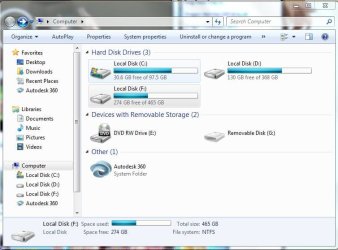
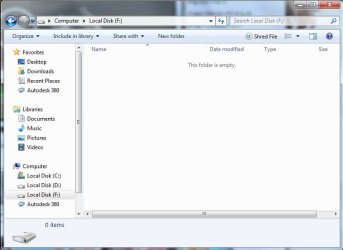
Aw!!! I Can see it.. yet its all Empty! Tsk tsk XD

F: Drive is my external Hard drive
 

Attachments

  • Capture3.JPG
    Capture3.JPG
    58.1 KB · Views: 2
  • Capture4.JPG
    Capture4.JPG
    41.4 KB · Views: 0

My Computer

Computer type
Laptop
Computer Manufacturer/Model Number
Toshiba
OS
Windows 7 Professional x64
CPU
Intel Celeron Dual-Core T3500
Memory
4 gb
Graphics Card(s)
intel graphics
Antivirus
ESET Smart Security 8
Browser
Mozilla, Google, Comodo
Guess Changing the Drive Letter Worked! First i make the time to change its drive letter before it will removed automatically. And i can access and can safety eject my USB external hard drive...

Thank You so much for your help once again!..
 

My Computer

Computer type
Laptop
Computer Manufacturer/Model Number
Toshiba
OS
Windows 7 Professional x64
CPU
Intel Celeron Dual-Core T3500
Memory
4 gb
Graphics Card(s)
intel graphics
Antivirus
ESET Smart Security 8
Browser
Mozilla, Google, Comodo
Thought Changing the Drive Letter worked.. but its not...My external hard drive is removed automatically in the middle of copying my files... Why is that so.... then after it automatically removed, it says "Windows cannot recognize" then it tells me to format my external drive....I ejected it then connect it again.. then cant access again my external hard drive..

Thank you for your help!
 

My Computer

Computer type
Laptop
Computer Manufacturer/Model Number
Toshiba
OS
Windows 7 Professional x64
CPU
Intel Celeron Dual-Core T3500
Memory
4 gb
Graphics Card(s)
intel graphics
Antivirus
ESET Smart Security 8
Browser
Mozilla, Google, Comodo
Hi Junrie,

I got the same problem too. Did you get the solution finally?
 

My Computer

Computer type
PC/Desktop
OS
Windows 7 Ultimate x64
Hello,

I have the same problem, ASMT2105 USB device, not showing, USB 3.
The only way I get it to show is to uninstall the drivers and restart the computer, it works for a couple of days and then......
again same problem.

I hope someone out there has a better solution, a permanent one.
I start to think it's a Windows 7 problem, maybe I'm wrong !
 

My Computer

Computer type
PC/Desktop
Computer Manufacturer/Model Number
unknown
OS
Microsoft Windows 7 Home Premium 64-bit 7601 Multiprocessor Free Service Pack 1
CPU
Intel(R) Core(TM) i7-4770 CPU @ 3.40GHz
Motherboard
Gigabyte Technology Co., Ltd. Z87X-UD3H-CF
Memory
16,0 GB RAM 15,89 GB usable
Graphics Card(s)
Intel(R) HD Graphics 4600
Sound Card
Realtek High Definition Audio
Screen Resolution
1920x1080
Hard Drives
(1) Samsung SSD 840 EVO 120G SCSI Disk Device (2) WDC WD20EFRX-68EUZN0 SCSI Disk Device
Keyboard
Logitech
Mouse
Logitech
Antivirus
Kaspersky Internet Security 2016
Browser
Google Chrome
Hiya I have a similar problem.
I have a Sandisk SDSA4DH-064G, its a MSata internal drive. I've just bought a USB3 to Msata adapter.
When I first plugged it into my friends computer it started loading the driver but it crashed.
I can find the drive in Device Manager. But I can't open it or load any details of he drive.
But I can't find it in Disk Management.

Anyone have a clue?
 

My Computer

Computer type
PC/Desktop
OS
Win 8 64 bit
I believe I have the understanding to the reason of this fault

I noticed people mention ASMT 2105 USB Device

I have this. in my device manager windows 10 ent

The fault I am having is same, but I have narrowed the fault down to how and when it occurs

1st let me explain, my ASMT 2105 relates to a external usb3.0 to m-sata enclosure, I purchased this from ebay, as I have a m4800 laptop and it has a 7mm SSD 256gb as its main hard drive, and a M-card mini card 256gb lite-on ssd in the msata slot as a secondary hard drive...

The system is NOT configured for raid... but I wanted to remove the msata ssd and use the slot for WIGIG, but in the mean time I wanted to take the msata ssd and put it into the enclosure, and use it like a removable hard drive...

So here comes the problem,

liek many people notice, it working fine, then a fault... I noticed when the fault would occur.... anytime I WRITE files to the ASMT 2105 (msata 256gb ssd) it would show the progress of about 199MB/s for maximum 3 seconds and then stall, and the light would blink on the enclosure box.

No matter what from that moment, its no responcsive, and hangs the system, only option is unplug usb lead... which frees up the system, but when i re-insert usb lead, it is still flashing, and the windows 10 does not see it, and neither does disk manager or device manager, it does however make a noise that usb attached...

nothing fixes this, not even driver removed etc, not even restart pc, not even shut down, or combination unplugging and replugging etc


the only way I fix it, is by removing the msata ssd out of the ASMT 2105 enclosure, and putting it back inside the laptop Mcard slot, and reboot TWICE... then it shows up in the system as a SSD working again, from this point, I can remove it and plug back inside the enclosure etc

I tried many scenario, and it will read all day long, but as soon as it is written to more than 3 seconds it hangs and needs the above paragraph in order to get it working again.
 

My Computer

Computer type
PC/Desktop
OS
10
Does your external hard drive have its own power supply? If it is operating only on USB power, that could be the cause of the problems. USB might not be providing sufficient power.

As ThrashZone stated above:
Make sure the external if it has a power switch it is on as well.

If it does not have its own power supply, then unplug all other USB devices except for the keyboard and mouse. Doing this will make more power available to the drive. See if that fixes it.
 

My Computer

Computer type
PC/Desktop
Computer Manufacturer/Model Number
Dell
OS
Linux Mint 18.2 xfce 64-bit (VMWare host) / Windows 8.1 Pro 32-bit (VMWare guest)
CPU
Haswell
Memory
4 GB
Monitor(s) Displays
Acer 23"
Screen Resolution
1920 x 1080
Hard Drives
Two hard drives, 1TB each: One for Linux, one for my data.
Keyboard
IBM Model M
Antivirus
Sophos (Linux), Trend Micro (Windows)
Browser
Firefox, Opera
Other Info
I use Samba to share my data drive with the other computers at my house and with my guest session in VMWare Workstation Player.
well nope, its a light weight no longer that 7cm x 10mm Msata SSD

so it pulls barely any power, unlike a external hard drive with spinning platters etc
 

My Computer

Computer type
PC/Desktop
OS
10
I noticed people mention ASMT 2105 USB Devicet

I have problems with this external case ASMT2105 with huge disks (4TB or more). I thought it was a hard drive issue, but when changed the case, the disk was recognized.

Still trying to find more information about ASMT2105...
 

My Computer

Computer type
PC/Desktop
Computer Manufacturer/Model Number
HP
OS
Windows 7 Professional 64bit
CPU
Intel Core i7-4785T CPU @ 2.20GHz
Memory
16,0 GB
Browser
Chrome
Back
Top