External USB Hard Drive Problems

Thanks Major Bud. I don't but I will likely go and get one. However I posted the issue on the Answers Home Page site and they responded with the following (in case others are having the same issue):
I suggest you to run a scan on both the computer to scan for error.
1. Click Start
2. Type: CMD, from the results, right click CMD->Click 'Run as Administrator'
3. At the Command Prompt, type: chkdsk /r

When you restart your system, your computer will be scanned for errors and attempts will be made to correct them.

This seems to have helped quite a bit after I tested by transferring large video files (500mb). However I do have intermittent problems that after transferring a file in that I cannot read from the external drive and when replugging it in I get the message "driver software was not successfully installed". I then restart and its OK.
 

My Computer

Computer Manufacturer/Model Number
Acer Aspire x188
OS
Windows 7
CPU
Intel Core 2 Quad CPU @ 2.33GHz
Memory
4.00GB RAM
Same problem here, my external hard drive would stop while copying contents, then the bubble "USB device not recognized" pop up.
By the way, the hotfix does not work for me. When I clicked on your link and requested the hotfix, I can only find the x86 version (my pc is 64-bit):
Select Product Language Platform Release File name Version Build File size (bytes) Modified date Windows 7/WindowsServer 2008 R2All (Global)x86sp1fix296521
And yes, same problem with my iPod. If I was restarting my computer, all my devices would be recognized normally, the problem only occurred when transferring data. I can only hope for this
This hotfix might receive additional testing. Therefore, if you are not severely affected by this problem, we recommend that you wait for the next software update that contains this hotfix.
 

My Computer

OS
Windows 7 Professional 64-bit
Omnia vanitas, did you try the fix in my message above, CMD, etc.? It does seem to have helped me in transferring files, except my USB external drive sometimes just stops being recognised while in use.
Also can you provide the link to the latest quote in your message about the hotfix receiving additional testing so i can keep an eye out for it? Thanks.
 

My Computer

Computer Manufacturer/Model Number
Acer Aspire x188
OS
Windows 7
CPU
Intel Core 2 Quad CPU @ 2.33GHz
Memory
4.00GB RAM
Same/similar problems with USB HDD errors

I am running Win7 64Bit on HP p6280t (Core2-Quad), 6 GB RAM and have several external USB drives connected. I am having similar problems when moving large files to these external USB drives using Windows file copy. When I used another program (Second Copy) to copy the files, it works fine. But if using normal Windows file copy with very many or very large files, it eventually quits responding. There is no error message, the file just stops moving.

This machine has the Intel ICH9 Family USB Host Controller, so it does not qualify for the Nvidia based hotfix mentioned above.

I have run chkdsk on these external drives without any improvement. I also noticed that it stopped responding when I ran Windows Defrag on the external drives.

I've been battling this for several weeks without success. Any suggestions?
 

My Computer

OS
Win7
Yes I think I can help. I received advice from Microsoft Support Hotfix won't work for external USB hard drive problems
They gave me two methods. The second worked for me. I have had no problems since. Here are the two methods:

Method 1: Try to update the driver for the device and check if it works.
Refer the following link for more information:
Update a driver for hardware that isn't working properly
http://windows.microsoft.com/en-us/windows7/Update-a-driver-for-hardware-that-isnt-working-properly

Method 2: Run the Hardware and Devices troubleshooter

If your computer is having problems with a recently installed device or other hardware, try using the Hardware and Devices troubleshooter to fix the problem. It checks for common issues and makes sure that any new device or hardware attached to your computer was installed correctly.

Open the Hardware and Devices troubleshooter by clicking the Start button, and then clicking Control Panel. In the search box, type troubleshooter, and then click Troubleshooting. Under Hardware and Sound, click Configure a device.* If you're prompted for an administrator password or confirmation, type the password or provide confirmation.

Hope this helps
 

My Computer

Computer Manufacturer/Model Number
Acer Aspire x188
OS
Windows 7
CPU
Intel Core 2 Quad CPU @ 2.33GHz
Memory
4.00GB RAM
The frustrations continue... I tried both methods above and no joy.
Windows update reports "No important updates available."
The USB HDD drive in question reports a valid Windows USB Disk driver from 6/21/2006. Search Windows update for new drivers reports:
"The best driver software for your device is already installed."

The Hardware & Device troubleshooter reports:
Problems found
Hardware changes might not have been detected.
 

My Computer

OS
Win7
I should've added this one. The other fixes related to the external drive failing to be recognised after using for some time, which was another problem I had. It was the following that fixed the problem with transferring large files. Sorry about the confusion and hope this works (follow the instructions closely, including, I think, the space after chkdsk). It does take quite a while for the scan to be completed. But it solved the problem for me:

I suggest you to run a scan on both the computer to scan for error.
1. Click Start
2. Type: CMD, from the results, right click CMD->Click 'Run as Administrator'
3. At the Command Prompt, type: chkdsk /r

When you restart your system, your computer will be scanned for errors and attempts will be made to correct them.
Note:
Important: While performing chkdsk on the hard drive if any bad sectors are found on the hard drive when chkdsk tries to repair that sector if any data available on that might be lost
 

My Computer

Computer Manufacturer/Model Number
Acer Aspire x188
OS
Windows 7
CPU
Intel Core 2 Quad CPU @ 2.33GHz
Memory
4.00GB RAM
Yes, I ran the chkdsk /r, but it was no help. The USB HDD problems persist. It is not just one drive, I've tried several with the same pathetic results.
 

My Computer

OS
Win7

My Computer

Computer Manufacturer/Model Number
Acer Aspire x188
OS
Windows 7
CPU
Intel Core 2 Quad CPU @ 2.33GHz
Memory
4.00GB RAM
Windows 7 Ultimate 64-bit and external USB storage

Same problem here. Upgraded to Windows 7 Ultimate 64-bit and none of the external USB-storage storage drives are working anymore after upgrade from Vista. My motherboard is Asus P5E Deluxe WIFI (Intel P38 chipset).

I've tried two different USB-drives from LaCie and one from WD, don't work, also USB memories don't work either. I've also tried installing separate Belkin's USB-card - did not help either.

All other USB-devices work just fine (keyboard, mice, scanner, UPS). USB drives are being detected by Windows 7, but they just show up "empty" or "uninitialized". Same drives work just fine with my laptop's Windows 7 32-bit.

Samuli / [email protected]
 

My Computer

OS
Windows 7 64 bit Ultimate
Motherboard
Asus P5E Deluxe
Memory
8GB
Graphics Card(s)
nVidia CX
Monitor(s) Displays
HP 30"
Problem solved. It was probably some old software that was causing the problems. If anyone is having same problems, I'd recommend booting up in safe mode and testing if the USB storage works there.
 

My Computer

OS
Windows 7 64 bit Ultimate
Motherboard
Asus P5E Deluxe
Memory
8GB
Graphics Card(s)
nVidia CX
Monitor(s) Displays
HP 30"
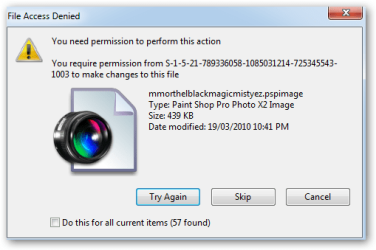
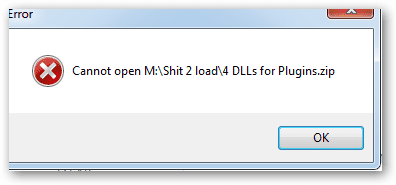
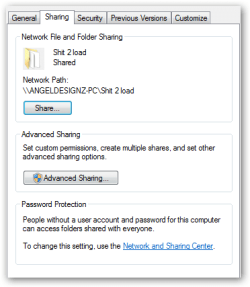
I am having a different kind of problem, I am now using windows 7 64 bit and 32bit I have a Iomega and an acomdata I can use them fine in windows XP but when I plug them into my new win7 computer and I can not unzip anything or move pictures. I get several errors One says I need permission here are some winsnaps of my errors. I think I have attached them Please I can not take much more frustration this has been four days of trying multiple things. = Take Ownership =install as administrator=share all with every one full control and idividual items Nothing has worked. Thanks Angel Also Personal mail is Email addresses removed I am off to bed I am exhausted. I will come back and look tomorrow thanks
 

Attachments

  • Iomega move file error.png
    Iomega move file error.png
    14.8 KB · Views: 4
  • Unzip error.png
    Unzip error.png
    4.2 KB · Views: 6
  • Share properties.png
    Share properties.png
    8.1 KB · Views: 4
Last edited by a moderator:

My Computer

OS
windows 7
win 7 driver issue. alternative solution.....

option 1:
install MS virtual PC, run win XP and see your external drive on the XP virtual machine. To get MSVPC go here:
Download details: Virtual PC 2007

option 2(only if you have more than one am machine):
use one of the many available FTP client/server and transfer files between the two machines. here is a popular one:
FileZilla - The free FTP solution

please let me know if you have any questions,

Itamar Belisha
 

My Computer

OS
7 pro
Is there any hope in sight?

Similar problem. Win7 64 bit ultimate. New build. Asus P7H55-M mobo with Intel H55 chipset. 8GB RAM. Toshiba USB external HDD, usually recognized but sometimes I get a 'driver did not correctly install' error message.

So with the external HDD recognized and the driver reported as 'working properly', I try to copy, or even just look at files that I know are on the HDD -- I can see them before and afterward on both of my other machines (Win XP) -- and I get a 'file is missing' error. It doesn't happen for every file, just some of them. Also, when I try to do a 'safe remove hardware' it tells me that the drive is busy, although AFAIK it isn't.

I've tried just about all of the fixes suggested here and elsewhere, including the virtual XP mode workaround and the registry patch. Nothing helps. (Although the registry patch did initially seem to delay the onset of the error.)

I also have a 2GB USB thumbdrive which works no problem.

I gather that this issue has been known since early 2009, and except for the Nvidea chipset/4GB hotfix, which doesn't apply to me, I don't see any sign of progress. So is that it then? Win 7 64 bit can't handle USB? End of story?

If I'm missing something, please advise!
 

My Computer

OS
Windows 7 Ultimate x64
CPU
i7 870
Motherboard
Asus P7H55-M
Memory
8GB
Graphics Card(s)
NVidea GeForce GE 220
Solved: New MOBO

My problems were finally resolved by an in-warranty Motherboard replacement. Apparently it was not software or driver related.
 

My Computer

OS
Win7
Success!

Sort of.

I still don't know what causes this problem -- presumably some unfortunate combination of the Asus P7H55M mobo and the win7 64 bit ultimate OS -- but I installed an Uptech UTB210 2 port USB 3.0 PCI express x1 card and its (32 bit) driver, and now at last everything is working properly with my Toshiba external HDD.

Also, by uninstalling the messed up driver for the Toshiba external HDD and then letting the OS re-find the hardware via the Uptech card, a properly working driver was finally installed and I'm no longer seeing that bogus 'you cannot safely remove the drive because it's in use' error message whenever I tried to safely remove the drive.

Exec summary:

1. Nothing I tried made any of the mobo's USB ports (back panel and internal) work properly for the external HDD, even though they all work fine for my USB thumbdrive.

2. Spending 30 bucks on a USB 3.0 PCI card fixed all of my USB/external HDD problems.
 

My Computer

OS
Windows 7 Ultimate x64
CPU
i7 870
Motherboard
Asus P7H55-M
Memory
8GB
Graphics Card(s)
NVidea GeForce GE 220
Back
Top