Extremely slow boot up

baghdadassup

New member
Local time
11:22 PM
Messages
4
Hello, new to the forums and I have a really big problem that has been with me for a year. I've learned to just ignore it but recently it almost caused me to miss turning in some homework.

My laptop has been having extremely slow boot up mainly at the "Starting Windows" screen.

I did some googling and found some useful posts. Some of the things I have tried are:

-Disabling non-essential startup apps and services
-Running CCleaner
-Checking for viruses and malware with Microsoft Security Essentials and MalwareBytes
-Checking my HD for bad sectors
-Testing with Memtest86+

So, I did some more googling and found that I can check my boot-up time through event viewer.

Attached below is my eventlog.

As you can see, it took me 8 minutes to boot up which is really ridiculous. This averages from 3-8 minutes all the time regardless if it's a cold or hot boot.

[Off-topic] Aside from the rebooting problem, sometimes my laptop freezes. The freezes occur very randomly. I could be closing a tab on Chrome and it'll freeze. I could be typing a message to a friend on Digsby and it'll freeze.

The weird thing is that I can move my mouse and click on stuff until everything becomes... (Not responding). I'll be able to roll over Desktop icons but as soon as I try to click on one, it freezes and won't open. This all happens in one phase and 3-4 minutes later it will continue like nothing happened but will do whatever I've done during the frozen phase such as opening an app, closing an app, typing, clicking, etc. When this happens I just don't touch the laptop until it's finishing with its business.

Thanks for reading my post and helping me. I'll try to update you guys with any additional info.

[edit] Added Memtest86+ to things I've tried
 

Attachments

Last edited:

My Computer

Computer Manufacturer/Model Number
MSI A6000-029US / Product Number: 9S7-168324-029
OS
Windows 7 Home Premium 64bit
Other Info
MSI has discontinued the A6000-029US :(
I'd download and run Memtest86+. It sounds like you might have some RAM issues.
 

My Computer

OS
Windows 7 Ultimate 64-bit
CPU
AMD Phenom II X6 1090T 3.2GHZ
Motherboard
MSI 890FXA-GD70
Memory
G.SKILL RipJaw 3x2GB DDR3-1066
Graphics Card(s)
2x HIS Radeon HD 6850 1 GB
Sound Card
VIA 8-channel
Monitor(s) Displays
2x 20 inch Acer LCDs, 1x 32" Sony LCD TV
Screen Resolution
4480x900
Hard Drives
1x Crucial 64GB SSD
3x 1TB HDDs (WD, Seagate, Hitatchi)
1x 500GB Seagate External
PSU
Kingwin 1000W Modular
Case
Coolermaster HAF 932
Cooling
1x 120mm, 3x 200mm, CoolerMaster Hyper 212+
Keyboard
Microsoft Wireless Keyboard 1000
Mouse
Microsoft Wiresless Mouse 5000
Internet Speed
20mbps
Other Info
Samsung BD-ROM/DVD-RW
I would also download and run HDTune and test the hard drive.
 

My Computer

Computer Manufacturer/Model Number
Custom
OS
Ubuntu 10.10 64 bit/Window 7 VM
CPU
Core 2 Duo 2.2 Ghz
Motherboard
ECS g31 mATX
Memory
4 GB Kingston ValueRAM (DDR2 800)
Graphics Card(s)
nVidia 240 GT
Sound Card
Onboard
Monitor(s) Displays
19" Dell LCD
Hard Drives
500 GB Seagate Drive x 2
PSU
Antec 430 Watt
Case
Coolermaster
Keyboard
Microsoft Ergonomic Keyboard 4000
Mouse
Laser Mouse (Logitech)
You said you have disabled not needed programs. When you check in msconfig how many check marks do you have?
 

My Computer

Computer type
PC/Desktop
Computer Manufacturer/Model Number
Home made Desktop
OS
Windows 10 Pro. 64/ version 1709 Windows 7 Pro/64
CPU
Intel i7-6800K @ 4.3
Motherboard
ASUS X-99 Deluxe II
Memory
Corsair Platinum 16 gig @2400
Graphics Card(s)
EVGA GTX 1070 OC
Monitor(s) Displays
Asus 27" LED LCD/VE278Q
Screen Resolution
1920-1080 or 1280-720 HDMI
Hard Drives
INTEL SSD 730-240 Gb Sata 3.0/
PSU
EVGA Platium 1200W
Case
Phanteks Luxe Tempered Glass 8 fans/ one radiator
Cooling
XSPC/ Water Cooled CPU
Keyboard
Das 4 Professional
Mouse
Logitech M705/MX Anywhere 2-S
Internet Speed
100 mbits
Antivirus
Microsoft Security Essentials/ Malwarebytes Premium 3.0/ SAS
Browser
I.E. 11 default/Firefox/ ISP Time Warner Cable/Spectrum
Other Info
LG BluRay Burner/
Sound system-KLipsch-THX/
Icy Dock ssd Hot Swap bays.
Hello, sorry for the late reply but I finished testing with Memtest86+ and nothing came up. I also scanned with HDTune and nothing as well.

I have 9 check boxes, this is a fresh copy of Windows with CCleaner, MalwareBytes, Microsoft Security Essentials, Dropbox, and Digsby. Some are drivers and updates: RealTek, Nvidia, Java, and Google update.
 

My Computer

Computer Manufacturer/Model Number
MSI A6000-029US / Product Number: 9S7-168324-029
OS
Windows 7 Home Premium 64bit
Other Info
MSI has discontinued the A6000-029US :(
Your case is a very common symptom of conflicting antivirus software. If you have two antivirus software installed at the same time and are both set to start automatically when you open the computer, the startup usually becomes very slow so you might as well remove one of the two antivirus software and just leave one installed and running at once. If you have Malwarebytes and Microsoft Security Essentials set to start and run automatically together, you must try to remove or at least disable one of them.


You can also try to perform a clean boot:
How to Troubleshoot a Problem by Performing a Clean Startup in Windows 7 or Vista

Good luck.
 
Last edited by a moderator:

My Computer

Computer Manufacturer/Model Number
Custom Built
OS
Windows 7 Ultimate 32 Bit, Windows Developer Preview, Linux Mint 9 Gnome 32 Bit
CPU
Intel Pentium Dual CPU E2180@2GHz
Motherboard
Elitegroup 671T-M3
Graphics Card(s)
NVIDIA GeForce 7200 GS
Monitor(s) Displays
AOC TFT1560 15" LCD Monitor
Screen Resolution
1024x768
Keyboard
Logitech USB Keyboard
Way more than I would have checked. I have 3, Blue ray mouse and keyboard and of course my anti virus. IMHO the rest you don't need at startup.
 

My Computer

Computer type
PC/Desktop
Computer Manufacturer/Model Number
Home made Desktop
OS
Windows 10 Pro. 64/ version 1709 Windows 7 Pro/64
CPU
Intel i7-6800K @ 4.3
Motherboard
ASUS X-99 Deluxe II
Memory
Corsair Platinum 16 gig @2400
Graphics Card(s)
EVGA GTX 1070 OC
Monitor(s) Displays
Asus 27" LED LCD/VE278Q
Screen Resolution
1920-1080 or 1280-720 HDMI
Hard Drives
INTEL SSD 730-240 Gb Sata 3.0/
PSU
EVGA Platium 1200W
Case
Phanteks Luxe Tempered Glass 8 fans/ one radiator
Cooling
XSPC/ Water Cooled CPU
Keyboard
Das 4 Professional
Mouse
Logitech M705/MX Anywhere 2-S
Internet Speed
100 mbits
Antivirus
Microsoft Security Essentials/ Malwarebytes Premium 3.0/ SAS
Browser
I.E. 11 default/Firefox/ ISP Time Warner Cable/Spectrum
Other Info
LG BluRay Burner/
Sound system-KLipsch-THX/
Icy Dock ssd Hot Swap bays.
Way more than I would have checked. I have 3, Blue ray mouse and keyboard and of course my anti virus. IMHO the rest you don't need at startup.
Yeah, things like Google Update and Java are not needed on startup. In my case, I only have 2, my antivirus and Windows Sidebar.
 

My Computer

Computer Manufacturer/Model Number
Custom Built
OS
Windows 7 Ultimate 32 Bit, Windows Developer Preview, Linux Mint 9 Gnome 32 Bit
CPU
Intel Pentium Dual CPU E2180@2GHz
Motherboard
Elitegroup 671T-M3
Graphics Card(s)
NVIDIA GeForce 7200 GS
Monitor(s) Displays
AOC TFT1560 15" LCD Monitor
Screen Resolution
1024x768
Keyboard
Logitech USB Keyboard
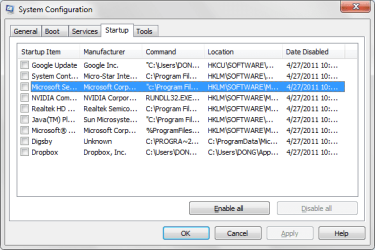
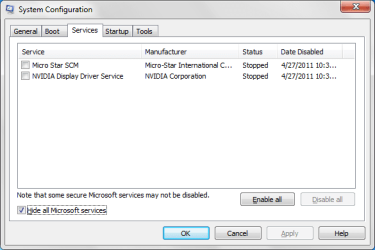
I have disabled all services and startup. This is what my services and startup looks like after I disabled them all and rebooted. It is attached below. It improved my reboot speed to 2-3 minutes but definitely not 8 minutes. We'll see how this goes in the next few days or so.

[edit] I found this Trace Windows 7 boot/shutdown/hibernate/standby/resume issues - MSFN Forum

The part which is the slowest is the MainPathBoot. It is ridiculously slow at that part. I can get out of sleep super fast and my desktop loads in under 10 seconds. It is only the "Starting Windows" part that is the slowest.
 

Attachments

  • servicesss.png
    servicesss.png
    11.6 KB · Views: 59
  • startupss.png
    startupss.png
    15.4 KB · Views: 85
Last edited:

My Computer

Computer Manufacturer/Model Number
MSI A6000-029US / Product Number: 9S7-168324-029
OS
Windows 7 Home Premium 64bit
Other Info
MSI has discontinued the A6000-029US :(
Please note. When you uncheck those items doesn't mean you can't use them. After you get to your desktop all you have to do is tick on them. It doesn't matter where you keep them, desktop, start menu, all programs ect. When you have them check in msconfig they start and run in the background whether you use them or not. Any program you have set in that program to check for updates auto will normally do that on start up. The only things I have set to check for updates auto is my anti virus and Windows updates. Check back and let us know how things have improved.
 

My Computer

Computer type
PC/Desktop
Computer Manufacturer/Model Number
Home made Desktop
OS
Windows 10 Pro. 64/ version 1709 Windows 7 Pro/64
CPU
Intel i7-6800K @ 4.3
Motherboard
ASUS X-99 Deluxe II
Memory
Corsair Platinum 16 gig @2400
Graphics Card(s)
EVGA GTX 1070 OC
Monitor(s) Displays
Asus 27" LED LCD/VE278Q
Screen Resolution
1920-1080 or 1280-720 HDMI
Hard Drives
INTEL SSD 730-240 Gb Sata 3.0/
PSU
EVGA Platium 1200W
Case
Phanteks Luxe Tempered Glass 8 fans/ one radiator
Cooling
XSPC/ Water Cooled CPU
Keyboard
Das 4 Professional
Mouse
Logitech M705/MX Anywhere 2-S
Internet Speed
100 mbits
Antivirus
Microsoft Security Essentials/ Malwarebytes Premium 3.0/ SAS
Browser
I.E. 11 default/Firefox/ ISP Time Warner Cable/Spectrum
Other Info
LG BluRay Burner/
Sound system-KLipsch-THX/
Icy Dock ssd Hot Swap bays.
Hey, I have updated my previous post. Sorry about the double post.

[edit] I got log files but I'm unsure if I'm allowed to link them here.
 
Last edited:

My Computer

Computer Manufacturer/Model Number
MSI A6000-029US / Product Number: 9S7-168324-029
OS
Windows 7 Home Premium 64bit
Other Info
MSI has discontinued the A6000-029US :(
On startup, always have your antivirus program to launch automatically for system safety. But glad to hear that your startup seems to have improved.
 

My Computer

Computer Manufacturer/Model Number
Custom Built
OS
Windows 7 Ultimate 32 Bit, Windows Developer Preview, Linux Mint 9 Gnome 32 Bit
CPU
Intel Pentium Dual CPU E2180@2GHz
Motherboard
Elitegroup 671T-M3
Graphics Card(s)
NVIDIA GeForce 7200 GS
Monitor(s) Displays
AOC TFT1560 15" LCD Monitor
Screen Resolution
1024x768
Keyboard
Logitech USB Keyboard
2 to 3 minutes compared to 8 minutes is a huge improvement. My restart is 97 seconds.
 

My Computer

Computer type
PC/Desktop
Computer Manufacturer/Model Number
Home made Desktop
OS
Windows 10 Pro. 64/ version 1709 Windows 7 Pro/64
CPU
Intel i7-6800K @ 4.3
Motherboard
ASUS X-99 Deluxe II
Memory
Corsair Platinum 16 gig @2400
Graphics Card(s)
EVGA GTX 1070 OC
Monitor(s) Displays
Asus 27" LED LCD/VE278Q
Screen Resolution
1920-1080 or 1280-720 HDMI
Hard Drives
INTEL SSD 730-240 Gb Sata 3.0/
PSU
EVGA Platium 1200W
Case
Phanteks Luxe Tempered Glass 8 fans/ one radiator
Cooling
XSPC/ Water Cooled CPU
Keyboard
Das 4 Professional
Mouse
Logitech M705/MX Anywhere 2-S
Internet Speed
100 mbits
Antivirus
Microsoft Security Essentials/ Malwarebytes Premium 3.0/ SAS
Browser
I.E. 11 default/Firefox/ ISP Time Warner Cable/Spectrum
Other Info
LG BluRay Burner/
Sound system-KLipsch-THX/
Icy Dock ssd Hot Swap bays.
Note that what is happening when you see the "Starting Windows" splashscreen is enumerating hardware (via PnP) and loading drivers for hardware found, and starting services (not all of them, but most of the "Automatic" ones and any driver services). Smss.exe is started, which spawns winlogon, services, csrss, lsass, and a few other things, after hardware is enumerated and drivers loaded. If you're delaying where you say you are, it's possible it's a driver load causing an issue.

To get a *real* good idea of what's happening, you really need more info in the boot trace:
Code:
xbootmgr -trace boot -traceFlags ALL_FAULTS+ALPC+COMPACT_CSWITCH+CSWITCH+DISK_IO+DISK_IO_INIT+DISPATCHER+DPC+DRIVERS+FILE_IO+FILE_IO_INIT+FILENAME+HARD_FAULTS+INTERRUPT+LOADER+MEMINFO+NETWORKTRACE+PERF_COUNTER+POWER+PRIORITY+PROC_THREAD+PROFILE+REGISTRY+SPLIT_IO+SYSCALL+VIRT_ALLOC -resultPath "C:\Boot_Trace"
Note that this command *will* slow down the boot process (quite a bit) on it's own, and the resulting file will be quite large.

If you run that and ultimately get another .ETL trace, you could zip it up and post it to a fileshare host, at which point we could download and take a look for clues.
 

My Computer

Computer type
PC/Desktop
Computer Manufacturer/Model Number
Custom
OS
Windows 10 Pro x64
CPU
Intel Core i7 4790K @ 4.5GHz
Motherboard
Asus Maximus Hero VII
Memory
32GB DDR3
Graphics Card(s)
Nvidia GeForce GTX970
Sound Card
Realtek HD Audio
Screen Resolution
1920x1200
Hard Drives
1x Samsung 250GB SSD
4x WD RE 2TB (RAIDZ)
PSU
Corsair AX760i
Case
Fractal Design Define R4
Cooling
Noctua NH-D15
Back
Top