baghdadassup
New member
- Local time
- 4:45 PM
- Messages
- 4
Hello, new to the forums and I have a really big problem that has been with me for a year. I've learned to just ignore it but recently it almost caused me to miss turning in some homework.
My laptop has been having extremely slow boot up mainly at the "Starting Windows" screen.
I did some googling and found some useful posts. Some of the things I have tried are:
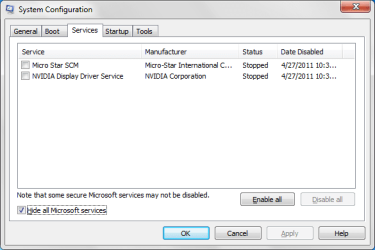
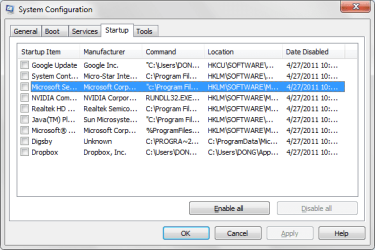
-Disabling non-essential startup apps and services
-Running CCleaner
-Checking for viruses and malware with Microsoft Security Essentials and MalwareBytes
-Checking my HD for bad sectors
-Testing with Memtest86+
So, I did some more googling and found that I can check my boot-up time through event viewer.
Attached below is my eventlog.
As you can see, it took me 8 minutes to boot up which is really ridiculous. This averages from 3-8 minutes all the time regardless if it's a cold or hot boot.
[Off-topic] Aside from the rebooting problem, sometimes my laptop freezes. The freezes occur very randomly. I could be closing a tab on Chrome and it'll freeze. I could be typing a message to a friend on Digsby and it'll freeze.
The weird thing is that I can move my mouse and click on stuff until everything becomes... (Not responding). I'll be able to roll over Desktop icons but as soon as I try to click on one, it freezes and won't open. This all happens in one phase and 3-4 minutes later it will continue like nothing happened but will do whatever I've done during the frozen phase such as opening an app, closing an app, typing, clicking, etc. When this happens I just don't touch the laptop until it's finishing with its business.
Thanks for reading my post and helping me. I'll try to update you guys with any additional info.
[edit] Added Memtest86+ to things I've tried
My laptop has been having extremely slow boot up mainly at the "Starting Windows" screen.
I did some googling and found some useful posts. Some of the things I have tried are:
-Disabling non-essential startup apps and services
-Running CCleaner
-Checking for viruses and malware with Microsoft Security Essentials and MalwareBytes
-Checking my HD for bad sectors
-Testing with Memtest86+
So, I did some more googling and found that I can check my boot-up time through event viewer.
Attached below is my eventlog.
As you can see, it took me 8 minutes to boot up which is really ridiculous. This averages from 3-8 minutes all the time regardless if it's a cold or hot boot.
[Off-topic] Aside from the rebooting problem, sometimes my laptop freezes. The freezes occur very randomly. I could be closing a tab on Chrome and it'll freeze. I could be typing a message to a friend on Digsby and it'll freeze.
The weird thing is that I can move my mouse and click on stuff until everything becomes... (Not responding). I'll be able to roll over Desktop icons but as soon as I try to click on one, it freezes and won't open. This all happens in one phase and 3-4 minutes later it will continue like nothing happened but will do whatever I've done during the frozen phase such as opening an app, closing an app, typing, clicking, etc. When this happens I just don't touch the laptop until it's finishing with its business.
Thanks for reading my post and helping me. I'll try to update you guys with any additional info.
[edit] Added Memtest86+ to things I've tried
Attachments
Last edited:
My Computer
- Computer Manufacturer/Model Number
- MSI A6000-029US / Product Number: 9S7-168324-029
- OS
- Windows 7 Home Premium 64bit
- Other Info
- MSI has discontinued the A6000-029US :(