Firefox icon

roby777

New member
Member
Local time
7:56 AM
Messages
39
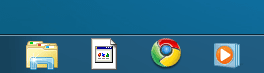
I have a problem with firefox icon(windows 7 x64 7127),it looks like on my picture.I didn`t have that problem ever.It looks like it`s missing and after i reinstall everything for a while is ok but after some minutes it looks like on picture.
 

Attachments

  • Capture.PNG
    Capture.PNG
    4 KB · Views: 13,866

My Computer

OS
Windows 7 x64
CPU
Intel Core 2 Duo 2.2 Ghz
Memory
2 GB DDR2
Graphics Card(s)
Nvidia 8600M GS
Screen Resolution
1280x800
Anyone??
 

My Computer

OS
Windows 7 x64
CPU
Intel Core 2 Duo 2.2 Ghz
Memory
2 GB DDR2
Graphics Card(s)
Nvidia 8600M GS
Screen Resolution
1280x800
Have you tried to unpin it then pin it again?
 

My Computer

Computer Manufacturer/Model Number
Home Brew
OS
Windows 7 Ultimate Vista Ultimate x64
CPU
Core 2 Duo E8500 3.16Ghz @ 3.8Ghz
Motherboard
eVGA 750i FTW
Memory
2x2Gigs Patriot PC2-6400 LL
Graphics Card(s)
Inno3D GeForce GTX260 216 SP
Monitor(s) Displays
ASUS VW222U 22" 2ms Response time
Screen Resolution
1680x1050
Hard Drives
SATA 150GB
SATA II 250GB
USB IDE 750GB Ext.
PSU
HYTEC 600W & Thermaltake 650W Toughpower Power Exp
Case
Thermaltake Armor LCS (Liquid Cooling System)
Cooling
Liquid Cooling System
Keyboard
Logitech G15 Gaming Keyboard
Mouse
Logitech G9 Gaming Mouse
I had that happen when I pinned a "shortcut" -- I think it created a shortcut to the shortcut. So I pinned the original program instead (from within the 'Program Files (x86)' folder). No more problem.
 

My Computer

Computer Manufacturer/Model Number
home brew
OS
Win.7.Ult.x64
CPU
Intel Core i7 970
Motherboard
Gigabyte GA-X58-UD5
Memory
12GB (6x2GB) OCZ Platinum DDR3 1600
Graphics Card(s)
Gigabyte GV-R485MC-1GH, ATI 4850, 1GB GDDR3, passive cooler
Sound Card
(on-board) Speakers - Klipsch ProMedia 2.1
Monitor(s) Displays
2x Dell U2410 (H-IPS)
Screen Resolution
1920x1200, 1920x1200
Hard Drives
System = Intel 320 160GB SSD --
Data = 2x WD2002FAEX, RAID1 (ICH10R) --
Backup = 5x WD20EARS (eSata port) --
Add'l Storage = 8x WD20EARS, RAID6 (Adaptec 5805)
PSU
PCP&C S75QB
Case
Lian Li PC-V2010B + EX-H34 expansion HD cage
Cooling
Xigmatek HDT-1283 heatsink & bracket + Scythe S-Flex SFF21E
Keyboard
Das Keyboard Professional, Logitech UltraX
Mouse
Logitech G400
Internet Speed
6.85 Mb/s down, 0.35 Mb/s up (typical)
Other Info
Pioneer DVR-217DBK burner --
stock Lian Li case fans + BS-06 PCI 140mm exhaust (all set on 'low')
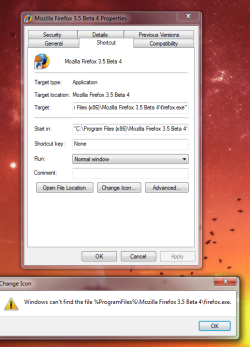
Yes I have but nothing changes.When i go to the properties and try to change icon i get this.
 

Attachments

  • Capture.PNG
    Capture.PNG
    66.6 KB · Views: 1,058

My Computer

OS
Windows 7 x64
CPU
Intel Core 2 Duo 2.2 Ghz
Memory
2 GB DDR2
Graphics Card(s)
Nvidia 8600M GS
Screen Resolution
1280x800
I think looking at the error message that it's trying to locate the icon in program files instead of program files (x86).
 

My Computer

Computer Manufacturer/Model Number
Home Brew
OS
Windows 7 Ultimate Vista Ultimate x64
CPU
Core 2 Duo E8500 3.16Ghz @ 3.8Ghz
Motherboard
eVGA 750i FTW
Memory
2x2Gigs Patriot PC2-6400 LL
Graphics Card(s)
Inno3D GeForce GTX260 216 SP
Monitor(s) Displays
ASUS VW222U 22" 2ms Response time
Screen Resolution
1680x1050
Hard Drives
SATA 150GB
SATA II 250GB
USB IDE 750GB Ext.
PSU
HYTEC 600W & Thermaltake 650W Toughpower Power Exp
Case
Thermaltake Armor LCS (Liquid Cooling System)
Cooling
Liquid Cooling System
Keyboard
Logitech G15 Gaming Keyboard
Mouse
Logitech G9 Gaming Mouse
The icon location should look like this. C:\Program Files (x86)\Mozilla Firefox\firefox.exe
 

My Computer

Computer Manufacturer/Model Number
Home Brew
OS
Windows 7 Ultimate Vista Ultimate x64
CPU
Core 2 Duo E8500 3.16Ghz @ 3.8Ghz
Motherboard
eVGA 750i FTW
Memory
2x2Gigs Patriot PC2-6400 LL
Graphics Card(s)
Inno3D GeForce GTX260 216 SP
Monitor(s) Displays
ASUS VW222U 22" 2ms Response time
Screen Resolution
1680x1050
Hard Drives
SATA 150GB
SATA II 250GB
USB IDE 750GB Ext.
PSU
HYTEC 600W & Thermaltake 650W Toughpower Power Exp
Case
Thermaltake Armor LCS (Liquid Cooling System)
Cooling
Liquid Cooling System
Keyboard
Logitech G15 Gaming Keyboard
Mouse
Logitech G9 Gaming Mouse
I did that and I think it`s ok now.Thanks!:D
 

My Computer

OS
Windows 7 x64
CPU
Intel Core 2 Duo 2.2 Ghz
Memory
2 GB DDR2
Graphics Card(s)
Nvidia 8600M GS
Screen Resolution
1280x800

My Computer

OS
Windows 7 64bit
CPU
Intel q6600 oc to 3.02
Motherboard
Abit IX38 QuadGT
Memory
4 GB PC2-8500C5 DDR2 XMS2 Corsair Dominator TwinX Ram
Graphics Card(s)
Sapphire HD 5870 VAPOR-X 1GB
Sound Card
Asus Xonar Xense
Monitor(s) Displays
DELL ST2410 & Samsung 2233LW
Screen Resolution
1920x1080
Hard Drives
2 x Seagate Barracuda 500GB SATA-II 32MB Cache
1 x Western Digital Blue 500GB SATA-II 1MB Cache
PSU
Corsair 650
Case
Antec Nine Hundred
Cooling
Freezer Pro
Keyboard
Logitech G15
Mouse
Logitech G500
Internet Speed
Sky 1.5mb
last 2 days suddenly I am also having this problem, unpinned FF but it did not solve the missing icon.
 

My Computer

Computer Manufacturer/Model Number
Custom Built
OS
Windows 7 Ultimate x64 build 7600
CPU
Intel C2D 6300 1.86MHz
Motherboard
Asus P5B-dlx wifi
Memory
4x1Gb Transcend JetRAM DDR2 PC2-6400 800MHz
Graphics Card(s)
XFX 7600GT
Sound Card
Creative Audigy Value
Monitor(s) Displays
Lenovo 20"
Screen Resolution
1680x1050
Hard Drives
4 x 1.5TB Seagate barracuda
PSU
Zebronics Platinum 450Watts
Case
Zebronics Peace
Cooling
stock cooling
Keyboard
silicon keyboard
Mouse
Logitech 3 button mouse
Internet Speed
1mbps
Back
Top