
How to Set a Default Folder Template for All Folders in Windows 7
Information
This will show you how to either set a folder template of your choice to be the default for all folders, or reset all folder templates back to default in all folders in Windows 7.
Note
Tip
Automatic Folder Type Discovery is when Windows will automatically change the folder template of a folder to match the file type of the last file added or saved in the folder. For example, if your folder contains music files and you add a picture file, then Windows may change the folder template and view to the "Picture" template to match the new picture file.
By setting a specific template (steps 2 to 6) to be the default, you will disable Automatic Folder Type Discovery. Afterwards, you will still be able to set folder views and templates how you like, but without Automatic Folder Type Discovery changing them for you.
By restoring the default templates (step 1), you will enable Automatic Folder Type Discovery.
By setting a specific template (steps 2 to 6) to be the default, you will disable Automatic Folder Type Discovery. Afterwards, you will still be able to set folder views and templates how you like, but without Automatic Folder Type Discovery changing them for you.
By restoring the default templates (step 1), you will enable Automatic Folder Type Discovery.
EXAMPLE: General Items, Documents, Pictures, Music, and Video templates
NOTE: These screenshots are with using the Details view. What you see in your window will also depend on what you have the View arrangement, Group by, Sort by, Stack by arrangement, or icon size set as.
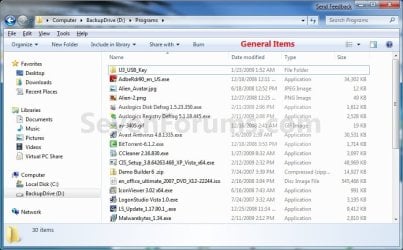
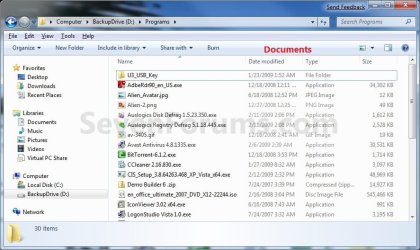
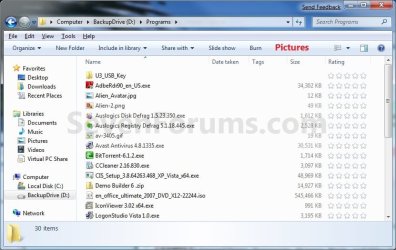
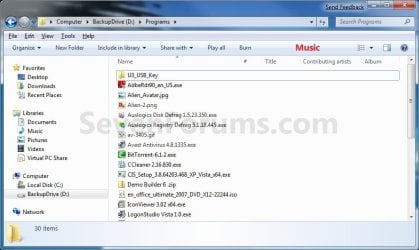

Here's How:
1. To Restore Default Folder Templates for All Folders
NOTE: This will also reset all folder views back to default as well.
A) Click on the Download button below to download the file below.
Restore_Default_Folder_Templates.bat
Download
B) Go to step 7.
2. To Set General Items Folder Template as Default for All Folders
A) Click on the Download button below to download the file below.
All_Folders_Use_General_Items_Folder_Template.bat
Download
B) Go to step 7.
3. To Set Documents Folder Template as Default for All Folders
A) Click on the Download button below to download the file below.
All_Folders_Use_Documents_Folder_Template.bat
Download
B) Go to step 7.
4. To Set Pictures Folder Template as Default for All Folders
A) Click on the Download button below to download the file below.
All_Folders_Use_Pictures_Folder_Template.bat
Download
B) Go to step 7.
5. To Set Music Folder Template as Default for All Folders
A) Click on the Download button below to download the file below.
All_Folders_Use_Music_Folder_Template.bat
Download
B) Go to step 7.
6. To Set Videos Folder Template as Default for All Folders
A) Click on the Download button below to download the file below.
All_Folders_Use_Videos_Folder_Template.bat
Download
B) Go to step 7.
7. Save the .bat file to your desktop.
8. Close all running programs and opened windows, and run the downloaded .bat file.
9. If prompted, click on Run.
NOTE: If you like, you can stop getting the Run prompt by unblocking the downloaded .bat file.
10. You will now notice your screen flicker as explorer is restarted to apply the registry changes.
11. You can delete the downloaded .bat file if you like.
That's it,
Shawn
Related Tutorials
- How to Change a Folder Template in Windows 7
- How to Reset the Folder View Settings for All Folders with the Same Folder Template in Windows 7
- How to Reset All Folder View Settings to Default in Windows 7
- How to "Apply to Folders" a Specific Folder View to All Folders with the Same Folder Template in Windows 7
- How to Change the File and Folder View Arrangement in Windows 7 Explorer
- How to Change the Icon Size in a Windows 7 Explorer Window
- How to Change the Group by, Sort by, and Arrange by Folder View in Windows 7 Explorer
- How to Set a Default Folder View for All Folders in Windows 7
- How to Add or Remove the Customize Tab from Properties in Windows 7
- How to Disable Auto Arrange in Windows 7 Explorer to have Free Sorting
- How to Add or Remove Windows Explorer Columns
- How to Change the Width of Columns in Windows Explorer
Attachments
-
All_Folders_Use_Documents_Folder_Template.bat381 bytes · Views: 5,304
-
All_Folders_Use_General_Items_Folder_Template.bat384 bytes · Views: 16,745
-
All_Folders_Use_Music_Folder_Template.bat377 bytes · Views: 3,211
-
All_Folders_Use_Pictures_Folder_Template.bat380 bytes · Views: 3,378
-
All_Folders_Use_Videos_Folder_Template.bat378 bytes · Views: 3,027
-
Restore_Default_Folder_Templates.bat956 bytes · Views: 10,073
Last edited:


