
Hello to all!
It's very nice seeing such a live and active community and I'm very excited with becoming a member!
I came here looking a solution to my problem, to say the truth...
Last month I installed IconPackager 4.0.0 without ever thinking that it had no support for Windows 7.
After a lot of searching, (not a whole month) I found out that upon "restore default icons" IconPackager cannot restore the default Icons Windows 7 has.
I found this post at Stardock/Iconpackager support forum IconPackager messed windows 7 icons? Get fix here! (Modz please pin) Forum Post by Voodooguy
And said "hey, another one had this problem and fixed it!". I copied the registry values, made a .reg file, inserted the code and restarted.
After the restart, most of the files where back to normal except:
Microsoft Word 2007 Documents
and,
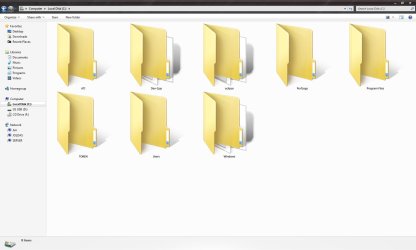
Windows Folder Thumbnails (the open folders that show the content of a folder)
The Windows folder thumbnails, appeared, but not properly showing the data in the middle of the open content folder, but below of the folder, and the old icon (that has been assigned with IconPackager) showing also below the wrong folder, and content.
I have attached the two (2) pictures, one for each occasion.
So for the Microsoft Word -> Assign the default Word Icon
and for the folders - > Get rid of the grey icon (the one on the very back) and assign the proper "open content folder" to show the content of every folder properly.
Don't know how much messed up is this and I thought that I knew how to troubleshoot windows.
It's very nice seeing such a live and active community and I'm very excited with becoming a member!
I came here looking a solution to my problem, to say the truth...
Last month I installed IconPackager 4.0.0 without ever thinking that it had no support for Windows 7.
After a lot of searching, (not a whole month) I found out that upon "restore default icons" IconPackager cannot restore the default Icons Windows 7 has.
I found this post at Stardock/Iconpackager support forum IconPackager messed windows 7 icons? Get fix here! (Modz please pin) Forum Post by Voodooguy
And said "hey, another one had this problem and fixed it!". I copied the registry values, made a .reg file, inserted the code and restarted.
After the restart, most of the files where back to normal except:
Microsoft Word 2007 Documents
and,
Windows Folder Thumbnails (the open folders that show the content of a folder)
The Windows folder thumbnails, appeared, but not properly showing the data in the middle of the open content folder, but below of the folder, and the old icon (that has been assigned with IconPackager) showing also below the wrong folder, and content.
I have attached the two (2) pictures, one for each occasion.
So for the Microsoft Word -> Assign the default Word Icon
and for the folders - > Get rid of the grey icon (the one on the very back) and assign the proper "open content folder" to show the content of every folder properly.
Don't know how much messed up is this and I thought that I knew how to troubleshoot windows.
Attachments

My Computer
- OS
- Windows 7 Professional x86
- CPU
- AMD Phenom(tm) 9950 Quad-Core Processor 3.00 GHz
- Motherboard
- ASUS M3A78 PRO
- Memory
- 2.00 GB
- Graphics Card(s)
- ATI Radeon HD 4770
- Sound Card
- OnBoard
- Monitor(s) Displays
- LG W2271TC-PF
- Screen Resolution
- 1680x1050
- Hard Drives
- 1 x 1TB
4 x 2TB(Server on LAN)
That's all.
- PSU
- 500 Watt Something :)
- Case
- Lian Li PC-A70 (Black)
- Cooling
- 6 x 120mm / 3 x 60mm Fans
- Keyboard
- Microsoft Sidewinder X6 Keyboard v1.0
- Mouse
- IntelliMouse Optical USB and PS/2 Vompatible
- Internet Speed
- Download: 50Mbps / Upload: 10Mbps

